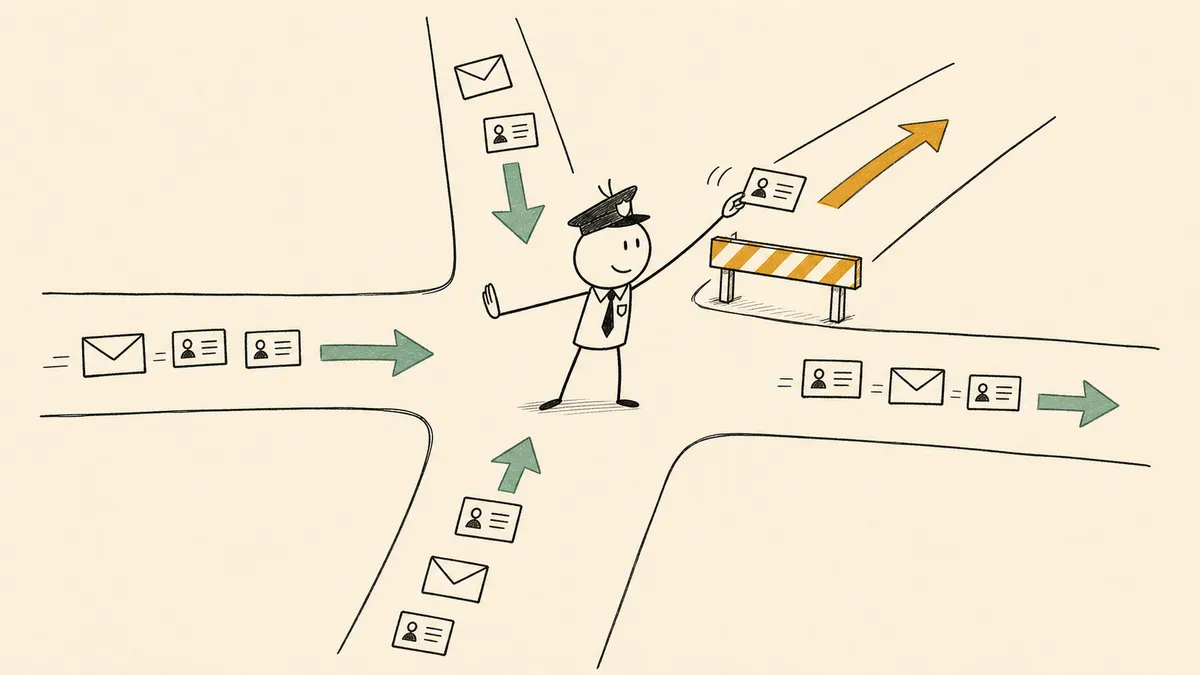
Most marketing automation example roundups grade the wrong thing. They list a welcome series, an abandoned-cart sequence, a re-engagement campaign, and they measure each one by the lift it produced. That makes for a tidy article and a useless template, because every one of those examples lives inside a single email tool and never has to hand a lead to another system. The workflows that actually consume a marketing ops lead’s week are the cross-tool ones, where a form submission, a score change, or a booked meeting kicks off a chain of routing, enrichment, and handoff that spans HubSpot, Salesforce, Slack, and the rest of the stack. Those are the examples worth studying, and a useful one names three things: the trigger, the steps, and the human checkpoint.
That last item is the one almost every list omits. Here is what most marketing automation guides will not say: an example without a checkpoint is not a finished workflow, it is a demo. Real lead flow has ambiguous ownership, failed enrichment lookups, duplicate records, and target accounts that should never be auto-routed. A workflow that pretends those cases do not exist breaks in week two. So each example below names where a human belongs, because that is the part that determines whether the thing survives contact with production.
A note on scope before the examples. This article describes patterns observable in the public documentation for HubSpot, Salesforce, Calendly, and similar platforms. It is not a report of FlowRunner customer outcomes, and there are no measured results claimed here. The point is the shape of the workflow, not a number.
What counts as a marketing automation workflow (and what most lists miss)
There are two things people call a marketing automation workflow, and conflating them is why the example lists feel thin.
The first is a single-tool campaign sequence. A welcome series inside your email platform. A drip that fires on a schedule. These run entirely within one tool’s boundary, and that tool automates them well. They are real, but they are not the operational work.
The second is a cross-tool workflow. A form submission lands in one system, gets enriched from a second, scored against signals from a third, routed by a rule in the CRM, and announced in Slack. This is the layer marketing ops actually owns: routing, enrichment, handoff, attribution, and exception handling. HubSpot’s own workflow documentation frames automation as triggers, conditions, and actions chained together (HubSpot: create workflows), and the moment those actions need to touch a system outside the tool that fired the trigger, you have left the campaign layer and entered operations.
Every example that follows is the second kind. Each one names the trigger, the steps, and the checkpoint. If you only remember one thing from this article, remember that a workflow example without a named checkpoint is incomplete.
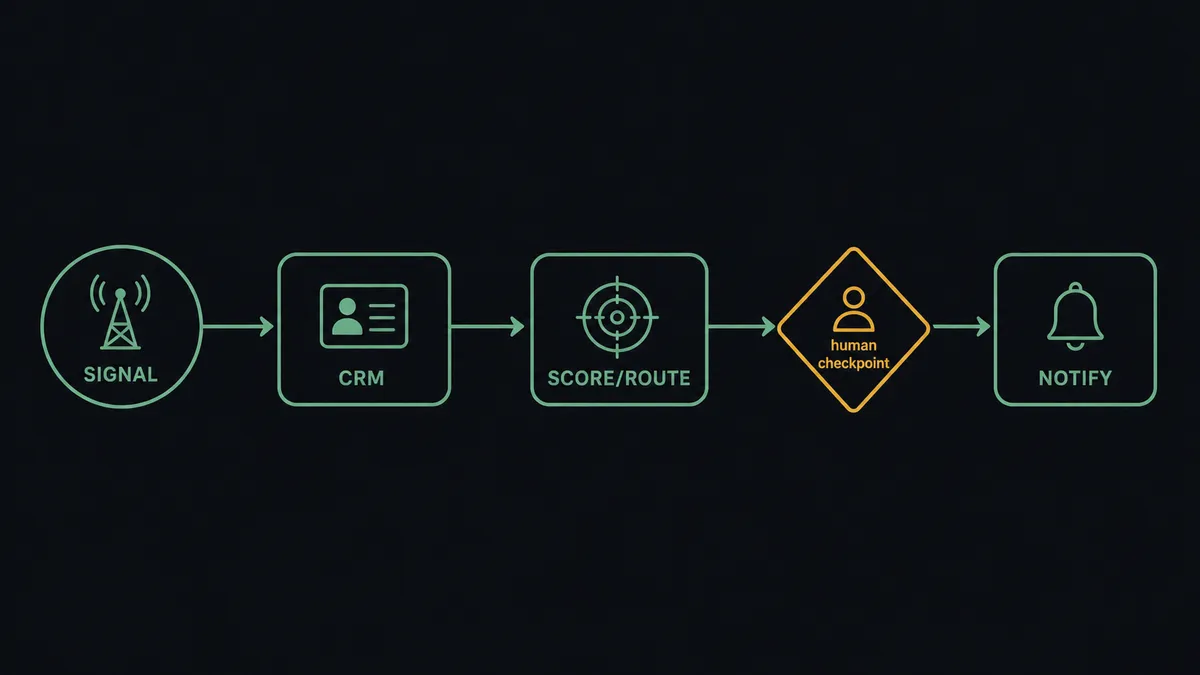
Example 1: Inbound form to qualified lead in the CRM
Trigger: a form submission, whether from a HubSpot form, a Google Form, or an embedded landing-page form.
Steps: enrich the contact from a data provider, check for an existing duplicate against the CRM, assign a lead score, and set an owner by territory or product line.
Human checkpoint: low-confidence enrichment and fuzzy duplicate matches do not auto-merge. They route to a marketing ops queue where a person decides, because a wrong merge corrupts the record permanently and a wrong owner assignment sends the lead to the wrong rep.
This is the most common marketing automation workflow on earth, and it is the one most often shipped without the checkpoint. The enrichment lookup fails silently, the duplicate logic guesses wrong, and three weeks later someone is untangling two contact records that should have been one. The reference build is qualifying inbound leads from a form into HubSpot, which shows the enrichment-and-route chain with the Slack notification carrying the context the rep needs.
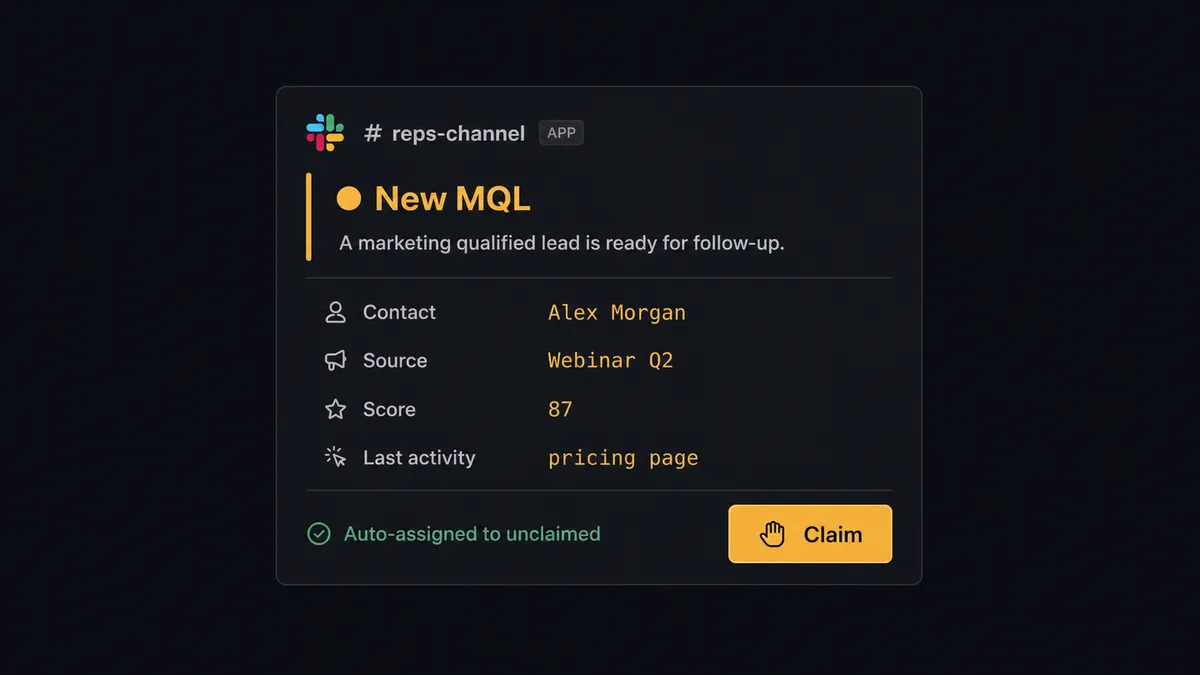
Example 2: New CRM lead to sales rep in Slack
Trigger: a new contact created in HubSpot or Salesforce that meets MQL criteria.
Steps: route to the correct rep’s Slack channel based on territory or account ownership, attach context (source, score, recent activity), and check for an existing open opportunity so you do not ping a rep about an account they already work.
Honest baseline: the realistic before-state is not chaos. It is a lead-alert email or a CRM mobile notification that the rep has trained themselves to ignore. A Slack message with the actual context, posted to the channel where the rep already lives, closes the gap that the ignored email leaves open.
Routing rules in major CRMs assign by territory, product line, or round-robin (Salesforce: lead assignment rules). The rule decides who. The workflow decides that the who actually finds out in time to act. The reference build is routing new HubSpot leads to Slack with duplicate checks.
Example 3: Meeting booking to pre-call prep
Trigger: a Calendly booking confirmed.
Steps: pull the contact and account record from the CRM, summarize recent touches and product interest, and post the brief to the rep’s Slack DM ahead of the call.
Why it belongs in a marketing automation list: this is the seam where marketing-sourced bookings meet the sales conversation, and it is exactly where attribution arguments start. If marketing booked the meeting but the source never reaches the rep, marketing loses the credit in the room where credit is assigned.
Calendly bookings can trigger downstream automation through documented webhooks (Calendly: event type integrations). The reference build is automated meeting prep from Calendly bookings. The checkpoint here is light: if the booked contact cannot be matched to a CRM record at all, flag it rather than posting a brief with empty fields.
Example 4: Lead scoring threshold to sales handoff with attribution intact
Trigger: a lead score crosses the MQL threshold in HubSpot or Salesforce.
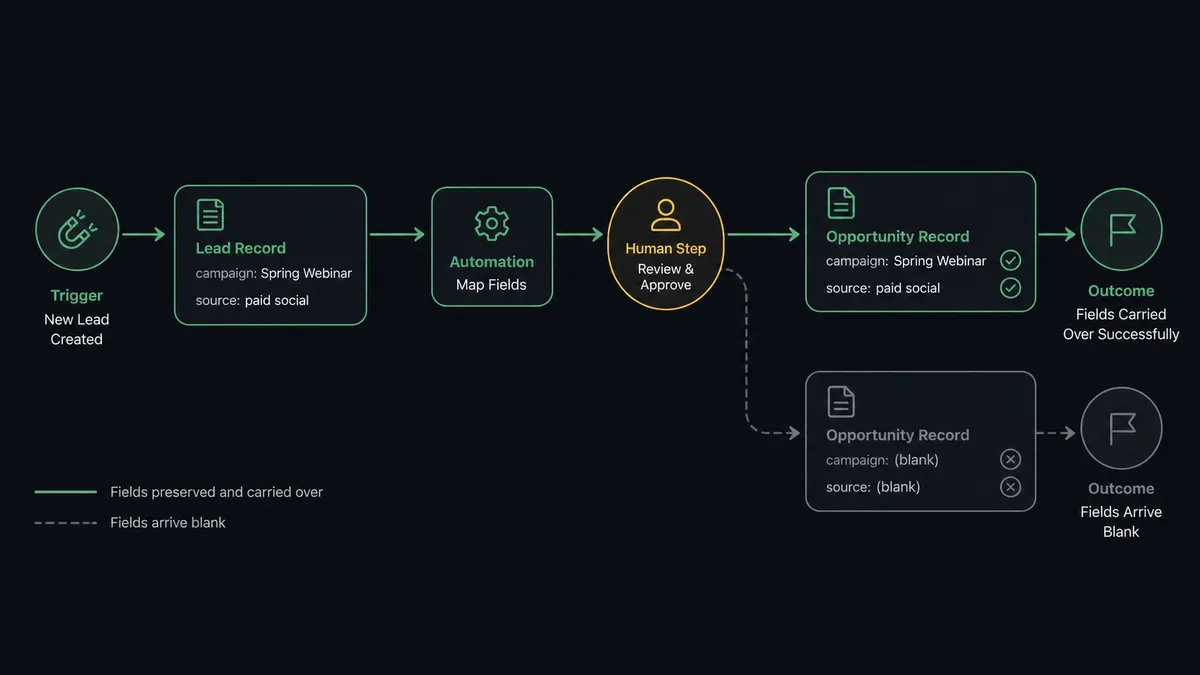
Steps: stamp the campaign and source onto the opportunity, notify the assigned rep in Slack, and create a follow-up task with an SLA so the handoff has a clock on it.
The failure this prevents: attribution data lives in marketing tools and dies at the lead record. When the opportunity gets created, the campaign and source fields do not come along, and revenue can no longer be traced back to the campaign that produced it. Salesforce documents campaign influence as the mechanism for connecting campaigns to opportunity revenue (Salesforce: campaign influence), and the whole model collapses if the IDs never propagate across the lead-to-opportunity boundary.
This is the example that separates a marketing ops lead who gets budget from one who fights for it every quarter. The reference build is lead scoring and campaign attribution in Salesforce, which carries the source field through the handoff instead of dropping it.
Example 5: Event or webinar registration to multi-channel follow-up
Trigger: a registration captured in the event tool.
Steps: sync the registrant to the CRM with the event as the source, add them to a post-event nurture, and notify the account owner if the registrant belongs to a target account.
Human checkpoint: target-account registrants do not get dropped into an automated nurture and forgotten. They generate a personal-outreach task for the owner. The whole point of a target-account motion is that a human touches it; automating that touch away defeats the strategy you spent a quarter building.
The pattern is the same as the others: machine handles the volume, human takes the cases where a human is the strategy.
Example 6: Customer milestone to lifecycle marketing trigger
Trigger: a product-usage milestone or an approaching renewal date, surfaced from the product database or the CS tool.
Steps: update the lifecycle stage in the CRM, suppress prospecting campaigns so you stop marketing to an existing customer, and enroll the account in an expansion or renewal sequence.
Why it belongs here: lifecycle marketing only works when the trigger comes from a real signal rather than a calendar guess. “Send the renewal email 60 days out” is a guess. “Send it when usage drops below the threshold that predicts churn” is a signal. The difference is whether the trigger lives in a system that actually sees the customer’s behavior, which is rarely the email tool.
Example 7: Content distribution off a publish event
Trigger: new content published, via an RSS feed or a CMS webhook.
Steps: post to X and other social channels, notify the content channel in Slack, and log the publish in the content calendar.
Posting to X from an automation uses the documented Create Post action and supports text-only or image variants (X: manage Tweets). Keep the scope honest here: this is a distribution helper, not a demand-gen workflow on its own. It saves the manual copy-paste across channels. It does not generate pipeline, and an example list that dresses it up as a growth engine is selling you something.
What separates the workflows that hold up from the ones that break
Look back across the seven examples and the same four structural properties decide which ones survive production:
- Duplicate handling at the CRM write step, not after the fact. Catching a duplicate before it lands is a workflow rule. Catching it afterward is a cleanup project.
- A human checkpoint for the cases that need judgment. Low-confidence routing, failed enrichment, and target-account exceptions go to a named owner with full context. This is the digital andon cord: the workflow stops the line when it hits a case it should not decide alone, rather than plowing ahead and creating a mess someone finds later.
- Stable IDs carried through every step. Campaign, source, and owner have to survive every handoff, especially the lead-to-opportunity boundary, or attribution dies quietly.
- An audit trail per run. When someone asks “what happened to that lead,” you want an answer, not a forensics project across five tools.
Notice what those four properties have in common: not one of them lives inside any single marketing tool. HubSpot governs what happens in HubSpot. Salesforce governs what happens in Salesforce. The duplicate check that has to read both, the checkpoint that pulls a human in between them, the IDs that have to cross the boundary intact, the trail that has to span the whole run: that work lives in the space between the systems, and no native feature inside any one of them will ever own it. That space is a category of its own. An orchestration layer is the thing that sits above the marketing stack, listens for what each tool emits, combines the signals, and pulls a named human in at the moments that need judgment. FlowRunner is built for that layer. It triggers on real events from the tools you already run, keeps the human in the loop on the calls that require one, and leaves an audit trail per run so the routing and attribution decisions are reviewable later instead of assumed.
If you want the operational version of this argument rather than the example library, the marketing workflows solution page walks through where the stack breaks and how the layer above it holds. And if you are weighing tools to run these patterns, the honest comparisons against Make.com and Zapier for marketing workflow automation lay out where each fits.
The examples are not the hard part. Any of these seven can be sketched on a whiteboard in five minutes. The hard part is the checkpoint, the IDs, and the trail, because those are the parts that decide whether the workflow you ship is still running, and still trusted, a quarter from now.
Frequently asked questions
What is a marketing automation workflow?
A sequence that triggers on an event, runs a series of steps, and ends in an action or notification. The ones worth studying span more than one tool: a form or signal source, a CRM, a scoring or routing layer, and a channel like Slack.
What is the difference between a marketing automation workflow and an email nurture?
An email nurture lives inside one email tool and sends messages on a schedule. A cross-tool workflow coordinates routing, enrichment, scoring, and handoff across systems. The nurture is one step inside the larger workflow, not the whole thing.
Where should a human review step go in a marketing automation workflow?
At the low-confidence moments: ambiguous lead ownership, a failed enrichment lookup, a duplicate match, or a target-account handoff. Automate the clear cases and route only the judgment calls to a named owner with full context.