
Ask the question the tool vendors skip: when your weekly P&L lands in front of the board and one number is wrong, who is accountable, and at what moment did they get the chance to catch it? That question decides whether Airbyte and FlowRunner are even in the same evaluation. Airbyte is one of the strongest open-source data movement platforms in the market, and it has recently extended into giving AI agents access to your business data. FlowRunner governs what those agents and the people around them are allowed to do with that data, and where a human gets pulled in. Those are different jobs. The confusion is real because both products now say the word “agents,” and a finance buyer typing “automate report generation” into a search bar cannot tell from the homepages which layer they are looking at.
So this comparison starts with the honest version. If the problem is consolidating data from hundreds of SaaS and database sources into a warehouse, or giving an AI assistant searchable read access to that data, Airbyte is built for exactly that and FlowRunner is not. If the problem is that the controller is still assembling the Friday P&L by hand, flagging the one variance that does not tie, and chasing a sign-off before it ships, that work sits on a different layer of the stack entirely. Knowing which problem you actually have is the whole evaluation.
Airbyte and FlowRunner, side by side
| Airbyte | FlowRunner | |
|---|---|---|
| Category | Open-source data replication platform and context layer for AI agents | Orchestration layer for coordinating work and AI agents across tools |
| Primary job | Replicate data from sources into warehouses and lakes; give agents searchable access to that data | Assemble reports, route approvals, escalate exceptions, govern what agents do |
| Built for | Data engineers feeding a warehouse; developers wiring agents to data | Finance and operations teams who own the report and the sign-off |
| Connectors | 600+ replication connectors plus 50+ agent connectors, with a Connector Builder for custom sources | Operational integrations to QuickBooks, NetSuite, Acumatica, Stripe, Slack, email, plus MCP-extensible custom connectors |
| The “agent” story | Context Store: a “live, searchable index of your customers, deals, tickets” so agents stop making things up | Agents as first-class workflow nodes that pause and call a human as a tool when uncertain |
| What lands where | Source rows land in Snowflake, BigQuery, Databricks, lakes; or get indexed for agent retrieval | Reports land in Slack channels, email inboxes, ERP entries, approval queues |
| Human-in-the-loop | Not the product’s job | Callable action: pause, route to a named approver via Slack, email, WhatsApp, or phone, resume on response |
| Governance | Sync security, access controls on the data layer | Cross-system audit trail and RBAC on the Professional plan at $299/mo; SSO on Business |
| Open source | Core edition is open source, “Always free”; 21.3k GitHub stars | Community Edition self-hosted; cloud tiers from a Free plan and $5/mo |
| Pricing model | Volume or capacity for replication; Agent Operations for agents | Execution-tiered subscription, Free / $5 / $45 / $299 / $999 / Enterprise |
The table answers the side-by-side question. The rest of this piece answers the one a checklist cannot: which of these you actually need for report generation, and why both teams keep landing on the same search result.
What Airbyte does, in Airbyte’s words
Airbyte’s documentation is unusually clear about what it is. It describes itself as “an open source data replication platform and context layer for AI agents” that lets you “Replicate data from hundreds of sources into warehouses, lakes, and databases.” The connector breadth is the headline asset: 600+ replication connectors plus 50+ agent connectors, with a Connector Builder for sources that are not in the catalog. The open-source core has real gravity behind it, with 21.3k stars on the airbytehq/airbyte repository and a community that has been building connectors for years.
The newer half of the story is the agent pivot. Airbyte’s homepage now leads with “Agents that actually know your business” and introduces the Context Store with a sharp line: “Without context, agents make things up. Airbyte gives every agent a live, searchable index of your customers, deals, tickets, and conversations across your tools.” One MCP connection, they say, “gives Claude, Cursor, or any MCP client access to your full business data.” That is a genuinely useful capability, and it is honestly described. An agent that can search your real data is better than one guessing.
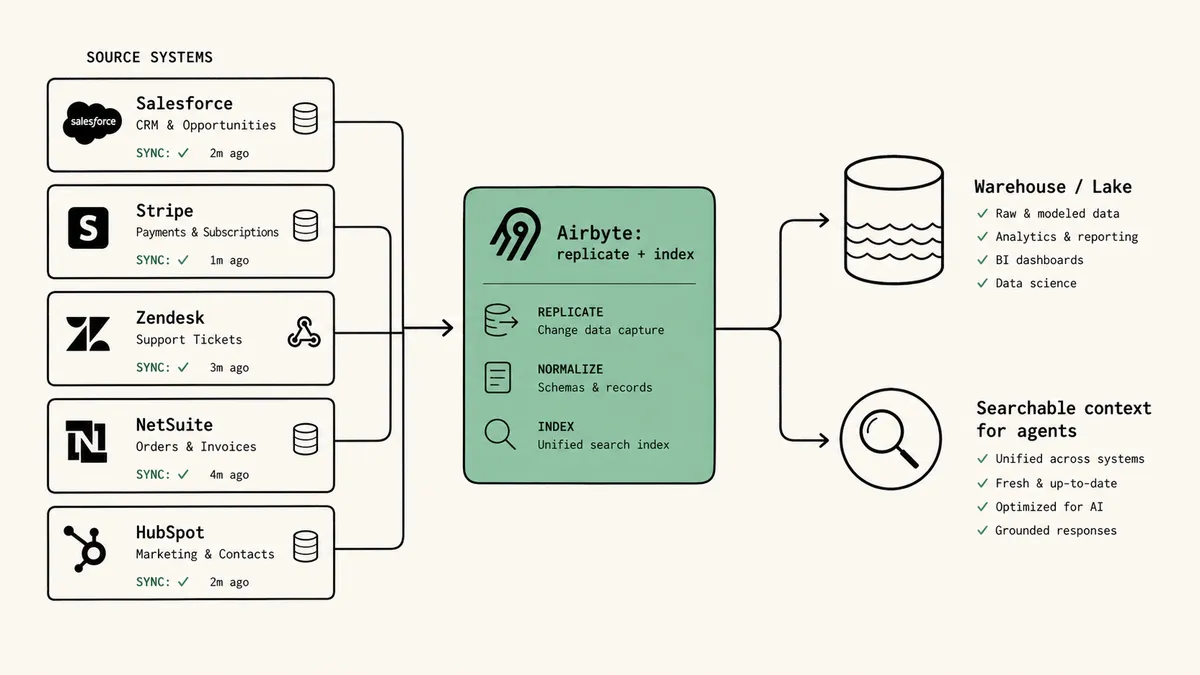
What Airbyte is honestly not built for is the moment after the agent has the data. The warehouse is loaded. The Context Store is indexed. The agent can read every deal and ticket you have. And somebody still has to decide what the agent is allowed to do with that, where it must stop, who it asks when a number looks wrong before that number ships to investors, and where the record of that decision lives. None of that is replication, and none of it is access. Airbyte does not claim it is. This is not a gap in Airbyte’s product. It is a different product.
What “automate report generation” actually means for a CFO
Here is what most posts comparing data tools will not say plainly: the fact that both Airbyte and FlowRunner now say “AI agents” is exactly what makes this hard to evaluate, and the distinction that resolves it is access versus accountability. Airbyte gives an agent access to your data. It does not give the agent a boss. For a finance leader, the boss, the place the work stops and a human signs, is the entire point.
For a large slice of mid-market finance teams, the report-generation problem is not solved by moving data anywhere or by giving an assistant read access to it. It is solved by getting the right summary, with the right context, into the right person’s hands, at the right time, with a place to escalate when something looks wrong. The pattern is recognizable from conversations with finance leaders running on operational systems like QuickBooks, NetSuite, and Acumatica:
- A weekly P&L digest needs to land in the CFO’s Slack by 9am Monday, pulled from QuickBooks, with a one-line variance comment against last week
- An AR aging summary needs to reach the controller every Friday, with anything past 60 days flagged for follow-up
- A monthly board pack needs operational KPIs assembled from the ERP and the payment processor, with the CFO reviewing variance commentary before it ships to investors
- An exception report needs to flag any vendor invoice paid twice, or any distributor billback that does not tie to the bank, and pause for human judgment before it gets posted
None of those are “queries against a warehouse,” and none are “an agent searching the Context Store.” They are operational events: a Friday clock tick, a Stripe webhook, an email in a shared inbox, an ERP transaction crossing a threshold. The report is the output of a governed workflow, not a retrieval result. The thread running through all four is the same one that runs through the difference between AI automation and AI agents: coordination and judgment are the work, not the data.
A finance team that solves this with a context layer alone ends up one step short. The agent can now see the data, which is real progress. But access is not control. An agent with searchable read access to your books and no governance layer above it will still happily assemble a P&L with a variance it had no instruction to question, and ship it. The duplicate-payment risk does not need better retrieval. It needs a workflow that stops, routes to the CFO, captures the response, and writes the decision to the audit trail.
Where FlowRunner fits: the layer that governs what happens with the data
FlowRunner is an orchestration layer. It coordinates work and AI agents across the tools a finance team already runs, and report generation is one of the patterns it most directly answers. The shape looks like this:
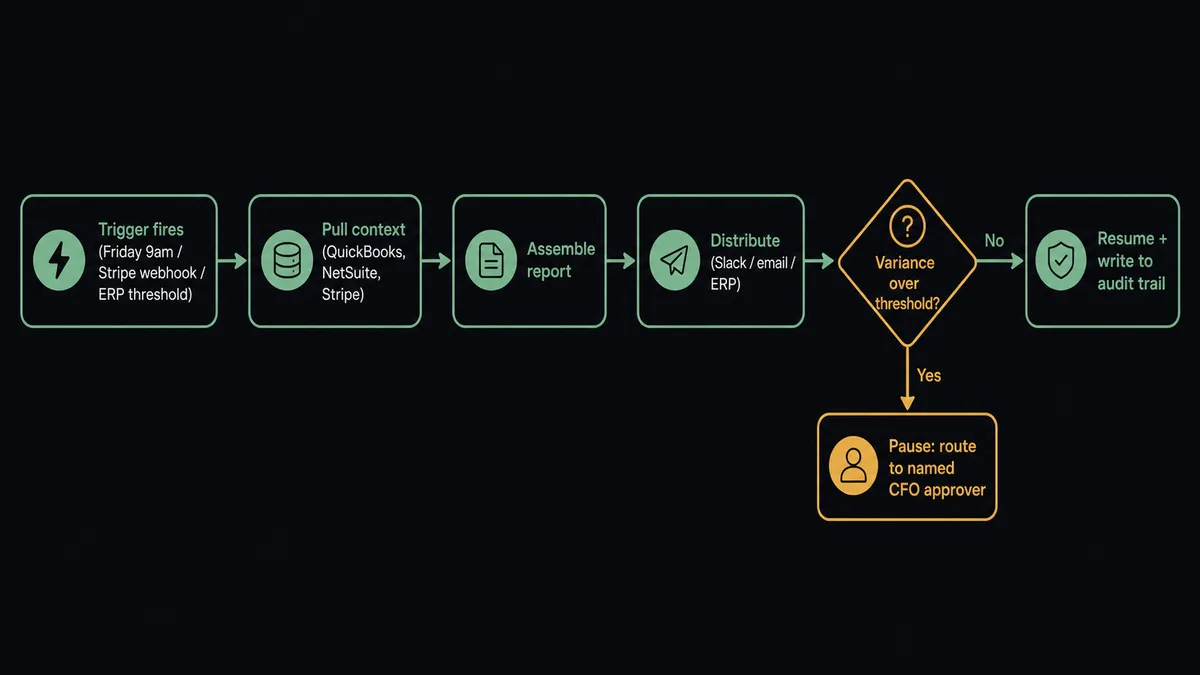
- A trigger fires (a scheduled time, an ERP transaction, a Stripe webhook, an inbox message)
- The workflow pulls the right context from the right systems (QuickBooks, NetSuite, Acumatica, Stripe, parsed documents)
- The workflow assembles the report (a digest, a variance summary, an exception list, a board-pack section)
- The workflow distributes the report (a Slack channel, email, an ERP entry, a shared drive)
- If something looks off, the workflow pauses and calls a human as an action, not a status notification
- The human gets the report and the flagged item with context already attached, responds with a structured decision, and the workflow resumes with the decision recorded in the audit trail
That step 5 is the difference that the access-versus-accountability framing points at. Airbyte’s context layer makes the data readable to an agent. FlowRunner makes the agent’s behavior governed: where it pauses, who it asks, what it is allowed to ship without a human, and what gets logged. A context layer answers “can the agent see the number.” An orchestration layer answers “who is accountable when the number is wrong, and where did they get the chance to catch it.” Both matter. They are not the same layer, and one does not substitute for the other.
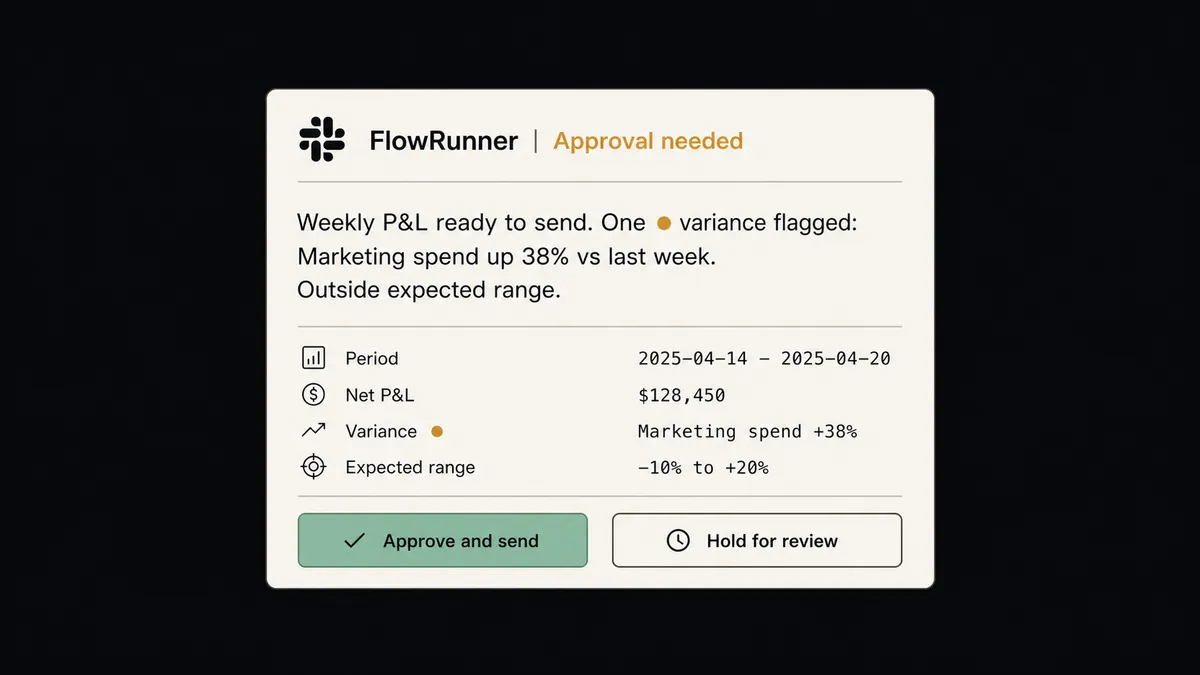
Concretely, this is the pattern behind an automated Monday P&L digest delivered to a finance team in Slack, where the report assembles from QuickBooks and lands in a channel at a scheduled time. It is the pattern in reconciling Stripe payments against QuickBooks invoices with a human-in-the-loop escalation, where a mismatch routes to a named reviewer instead of silently posting. And it is the pattern in everything a finance team can automate with Acumatica, where ERP-level reporting, exception flagging, and notification happen inside one governed workflow.
The category that owns this layer is orchestration as a service. The seam it covers is the one between data being accessible and a decision being accountable. A warehouse stores rows. A context layer makes those rows searchable to an agent. Neither is built to fire on an operational event, assemble a report from the systems of record, deliver it to a named person, pause for human judgment when an exception comes through, and record who decided what. That work is its own category, and FlowRunner is built for it.
Where Airbyte is the better fit
This is the section that, if I could not write it, would mean I had not understood Airbyte. There are clear cases where Airbyte is the right product and FlowRunner is not in the running:
- The actual problem is data centralization from many SaaS and database sources into a warehouse or lake. Airbyte’s 600+ connector catalog is dramatically broader than FlowRunner’s, and replication is what it is engineered to do.
- You need an agent to have searchable read access to your full business data. Airbyte’s Context Store and MCP access for Claude, Cursor, or any MCP client are purpose-built for exactly that, and FlowRunner does not offer an equivalent data-indexing layer.
- You want open source you can run yourself for free. Airbyte’s Core edition is “Always free” with a mature community behind it. FlowRunner has a Community Edition, but not the same ecosystem depth or 21.3k-star contributor base.
- Your data team is large enough to operate the warehouse and the BI layer, and the report assembly happens inside that stack rather than in operational tools.
Two honest limitations of FlowRunner belong here and not buried elsewhere. First, Airbyte’s connector breadth and years of production deployments are a real maturity advantage; FlowRunner is earlier-stage, with fewer publicly documented deployments and a smaller community of contributed integrations. Second, for bulk replication into a warehouse, Airbyte’s replication product is the right tool and FlowRunner is not built for that job at all. If those describe your need, buy Airbyte. It is genuinely good at what it does, and we are not the better product for data movement. We are not in that category.
Where FlowRunner is the better fit
Choose FlowRunner when:
- The report comes from operational systems (QuickBooks, NetSuite, Acumatica, Stripe, inboxes) and goes to operational channels (Slack, email, an ERP, an approval queue), without needing to land in a warehouse first
- The workflow needs to pause and ask a human when an exception shows up (a duplicate-payment risk, an AR anomaly, a variance outside range), not just make the data available to read
- Non-developers in finance ops should configure new reports, schedules, and escalation logic without filing a data-engineering ticket
- You need a cross-system audit trail and RBAC on a mid-market budget, included on the Professional plan at $299 a month (SSO arrives on the Business plan) rather than gated behind an enterprise procurement cycle
- AI agents are appearing in your stack (a forecasting agent, an AP coding agent, a variance-commentary agent), and you need a layer above them that keeps a human in control on the calls that matter
For most mid-market finance teams, the two products are complementary, not competing. The same is true of our comparison against Fivetran, which sits on the pure data-movement side of this same boundary. Airbyte lands and indexes the data. FlowRunner governs the report, the approval, and the exception, regardless of where the source data lives.
How to decide
One question, asked the right way: when the report is wrong, who is accountable, and where did they get the chance to catch it?
If your answer points at a data freshness or coverage problem, your analytics team explores the data in a BI tool, and the bottleneck is replication or giving an agent access to read it, then your problem lives on the data layer. Airbyte is the platform to evaluate, and the report is a downstream artifact built on top of what Airbyte delivers.
If your answer is “a named person in finance signs off, and right now they catch the bad number by manually eyeballing it on Friday afternoon,” then your problem is orchestration. The category to evaluate is orchestration as a service. The report is the output of a coordinated workflow across operational systems, with a human pulled in at the moment a judgment is required, and an audit trail recording the decision. Access to the data was never the constraint. Accountability for what gets done with it was.
Most finance teams past a certain size will run both layers over time, for different work. That is not a hedge. It is the architecture the work actually has, and knowing what is worth automating first is the useful next read for sequencing the two. If you are weighing extraction and document workflows alongside reporting, what automating data extraction actually means for finance teams covers the upstream half of the same picture.
Frequently asked questions
Is FlowRunner a replacement for Airbyte?
No. Airbyte is an open-source data replication platform that moves data from 600+ sources into warehouses, lakes, and databases, and now also serves as a context layer that gives AI agents searchable access to that data. FlowRunner is an orchestration layer that coordinates what agents and people do across the tools a finance team already runs. If the problem is consolidating data into Snowflake or BigQuery, or giving an agent read access to your business data, Airbyte is built for that. FlowRunner is not a replication tool.
Airbyte now has an agent context layer. How is that different from what FlowRunner does?
Airbyte's Context Store gives an agent access to your data so it stops making things up. That is the read side: the agent can see your customers, deals, and tickets. FlowRunner governs the act side: what the agent is allowed to do with what it sees, where it pauses, who it asks when a number looks wrong, and what gets written to the audit trail. Access is necessary. It is not the same as governance and human-in-the-loop control.
Can we automate report generation directly from QuickBooks or NetSuite without a warehouse or a context store?
Yes, and that is the case FlowRunner is built for. Most mid-market finance teams want a weekly P&L digest, an AR aging summary, or a duplicate-payment flag delivered to Slack or email from the operational systems themselves. FlowRunner connects to QuickBooks, NetSuite, Acumatica, and Stripe directly, assembles the report, distributes it, and pauses for a named approver when a variance crosses a threshold.