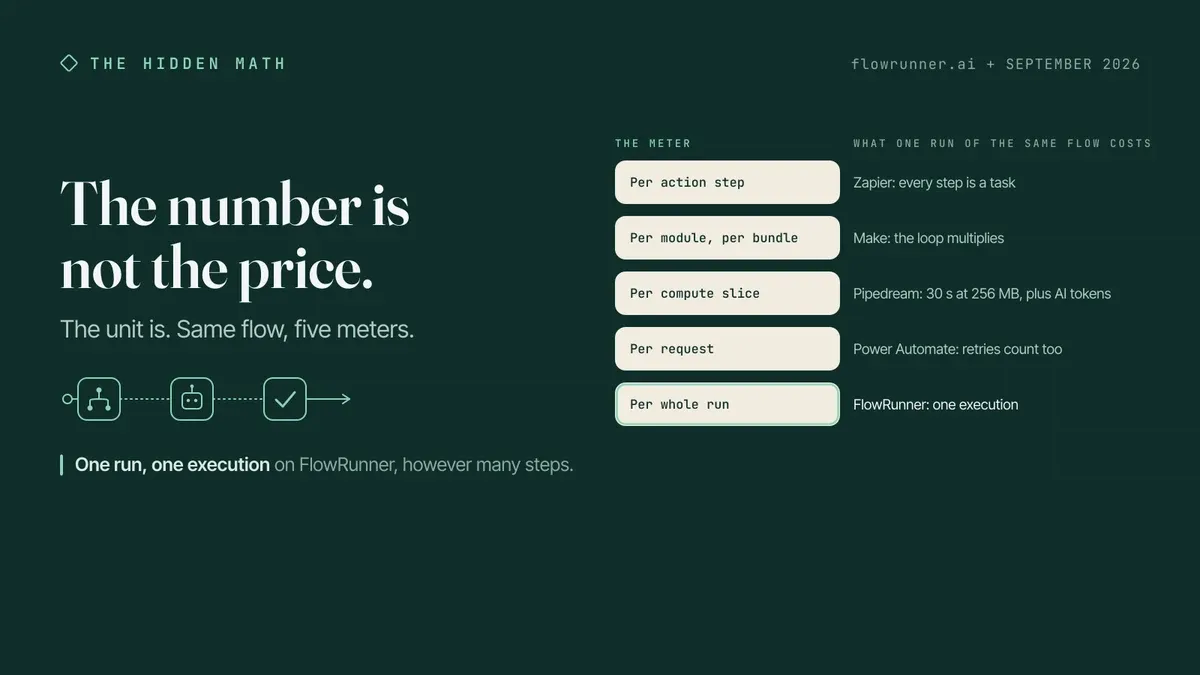
The number on a free plan is not the price. The unit is the price, and most people never read it.
Free automation plans look alike on price and differ on what the number counts. Zapier counts each action step as a task. Make counts each module run over each bundle of data as a credit. Pipedream counts 30-second slices of compute, plus AI tokens on a second meter. Power Automate counts every request, retries included. Several AI-native tools count AI credits that bundle the model cost. FlowRunner and Activepieces count one execution per whole run. The same workflow costs a different number on every one of them.
So take one workflow and follow it through all of them.
The invoice, and the ten things that happen to it
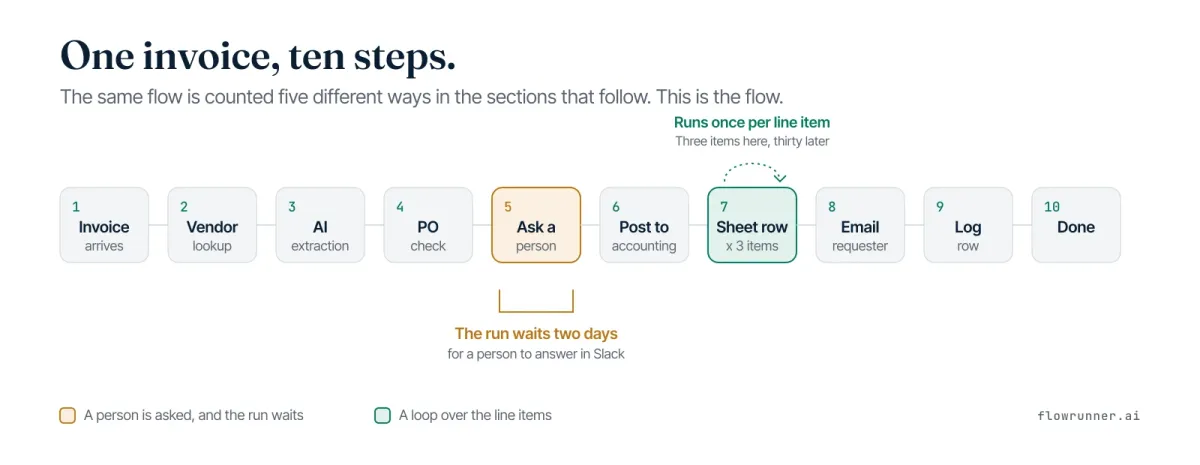
An invoice lands in a shared mailbox on a Tuesday morning. Ten steps happen to it.
- It arrives, by email or webhook.
- Fetch the vendor record from the CRM.
- Extract amount, due date, and line items with an AI step.
- Check the amount against the purchase order.
- Over the threshold, ask a person on Slack, and wait.
- Post the decision to the accounting system.
- Write a sheet row for each of three line items.
- Notify the requester by email.
- Log the run to a table.
- Done.
One AI call, a loop with three iterations, and one human who takes two days to answer. Nothing exotic. The meters are what move.
Vendor numbers below come from each vendor’s own pricing page or documentation: July 2026 for Zapier, Make, and Power Automate, September 15, 2026 for the rest.
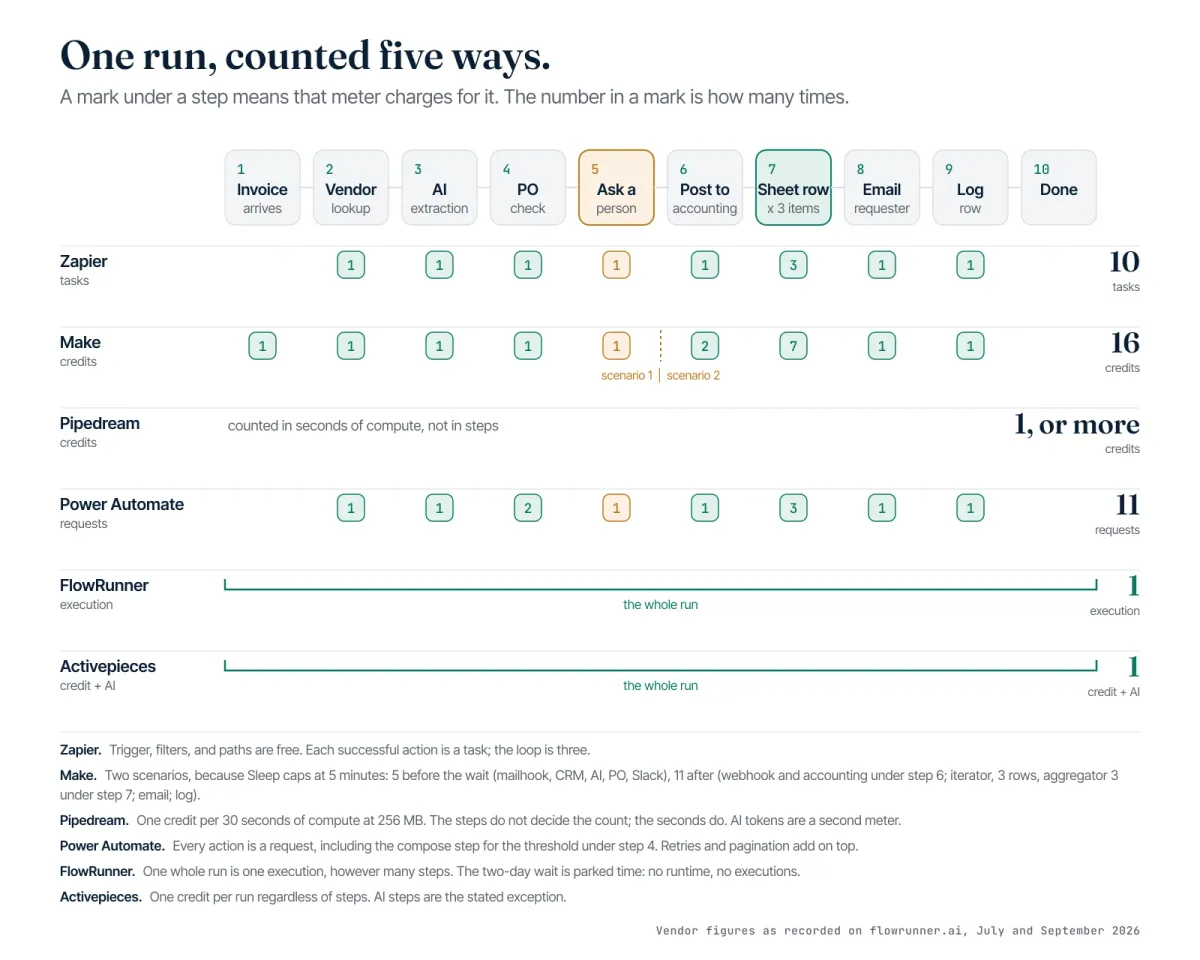
Counted as steps: ten tasks
Zapier’s unit is the task: one successful action step, per its documentation. Triggers, filters, and Paths are free.
So: trigger free, vendor lookup 1, AI extraction 1, purchase order lookup 1 (the comparison itself is a filter, free), approval request 1, post to accounting 1, three sheet rows 3, email 1, log row 1.
Ten tasks for one invoice, against a free allowance of 100 tasks a month. Take the loop to thirty line items and it costs 37 tasks.
The Request Approval action sits on Professional and above, so on the free plan the errand stops at step four. And an MCP call, if that is how the extraction runs, counts as two tasks. FlowRunner vs Zapier has the rest.
Here is what most posts about free plans will not say. The plans with the biggest headline numbers have the smallest units. A four-figure allowance counting module runs and a three-figure allowance counting whole runs are not on the same scale. The number got bigger because the thing it counts got smaller.
Counted as modules over bundles: sixteen credits
Make counts a credit for one module run over one bundle of data. Its documentation puts a three-module scenario over ten items at roughly 31 credits, because the modules downstream of the data run once per item.
The invoice also splits in two, because Make’s Sleep module maxes out at 300 seconds. A two-day answer cannot be waited on inside one scenario, so one scenario asks and a webhook-started second one finishes. Both get counted.
Scenario one: mailhook trigger 1, CRM lookup 1, AI extraction 1, purchase order lookup 1, Slack message 1. Five credits.
Scenario two: webhook trigger 1, post to accounting 1, iterator 1, sheet row per item 3, then an aggregator to collapse those three bundles back into one, which by Make’s own rule runs once per bundle it receives, 3, email 1, log row 1. Eleven credits.
Sixteen for the errand, against a free allowance of 1,000 credits a month and two active scenarios, both of which this build spends. Thirty line items takes scenario two to 65, because everything downstream of the iterator moves with the item count. Make’s Human in the Loop app is an Enterprise feature in closed beta, which is why the split is the pattern. More at FlowRunner vs Make.
Counted as compute: one credit, or several
Pipedream’s credit is 30 seconds of compute at 256 MB, and its documentation says a multi-step workflow can burn several per run. The ten steps do not decide the count. The seconds do.
Finish inside 30 seconds and the errand is one credit, against a free allowance of up to 100 a month. Take the loop to thirty rows and the count moves only as far as the extra seconds push it. The AI extraction is counted apart from that: 1M AI tokens a month on the free plan.
The two-day wait is where the published facts run out. The docs state a 5-minute execution cap on the free plan and 7 days of event history. They do not state how a workflow parked waiting on a person is metered, so that is where this stops.
Counted as requests: eleven, before anything retries
Power Automate counts a Power Platform request, which is essentially each action. Microsoft’s documentation counts Compose actions, variable initializations, retries, and pagination calls. The ceiling on the free and Microsoft 365-seeded entitlement is 6,000 requests per user per 24 hours.
A clean run with nothing retrying: CRM lookup, AI extraction, purchase order lookup, one Compose for the threshold, the approval, the post to accounting, three sheet rows, the email, the log row. Eleven requests. Thirty line items takes it to 38, and every retry adds to it.
Three plan facts sit against it. Approvals reach Outlook actionable email, a Teams adaptive card, or the action center, so the Slack ask in step five is not one of the documented channels. A pending approval dies at the 30-day run duration cap. The seeded entitlement covers standard connectors, with premium connectors on the paid plan at $15 per user per month. Side by side on the rest: FlowRunner vs Power Automate.
Counted as one run: one execution
FlowRunner counts the execution: one complete workflow run, start to finish. The invoice is one execution, AI call and loop and two days of waiting included.
Ten steps or forty, three line items or thirty, it stays one, because step count is not a meter on any FlowRunner plan. The free plan carries 100 executions a month, one running at a time, with 24 hours of log history, all 2,100+ integrations, unlimited users, unlimited workflows, and the human step included. AI runs on BYOK, a model where the customer supplies their own AI provider API credentials, pays providers directly for usage, and FlowRunner orchestrates calls across providers without taking a markup on inference. The pricing page has the ladder, and the reasoning behind metering volume instead of capability is its own article.
Activepieces counts the same way: one credit per run regardless of step count, AI the stated exception, on 100 credits a day, unlimited flows, and a single user account. Plus is $20 a month for 10,000 credits. Two platforms here count the errand. The rest count pieces of it.
The second meter: AI
Step three is the cheapest thing here to describe and the hardest to price, because on most of the field it moves a meter of its own.
- Zapier Agents: activities, not tasks. 400 a month free, 10 per run, where an activity is any billable agent action.
- Make AI Agents: on the paid tiers.
- Pipedream: AI tokens beside the compute credits, 1M a month free.
- Dify: message credits, 200 on the free Sandbox tier.
- Microsoft Copilot Studio: Copilot Credits, $200 a month for 25,000, and agents built on the trial cannot be published.
- Gumloop, Lindy, and Relevance AI: no permanent free plan, and AI is credits on all three. Gumloop Pro from $37 a month, 20,000 credits, your own keys supported, plus an 8% orchestration fee. Lindy Plus $29.99 per user per month, 3,000 credits per user. Relevance AI retired its free plan; Pro is $19 a month annual, 2,500 actions plus $20 of Vendor Credits, which your own keys bypass.
- FlowRunner: no AI meter on any plan, Free included. Your keys, your provider rates, your invoice from the provider.
Each from the vendor’s own page on September 15, 2026, and the full field sits in the comparison of free plans. One currency or two is the question step three asks.
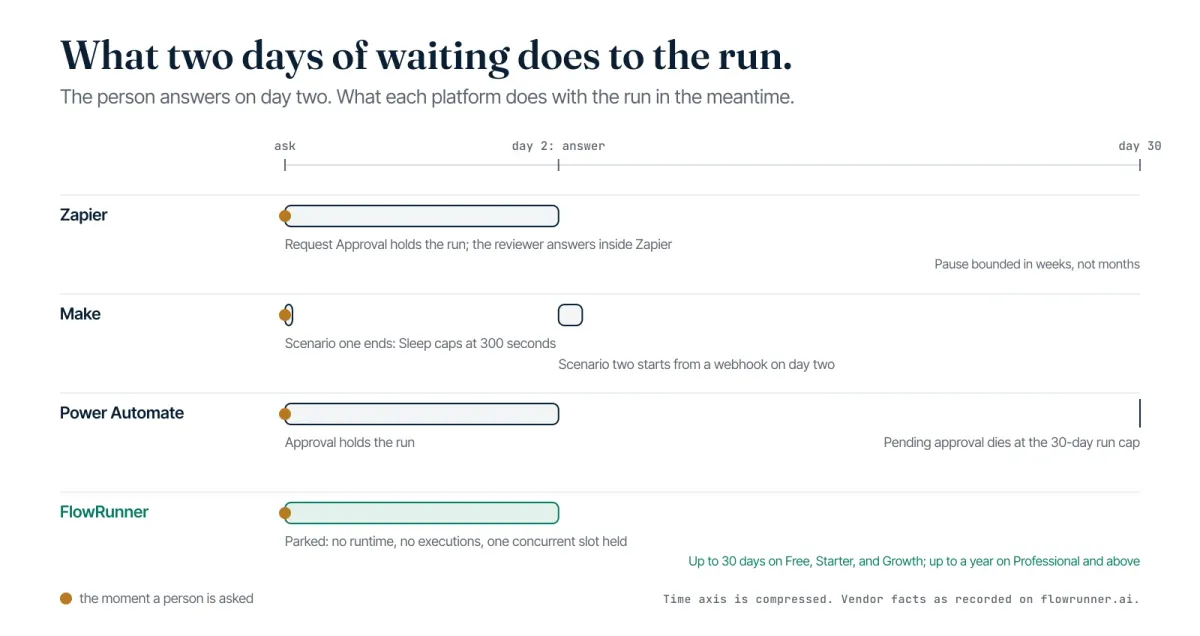
What the two-day wait does to the count
Step five is where the meters stop agreeing about what is even happening.
On a step meter the two days are free and the asking is not: the approval is a task and so is a reminder, and because the approval cannot sit inside a looping step, reviewing each line item means one run per item. On Make the wait cannot be native past 300 seconds, so the errand splits in two and the count follows. On Power Automate the run stays alive while the approval is pending, and at 30 days it dies. On FlowRunner the run parks: up to 30 days on Free, Starter, and Growth, up to a year on Professional and above, and parked time costs nothing further because the execution was counted when it started. It does hold a concurrency slot, and Free and Starter have one. Business and Enterprise keep an execution backlog queue, so a request arriving while the pool is full waits its turn; on Free, Starter, Growth, and Professional that request is rejected and the trigger source receives an error.
Human-in-the-loop is an execution pattern where AI agents pause autonomously, assemble the relevant context and the decision choices available, route to a human via their preferred channel, and resume the moment the human responds. Four answers to one question, and the question is not about billing. Every meter above prices activity, which is what a single system can see: a step fired, a module ran, a request came in. None of them prices custody. The two days between the ask and the answer are the part of this errand nothing owns, and the run has to still be the same run when the answer arrives, or the audit trail is two halves with a human-shaped gap.
Holding that gap open is a job for a layer rather than a feature bolted to the end of a pipeline. An orchestration layer above the systems of record keeps a single run alive across time none of them will account for, and treats the pause as the point of the workflow rather than an interruption to it. Orchestration as a Service is the name for that category, a platform category that coordinates, governs, and supervises multi-agent environments while keeping humans in control of the decisions that require judgment. FlowRunner is built for that layer, which is why its meter counts the errand and not the two days it spent waiting on a person.
Thirty seconds, three things to find
Open any free plan’s pricing page and find three sentences before you look at a number.
Find the sentence that defines the unit. It lives in a footnote, a tooltip, or a help-center article one click away, and it is the only sentence that says what the headline number means.
Find out whether AI is a second currency. Credits that bundle the model cost mean the bill moves when the model does. Your own provider keys mean one meter instead of two.
Find what happens when a person is in the loop: which tier the approval lives on, how long a run can hold open, and whether the pause draws down the meter while it waits. That is the fact this invoice turned on, and the one a pricing page buries deepest.
Start on the Free plan
One invoice, ten steps, three line items, two days of waiting for a person: ten tasks, sixteen credits, eleven requests, or one execution, depending on whose page you are reading. Open a free workspace and build that errand with the approval in it, then look at what it actually drew down. If you would rather walk your own version through with someone first, send us a note.
Frequently asked questions
What is a Zapier task?
One successful action step. Zapier's documentation defines it that way, so a Zap with ten actions consumes ten tasks per run. Triggers, filters, and Paths do not count. An MCP call counts as two tasks. Verified September 15, 2026.
What is a Make credit?
One module run over one bundle of data. Make's own documentation puts a three-module scenario processing ten items at roughly 31 credits, because every module downstream of the data runs once per item.
Does waiting for an approval use up executions on FlowRunner?
No. A run that pauses for a person is still one execution from start to finish, however long it waits. Waits hold up to 30 days on Free, Starter, and Growth, and up to one year on Professional and above. A parked run does occupy one of the workspace's concurrent slots while it waits.
Why do two free plans with the same number cost different amounts?
Because the number counts different things. An allowance of 100 tasks counts action steps, and an allowance of 100 executions counts whole runs, so the same ten-step workflow draws ten from the first and one from the second.