How to Connect Xero with Cin7 Omni (With or Without an AI Agent)
Turn Xero invoices into Cin7 Omni sales orders with a stock check in between, optionally as an AI agent that pauses for a human before a credit note or void touches the books when inventory cannot cover the order.
How do you connect Xero to Cin7 Omni?
You connect Xero to Cin7 Omni by letting the books drive the warehouse: Xero’s On Invoice Created trigger fires when finance raises an invoice, the workflow pulls the detail with Get Invoice, matches the buyer in Cin7 Omni with List Contacts or adds them with Create Contact, and raises the order with Create Sales Order, carrying the invoice number as the order reference. FlowRunner is a visual AI-agent orchestration platform where automations run autonomously and pause for human judgment on the steps that carry real consequence. The same connection can run as an AI agent that checks List Stock before the order ever reaches the warehouse, and stops for a named human before Create Credit Note or Void Invoice changes the books when inventory cannot cover what was invoiced.
The problem it solves
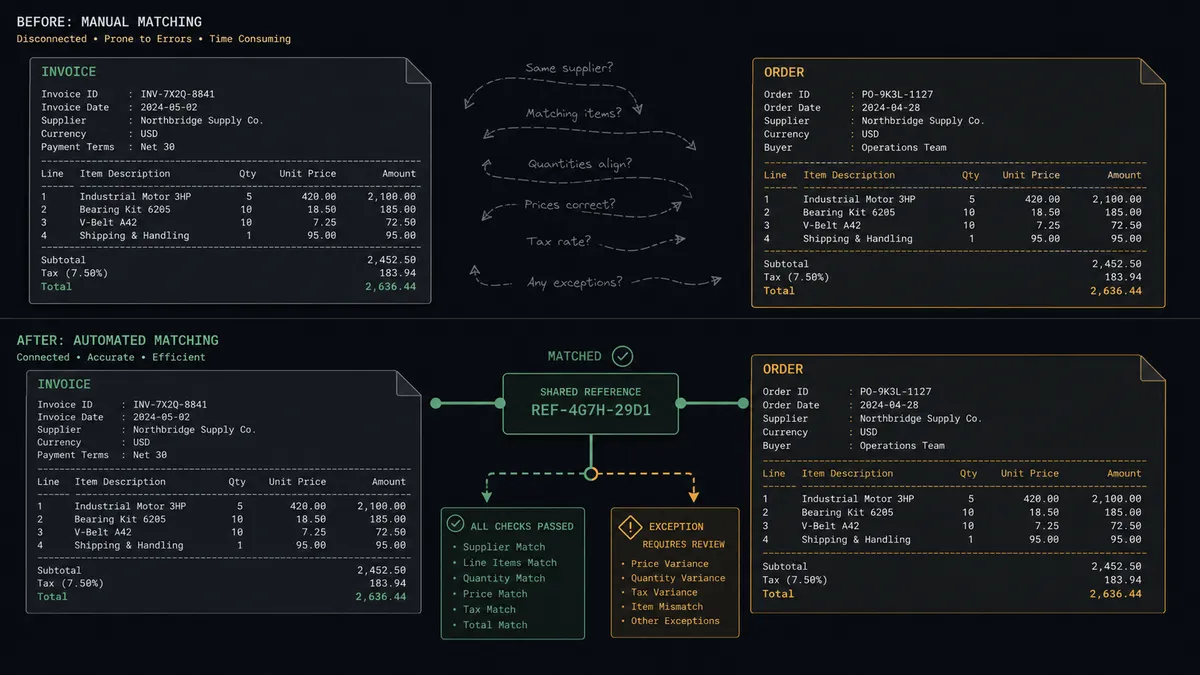
Today the bridge between accounting and inventory is retyping. Finance raises an invoice in Xero; someone in operations opens Cin7 Omni, finds or creates the customer, and keys the same lines into a sales order. Every order, twice. The invoice number and the order reference match only when someone remembers to make them match, and the warehouse learns about an order whenever the retyping happens, not when the sale does.
The edges are where the money leaks. An invoice goes out for stock that is not actually available, and the customer finds out after they have paid. A short shipment needs a credit note, and it gets raised days later from memory, for the wrong amount. A payment lands in Xero but the order sits in Cin7 Omni untouched because nobody connected “paid” to “dispatch.” At month end, someone reconciles invoices against orders line by line and discovers the drift all at once, when every discrepancy is old and cold.
How it works: the connection
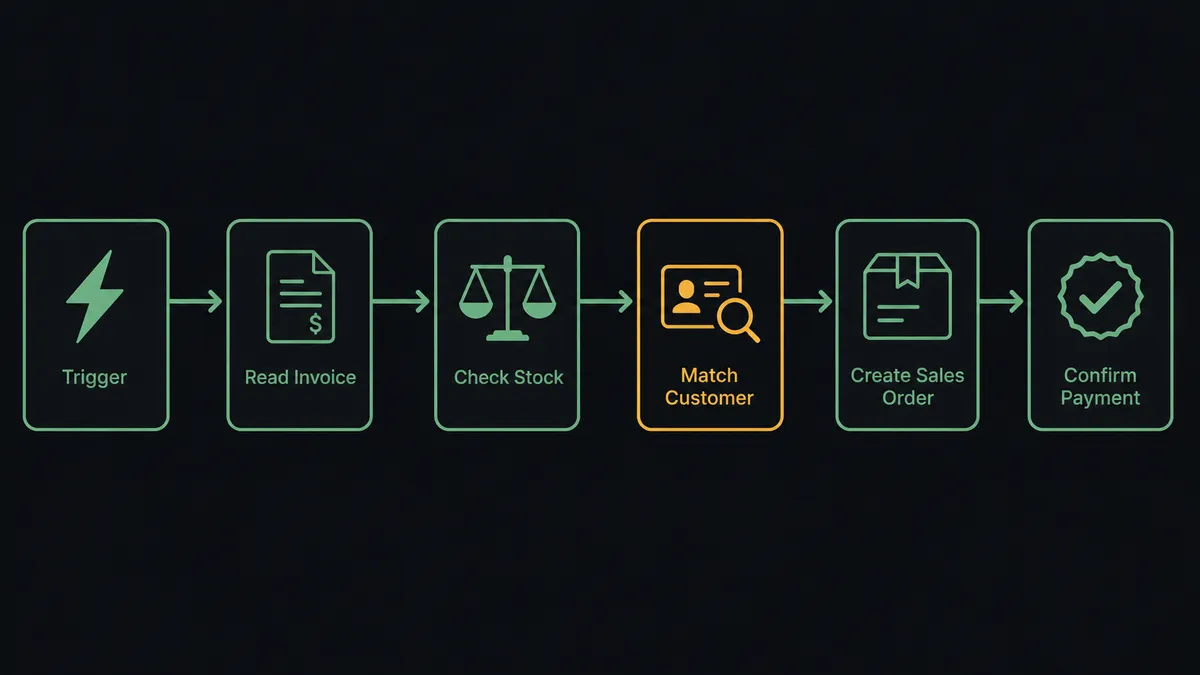
The connection listens to Xero and writes to Cin7 Omni. Here is the plain version, grounded in the real connector actions.
- Trigger: Xero fires On Invoice Created when finance raises an invoice.
- Read: The workflow calls Get Invoice to pull the contact, line items, quantities, prices, and due date.
- Check stock: It calls List Stock in Cin7 Omni for each product option, reading available, held, incoming, and on-order quantities across branches.
- Match the customer: It calls List Contacts filtered by email to find the buyer. If no contact exists, Create Contact adds them with name, company, and address.
- Raise the order: It calls Create Sales Order with the member ID, line items, unit prices, delivery address, and the Xero invoice number as the reference.
- Confirm payment later: When Xero fires On New Payment Received, the workflow calls Get Payment and Get Sales Order to confirm the paid invoice’s order is in the right stage, and posts a dispatch-ready note to the operations channel.
That is the “just connect them” answer. One entry in Xero becomes one order in Cin7 Omni, referenced both ways, with nobody retyping lines.
Can an AI agent run it? (and why a human stays in the loop)
Yes, and the difference from a field-mapping sync shows up on the first order that is not routine. The agent holds the real actions as tools: Get Invoice, Find Invoices, Create Credit Note, Void Invoice, Email Invoice on the Xero side; List Stock, List Contacts, Create Contact, Create Sales Order, Get Sales Order on the Cin7 Omni side. It reads each invoice in context: does the buyer exist, do the lines resolve to real product options, and does available stock actually cover the quantities finance just committed to?
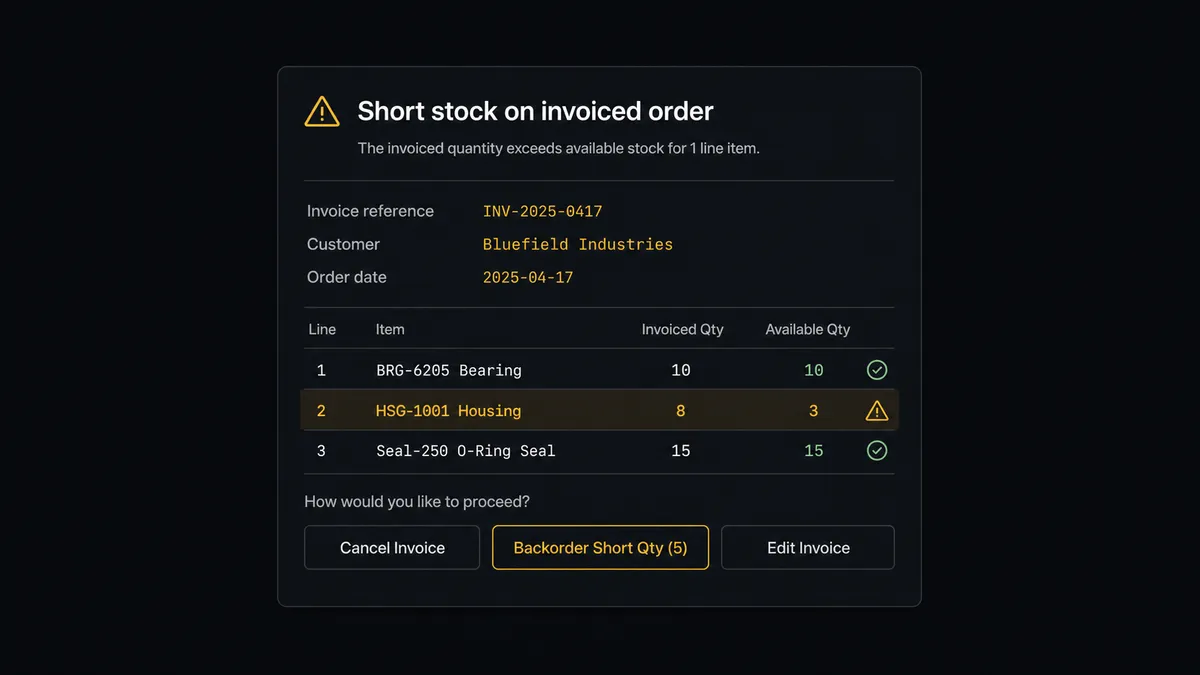
The consequential moment is when it does not. Correcting the books means Create Credit Note or Void Invoice in Xero, and both are actions a business regrets when they run wrong. So the agent does not fire either one. It invokes a human-in-loop flow it holds as a callable tool, and the workflow pauses and posts: “Invoice [number] for [customer]: [item] shows fewer available units than invoiced across all branches, with more on order. Options: raise the sales order as a backorder, credit the short lines, or hold.” The approver picks one. Only then does the agent act, and the decision, the approver, and the timestamp land in the audit trail.
Escalation is judgment, not a threshold. A one-unit shortfall on a stocked item with incoming inventory is a backorder the agent handles and notes. The same shortfall on a new customer’s first order, or a total that disagrees with the order value, is a stop. Prospects call this the digital andon cord: like Toyota’s production line pull cord, the workflow stops the line the moment it hits uncertainty, and a person pulls it back into motion.
FlowRunner vs Celigo
Celigo is a serious iPaaS, and for the right buyer it is a good one. Its prebuilt integration apps for order-to-cash flows are mature, it handles high transaction volumes, and IT teams running large ERP estates get real leverage from its managed connectors and error handling. If you have an integration team and a NetSuite-centric stack, Celigo belongs on your shortlist.
The difference is who runs it and what happens at the judgment steps. Here is the honest side-by-side.
| What matters for this pair | FlowRunner | Celigo |
|---|---|---|
| Human-in-the-loop on credit notes and voids | Native. The agent pauses before Create Credit Note or Void Invoice and waits for a named approval | Error and exception queues for technical failures, not native approval steps in the flow |
| Who runs the flow | An AI agent reads the invoice, checks stock, reasons, picks actions as tools | Prebuilt integration apps and flows configured and maintained by an integration team |
| Users included | Unlimited users on every tier | Enterprise licensing; seats and endpoints priced accordingly |
| Bring your own AI keys | Yes, BYOK | AI capabilities are part of Celigo’s own platform stack |
| Self-hosted option | Yes, cloud-hosted or self-hosted | Cloud iPaaS |
| Pricing model | Transparent workflow-based tiers starting at $45/mo | Custom enterprise quotes, typically scoped by endpoints and volume |
If you have an IT-owned integration platform strategy and the budget that goes with it, Celigo is a legitimate choice. If you want operations to own the Xero to Cin7 Omni flow directly, with an agent doing the checking and a human on every decision that touches the books, this pairing is where FlowRunner fits.
Before and after
| Category | Before | After |
|---|---|---|
| Order entry | Every Xero invoice is retyped into Cin7 Omni by hand | On Invoice Created drives Create Sales Order with the invoice number as reference |
| Stock certainty | Invoices commit stock nobody verified | List Stock checks available quantities across branches before the order is raised |
| Short shipments | Credit notes raised days later, from memory, for amounts nobody double-checked | Short lines are quoted with exact quantities and credited only after a named approval |
| Paid-to-dispatch | Payments land in Xero while orders idle in Cin7 Omni | On New Payment Received confirms the order stage and posts a dispatch-ready note |
| Reconciliation | Month-end line-by-line matching of invoices to orders | Records reference each other from creation, and exceptions surface the day they happen |
What you can build
Invoice to order, with a stock gate. On Invoice Created fires, the agent verifies lines against List Stock, matches the buyer with List Contacts, and raises the order with Create Sales Order. Clean orders flow untouched; short ones stop for a decision.
Paid means dispatch-ready. On New Payment Received fires, the agent calls Get Payment and cross-references the order with Get Sales Order, then posts to the operations channel that the order is cleared, so the warehouse works from payment reality instead of a printed list.
Reverse flow: orders into the books. On a schedule, List Sales Orders pulls new Cin7 Omni orders and the workflow raises matching invoices in Xero with Create Invoice, then sends them with Email Invoice, for teams whose orders start in the warehouse instead of the ledger.
One customer record, both systems. On Contact Created fires in Xero and the agent mirrors the new account into Cin7 Omni with Create Contact, so the first order never stalls on a missing customer.
Payables meets purchasing. The agent pairs List Purchase Orders in Cin7 Omni with Get Aged Payables in Xero and posts a weekly digest of what is on order against what is owed, giving operations and finance the same cash picture.
Common questions
Is it free to connect Xero and Cin7 Omni on FlowRunner? You can build and run the connection on FlowRunner’s free plan, which includes 100 executions a month and every integration with no credit card required, and new accounts also get 14 days of Professional. Both connectors are available on every FlowRunner tier, and every tier includes unlimited users and unlimited workflows.
Can I self-host the Xero to Cin7 Omni workflow? Yes. FlowRunner offers a cloud-hosted option and a self-hosted option, so the connection can run inside your own environment. Self-hosting is available for teams that need the workflow to run on their own infrastructure.
Does the AI agent need my own OpenAI or Claude key? FlowRunner uses a bring-your-own-keys model, so you connect the AI provider key you already have. You are not locked to one model, and you control which provider runs the agent.
What happens when stock cannot cover an invoiced order? The agent stops before anything changes in either system. It posts the invoice number, the customer, the short lines with available versus invoiced quantities from List Stock, and three choices: create the order as a backorder, raise a credit note for the short lines, or hold. A named human decides, and only then does the agent act.
Which Xero triggers can start a Cin7 Omni action? Xero exposes eight triggers, including On Invoice Created, On Invoice Updated, On New Payment Received, On Contact Created, and On Credit Note Created. This connection starts from On Invoice Created for the order flow and uses On New Payment Received to confirm orders are cleared for dispatch.
Can it work in the other direction, from Cin7 Omni orders to Xero invoices? Yes. Cin7 Omni has no event triggers in the FlowRunner catalog, so the reverse flow runs on a schedule: List Sales Orders pulls new orders, and the workflow raises matching invoices in Xero with Create Invoice against the right contact.
Getting started
Start on the free plan: 100 executions a month, every integration included, no credit card required, plus 14 days of Professional for new accounts. Both connectors are available on every tier, and every tier includes unlimited users and unlimited workflows.
Explore the integration details:
- Xero integration (8 triggers and 37 actions covering invoices, payments, contacts, and reports)
- Cin7 Omni integration (10 actions across products, stock, sales orders, purchase orders, and contacts)
Start building free at flowrunner.ai or book a demo to see a live Xero to Cin7 Omni workflow, short-stock approval and all.
Frequently asked questions
Is it free to connect Xero and Cin7 Omni on FlowRunner?
You can build and run the connection on FlowRunner's free plan, which includes 100 executions a month and every integration with no credit card required, and new accounts also get 14 days of Professional. Both connectors are available on every FlowRunner tier, and every tier includes unlimited users and unlimited workflows.
Can I self-host the Xero to Cin7 Omni workflow?
Yes. FlowRunner offers a cloud-hosted option and a self-hosted option, so the connection can run inside your own environment. Self-hosting is available for teams that need the workflow to run on their own infrastructure.
Does the AI agent need my own OpenAI or Claude key?
FlowRunner uses a bring-your-own-keys model, so you connect the AI provider key you already have. You are not locked to one model, and you control which provider runs the agent.
What happens when stock cannot cover an invoiced order?
The agent stops before anything changes in either system. It posts the invoice number, the customer, the short lines with available versus invoiced quantities from List Stock, and three choices: create the order as a backorder, raise a credit note for the short lines, or hold. A named human decides, and only then does the agent act.
Which Xero triggers can start a Cin7 Omni action?
Xero exposes eight triggers, including On Invoice Created, On Invoice Updated, On New Payment Received, On Contact Created, and On Credit Note Created. This connection starts from On Invoice Created for the order flow and uses On New Payment Received to confirm orders are cleared for dispatch.
Can it work in the other direction, from Cin7 Omni orders to Xero invoices?
Yes. Cin7 Omni has no event triggers in the FlowRunner catalog, so the reverse flow runs on a schedule: List Sales Orders pulls new orders, and the workflow raises matching invoices in Xero with Create Invoice against the right contact.