How to Connect DocuSign with Cin7 Omni (With or Without an AI Agent)
Connect DocuSign signed agreements to Cin7 Omni customers and sales orders, with an AI agent that onboards accounts automatically and pauses for a human before a signed order commits real inventory.
How do you connect DocuSign to Cin7 Omni?
You connect DocuSign to Cin7 Omni by letting signatures drive fulfillment: DocuSign’s On Envelope Completed trigger fires when every recipient has signed, the workflow pulls the signer with Get Envelope Recipients and the executed agreement with Download Document, matches or creates the buyer in Cin7 Omni with List Contacts and Create Contact, and commits the order with Create Sales Order. FlowRunner is a visual AI-agent orchestration platform where automations run autonomously and pause for human judgment on the steps that carry real consequence. Run the same connection as an AI agent and the handoff gains judgment: the agent reads the agreed terms, checks them against live stock with List Stock, and pauses for a named human before a signed promise becomes a committed order.
The problem it solves
Between “they signed” and “it ships” sits a person with two screens open. A wholesale agreement or dealer order form completes in DocuSign, and someone downloads the PDF, reads the line items, opens Cin7 Omni, checks whether this buyer exists, creates the account if not, looks up each SKU, checks stock, and keys in the sales order. Every field is an opportunity to transpose a quantity or pick the wrong product option. On a good day the order goes in that afternoon. On a busy day the signed agreement sits in an inbox while the customer wonders when their opening order will arrive.
The exceptions are where the real risk lives. The signed form lists a product option that was superseded last quarter. The agreed quantity is more than the warehouse holds, and nobody notices until fulfillment fails. A new dealer signs and the account gets created twice, once by sales and once by ops, splitting the order history from day one. And when an envelope is declined or voided, that news often never leaves the sales team, so operations keeps planning around an order that legally does not exist.
How it works: the connection
The connection listens to DocuSign and writes to Cin7 Omni. Here is the plain version, grounded in the real connector actions.
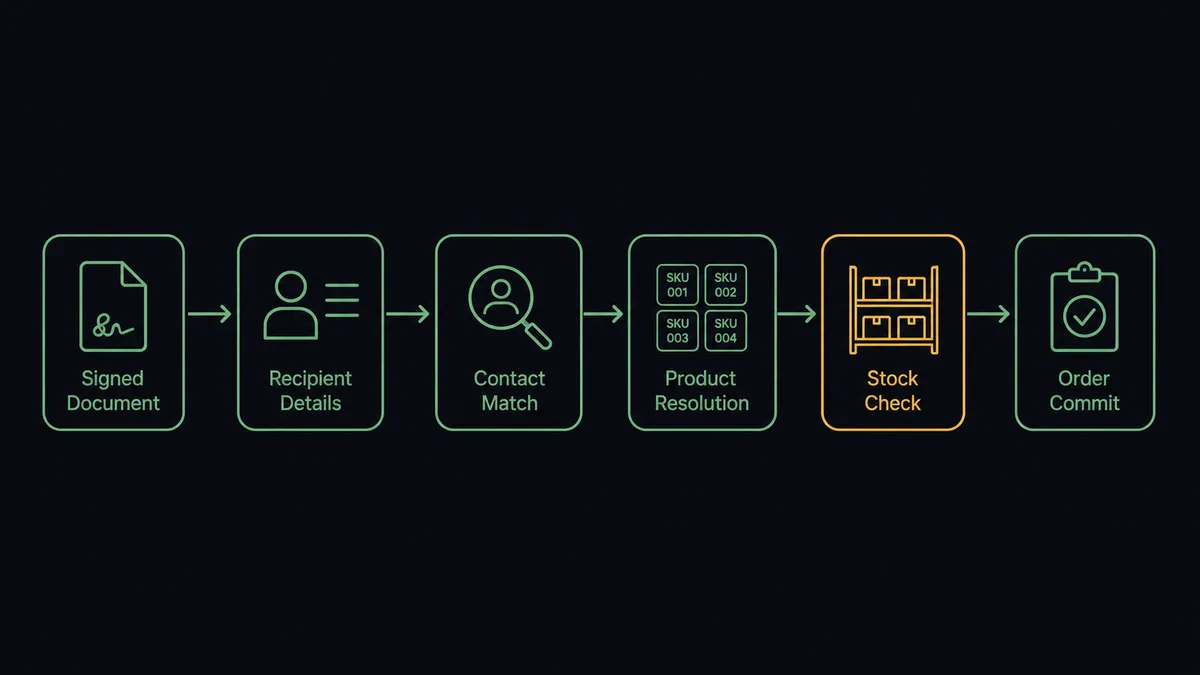
- Trigger: DocuSign fires On Envelope Completed the moment the final recipient signs.
- Read: The workflow calls Get Envelope Recipients for the signer’s name, company, and email, and Download Document to capture the executed agreement.
- Match the buyer: It calls List Contacts in Cin7 Omni filtered by the signer’s email. If no account exists, Create Contact onboards the buyer with company, email, phone, and address, typed as a customer.
- Resolve the items: It calls List Products and Get Product to map each agreed item to the correct product option ID, SKU, and current price.
- Check availability: It calls List Stock for the relevant product options and branches, reading available, held, incoming, and on-order quantities.
- Commit the order: It calls Create Sales Order with the member ID, line items, quantities, unit prices, and the delivery address from the agreement, carrying the envelope ID in the order reference.
That is the “just connect them” answer. Signed terms become a sales order with the paper trail attached. The exit paths matter too: On Envelope Declined and On Envelope Voided route straight to the account owner, so operations stops planning around orders that died.
Can an AI agent run it? (and why a human stays in the loop)
Yes, and this is the difference between a data bridge and an operations teammate. The agent holds the real actions as tools: Get Envelope Status, Get Envelope Recipients, Download Document, and Resend Envelope on the DocuSign side; List Contacts, Create Contact, List Products, Get Product, List Stock, List Branches, and Create Sales Order on the Cin7 Omni side. For each completed envelope it works the way your best coordinator would: confirm the buyer, reconcile the agreed items against the current catalog, and check the stock position before promising anything.
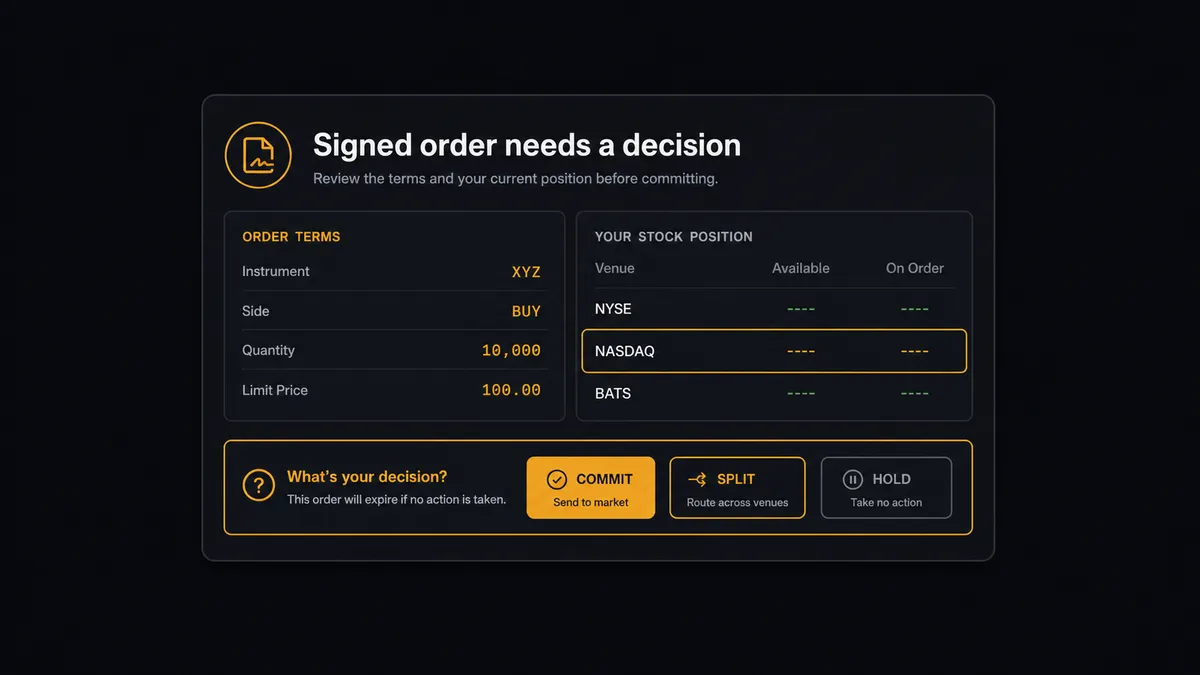
The consequential step is Create Sales Order. The moment it runs, stock is spoken for, fulfillment starts moving, and a new account has an open balance. So the agent commits routine reorders on its own and stops for everything that carries weight. When a newly signed dealer’s opening order includes a quantity that exceeds available stock at the default branch, the agent does not silently create a backorder or trim the line. It invokes a human-in-loop flow it holds as a callable tool and posts: “Opening order from the newly signed dealer agreement: the largest line exceeds available stock at the main branch, with more incoming on the next purchase order. Commit in full, split the shipment, or hold for review?” A person picks, and only then does Create Sales Order run, with the envelope reference, the approver, and the timestamp bound to the order.
Prospects call this a digital andon cord, after the cord that stops a Toyota production line. The workflow runs at machine speed through every clean handoff and stops the line the moment terms and reality disagree. Sales keeps its speed. Operations keeps its judgment.
FlowRunner vs Celigo
For ERP-grade integration, Celigo is a serious comparison. Its iPaaS heritage runs deep, its prebuilt integration apps encode years of real sync logic for order-to-cash flows, and for large catalogs syncing continuously between systems it is proven infrastructure. Teams standardizing a whole integration estate on one iPaaS have good reasons to shortlist it.
This pair is a different shape of problem. It is not a continuous sync; it is a judgment-bearing handoff from a legal event to an inventory commitment, and that is what FlowRunner is built for.
| What matters for this pair | FlowRunner | Celigo |
|---|---|---|
| Human-in-the-loop before Create Sales Order commits stock | Native. The agent invokes an approval flow as a callable tool and pauses | Flows can route errors and exceptions for handling; approval is not the core design center |
| Who runs the flow | An AI agent reads the signed terms, checks stock, picks actions as tools | Configured flow logic mapping fields between endpoints |
| Users included | Unlimited users on every tier | Priced by edition and endpoints, scoped in enterprise terms |
| Bring your own AI keys | Yes, BYOK. Connect the provider key you already have | AI features run inside Celigo’s platform |
| Self-hosted option | Yes, cloud-hosted or self-hosted | Cloud iPaaS |
| Pricing model | Transparent workflow-based tiers starting at $45/mo | Edition-based pricing typically scoped for enterprise budgets |
If you are syncing thousands of records an hour across a full ERP estate, Celigo’s integration apps earn their keep. If you want signed agreements turning into committed orders this week, with a person on every consequential commit, this pairing is the faster and more accountable route.
Before and after
| Category | Before | After |
|---|---|---|
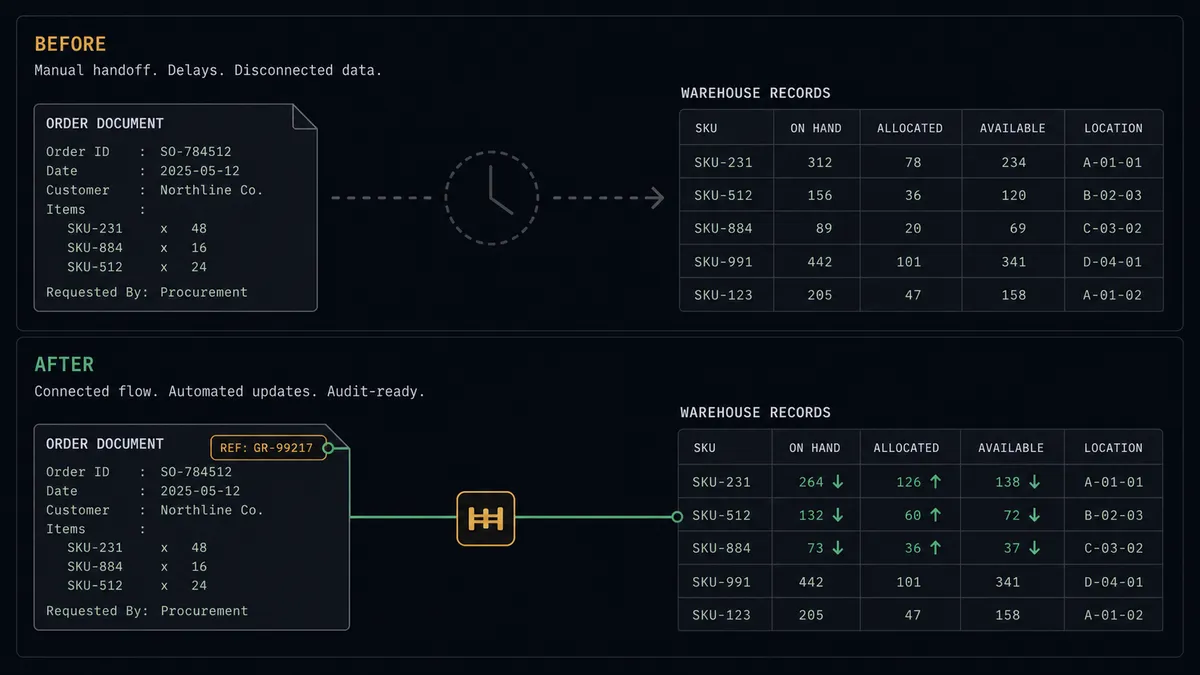
| Order entry | Someone rekeys signed terms from the PDF into Cin7 Omni by hand | Create Sales Order runs from the envelope with the paper trail attached |
| Account onboarding | New dealers get created twice, or late, splitting order history | List Contacts matches first and Create Contact onboards exactly once |
| Stock surprises | Oversold lines surface at fulfillment, after the customer was promised | List Stock is checked before commit and mismatches go to a person |
| Dead deals | Declined and voided envelopes quietly stay in the operations plan | On Envelope Declined and On Envelope Voided notify the owner the same day |
| Traceability | Nobody can connect an order back to who signed and who approved | Envelope reference, approver, and timestamp travel with every order |
What you can build
Signature to sales order, gated. On Envelope Completed fires, the agent matches the buyer with List Contacts, resolves items with Get Product, checks List Stock, and a person approves before Create Sales Order commits. Routine reorders from established accounts pass straight through.
Dealer onboarding in one motion. A new dealer signs the agreement and the agent calls Create Contact with the full account details, files the executed PDF from Download Document against your records, and stages the opening order for approval, so day one is clean instead of duplicated.
Declined-deal routing. On Envelope Declined fires and the agent pulls Get Envelope Status and Get Envelope Recipients, then alerts the account owner with the recipient who declined, so the follow-up conversation happens while the deal is still warm.
Stalled signature chase. On a schedule the agent calls List Envelopes for envelopes sent but not completed, checks each with Get Envelope Status, and calls Resend Envelope for the ones sitting with a single unsigned recipient, keeping legal handoffs from dying in inboxes.
Pre-commit stock briefing. Before a large signed order goes to the approver, the agent enriches the request with List Stock across branches from List Branches and open incoming quantities from List Purchase Orders, so the person deciding sees the whole position, not just the ask.
Getting started
Start on the free plan: 100 executions a month, every integration included, no credit card required, plus 14 days of Professional for new accounts. Both connectors are available on every tier, and every tier includes unlimited users and unlimited workflows.
Explore the integration details:
- DocuSign integration (4 triggers and 9 actions across the signing lifecycle)
- Cin7 Omni integration (10 actions covering products, stock, orders, and contacts)
Start building free at flowrunner.ai or book a demo to see a live DocuSign to Cin7 Omni workflow, stock-check approval and all.
Frequently asked questions
Is it free to connect DocuSign and Cin7 Omni on FlowRunner?
You can build and run the connection on FlowRunner's free plan, which includes 100 executions a month and every integration with no credit card required, and new accounts also get 14 days of Professional. Both connectors are available on every FlowRunner tier, and every tier includes unlimited users and unlimited workflows.
Can I self-host the DocuSign to Cin7 Omni workflow?
Yes. FlowRunner offers a cloud-hosted option and a self-hosted option, so the connection can run inside your own environment.
Does the AI agent need my own OpenAI or Claude key?
FlowRunner uses a bring-your-own-keys model, so you connect the AI provider key you already have. You are not locked to one model.
What happens when the signed order does not match available stock?
The agent stops and invokes a human-in-loop step. It posts the signed line items, the current position from List Stock including incoming quantities, and its recommendation, then waits. A person decides whether to commit the order, split it, or hold it, and only then does Create Sales Order run.
Which DocuSign events can trigger a Cin7 Omni action?
DocuSign offers four triggers: On Envelope Completed, On Envelope Sent, On Envelope Declined, and On Envelope Voided. On Envelope Completed is the one that drives order creation, firing only when every recipient has signed.
Does every signed agreement create a sales order automatically?
You decide. Routine reorders from established accounts that pass the stock check flow straight through. First orders from a newly signed account, unusual quantities, and any signed terms that conflict with the catalog pause for a named approver before Create Sales Order commits anything. Each decision is captured in the audit trail.