How to Connect Parseur with Cin7 Omni (With or Without an AI Agent)
Connect Parseur to Cin7 Omni so emailed purchase orders become sales orders without rekeying, with an AI agent that resolves SKUs and pauses for a human before an uncertain line item commits inventory.
How do you connect Parseur to Cin7 Omni?
You connect Parseur to Cin7 Omni by turning emailed purchase orders into sales orders: Parseur’s On Document Processed (Realtime) trigger fires when a PDF purchase order is extracted, the workflow pulls the buyer and line items with Get Parsed Data, matches the customer with List Contacts, resolves each line to a product option with List Products and Get Product, and commits the order with Create Sales Order. FlowRunner is a visual AI-agent orchestration platform where automations run autonomously and pause for human judgment on the steps that carry real consequence. Run the same connection as an AI agent and the intake desk gains judgment: the agent reads each parsed order the way a person would, and pauses for a named human before an uncertain line item commits real inventory.
The problem it solves
Wholesale customers do not send API calls. They send purchase orders: PDFs from their own systems, spreadsheets exported to email, sometimes a photographed form. Someone on your team opens each one, reads the buyer’s own product descriptions, translates them into your SKUs, checks quantities against what the warehouse holds, and keys the order into Cin7 Omni line by line. It is the highest-stakes data entry in the building, because every keystroke is a promise about physical goods, and it competes for attention with everything else operations does.
The edge cases are expensive in a way typos elsewhere are not. A customer orders by their internal part number and the entry clerk guesses the mapping wrong, so a pallet of the wrong product ships. A PO arrives at last year’s pricing and nobody catches the difference until the invoice dispute. A big order lands during a stock trough and gets keyed in anyway, committing goods that do not exist. And the PO that arrives at five on Friday sits until Monday, which for the customer means their order is two days late before it is even in your system.
How it works: the connection
The connection listens to Parseur and writes to Cin7 Omni. Here is the plain version, grounded in the real connector actions.
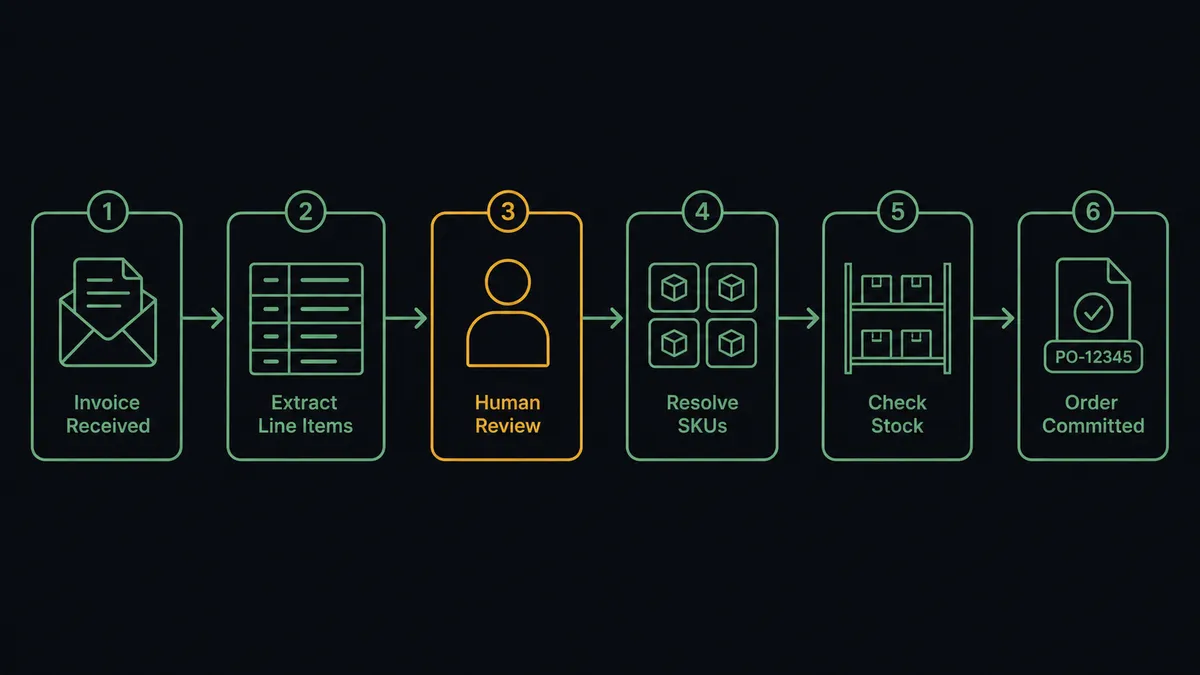
- Trigger: Parseur fires On Document Processed (Realtime) the moment a purchase order lands in the orders mailbox and is extracted.
- Read: The workflow calls Get Parsed Data to retrieve the buyer, PO number, requested delivery date, and every line item with quantity and price.
- Match the buyer: It calls List Contacts in Cin7 Omni filtered by the sender’s email to find the customer account and its price column.
- Resolve the lines: It calls List Products and Get Product to map each parsed line to the correct product option ID, SKU, and current unit price.
- Check availability: It calls List Stock for those product options, reading available, held, incoming, and on-order quantities at the fulfilling branch.
- Commit the order: It calls Create Sales Order with the member ID, resolved line items, quantities, and prices, carrying the customer’s PO number as the order reference.
That is the “just connect them” answer. The PO your customer emailed at five on Friday is a referenced sales order minutes later, not a Monday problem. When a template misses a field, Reprocess Document re-runs the extraction and the workflow picks the document up again.
Can an AI agent run it? (and why a human stays in the loop)
Yes, and this is where the connection outgrows every template-based sync. A deterministic mapping works while customers fill in perfect POs, which is to say it works until the second week. The agent holds the real actions as tools, Get Parsed Data, List Documents, and Reprocess Document on the Parseur side, List Contacts, Create Contact, List Products, Get Product, List Stock, List Branches, and Create Sales Order on the Cin7 Omni side, and it reasons through each order like your most careful order-desk person. It reads “blue widget, large, the usual” and resolves it against the account’s order history. It notices the unit price on the PO is below the account’s price column and treats that as a question, not an instruction.
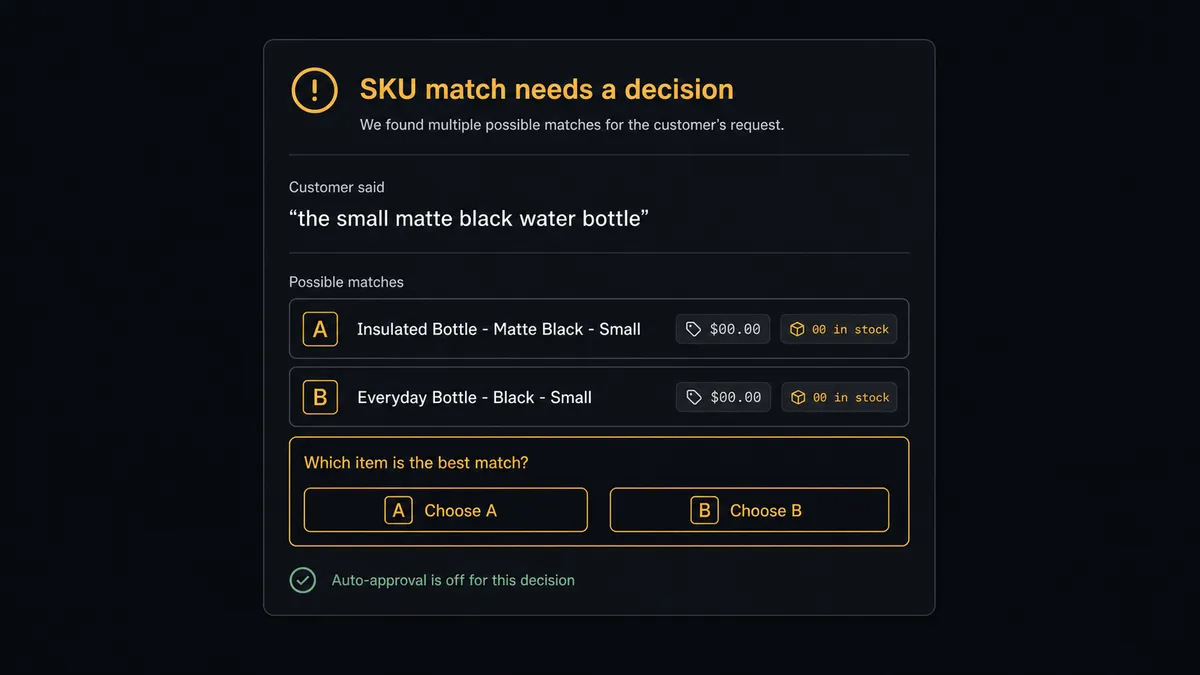
The consequential step is Create Sales Order, because a committed order reserves goods, drives picking, and becomes a promise with a delivery date. The agent commits clean orders on its own: known buyer, exact SKU matches, prices that agree, stock that covers. Everything else stops the line. When a line resolves to two plausible product options, the agent invokes a human-in-loop flow it holds as a callable tool and posts: “PO from an established account: four of five lines resolved exactly. Line three reads in the customer’s wording and matches two catalog options at different prices. Stock covers either. Which product option should this commit as?” A person answers in one click, the agent commits with Create Sales Order, and the order carries the source document, the decision, the approver, and the timestamp.
Prospects call this pattern the digital andon cord: the line runs at full speed and stops itself the moment it hits uncertainty, because in fulfillment the expensive mistake is the one that ships. Your team stops doing data entry and starts doing only the five-second judgment calls that were always the real job.
FlowRunner vs Celigo
If this problem sounds like EDI, Celigo is the established answer, and its strengths are real. It is mature iPaaS infrastructure, its prebuilt integration apps encode years of order-to-cash logic, and for continuous high-volume sync between an ERP and its satellite systems it is proven at enterprise scale. A company standardizing all integration on one platform will reasonably shortlist it.
But emailed PDF purchase orders are not a sync problem. They are an interpretation problem followed by a commitment problem, and that is the shape FlowRunner is built for.
| What matters for this pair | FlowRunner | Celigo |
|---|---|---|
| Human-in-the-loop before Create Sales Order commits an uncertain order | Native. The agent invokes an approval flow as a callable tool and pauses | Exception records can route to error handling; per-order approval is not the core design center |
| Who runs the flow | An AI agent interprets each parsed document and picks actions as tools | Configured flow logic mapping source fields to destination fields |
| Users included | Unlimited users on every tier | Priced by edition and endpoints, scoped in enterprise terms |
| Bring your own AI keys | Yes, BYOK. Connect the provider key you already have | AI features run inside Celigo’s platform |
| Self-hosted option | Yes, cloud-hosted or self-hosted | Cloud iPaaS |
| Pricing model | Transparent workflow-based tiers starting at $45/mo | Edition-based pricing typically scoped for enterprise budgets |
If you are integrating a dozen enterprise endpoints with continuous record sync, Celigo is built for that estate. If the job is turning messy inbound purchase orders into trustworthy Cin7 Omni orders with a person on the doubtful lines, this pairing does it at a fraction of the footprint.
Before and after
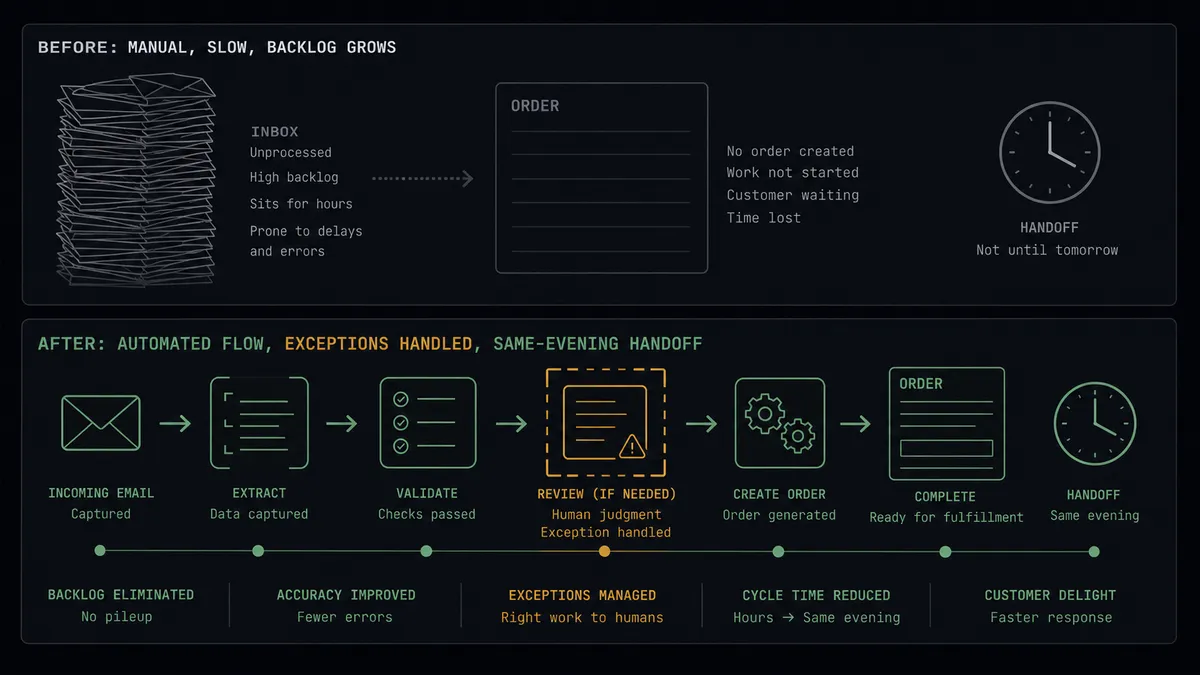
| Category | Before | After |
|---|---|---|
| Order entry | Every emailed PO is read and rekeyed into Cin7 Omni line by line | Parsed lines resolve through List Products and commit via Create Sales Order automatically |
| SKU errors | A wrong guess on a customer’s part number ships the wrong pallet | Fuzzy matches pause for a person; only exact resolutions commit unattended |
| Price drift | Old pricing on a PO surfaces later as an invoice dispute | The agent compares parsed prices to the account’s price column and flags conflicts before commit |
| Stock conflicts | Orders get keyed against goods the warehouse does not hold | List Stock is checked pre-commit, and shortfalls escalate with the full position |
| Friday orders | POs arriving after hours wait for Monday | On Document Processed (Realtime) turns them into referenced orders the same evening |
What you can build
PO inbox to sales order, gated. On Document Processed (Realtime) fires per emailed PO. The agent parses with Get Parsed Data, matches the buyer with List Contacts, resolves SKUs with Get Product, checks List Stock, and commits clean orders with Create Sales Order while doubtful ones wait for a person.
New account intake with one approval. A PO arrives from an unknown email. The agent stages Create Contact from the parsed details and bundles the new account with its first order into a single approval, so new wholesale relationships start verified.
Multi-branch allocation briefing. For large orders, the agent pulls List Stock across every location from List Branches and presents the approver with where the goods actually sit, so the commit decision includes the fulfillment plan instead of preceding it.
Backorder early warning. When a parsed order lands during a stock trough, the agent checks incoming quantities on List Purchase Orders and tells the approver when cover arrives, turning a silent oversell into an informed promise.
Missed-document sweep. On a schedule the agent calls List Documents on the orders mailbox, cross-checks against recent List Sales Orders references, and replays anything parsed but never committed, so no PO dies between the mailbox and the ERP.
Getting started
Start on the free plan: 100 executions a month, every integration included, no credit card required, plus 14 days of Professional for new accounts. Both connectors are available on every tier, and every tier includes unlimited users and unlimited workflows.
Explore the integration details:
- Parseur integration (2 triggers and 6 actions for document extraction pipelines)
- Cin7 Omni integration (10 actions covering products, stock, orders, and contacts)
Start building free at flowrunner.ai or book a demo to see a live Parseur to Cin7 Omni workflow, SKU approval and all.
Frequently asked questions
Is it free to connect Parseur and Cin7 Omni on FlowRunner?
You can build and run the connection on FlowRunner's free plan, which includes 100 executions a month and every integration with no credit card required, and new accounts also get 14 days of Professional. Both connectors are available on every FlowRunner tier, and every tier includes unlimited users and unlimited workflows.
Can I self-host the Parseur to Cin7 Omni workflow?
Yes. FlowRunner offers a cloud-hosted option and a self-hosted option, so the connection can run inside your own environment.
Does the AI agent need my own OpenAI or Claude key?
FlowRunner uses a bring-your-own-keys model, so you connect the AI provider key you already have. You are not locked to one model.
What happens when a parsed line item does not match a product cleanly?
The agent stops and invokes a human-in-loop step. It posts the customer's own wording from the purchase order next to the closest catalog candidates from List Products, with prices and stock context, and waits for a person to pick the right product option, correct the line, or reject it before Create Sales Order runs.
Which Parseur events can trigger a Cin7 Omni action?
Parseur offers two triggers: On Document Processed (Realtime), an instant webhook that fires the moment a document is processed, and On Document Processed (Polling), which periodically checks a mailbox for newly processed documents. Realtime is the natural choice for order intake.
Can the workflow handle purchase orders from new customers?
Yes. When the buyer's email has no match in List Contacts, the agent stages a Create Contact with the details parsed from the document and routes the new account plus its first order to a person for one combined approval, so new relationships start verified rather than assumed.