How to Connect Xero with Braintree (With or Without an AI Agent)
Connect Xero invoices to Braintree charges and refunds, with an AI agent that reconciles both ledgers and pauses for a named human before Charge Payment Method or Refund Transaction moves real money.
How do you connect Xero to Braintree?
You connect Xero to Braintree by having Xero’s On Invoice Created trigger fire when a billable invoice posts, verifying the details with Get Invoice and Get Contact, collecting the money with Braintree’s Charge Payment Method, and marking the invoice settled with Create Payment back in Xero, so an invoice raised in the ledger becomes cash collected and reconciled without anyone touching either system. FlowRunner is a visual AI-agent orchestration platform where automations run autonomously and pause for human judgment on the steps that carry real consequence. The same connection can run as an AI agent that checks for duplicates, catches mismatches, and pauses for a named billing manager before any charge or refund actually moves money.
The problem it solves
Today, the invoice ledger and the payment gateway are reconciled by a person with two browser tabs. Finance raises invoices in Xero. Charges happen in Braintree, some automatic, some keyed in manually. At month end, someone exports both sides and plays matching: which invoices were charged, which charges have no invoice, which customer paid twice because the invoice was reissued. Every unmatched row is twenty minutes of archaeology, and the close drags days past where it should land.
The edges are where real money leaks. A subscription customer’s invoice goes out but the charge never runs, and nobody notices until the customer has consumed a quarter of unpaid service. An invoice gets reissued after an edit and charged twice, which the customer notices immediately. A credit note is raised in Xero but the Braintree refund is forgotten, so the books say the customer was made whole and the customer’s card statement disagrees. Each of these is a support escalation, and some of them are chargebacks.
How it works: the connection
The connection listens to Xero and settles through Braintree. Here is the plain version, grounded in the real connector actions.
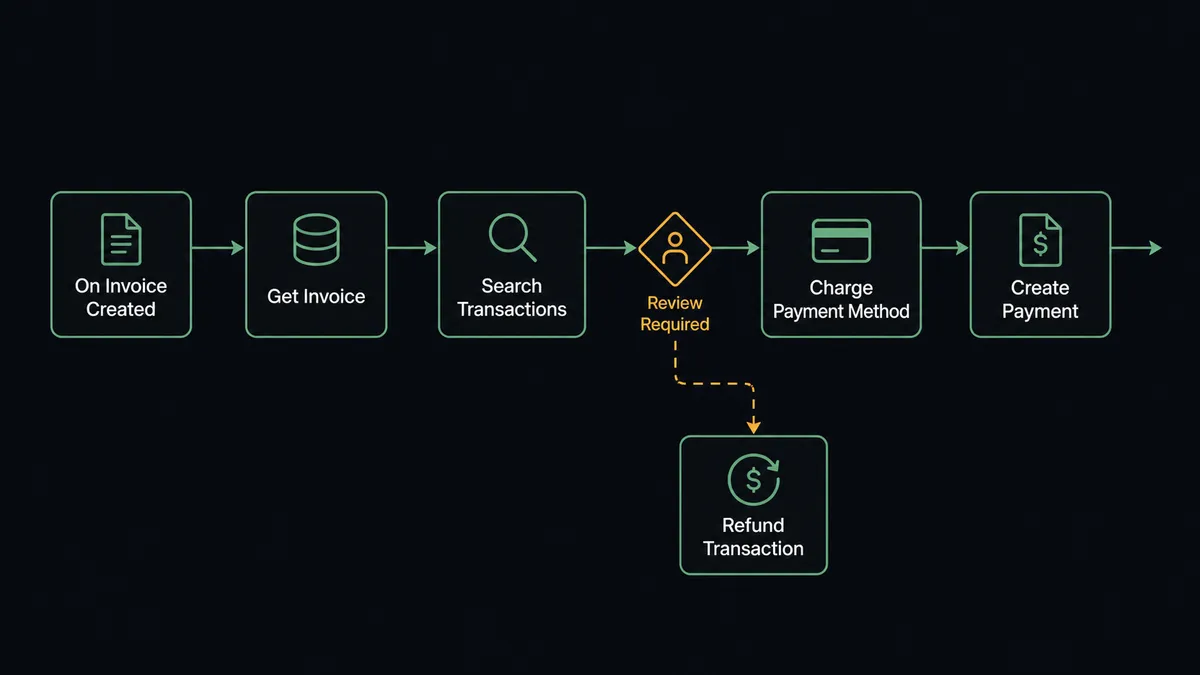
- Trigger: Xero fires On Invoice Created when a billable invoice posts to the ledger.
- Read: The workflow calls Get Invoice for the amount, currency, and reference, and Get Contact for the customer’s billing profile.
- Guard: It calls Search Transactions in Braintree to confirm no charge already exists for this invoice reference.
- Charge: It calls Charge Payment Method with the invoice amount against the customer’s stored payment method.
- Reconcile: On success, it calls Create Payment in Xero against the invoice, so the ledger shows paid the moment the gateway confirms.
- Refund path: When On Credit Note Created fires, the workflow finds the original charge with Get Transaction, issues Refund Transaction for the credited amount, and ties it back with Allocate Credit Note.
That is the “just connect them” answer. Invoices collect themselves, refunds follow their credit notes, and the two systems agree without a month-end matching exercise.
Can an AI agent run it? (and why a human stays in the loop)
Yes, and billing is exactly where agent judgment beats a hardcoded rule. The agent holds the pair’s real actions as tools: Get Invoice, Get Contact, Find Invoices, Search Transactions, Get Transaction, Charge Payment Method, Refund Transaction, Void Transaction, Create Payment, Allocate Credit Note. For each new invoice it reasons about the whole picture: does the amount match this customer’s usual cycle, is this the first charge on a newly stored payment method, was the invoice edited after issue, does Search Transactions show something that looks like the same collection under a different reference?
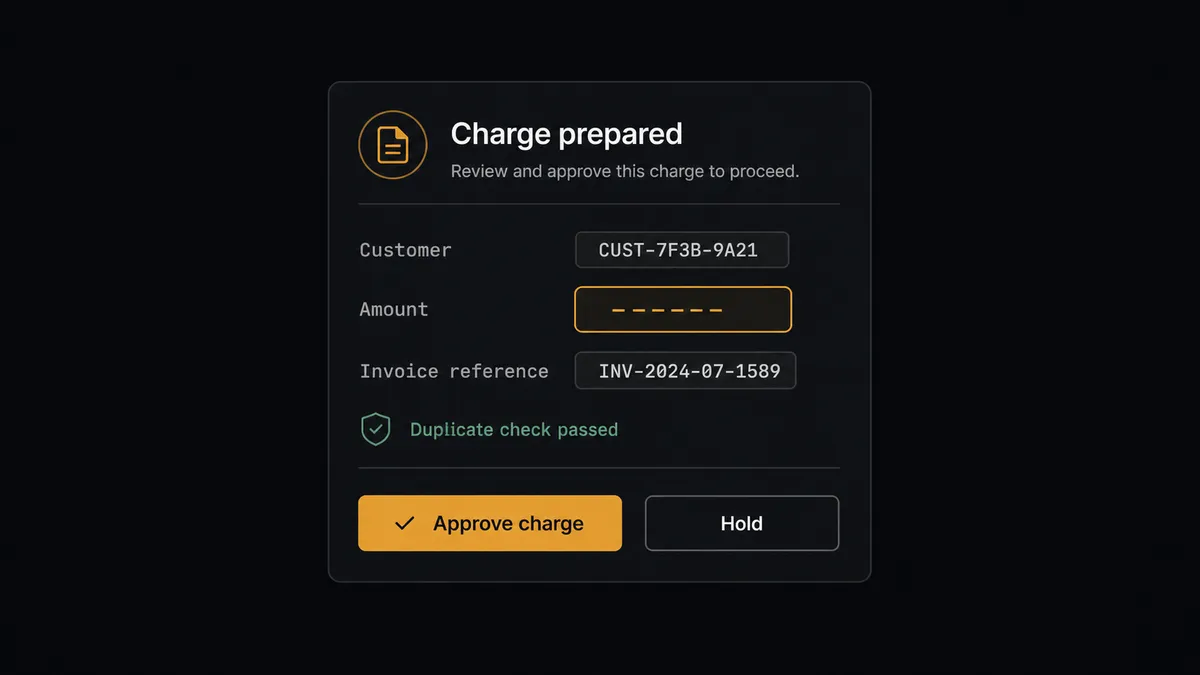
The consequential steps are the two that move money: Charge Payment Method takes it from a customer’s card, and Refund Transaction sends it back. Both are effectively irreversible in the way that matters, because even a corrected mistake shows up on a customer’s statement and in your dispute rate. So before either fires, the agent invokes a human-in-loop flow it holds as a callable tool. The workflow pauses and posts to the billing channel: “Charge prepared for [customer]: [amount] against invoice [number], payment method on file, no duplicate found. Approve to collect?” The billing manager approves in one click, and only then does the charge run. The same message pattern guards every refund, with the credit note and original transaction attached.
Routine renewals with clean history can be configured to flow, while anything unusual stops the line: an amount out of pattern, a first-time charge, a mismatch between ledgers. Prospects call this the digital andon cord, and it is the heart of how FlowRunner treats money movement: like Toyota’s production line, the workflow halts the moment it hits uncertainty, and a person decides whether the money moves.
FlowRunner vs Zapier
Zapier connects to both Xero and Braintree, and its strength here is real: for notification and bookkeeping-adjacent tasks, a new transaction posting to a spreadsheet, an invoice pinging a Slack channel, it is quick to set up and the template gallery covers the common patterns. Plenty of finance teams run useful Zapier automations around the edges of their billing stack.
But this pairing is not around the edges, it is the money itself. FlowRunner is built around native human-in-the-loop and AI-agent orchestration, which is the difference between “the trigger fired so the charge ran” and “the agent prepared the charge and a person released it.”
| What matters for this pair | FlowRunner | Zapier |
|---|---|---|
| Human-in-the-loop before Charge Payment Method or Refund Transaction | Native. The agent invokes an approval flow as a callable tool and waits | Available via added approval steps, not a native agent decision |
| Who runs the flow | An AI agent reconciles both ledgers, reasons, picks actions as tools | Predefined step sequence you configure per Zap |
| Users included | Unlimited users on every tier | Priced by task volume; seats vary by plan |
| Bring your own AI keys | Yes, BYOK. Connect the AI provider key you already have | AI features tied to Zapier’s own AI offering |
| Self-hosted option | Yes, cloud-hosted or self-hosted | Cloud only |
| Pricing model | Transparent workflow-based tiers | Per-task pricing that can be hard to predict as volume grows |
If you want lightweight notifications around your billing events, Zapier handles that well. If the workflow itself charges cards and issues refunds, and you want every movement approved, reconciled into Xero, and attributable to a named person, this pairing is the safer instrument.
Before and after
| Category | Before | After |
|---|---|---|
| Collection timing | Invoices wait for someone to run the charge, or for the customer to notice | The charge is prepared the moment On Invoice Created fires and runs on approval |
| Duplicate charges | Discovered by the customer, apologized for by support | Search Transactions blocks the duplicate before it is ever proposed |
| Reconciliation | A month-end matching exercise across two exports | Create Payment closes each invoice as the gateway confirms, continuously |
| Refund follow-through | Credit notes raised in Xero with the gateway refund left to memory | On Credit Note Created drives Refund Transaction and Allocate Credit Note in one gated flow |
| Accountability | No record of who authorized a charge or refund | Every movement carries a named approver and timestamp in the audit trail |
What you can build
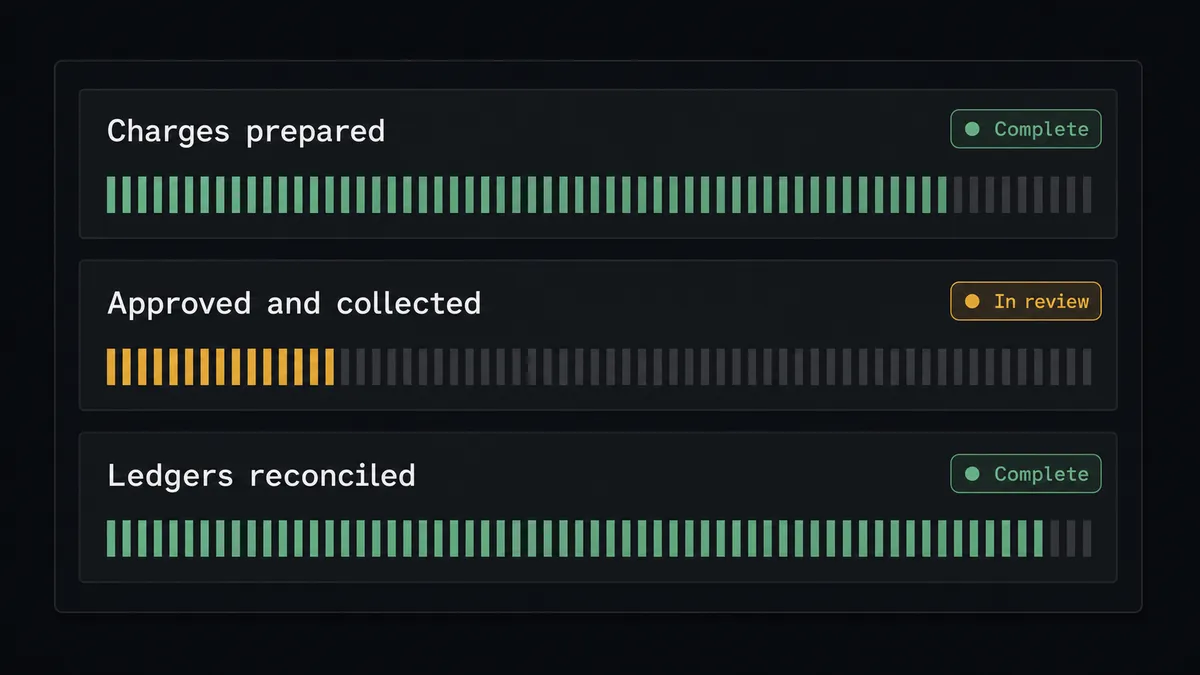
Invoice-to-cash with a release valve. On Invoice Created fires, the agent verifies with Get Invoice and Search Transactions, prepares Charge Payment Method, and the billing manager releases it. Create Payment closes the invoice the moment Braintree confirms.
Gated refunds that finish the job. On Credit Note Created fires, the agent matches the original charge with Get Transaction, prepares Refund Transaction, and after approval ties everything together with Allocate Credit Note, so no credit note ever dangles without its refund.
Failed-charge triage. When a prepared charge declines, the agent checks the decline reason, retries only where that is sane, and otherwise routes the account to a person with the invoice and history attached, instead of hammering a dead card.
Same-day mismatch sweep. On a schedule, the agent runs Find Invoices for unpaid invoices past their charge date and Search Transactions for charges with no matching payment record, then posts the exceptions to finance while they are hours old instead of weeks.
Pre-capture check for authorized payments. For flows that authorize first, the agent reviews the order against the invoice before Capture Transaction runs, and voids stale authorizations with Void Transaction behind the same approval gate.
Getting started
Start on the free plan: 100 executions a month, every integration included, no credit card required, plus 14 days of Professional for new accounts. Both connectors are available on every tier, and every tier includes unlimited users and unlimited workflows.
Explore the integration details:
- Xero integration (8 triggers and 38 actions covering invoices, payments, contacts, and financial reports)
- Braintree integration (8 actions covering charges, refunds, captures, and transaction search)
Start building free at flowrunner.ai or book a demo to see a live Xero to Braintree workflow, charge approval and all.
Frequently asked questions
Is it free to connect Xero and Braintree on FlowRunner?
You can build and run the connection on FlowRunner's free plan, which includes 100 executions a month and every integration with no credit card required, and new accounts also get 14 days of Professional. Both connectors are available on every FlowRunner tier, and every tier includes unlimited users and unlimited workflows.
Can I self-host the Xero to Braintree workflow?
Yes. FlowRunner offers a cloud-hosted option and a self-hosted option, so the connection can run inside your own environment. Self-hosting is available for teams that need the workflow to run on their own infrastructure.
Does the AI agent need my own OpenAI or Claude key?
FlowRunner uses a bring-your-own-keys model, so you connect the AI provider key you already have. You are not locked to one model, and you control which provider runs the agent.
What happens when the agent finds a mismatch between an invoice and a charge?
It stops before money moves. If Search Transactions shows a possible duplicate, the amount differs from the invoice, or the billing profile changed since the last cycle, the agent packages both records and routes them to the billing manager. No Charge Payment Method or Refund Transaction runs until a person resolves the mismatch.
Which triggers and actions does the Xero to Braintree workflow use?
Xero provides the triggers: On Invoice Created starts the charge path and On Credit Note Created starts the refund path. The workflow reads context with Get Invoice, Get Contact, and Search Transactions, moves money with Braintree's Charge Payment Method or Refund Transaction, and closes the books with Create Payment and Allocate Credit Note in Xero. Braintree has no triggers.
Are refunds handled the same way as charges?
Yes, with the same gate. On Credit Note Created fires in Xero, the agent matches the original charge with Get Transaction, prepares Refund Transaction for the credited amount, and pauses for approval. After sign-off it issues the refund and ties it back with Allocate Credit Note, so the credit note, the refund, and the approver are all linked.