How to Connect Slack with Braintree (With or Without an AI Agent)
Connect Slack to Braintree so refund requests are researched and executed in-channel, with an AI agent that assembles the transaction evidence and pauses for a named approver before Refund Transaction or Void Transaction moves money.
How do you connect Slack to Braintree?
You connect Slack to Braintree by having Slack’s On Mention trigger drive Braintree’s transaction actions: a teammate asks for a refund in the billing channel, the workflow finds the charge with Search Transactions, pulls the full record with Get Transaction, and executes with Refund Transaction once approved, so a payment operation that used to require gateway access happens in the channel where the request arrived. FlowRunner is a visual AI-agent orchestration platform where automations run autonomously and pause for human judgment on the steps that carry real consequence. The same connection can run as an AI agent that does the research on its own, proposes the right instrument for the transaction’s state, and pauses for a named human before a single cent moves.
The problem it solves
Right now a refund is a relay race. Support agrees to a refund in a ticket and posts “can someone refund order 8842?” in the billing channel. Then it waits for one of the two people with Braintree access. That person logs into the gateway, searches for the transaction, squints at whether it settled, decides between a refund and a void, executes, screenshots the result, and pastes it back into Slack. Elapsed time: anywhere from ten minutes to two days, depending on who is on vacation. Meanwhile the customer is refreshing their banking app.
The edges are where money actually leaks. A refund gets issued twice because the thread did not show it was already done. A void is attempted on a settled charge and fails silently, so nobody follows up with the refund it needed instead. An amount gets fat-fingered, and now you are clawing back the difference from a customer. And every one of these operations happens under credentials shared wider than anyone would admit in an audit, with no record of who actually clicked. Payment operations fail in two directions: too slow, and refunds become support escalations; too loose, and money moves without anyone checking the claim.
How it works: the connection
The connection listens to the billing channel and operates the gateway. Here is the plain version, grounded in the real connector actions.
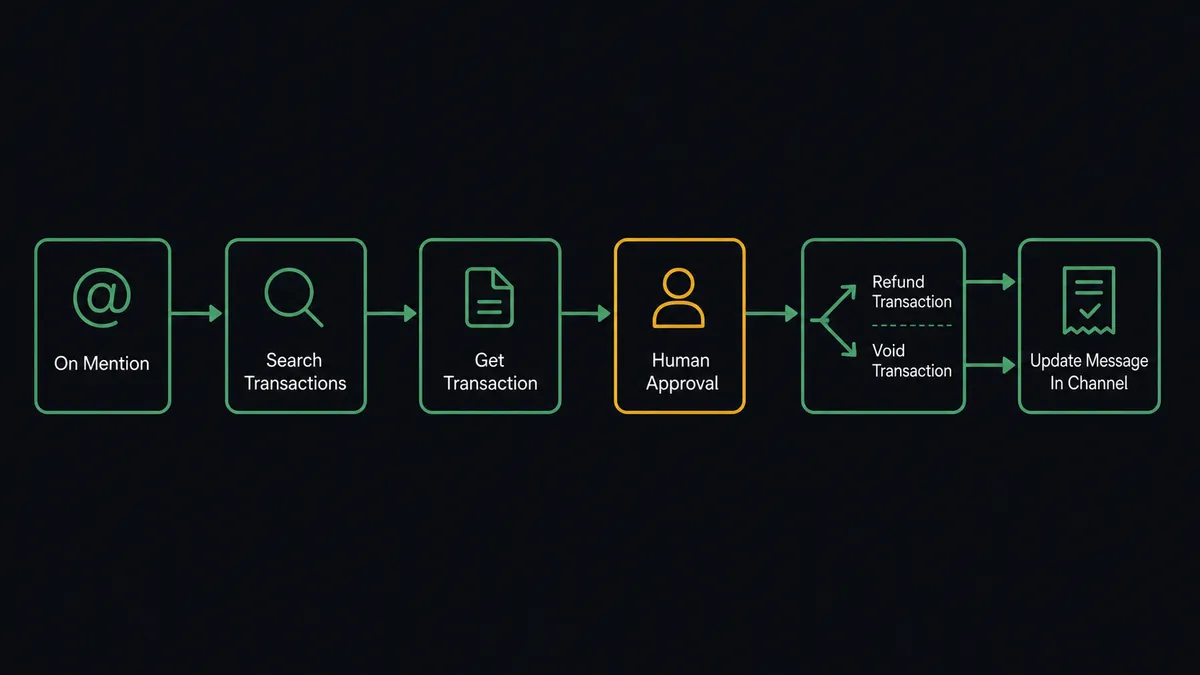
- Trigger: Slack fires On Mention when a teammate summons the workflow: “@flow refund txn 8842, duplicate charge, customer ticket 5513.”
- Search: The workflow calls Search Transactions with the reference, amount, or customer detail from the request.
- Read: It calls Get Transaction on the match to pull the amount, status, settlement state, payment method, and history.
- Present: It calls Send Message To Channel to post the dossier as a card: transaction, amount, state, prior refunds, and the proposed action.
- Decide: A named approver clicks approve or reject; On Block Action captures the click and the identity.
- Execute: The workflow calls Refund Transaction for a settled charge, or Void Transaction for an authorization that has not settled.
- Stamp: Update Message In Channel writes the outcome onto the original card: what ran, how much, who approved, when.
That is the “just connect them” answer. The research that used to require gateway access happens automatically, the decision happens in Slack, and the thread becomes the record. Capture Transaction slots into the same shape for two-step checkouts, and Ping makes a cheap health check before anything else runs.
Can an AI agent run it? (and why a human stays in the loop)
Yes, and the agent’s job is to make the human decision fast and fully informed, not to make it disappear. A fixed pipeline can fetch a transaction by ID. The agent handles requests the way people actually type them: “refund the Hendricks charge from Tuesday, the one around $180.” It runs Search Transactions with what it has, narrows candidates, checks history for prior refunds on the same charge, reads the settlement state, and proposes the correct instrument. Refund Transaction and Void Transaction are different tools for different states, and the agent knows which one this transaction needs before any person has spent a minute on it.
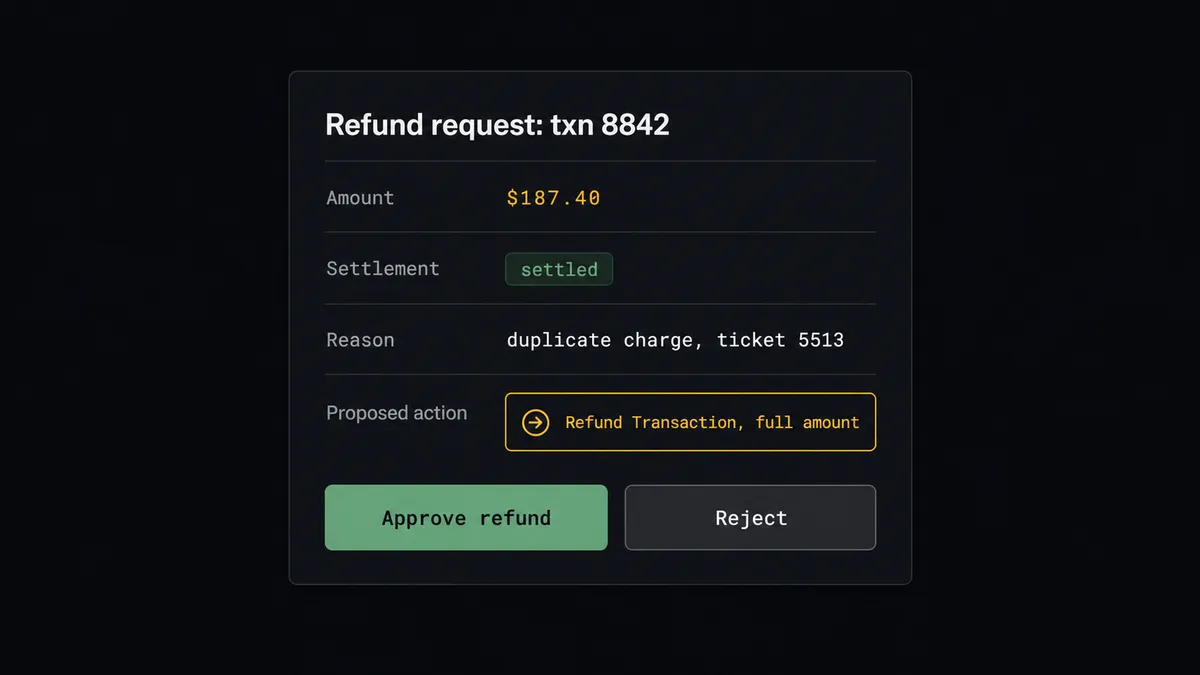
The consequential step is obvious here: money leaving the account. The agent holds Refund Transaction, Void Transaction, and Charge Payment Method as gated tools behind a human-in-loop flow it invokes as a callable tool. The workflow pauses and posts to the channel: “Transaction 8842: $187.40, settled Tuesday, no prior refunds. Requested reason: duplicate charge, ticket 5513. Proposed: full refund via Refund Transaction. Approve?” A named approver clicks once. Only then does the money move, and the card updates itself with the outcome and the approver’s name. A request that smells wrong, a second refund on the same transaction, an amount that does not match the ticket, gets flagged in the card instead of buried in it.
This is the digital andon cord, the framing our own prospects gave us: like the pull cord on a Toyota line, the workflow stops the line the moment the next step is irreversible. Searching is free. Reading is free. Moving money stops the line, every time, and the person who pulls it back into motion is named in the record.
FlowRunner vs Zapier
Zapier is the default reflex for Slack automations, and the reflex is earned: the connector library is vast, the editor is friendly, and for notification-direction flows, posting payment events into a channel, it is quick to stand up and reliable. If all you want is visibility, Zapier gets you visibility.
This pair needs the other direction: executing money-moving operations from Slack, safely. Here is the honest side-by-side.
| What matters for this pair | FlowRunner | Zapier |
|---|---|---|
| Human-in-the-loop on Refund Transaction and Void Transaction | Native. The agent invokes an approval flow as a callable tool and pauses before money moves | Approval steps can be assembled into a Zap, not a native agent decision |
| Who runs the flow | An AI agent reads, reasons, picks actions as tools, and routes by settlement state | Predefined step sequence you configure per Zap |
| Users included | Unlimited users on every tier | Priced by task volume; seats vary by plan |
| Bring your own AI keys | Yes, BYOK | AI features tied to Zapier’s own AI offering |
| Self-hosted option | Yes, cloud-hosted or self-hosted; relevant when payment data policies demand it | Cloud only |
| Pricing model | Transparent workflow-based tiers | Per-task pricing that grows with every lookup and click |
If you want Braintree events mirrored into Slack for awareness, Zapier does that well. If you want refunds researched, gated, executed, and audit-trailed from the channel where they are requested, this pairing is the better fit.
Before and after
| Category | Before | After |
|---|---|---|
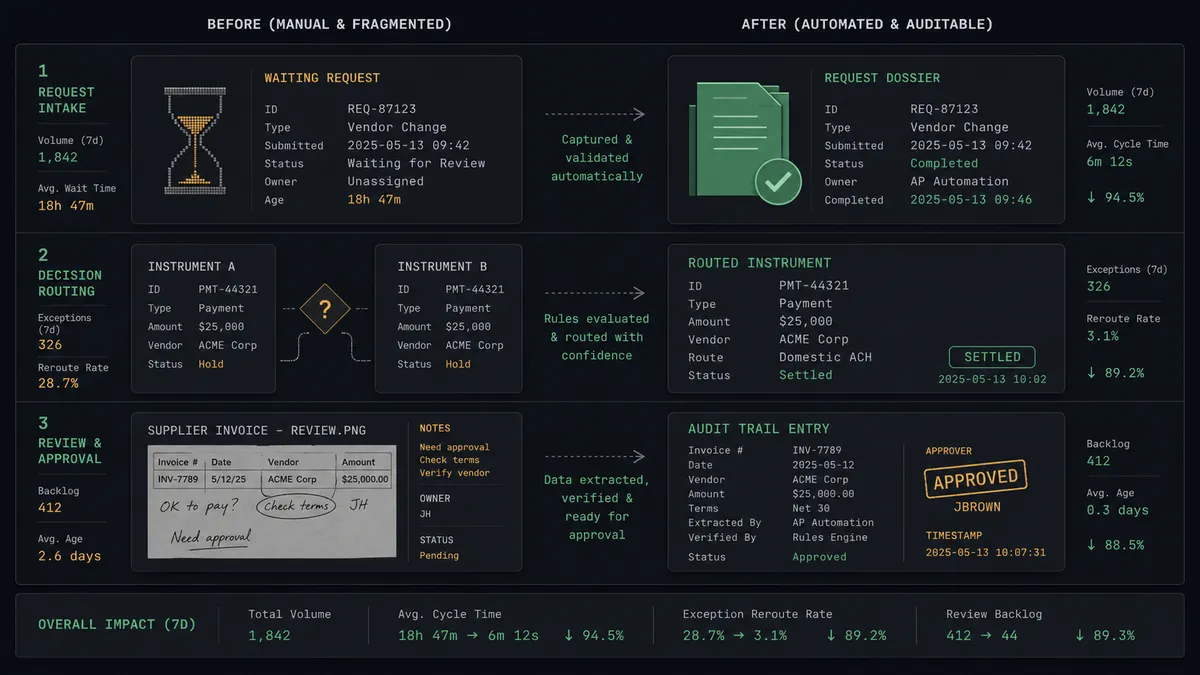
| Refund turnaround | Requests wait for one of two people with gateway access | The dossier is in the channel in seconds; approval is one click |
| Transaction research | Manual gateway search, squinting at settlement states | Search Transactions and Get Transaction assemble the record automatically |
| Refund vs void | Guessed, and the wrong instrument fails quietly | Routed by settlement state, proposed on the card before execution |
| Double refunds | The thread does not show what already ran | Prior refunds surface on the card, and the stamped outcome closes the loop |
| Audit trail | Shared gateway logins, screenshots as receipts | Every action carries transaction ID, amount, approver, and timestamp |
What you can build
Refund desk in the billing channel. On Mention takes the request, Search Transactions and Get Transaction build the dossier, and Refund Transaction fires after a named approval. The whole operation lives in one thread.
Settlement-aware routing. The agent reads each transaction’s state and proposes Void Transaction for authorizations that have not settled, saving the fees and delay of a settle-then-refund cycle, with the person still making the call.
Two-step checkout completion. For authorize-first flows, the agent watches for fulfillment confirmations posted in Slack and runs Capture Transaction, full or partial up to the authorized amount, gated for captures above the threshold you set.
Reconciliation answers on demand. On Mention, “what did we process for customer 2214 this month?” runs Search Transactions with the right filters and posts a summarized list with statuses, no gateway login, no export.
Suspicious-request tripwire. Every gated card includes what the agent noticed: a second refund attempt on the same transaction, an amount mismatch against the ticket, a request from someone outside the billing group. The approver sees the flag before the click, not after the loss.
Getting started
Start on the free plan: 100 executions a month, every integration included, no credit card required, plus 14 days of Professional for new accounts. Both connectors are available on every tier, and every tier includes unlimited users and unlimited workflows.
Explore the integration details:
- Slack integration (8 triggers and 16 actions covering messages, channels, members, and interactive approvals)
- Braintree integration (8 actions covering charges, refunds, voids, captures, and transaction search)
Start building free at flowrunner.ai or book a demo to see a live Slack to Braintree workflow, refund approval and all.
Frequently asked questions
Is it free to connect Slack and Braintree on FlowRunner?
You can build and run the connection on FlowRunner's free plan, which includes 100 executions a month and every integration with no credit card required, and new accounts also get 14 days of Professional. Both connectors are available on every FlowRunner tier, and every tier includes unlimited users and unlimited workflows.
Can I self-host the Slack to Braintree workflow?
Yes. FlowRunner offers a cloud-hosted option and a self-hosted option, so the connection can run inside your own environment.
Does the AI agent need my own OpenAI or Claude key?
FlowRunner uses a bring-your-own-keys model, so you connect the AI provider key you already have. You are not locked to one model.
What happens when the agent cannot confidently match a refund request to a transaction?
No money moves. If Search Transactions returns multiple candidates or none, the agent posts what it found, or did not find, and asks the requester to narrow it down. Refund Transaction only ever targets a transaction a person has looked at and approved.
Which Slack triggers and Braintree actions does this connection use?
Slack's On Mention and On Channel Message triggers start the flow, and On Block Action captures the approval click. On the Braintree side the workflow uses Search Transactions, Get Transaction, Refund Transaction, Void Transaction, and Capture Transaction.
Does the agent pick between refunding and voiding on its own?
It routes, a person decides. The agent reads the settlement state from Get Transaction and proposes the correct instrument: Refund Transaction for a settled charge, Void Transaction for an authorization that has not settled. The proposal goes on the approval card, and the action fires only after sign-off.