How to Connect NetSuite with Braintree (With or Without an AI Agent)
Reconcile settled Braintree transactions into NetSuite customers, invoices, and payments automatically, with an AI agent that flags mismatches and pauses for a finance owner before a refund executes or a ledger record is corrected.
How do you connect NetSuite to Braintree?
Neither service exposes a trigger, so you connect NetSuite to Braintree with a nightly workflow: Search Transactions pulls the day’s settled charges from the gateway, each one is matched in NetSuite with Get Customer and List Invoices, and the money is applied with Create Payment so the ledger reflects what actually settled. FlowRunner is a visual AI-agent orchestration platform where automations run autonomously and pause for human judgment on the steps that carry real consequence. Run as an AI agent, the same connection reconciles the clean matches on its own, routes only the mismatches to a person, and pauses for a named finance owner before a refund executes or a ledger record is corrected.
The problem it solves
Right now the bridge between your gateway and your ERP is an export. At month-end, or weekly if the team is diligent, someone downloads settled transactions from Braintree, opens NetSuite, and works down the list: find the customer, find the invoice, apply the payment, note the exceptions in a spreadsheet column. The books are correct roughly once per cycle, on the day the reconciliation finishes, and drift the rest of the time. AR shows invoices open that were paid weeks ago, and collections emails go to customers who already paid.
The exceptions are where the hours actually go. A charge settles with no matching invoice because the sales order never generated one. A customer pays under a different email than the one on their NetSuite record, so the match fails silently. A partial payment lands and nobody decides how to apply it. A refund executed at the gateway never gets reversed in the ledger, or worse, gets reversed twice. Each one is a small archaeology project, done under close pressure, weeks after the event when nobody remembers the context.
How it works: the connection
The connection reads from Braintree and writes to NetSuite. Here is the plain version, grounded in the real connector actions.
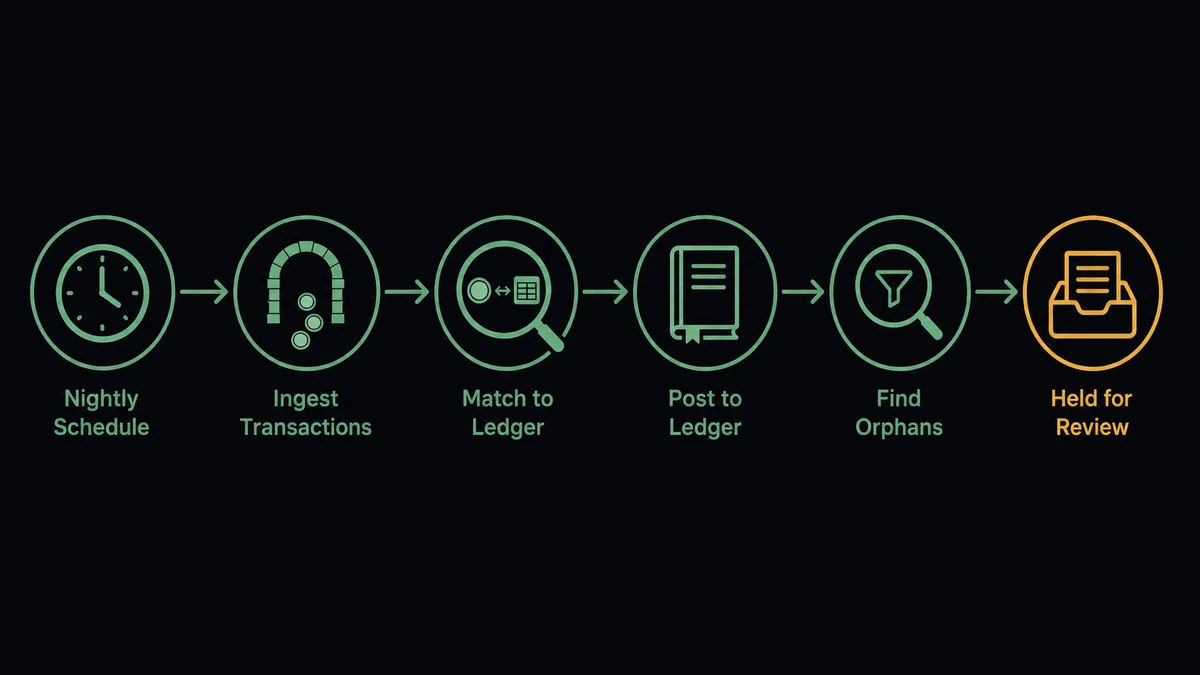
- Trigger: On a schedule, the nightly run calls Search Transactions for all charges settled since the last run.
- Read: For each result, Get Transaction pulls the full record: amount, customer detail, and settlement state.
- Match the customer: The workflow calls Get Customer in NetSuite by email. If no record exists, it calls Create Customer so the payment has somewhere to land.
- Match the invoice: It calls List Invoices for the customer’s open balance and pairs the charge with its invoice by amount and reference.
- Apply the payment: It calls Create Payment against the matched invoice, with the Braintree transaction ID in the memo so every ledger entry carries its gateway reference.
- Sweep for orphans: Run SuiteQL Query finds the inverse problems: invoices marked paid with no gateway match, and settled charges that touched no invoice.
- Report: The run summary lists what reconciled cleanly and what is held for review.
That is the “just connect them” answer. Reconciliation stops being a month-end rebuild and becomes a nightly diff, so close reads a short exception list instead of a spreadsheet.
Can an AI agent run it? (and why a human stays in the loop)
Yes, and matching is exactly the work that deserves reasoning rather than rules. A fixed sync joins on email and amount, and everything that fails the join becomes manual work. An AI agent holds the real actions as tools, Get Customer, Create Customer, List Invoices, Create Payment, Run SuiteQL Query on the ledger side, Search Transactions, Get Transaction, Refund Transaction, Void Transaction on the gateway side, and reasons about the near-misses. A charge under a personal email that matches an existing company record on name and amount gets proposed as a match, with the evidence, instead of dumped in an exception pile. A partial payment gets a proposed application split rather than a shrug.
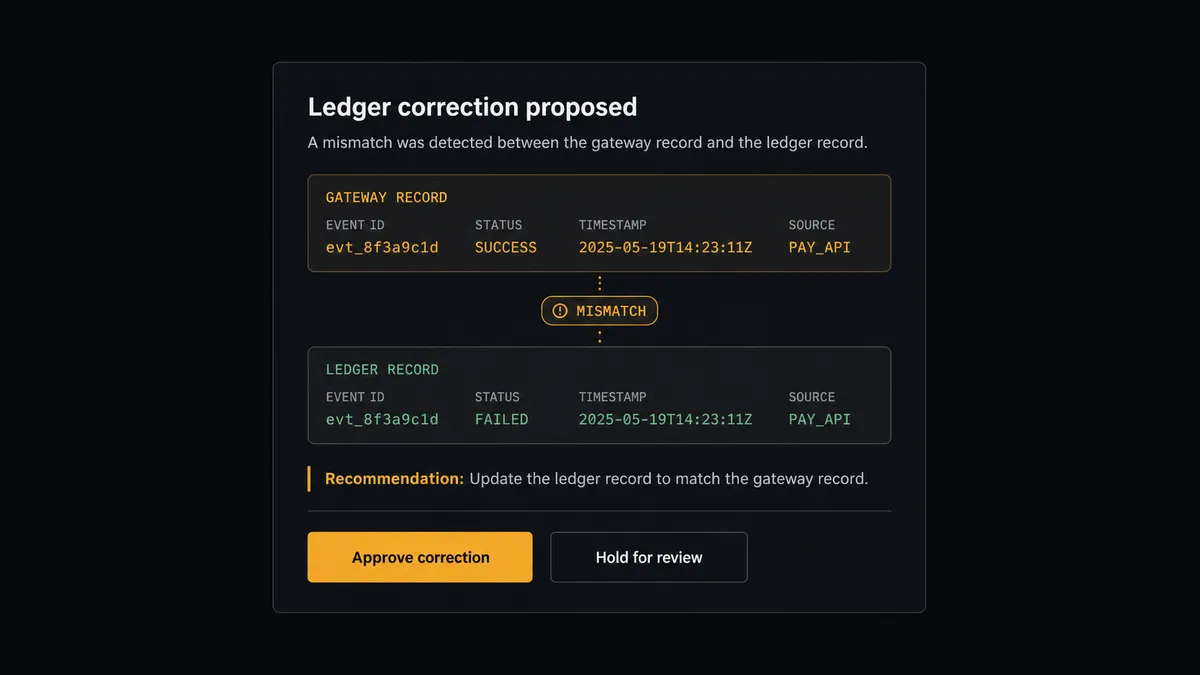
Two operations in this pair are consequential enough that the agent never runs them alone. Refund Transaction moves money out through the gateway and is not undoable. Delete Payment rewrites the ledger’s history of money received. Before either, the agent invokes a human-in-loop flow it holds as a callable tool. The workflow pauses and posts to the finance channel: “Proposed correction: payment applied to invoice [number] does not match gateway transaction [ID]. Recommend Delete Payment and reapply against the correct invoice. Both records attached. Approve?” The finance owner reviews the evidence and clicks once. Only then does the correction run, in both systems, with the approver’s name, the gateway reference, and the timestamp in the audit trail.
The judgment is contextual, not threshold-bound. A small refund against a charge that already carries one reversal gets escalated; a routine, first-time, policy-clean refund flows to approval with a recommendation attached. Prospects call this a digital andon cord: like Toyota’s quality control pull cord, the workflow stops the line the moment it hits uncertainty, and your team pulls it back into motion.
FlowRunner vs Celigo
Finance teams on NetSuite will rightly look at Celigo. It is a NetSuite-specialist iPaaS with prebuilt integration apps, deep familiarity with NetSuite’s record model, and a customer base that runs serious transaction volume through it. If your problem is a catalog of standard NetSuite integrations maintained by a vendor who knows the ERP intimately, Celigo has earned its position.
The difference is the layer above the pipes. FlowRunner is built around native human-in-the-loop and AI-agent orchestration, where an agent reasons about each mismatch and a named person clears the consequential operations. Here is the honest side-by-side.
| What matters for this pair | FlowRunner | Celigo |
|---|---|---|
| Human-in-the-loop on refunds and ledger corrections | Native. The agent invokes an approval flow as a callable tool and pauses before Refund Transaction or Delete Payment | Error and exception management flows exist; approval is a process you configure, not an agent’s judgment on the specific record |
| Who runs the flow | An AI agent reads both records, reasons about the mismatch, and picks actions as tools | Prebuilt integration apps and configurable flows running mapped syncs |
| Users included | Unlimited users on every tier | Priced as an enterprise iPaaS; entitlements vary by edition |
| Bring your own AI keys | Yes, BYOK | AI capabilities are Celigo’s own platform features |
| Self-hosted option | Yes, cloud-hosted or self-hosted | Cloud iPaaS |
| Pricing model | Transparent workflow-based tiers starting at $45/mo | Enterprise contracts scoped to endpoints and editions |
If you are standardizing a dozen NetSuite integrations under one enterprise vendor, Celigo is a credible home for that. If the job is this reconciliation, run nightly, with reasoning on the mismatches and a named approver on every reversal, at mid-market pricing, that is where FlowRunner is the better fit.
Before and after
The shift is qualitative: reconciliation becomes a nightly diff with a short exception list.
| Category | Before | After |
|---|---|---|
| Payment application | Settled charges wait for the periodic export-and-apply session | Create Payment applies each settled charge nightly, gateway reference in the memo |
| AR accuracy | Invoices show open for weeks after the money landed | The ledger tracks settlement within a day, so collections never chase paid customers |
| Exception handling | Mismatches surface at close, context long gone | Mismatches surface the next morning with both records attached and a proposed resolution |
| Refund integrity | Gateway reversals and ledger reversals drift apart | Refunds execute once, gated by approval, and post to both systems together |
| Close workload | Reconciliation is rebuilt from exports every cycle | Close reads the accumulated nightly runs and the audit trail of approved corrections |
What you can build
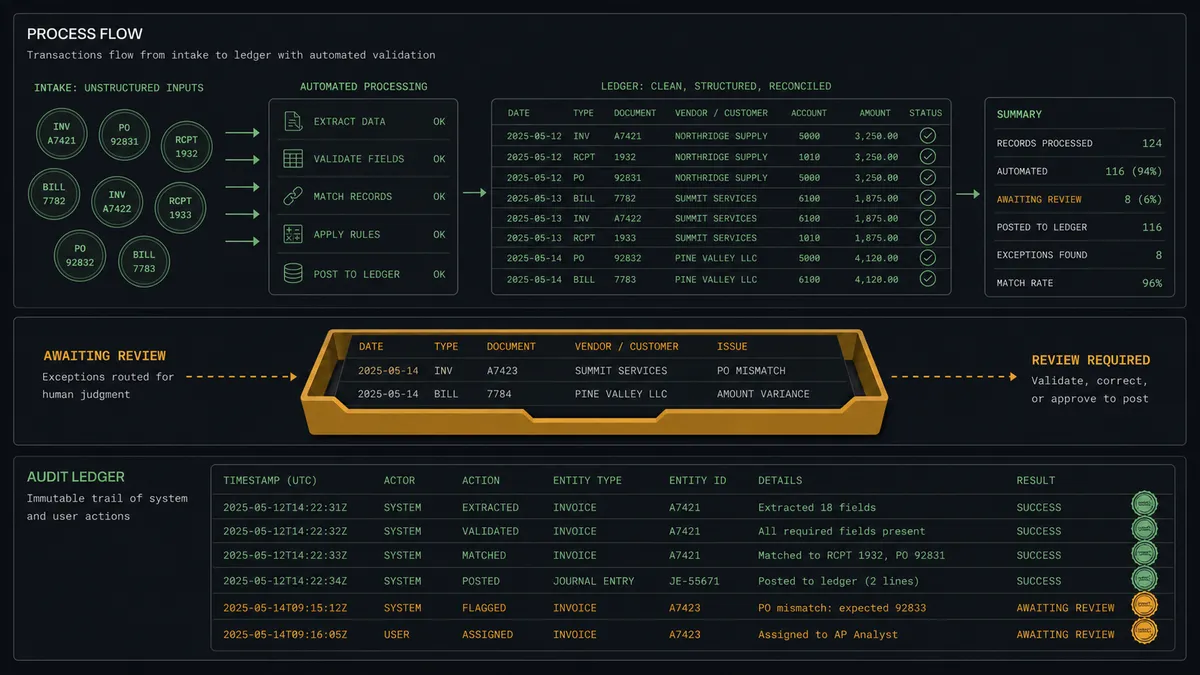
The nightly reconciler. Search Transactions pulls the day’s settlements, Get Customer and List Invoices match each one, Create Payment applies the money, and the morning summary lists the handful of holds. The books stay within a day of the gateway all month.
The gated refund path. Refund decisions from support or sales arrive as requests, the agent verifies the original charge with Get Transaction, and a named approver clears Refund Transaction or Void Transaction by settlement state. The agent then records the reversal in NetSuite so both systems agree.
The orphan sweep. Run SuiteQL Query hunts the silent failures weekly: invoices marked paid with no gateway match, settled charges with no invoice, customers with duplicate records splitting their history. Each finding arrives as a case with evidence, not a row in a month-end surprise.
The new-customer backfill. When a charge arrives for a buyer NetSuite has never seen, the agent creates the record with Create Customer from the gateway’s customer detail, links the payment, and flags the record for enrichment, so revenue never waits on data entry.
The capture-to-cash completer. For authorize-first orders, the agent confirms fulfillment from the sales order with Get Sales Order, executes Capture Transaction at the gateway, then invoices and applies payment in NetSuite with Create Invoice and Create Payment, holding above-policy captures for approval.
Getting started
Start on the free plan: 100 executions a month, every integration included, no credit card required, plus 14 days of Professional for new accounts. Both connectors are available on every tier, and every tier includes unlimited users and unlimited workflows, so controllers, AR clerks, and approvers all work from the same reconciliation without seat math.
Explore the integration details:
- NetSuite integration (27 actions covering customers, vendors, invoices, sales orders, payments, and SuiteQL)
- Braintree integration (8 actions covering charges, captures, refunds, voids, and transaction search)
Start building free at flowrunner.ai or book a demo to see a live NetSuite to Braintree workflow, correction approval and all.
Frequently asked questions
Is it free to connect NetSuite and Braintree on FlowRunner?
You can build and run the connection on FlowRunner's free plan, which includes 100 executions a month and every integration with no credit card required, and new accounts also get 14 days of Professional. Both connectors are available on every FlowRunner tier, and every tier includes unlimited users and unlimited workflows.
Can I self-host the NetSuite to Braintree workflow?
Yes. FlowRunner offers a cloud-hosted option and a self-hosted option, so the connection can run inside your own environment.
Does the AI agent need my own OpenAI or Claude key?
FlowRunner uses a bring-your-own-keys model, so you connect the AI provider key you already have. You are not locked to one model.
What happens when a Braintree charge does not match any NetSuite record?
It never posts silently. The agent holds the transaction out of the ledger, packages the gateway record alongside its best candidate matches from List Invoices and Get Customer, and routes the case to the finance owner. The ledger only receives entries the reconciliation can defend.
Neither NetSuite nor Braintree has a trigger, so what starts the workflow?
A schedule. Each night the workflow calls Search Transactions for the day's settled Braintree charges, then matches each one in NetSuite with Get Customer, List Invoices, and Run SuiteQL Query before applying payments with Create Payment.
Can the workflow handle refunds in both systems?
Yes, and that is the gated path. A refund executes at the gateway with Refund Transaction, or with Void Transaction when the charge has not settled, only after a named approver signs off. The agent then records the reversal in NetSuite so the ledger and the gateway tell the same story.