Wise + Xero: Approved Bills Paid Abroad and Reconciled
Connect Wise and Xero so an approved vendor bill becomes a priced, funded international transfer, with a human approving the release and Xero marked paid automatically.
How do you connect Wise to Xero?
Connecting Wise to Xero means firing Xero’s On Invoice Updated trigger when a vendor bill is approved for payment, running Wise’s Create Quote, Create Recipient Account, and Create Transfer actions to price and prepare the international payment, then closing the loop with Xero’s Create Payment action once the transfer is funded. FlowRunner is a visual AI-agent orchestration platform where automations run autonomously and pause for human judgment on the steps that carry real consequence. The same connection can run as a script that always follows this sequence, or as an AI agent that reads the bill, decides how to route it, and calls a human-in-loop flow as a tool before the one step that actually moves money.
The problem it solves
An AP clerk approves a vendor bill in Xero for a supplier in Germany. Now the manual work starts. They open Wise, look up the current rate, quote the conversion by hand, check whether the payee already exists or needs a new recipient account, key in the amount, and submit the transfer. Then they go back to Xero and manually mark the bill as paid, assuming they remember to before month end. Do this across a dozen currencies and forty vendors a month and the AP clerk is spending hours on data entry that a spreadsheet would do just as well, if the spreadsheet could talk to a bank.
The real risk is not the time. It is the exceptions that fall through the cracks. A first-time vendor gets paid at the wrong bank details because nobody double-checked the recipient. A rate moves between quoting and funding and nobody notices until reconciliation. A bill gets paid twice because Xero and Wise were never actually connected, just two systems a person kept in sync by memory. A billing manager wants payouts to move fast for trusted, repeat vendors and slow down for anything new or unusual, but a fully manual process cannot tell the difference, and a fully automated one without a checkpoint cannot either.
How it works: the connection
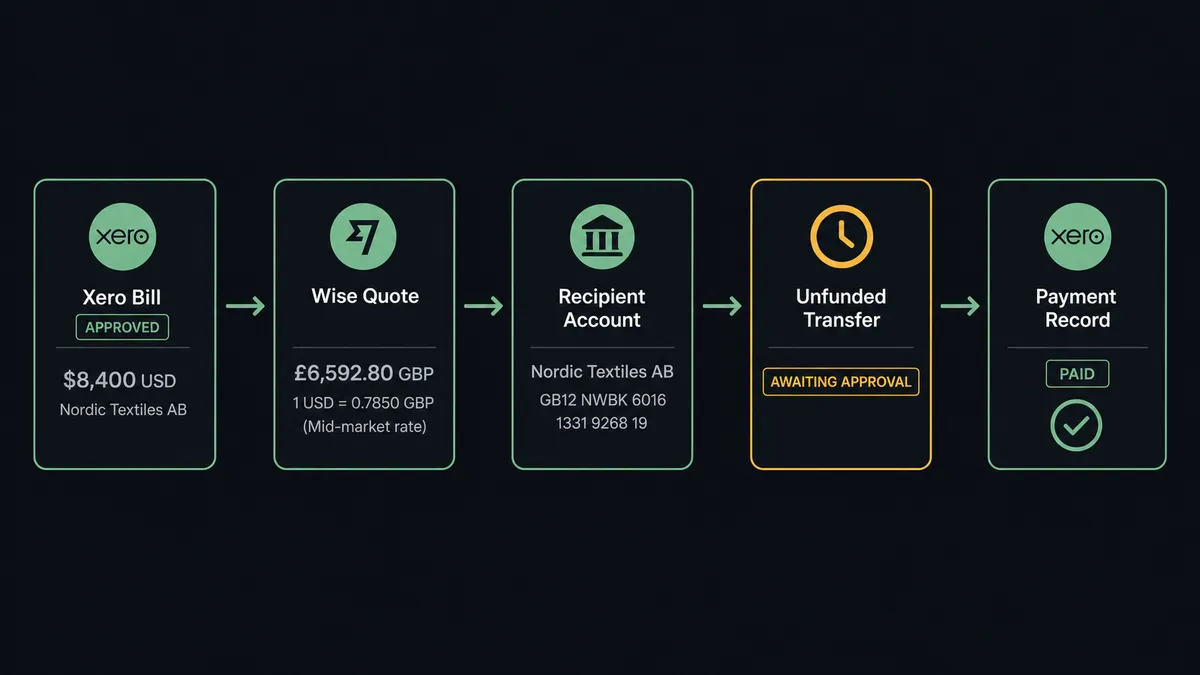
The flow starts in Xero. On Invoice Updated fires when a bill’s status changes, and the flow filters for the moment a bill moves into approved. The agent retrieves the bill’s detail with Get Invoice: the contact, the currency, the amount, and the due date.
From there the agent works the Wise side of the connection. It checks List Recipient Accounts to see whether this payee already has a recipient account on file. If not, it registers one with Create Recipient Account, using the bank details tied to the Xero contact. It prices the transfer with Create Quote, which returns the mid-market rate, the fees, and a quote id. It then creates the transfer itself with Create Transfer, combining the recipient and the quote into a transfer that exists in Wise but has not moved any money, because Create Transfer always produces an unfunded transfer.
That unfunded state is the connection’s hinge point. The transfer is fully prepared, priced, and attached to a real payee, but it sits and waits. Once Fund Transfer runs, the balance moves. Once it is confirmed, the agent calls Create Payment in Xero to record the payment against the original bill, so the ledger reflects reality without anyone opening Xero to update it by hand.
Can an AI agent run it? (and why a human stays in the loop)
A fixed integration can move a bill from Xero into a Wise transfer every time, on a rule. An AI agent does something a rule cannot: it reads the bill, evaluates the vendor and the amount against what it has seen before, and decides whether this one needs a person or not, using the human-in-loop flow as a callable tool rather than a hardcoded branch.
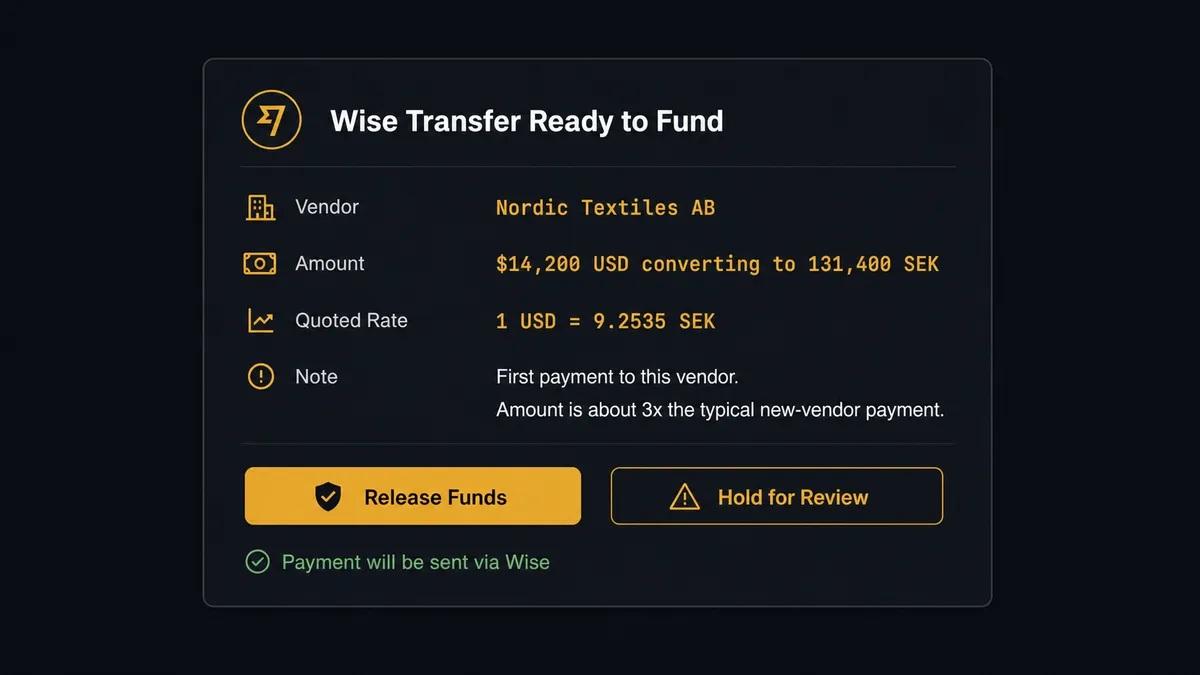
Picture a bill for $14,200 to a vendor the agent has never registered a recipient account for. The agent notices two things: no payment history for this payee, and an amount that runs well above the typical first payment size for a new vendor. It does not fund the transfer. It packages the context, the recipient name and bank details, the amount, the converted currency, and the quoted rate, and sends it to the finance approver over Slack: “This transfer is ready to fund from the balance shown. First payment to this vendor, amount runs about 3x the typical size for a new payee. Release it?” The approver reviews and responds. The agent resumes, funds exactly the transfer that was approved with Fund Transfer, and writes the approver’s identity and the timestamp to the audit trail.
A repeat vendor with a decade of clean payment history and a routine amount does not need that pause, and the agent does not force one on it. This is not a sync tool moving data on a timer. It is a digital andon cord: the agent keeps moving until it hits a step with real consequence, then it stops and asks.
FlowRunner vs Zapier
Zapier is genuinely fast to set up for a simple Wise-to-Xero trigger, and most AP teams already know its interface, which matters when the person building the automation is not a developer. That ease of use is real and FlowRunner does not pretend otherwise.
Where the two diverge is what happens at the moment money actually moves. Zapier can trigger a Wise transfer off a Xero event, but it has no native concept of pausing mid-workflow for a person to review context and decide, and no audit trail built around that decision.
| FlowRunner | Zapier | |
|---|---|---|
| Human-in-loop on funding | Native: the agent pauses before Fund Transfer and routes to Slack, email, or WhatsApp with full context | Not native; requires a separate approval app bolted on, with no agent reasoning behind when to trigger it |
| Users included | Unlimited on every tier | Priced per user on most plans |
| AI model access | BYOK, use your own provider key | Tied to Zapier’s own AI credits and usage limits |
| Pricing model | Transparent workflow-based tiers with clear execution limits | Per-task pricing that gets harder to predict as volume grows |
| Self-hosting | Free Community Edition and Enterprise self-hosted option | Cloud only |
Before and after
| Before | After | |
|---|---|---|
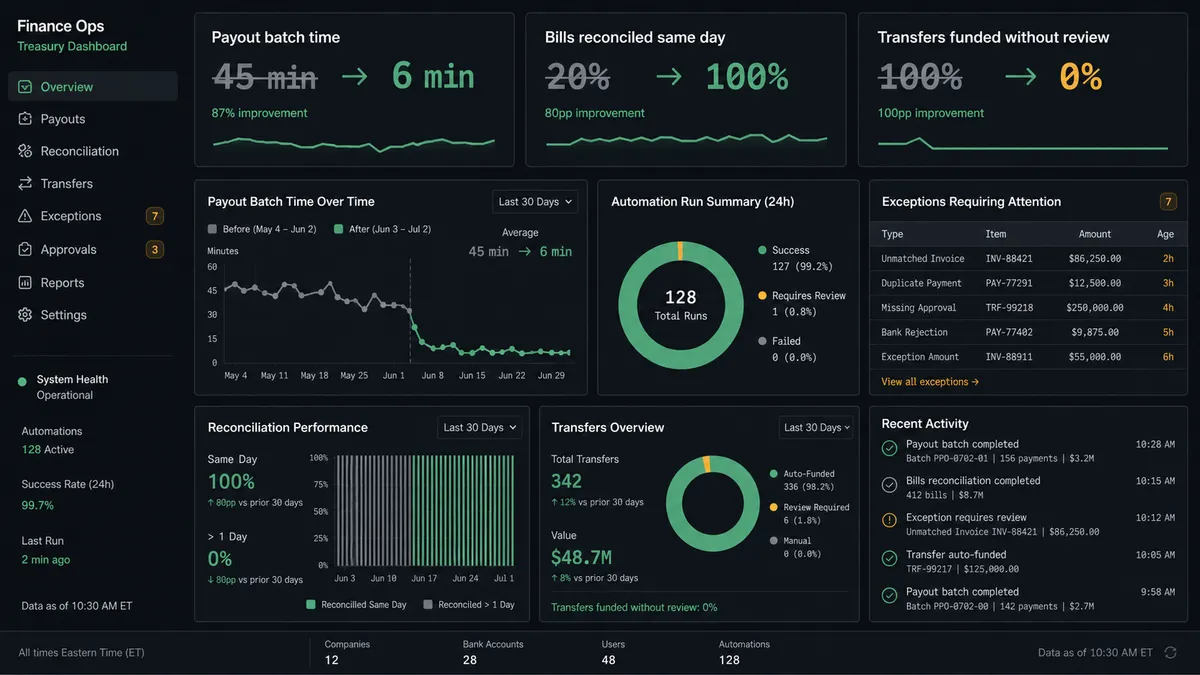
| Payout assembly | Each international payment quoted and entered one at a time by hand | Quote, recipient, and transfer created for every approved bill in one pass |
| Rate and fee capture | Someone looks up the rate and fees before every transfer | The agent quotes the conversion and records the rate at the moment of quoting |
| Funding review | Transfers funded individually with no second check | The prepared transfer is funded only after a person confirms it |
| Reconciliation | Bill marked paid in Xero manually, sometimes days later | Create Payment posts against the bill the moment the transfer is funded |
| New vendor handling | New payee details entered from memory or a spreadsheet | Recipient account created and matched against Xero contact details automatically |
What you can build
Approved bill to funded transfer. Xero’s On Invoice Updated trigger starts the flow the moment a bill is approved. The agent prices and prepares the Wise transfer, pauses for approval, funds it, and posts the payment back to the bill automatically.
Aged payables batch run. The agent pulls Get Aged Payables from Xero every Monday, batches every overdue vendor bill into priced Wise transfers, and sends the finance approver a single message with the batch total instead of one message per payee.
New vendor onboarding. When Create Contact fires in Xero for a new supplier, the agent creates the matching Wise recipient account in the same pass with Create Recipient Account, so the payee is ready before the first bill is even due.
International refund on a credit note. A Xero credit note triggers a Wise transfer back to a foreign customer. Because reversals carry more risk than standard payouts, the human-in-loop step always fires on this path regardless of amount.
Rate movement check. Before funding a large batch, the agent checks Get Exchange Rate against the rate captured at quote time. If the rate has moved unfavorably beyond a threshold you set, it flags the batch to finance instead of releasing it on the original quote.
Common questions
Is it free to connect Wise and Xero on FlowRunner? FlowRunner has a free plan with 100 executions a month, every integration included, and no credit card required, and new accounts get 14 days of Professional on top. Every tier includes unlimited users and unlimited workflows.
Can I self-host the Wise to Xero connection? Yes. FlowRunner offers a free Community Edition for self-hosting, and an Enterprise self-hosted option with full compliance features.
Does the agent need my own Wise and Xero API credentials? Yes, you connect your own Wise account and Xero organization directly. FlowRunner also runs on a BYOK model for the AI provider, so you supply your own model key.
What happens when the agent isn’t sure about a vendor or an amount? It pauses before funding and sends the recipient, amount, currency, and quoted rate to your finance approver over Slack, email, or WhatsApp, with the reason it flagged the transfer. Nothing moves until a person responds.
Can the agent pay vendor bills automatically with no human step at all? You can configure it that way, but the recommended pattern keeps a human gate on Fund Transfer specifically, since that is the action that moves money.
Does FlowRunner support multi-currency Xero organizations? Yes. The agent reads the bill’s currency from Xero, prices the conversion at Wise’s mid-market rate, and records the resulting payment back against the correct currency once it posts.
Getting started
Start on the free plan: 100 executions a month, every integration included, no credit card required, plus 14 days of Professional for new accounts. Connect your Wise account and your Xero organization, choose the On Invoice Updated trigger, and add the human-in-loop approval before Fund Transfer runs.
Set it up yourself at flowrunner.ai, or book time with the team at calendly.com/flowrunner/intro to walk through the flow for your AP process.
Frequently asked questions
Is it free to connect Wise and Xero on FlowRunner?
FlowRunner has a free plan with 100 executions a month, every integration included, and no credit card required, and new accounts get 14 days of Professional on top. Every tier, including Growth, includes unlimited users and unlimited workflows, so an AP team can build and test the Wise to Xero connection at no cost before committing to a paid plan.
Can I self-host the Wise to Xero connection?
Yes. FlowRunner offers a free Community Edition for self-hosting, and an Enterprise self-hosted option with full compliance features for teams that need vendor payment data to stay on their own infrastructure.
Does the agent need my own Wise and Xero API credentials?
Yes, you connect your own Wise account and your own Xero organization through standard OAuth and API token setup. FlowRunner also runs on a BYOK model for the AI provider itself, so you supply your own model key rather than routing through a shared one.
What happens when the agent isn't sure about a vendor or an amount?
The agent pauses before funding and sends the recipient, the amount, the currency, and the quoted rate to the finance approver over Slack, email, or WhatsApp, with the reason it flagged the transfer. Nothing moves until a person responds, because Wise transfers are created unfunded and stay that way until Fund Transfer runs.
Can the agent pay vendor bills automatically with no human step at all?
You can configure it that way, but the recommended pattern keeps a human gate on Fund Transfer specifically, since that is the one action that actually moves money. Everything upstream of it, quoting, registering the recipient, and creating the unfunded transfer, can run without a pause.
Does FlowRunner support multi-currency Xero organizations?
Yes. The agent reads the bill's currency and amount from Xero, prices the conversion at Wise's mid-market rate with Create Quote, and records the resulting payment back against the correct Xero currency once it posts.