How to Connect Slack with Base64.ai (With or Without an AI Agent)
Scan documents shared in Slack with Base64.ai and post the extracted fields back to the thread, with an AI agent that accepts high-confidence extractions on its own and pauses for a human before low-confidence data or a borderline identity match is treated as verified.
How do you connect Slack to Base64.ai?
You connect Slack to Base64.ai by having Slack’s On File Shared trigger drive Base64.ai actions: when a document lands in a watched channel, the workflow grabs it with Get File Info, sends it to Scan Document, and posts the extracted fields back into the same thread with Send Message To Channel, so an invoice PDF becomes labeled data without anyone retyping it. FlowRunner is a visual AI-agent orchestration platform where automations run autonomously and pause for human judgment on the steps that carry real consequence. The same connection can run as an AI agent that reads the per-field confidence scores Base64.ai returns, accepts the clean extractions on its own, and pauses for a named reviewer before a doubtful field or a borderline identity match is treated as verified.
The problem it solves
Documents arrive where people talk, not where data systems live. A vendor invoice gets forwarded into the AP channel. A driver’s license photo lands in the onboarding thread. A signed agreement is dropped in the deal channel with “fully executed!” Then a person opens each file, reads it, and retypes the amount, the date, the ID number, the counterparty into whatever system needs it. The channel was the fast part; the keyboard is the bottleneck, and every retyped field is a chance to transpose two digits on an invoice total.
The deeper problem is false confidence. Manual data entry does not come with a confidence score; a typo looks exactly as authoritative as a correct value. And when the stakes rise, verifying an identity document, confirming a contract got signed by the right person, the person doing the eyeballing has no instrument beyond squinting. Teams end up with either sloppy speed (accept whatever was typed) or expensive caution (a second person re-checks everything, including the 95 percent that was fine).
How it works: the connection
The connection listens to Slack and calls Base64.ai. Here is the plain version, grounded in the real connector actions.
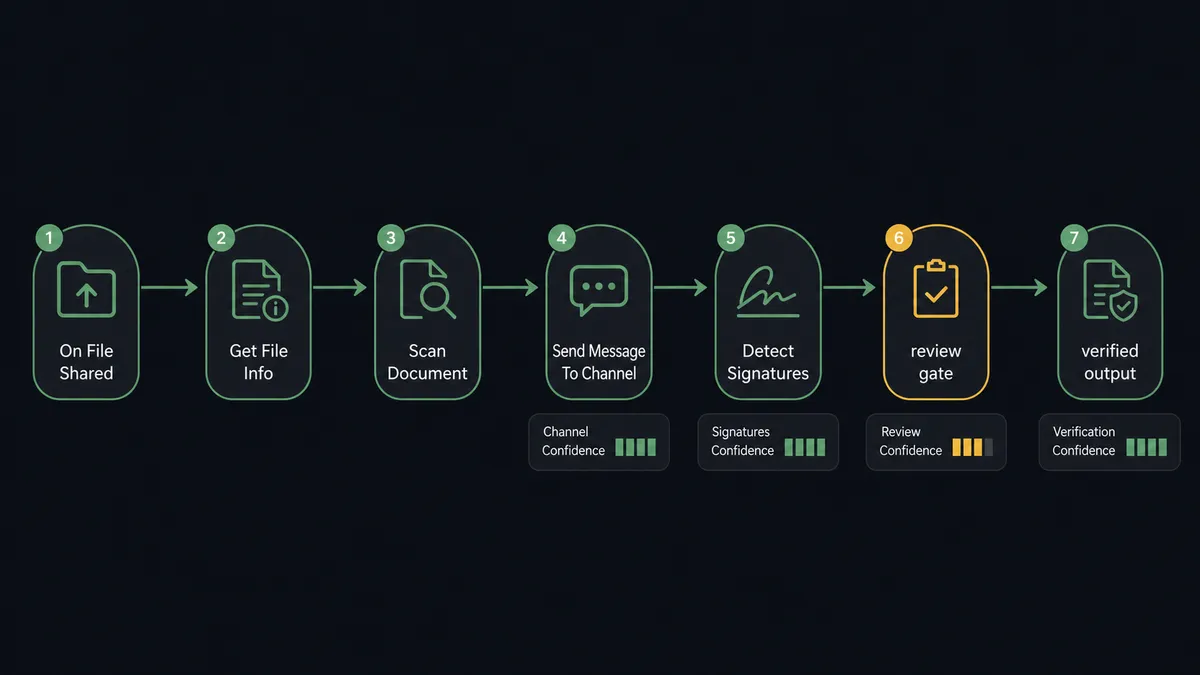
- Trigger: Slack fires On File Shared when a document lands in the watched channel.
- Read: The workflow calls Get File Info to retrieve the file’s metadata and location.
- Scan: It calls Scan Document, which recognizes the document type automatically, invoice, receipt, ID, passport, or form, and returns labeled fields, tables, signatures, and a confidence score per field.
- Handle big files: For heavy PDFs or batches it calls Start Async Scan instead, then polls Get Async Scan Result with the returned job UUID until extraction completes.
- Post back: It calls Send Message To Channel with the extraction summary in the original thread: document type, key fields, and which fields scored low.
- Verify extras when relevant: For IDs it calls Detect Faces to pull the photo; for agreements it calls Detect Signatures to confirm the document is actually signed.
- Archive the result: The stored result stays retrievable by Get Result by UUID, so any extraction can be re-fetched and audited later.
That is the “just connect them” answer. A file dropped in Slack comes back as structured, labeled data in the same thread, with the weak spots flagged instead of hidden.
Can an AI agent run it? (and why a human stays in the loop)
Yes, and the agent is what makes the confidence scores mean something. A plain pipeline treats extraction as done when the API responds. An AI agent holds Scan Document, Start Async Scan, Detect Faces, Recognize Face (Match), Detect Signatures, and Verify Signature (Match) as tools and reasons about what came back: an invoice whose fields all score high goes straight through; an invoice whose total scored low against a blurry scan does not get to pretend it is data yet.
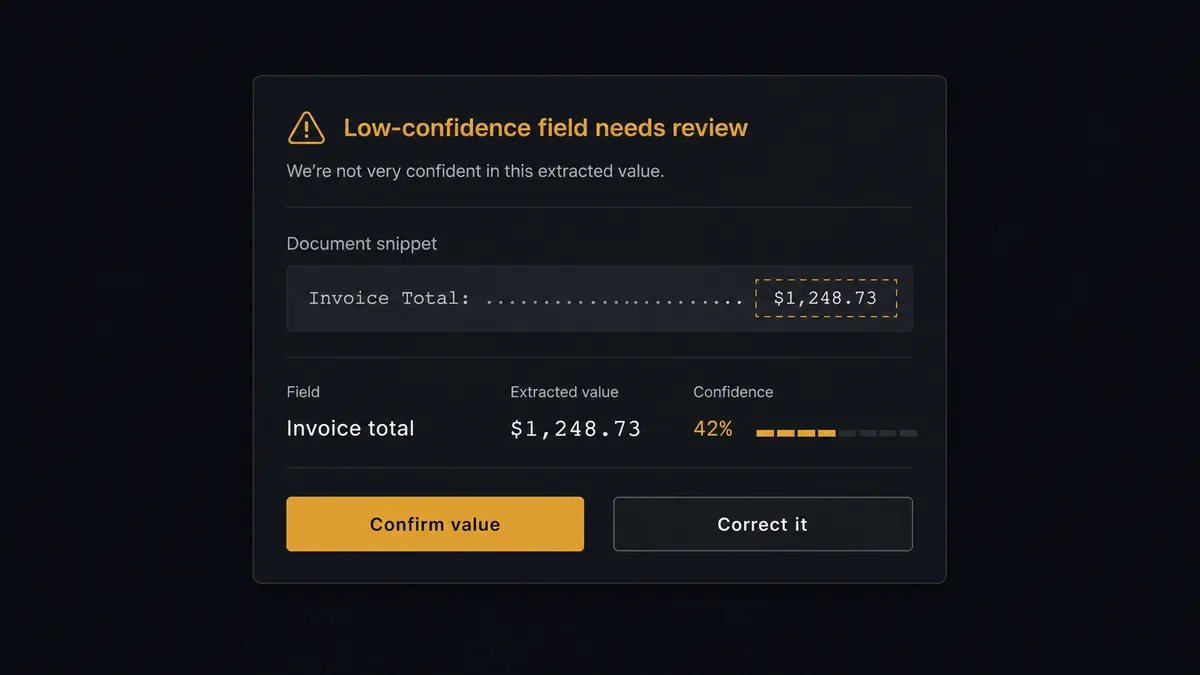
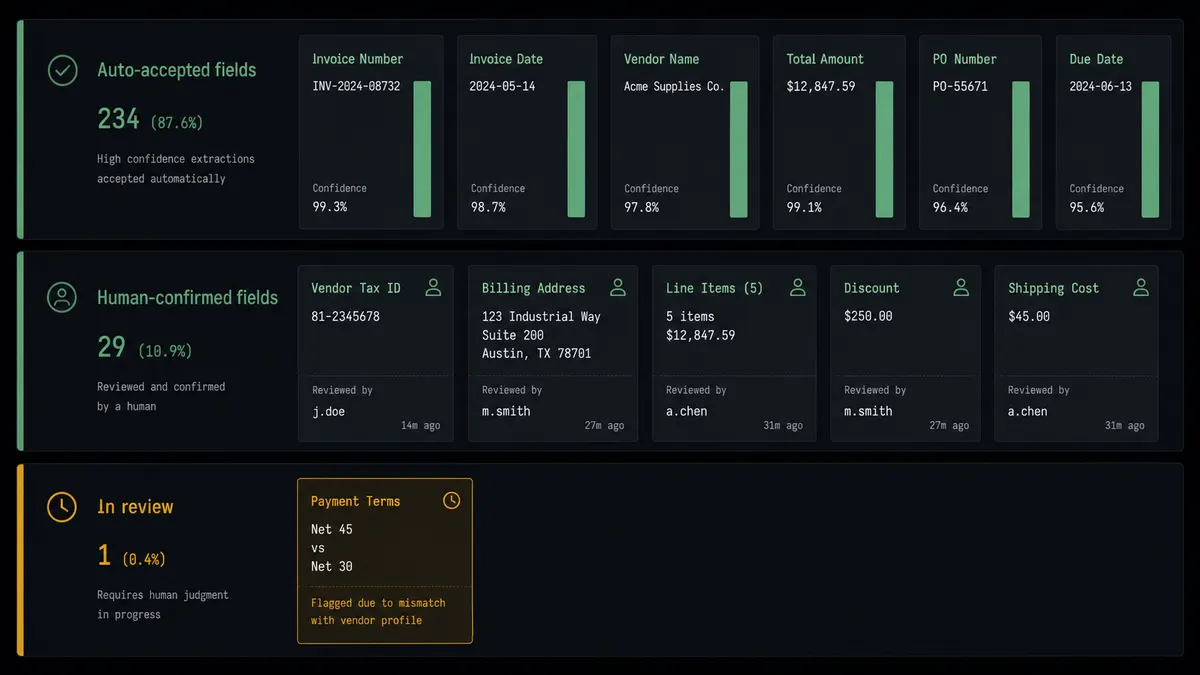
The consequential step is the moment doubtful data becomes trusted data. When a field scores below your threshold, the agent invokes the human-review flow it holds as a callable tool. The workflow pauses and posts to the thread where the document arrived: “Scanned [document type]. Invoice total read as [value] with low confidence, snippet attached. Confirm or correct?” The reviewer answers in one click without leaving Slack, and only then does the extraction flow downstream, with auto-accepted and human-confirmed fields distinguished in the record. Identity work gets the same discipline with sharper stakes: Recognize Face (Match) returns a similarity score comparing an ID photo to a selfie, and a borderline score is exactly the case that must not be settled by a machine alone. The agent posts both images’ context and the score, and a person makes the call before anyone is treated as verified.
This is the digital andon cord for document operations: the line runs at machine speed through everything the scanner is sure about, and stops the moment it is not. Your team stops re-checking the 95 percent that was fine and spends its attention only where the confidence scores say it is needed.
FlowRunner vs n8n
n8n deserves its reputation with technical teams: fair-code licensing, a self-host path, and enough HTTP flexibility that a developer can wire Slack files into Base64.ai’s API and get JSON back in an afternoon. If you have engineers who want to own that plumbing, the raw connection is achievable there.
The difference is everything after the JSON arrives. Confidence-based routing, a review step that pauses mid-run and resumes on a human answer, and an agent that decides per document what needs a person: in n8n these are patterns you design, build, and maintain; in FlowRunner they are the platform.
| What matters for this pair | FlowRunner | n8n |
|---|---|---|
| Human-in-the-loop on low-confidence fields and identity matches | Native. The agent pauses and posts a review card, then resumes on the answer | Buildable with wait nodes and custom wiring; the review pattern is yours to maintain |
| Who runs the flow | An AI agent reads confidence scores, reasons, picks scan and match tools | Node graph you design per document path; the graph stays fixed |
| Users included | Unlimited users on every tier | Cloud plans price by executions; unlimited self-host means running it yourself |
| Bring your own AI keys | Yes, BYOK | Yes, own keys in its AI nodes |
| Self-hosted option | Yes, cloud-hosted or self-hosted | Yes, fair-code self-host |
| Pricing model | Transparent workflow-based tiers | Execution-based cloud pricing; document volume drives execution volume |
If your engineers want to hand-build the pipeline and own the review logic as custom workflow code, n8n can do the job. If you want document intake where the escalation behavior is native and an ops team can run it without engineering on call, this pairing is the better fit.
Before and after
| Category | Before | After |
|---|---|---|
| Document intake | A person opens each file in the channel and retypes fields by hand | Scan Document returns labeled fields to the thread automatically |
| Error visibility | A typo looks exactly as trustworthy as a correct value | Every field carries a confidence score, and weak ones are flagged in the thread |
| Review effort | A second person re-checks entire documents, including everything that was fine | Humans see only the fields the scanner doubted |
| Identity checks | Eyeball comparison of an ID photo to a selfie, no instrument, no record | Recognize Face (Match) scores the comparison and borderline cases route to a named reviewer |
| Auditability | No trail of who verified what | Auto-accepted and human-confirmed fields are distinguished, with reviewer and timestamp |
What you can build
AP inbox that reads itself. On File Shared fires on the AP channel. Scan Document extracts vendor, date, line items, and total; clean invoices flow downstream and doubtful totals pause for one-click review in the thread.
Onboarding identity check. An ID lands in the onboarding thread. Scan Document reads the fields, Detect Faces pulls the photo, Recognize Face (Match) scores it against the submitted selfie, and a borderline score waits for a named reviewer before the account is verified.
Signature confirmation on deals. When “signed” agreements arrive, Detect Signatures confirms a signature actually exists, and Verify Signature (Match) compares it against the specimen on file before the deal channel celebrates.
Batch scans without the wait. A zip of receipts gets submitted through Start Async Scan; the agent polls Get Async Scan Result and posts one consolidated summary when the batch completes, flagged fields on top.
Quota watchdog. On a schedule, the agent calls Get Account, checks remaining Base64.ai scan credit, and posts a heads-up to the ops channel before a busy month runs the balance dry.
Common questions
Is it free to connect Slack and Base64.ai on FlowRunner? You can build and run the connection on FlowRunner’s free plan, which includes 100 executions a month and every integration with no credit card required, and new accounts also get 14 days of Professional. Both connectors are available on every FlowRunner tier, and every tier includes unlimited users and unlimited workflows.
Can I self-host the Slack to Base64.ai workflow? Yes. FlowRunner offers a cloud-hosted option and a self-hosted option, so the connection can run inside your own environment.
Does the AI agent need my own OpenAI or Claude key? FlowRunner uses a bring-your-own-keys model, so you connect the AI provider key you already have. You are not locked to one model.
What happens when Base64.ai returns low confidence on a field? The agent does not pass weak data downstream. It posts the document snippet and the extracted value side by side in the Slack thread, marks the doubtful fields, and waits for a person to confirm or correct each one. Only then does the extraction count as verified, with the reviewer recorded.
Which Slack trigger starts a Base64.ai scan? On File Shared is the natural fit: the moment a document lands in a watched channel, the workflow pulls it with Get File Info and sends it to Scan Document. On Mention works for on-demand scans, and Start Async Scan handles large files without blocking.
Can this pair verify identity documents? Yes. Scan Document reads IDs, passports, and driver’s licenses into labeled fields, Detect Faces extracts the photo, and Recognize Face (Match) compares it against a submitted selfie, returning a similarity score. Borderline scores route to a human before any identity is treated as verified.
Getting started
Start on the free plan: 100 executions a month, every integration included, no credit card required, plus 14 days of Professional for new accounts. Both connectors are available on every tier, and every tier includes unlimited users and unlimited workflows.
Explore the integration details:
- Slack integration (8 triggers and 16 actions covering messages, reactions, files, and channel management)
- Base64.ai integration (11 actions covering scanning, face and signature matching, and stored results)
Start building free at flowrunner.ai or book a demo to see a live Slack to Base64.ai workflow, confidence gate and all.
Frequently asked questions
Is it free to connect Slack and Base64.ai on FlowRunner?
You can build and run the connection on FlowRunner's free plan, which includes 100 executions a month and every integration with no credit card required, and new accounts also get 14 days of Professional. Both connectors are available on every FlowRunner tier, and every tier includes unlimited users and unlimited workflows.
Can I self-host the Slack to Base64.ai workflow?
Yes. FlowRunner offers a cloud-hosted option and a self-hosted option, so the connection can run inside your own environment.
Does the AI agent need my own OpenAI or Claude key?
FlowRunner uses a bring-your-own-keys model, so you connect the AI provider key you already have. You are not locked to one model.
What happens when Base64.ai returns low confidence on a field?
The agent does not pass weak data downstream. It posts the document snippet and the extracted value side by side in the Slack thread, marks the doubtful fields, and waits for a person to confirm or correct each one. Only then does the extraction count as verified, with the reviewer recorded.
Which Slack trigger starts a Base64.ai scan?
On File Shared is the natural fit: the moment a document lands in a watched channel, the workflow pulls it with Get File Info and sends it to Scan Document. On Mention works for on-demand scans, and Start Async Scan handles large files without blocking.
Can this pair verify identity documents?
Yes. Scan Document reads IDs, passports, and driver's licenses into labeled fields, Detect Faces extracts the photo, and Recognize Face (Match) compares it against a submitted selfie, returning a similarity score. Borderline scores route to a human before any identity is treated as verified.