How to Connect HubSpot with Base64.ai (With or Without an AI Agent)
Connect Base64.ai document extraction to HubSpot so scanned order forms and contracts update contacts, companies, and deals automatically, with a human approving any low-confidence write before it touches the deal record.
How do you connect HubSpot to Base64.ai?
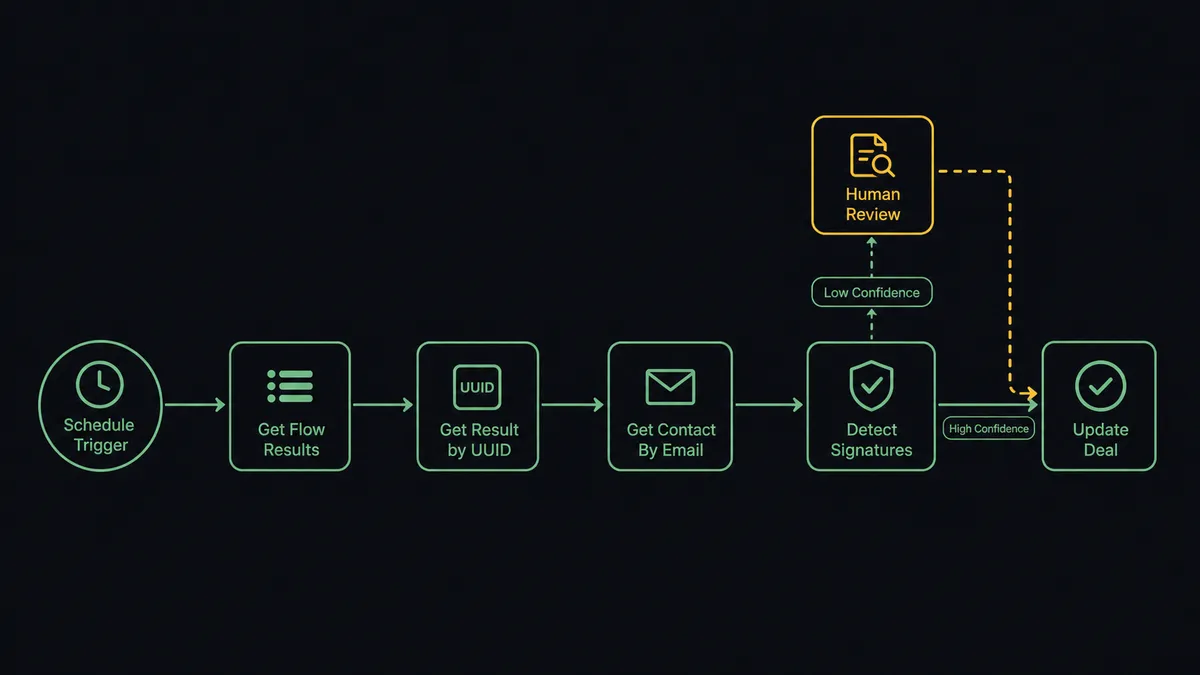
You connect HubSpot to Base64.ai with a scheduled workflow: each run calls Get Flow Results to collect newly scanned documents, pulls each extraction with Get Result by UUID, matches the signer with Get Contact By Email, and writes the labeled fields into the right records with Create Contact, Update Company, and Update Deal. FlowRunner is a visual AI-agent orchestration platform where automations run autonomously and pause for human judgment on the steps that carry real consequence. The same connection can run as an AI agent that checks per-field confidence scores, updates HubSpot on its own when the data is clean, and pauses for a named human before a shaky number lands on a deal record.
The problem it solves
Right now the bridge between paper and your CRM is a person with two windows open. A signed order form or a countersigned contract arrives as a PDF. Someone on the ops team opens it, squints at the scan, finds the matching contact and deal in HubSpot, and re-keys the contract value, the renewal date, the signer’s title, and the billing entity. Every document is minutes of copy work, and every copy is a chance to fat-finger the one number that revenue reporting runs on.
The edges are where it actually hurts. A contract comes in under a personal email that matches nothing in HubSpot, so it never gets attached to the deal. An order form is missing its signature page and nobody notices until the renewal conversation. A misread total, 14,500 keyed as 45,100, sits on the deal for a quarter and quietly poisons the forecast. The monthly “document reconciliation” sweep is really an apology for the gap between the filing cabinet and the pipeline.
How it works: the connection
The connection reads from Base64.ai and writes to HubSpot. Here is the plain version, grounded in the real connector actions.
- Trigger: On a schedule, the workflow calls Get Flow Results in Base64.ai to collect documents scanned since the last run.
- Read: For each new document, Get Result by UUID pulls the full extraction: the recognized document type, labeled fields, tables, and per-field confidence scores.
- Match the person: Get Contact By Email looks up the signer in HubSpot. If no record exists, Create Contact adds one from the extracted name and email.
- Match the company: The workflow checks the extracted company name against Get All Companies and calls Create Company when the account is new.
- Verify the signature: Detect Signatures confirms the document actually carries a handwritten signature before it counts as executed.
- Write the values: Update Deal writes the contract value and renewal date onto the deal, and Update Contact fills in the signer’s title and phone.
- Link it together: Associate Objects ties the contact, company, and deal so the document’s data lives on one connected record set.
That is the “just connect them” answer. Scans become structured CRM data, and nobody re-keys a contract again. Neither connector exposes an event trigger, so the schedule is the heartbeat that drains the extraction queue each run.
Can an AI agent run it? (and why a human stays in the loop)
Yes, and this is where the connection stops being a pipe and starts being a coworker. Instead of a fixed mapping that writes whatever the OCR returns, an AI agent reads each extraction and reasons about it. It holds the real actions as tools, Scan Document, Get Result by UUID, Detect Signatures, Verify Signature (Match), Get Contact By Email, Create Contact, Update Company, Update Deal, Associate Objects, and picks the ones each document needs.
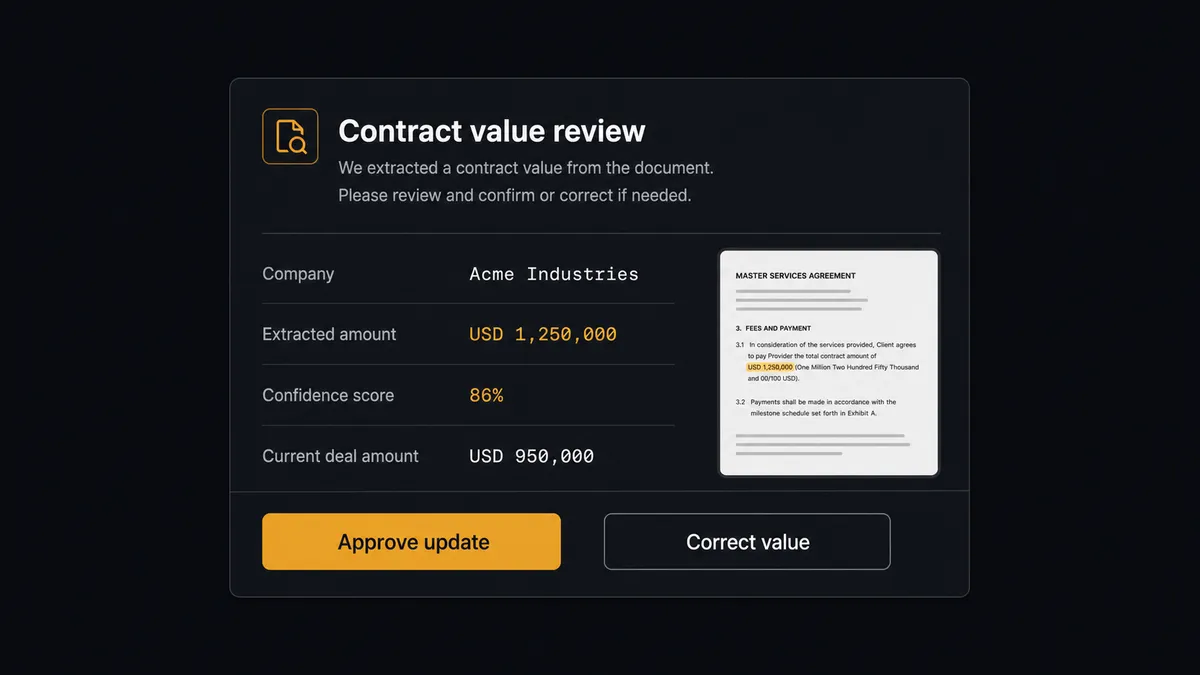
The consequential step is Update Deal. A deal record is not a scratchpad: its amount and close date feed the pipeline review, the forecast, and the commission math. So the agent treats confidence as a first-class signal. A high-confidence contract value that squares with the deal’s existing amount gets written. When the score is low, the scan is smudged, or the value is far from what the deal said yesterday, the agent stops. It invokes a human-in-loop flow it holds as a callable tool and posts to your ops channel: “Contract scanned for [company]. Extracted value [amount] at [confidence] confidence, deal currently shows [old amount]. Source page attached. Approve the update?” A person confirms or corrects the value, and only then does Update Deal run. The decision, the reviewer’s name, and the timestamp all land in the audit trail.
This is the difference between fast automation and automation you can trust with revenue data. Prospects call it a digital andon cord: like the pull cord on a Toyota line, the workflow stops itself the moment it hits uncertainty, and a person clears it back into motion. The agent knows which writes are cheap and which ones a VP will ask about later.
FlowRunner vs n8n
Technical teams looking at this pair will rightly consider n8n. Its self-hosted community edition is genuinely free, its node library is deep, and a developer comfortable wiring HTTP nodes and expressions can build a Base64.ai to HubSpot pipeline with full control over every request, with community examples for both APIs.
The difference is who can run it, and what happens at the risky write. In n8n, the confidence check is an IF node with a threshold someone hardcodes, and the approval is a wait node a developer wires per workflow. In FlowRunner, the agent reasons about each document and holds human review as a native tool. Here is the honest side-by-side.
| What matters for this pair | FlowRunner | n8n |
|---|---|---|
| Human-in-the-loop on low-confidence deal updates | Native. The agent invokes an approval flow as a callable tool and pauses before Update Deal | Wait and approval nodes exist, but the builder wires the logic per workflow; not an agent decision |
| Who runs the flow | An AI agent reads the extraction, reasons, picks actions as tools | A node graph a developer wires and maintains; AI agent nodes exist but the graph stays fixed |
| Users included | Unlimited users on every tier | Cloud plans meter workflows and executions; self-host capacity is yours to manage |
| Bring your own AI keys | Yes, BYOK | Yes, n8n also supports your own model keys |
| Self-hosted option | Yes, cloud-hosted or self-hosted | Yes, self-hosting is a core n8n strength |
| Pricing model | Transparent workflow-based tiers | Execution-based cloud pricing; full cloud compliance features sit on custom-priced Enterprise |
If your team is developers who want a free, self-hosted graph they fully control, n8n is a fair choice. If the people who own document intake are ops folks who need extraction flowing into HubSpot with a reviewer on the risky writes and an audit trail an auditor will accept, this pairing on FlowRunner is the better fit.
Before and after
| Category | Before | After |
|---|---|---|
| Document intake | Signed PDFs sit in an inbox until someone opens each one and re-keys it | Every scan is picked up on the next scheduled run and extracted with labeled fields |
| CRM accuracy | Contract values typed by hand, with transposition errors surfacing at forecast time | Values written from the extraction, and low-confidence fields held for review instead of guessed |
| Signature checks | Someone flips to the last page of each PDF, when they remember to | Detect Signatures confirms every order form is signed before the deal moves |
| New records | Unknown signers get a sticky note and a “create the contact later” promise | Create Contact and Create Company add missing records and Associate Objects links them |
| Accountability | Nobody can say who changed the deal amount or why | Every deal update carries the source document, confidence score, approver, and timestamp |
What you can build
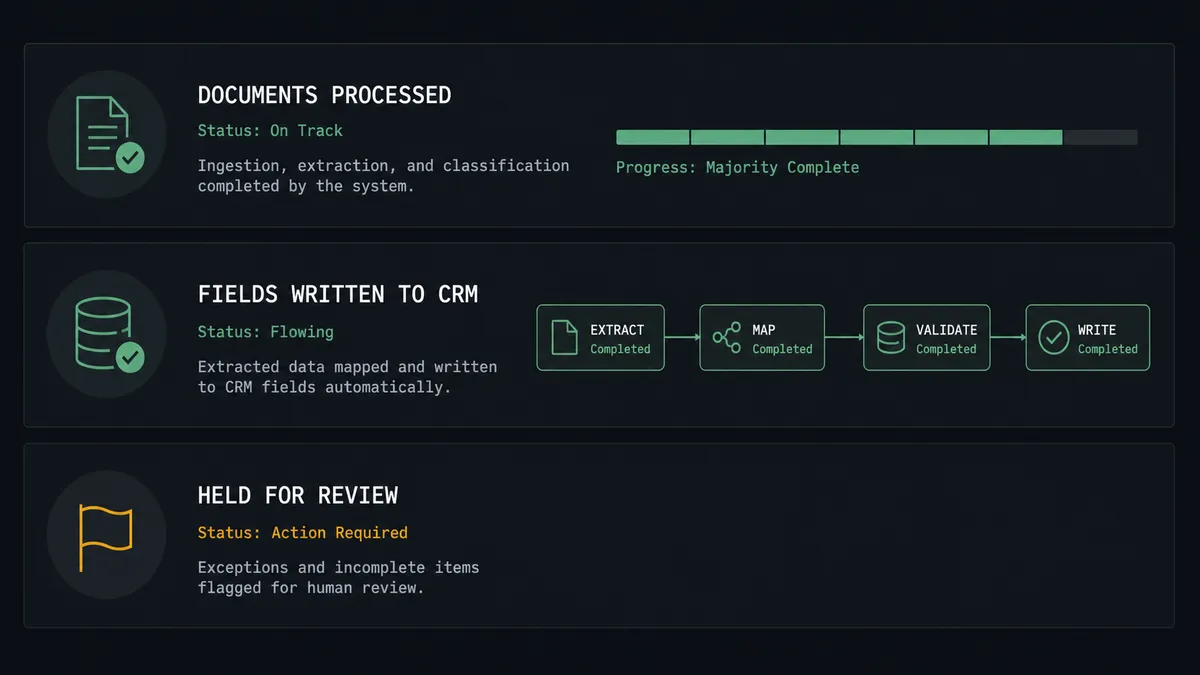
Order form to updated deal, hands off. Get Flow Results feeds each run, Get Result by UUID pulls the extraction, Get Contact By Email matches the signer, and Update Deal writes the value and renewal date. Clean scans never touch a human.
Contract signature verification. Before a deal advances, Detect Signatures checks the scanned agreement and Verify Signature (Match) compares it to the specimen on file. A missing or mismatched signature routes to a person, not a pipeline stage.
Business card and intake form capture. Scan Document reads event intake forms and returns labeled fields. The agent checks for an existing record with Search Contacts, then calls Create Contact and Associate Objects so follow-up starts from the CRM, not from a shoebox of paper.
Identity check on high-value accounts. For deals that need a verified counterparty, Detect Faces pulls the photo from a scanned ID and Recognize Face (Match) compares it with the submitted selfie, with borderline scores escalated before Update Company marks the account verified.
Bulk backfile cleanup. Point Start Async Scan at a folder of legacy contracts, poll Get Async Scan Result, and let the agent reconcile each extraction against Get All Deals, queuing every paper-versus-pipeline discrepancy for one human pass.
Getting started
Start on the free plan: 100 executions a month, every integration included, no credit card required, plus 14 days of Professional for new accounts. Both connectors are available on every tier with unlimited users and unlimited workflows, so the ops person who owns document intake and the sales manager who approves deal changes share one workspace from day one.
Explore the integration details:
- HubSpot integration (21 actions covering contacts, companies, deals, and associations)
- Base64.ai integration (11 actions covering document scans, faces, signatures, and stored flow results)
Start building free at flowrunner.ai or book a demo to see a live HubSpot to Base64.ai workflow, low-confidence review gate and all.
Frequently asked questions
Is it free to connect HubSpot and Base64.ai on FlowRunner?
You can build and run the connection on FlowRunner's free plan, which includes 100 executions a month and every integration with no credit card required, and new accounts also get 14 days of Professional. Both connectors are available on every FlowRunner tier, and every tier includes unlimited users and unlimited workflows.
Can I self-host the HubSpot to Base64.ai workflow?
Yes. FlowRunner offers a cloud-hosted option and a self-hosted option, so the connection can run inside your own environment.
Does the AI agent need my own OpenAI or Claude key?
FlowRunner uses a bring-your-own-keys model, so you connect the AI provider key you already have. You are not locked to one model.
What happens when Base64.ai returns a low confidence score on a field?
The agent does not write the value into HubSpot. It invokes a human-in-loop step, posts the extracted field, the confidence score, and a link to the source document to your team's channel, and waits for a person to confirm or correct the value before Update Deal or Update Contact runs.
Which triggers does this connection use?
Neither connector exposes an event trigger, so the workflow runs on a schedule. It calls Get Flow Results in Base64.ai to pick up newly scanned documents, then pushes the extracted data into HubSpot with actions like Get Contact By Email, Create Contact, Update Company, and Update Deal.
Can the workflow confirm a contract is actually signed before updating the deal?
Yes. The agent calls Detect Signatures on the scanned document to confirm a handwritten signature is present, and Verify Signature (Match) to compare it against a known specimen. An unsigned or mismatched document is escalated to a human instead of moving the deal forward.