How to Connect Wufoo with Mailchimp Marketing (With or Without an AI Agent)
Connect Wufoo form submissions to Mailchimp Marketing audiences in real time, optionally as a FlowRunner AI agent that resolves field IDs, tags subscribers, and pauses for human review before adding flagged contacts.
How do you connect Wufoo to Mailchimp Marketing?
A new Wufoo form submission triggers FlowRunner to call List Form Fields, map the raw Field IDs to readable labels, and then call Add Or Update List Member to add the contact to the correct Mailchimp audience. FlowRunner is a visual AI-agent orchestration platform where automations run autonomously and pause for human judgment on the steps that carry real consequence. The same connection can run as an AI agent that evaluates each entry before adding it, applies behavioral tags, and routes flagged submissions to a reviewer before anything is written to your list.
The problem form submissions create for marketing teams
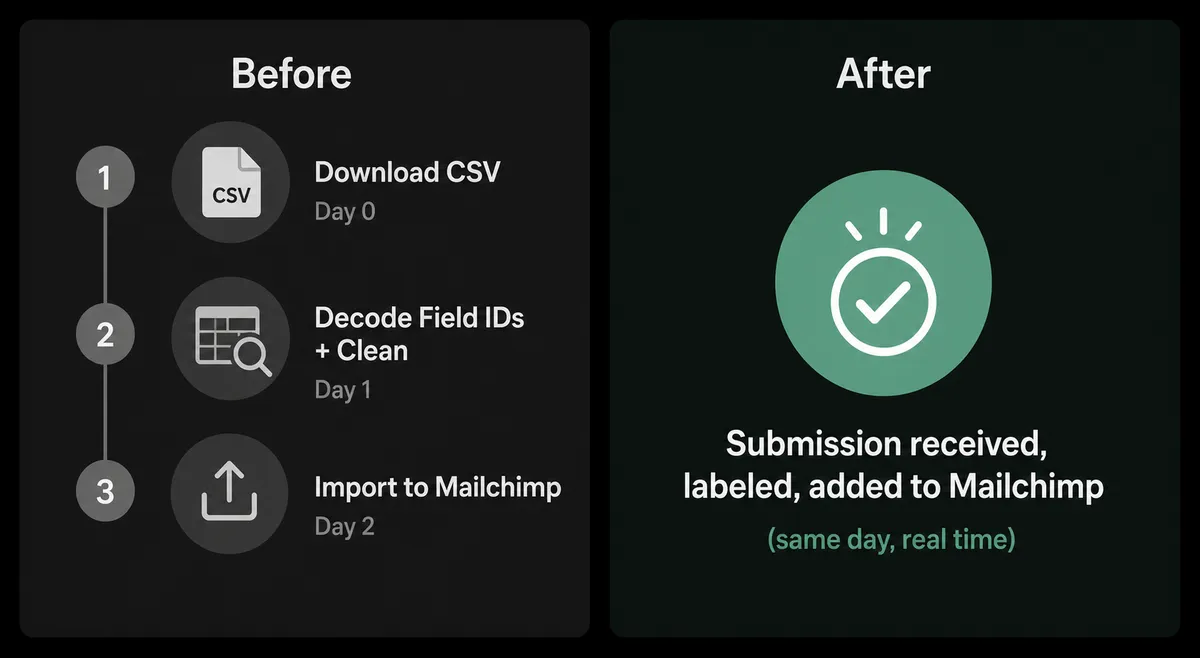
Every Wufoo form submission that does not reach Mailchimp is a contact your team worked to acquire and then lost. The manual version of this workflow involves someone downloading a CSV, decoding Wufoo’s Field ID columns (Field1, Field105, not “Email” or “Company”), cleaning the data, and uploading it to Mailchimp. By the time that happens, the submission is hours or days old. For teams running multiple forms, the spreadsheet work compounds fast.
The friction is not just the time. Wufoo entries arrive keyed by system-generated Field IDs, so anyone doing the manual import has to cross-reference the form builder to know what Field105 actually means. Wrong mappings push bad data into Mailchimp, and bad data in an audience list means the wrong people get the wrong emails. The exceptions, the entries that should not be added automatically, fall through the cracks in either direction: added when they should not be, or held in a spreadsheet indefinitely because no one is sure.
How it works: the connection
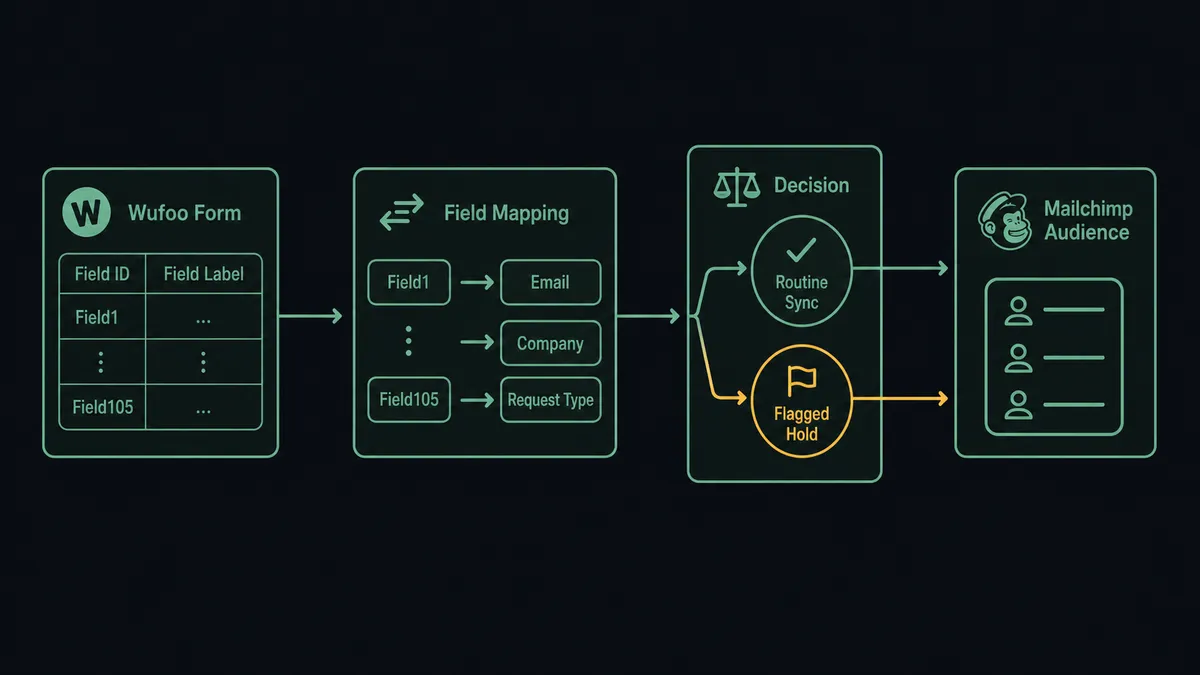
The FlowRunner Wufoo connector listens for new entries on your form using a registered webhook (via Add Webhook) or a scheduled poll via List Entries. When an entry arrives, the first action the agent takes is calling List Form Fields for that form. This returns every field’s ID, label, type, and choices. The agent maps the raw submission data to those labels before it reads anything.
Once the entry is labeled, the agent calls Add Or Update List Member on the Mailchimp Marketing connector. This action checks for an existing subscriber at that email address, updates the record if found, and creates it if not. That idempotency matters: resubmissions and updated entries do not create duplicates. The agent then calls Add Tag to apply the configured source tag (for example, “Wufoo-FormName-2026”) so the audience segment reflects where each subscriber came from.
The data mapping is direct. The Wufoo connector surfaces fields like email, first name, last name, and any custom fields as labeled values. The Mailchimp connector accepts those labels as subscriber profile fields. No export, no import, no spreadsheet in between.
Can an AI agent run it? (And why a human stays in the loop)
A straight trigger-action connection adds every submission automatically. An AI agent running the same flow does something different: it reads the labeled entry, reasons about it, and decides what to do.
The agent’s toolbox includes List Form Fields, List Entries, Add Or Update List Member, Add Tag, Add Member Note, and the human-in-loop flow you configure as a callable tool. On each submission, the agent reads the labeled entry and evaluates it. A clean entry from a recognizable source with all required fields goes straight to Mailchimp. An entry with a missing email field, a flagged answer, or a request type the agent has not seen from this form before does not move automatically.
When the agent invokes the human-in-loop tool, it assembles everything the reviewer needs: the form name, the labeled entry, the specific reason it flagged this submission, and two options (approve to add to Mailchimp, or reject to log and skip). That package goes to the reviewer via Slack or email. The workflow pauses. The reviewer responds. The agent resumes with the decision as input, writes the result to the audit trail (who decided, what they decided, when), and either adds the subscriber or logs the rejection.
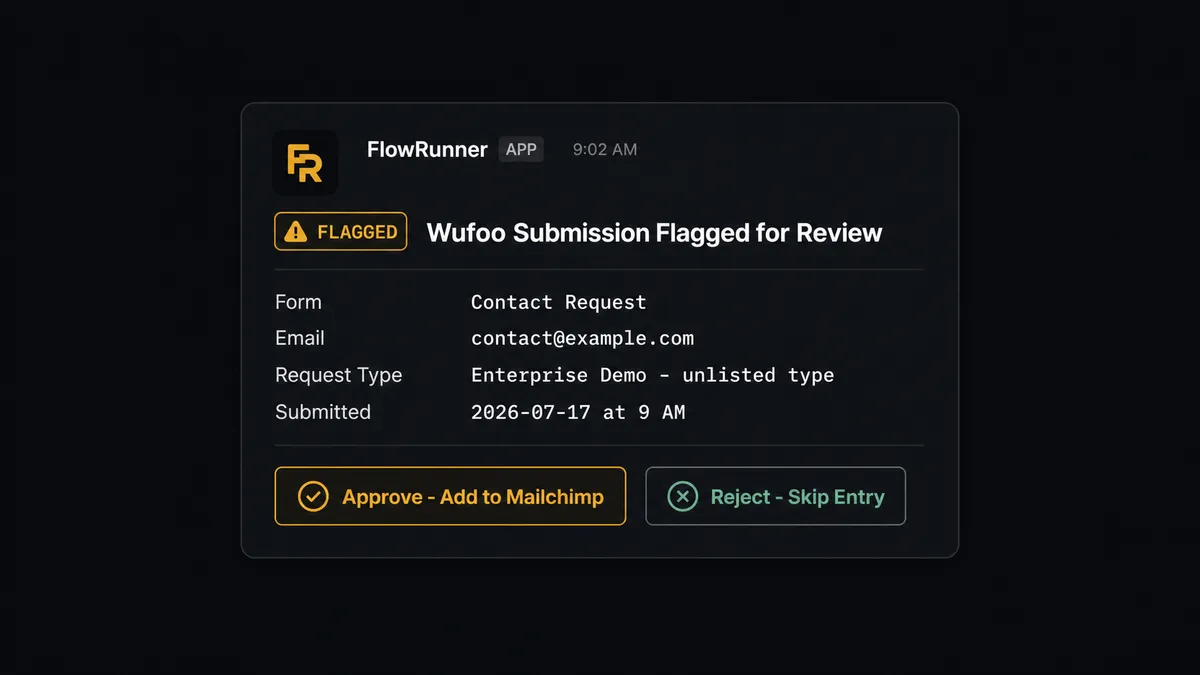
This is not a threshold. The agent does not escalate every submission above a certain count. It escalates the submission where the entry itself gives it reason to pause: an answer pattern it has not encountered, a field combination that does not match what this form normally collects, or a request type that would affect which Mailchimp audience and tag the subscriber should receive. The decision to involve a human is an agent judgment call, not a rule.
FlowRunner vs Zapier
Zapier is the natural comparison here. It connects thousands of apps, it is well-documented, and non-technical users set it up without support tickets. For a straightforward Wufoo-to-Mailchimp sync where every submission should be added automatically, Zapier works.
The differences that matter for this workflow are in what happens at the edges.
| Capability | Zapier | FlowRunner |
|---|---|---|
| Basic Wufoo to Mailchimp sync | Yes, with standard Zap triggers | Yes, via webhook or scheduled poll |
| Field ID resolution | Manual mapping in the Zap editor | Agent calls List Form Fields automatically before reading the entry |
| Human review on flagged entries | Conditional logic; requires a separate approval Zap | Native human-in-loop tool invoked by the agent based on entry context |
| Audit trail (who approved, when) | Not captured | Full decision log: reviewer identity, decision, timestamp |
| AI agent reasoning across submissions | Not available | Agent reads and reasons about each entry before acting |
| Unlimited users on every tier | No (user seat limits on most plans) | Yes, all tiers |
Zapier’s strength is speed to the first working Zap. FlowRunner’s difference is what happens when a submission does not fit the clean case. Zapier processes it or skips it based on the filter you configured. FlowRunner’s agent evaluates it and decides whether to ask someone.
Before and after
| Category | Before | After |
|---|---|---|
| Field ID mapping | Staff decode Wufoo’s Field1, Field105 by hand for each export | Agent calls List Form Fields automatically; downstream records carry readable labels |
| Time from submission to Mailchimp | Hours to days depending on export schedule | Real time via webhook; the subscriber is in the audience before the confirmation email arrives |
| Duplicate handling | Manual deduplication during import | Add Or Update List Member is idempotent; resubmissions update existing records |
| Flagged entries | Added anyway, or stuck in a spreadsheet | Agent holds flagged submissions for reviewer decision before writing to the audience |
| Audit trail | No record of what was added, adjusted, or rejected | Every agent decision, human approval, and rejection logged with timestamp and identity |
| Team access | Import file shared by whoever runs the export | Unlimited users on the FlowRunner workflow; any team member can review flagged entries |
What you can build
Lead capture to nurture sequence. A contact fills out a Wufoo demo request form. The agent maps the fields, calls Add Or Update List Member to add them to the Demo Requests audience, applies the “Demo-Request” tag with Add Tag, and logs a note via Add Member Note with the submission date and form source. The contact is immediately eligible for the demo follow-up sequence.
Event registration sync. A Wufoo event registration form feeds attendees directly into a Mailchimp audience segment. The agent maps registration fields to Mailchimp profile fields, applies an event-specific tag, and adds a custom event record with Add Event so the subscriber’s behavioral history reflects the registration.
Contact qualification gate. A Wufoo intake form asks qualifying questions before a contact reaches the sales team. The agent reads the labeled answers, adds clean submissions to the Qualified Leads audience, and holds submissions with incomplete or inconsistent answers for a reviewer. Rejected entries never reach the Mailchimp list.
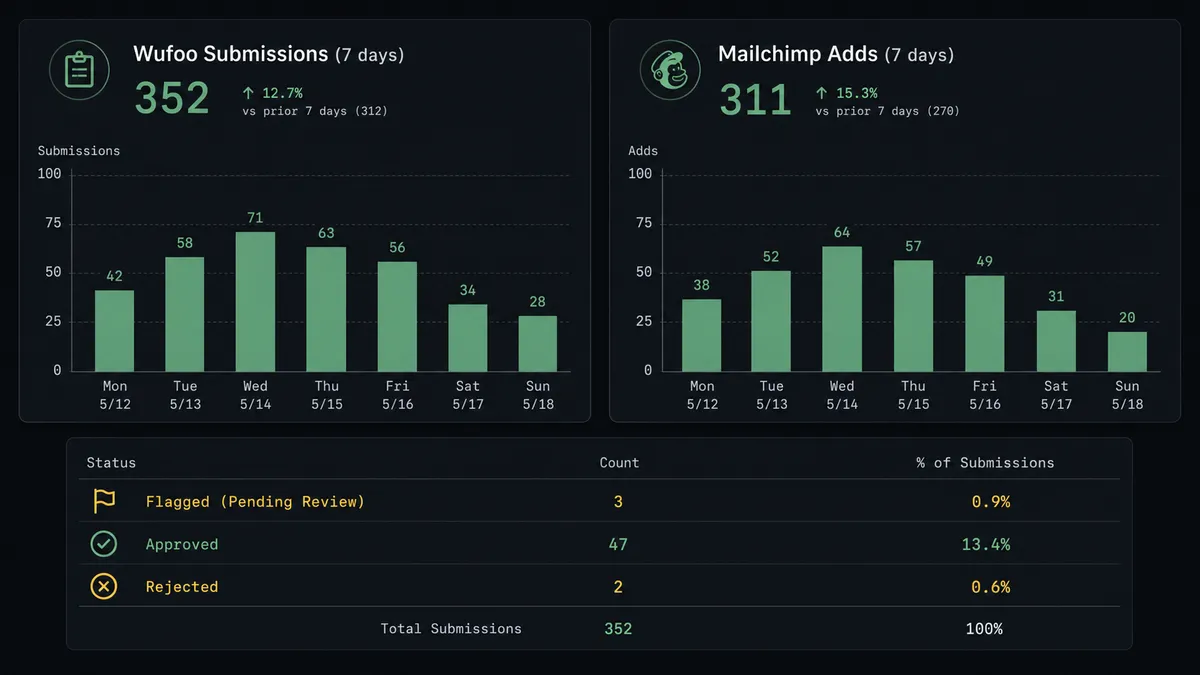
Weekly form submission digest. An agent calls Get Entry Count across multiple Wufoo forms each Monday, pulls campaign performance from Get Campaign Report in Mailchimp, and posts a combined digest to the team Slack channel. The form-to-list conversion rate is visible without anyone opening two dashboards.
Common questions
Is it free to connect Wufoo and Mailchimp Marketing on FlowRunner?
FlowRunner has a free plan with 100 executions a month, every integration included, and no credit card required, and new accounts get 14 days of Professional on top. Beyond the free plan, Growth is $45 per month. All tiers include unlimited users and unlimited workflows.
Does the agent need my own API key or AI provider account?
FlowRunner uses a bring-your-own-key model for AI providers, so you supply your own OpenAI, Anthropic, or other provider key. The Wufoo and Mailchimp Marketing connectors authenticate separately with their own API keys and are not part of the AI provider setup.
Can I self-host FlowRunner?
Yes. FlowRunner offers a free Community Edition for self-hosted single-instance deployments, and an Enterprise self-hosted tier with multi-instance clustering and the full compliance suite. The cloud-hosted tiers are the faster path to getting started.
What happens when the agent is not sure whether to add a subscriber?
The agent pauses and routes the flagged entry to the designated reviewer through Slack, email, or another configured channel. It packages the labeled Wufoo entry, the reason it flagged it, and the available options: approve to add, adjust the data, or reject. The agent waits for the response before acting.
Does this work if my Wufoo form uses field IDs instead of readable labels?
Yes. The FlowRunner Wufoo connector calls List Form Fields to map each Field ID to its label before the agent reads or routes the entry. The downstream Mailchimp record always carries readable field names, not raw IDs like Field1 or Field105.
Can I filter which Wufoo entries get added to Mailchimp?
Yes. The agent evaluates each labeled entry against conditions you configure before calling any Mailchimp action. Entries that meet subscription criteria are added automatically. Entries that meet review conditions pause for a human. Entries that do not meet either condition are skipped or routed to a separate log.
Getting started
FlowRunner has a free plan with 100 executions a month, every integration included, and no credit card required, and new accounts get 14 days of Professional on top. Corporate email required to start.
Connect both integrations from the FlowRunner integration directory: Wufoo and Mailchimp Marketing. Both connectors are built and verified against the live APIs.
Start your trial at flowrunner.ai or book a 30-minute walkthrough at calendly.com/flowrunner/intro if you want to see the human-in-loop flow running on a live example before you build.
Frequently asked questions
Is it free to connect Wufoo and Mailchimp Marketing on FlowRunner?
FlowRunner has a free plan with 100 executions a month, every integration included, and no credit card required, and new accounts get 14 days of Professional on top. Beyond the free plan, Growth is $45 per month. All tiers include unlimited users and unlimited workflows.
Does the agent need my own API key or AI provider account?
FlowRunner uses a bring-your-own-key model for AI providers, so you supply your own OpenAI, Anthropic, or other provider key. The Wufoo and Mailchimp Marketing connectors authenticate separately with their own API keys and are not part of the AI provider setup.
Can I self-host FlowRunner?
Yes. FlowRunner offers a free Community Edition for self-hosted single-instance deployments, and an Enterprise self-hosted tier with multi-instance clustering and the full compliance suite. The cloud-hosted tiers are the faster path to getting started.
What happens when the agent is not sure whether to add a subscriber?
The agent pauses and routes the flagged entry to the designated reviewer through Slack, email, or another configured channel. It packages the labeled Wufoo entry, the reason it flagged it, and the available options: approve to add, adjust the data, or reject. The agent waits for the response before acting.
Does this work if my Wufoo form uses field IDs instead of readable labels?
Yes. The FlowRunner Wufoo connector calls List Form Fields to map each Field ID to its label before the agent reads or routes the entry. The downstream Mailchimp record always carries readable field names, not raw IDs like Field1 or Field105.
Can I filter which Wufoo entries get added to Mailchimp?
Yes. The agent evaluates each labeled entry against conditions you configure before calling any Mailchimp action. Entries that meet subscription criteria are added automatically. Entries that meet review conditions pause for a human. Entries that do not meet either condition are skipped or routed to a separate log.