How to Connect Mailchimp Marketing with iAuditor (With or Without an AI Agent)
Turn iAuditor inspection results into targeted Mailchimp briefings for the right site managers, with an AI agent that segments by inspection outcome and pauses for an operations lead before any campaign reaches the network.
How do you connect Mailchimp Marketing to iAuditor?
You connect Mailchimp Marketing to iAuditor with a scheduled workflow that reads completed inspections through Search Inspections and Get Inspection, segments your site managers in Mailchimp with Add Member Tag and Add Or Update List Member based on how their sites performed, and sends the right briefing to each segment with Add Campaign and Send Campaign. Neither connector exposes an event trigger, so the workflow runs on a schedule, typically daily after site walks wrap. FlowRunner is a visual AI-agent orchestration platform where automations run autonomously and pause for human judgment on the steps that carry real consequence. Run as an agent, the connection reads the actual findings, decides which sites need which message, and holds every campaign send for an operations lead, because a compliance briefing to the network is an official record the moment it leaves.
The problem it solves
Multi-site operators live this cycle: inspections happen all week in iAuditor, and communication about them happens whenever someone gets around to it. An ops coordinator reads the inspection summaries, writes one generic email to every site manager, and pastes it into Mailchimp. The managers whose sites passed skim it and learn nothing. The managers whose sites failed get the same email as everyone else, with no specifics about their findings. The one message that needed urgency, the critical finding at two locations, is buried in paragraph four.
The edges are where it costs money. A manager never learns their site’s finding is still open, so the reinspection fails too. A network-wide alert about a recalled piece of equipment goes out two days late because the coordinator was traveling. And when leadership asks which managers actually read the compliance briefing, nobody knows, because the send list and the inspection data live in systems that have never met. Communication is the last mile of a compliance program, and it is the mile that usually goes unmeasured.
How it works: the connection
The connection reads iAuditor and writes to Mailchimp Marketing. Here is the plain version, grounded in the real connector actions.
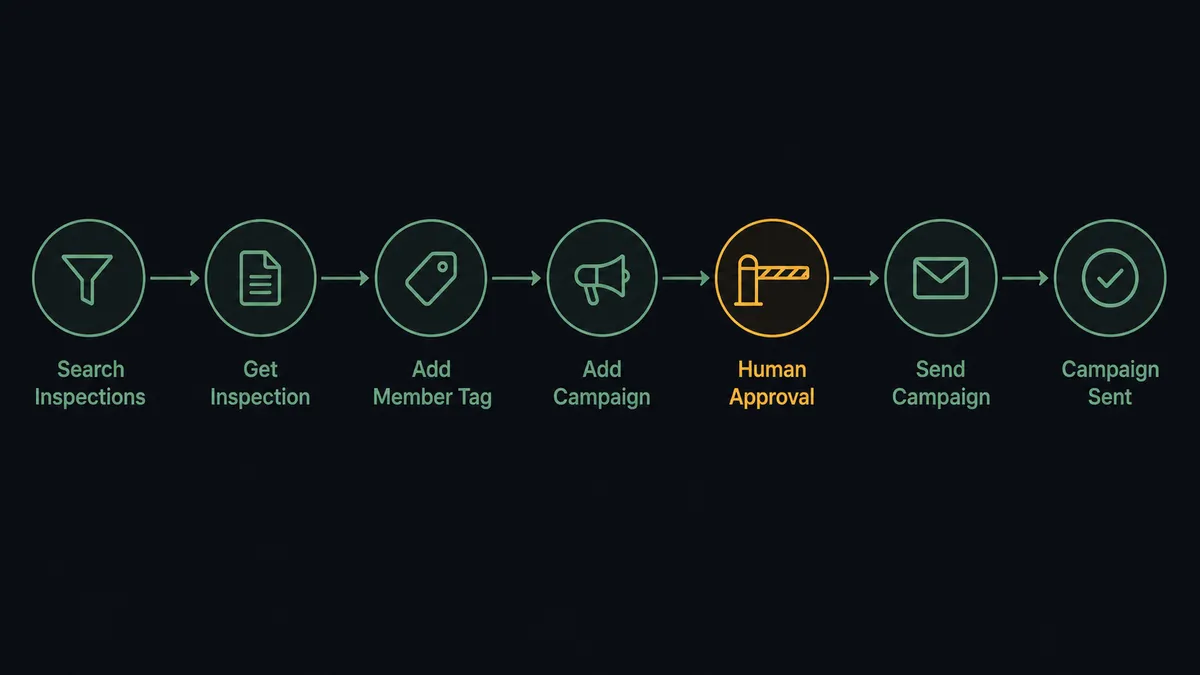
- Trigger: On a schedule, the daily run opens after site walks wrap.
- Read: Search Inspections gathers the day’s completed inspections, and Get Inspection pulls each one’s failed items and notes.
- Match the people: Search Users in iAuditor lines up inspectors and site owners with their Mailchimp list records via Search Member.
- Segment: Add Or Update List Member keeps the manager roster current, and Add Member Tag applies outcome tags: clean, open findings, critical. Remove Member Tag clears tags as sites resolve their items.
- Draft: Add Campaign creates the briefing for each segment, with the failing sites’ specifics in the failing sites’ version.
- Send: Send Campaign delivers each briefing to its segment.
- Close the loop: Get Campaign Report and Get Clicks Report show which managers engaged, and Create Action files an iAuditor follow-up for the sites that never opened theirs.
That is the “just connect them” answer. Every manager hears about their own sites, the network hears about network-level issues, and engagement is measured instead of assumed.
Can an AI agent run it? (and why a human stays in the loop)
Yes, and the agent is what turns a mail merge into an operations function. A fixed pipeline can tag managers and fire templates. An AI agent holds Search Inspections, Get Inspection, Search Users, Add Member Tag, Remove Member Tag, Add Or Update List Member, Add Campaign, Send Campaign, Get Campaign Report, and Create Action as tools, and it reasons about the findings themselves. Three sites failing the same refrigeration item in one week is not three isolated notes, it is a pattern that deserves a network-wide briefing with the pattern named. The agent drafts that briefing and states its evidence.
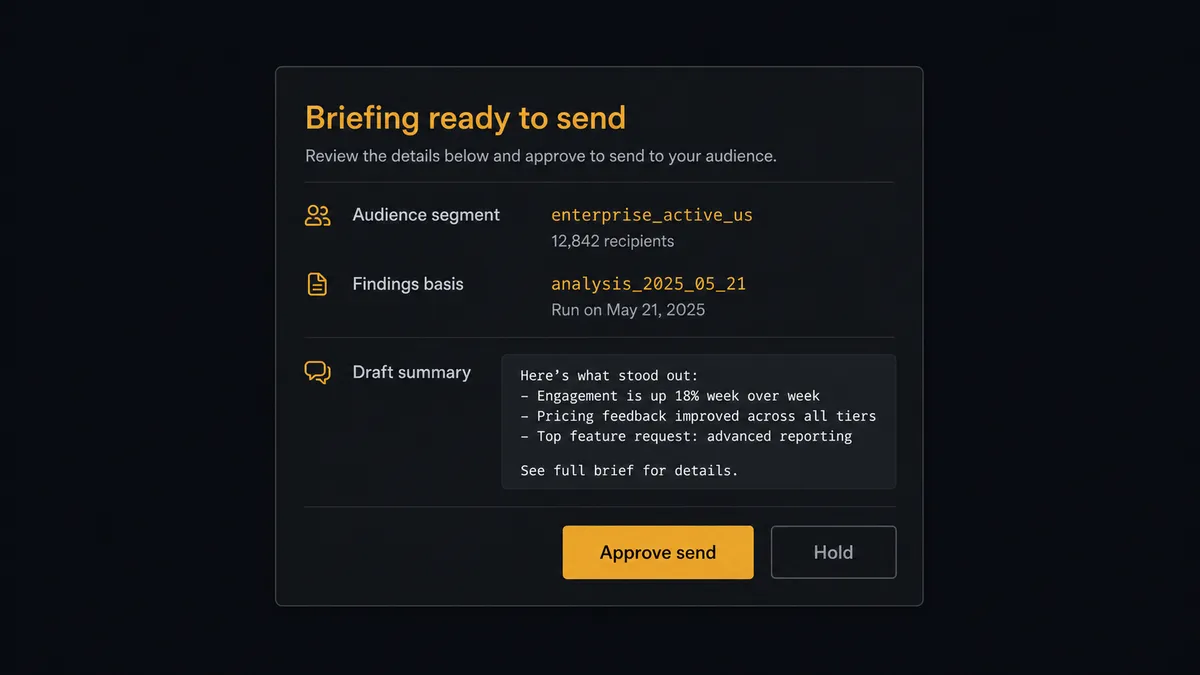
The consequential step is the send. Send Campaign to the manager network is an official communication: it sets expectations, creates knowledge the company is accountable for, and cannot be unsent. So the agent never calls it alone. It packages the audience, the segment logic, the draft, and the findings behind it, then invokes a human-in-loop flow it holds as a callable tool. The workflow pauses and posts to the operations channel: “Briefing ready for [segment]: [audience description]. Basis: [findings summary]. Draft attached. Approve send, edit, or hold?” Only after the operations lead approves does the campaign go out, and the approval is logged with the send.
The same gate covers the quiet destructive edge: Unsubscribe Or Delete List Member never runs against a manager record without sign-off, so a roster cleanup cannot silently drop someone from compliance communications. FlowRunner prospects call this pattern a digital andon cord: like Toyota’s line-stop cord, the workflow halts the line at the moment of consequence, and a person decides whether it moves.
FlowRunner vs Zapier
Zapier is a fair default for teams gluing a forms tool to an email tool: its connector catalog is the largest around, the editor is genuinely easy for non-technical staff, and templates cover plenty of inspection and email patterns. For a simple “inspection completed, notify someone” flow, Zapier gets there fastest.
The difference is that this workflow is not a notification, it is a judgment chain: what did the findings mean, who needs to know, and who signs off before the network hears. FlowRunner runs that chain as an agent with a native human gate.
| What matters for this pair | FlowRunner | Zapier |
|---|---|---|
| Human-in-the-loop on network sends | Native. The agent pauses before Send Campaign and waits for the operations lead | Available via added approval steps, not a native agent decision |
| Who runs the flow | An AI agent reads findings, segments, drafts, and picks actions as tools | Predefined step sequence you configure per Zap |
| Users included | Unlimited users on every tier | Priced by task volume; seats vary by plan |
| Bring your own AI keys | Yes, BYOK | AI features tied to Zapier’s own AI offering |
| Self-hosted option | Yes, cloud-hosted or self-hosted | Cloud only |
| Pricing model | Transparent workflow-based tiers | Per-task pricing; daily multi-site segmentation consumes tasks quickly |
If you need one notification when one form completes, use Zapier. If inspection outcomes should drive segmented, approved, measured communications across a site network, this pairing is the better fit.
Before and after
| Category | Before | After |
|---|---|---|
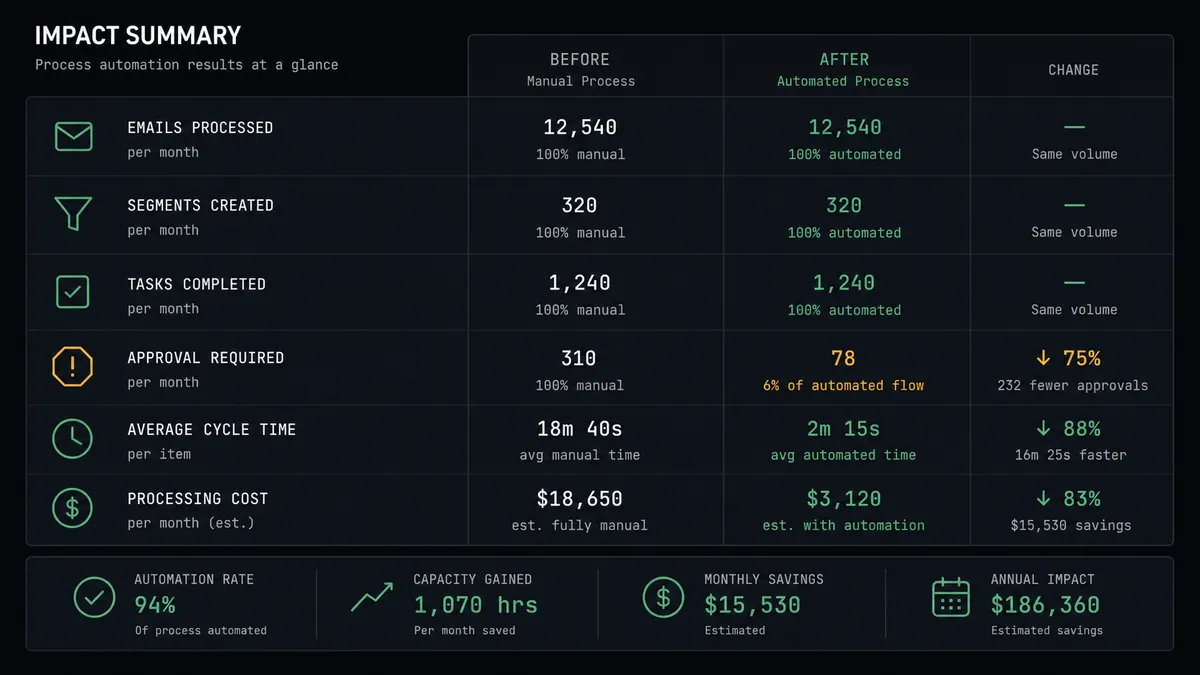
| Briefing relevance | One generic email to every manager regardless of their results | Each segment gets a briefing grounded in its own sites’ findings |
| Critical findings | Urgent items travel at the speed of a coordinator’s inbox | Critical outcomes are drafted for escalation the same day, with approval |
| Audience accuracy | The send list drifts from the actual manager roster | Add Or Update List Member keeps the roster current from inspection data |
| Engagement | Nobody knows who read the compliance briefing | Get Campaign Report ties opens and clicks back to specific sites |
| Follow-through | Unread briefings vanish without a trace | Non-engagement becomes a tracked iAuditor task via Create Action |
What you can build
Outcome-segmented weekly briefing. The daily runs accumulate outcome tags via Add Member Tag; on Friday the agent drafts three briefings with Add Campaign, one per segment, and sends each after approval. Managers stop ignoring compliance email because it is finally about their sites.
Pattern alert. When Get Inspection data shows the same item failing across multiple sites, the agent drafts a network-wide alert naming the pattern and the affected item, and routes it to the operations lead for an expedited approve-and-send.
Reinspection countdown. Sites with open findings get a targeted reminder sequence as their reinspection window closes, driven by their tag state, with Remove Member Tag retiring managers from the sequence the moment their findings clear.
Engagement-to-action loop. After each send, the agent reads Get Campaign Report and Get Clicks Report, maps non-openers to their sites, and files Create Action follow-ups in iAuditor so the unread briefing becomes someone’s tracked task.
Roster hygiene with a gate. The agent reconciles Search Users against the Mailchimp list, proposes additions via Add Or Update List Member automatically, and holds any Unsubscribe Or Delete List Member for approval so nobody silently falls out of the communication chain.
Getting started
Start on the free plan: 100 executions a month, every integration included, no credit card required, plus 14 days of Professional for new accounts. Both connectors are available on every tier, and every tier includes unlimited users and unlimited workflows.
Explore the integration details:
- Mailchimp Marketing integration (20 actions covering audiences, tags, campaigns, and reports)
- iAuditor integration (8 actions covering inspections, templates, and corrective actions)
Start building free at flowrunner.ai or book a demo to see a live Mailchimp Marketing to iAuditor workflow, send approval and all.
Frequently asked questions
Is it free to connect Mailchimp Marketing and iAuditor on FlowRunner?
You can build and run the connection on FlowRunner's free plan, which includes 100 executions a month and every integration with no credit card required, and new accounts also get 14 days of Professional. Both connectors are available on every FlowRunner tier, and every tier includes unlimited users and unlimited workflows.
Can I self-host the Mailchimp Marketing to iAuditor workflow?
Yes. FlowRunner offers a cloud-hosted option and a self-hosted option, so the connection can run inside your own environment.
Does the AI agent need my own OpenAI or Claude key?
FlowRunner uses a bring-your-own-keys model, so you connect the AI provider key you already have. You are not locked to one model.
What happens when the agent is unsure whether a finding warrants a network-wide briefing?
It asks before it addresses the network. The agent posts the finding, the affected sites, and its recommended audience to the operations channel and waits. A person decides whether this goes to every manager, only the affected sites, or nobody, and that decision is recorded.
Which Mailchimp Marketing and iAuditor actions does this workflow use?
Both connectors are action-based, so the workflow runs on a schedule. It reads iAuditor with Search Inspections, Get Inspection, and Search Users, segments the audience with Add Member Tag, Remove Member Tag, and Add Or Update List Member, and sends with Add Campaign and Send Campaign. Get Campaign Report closes the loop on who engaged.
Can the workflow follow up with managers who never open the briefing?
Yes. After a send, the agent reads Get Campaign Report and Get Clicks Report, matches non-engagement to sites, and creates follow-up work in iAuditor with Create Action so an unread compliance briefing becomes a tracked task instead of a silent gap.