How to Connect Mailchimp Marketing with Formbricks (With or Without an AI Agent)
Connect Formbricks survey responses to Mailchimp Marketing so feedback reshapes your segments automatically, with an AI agent that tags members by what they actually said and pauses for a human before a follow-up campaign reaches unhappy customers.
How do you connect Mailchimp Marketing to Formbricks?
You connect Mailchimp Marketing to Formbricks by polling List Responses for your watched surveys on a schedule, pulling each submission’s answers with Get Response, finding the respondent in your audience with Search Member, and reshaping their segment with Add Member Tag and Add Member Note. FlowRunner is a visual AI-agent orchestration platform where automations run autonomously and pause for human judgment on the steps that carry real consequence. Run as an agent, the same connection reads what each respondent actually wrote, tags on its own, and pauses for a named human before Send Campaign puts a follow-up in front of people who just told you they are unhappy.
The problem it solves
Today your survey tool and your email tool disagree about who your customers are. Formbricks knows someone rated you poorly on Tuesday and wrote two paragraphs about why. Mailchimp knows the same person as “subscribed, opens sometimes” and cheerfully queues them for Thursday’s promotional blast. The person connecting those two facts is a marketer with two dashboards and no time, so segmentation by actual feedback happens quarterly, manually, or never.
The edges are relationship-enders. A customer describes a painful failure in your survey and receives a “we miss you, here’s a discount” email the next morning, proof nobody read a word. Another writes “stop emailing me” into a free-text field, which is a consent signal your email platform never sees, and keeps receiving campaigns. Meanwhile your happiest respondents, the ones who volunteered praise, never get asked for the review or referral they were plainly willing to give. Every one of those is a person telling you something and the machine answering with noise.
How it works: the connection
The connection reads from Formbricks and writes to Mailchimp Marketing. Here is the plain version, grounded in the real connector actions.
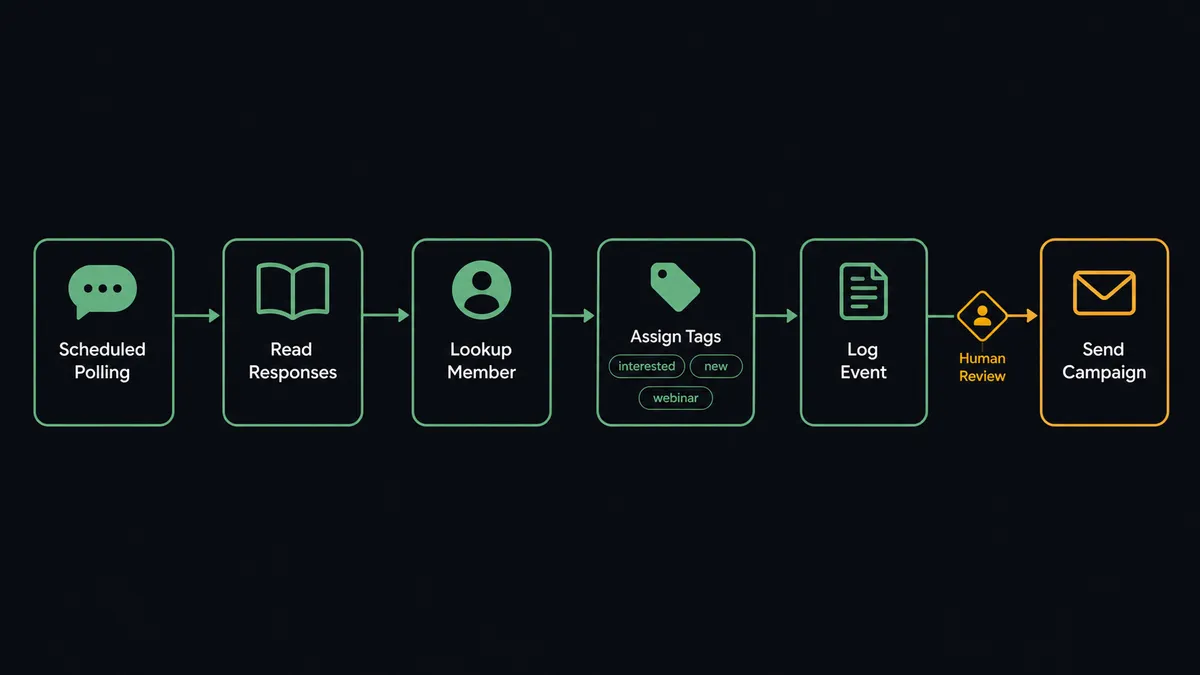
- Trigger: On a schedule, the workflow runs List Responses for each survey chosen via List Surveys, comparing against already-processed response IDs.
- Read: Get Response pulls the full answer data, finished status, contact association, and metadata for each new submission.
- Match: Search Member finds the respondent in the Mailchimp audience by email, so feedback attaches to the record your campaigns actually use.
- Tag: Add Member Tag applies the outcome, for example the survey name and score band, and Remove Member Tag clears outdated states so segments stay true.
- Preserve the words: Add Member Note writes the free-text answer onto the member profile, so anyone drafting to this segment can read what these people said.
- Log the moment: Add Event records the survey completion on the member, giving journeys and reporting a dated marker to react to.
- Measure the follow-up: After any campaign to a feedback-derived segment, Get Campaign Report pulls opens and clicks so the loop learns.
That is the “just connect them” answer. Survey answers stop dying in a dashboard and start reshaping the segments your email actually sends to, with the respondent’s own words attached to their record.
Can an AI agent run it? (and why a human stays in the loop)
Yes, and reading is the point. The agent holds the pair’s actions as tools: List Responses, Get Response, List Contacts, Search Member, Add Member Tag, Remove Member Tag, Add Member Note, Add Event, Send Campaign, Unsubscribe Or Delete List Member. A score-based rule sees a low rating; the agent sees why. A low score with “too expensive for us right now” is a pricing objection worth a different tag than a low score with “support never answered.” A high score with “but the export keeps failing” is loyalty carrying a defect report, and the agent tags the loyalty and routes the defect instead of filing the whole person under “happy.”
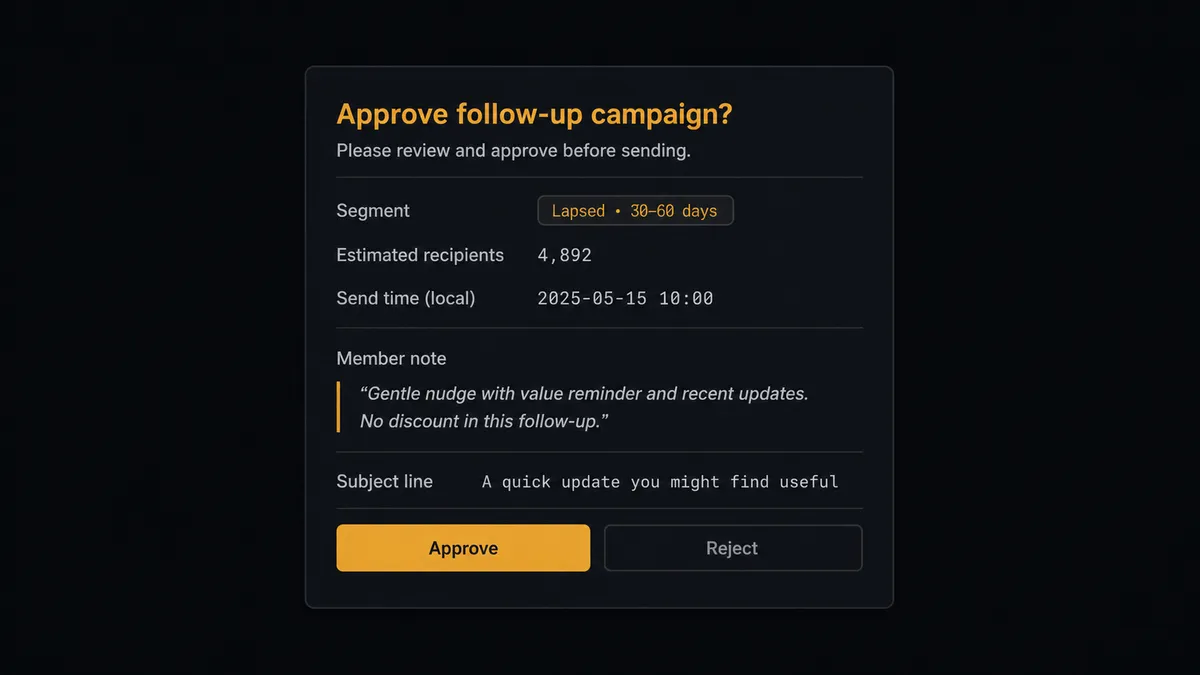
The consequential step is Send Campaign to a segment built from negative feedback. These are your most fragile recipients: they just told you what is wrong, and the next email either proves you listened or proves you did not. Wrong tone, wrong timing, or a generic discount to someone describing a serious failure does damage no later campaign undoes. So the agent drafts the follow-up but does not send it. It invokes a human-in-loop flow it holds as a callable tool, and the workflow pauses and posts: “Follow-up drafted for the detractor segment from [survey name]. Draft and audience definition attached, member notes quoted. Approve to send?” Only after a named approver signs off does Send Campaign fire.
Consent signals get an even harder stop. A respondent writing “stop emailing me” triggers a proposed Unsubscribe Or Delete List Member with the quote attached, executed only on confirmation. Prospects call this a digital andon cord: the workflow stops the line the moment it hits a step that touches trust, and your team pulls it back into motion.
FlowRunner vs Zapier
Zapier is a fair default here: it connects survey tools to Mailchimp cleanly, its editor is quick to learn, and a Zap that tags a member when a response arrives takes minutes to build. For a simple “responded to survey” tag, it is honestly all you need.
The difference is what happens after the tag. Feedback segmentation is only valuable when someone emails those segments, and that send is precisely where a fixed automation is weakest.
| What matters for this pair | FlowRunner | Zapier |
|---|---|---|
| Human-in-the-loop on Send Campaign to detractor segments | Native. The agent drafts, then a named approver reviews before the send | Available via added approval steps, not a native agent decision |
| Who runs the flow | An AI agent reads response text, reasons, picks actions as tools | Predefined step sequence you configure per Zap |
| Users included | Unlimited users on every tier | Priced by task volume; seats vary by plan |
| Bring your own AI keys | Yes, BYOK | AI features tied to Zapier’s own AI offering |
| Self-hosted option | Yes, cloud-hosted or self-hosted | Cloud only |
| Pricing model | Transparent workflow-based tiers | Per-task pricing; polling plus multi-step tagging consumes tasks fast |
If you just need responses to leave a mark on member records, Zapier does it. If you want segments that reflect what people actually wrote and a human approving every email that answers criticism, this pairing is the better fit.
Before and after
| Category | Before | After |
|---|---|---|
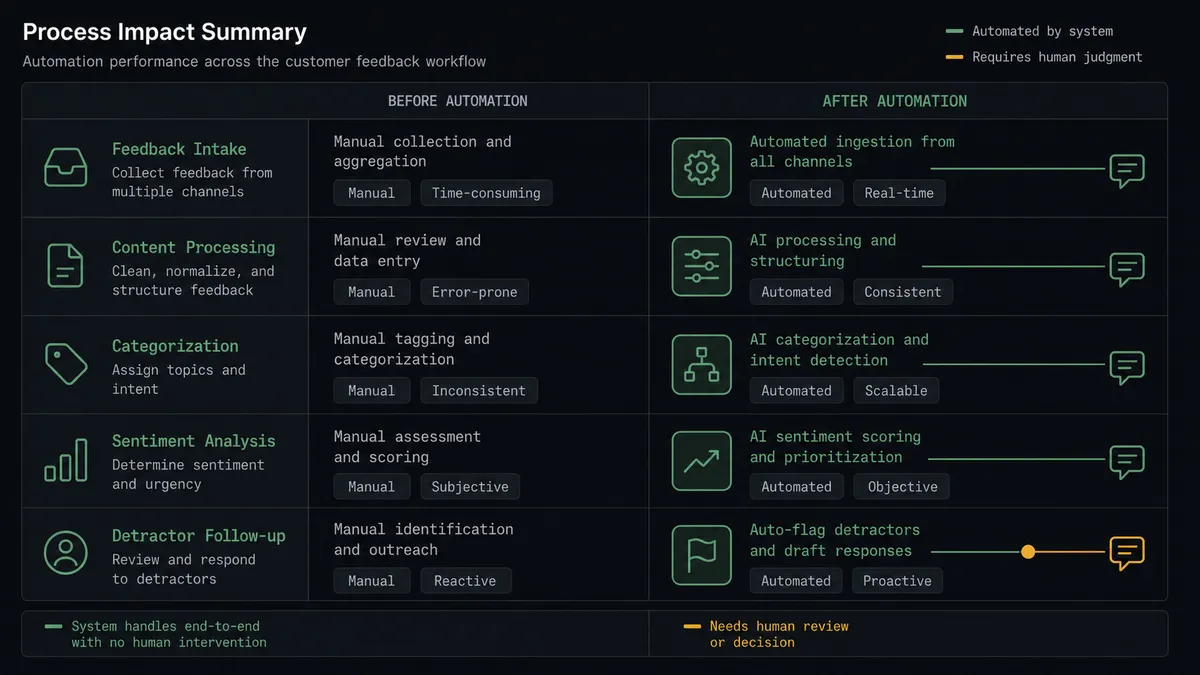
| Segmentation | Survey results and email segments reconcile quarterly, by hand, if at all | Tags update within the polling interval of each response |
| Context for drafting | Campaign writers see a tag, never the words behind it | Add Member Note quotes the response on the member profile |
| Detractor follow-up | Unhappy customers get the same promotional blast as everyone | Follow-ups are drafted per segment and sent only after named approval |
| Consent signals | ”Stop emailing me” in a free-text field goes nowhere | Proposed removal with the quote attached, executed on confirmation |
| Promoter moments | Volunteered praise expires unread | Happy respondents are tagged for review and referral asks the same day |
What you can build
Feedback-true segments, hands off. List Responses and Get Response feed each answer to the agent, Search Member finds the respondent, and Add Member Tag with Add Member Note reshapes the audience with the evidence attached.
Detractor follow-up with a named approver. The agent drafts a specific, non-promotional reply campaign for the at-risk segment, and Send Campaign runs only after a human reads the draft against the quoted notes.
Promoter harvest. Respondents whose answers volunteer praise get tagged the same day, and the agent queues the review or referral ask while the goodwill is fresh, with Add Event marking the touch so nobody asks twice.
Consent guardian. Any response reading as an opt-out request becomes a proposed Unsubscribe Or Delete List Member with the member’s words quoted, keeping your list clean and your compliance posture honest.
Closed-loop reporting. After each follow-up send, the agent pairs Get Campaign Report engagement with the originating survey’s responses and posts a summary of which feedback themes got answered and how those members responded, so the loop is measured, not assumed.
Getting started
Start on the free plan: 100 executions a month, every integration included, no credit card required, plus 14 days of Professional for new accounts. Both connectors are available on every tier, and every tier includes unlimited users and unlimited workflows.
Explore the integration details:
- Mailchimp Marketing integration (20 actions covering audiences, tags, campaigns, and reports)
- Formbricks integration (9 actions covering surveys, responses, and contacts)
Start building free at flowrunner.ai or book a demo to see a live Formbricks to Mailchimp Marketing workflow, detractor-send approval and all.
Frequently asked questions
Is it free to connect Mailchimp Marketing and Formbricks on FlowRunner?
You can build and run the connection on FlowRunner's free plan, which includes 100 executions a month and every integration with no credit card required, and new accounts also get 14 days of Professional. Both connectors are available on every FlowRunner tier, and every tier includes unlimited users and unlimited workflows.
Can I self-host the Mailchimp Marketing to Formbricks workflow?
Yes. FlowRunner offers a cloud-hosted option and a self-hosted option, so the connection can run inside your own environment.
Does the AI agent need my own OpenAI or Claude key?
FlowRunner uses a bring-your-own-keys model, so you connect the AI provider key you already have. You are not locked to one model.
What happens when a respondent asks to stop receiving emails in their survey answer?
The agent treats that as a consent signal, not a sentiment. It posts the response text and the member's profile to a named approver and proposes Unsubscribe Or Delete List Member. The removal happens only after confirmation, and the response is preserved as the reason in the member's note.
Neither connector lists a catalog trigger. How does the workflow start?
On a schedule. The workflow polls List Responses for each watched Formbricks survey at your chosen interval, pulls full answer data with Get Response, and processes only responses it has not already handled.
Which actions does this connection use on each side?
On the Formbricks side: List Surveys, List Responses, Get Response, and List Contacts. On the Mailchimp side: Search Member, Add Member Tag, Remove Member Tag, Add Member Note, Add Event, Send Campaign, and Get Campaign Report.