Wave + Google Sheets: Sheet Rows Become Reviewed Invoices
Connect Wave and Google Sheets so a billing request row drafts a Wave invoice and Wave's transactions flow back into a reconciliation sheet, with an AI agent that pauses for a bookkeeper before an unusual invoice goes out.
How do you connect Wave to Google Sheets?
Connect Wave to Google Sheets by having a new row in a Google Sheets tracker (On New Row) trigger Wave’s List Customers, Create Invoice, Approve Invoice, and Send Invoice actions in sequence, or by running the connection the other direction: pulling Wave’s List Transactions and List Accounts data into a Google Sheets tab with Add Row for weekly reconciliation. FlowRunner is a visual AI-agent orchestration platform where automations run autonomously and pause for human judgment on the steps that carry real consequence. The same connection can run as an AI agent that reads each row, reasons about it, and calls a human-in-loop tool before Wave sends an invoice that looks unusual.
The problem it solves
A sales rep or account manager fills out a billing request the same way most small teams do: a row in a shared spreadsheet, or a Slack message that eventually becomes a row. The bookkeeper checks the tracker when they have a minute, retypes the customer name into Wave, looks up whether that customer already exists, prices each line item by hand, and drafts the invoice. On a slow week this takes a few minutes per row. On a busy week, requests stack up, invoicing trails the sale by days, and nobody notices until a customer asks where their bill is.
The other half of the problem shows up at month end. Wave holds the transaction and account data, but nobody is watching it in real time, so the ledger gets reviewed in a burst at tax time instead of continuously. Uncategorized entries and unusual account activity sit unexamined for weeks. The owner or ops lead wants a weekly picture of the books without opening Wave and scrolling a ledger, and the bookkeeper wants that picture to build itself instead of becoming a Friday-afternoon export job. Both problems are the same shape: work that should be an event-driven handoff between two systems is instead a person copying data between them, and exceptions fall through the cracks because nobody is watching every row and every transaction at once.
How it works: the connection
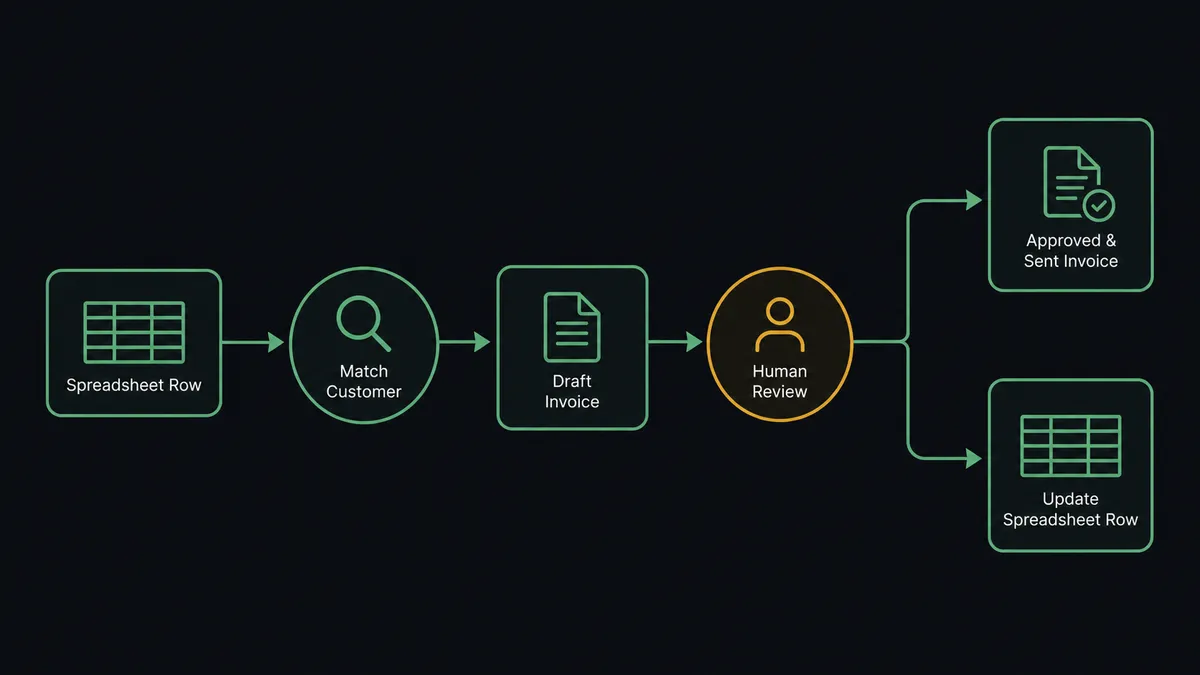
The billing side of the connection starts on Google Sheets. When a new row lands in a billing request tracker, On New Row fires and the flow reads the row’s values against the mapped header columns: customer name, line items, PO number, memo. Wave’s List Customers runs first, paging through the business’s customers to find a match by name so billing history stays on one record. If no match exists, Create Customer adds the buyer with the display name from the row.
With the customer resolved, Create Invoice drafts the invoice using product-based line items, dates, the PO number, and any memo carried over from the row. Wave’s API always produces a draft here, never a live bill, which is what makes this step safe to run at machine speed without a person watching every keystroke. The draft then waits for Approve Invoice and Send Invoice, the two actions that turn a draft into something a customer actually receives.
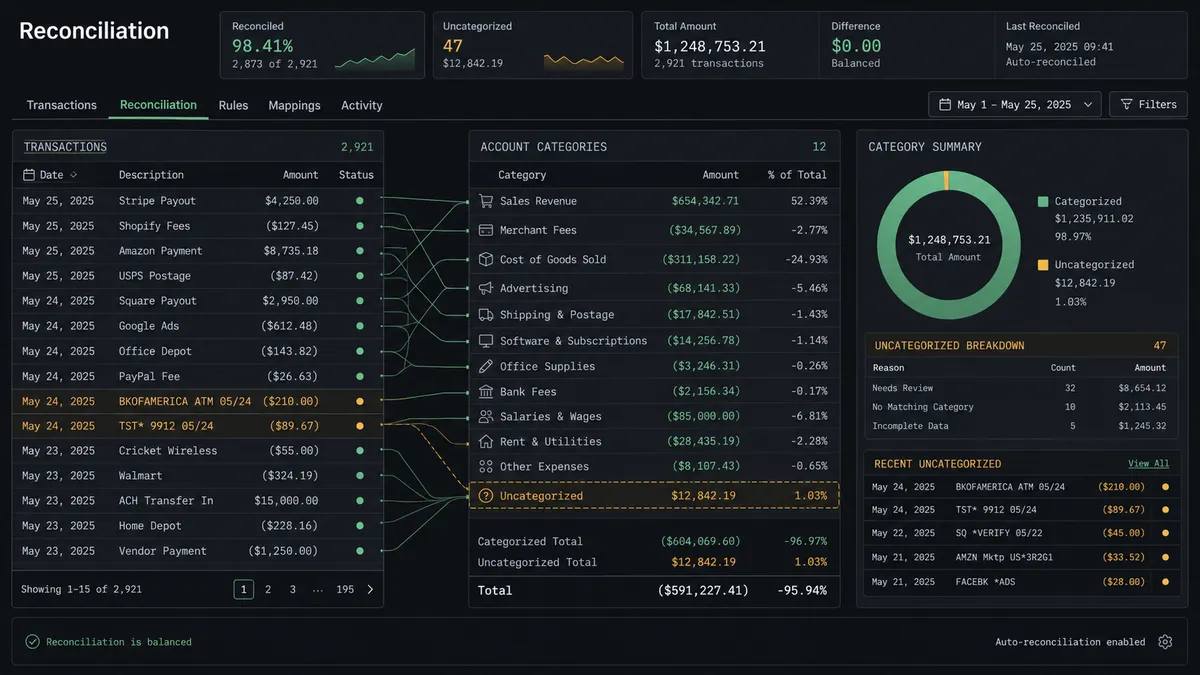
The reconciliation side runs the connection in reverse. On a weekly schedule, List Transactions pulls the period’s bookkeeping entries from Wave and List Accounts frames them against the chart of accounts. The flow writes the results into a Google Sheets tab with Add Row: cash movement by account, anything uncategorized, anything hitting an account that is unusual for its type. Once an invoice sends, Update Row writes the status and the invoice’s shareable link back to the original tracker row, so the sheet reflects what happened in Wave without anyone opening Wave to check.
Can an AI agent run it? (and why a human stays in the loop)
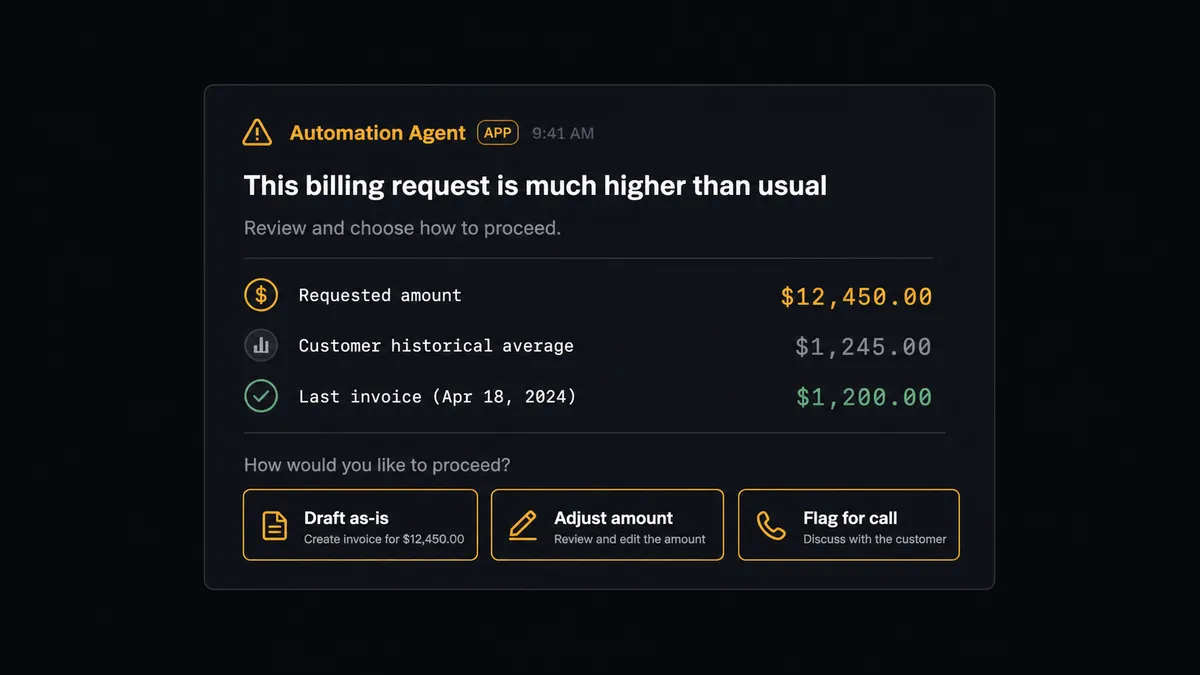
An AI agent can run this whole connection, and the difference from a plain sync tool shows up at the moment a request looks wrong. Zapier or a basic sync can move a row into an invoice on a fixed rule. FlowRunner’s agent reads the row, evaluates it against what it already knows from Wave, and decides whether to proceed on its own or bring in a person, calling the human-in-loop flow as a tool rather than following a hardcoded threshold.
Say a new row in the tracker requests an $18,400 invoice for a customer whose last three invoices in Wave, pulled with List Invoices, averaged $2,100. The agent does not draft it and move on. It packages the requested amount, the customer’s invoice history, and the line items from the row, and invokes the human-in-loop tool to message the bookkeeper on Slack before Create Invoice even runs: “Row 42 in Billing Requests asks for an $18,400 invoice to Acme Retail. Their last three invoices averaged $2,100. Draft as-is, adjust the amount, or flag for a call.” The bookkeeper responds, and the agent resumes with that decision as input. A routine $1,800 request from a customer with a matching history drafts and reaches the standard approval step without ever generating a Slack message.
This is not a sync tool. The agent knows when to stop and ask, and every pause, the reason for it, and who decided is captured in the audit trail. Prospects call this a digital andon cord: the line keeps moving until the agent hits something that warrants a human, and then it stops the line instead of guessing.
FlowRunner vs Zapier
Zapier is a reasonable default for small teams connecting Wave and Google Sheets. It is genuinely easy to set up, has broad app coverage, and most bookkeepers or ops leads can build a basic Zap without help. For a straight row-to-invoice sync with no judgment involved, it works.
Where the two differ is what happens when a row is not routine. Zapier does not reason about a request before it acts; it runs the rule it was given. FlowRunner’s agent decides, on its own judgment, when a request deserves a person’s eyes before Wave sends anything.
| What matters for this connection | FlowRunner | Zapier |
|---|---|---|
| Review before Wave sends the invoice | The agent reasons about the row and invokes a human-in-loop step as a tool call when something looks off | Runs the mapped action every time; adding judgment means building and maintaining conditional branches by hand |
| Users on your plan | Unlimited on every tier | Priced per user as you add teammates on higher tiers |
| AI provider for the agent | BYOK, bring your own Claude or OpenAI key | AI features run on Zapier’s own metered credits |
| Self-hosting | Free Community Edition, self-hosted Enterprise for multi-instance | Cloud-only |
| Pricing model | Flat workflow-based tiers with a clear execution cap | Per-task pricing that climbs as row and invoice volume grows |
Before and after
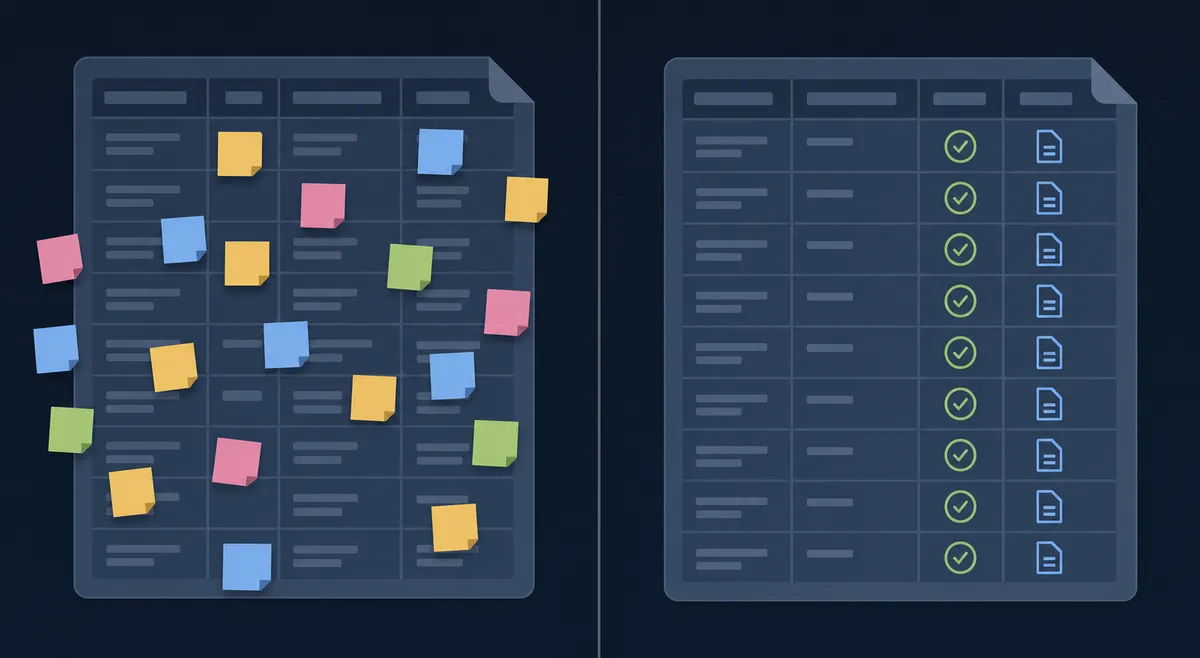
| Billing requests | A rep drops a note or a row and it waits until the bookkeeper has time to act on it | A new row becomes a draft invoice with the right customer and line items automatically | | Bookkeeper’s task | Retype the request into Wave, look up or create the customer, price each line by hand | Open one draft, check the amount and history, approve | | Overdue follow-up | Unpaid invoices surface only when someone remembers to check | The agent sweeps invoice status weekly and flags accounts with a pattern for a personal call | | Ledger visibility | The books get reviewed in a burst at tax time | Transactions and account balances write into a reconciliation tab every week | | The tracker sheet | A list that goes quiet after the row is entered | The sheet reflects the invoice status and link the moment it sends |
What you can build
Billing request tracker to sent invoice A new row in Google Sheets (On New Row) triggers List Customers and Create Invoice in Wave; the bookkeeper approves the draft, Approve Invoice and Send Invoice fire, and Update Row writes the outcome back to the sheet.
Weekly reconciliation digest List Transactions and List Accounts pull Wave’s ledger on a schedule and write cash movement and uncategorized entries into a Google Sheets tab with Add Row, so the owner reads one page instead of scrolling Wave.
Overdue receivables sheet List Invoices filtered to unpaid and overdue writes results into a tracking sheet, and the agent flags customers with repeat overdue history for a personal call instead of a template reminder.
Product catalog sync check Get Rows on a pricing sheet compares against List Products in Wave, and Format Row marks any mismatched price for the owner to fix before it reaches an invoice.
Common questions
Is it free to connect Wave and Google Sheets on FlowRunner? Yes to start. FlowRunner has a free plan with 100 executions a month, every integration included, and no credit card required, and new accounts get 14 days of Professional on top.
Can I self-host this Wave and Google Sheets connection? Yes. The free Community Edition runs a single self-hosted instance, and the self-hosted Enterprise tier adds multi-instance clustering and full audit retention for teams that need it.
Does the AI agent need my own OpenAI key? FlowRunner uses a bring-your-own-key model for AI providers, so the agent runs on your own Claude, OpenAI, or other provider key rather than a metered credit pool baked into the plan.
What happens when the agent isn’t sure about a row or an invoice? The agent invokes a human-in-loop step as a tool call: it packages the row or invoice details, the reason it paused, and the options, then routes the decision to the bookkeeper by Slack or email and resumes once a person answers.
Can I keep human approval only on Wave invoices and let Google Sheets updates run automatically? Yes. Human-in-loop is scoped per step, so the agent can write status updates and reconciliation rows to Google Sheets without a pause while still holding for review before Approve Invoice and Send Invoice fire in Wave.
Which trigger starts the flow, and can I run reconciliation on a schedule instead of on a row? The billing flow starts on Google Sheets’ On New Row trigger; the reconciliation flow that pulls Wave’s transactions and accounts into a sheet typically runs on a schedule, such as every Friday, rather than on a trigger from either app.
Getting started
FlowRunner has a free plan with 100 executions a month, every integration included, and no credit card required, and new accounts get 14 days of Professional on top. Build the billing tracker flow first, add the human-in-loop step before Wave sends anything, then layer in the weekly reconciliation flow once the first one is running clean.
Start at flowrunner.ai or book a walkthrough at calendly.com/flowrunner/intro.
Frequently asked questions
Is it free to connect Wave and Google Sheets on FlowRunner?
Yes to start. FlowRunner has a free plan with 100 executions a month, every integration included, and no credit card required, and new accounts get 14 days of Professional on top.
Can I self-host this Wave and Google Sheets connection?
Yes. The free Community Edition runs a single self-hosted instance, and the self-hosted Enterprise tier adds multi-instance clustering and full audit retention for teams that need it.
Does the AI agent need my own OpenAI key?
FlowRunner uses a bring-your-own-key model for AI providers, so the agent runs on your own Claude, OpenAI, or other provider key rather than a metered credit pool baked into the plan.
What happens when the agent isn't sure about a row or an invoice?
The agent invokes a human-in-loop step as a tool call: it packages the row or invoice details, the reason it paused, and the options, then routes the decision to the bookkeeper by Slack or email and resumes once a person answers.
Can I keep human approval only on Wave invoices and let Google Sheets updates run automatically?
Yes. Human-in-loop is scoped per step, so the agent can write status updates and reconciliation rows to Google Sheets without a pause while still holding for review before Approve Invoice and Send Invoice fire in Wave.
Which trigger starts the flow, and can I run reconciliation on a schedule instead of on a row?
The billing flow starts on Google Sheets' On New Row trigger; the reconciliation flow that pulls Wave's transactions and accounts into a sheet typically runs on a schedule, such as every Friday, rather than on a trigger from either app.