How to Connect Typeform with HubSpot (With or Without an AI Agent)
Connect Typeform and HubSpot so every form submission creates or updates a HubSpot contact and deal automatically, optionally running as an AI agent that pauses for human review before writing duplicate or sensitive records.
How do you connect Typeform to HubSpot?
You connect Typeform to HubSpot by using the Typeform Get Form Responses action as the data source and the HubSpot Create Contact, Create Deal, and Associate Objects actions as the downstream steps. FlowRunner is a visual AI-agent orchestration platform where automations run autonomously and pause for human judgment on the steps that carry real consequence. The same connection that moves form submissions into your CRM can run as an AI agent that checks for duplicates, evaluates submission content, and pauses for a human before writing anything it is not certain about.
What problem does this solve?
Right now, someone on your team is looking at a Typeform submission notification and manually copying the name, email, and company into HubSpot. Then they create a contact. Then they create a deal. Then they associate the two. Then they realize the contact already exists because someone filled out a different form three months ago. They spend 10 minutes untangling the duplicate, and that is when they catch it. When they do not catch it, your CRM gains another stale duplicate that pollutes your pipeline reports and sends two reps after the same prospect.
The problem is not that the process is hard. It is that the process is manual, so it runs only when someone has time for it. Webinar registrations pile up over a weekend. Trade show leads sit in a spreadsheet until someone processes them Tuesday afternoon. By the time those contacts land in HubSpot, the moment has passed. The opportunity fell through the cracks because the handoff between form and CRM required a person to carry it.
How it works: the Typeform to HubSpot connection
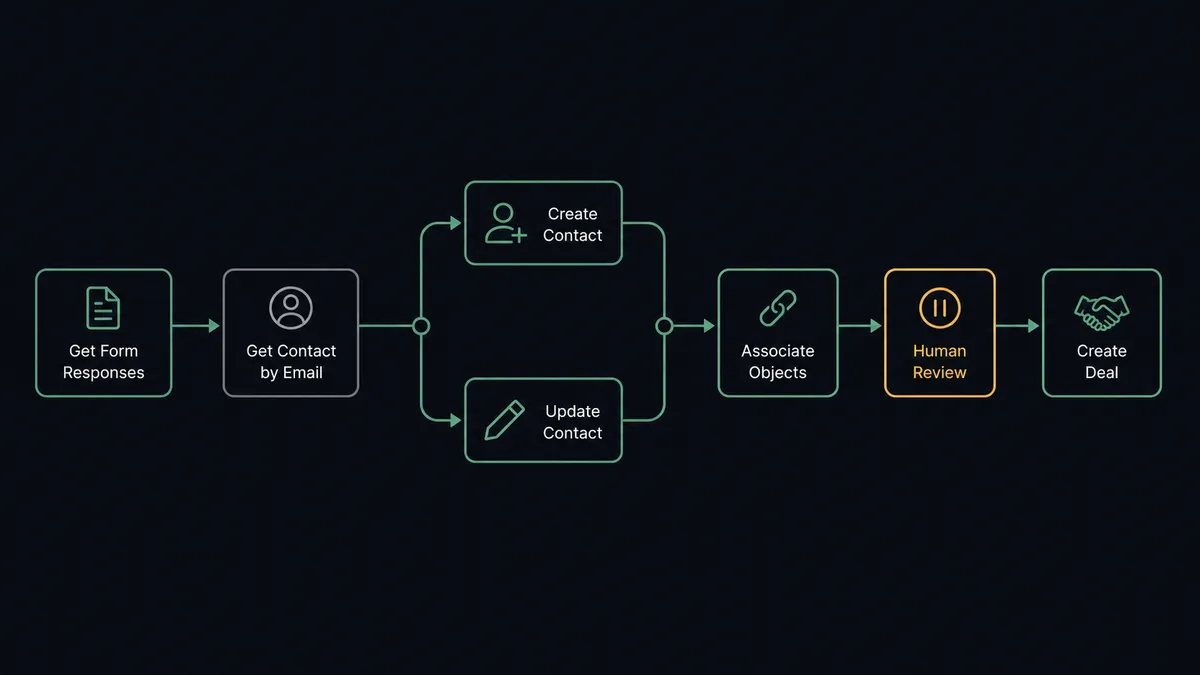
The workflow runs on a schedule. At each interval, the agent calls Typeform’s Get Form Responses action to retrieve submissions since the last check. For every new response, it extracts the respondent’s email address and calls HubSpot’s Get Contact by Email action to look up whether a record already exists.
If no contact exists, the agent calls Create Contact to create a new record, maps the Typeform fields to HubSpot properties, and then calls Associate Objects to link the contact to the correct company record. If a contact already exists, it calls Update Contact to apply any new information from the form.
After the contact is in place, the agent calls Create Deal to open a deal in the inbound pipeline at the right lifecycle stage. The deal is associated with the contact and company. Total time from form submission to CRM record: under 30 seconds, with no one touching a keyboard.
The actions available across both integrations give the agent a precise toolset. On the Typeform side: Get Form Responses to retrieve submissions, Get Form Insights to pull analytics, and Get Form to read field structure before mapping. On the HubSpot side: Get Contact by Email for deduplication, Create Contact and Update Contact for record management, Create Deal and Update Deal for pipeline management, and Associate Objects to maintain the relationship graph.
Can an AI agent run it? (And why a human stays in the loop)
A standard Zapier or n8n connection moves every Typeform submission into HubSpot without reading what is in it. The agent does not work that way. It reads the submission, evaluates what it finds, and decides what to do. The agent has Get Form Responses, Get Contact by Email, Create Contact, Update Contact, Create Deal, and Associate Objects as its tools. It chooses which ones to call and in what order based on what the submission actually contains.
The decision point that matters is duplicate detection. Say a respondent submits a form with an email that already exists in HubSpot under two different company associations. The agent finds the conflict. It does not silently pick one. It invokes the human-in-loop subflow.
The agent packages the context: the incoming form data, the two existing records, the conflicting company associations, and a plain-language summary of what it found. It sends this to the CRM admin via Slack: “I found two contacts matching this email with different company associations. Which record should I link this deal to? Option A: [contact 1, company 1]. Option B: [contact 2, company 2].” The admin clicks one option. The workflow resumes. The decision, the admin’s identity, and the timestamp go into the audit trail.
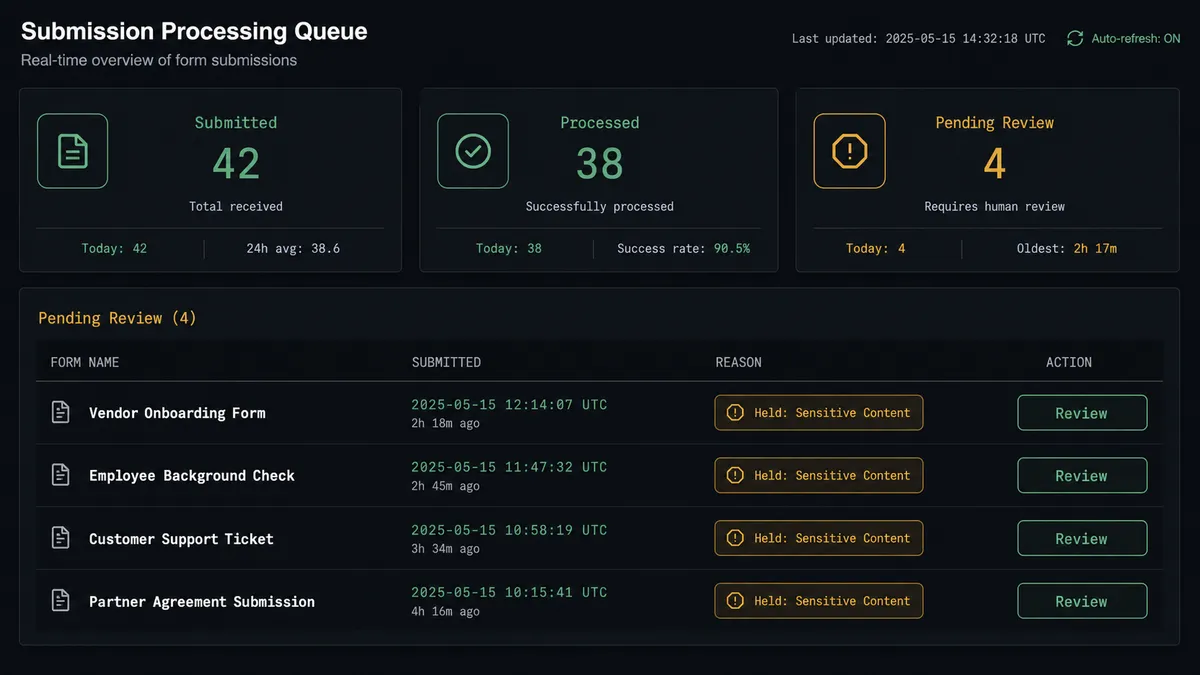
The same escalation applies when Get Form Responses returns submissions containing sensitive content. Healthcare intake details. Financial data. Legally significant disclosures. The agent holds the submission and routes it for compliance review before pushing anything downstream. This is not a hardcoded rule. The agent evaluates the content and decides whether the situation warrants human judgment. A standard form submission moves straight through. A form response that looks like a medical history does not.
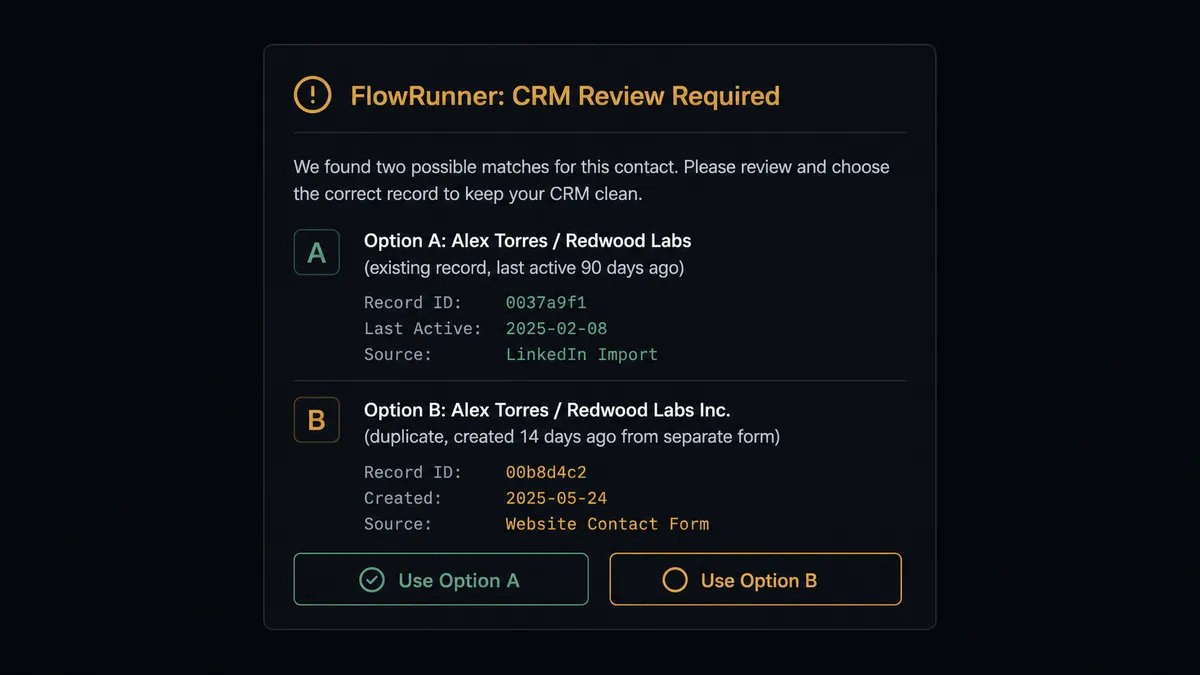
This is the digital andon cord concept applied to CRM data quality. The agent stops the line when it hits uncertainty. Your CRM gets clean data because a human made the call on the ambiguous cases, not because the automation guessed.
FlowRunner vs Zapier
Zapier is the tool most non-technical teams reach for first when connecting Typeform and HubSpot, and it earns that position. The setup is fast, the interface is accessible, and the Typeform-to-HubSpot zap is one of the most-used connections in their library. For teams that need basic form-to-CRM routing without conditional logic, Zapier works.
The differences show up at scale and at the edge cases.
| Feature | Zapier | FlowRunner |
|---|---|---|
| Basic Typeform to HubSpot connection | Yes, fast setup | Yes, comparable setup |
| Duplicate detection before contact creation | Conditional steps, manual logic | Agent calls Get Contact by Email on every submission natively |
| Human-in-loop for exceptions | No native support | Agent invokes human review as a callable tool; decision logged |
| Sensitive data handling | No content evaluation | Agent reads submission content and holds flagged responses |
| AI agent with tool selection | No | Agent picks actions based on submission context |
| Pricing model | Per-task execution; costs grow with volume | Workflow-based tiers; $45/mo Growth, $299/mo Professional |
| Unlimited users on base tier | No (user limits by plan) | Yes, all tiers |
The honest version: if you need a simple one-direction sync and your data is clean, Zapier is fast and familiar. If your data has exceptions, duplicates, sensitive content, or compliance requirements, the automation needs to read what it is processing.
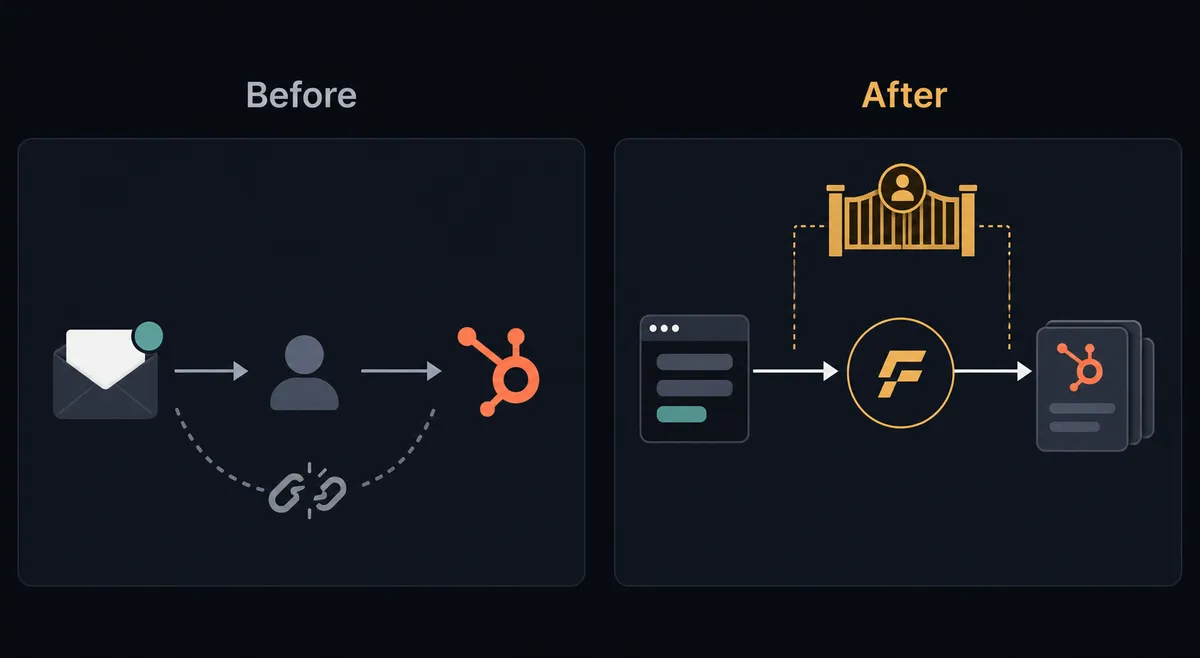
Before and after
| Category | Before | After |
|---|---|---|
| Time from form to CRM record | Hours to days depending on team bandwidth | Under 30 seconds on every submission |
| Duplicate contact rate | Unchecked; duplicates accumulate across form campaigns | Get Contact by Email runs on every submission before any record is created |
| Exception handling | Duplicate and sensitive submissions create data problems silently | Agent pauses and routes exceptions to a named person with full context |
| Audit trail on CRM decisions | None; no record of who created what or why | Every decision and escalation logged with identity and timestamp |
| Team time on data entry | Ongoing; reps and ops staff pull form data into CRM manually | Zero; team touches only the exceptions the agent cannot resolve |
What you can build
New lead routing from event registration forms. Every Typeform event registration calls Get Form Responses, checks HubSpot with Get Contact by Email, creates or updates the contact, opens a deal in the event pipeline, and sends the assigned rep a Slack notification with context. Reps see new leads in real time without touching the form platform.
Client onboarding intake processing. When a deal closes in HubSpot, the agent creates a custom Typeform intake form using Create Empty Form and sends the personalized URL to the client. When the client submits, the agent calls Get Form Responses, extracts intake data, updates the HubSpot contact record with Update Contact, and holds any submission containing sensitive information for compliance review before creating the project record.
Stalled deal re-engagement surveys. A weekly workflow calls HubSpot Get All Deals to find deals in negotiation that have not been updated in 14 days. The agent sends each deal owner a Typeform survey link asking for a status update. When responses come back, Get Form Responses retrieves them and the agent updates each deal with Update Deal based on the rep’s answers.
Multi-language lead capture. For campaigns in multiple regions, the agent uses Typeform Auto-Translate Form to create localized versions of the same lead form. Responses from all language variants route through the same HubSpot workflow, with Contact records tagged by region.
Compliance-gated healthcare intake. A healthcare intake form collects patient information. The agent retrieves submissions with Get Form Responses and evaluates content before taking any action. Submissions containing protected health information are held and routed to the compliance reviewer. Cleared submissions proceed to Create Contact and Create Deal. Every hold and clearance is logged.
Common questions
Is it free to connect Typeform and HubSpot on FlowRunner? FlowRunner has a free plan with 100 executions a month, every integration included, and no credit card required, and new accounts get 14 days of Professional on top. No credit card is required to start. After the trial, Growth is $45 per month and includes unlimited users and workflows.
Can I self-host FlowRunner? Yes. FlowRunner offers a self-hosted Community Edition at no cost for single-instance deployments, and an Enterprise self-hosted tier with multi-instance clustering and the full compliance suite.
Does the agent need my own OpenAI or AI provider key? FlowRunner uses a bring-your-own-key model. You connect your own AI provider account, whether that is OpenAI, Anthropic, or another supported provider. FlowRunner orchestrates the agent; it does not bill you for AI model usage.
What happens when the agent is not sure whether to create a new contact or merge a duplicate? The agent pauses and routes the ambiguity to a designated person via Slack, email, or WhatsApp with full context: the existing record, the incoming form data, and the options. The workflow resumes after the person decides. The decision, the decider, and the timestamp are all captured in the audit trail.
Can I use a webhook trigger instead of polling Typeform for responses? FlowRunner’s Typeform integration uses the Get Form Responses action to retrieve submissions. Workflows can be scheduled to run at short intervals to approximate near-real-time processing. If you need sub-minute latency, ask about webhook trigger support on your plan during the trial.
How does FlowRunner handle sensitive data submitted through Typeform? The agent evaluates submission content before routing it downstream. If a response contains information flagged as sensitive (healthcare details, financial data, legally significant answers), the agent holds the submission and routes it to a designated reviewer before any downstream action is taken.
Getting started
FlowRunner’s Typeform integration and HubSpot integration are both available on every tier, including the trial.
Start on the free plan: 100 executions a month, every integration included, no credit card required, plus 14 days of Professional for new accounts.
If you want to see the duplicate detection and human-in-loop escalation before committing to setup time, book a 30-minute intro call. We will walk through the workflow with your actual forms.
Ready to start: flowrunner.ai
Frequently asked questions
Is it free to connect Typeform and HubSpot on FlowRunner?
FlowRunner has a free plan with 100 executions a month, every integration included, and no credit card required, and new accounts get 14 days of Professional on top. No credit card is required to start. After the trial, Growth is $45 per month and includes unlimited users and workflows.
Can I self-host FlowRunner?
Yes. FlowRunner offers a self-hosted Community Edition at no cost for single-instance deployments, and an Enterprise self-hosted tier with multi-instance clustering and the full compliance suite.
Does the agent need my own OpenAI or AI provider key?
FlowRunner uses a bring-your-own-key model. You connect your own AI provider account, whether that is OpenAI, Anthropic, or another supported provider. FlowRunner orchestrates the agent; it does not bill you for AI model usage.
What happens when the agent is not sure whether to create a new contact or merge a duplicate?
The agent pauses and routes the ambiguity to a designated person via Slack, email, or WhatsApp with full context: the existing record, the incoming form data, and the options. The workflow resumes after the person decides. The decision, the decider, and the timestamp are all captured in the audit trail.
Can I use a webhook trigger instead of polling Typeform for responses?
FlowRunner's Typeform integration uses the Get Form Responses action to retrieve submissions. Workflows can be scheduled to run at short intervals to approximate near-real-time processing. If you need sub-minute latency, ask about webhook trigger support on your plan during the trial.
How does FlowRunner handle sensitive data submitted through Typeform?
The agent evaluates submission content before routing it downstream. If a response contains information flagged as sensitive (healthcare details, financial data, legally significant answers), the agent holds the submission and routes it to a designated reviewer before any downstream action is taken.