Connect Lemlist to HubSpot: Replies Become Deals
Connect Lemlist and HubSpot so an engaged prospect's reply creates or updates a HubSpot contact and deal automatically, with an AI agent pausing for a rep before an interested lead moves off the sequence.
How do you connect Lemlist to HubSpot?
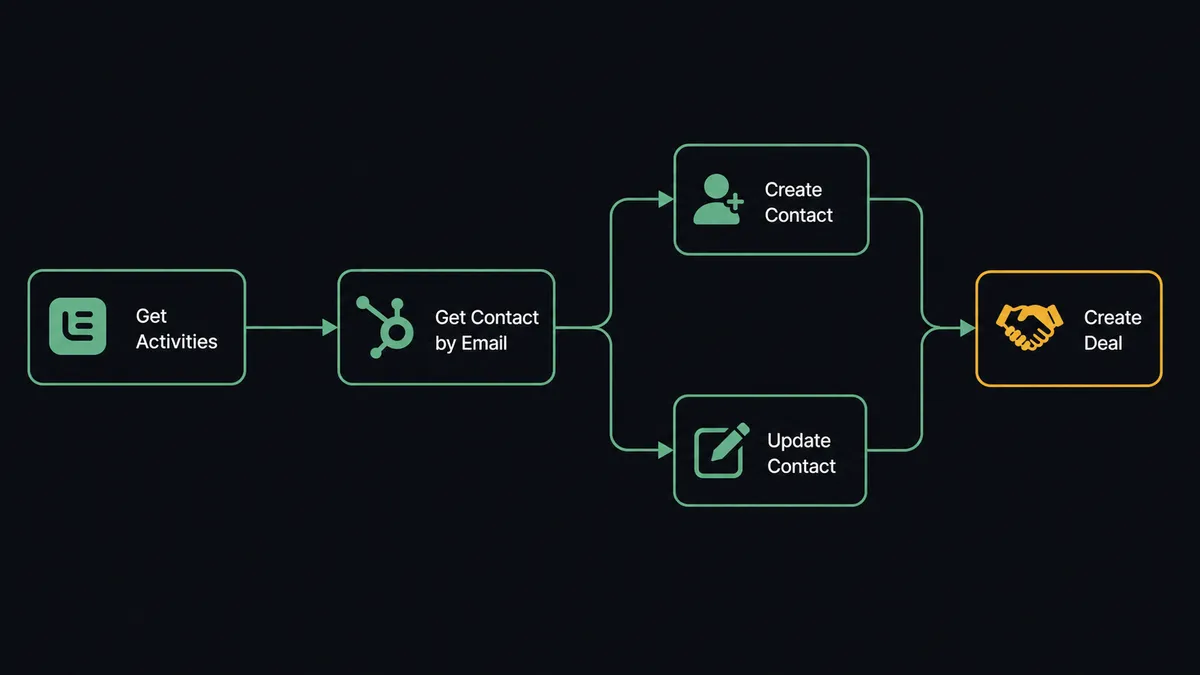
A scheduled poll of Lemlist’s Get Activities action catches a reply or click event, which drives HubSpot’s Get Contact by Email to check for an existing record, then Create Contact or Update Contact and Create Deal to put the engaged prospect into the pipeline. FlowRunner is a visual AI-agent orchestration platform where automations run autonomously and pause for human judgment on the steps that carry real consequence. The same connection can run as an AI agent that reads each reply, decides whether it signals real interest, and pauses for a sales rep before the lead comes off the automated sequence.
The problem it solves
An SDR or sales ops lead running outbound through Lemlist has a visibility problem, not a sending problem. Lemlist sends the sequence, tracks opens and clicks, and logs replies, but that engagement data lives inside the outreach tool. HubSpot, where the rest of the sales team actually works the pipeline, only knows about a prospect if someone manually copies the reply over and creates a contact by hand. A rep checking HubSpot has no idea a lead opened the email three times this week or replied an hour ago unless they also happen to be logged into Lemlist watching the activity feed.
The handoff moment is worse. When a lead marks itself interested with a reply, the SDR has to notice it, decide who should take the conversation, and manually create or find the HubSpot contact and deal before anyone can act on it. In practice that means hot leads sit for hours in a Lemlist inbox while automated follow-ups keep firing, or a reply falls through the cracks entirely because the person watching that campaign was in back-to-back meetings. Meanwhile duplicate contacts pile up in HubSpot because nobody checks for an existing record before creating a new one, so the same prospect ends up as two or three disconnected entries the sales team has to untangle later.
How it works: the connection
The connection starts with Lemlist’s Get Activities action, which returns sent, opened, clicked, replied, and bounced events for the team, filterable by type and campaign. Because Lemlist exposes no event triggers of its own, FlowRunner polls this action on a schedule, commonly every 15 minutes, and evaluates whatever new activity shows up since the last run.
When a reply or a meaningful click comes through, the flow passes the lead’s email to HubSpot’s Get Contact by Email action first. This lookup is the deduplication step: if a matching contact exists, the flow calls Update Contact to refresh lifecycle stage and engagement data; if none exists, it calls Create Contact to build the record from the Lemlist lead data (name, company, phone, LinkedIn URL, and the merge variables the campaign was tracking), then Associate Objects to link the new contact to its company. Either path continues into Create Deal, opening an opportunity in the inbound pipeline so the reply becomes a tracked deal instead of a line in someone’s inbox. On the Lemlist side, a genuinely interested reply triggers Mark Lead as Interested, which can pause that lead’s automated follow-ups so a human, not the sequence, decides what happens next.
Can an AI agent run it? (and why a human stays in the loop)
The connection above is a sync. The upgrade is an agent that reasons about what a reply actually means before it acts, which is the part n8n and Zapier do not offer. An AI Agent node holds Get Activities, Get Contact by Email, Create Contact, Update Contact, Create Deal, and Mark Lead as Interested as tools, and it decides which ones to use, and when, based on what the activity data actually shows rather than a fixed sequence someone wired once.
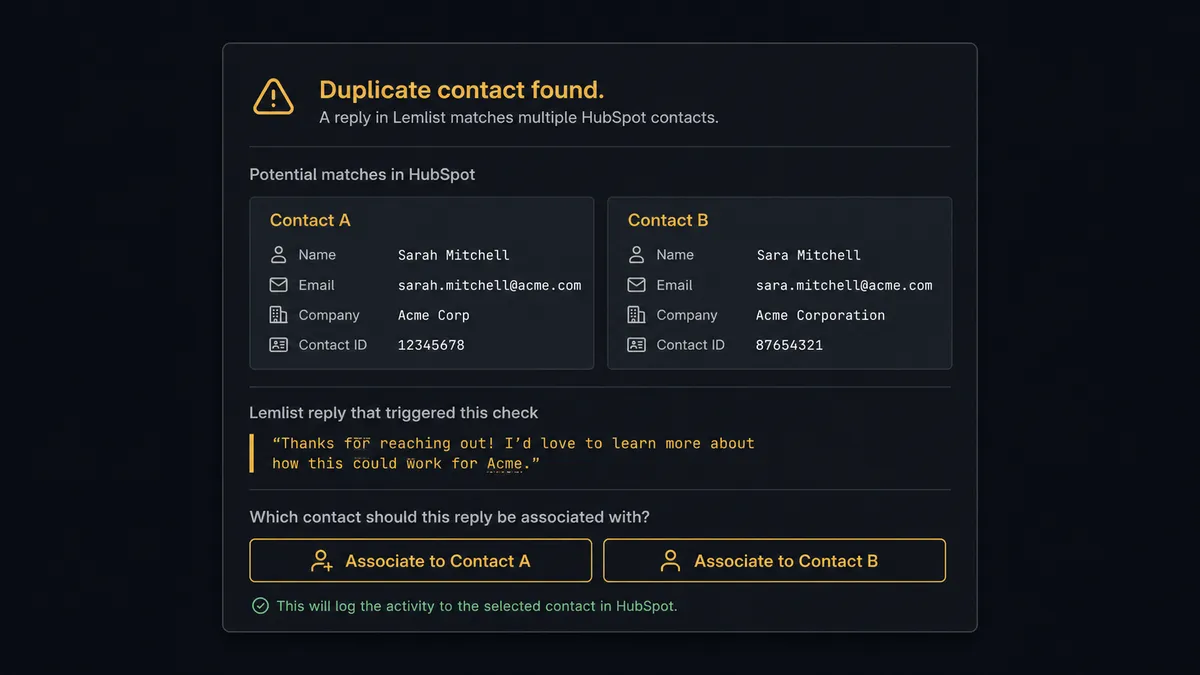
Here is the moment that matters. When the agent looks up a replying lead in HubSpot and Get Contact by Email returns two records with the same email domain (a common scenario when a prospect’s company already has contacts in the CRM from a prior deal or a different rep’s outreach), it does not silently pick one and risk associating a new deal with the wrong record, and it does not skip the sync and lose the reply. It invokes a human-in-loop flow as a tool, the same way it invokes Create Deal, and posts to a CRM admin in Slack: “I found two contacts matching this email from the Lemlist reply on the {{campaign}} sequence. Which should I associate this deal with?” The message includes both matching HubSpot records and the actual reply text from Lemlist. The admin picks one with a click. The agent resumes, associates the deal to the chosen record, and logs the decision, the decider, and the timestamp to the audit trail.
The same judgment applies on the Lemlist side of the handoff. Mark Lead as Interested is available to the agent as a tool, but the agent does not fire it on every reply. A one-word “not interested, please remove me” is not the same signal as “this looks interesting, can we talk Thursday,” even though both are technically replies. The agent reads the reply content and the lead’s prior activity, and only when it judges the engagement to be a real interest signal does it mark the lead interested, pause the sequence, and route the full thread to the assigned rep. This is not a hardcoded rule like “any reply pauses the sequence.” Prospects call this a digital andon cord: like Toyota’s quality control pull cord, the agent stops the line the instant something needs a person’s judgment instead of guessing and moving on. This is not a sync tool. The agent knows when to stop and ask.
FlowRunner vs Zapier
Zapier is a real option for this pair and it is fast to set up. A sales ops lead can build a Lemlist-to-HubSpot Zap connecting a new reply to Create Contact in an afternoon, and for teams that just want engagement data mirrored into the CRM, that is often enough. Where it runs out of road is the judgment calls: Zapier’s Paths can branch on whether a contact already exists, but there is no agent reading the reply text and the lead’s history together to decide whether this particular reply is worth pulling a rep away from their queue for. A human step in Zapier means someone remembers to check Lemlist before HubSpot goes stale, not a workflow that notices and routes the decision on its own.
| Capability | Zapier | FlowRunner |
|---|---|---|
| Human-in-the-loop | Manual check outside the Zap, no built-in pause-and-resume | Native: the agent invokes a human approval flow as a tool and resumes on response |
| Duplicate contact handling | Branch logic you build and maintain yourself | The agent evaluates matches and escalates ambiguous ones instead of picking silently |
| Pricing model | Per-task pricing that scales with every activity event polled | Transparent workflow-based tiers with a fixed execution allowance |
| Users included | Paid per-user on most plans | Unlimited users and unlimited workflows on every tier |
| AI provider | Built-in AI steps run on Zapier’s models | BYOK: bring your own OpenAI or Anthropic key, data stays in your account |
| Self-hosting | Not available | Free Community Edition for self-hosted deployments |
Before and after
| Category | Before | After |
|---|---|---|
| Engagement visibility | Replies and clicks sit in Lemlist, disconnected from the CRM the sales team works from | Get Activities feeds engagement into HubSpot within one polling cycle |
| Contact creation | A rep copies a replied lead into HubSpot by hand, or skips it | Get Contact by Email checks first, then Create Contact or Update Contact runs automatically |
| Duplicate records | No systematic check before creating a new contact | The agent escalates ambiguous matches to a CRM admin instead of guessing |
| Interested-lead handoff | The SDR has to notice a reply and manually stop the sequence | Mark Lead as Interested pauses follow-ups the moment the agent confirms real interest |
| Opt-out enforcement | An unsubscribe in one campaign can leave the address live in others | Add to Unsubscribes blocks the address across all campaigns at once |
What you can build
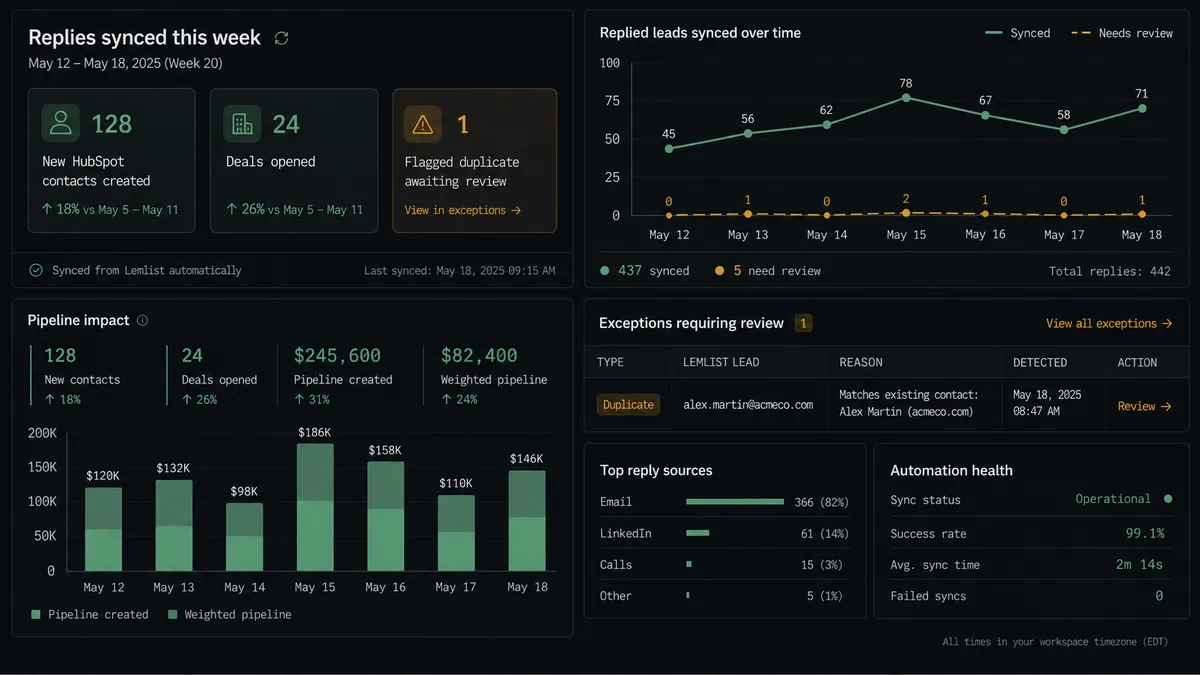
Reply-to-deal sync. Every genuine reply or click Get Activities returns runs Get Contact by Email, then Create Contact or Update Contact and Create Deal, so an engaged prospect becomes a tracked HubSpot opportunity without a rep touching a keyboard.
Interested-lead handoff with full context. When the agent confirms a reply signals real interest, it calls Mark Lead as Interested to pause the sequence and routes the reply, the campaign, and the matching HubSpot deal to the assigned rep in one Slack message.
Duplicate-safe contact creation. The agent checks Get Contact by Email before every write and escalates any match against two or more records to a CRM admin, so HubSpot’s contact list stays clean without a dedup project.
Global unsubscribe enforcement. A HubSpot contact marked as unsubscribed or bounced can trigger Add to Unsubscribes in Lemlist, keeping the outreach blocklist in sync with the CRM’s own suppression list.
Campaign performance rollups. Get Campaign Stats pulls aggregate sent, opened, clicked, and replied counts on a schedule, and the agent writes them into HubSpot as custom properties on the associated deals so pipeline reviews include real outreach data.
Getting started
Connecting Lemlist and HubSpot takes a few minutes: authenticate both accounts, set Get Activities to poll on a schedule, and map the contact and deal actions in HubSpot. FlowRunner has a free plan with 100 executions a month, every integration included, and no credit card required, and new accounts get 14 days of Professional on top. Review the full capability lists on the Lemlist integration page and the HubSpot integration page, then build the connection at flowrunner.ai or book time to walk through it at calendly.com/flowrunner/intro.
Frequently asked questions
Is it free to connect Lemlist and HubSpot on FlowRunner?
Yes. FlowRunner has a free plan with 100 executions a month, every integration included, and no credit card required, and new accounts get 14 days of Professional on top.
Lemlist doesn't have triggers. How does the workflow know when to run?
FlowRunner polls Lemlist's Get Activities action on a schedule to catch new sent, opened, clicked, and replied events, then acts on whatever it finds. This is how the connection stays current without Lemlist needing to push webhooks.
Can I self-host this connection?
Yes. FlowRunner offers a free self-hosted Community Edition for single-instance deployments, and a self-hosted Enterprise tier with multi-instance clustering and the full compliance suite for teams that need outreach and CRM data to stay on their own infrastructure.
Does the agent need my own OpenAI key?
FlowRunner is a bring-your-own-key platform. You supply the API key for the AI provider you choose, so your outreach and CRM data never passes through a shared model layer you don't control.
What happens when the agent finds two matching contacts in HubSpot?
The agent does not guess. It pauses the workflow and routes the ambiguity to a CRM admin through Slack, showing both matching records and the Lemlist activity that triggered the check, and resumes only after the admin picks one.
Can I run this as a plain sync without an AI agent?
Yes. You can wire Get Activities directly to Create Contact or Update Contact as a fixed sequence with no agent reasoning involved. The AI agent is an upgrade you add when you want the workflow to decide when a reply is significant enough to escalate.