JustCall HubSpot Integration: Calls Logged, Duplicates Reviewed
Connect JustCall to HubSpot so every call logs its outcome in the CRM automatically, with an AI agent that pauses for a human when a contact match is ambiguous.
How do you connect JustCall to HubSpot?
You connect JustCall to HubSpot by pairing JustCall’s List Calls and Get Call actions with HubSpot’s Get Contact by Email and Update Contact actions: FlowRunner pulls each completed call’s outcome from JustCall, matches the caller to a HubSpot record, and writes the disposition and deal update back automatically. FlowRunner is a visual AI-agent orchestration platform where automations run autonomously and pause for human judgment on the steps that carry real consequence. The same connection can run as an AI agent that reasons about which HubSpot contact a call belongs to, and pauses for a person when two contacts share a phone number or none exist at all.
The problem it solves
A rep hangs up, dials the next number, and the notes from the last call never get written. By 4 pm there’s a dozen calls with no disposition and no summary, and the CRM that sales leadership checks on Monday morning is built on blanks. The billing manager doesn’t feel this one, but the sales manager does: pipeline reviews run on guesswork because “what happened on that call” lives in a rep’s memory instead of a record. Multiply that by a team of eight reps making forty calls a day, and reconstructing the truth after the fact isn’t a task anyone has time for.
The same gap shows up on text. A prospect asks to be texted the pricing sheet, the rep sends it from whatever screen the conversation is on, and the message exists nowhere the rest of the team can see it. When that prospect calls back three weeks later and talks to someone else, the new rep has no idea a text conversation ever happened. Manual CRM entry and duplicate contact records compound the mess: two reps create two contacts for the same person because neither checked first, and now the deal history is split across records that never reconcile.
How it works: the connection
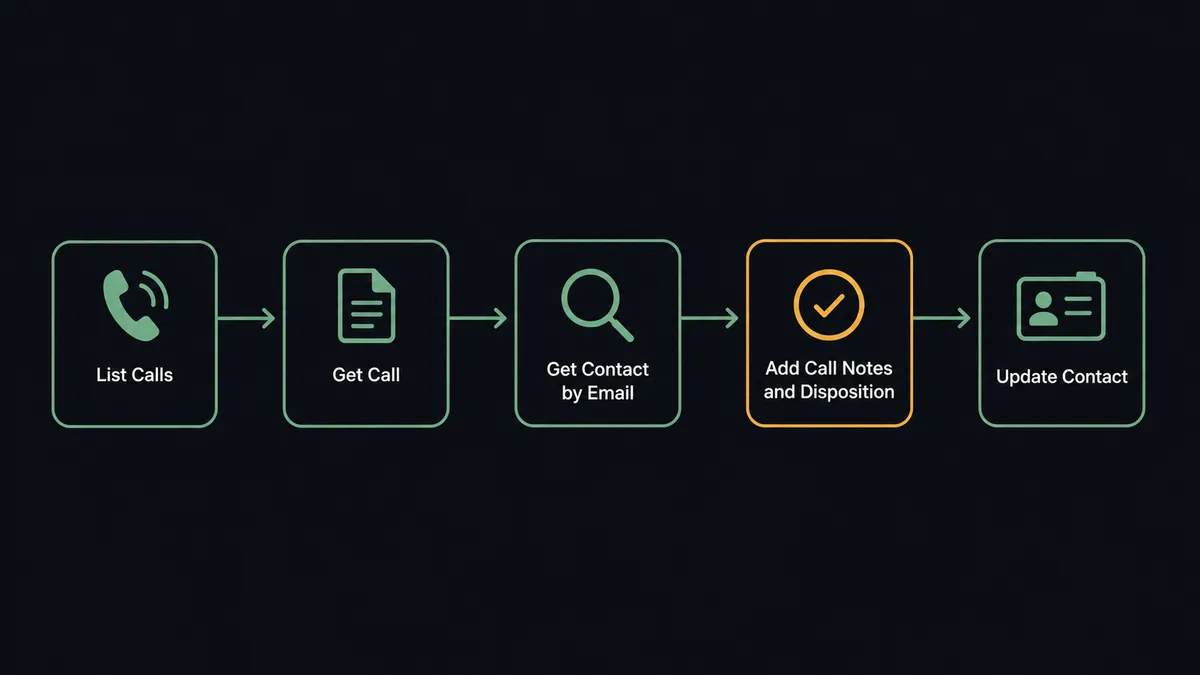
The flow starts with JustCall’s List Calls, run as a scheduled sweep (an afternoon pass, or triggered per call) that pulls every completed call for the period. For each call missing notes or a disposition, Get Call retrieves the full record: duration, agent, recording URL, and whatever the rep managed to jot down live.
From there, the agent looks the caller up in HubSpot. Get Contact by Email or Search Contacts checks for an existing record before anything gets written, the same discipline HubSpot’s own inbound-lead workflow uses to avoid creating duplicate contacts. When the match is clean, Add Call Notes and Disposition logs the outcome code and summary back in JustCall, and Update Contact, Create Deal, or Associate Objects pushes the corresponding update into HubSpot: a note on the contact timeline, a stage change on the deal, or a fresh association between the call and the account it belongs to.
Text follow-ups run the same way in reverse. When a call ends with “text me the details,” the agent drafts the SMS and queues it. Once a rep approves it, Send SMS delivers the message from the same JustCall number the prospect just spoke to, and the resulting thread gets tied back to the HubSpot contact so anyone on the team can see it later, not just whoever’s screen it happened on.
Can an AI agent run it? (and why a human stays in the loop)
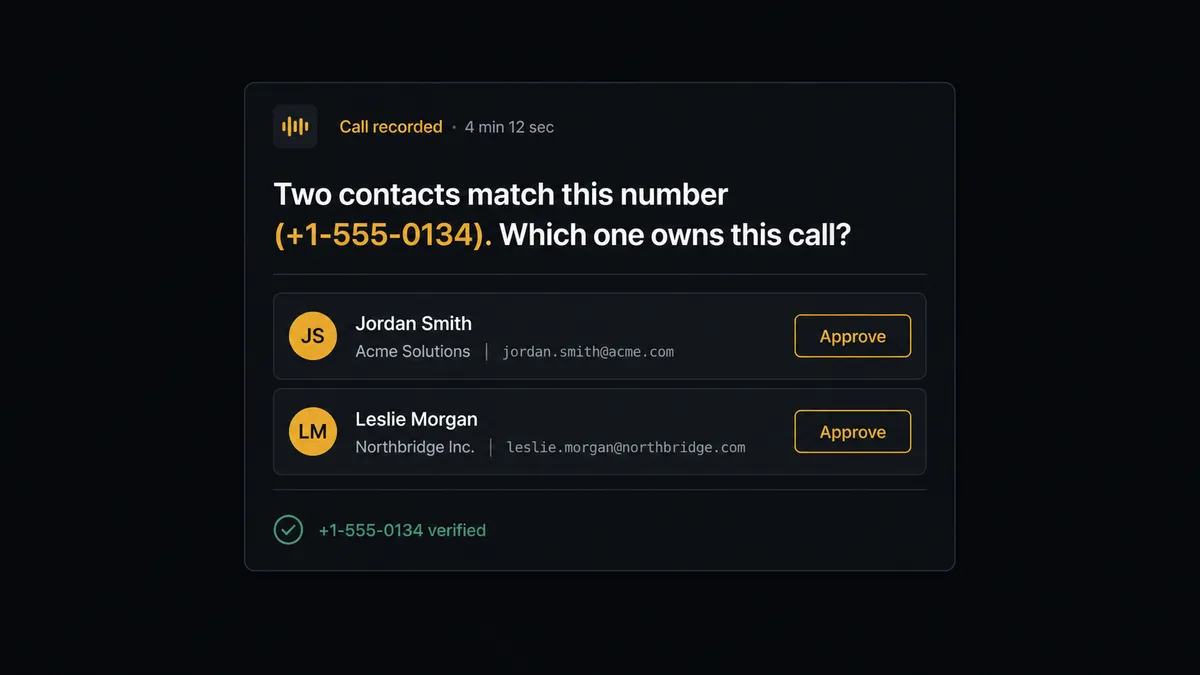
Zapier and n8n can wire List Calls to Update Contact. What they can’t do is have the agent reason about which contact record a call actually belongs to, and stop when it isn’t sure. In FlowRunner, the agent doesn’t just run the lookup and take whatever HubSpot returns; it evaluates the result. A clean single match, it writes the update and moves on. Two contacts with the same phone number, or a call from a number with no HubSpot record at all, it treats as a decision that needs a person, not a coin flip it should make on its own.
Here’s the moment that matters: the agent runs Get Contact by Email and gets back two records, both tied to the same phone number under slightly different email addresses, one from a form fill eight months ago and one a rep created manually last week. Rather than guess, the agent invokes a human-in-loop tool as a callable step, exactly the way it would call any other action. It posts the ambiguity to the CRM admin in Slack with both candidate records, the call recording link, and the disposition it was about to log: “Two contacts match this number. Which one owns this call?” The admin picks one with a click. The agent associates the call to that contact, logs the disposition, and records the admin’s decision in the audit trail. The same gate applies to the first outbound SMS to a new number: the agent drafts it, but a rep approves before it sends from the team’s line, because one bad message to the wrong number is a compliance problem, not a bug to fix later.
This is not a sync tool. The agent knows when to stop and ask, the way a good analyst would flag “these two records might be the same person” instead of merging them and hoping.
FlowRunner vs Zapier
Zapier connects JustCall and HubSpot well for simple, single-path automations: new call triggers a Zap, a Zap creates or updates a contact. It’s fast to set up and familiar to non-technical teams, and for a single trigger-to-action pair with no branching logic, it works fine.
Where it runs out of road is exactly the scenario above: deciding between ambiguous contact matches, holding a message for approval, and giving an admin full context before a record gets written. Zapier’s paths can branch on a condition, but there’s no native concept of an agent reasoning about the match quality and routing a genuinely uncertain case to a person with context attached.
| Zapier | FlowRunner | |
|---|---|---|
| Human-in-the-loop | Conditional branches on hardcoded rules | Native tool the agent invokes based on its own judgment |
| Duplicate contact handling | No built-in reasoning; runs the path it’s given | Agent evaluates match quality, escalates ambiguous cases |
| Pricing model | Per-task execution pricing | Transparent workflow-based tiers, no per-task anxiety |
| Users included | Priced per user on most plans | Unlimited users on every tier |
| AI model access | Zapier-hosted AI credits | BYOK: use your own OpenAI, Anthropic, or other provider account |
Before and after
| Metric | Before | After |
|---|---|---|
| Call disposition logging | Reps leave notes and outcomes blank when the next call comes in | Every call carries its outcome the same afternoon, matched to the right HubSpot record |
| Duplicate contact risk | No systematic check before creating a new contact | Get Contact by Email runs before every write; ambiguous matches route to a CRM admin |
| SMS follow-up visibility | Texts live and die on whoever’s phone screen the conversation is on | Follow-ups draft, get rep approval, send, and log to the HubSpot contact automatically |
| Pipeline review accuracy | Monday review runs on calls nobody wrote up | Deal stages and call notes reflect what actually happened, not what got remembered |
| Activity reporting | Someone manually exports and assembles calls-by-agent reports | Call and text activity flows to HubSpot and reporting sheets on schedule |
What you can build
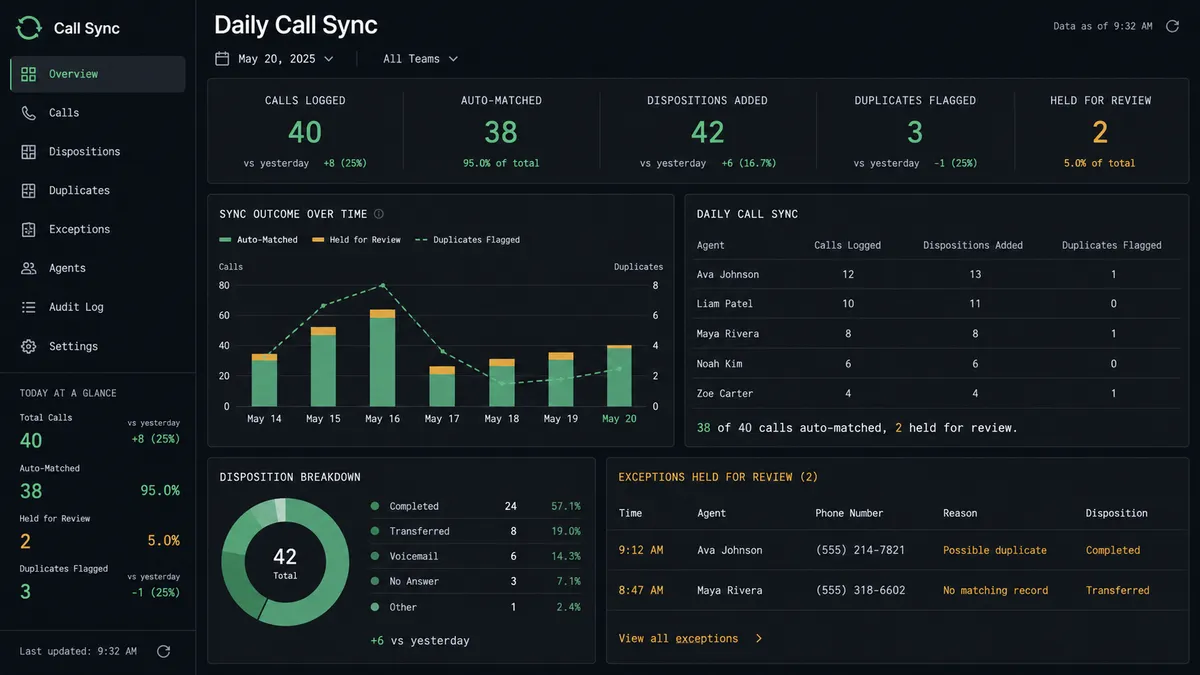
Same-day call hygiene. The agent sweeps JustCall’s completed calls every afternoon, matches each one to its HubSpot contact with Get Contact by Email, and logs the disposition with Add Call Notes and Disposition before the rep leaves for the day.
Deal stage updates from call outcomes. When a call disposition indicates a closed deal or a stalled one, the agent updates the corresponding HubSpot deal stage with Update Deal and associates the call recording to the deal record for later reference.
Approved SMS follow-up threads. A prospect asks for details by text, the agent drafts the message, a rep approves it, Send SMS delivers it from the right JustCall number, and the resulting thread logs against the HubSpot contact timeline.
Contact book reconciliation. Nightly, the agent walks JustCall’s contact list against HubSpot, normalizes numbers, fills in missing company and email fields with Update Contact, and queues true duplicates for a person to confirm before Delete Contact ever runs.
New lead routing with call-ready context. When HubSpot creates a contact from an inbound form, the agent creates a matching JustCall contact so the rep sees a name, not a bare number, the next time that prospect calls in.
Common questions
Is it free to connect JustCall and HubSpot on FlowRunner? Yes. FlowRunner has a free plan with 100 executions a month, every integration included, and no credit card required, and new accounts get 14 days of Professional on top.
Does the agent need my own OpenAI key? FlowRunner runs on a bring-your-own-key model, so you connect the AI provider account you already use rather than paying FlowRunner a markup on model calls.
What happens when the agent isn’t sure which HubSpot contact a call belongs to? It stops and asks. The agent posts the ambiguous match to a CRM admin with both candidate contacts and the call context, and waits for a decision before writing anything to HubSpot.
Can I self-host this connection instead of using FlowRunner Cloud? Yes, FlowRunner offers a self-hosted Enterprise option for teams that need the integration running on their own infrastructure.
Does this replace my sales reps’ calls or texts? No. Reps still make the calls and approve the first outbound text to a prospect. The agent handles the record-keeping and CRM sync around those conversations.
Can the same flow handle SMS follow-ups, not just calls? Yes. The agent can draft SMS follow-ups from JustCall, hold them for rep approval before the first message to a new contact, and log the resulting thread against the HubSpot deal.
Getting started
FlowRunner has a free plan with 100 executions a month, every integration included, and no credit card required, and new accounts get 14 days of Professional on top. Set up the sweep, add the human-in-loop step for ambiguous contact matches, and let the agent handle the rest while your reps keep talking to prospects instead of writing up notes at 6 pm.
Start at flowrunner.ai or book a walkthrough to see the JustCall and HubSpot connection built live.
Frequently asked questions
Is it free to connect JustCall and HubSpot on FlowRunner?
Yes. FlowRunner has a free plan with 100 executions a month, every integration included, and no credit card required, and new accounts get 14 days of Professional on top.
Does the agent need my own OpenAI key?
FlowRunner runs on a bring-your-own-key model, so you connect the AI provider account you already use rather than paying FlowRunner a markup on model calls.
What happens when the agent isn't sure which HubSpot contact a call belongs to?
It stops and asks. The agent posts the ambiguous match to a CRM admin with both candidate contacts and the call context, and waits for a decision before writing anything to HubSpot.
Can I self-host this connection instead of using FlowRunner Cloud?
Yes, FlowRunner offers a self-hosted Enterprise option for teams that need the integration running on their own infrastructure.
Does this replace my sales reps' calls or texts?
No. Reps still make the calls and approve the first outbound text to a prospect. The agent handles the record-keeping and CRM sync around those conversations.
Can the same flow handle SMS follow-ups, not just calls?
Yes. The agent can draft SMS follow-ups from JustCall, hold them for rep approval before the first message to a new contact, and log the resulting thread against the HubSpot deal.