How to Connect Typeform with CleverReach (With or Without an AI Agent)
Move Typeform respondents into CleverReach groups automatically, with an AI agent that checks consent on every response and pauses for a human before Add Receiver puts anyone on a mailing list.
How do you connect Typeform to CleverReach?
You connect Typeform to CleverReach by polling Get Form Responses on a schedule, checking each new respondent against CleverReach with Get Receiver, and filing clean opt-ins into the right group with Add Receiver, so a form submitted at lunch is on the correct mailing list by early afternoon. FlowRunner is a visual AI-agent orchestration platform where automations run autonomously and pause for human judgment on the steps that carry real consequence. Run as an AI agent, the same connection reads the consent answer on every single response and pauses for a named human before anyone with an ambiguous answer lands on a list.
The problem it solves
Today the path from form to mailing list runs through a person and a spreadsheet. Someone downloads Typeform responses on Friday, cleans up the emails, guesses which CleverReach group each person belongs in, and imports the batch. Anyone who signed up on Monday waited four days to get the welcome email. Anyone who filled in the form twice is now in the list twice. And the interest answers people carefully gave, the ones that should drive segmentation, get flattened into a single generic group because mapping them by hand takes too long.
The edges are a legal matter, not just an annoyance. CleverReach’s home market runs on GDPR, and consent is the whole game. A respondent who left the newsletter checkbox unticked but got swept into the import anyway is not a data-entry error, it is a compliance incident. So is the deletion request that sat in an inbox for three weeks. Batch imports have no way to read intent; they move whatever is in the file.
How it works: the connection
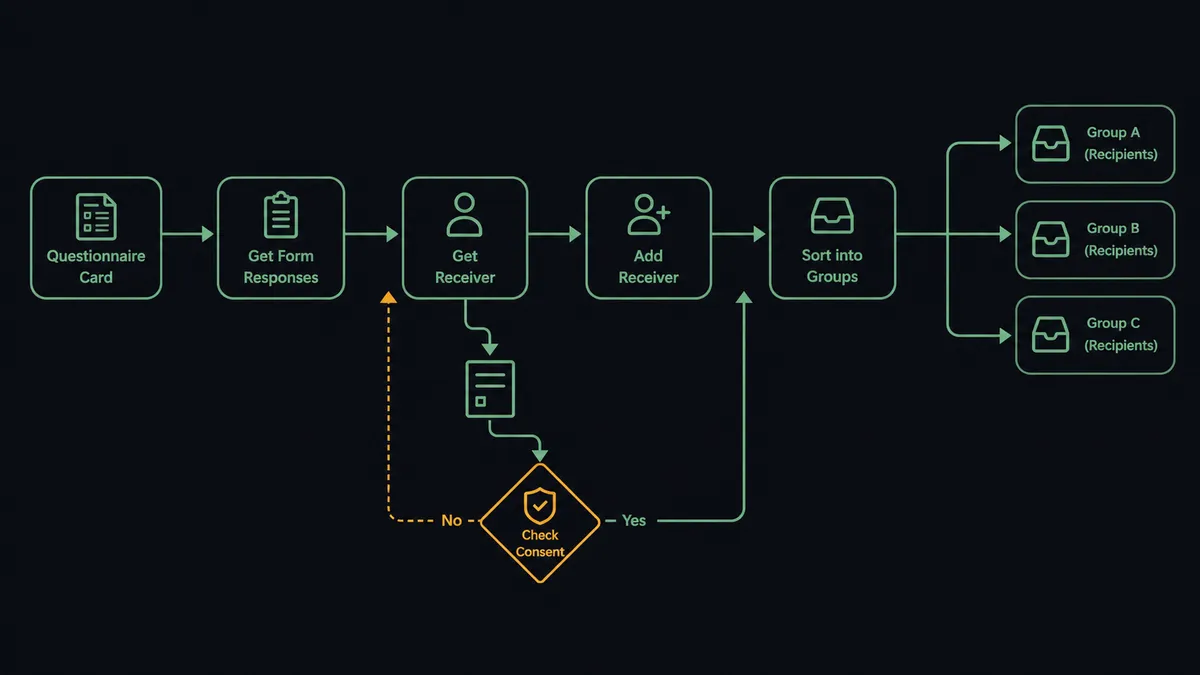
The connection reads Typeform on a schedule and writes to CleverReach. Here is the plain version, grounded in the real connector actions.
- Trigger: On a schedule, the workflow calls Get Form Responses for each mapped form and collects everything new.
- Read: Get Form loads the form structure, so answer fields map to named attributes rather than positional guesses.
- Check consent: The workflow reads the consent question’s answer on each response and separates clear opt-ins from everything else.
- Match: Get Receiver checks the target CleverReach group for an existing record by email.
- Write: Add Receiver files new opt-ins into the mapped group with their interest answers as attributes; Update Receiver refreshes people who already exist.
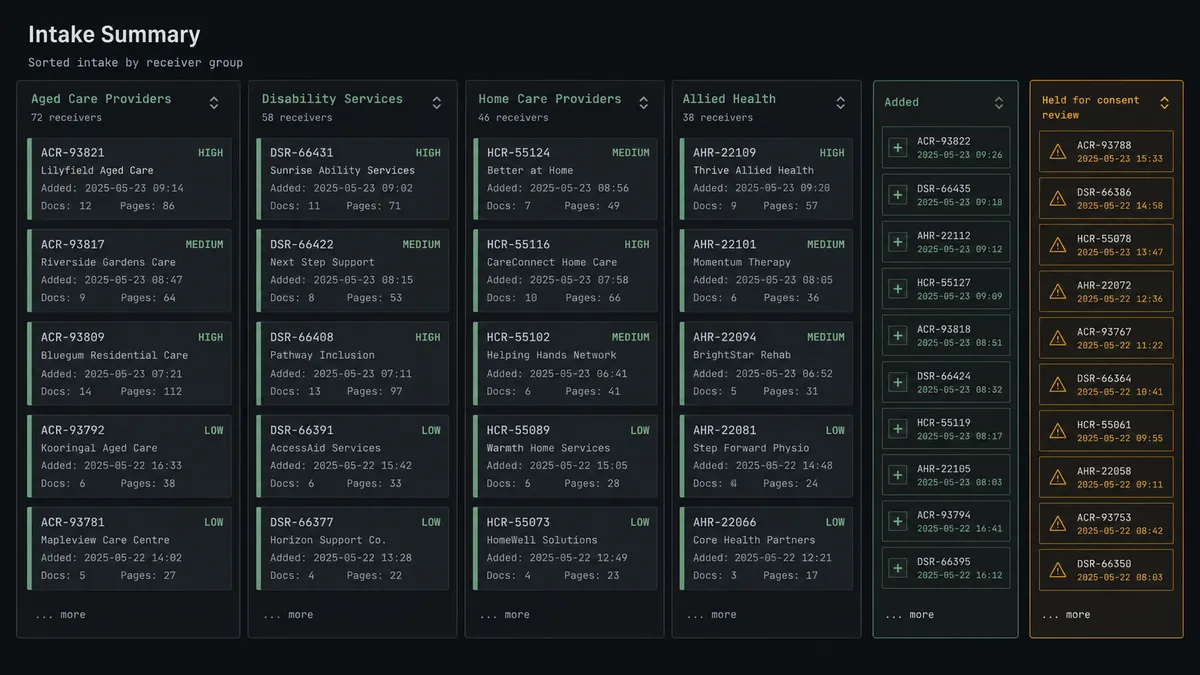
- Report: A summary of who was added, updated, and held posts to your team’s channel after each run.
That is the “just connect them” answer. Respondents reach the right group within a polling cycle, segmentation reflects what people actually answered, and the Friday import dies quietly. Get Form Insights adds a layer on top: completion and drop-off data flows into the same report, so you see which forms feed the list and which leak. And because List Groups and List Mailings are part of the same toolbox, the workflow can verify that every mapped group still exists before it writes, instead of failing silently against a group someone renamed.
Can an AI agent run it? (and why a human stays in the loop)
Yes, and consent is exactly the kind of judgment that separates an agent from a pipe. A deterministic sync can test whether a checkbox equals true. An AI agent reads the whole response: the free-text answer that says “sure, but only about the Berlin event,” the corporate address that appears in two groups already, the respondent who filled the form in twice with different emails. Its toolbox is the real action set: Get Form Responses, Get Form, Get Receiver, Add Receiver, Update Receiver, Delete Receiver.
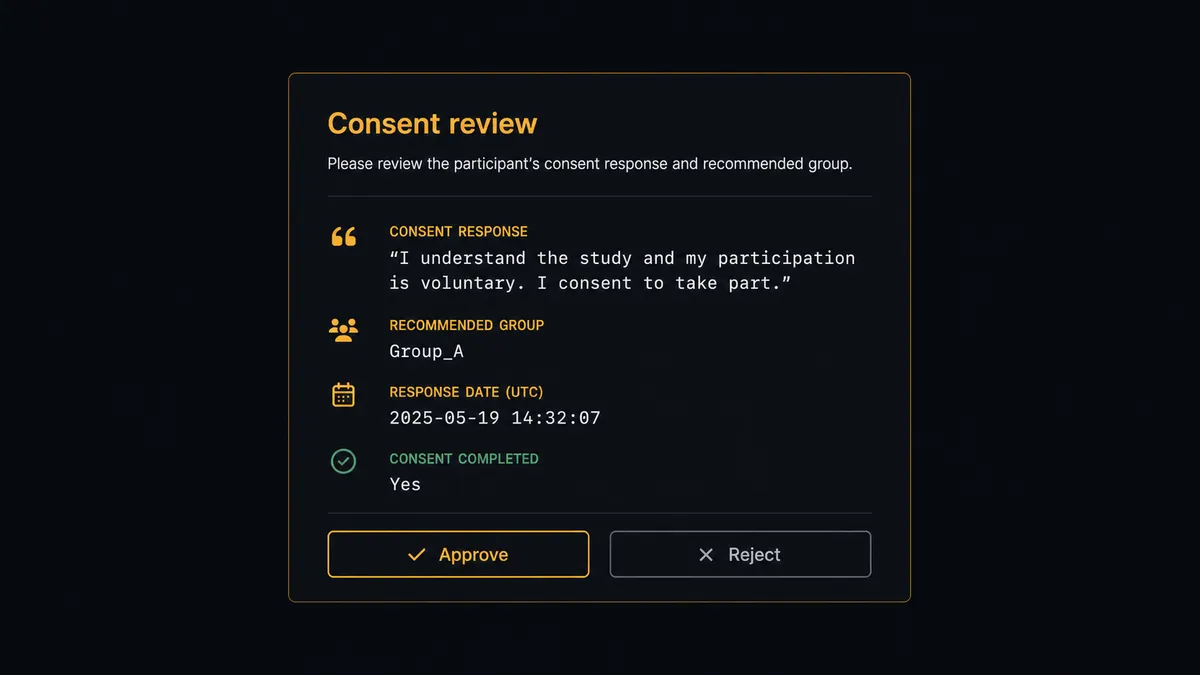
The consequential step is putting a person on a mailing list, because in CleverReach’s world that step has legal weight. When consent is anything less than explicit, the agent invokes a human-in-loop flow it holds as a callable tool. The workflow pauses and posts: “New response from [respondent] on the event form. Consent answer: ‘only if it’s about pricing updates.’ Recommend adding to the pricing group only. Approve?” A person decides, and Add Receiver runs or does not. The same gate guards the other direction: a removal request stages Delete Receiver in CleverReach and Delete Responses in Typeform, and a human confirms before either permanent deletion runs.
The result is a list where every address has a defensible story: what they consented to, when, and, for the judgment calls, who decided. Prospects call this a digital andon cord: the workflow stops the line the moment it hits uncertainty, and your team pulls it back into motion.
FlowRunner vs Zapier
Most teams connecting Typeform to CleverReach try Zapier first, and the instinct is sound. Zapier’s connector library is enormous, its editor is genuinely easy, and a Typeform-to-CleverReach Zap that copies every response into a group takes minutes to stand up. For a low-stakes list where every response is a clean opt-in by construction, it does the job.
The difference appears when responses need reading, not just moving. FlowRunner runs this connection as an agent that evaluates consent per response and holds human approval as a native tool, rather than a fixed step sequence that treats every row the same.
| What matters for this pair | FlowRunner | Zapier |
|---|---|---|
| Human-in-the-loop on ambiguous consent | Native. The agent invokes an approval flow as a callable tool and pauses before Add Receiver | Available via added approval steps, not an agent judgment per response |
| Who runs the flow | An AI agent reads each response, reasons, picks actions as tools | Predefined step sequence you configure per Zap |
| Users included | Unlimited users on every tier | Priced by task volume; seats vary by plan |
| Bring your own AI keys | Yes, BYOK | AI features tied to Zapier’s own AI offering |
| Self-hosted option | Yes, cloud-hosted or self-hosted | Cloud only |
| Pricing model | Transparent workflow-based tiers | Per-task pricing that grows with response volume |
If every form response is an unambiguous opt-in and volume is modest, Zapier is a fine choice. If your list lives under GDPR scrutiny and you want judgment applied before anyone is added or deleted, with a logged approver on every edge case, that is FlowRunner’s territory.
Before and after
| Category | Before | After |
|---|---|---|
| List updates | Weekly CSV export from Typeform, manual import into CleverReach | Add Receiver files each response within a polling cycle of submission |
| Segmentation | Everyone lands in one generic group | Interest answers map to attributes and groups automatically |
| Consent handling | Whatever is in the import file gets mailed | Ambiguous consent pauses for a named person before anyone joins a list |
| Deletion requests | Sit in an inbox until someone remembers | Staged as Delete Receiver and Delete Responses, confirmed by a human, logged |
| Duplicates | Repeat respondents pile up as duplicate records | Get Receiver matches first; Update Receiver refreshes instead of duplicating |
What you can build
Signup-to-group filing. Get Form Responses pulls new submissions, the agent reads the interest answers, and Add Receiver files each clean opt-in into the matching CleverReach group with attributes intact. Segmentation happens at intake, not at import time.
Consent triage. Every response with a free-text, missing, or contradictory consent answer pauses on an approval card. A person decides, the decision is logged, and the list stays defensible under audit.
Event follow-up lists. A registration form feeds a dedicated event group via Add Receiver, and after the event the agent moves attendees into the nurture group with Update Receiver, so follow-up email matches what people actually attended.
Right-to-erasure handling. A deletion request kicks off Get Receiver to locate the person, stages Delete Receiver in CleverReach and Delete Responses in Typeform, and executes both only after a human confirms, closing the request with a logged trail.
Form health digest. On a weekly schedule the agent calls Get Form Insights and Get Form Responses across your active forms and posts a digest of completion patterns and list growth to your channel, so you see which forms feed CleverReach and which need work. Forms that collect responses but produce no consented receivers stand out immediately, which is exactly the gap worth fixing first.
Getting started
Start on the free plan: 100 executions a month, every integration included, no credit card required, plus 14 days of Professional for new accounts. Both connectors are available on every tier, and every tier includes unlimited users and unlimited workflows.
Explore the integration details:
- Typeform integration (36 actions covering forms, responses, insights, and themes)
- CleverReach integration (10 actions covering groups, receivers, mailings, and forms)
Start building free at flowrunner.ai or book a demo to see a live Typeform to CleverReach workflow, consent gate and all.
Frequently asked questions
Is it free to connect Typeform and CleverReach on FlowRunner?
You can build and run the connection on FlowRunner's free plan, which includes 100 executions a month and every integration with no credit card required, and new accounts also get 14 days of Professional. Both connectors are available on every FlowRunner tier, and every tier includes unlimited users and unlimited workflows.
Can I self-host the Typeform to CleverReach workflow?
Yes. FlowRunner offers a cloud-hosted option and a self-hosted option, so the connection can run inside your own environment.
Does the AI agent need my own OpenAI or Claude key?
FlowRunner uses a bring-your-own-keys model, so you connect the AI provider key you already have. You are not locked to one model.
What happens when a response has unclear consent?
The agent does not add the person. It packages the response, the consent answer as written, and the form context, then invokes a human-in-loop step. A person decides whether Add Receiver runs, and that decision is recorded with a name and timestamp.
Which actions move the data if Typeform has no triggers here?
The Typeform connector is action-based, so the workflow runs on a schedule. Each run calls Get Form Responses for the forms you choose, processes anything new, and writes to CleverReach with Add Receiver or Update Receiver against the group you map.
Can the workflow handle deletion requests too?
Yes. When a respondent asks to be removed, the agent locates them with Get Receiver, stages Delete Receiver in CleverReach and Delete Responses in Typeform, and pauses for a person to confirm, because both removals are permanent.