How to Connect Typeform with Braze (With or Without an AI Agent)
Turn Typeform responses into Braze profile updates and triggered campaigns, with an AI agent that reads each response, respects the consent it contains, and pauses for a marketer before any send reaches more than one person.
How do you connect Typeform to Braze?
Neither service exposes a trigger, so you connect Typeform to Braze with a scheduled workflow: Get Form Responses pulls new submissions every hour, Track Users writes each respondent’s answers onto their Braze profile as attributes and an event, and Trigger Campaign fires the follow-up with the answers passed as trigger properties. FlowRunner is a visual AI-agent orchestration platform where automations run autonomously and pause for human judgment on the steps that carry real consequence. Run as an AI agent, the same connection reads what each respondent actually said, applies the consent they expressed with Set Subscription Status before anything sends, and pauses for a marketer before any message reaches more than one person.
The problem it solves
Today the form and the messaging platform are connected by a CSV and a calendar reminder. Responses accumulate in Typeform. Once a week, someone exports them, reshapes the columns, and imports the batch into Braze, where the new profiles join whatever journey was configured for their segment. Everything the respondent told you, the plan they are on, the problem they described, the channel they prefer, arrives days late and half-flattened, and the welcome message goes out long after the moment that prompted the signup has passed.
The edges are compliance-shaped. A respondent ticks email-only, and the import enrolls them in a journey with an SMS step. Someone uses the form to say stop contacting me, and that answer sits in an unexported response while campaigns keep sending. A survey answer containing health or financial detail gets copied onto a marketing profile nobody meant it to reach. Each of these is a small event with an outsized cost, and the batch process cannot catch any of them because it never reads the answers, it just moves the columns.
How it works: the connection
The connection reads from Typeform and writes to Braze. Here is the plain version, grounded in the real connector actions.
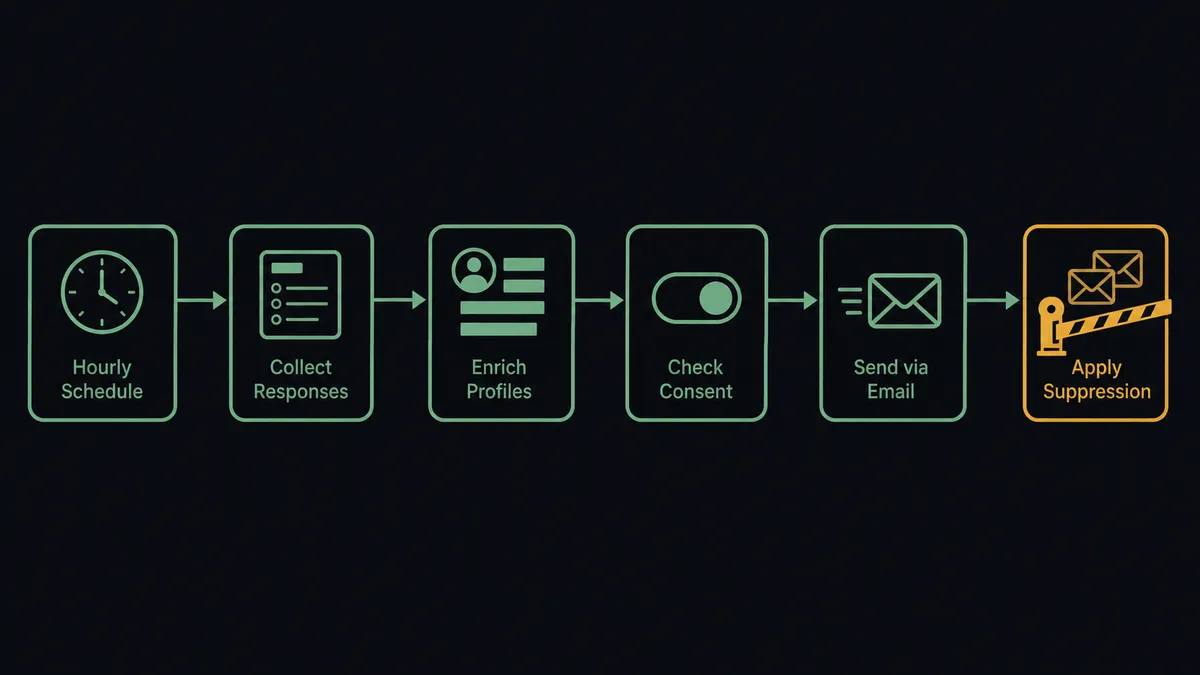
- Trigger: On a schedule, Get Form Responses runs hourly and retrieves submissions received since the last run.
- Read: The workflow parses each response: identity fields, consent answers, and the substantive answers that drive segmentation.
- Write the profile: It calls Track Users to set attributes from the answers and log a submission event on the matched profile, so event-triggered Canvases in Braze see the signal.
- Apply consent first: It calls Set Subscription Status with whatever the respondent expressed, before any message is possible.
- Verify the campaign: It calls Get Campaign Details to confirm the follow-up is API-triggered and to inspect which channels it uses.
- Fire the follow-up: It calls Trigger Campaign for the one-person confirmation, passing answers as trigger properties so the message reflects what the respondent actually said.
- Report: The hourly summary lists profiles updated, consents applied, and any responses held for review.
That is the “just connect them” answer. Every submission reaches the profile within the hour, consent lands before the first message, and personalization comes from the answers rather than the segment average.
Can an AI agent run it? (and why a human stays in the loop)
Yes, and the difference is that the agent reads answers instead of moving columns. It holds the real actions as tools: Get Form Responses and Get Form Insights on the form side; Track Users, Set Subscription Status, Trigger Campaign, Send Message, Get Campaign Details, and Export Users on the messaging side. A response that maps cleanly to a segment gets its attributes written and its confirmation fired. A response where the answers contradict each other, or where free text contains something that does not belong on a marketing profile, gets held rather than written. A response whose consent boxes are ambiguous gets the conservative interpretation and a flag.
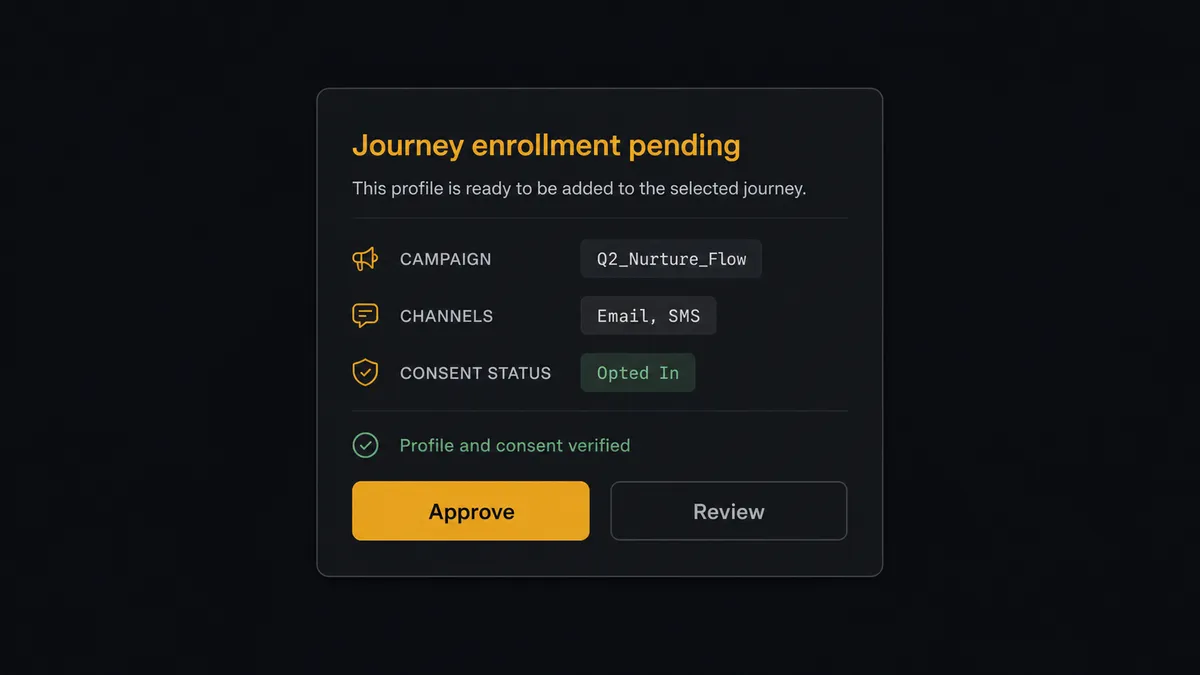
The consequential step is reach. A one-person transactional confirmation is low stakes and reversible in reputation terms: worst case, one person gets a slightly wrong message. Enrolling someone in a multi-step journey, or firing a send aimed at an audience, is different: it compounds over time and cannot be unsent. So before Trigger Campaign enrolls anyone in a journey, or Send Message reaches more than one person, the agent invokes a human-in-loop flow it holds as a callable tool. The workflow pauses and posts to the marketing channel: “Response batch mapped to the [name] journey. Campaign channels: [channels], per Get Campaign Details. Consent verified for each profile. Approve enrollment?” The marketer approves, and only then does the campaign fire. The approver, the campaign, and the trigger properties all land in the audit trail.
Consent handling never waits for approval in the other direction: an opt-out expressed in a form response is applied with Set Subscription Status immediately, under standing policy, because the risk there is delay, not action. Prospects call this pattern a digital andon cord: like Toyota’s quality control pull cord, the workflow stops the line the moment it hits uncertainty, and your team pulls it back into motion.
FlowRunner vs Zapier
Marketing teams wiring Typeform to Braze usually try Zapier first, reasonably. Zapier’s connector library is enormous, its Typeform support is mature, and its template gallery gets a simple submission-to-profile Zap running in minutes. For a low-stakes flow, form response in, profile attribute out, it is a fast and proven path.
The difference shows up where messaging decisions carry weight. FlowRunner is built around native human-in-the-loop and AI-agent orchestration, where an agent reads each response and a marketer clears anything with reach. Here is the honest side-by-side.
| What matters for this pair | FlowRunner | Zapier |
|---|---|---|
| Human-in-the-loop on journey enrollment and audience sends | Native. The agent invokes an approval flow as a callable tool and pauses before Trigger Campaign or Send Message reaches an audience | Approval-style steps can be added; the gate is a configured step, not a judgment about the specific batch |
| Who runs the flow | An AI agent reads the answers, applies consent, and picks actions as tools | A predefined step sequence you configure per Zap |
| Users included | Unlimited users on every tier | Priced by task volume; seats vary by plan |
| Bring your own AI keys | Yes, BYOK | AI features tied to Zapier’s own AI offering |
| Self-hosted option | Yes, cloud-hosted or self-hosted | Cloud only |
| Pricing model | Transparent workflow-based tiers with clear execution limits | Per-task pricing where every response consumes tasks as volume grows |
If you need one form writing one attribute to one profile, Zapier will do it quickly. If responses carry consent, sensitive answers, and journey decisions, and you want a marketer’s name on every send with reach, that is where FlowRunner is the better fit.
Before and after
The shift is qualitative: the messaging platform starts running on what respondents actually said.
| Category | Before | After |
|---|---|---|
| Response latency | Submissions wait for the weekly export-and-import batch | Get Form Responses lands every submission on the profile within the hour |
| Consent | Channel preferences flattened or lost in the import | Set Subscription Status applies each respondent’s expressed consent before any message |
| Personalization | The welcome message reflects the segment, not the person | Trigger Campaign carries the respondent’s own answers as trigger properties |
| Sensitive answers | Free-text detail copied onto profiles unreviewed | The agent holds responses with sensitive content for a person to clear |
| Send accountability | Journey enrollments happen silently inside the import | Every enrollment and audience send carries a named approver in the audit trail |
What you can build
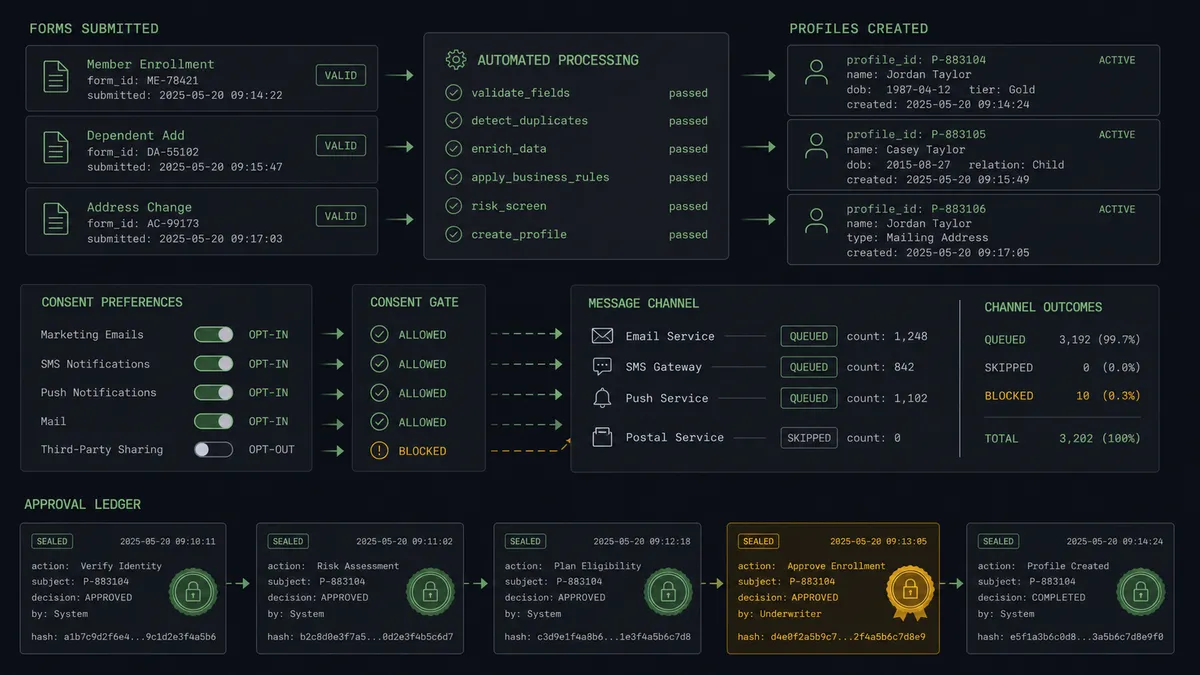
The hourly intake pipeline. Get Form Responses retrieves new submissions, Track Users writes attributes and the submission event, Set Subscription Status applies consent, and the approved confirmation fires with Trigger Campaign. The signup moment and the welcome message stay minutes apart, not days.
The consent guardian. Any form, survey, or preference-center Typeform can carry consent questions. The agent reads them on every submission and applies changes with Set Subscription Status immediately, so an opt-out expressed anywhere takes effect before the next send, with the source response linked in the audit trail.
The research-to-segment loop. After a survey closes, the agent reviews responses with Get Form Responses and Get Form Insights, proposes segment updates from the answer patterns, writes approved attribute changes with Track Users, and drafts the follow-up campaign brief for the marketer who approves the send.
The high-intent fast lane. Responses whose answers signal buying intent, budget stated, timeline near, decision-maker role, get flagged. The agent writes the intent attributes with Track Users and proposes the sales-alert campaign via Trigger Campaign, held for a marketer when it enrolls the respondent in a sequence.
The profile hygiene audit. Periodically the agent exports matched profiles with Export Users, compares them against recent form answers, and proposes corrections for stale attributes, with any bulk change to profiles or subscriptions held for approval before it runs.
Getting started
Start on the free plan: 100 executions a month, every integration included, no credit card required, plus 14 days of Professional for new accounts. Both connectors are available on every tier, and every tier includes unlimited users and unlimited workflows, so the marketer who approves sends works inside the same flow as the ops team that built it.
Explore the integration details:
- Typeform integration (36 actions covering forms, responses, insights, themes, and workspaces)
- Braze integration (8 actions covering user tracking, campaigns, messaging, and subscription status)
Start building free at flowrunner.ai or book a demo to see a live Typeform to Braze workflow, enrollment approval and all.
Frequently asked questions
Is it free to connect Typeform and Braze on FlowRunner?
You can build and run the connection on FlowRunner's free plan, which includes 100 executions a month and every integration with no credit card required, and new accounts also get 14 days of Professional. Both connectors are available on every FlowRunner tier, and every tier includes unlimited users and unlimited workflows.
Can I self-host the Typeform to Braze workflow?
Yes. FlowRunner offers a cloud-hosted option and a self-hosted option, so the connection can run inside your own environment.
Does the AI agent need my own OpenAI or Claude key?
FlowRunner uses a bring-your-own-keys model, so you connect the AI provider key you already have. You are not locked to one model.
What happens when a form response contains sensitive or ambiguous answers?
The agent holds it. Responses with health details, financial information, or answers that contradict each other are not pushed onto the Braze profile. The agent routes the response to the owner with its concern stated, and only writes what a person clears.
Neither Typeform nor Braze has a trigger, so what starts the workflow?
A schedule. The workflow calls Get Form Responses hourly to retrieve submissions since the last run, then writes each respondent's attributes to Braze with Track Users and fires any approved follow-up with Trigger Campaign.
How does consent captured in the form reach Braze?
Directly and first. The agent reads the consent answers in each response and applies them with Set Subscription Status before any message is sent, so a respondent who ticked email-only never receives an SMS, and an opt-out expressed in the form takes effect immediately.