How to Connect Typeform with Campaign Monitor (With or Without an AI Agent)
Enroll Typeform respondents into Campaign Monitor lists automatically, with an AI agent that checks each address's subscription state first and pauses for the list owner before any add that would override a recorded opt-out.
How do you connect Typeform to Campaign Monitor?
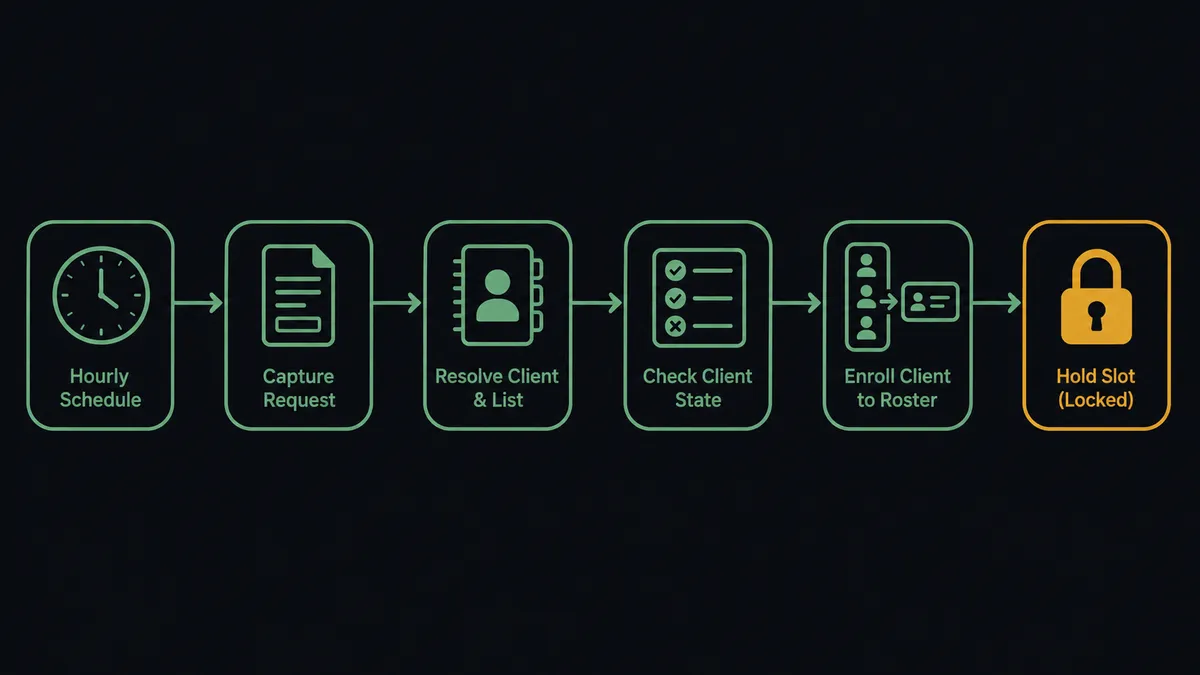
Neither service exposes a trigger, so you connect Typeform to Campaign Monitor with a scheduled workflow: Get Form Responses pulls new submissions every hour, List Clients and List Lists resolve the right audience, Get Subscriber checks whether each address already exists and in what state, and Add Subscriber enrolls the clean ones with custom fields and consent-to-track set from the form. FlowRunner is a visual AI-agent orchestration platform where automations run autonomously and pause for human judgment on the steps that carry real consequence. Run as an AI agent, the same connection reads each address’s subscription state before writing, and pauses for the list owner before any add that would override a recorded opt-out.
The problem it solves
Today the list grows by CSV. Signups accumulate in Typeform until someone remembers to export them, and the batch gets imported into Campaign Monitor with whatever column mapping survived the copy-paste. The person who signed up on the 3rd receives their first email on the 28th, when the campaign that prompted the signup is long over. For agencies and multi-brand teams the problem multiplies: each client’s audience has its own list, its own custom fields, and its own import backlog, and the maintenance burden scales with every brand added.
The dangerous edge is consent. Campaign Monitor tracks each address’s state precisely: Active, Unconfirmed, Unsubscribed, Bounced, Deleted. A bulk import mostly ignores those states, which is how a person who unsubscribed in March gets re-added in June because they filled out an unrelated survey. That is not a data error, it is a broken promise with regulatory weight, and the sender reputation damage lands on every future campaign. The import process cannot catch it because it never reads the state; it just writes rows.
How it works: the connection
The connection reads from Typeform and writes to Campaign Monitor, checking before every write. Here is the plain version, grounded in the real connector actions.
- Trigger: On a schedule, Get Form Responses runs hourly and retrieves submissions received since the last run.
- Resolve the audience: The workflow calls List Clients and List Lists to find the right list for the form’s brand, then Get List to confirm its configuration.
- Check state first: For each respondent’s address, it calls Get Subscriber. A new address proceeds; an Active one gets refreshed; an Unsubscribed one stops here.
- Enroll: It calls Add Subscriber for clean addresses, with name and custom fields mapped from the form answers and consent-to-track set from the form’s consent question.
- Refresh: For already-active records, it calls Update Subscriber so new answers update name and custom fields without disturbing the subscription.
- Honor exits: When a form response expresses an opt-out, it calls Unsubscribe Subscriber immediately.
- Log: The daily summary posts adds, updates, unsubscribes, and held addresses, so the list’s growth is on the record.
That is the “just connect them” answer. Signups land on the list the hour they happen, custom fields intact, and the subscription state is read before anything is written.
Can an AI agent run it? (and why a human stays in the loop)
Yes, and the agent’s job here is to be the permission-aware clerk the batch import never was. It holds the real actions as tools: Get Form Responses on the form side; List Clients, List Lists, Get List, Get Subscriber, Add Subscriber, Update Subscriber, and Unsubscribe Subscriber on the list side. For each respondent it reasons about identity and state: a typo-variant of an address already on the list gets flagged rather than enrolled as a duplicate, a respondent whose answers indicate the wrong brand gets routed to the right client’s list, and a form response that reads as a complaint rather than a signup never becomes an Add Subscriber call at all.
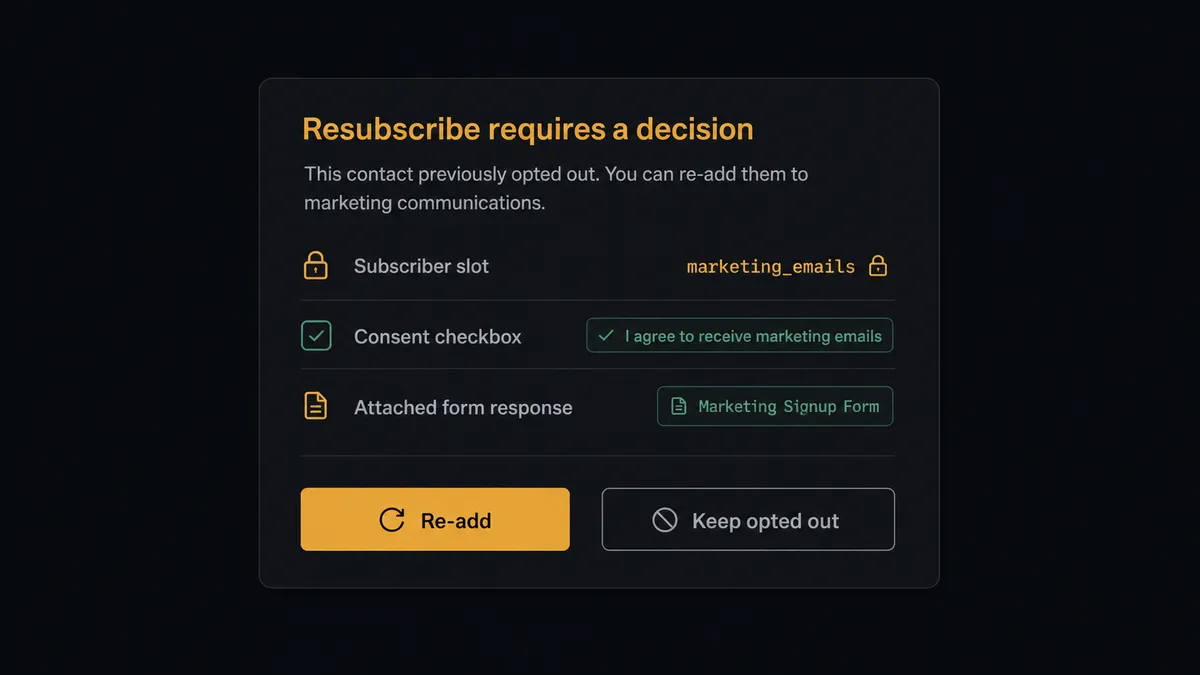
The consequential step is overriding recorded consent. An address whose state is Unsubscribed is not a gap in the data, it is a person who said stop, on the record. Re-adding them because they touched a form is exactly how compliant companies end up sending to people who opted out. So when a new submission arrives for an opted-out address, the agent stops and invokes a human-in-loop flow it holds as a callable tool. The workflow pauses and posts to the list owner: “New submission from [address], currently Unsubscribed on [list]. The form includes an explicit consent checkbox, checked. Full response attached. Treat this as fresh consent and re-add?” The list owner decides. Only on approval does Add Subscriber run, and the override carries the owner’s name and timestamp in the audit trail, which is precisely the evidence you want on file for a consent decision.
Opt-outs flow the other way without waiting: an unsubscribe expressed in any form response executes immediately via Unsubscribe Subscriber, because the risk in that direction is delay. Prospects call this a digital andon cord: like Toyota’s quality control pull cord, the workflow stops the line the moment it hits uncertainty, and your team pulls it back into motion.
FlowRunner vs Zapier
The default way teams wire Typeform to Campaign Monitor is Zapier, and it earned that default. The connector library is vast, both apps are well supported, and the template gallery has form-to-list Zaps that a non-technical marketer can activate in minutes. For a single brand with a clean list and low stakes, that path works.
The difference is what the flow does when the address already has a history. FlowRunner is built around native human-in-the-loop and AI-agent orchestration, where the agent reads subscription state and a person rules on consent overrides. Here is the honest side-by-side.
| What matters for this pair | FlowRunner | Zapier |
|---|---|---|
| Human-in-the-loop on resubscribing opted-out addresses | Native. The agent invokes an approval flow as a callable tool and pauses before Add Subscriber overrides a recorded opt-out | Approval-style steps can be added; state-dependent consent routing is yours to build per Zap |
| Who runs the flow | An AI agent reads each address’s state and picks actions as tools | A predefined step sequence you configure per Zap |
| Users included | Unlimited users on every tier | Priced by task volume; seats vary by plan |
| Bring your own AI keys | Yes, BYOK | AI features tied to Zapier’s own AI offering |
| Self-hosted option | Yes, cloud-hosted or self-hosted | Cloud only |
| Pricing model | Transparent workflow-based tiers with clear execution limits | Per-task pricing where every submission consumes tasks across every brand |
If you run one form into one list and nobody on it has ever unsubscribed, Zapier is a fine choice. If your lists are permission records across multiple brands, and you want a named decision on every consent override, that is where FlowRunner is the better fit.
Before and after
The shift is qualitative: the list becomes a maintained permission record instead of an import destination.
| Category | Before | After |
|---|---|---|
| List growth | Signups wait in Typeform for the periodic CSV import | Add Subscriber enrolls each clean address within the hour, custom fields intact |
| Consent state | Import overwrites whatever state an address had | Get Subscriber is read before every write, and opt-outs stop the line |
| Resubscribes | Opted-out addresses silently re-added by the batch | Each override is a named list-owner decision, recorded in the audit trail |
| Multi-brand upkeep | Every client’s list has its own manual import backlog | List Clients and List Lists route every form to the right audience through one flow |
| Opt-out latency | A stop request in a form waits until someone reads the export | Unsubscribe Subscriber executes the hour the response arrives |
What you can build
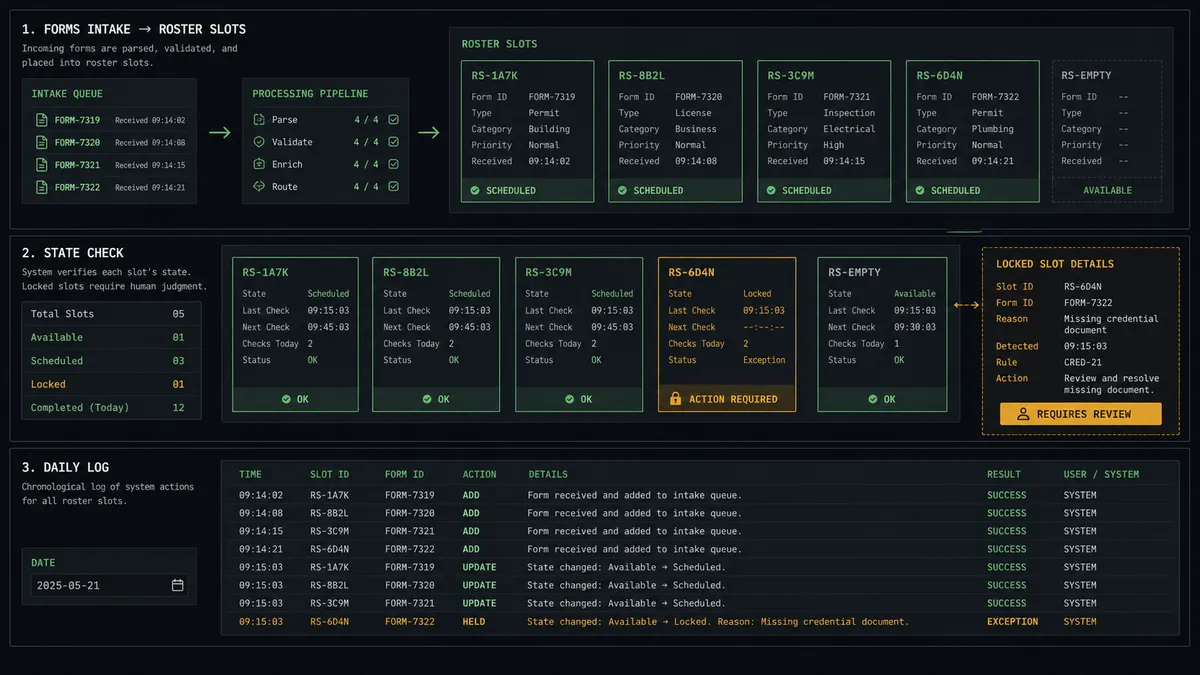
The hourly enrollment pipeline. Get Form Responses pulls new signups, Get Subscriber checks state, Add Subscriber enrolls clean addresses with consent-to-track set, and the daily log posts what happened. The list grows in real time and every write was checked first.
The multi-brand intake router. An agency runs signup forms for several clients. The agent resolves each form to the right client and list with List Clients and List Lists, applies that brand’s custom fields, and holds any cross-brand anomaly, so one flow maintains every audience to the same standard.
The preference updater. A profile-update Typeform lets subscribers change their name, interests, or details. The agent matches each response with Get Subscriber and applies changes with Update Subscriber, so records stay current without anyone touching the list, and any change that reads as an opt-out executes as one.
The campaign-aware welcome check. Before enrolling a batch, the agent reviews List Sent Campaigns and List Draft Campaigns for the audience, so new subscribers are not dropped into the middle of an in-flight send sequence, and flags timing conflicts for the list owner.
The provisioned launch list. For a new campaign or brand, the agent creates the audience with Create List, configured for double opt-in where policy requires, wires the signup form into it, and hands the list owner a running, consent-checked intake on day one.
Getting started
Start on the free plan: 100 executions a month, every integration included, no credit card required, plus 14 days of Professional for new accounts. Both connectors are available on every tier, and every tier includes unlimited users and unlimited workflows, so every list owner across every brand can rule on their own consent decisions.
Explore the integration details:
- Typeform integration (36 actions covering forms, responses, insights, themes, and workspaces)
- Campaign Monitor integration (10 actions covering clients, lists, subscribers, and campaign history)
Start building free at flowrunner.ai or book a demo to see a live Typeform to Campaign Monitor workflow, consent gate and all.
Frequently asked questions
Is it free to connect Typeform and Campaign Monitor on FlowRunner?
You can build and run the connection on FlowRunner's free plan, which includes 100 executions a month and every integration with no credit card required, and new accounts also get 14 days of Professional. Both connectors are available on every FlowRunner tier, and every tier includes unlimited users and unlimited workflows.
Can I self-host the Typeform to Campaign Monitor workflow?
Yes. FlowRunner offers a cloud-hosted option and a self-hosted option, so the connection can run inside your own environment.
Does the AI agent need my own OpenAI or Claude key?
FlowRunner uses a bring-your-own-keys model, so you connect the AI provider key you already have. You are not locked to one model.
What happens when a form respondent's address shows as Unsubscribed in Campaign Monitor?
The workflow stops for that address. An Unsubscribed state is a recorded opt-out, and re-adding it is a consent decision, not a data fix. The agent packages the form response, the subscription state from Get Subscriber, and the history, and the list owner decides whether the new submission constitutes fresh consent.
Neither Typeform nor Campaign Monitor has a trigger, so what starts the workflow?
A schedule. The workflow calls Get Form Responses hourly to retrieve new submissions, resolves the correct audience with List Clients and List Lists, checks each address with Get Subscriber, and enrolls clean addresses with Add Subscriber.
Can one workflow serve multiple brands or clients?
Yes. Campaign Monitor's client-scoped model means the agent resolves the right client and list with List Clients and List Lists per form, so an agency or multi-brand team runs every audience through the same consent-checked flow.