How to Connect Stripe with Dialpad (With or Without an AI Agent)
Connect Stripe billing events to Dialpad so failed payments trigger timely text outreach, with an AI agent that pauses for a human before a payment reminder reaches a customer's phone.
How do you connect Stripe to Dialpad?
You connect Stripe to Dialpad by having Stripe’s Parse Webhook Event trigger drive Dialpad’s outreach actions: when a payment fails, the workflow matches the customer with List Contacts or provisions them with Create Contact, then delivers a payment reminder with Send SMS, so a billing failure becomes a text on the customer’s phone while the failure is still fresh instead of an email in a promotions tab. FlowRunner is a visual AI-agent orchestration platform where automations run autonomously and pause for human judgment on the steps that carry real consequence. Run as an AI agent, the same connection classifies each failure, sends the routine reminders on its own, and stops for a named person before anything sensitive reaches a customer’s phone, by text or by call.
The problem it solves
Failed payments mostly die in email. The dunning notice goes out, lands unread, and the subscription lapses while the customer genuinely intended to fix their card. Meanwhile your team finds out about the failures in a weekly Stripe review, long past the moment when a quick “your card expired, here is the update link” text would have recovered the payment in five minutes. Phone outreach, the channel that actually recovers stubborn cases, only happens when someone in ops builds a call list by hand, and that list is stale before lunch.
The edges cut in both directions. Text a customer about a disputed charge with a chirpy payment-reminder template and you have escalated the dispute. Call a customer cold about a small failed renewal and you have spent expensive human minutes on something a text would have fixed. And when a collection call does happen, the commitment made on it, a promised date, a request to cancel, lives only in the caller’s memory. The billing system never hears what the phone call decided, so next week’s automation contradicts last week’s conversation.
How it works: the connection
The connection listens to Stripe and writes to Dialpad. Here is the plain version, grounded in the real connector actions.
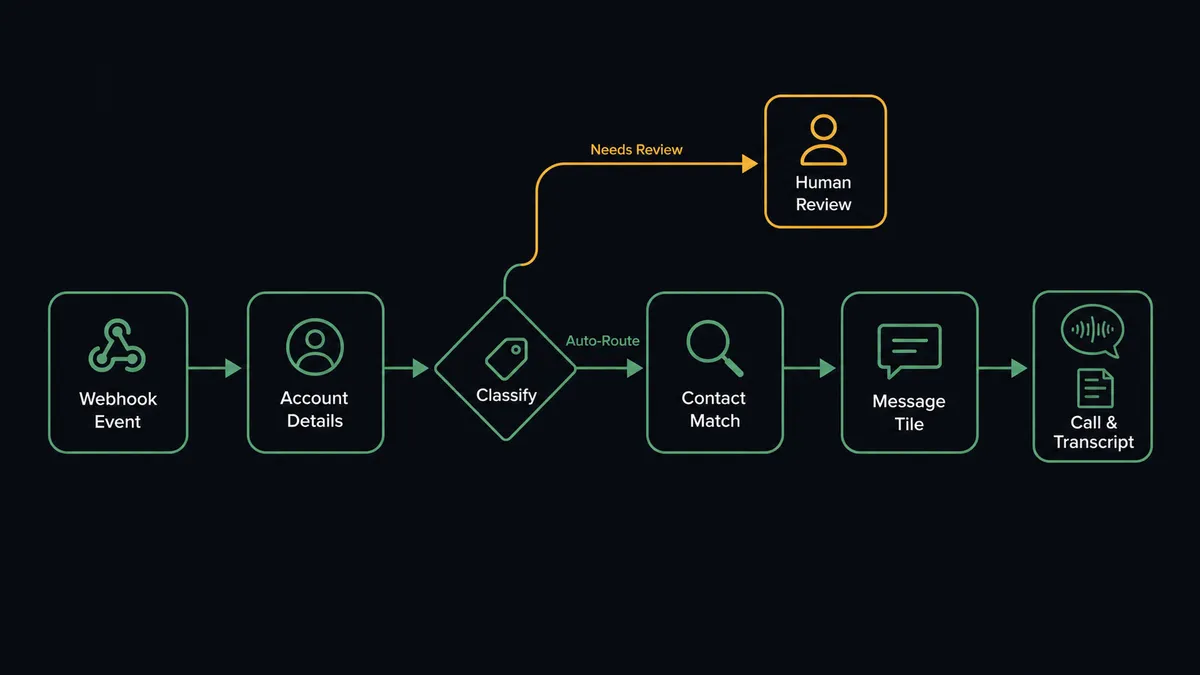
- Trigger: Stripe fires Parse Webhook Event when a payment fails or a dispute opens.
- Read: The workflow calls Get Customer and Get Subscription in Stripe to pull the account, plan, amount, and failure reason.
- Match: It calls List Contacts in Dialpad to find the customer by phone or email, and Create Contact when no record exists.
- Reach out: It calls Send SMS with the right template for the failure: a card-update link for an expired card, a retry notice for insufficient funds.
- Escalate: For accounts that warrant a conversation, it sets up a call for your team member via Initiate Call rather than another text.
- Capture: After the call, it pulls Get Call Transcript so the commitment made on the phone flows back into the follow-up.
That is the “just connect them” answer. Billing failures become timely texts, stubborn cases become calls with context, and what gets agreed on the phone stops evaporating.
Can an AI agent run it? (and why a human stays in the loop)
Yes, and the value is in the triage. An AI agent holds the real actions as tools: Get Customer, Get Subscription, List Contacts, Create Contact, Send SMS, Initiate Call, Get Call Transcript. It reads each failure and matches the response to the moment. First failure on a monthly plan with an expired card: send the friendly text now, because speed is what recovers it. Third failure on an annual account: stop templating, because this is a relationship moment, not a reminder moment.
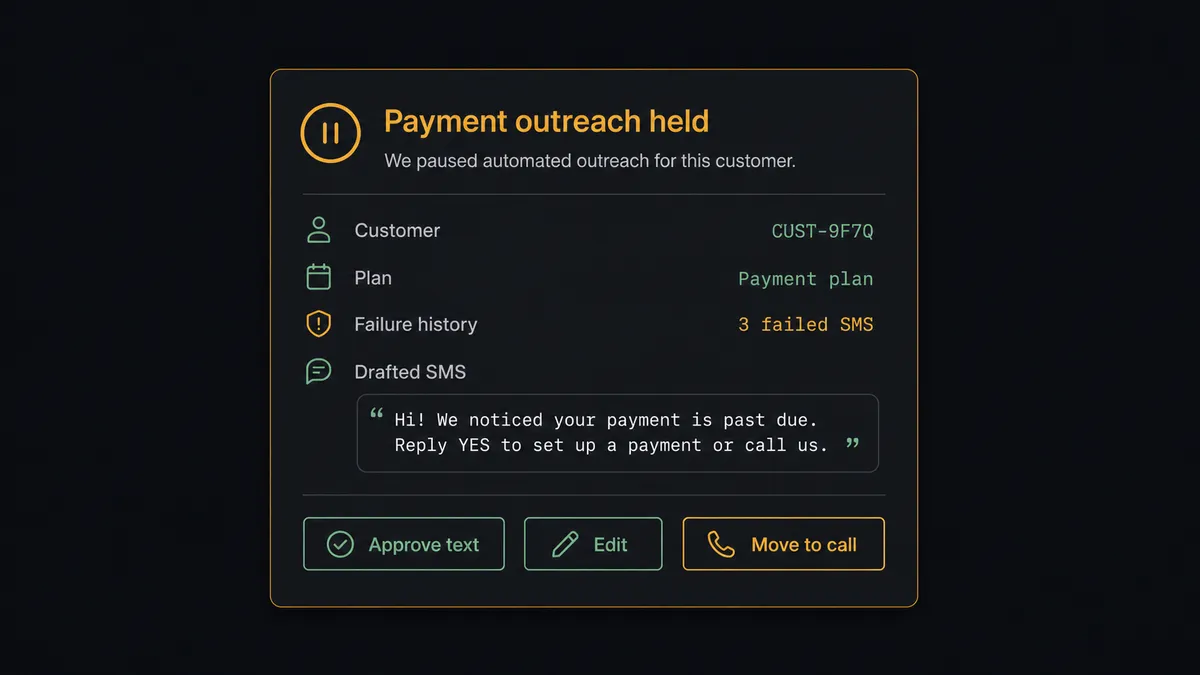
The consequential step is anything that reaches the customer’s phone, because a text about money sets the tone of the relationship and a phone call doubly so. On every sensitive case, the agent invokes a human-in-loop flow it holds as a callable tool. The workflow pauses and posts to your channel: “Third failed payment for [customer] on [plan] at [amount]/mo. Dispute history: none. Drafted text attached. Approve the text, or take it to a call?” A named person approves, edits, or chooses the call, in which case Initiate Call connects your team member with the account story in front of them. Only after the decision does anything fire, and the decision, the approver, and the timestamp land in the audit trail. Disputes never get automated outreach at all: the agent packages the context and hands the whole case to a person.
Prospects call this pattern a digital andon cord. Like Toyota’s line workers pulling the cord the moment something looks wrong, the workflow stops the line the instant the next message would carry real relationship risk, and a human decides how the conversation goes.
FlowRunner vs Zapier
Zapier is a fair first instinct here. It connects Stripe and Dialpad, its editor is comfortable for a non-engineer, and a “failed payment sends an SMS” Zap is quick to build and reliable at what it does. If every failure deserves the same text, Zapier will send it on time, every time.
The problem is that outreach to a customer’s phone is exactly where “the same treatment for everything” is the risk. FlowRunner makes the pause a native step the agent chooses based on what it reads in the account.
| What matters for this pair | FlowRunner | Zapier |
|---|---|---|
| Human-in-the-loop on texts and calls | Native. The agent pauses before Send SMS on sensitive cases and always before Initiate Call | Approval steps exist as add-ons, not a native agent decision |
| Who runs the flow | An AI agent classifies each failure and picks actions as tools | Predefined step sequence per Zap, one treatment per event |
| Users included | Unlimited users on every tier | Priced by task volume; seats vary by plan |
| Bring your own AI keys | Yes, BYOK | AI features tied to Zapier’s own AI offering |
| Self-hosted option | Yes, cloud-hosted or self-hosted | Cloud only |
| Pricing model | Transparent workflow-based tiers | Per-task pricing that scales with billing event volume |
If a single templated text per failure covers your risk, Zapier is a fine tool for it. If who the customer is should change what lands on their phone, and the sensitive cases need a named approver, that is what this pairing does.
Before and after
| Category | Before | After |
|---|---|---|
| Failure response time | Discovered in the weekly Stripe review | A text reaches the customer while the failure is fresh |
| Channel choice | Email for everything, calls only when someone builds a list | Texts for routine cases, calls set up for the ones worth a conversation |
| Sensitive accounts | Same template as everyone, occasionally at the worst moment | Held for a named person with the account story attached |
| Call outcomes | Live in the caller’s memory | Get Call Transcript feeds the commitment back into the workflow |
| Accountability | Nobody can say who approved which outreach | Every held message and call carries an approver and timestamp |
What you can build
Card-expiry text recovery. Parse Webhook Event fires on an expired-card failure. The agent matches the customer via List Contacts and sends the update link with Send SMS within moments, when recovery odds are best.
Repeat-failure escalation to a call. On the second or third failure, the agent stops texting, packages the history, and a named person decides between an edited text and a call connected through Initiate Call.
Dispute hands-off rule. Dispute events never trigger automated outreach. The agent assembles the charge context and routes the case to a person, because a chargeback conversation is never a template.
Promise-to-pay follow-through. After a collection call, the agent reads Get Call Transcript, extracts the promised date, and schedules the retry in Stripe with Confirm Payment Intent for that date instead of the default cadence.
Contact hygiene both ways. Every new Stripe customer gets a matched Dialpad record via Create Contact and Update Contact, so when a customer does call in, the person answering sees who they are.
Getting started
Start on the free plan: 100 executions a month, every integration included, no credit card required, plus 14 days of Professional for new accounts. Both connectors are available on every tier, and every tier includes unlimited users and unlimited workflows.
Explore the integration details:
- Stripe integration (1 trigger and 67 actions covering payments, customers, subscriptions, and refunds)
- Dialpad integration (33 actions covering calls, SMS, contacts, transcripts, and call analytics)
Start building free at flowrunner.ai or book a demo to see a live Stripe to Dialpad workflow, outreach approval and all.
Frequently asked questions
Is it free to connect Stripe and Dialpad on FlowRunner?
You can build and run the connection on FlowRunner's free plan, which includes 100 executions a month and every integration with no credit card required, and new accounts also get 14 days of Professional. Both connectors are available on every FlowRunner tier, and every tier includes unlimited users and unlimited workflows.
Can I self-host the Stripe to Dialpad workflow?
Yes. FlowRunner offers a cloud-hosted option and a self-hosted option, so the connection can run inside your own environment.
Does the AI agent need my own OpenAI or Claude key?
FlowRunner uses a bring-your-own-keys model, so you connect the AI provider key you already have. You are not locked to one model.
Can the agent text or call a customer without anyone reviewing it?
Only for the routine tier you define, such as a first card-expiry reminder. Anything sensitive, including disputes, repeated failures, and high-value accounts, pauses the workflow. The draft goes to your team, and Send SMS fires only after a named person approves. Initiate Call always routes to a human first, connecting your team member rather than dialing the customer cold.
Which Stripe events can start the Dialpad workflow?
Stripe's Parse Webhook Event trigger fires on the events you subscribe to, such as a failed payment, a canceled subscription, or a dispute. The workflow reads the payload, matches the customer in Dialpad with List Contacts, and decides whether the moment calls for a text, a call, or a hold.
How do phone conversations get back into the billing picture?
After a collection call, the workflow pulls the conversation with Get Call Transcript, and the agent summarizes the commitment made, such as a promised payment date, and attaches it to the follow-up so the next step honors what was agreed on the phone.