How to Connect Stripe with Crisp (With or Without an AI Agent)
Connect Stripe billing events to Crisp so payment failures and subscription changes reach customers as timely chat messages, with an AI agent that pauses for a human before a sensitive billing message reaches a customer.
How do you connect Stripe to Crisp?
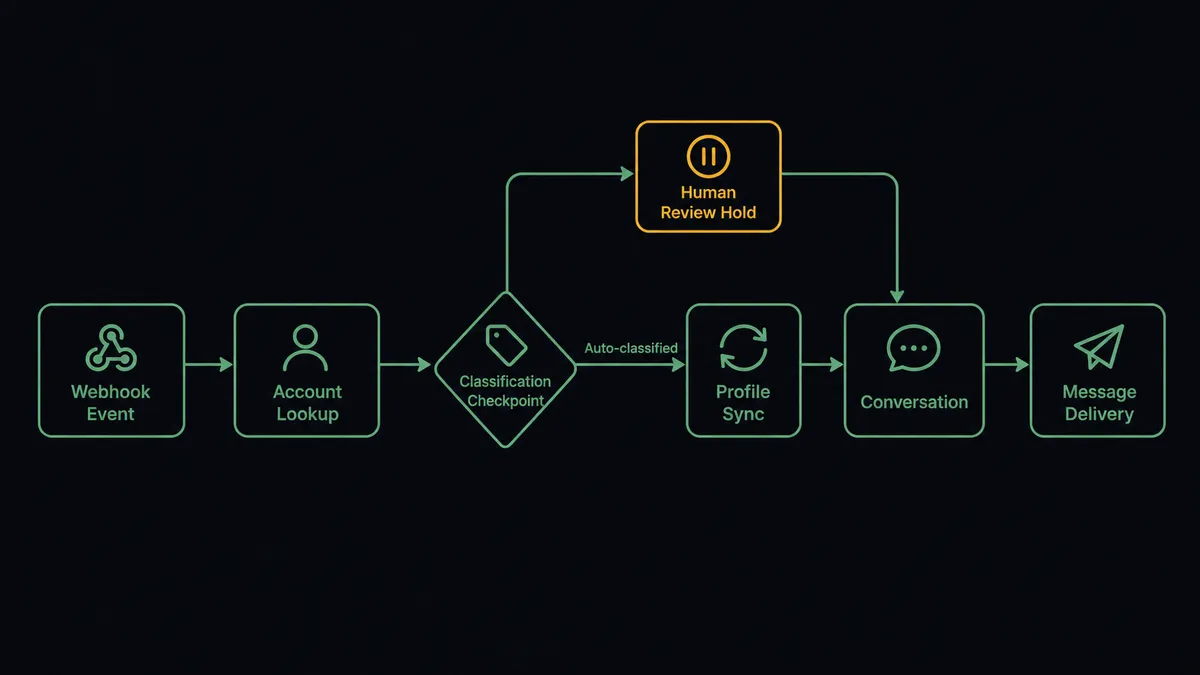
You connect Stripe to Crisp by having Stripe’s Parse Webhook Event trigger drive Crisp’s messaging actions: when a payment fails or a subscription changes, the workflow matches the customer with Get Person or List People, syncs their billing status onto the profile with Update Person, then opens a thread with Create Conversation and delivers the message with Send Message, so a billing event becomes a customer conversation instead of a silent dashboard entry. FlowRunner is a visual AI-agent orchestration platform where automations run autonomously and pause for human judgment on the steps that carry real consequence. Run as an AI agent, the same connection reads each event, sends the routine nudges on its own, and stops for a named person before a sensitive billing message reaches a customer’s chat window.
The problem it solves
Right now, billing events and customer conversations live in different rooms. A payment fails in Stripe on Monday. Nobody messages the customer until someone reviews the failed-payments list, which happens when it happens. Meanwhile the customer’s access degrades, they open a chat in Crisp asking why, and the support person answering has no idea a payment failed because Stripe context does not live in Crisp. Now two people are reconstructing a story that both systems already knew, in front of a customer who is already annoyed.
The edges are where it turns from friction into churn. An expired card fails three renewals in a row with no outreach and the subscription lapses quietly. A dispute arrives and the first customer contact happens after the chargeback, when the relationship is already adversarial. A high-value account’s payment fails and gets the same templated treatment as a trial user, when a human touch would have kept the account. The cost is not the failed payment. It is the conversation that never happened at the moment it would have mattered.
How it works: the connection
The connection listens to Stripe and writes to Crisp. Here is the plain version, grounded in the real connector actions.
- Trigger: Stripe fires Parse Webhook Event when a payment fails, a subscription is canceled, or a dispute opens.
- Read: The workflow calls Get Customer and Get Subscription in Stripe to pull the account, the plan, and the amount at stake.
- Match: It calls Get Person in Crisp, falling back to List People, to find the customer by email.
- Sync: It calls Update Person to write the plan, billing status, and failure reason onto the Crisp profile, so every future conversation starts with context.
- Open the thread: It calls Create Conversation to start a thread tied to that person.
- Message: It calls Send Message with the right template for the event: a card-update link for an expired card, a retry notice for insufficient funds.
That is the “just connect them” answer. Billing events become conversations, and your support team stops answering chat questions blind. The same path in reverse keeps profiles honest: every subscription change lands on the Crisp profile via Update Person whether or not a message goes out.
Can an AI agent run it? (and why a human stays in the loop)
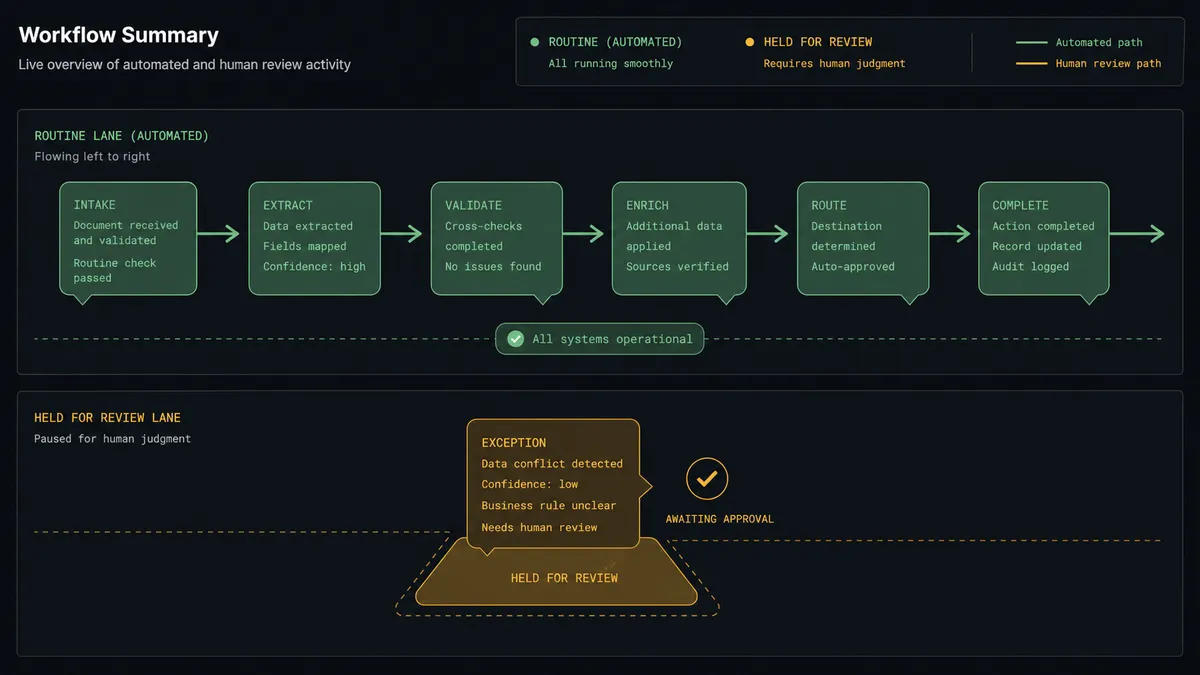
Yes, and this is the difference between a notification pipe and a judgment call. An AI agent holds the real actions as tools: Get Customer, Get Subscription, Get Person, Update Person, Create Conversation, Send Message. For each event it reasons about who this customer is and what the moment calls for. An expired card on a monthly starter plan gets the friendly templated nudge, sent immediately, no ceremony. That is most of the volume, and it should never wait for a person.
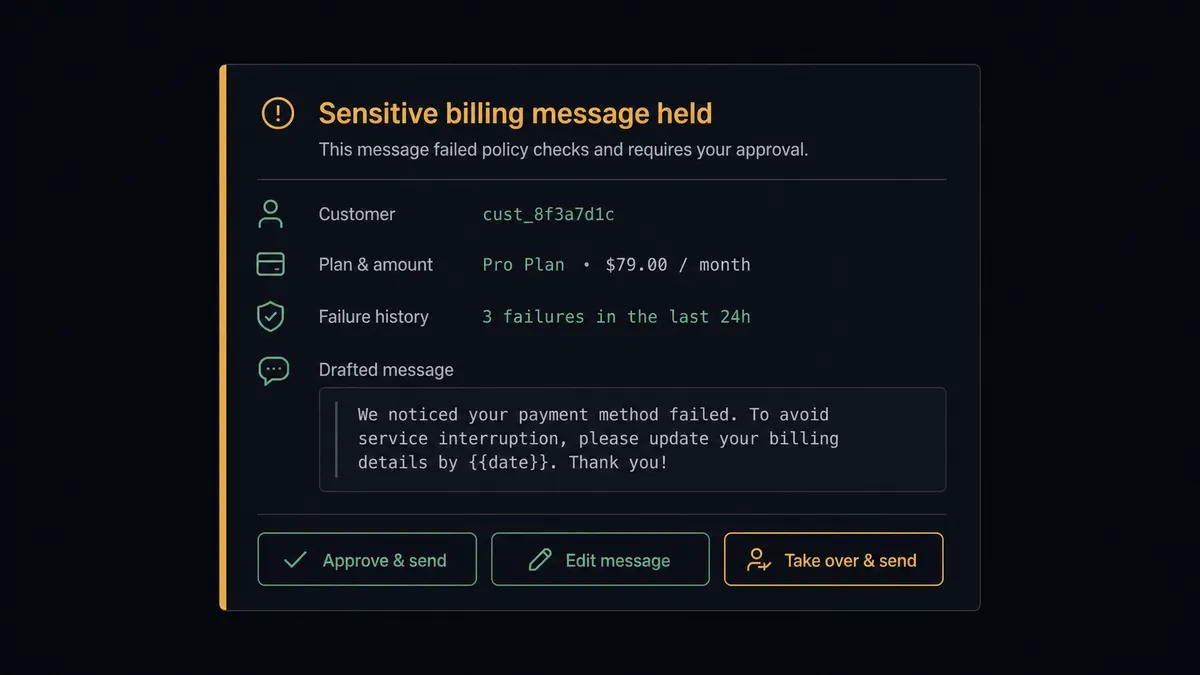
The consequential step is Send Message, because a message in a customer’s chat window cannot be unsent. Before messaging anyone about a dispute, a repeated failure, or a subscription that represents real revenue, the agent invokes a human-in-loop flow it holds as a callable tool. The workflow pauses and posts to your channel: “Third failed payment for [customer], on [plan] at [amount]/mo. Draft message attached. Approve, edit, or take over the conversation?” A person approves, rewrites, or steps in personally. Only then does Send Message fire, and the decision, the approver, and the timestamp land in the audit trail. The agent also knows what it does not know: when a failure reason does not fit its classifications, it holds the message rather than guessing at tone.
Prospects call this pattern a digital andon cord. Like Toyota’s line workers pulling the cord the moment something looks off, the workflow stops the line at uncertainty. Routine recovery messages flow at machine speed. The conversations that decide whether an account stays get a human, with the full billing story already assembled.
FlowRunner vs Zapier
Zapier deserves its reputation here. It connects both Stripe and Crisp, its template gallery almost certainly has a “failed payment sends a chat message” recipe ready to go, and for a single templated notification it is the fastest path to live. If every billing event deserves the same message, Zapier will send it reliably.
The difference is that billing messages are not all the same, and the costly ones are exactly the ones a template mishandles. FlowRunner treats the pause as a native step the agent chooses, not an exception you engineer around.
| What matters for this pair | FlowRunner | Zapier |
|---|---|---|
| Human-in-the-loop on customer-facing billing messages | Native. The agent pauses before Send Message and posts the draft for approval | Approval steps exist as add-ons, not a native agent decision |
| Who runs the flow | An AI agent classifies the event, reasons, and picks actions as tools | Predefined step sequence per Zap, same treatment per event type |
| Users included | Unlimited users on every tier | Priced by task volume; seats vary by plan |
| Bring your own AI keys | Yes, BYOK | AI features tied to Zapier’s own AI offering |
| Self-hosted option | Yes, cloud-hosted or self-hosted | Cloud only |
| Pricing model | Transparent workflow-based tiers | Per-task pricing that scales with your billing event volume |
If you want one templated message per event and volume is modest, Zapier is a fine choice. If the message going out depends on who the customer is and what is at stake, and the sensitive ones need a named approver, that is what this pairing is for.
Before and after
| Category | Before | After |
|---|---|---|
| Failed payment outreach | Happens when someone reviews the Stripe dashboard | The customer hears from you in chat while the failure is fresh |
| Support context | Chat agents answer billing questions with no Stripe visibility | Update Person keeps plan and billing status on every Crisp profile |
| Sensitive accounts | High-value failures get the same template as everyone else | The agent holds them for a human, draft attached |
| Dispute conversations | First contact happens after the chargeback | A person is looped in the moment the dispute event fires |
| Accountability | No record of who decided to send what | Every held message carries an approver and a timestamp |
What you can build
Card-expiry recovery, hands off. Parse Webhook Event fires on a failed renewal. The agent confirms the reason is an expired card, matches the customer with Get Person, and sends a friendly card-update message through Create Conversation and Send Message. No human needed, because nothing is at stake but a nudge.
Repeat-failure escalation. On the second or third failure for the same account, the agent stops templating. It assembles the failure history, drafts a personal message, and holds it for a named approver before Send Message fires.
Billing-aware support profiles. Every subscription event, upgrade, downgrade, or cancellation flows through Update Person, so a Crisp agent opening any conversation sees the plan, status, and recent billing history without asking the customer to explain their own account.
Dispute first-touch. When a dispute event arrives, the agent opens a conversation with Create Conversation, attaches the charge context, and routes the whole thread to a human before any message goes out, because a chargeback conversation is never routine.
Cancellation save. When a subscription cancellation event fires on an account above your revenue threshold, the agent packages the account history and asks a person whether to send a check-in message, offer a pause via Update Subscription in Stripe, or let it go quietly.
Getting started
Start on the free plan: 100 executions a month, every integration included, no credit card required, plus 14 days of Professional for new accounts. Both connectors are available on every tier, and every tier includes unlimited users and unlimited workflows.
Explore the integration details:
- Stripe integration (1 trigger and 67 actions covering payments, customers, subscriptions, refunds, and invoicing)
- Crisp integration (9 actions covering conversations, messages, and people profiles)
Start building free at flowrunner.ai or book a demo to see a live Stripe to Crisp workflow, sensitive-message approval and all.
Frequently asked questions
Is it free to connect Stripe and Crisp on FlowRunner?
You can build and run the connection on FlowRunner's free plan, which includes 100 executions a month and every integration with no credit card required, and new accounts also get 14 days of Professional. Both connectors are available on every FlowRunner tier, and every tier includes unlimited users and unlimited workflows.
Can I self-host the Stripe to Crisp workflow?
Yes. FlowRunner offers a cloud-hosted option and a self-hosted option, so the connection can run inside your own environment.
Does the AI agent need my own OpenAI or Claude key?
FlowRunner uses a bring-your-own-keys model, so you connect the AI provider key you already have. You are not locked to one model.
What stops the agent from sending a customer a billing message it should not send?
The agent classifies each event before it writes anything. Routine cases like an expired card get a templated nudge. Sensitive cases, such as a dispute, a repeated failure, or a high-value subscription at risk, pause the workflow and post a draft to your team. Send Message only fires after a named person approves the draft.
Which Stripe events can start the Crisp workflow?
Stripe's Parse Webhook Event trigger fires on the events you subscribe to, such as a failed payment, a canceled subscription, or a new dispute. The workflow reads the payload, matches the customer in Crisp with Get Person or List People, and decides what to do next.
Does the connection keep Crisp profiles in sync with Stripe?
Yes. The workflow calls Update Person to write the customer's plan, billing status, and lifetime value onto their Crisp profile, so any human agent who opens the conversation sees current billing context without leaving Crisp.