How to Connect ShipBob with Dialpad (With or Without an AI Agent)
Connect ShipBob shipment events to Dialpad so customers get texted about shipping, delivery, and exceptions, with an AI agent that triages each exception and pauses for a human before the bad-news message goes out.
How do you connect ShipBob to Dialpad?
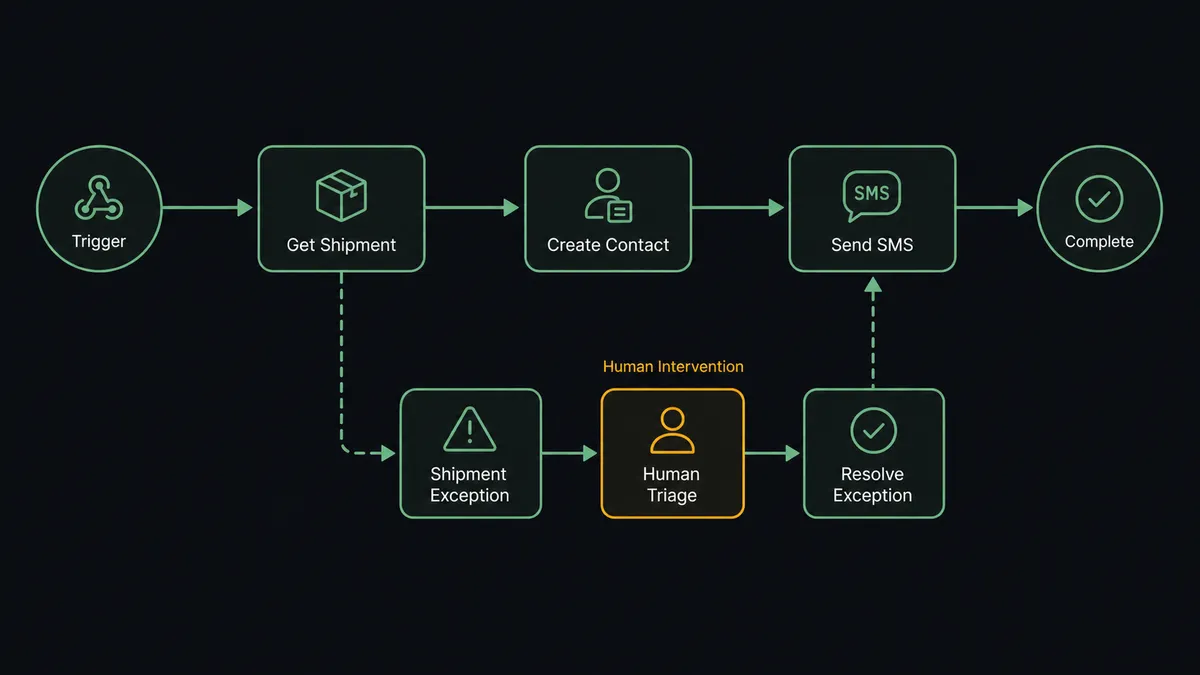
You connect ShipBob to Dialpad by having ShipBob’s shipment triggers drive Dialpad actions: On Order Shipped fires and the workflow pulls the order with Get Order, makes sure the customer’s number exists with Create Contact, and texts the tracking link with Send SMS, with On Shipment Delivered and On Shipment Exception driving their own messages the same way. FlowRunner is a visual AI-agent orchestration platform where automations run autonomously and pause for human judgment on the steps that carry real consequence. Run as an AI agent, the same connection triages every exception before saying anything, texts the routine delays itself, and stops for a named human before bad news reaches the customer on an order big enough to lose.
The problem it solves
Between your 3PL and your customers sits a dashboard nobody watches in real time. Orders ship, packages land, and most of the time silence is fine. But when a shipment goes sideways, the clock starts: the customer does not know yet, the 3PL has done its part by flagging the exception, and the only way your team finds out is if someone happens to check ShipBob or the customer emails first, already annoyed. Support learns about shipping problems from the people the problems happened to.
The edges compound. A routine carrier delay gets no message at all, so the customer refreshes tracking for three days and forms an opinion about your brand. A high-value order stalls in an exception queue over a weekend, and by Monday the buyer has filed a dispute. When someone does send an update, it is typed by hand from whatever the dashboard shows, with no record on the customer’s account that it happened. The information all exists; it just never moves to the person who needs it, at the speed the situation deserves.
How it works: the connection
The connection listens to ShipBob and speaks through Dialpad. Here is the plain version, grounded in the real connector actions.
- Trigger: ShipBob fires On Order Shipped when the warehouse ships an order.
- Read: The workflow calls Get Order and Get Shipment to pull the customer’s details, the items, and the tracking reference.
- Sync the contact: It calls Create Contact in Dialpad if the customer’s number is not already there, so future calls and texts show history.
- Text the good news: It calls Send SMS with a shipped confirmation and the tracking reference.
- Confirm the landing: On Shipment Delivered fires a short delivered note through Send SMS, closing the loop.
- Catch the trouble: On Shipment Exception fires a separate path that pulls the exception detail with Get Shipment and drafts the appropriate update.
- Escalate to a voice: For exceptions that warrant a conversation, Initiate Call connects the assigned rep to the customer, and Get Call Transcript records how it resolved.
That is the “just connect them” answer. Customers hear about their orders from you, not from a stalled tracking page, and every shipping event has a message path with no human bottleneck on the routine cases.
Can an AI agent run it? (and why a human stays in the loop)
Yes, and exceptions are exactly where the agent earns its place. A template automation can text “your order shipped” on a trigger; it treats a one-day carrier delay and a destroyed-in-transit event as the same class of message. An AI agent holds Get Order, Get Shipment, Create Contact, Send SMS, and Initiate Call as tools and reads each exception before deciding what kind of moment this is. A minor delay on a routine order gets an immediate, calm text with the revised expectation. A serious exception on a large order is a different animal, and the agent knows it.
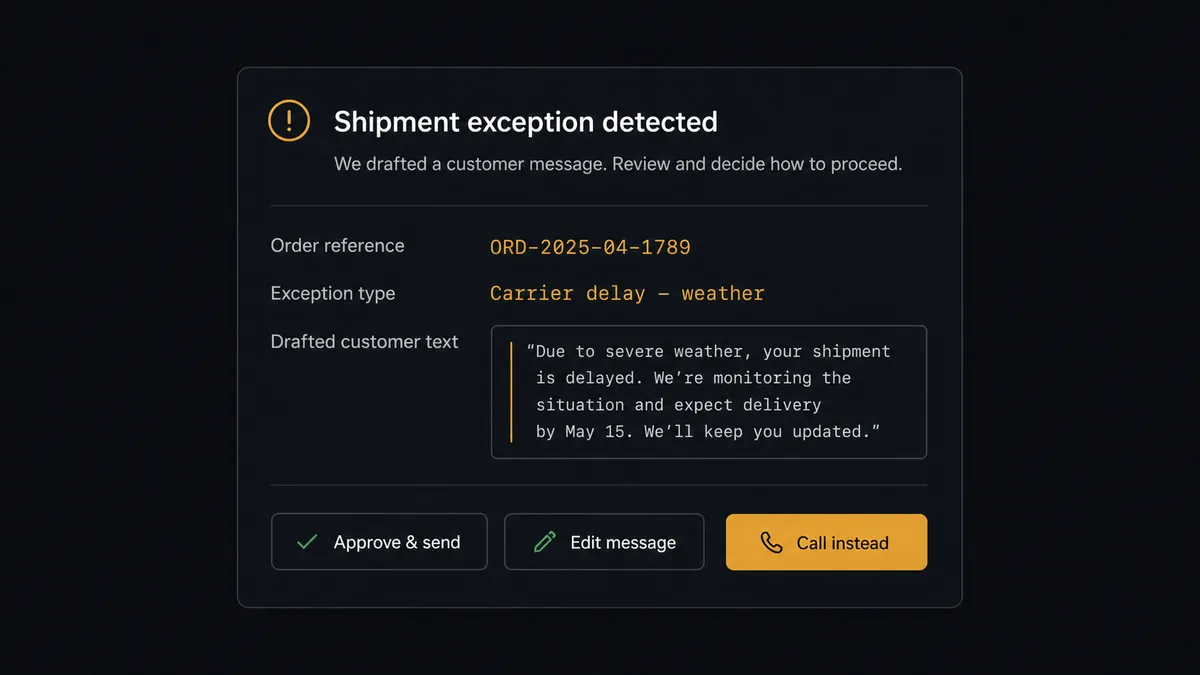
The consequential step is Send SMS on the bad-news path. A poorly worded delay text on a high-value order does not inform the customer, it activates them. So before that send, the agent invokes a human-in-loop flow it holds as a callable tool. The workflow pauses and posts to your support channel: “Shipment exception on order [reference] for [customer]: carrier reports damage in transit. Order is well above typical value. Draft: [message text]. Approve the text, edit it, or call instead?” The rep approves, rewrites, or picks the call, in which case Initiate Call bridges them to the customer while the details are on screen, and Get Call Transcript files what was said. Nothing reaches the customer until a person has owned the decision, and the log shows who.
This is the digital andon cord for fulfillment: like Toyota’s production line pull cord, the workflow stops the line the moment it hits uncertainty. Shipped and delivered messages flow untouched at full speed. The messages that decide whether a shipping problem becomes a churn story wait for a named human, every time.
FlowRunner vs Celigo
Celigo has a legitimate claim on ShipBob integrations. Its iPaaS moves 3PL data into ERPs and order systems at serious volume, its prebuilt integration apps encode years of order-to-cash edge cases, and IT teams that standardize on it get solid monitoring and error handling. If the job is synchronizing ShipBob records with your commerce stack at scale, Celigo is built for that.
This pair, though, is not a record-sync problem. It is a customer-communication problem, and the hard part is judgment: what to say, when to say it, and when a human should say it instead. Celigo executes mappings between systems; composing a situation-appropriate message to an upset customer and pausing for an approver is not the shape of what it does. FlowRunner runs this as an agent whose escalation to a person is a native step, not an error state.
| What matters for this pair | FlowRunner | Celigo |
|---|---|---|
| Human-in-the-loop before Send SMS delivers bad news | Native. The agent invokes an approval flow as a callable tool and waits for a named approver | Error handling and alerting on integration flows, not a pause-for-judgment message step |
| Who runs the flow | An AI agent triages events, drafts messages, picks actions as tools | Configured integration flows executed as defined |
| Users included | Unlimited users on every tier | Seat and endpoint licensing scoped by plan |
| Bring your own AI keys | Yes, BYOK. Connect the AI provider key you already have | AI features run inside Celigo’s own platform stack |
| Self-hosted option | Yes, cloud-hosted or self-hosted | Cloud iPaaS |
| Pricing model | Transparent workflow-based tiers | Enterprise iPaaS pricing scoped by endpoints and volume |
If you need ShipBob data flowing into an ERP under IT governance, Celigo is a strong choice. If you need shipment events turning into the right customer conversations, with a person on the ones that carry risk, that is what this pairing does.
Before and after
| Category | Before | After |
|---|---|---|
| Shipping updates | Customers watch a tracking page and infer; nobody proactively tells them anything | On Order Shipped and On Shipment Delivered fire texts within seconds of each event |
| Exception response | Exceptions sit in the 3PL dashboard until someone checks or the customer complains | On Shipment Exception is triaged the moment it fires, with the routine delays texted immediately |
| Bad news delivery | Whoever notices types whatever seems right, or avoids sending it at all | Serious exception messages are drafted with context and approved by a named person before sending |
| Escalation to a call | The rep digs through the dashboard mid-call to figure out what happened | Initiate Call bridges the rep with the order and exception details already assembled |
| Communication record | Texts and calls leave no trace on the order’s story | Every message and Get Call Transcript summary is logged with timestamps and approvers |
What you can build
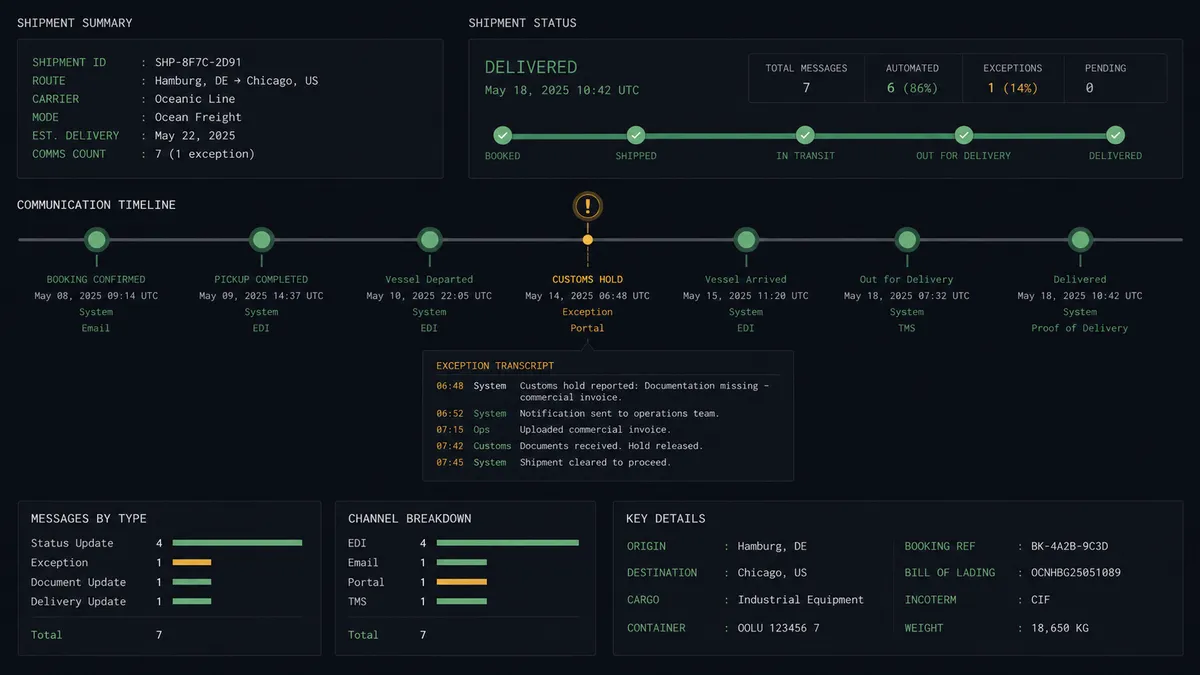
Tracking texts on every shipment. On Order Shipped fires. The agent pulls the customer and tracking reference with Get Order and Get Shipment, syncs the number with Create Contact, and sends the confirmation with Send SMS. No dashboard watching, no copy-paste.
Delivered confirmations that close the loop. On Shipment Delivered fires a short landed message, so the customer knows the package arrived and support stops fielding “did it deliver?” tickets.
Exception triage with a gate. On Shipment Exception fires. The agent classifies the problem, texts routine delays itself, and holds serious ones at the approval step where a rep approves the draft, rewrites it, or takes it to a call with Initiate Call.
Hold-release watch. On Shipment On Hold fires. The agent pulls the order context, posts the hold reason to your ops channel, and once the hold clears, texts the customer an updated expectation without anyone having tracked the case by hand.
Return acknowledged, refund path started. On Return Completed fires. The agent confirms receipt to the customer with Send SMS and posts the return summary to your team, so the refund conversation starts the day the warehouse checks the item in.
Getting started
Start on the free plan: 100 executions a month, every integration included, no credit card required, plus 14 days of Professional for new accounts. Both connectors are available on every tier, and every tier includes unlimited users and unlimited workflows.
Explore the integration details:
- ShipBob integration (5 triggers and 20 actions covering fulfillment, inventory, and receiving)
- Dialpad integration (33 actions covering calls, SMS, and telephony admin)
Start building free at flowrunner.ai or book a demo to see a live ShipBob to Dialpad workflow, exception approval and all.
Frequently asked questions
Is it free to connect ShipBob and Dialpad on FlowRunner?
You can build and run the connection on FlowRunner's free plan, which includes 100 executions a month and every integration with no credit card required, and new accounts also get 14 days of Professional. Both connectors are available on every FlowRunner tier, and every tier includes unlimited users and unlimited workflows.
Can I self-host the ShipBob to Dialpad workflow?
Yes. FlowRunner offers a cloud-hosted option and a self-hosted option, so the connection can run inside your own environment.
Does the AI agent need my own OpenAI or Claude key?
FlowRunner uses a bring-your-own-keys model, so you connect the AI provider key you already have. You are not locked to one model.
What happens when the agent is unsure how to word an exception message?
It does not improvise at the customer's expense. The agent posts the order details, the exception type from Get Shipment, and its drafted message to your support channel, then waits for a person to approve the text, rewrite it, or take the conversation to a call before Send SMS runs.
Which ShipBob events can trigger a Dialpad action?
ShipBob offers five triggers: On Order Shipped, On Shipment Delivered, On Shipment Exception, On Shipment On Hold, and On Return Completed. The messaging flow typically uses On Order Shipped for tracking texts, On Shipment Delivered for confirmations, and On Shipment Exception for the gated bad-news path.
Can a rep call the customer instead of texting on a serious exception?
Yes. The approval card includes a call option. Choosing it fires Initiate Call to ring the assigned rep and connect them to the customer, and Get Call Transcript captures the conversation afterward so the resolution is on record.