How to Connect Stripe with DEAR Inventory (With or Without an AI Agent)
Connect Stripe payments to DEAR Inventory so paid orders become sales records with stock checked first, with an AI agent that pauses for a human before refunding a customer when availability falls short.
How do you connect Stripe to DEAR Inventory?
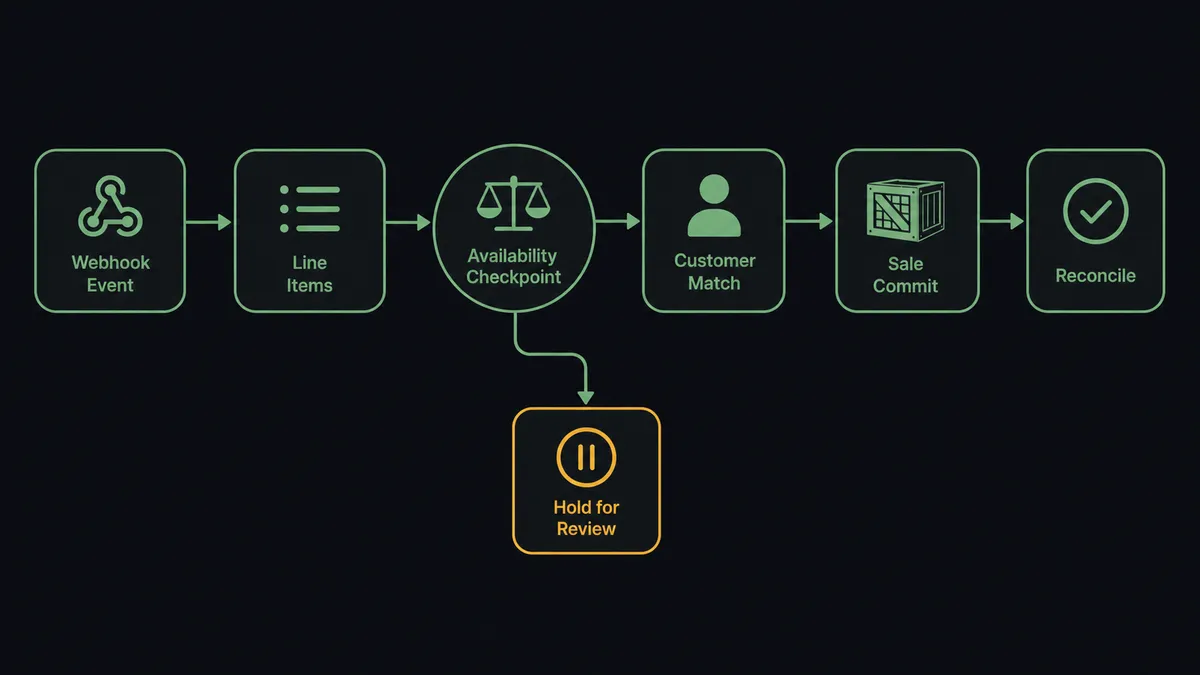
You connect Stripe to DEAR Inventory by having Stripe’s Parse Webhook Event trigger drive DEAR’s order actions: when a checkout completes, the workflow pulls the order with Get Checkout Session and Get Line Items, verifies stock with Product Availability, matches the buyer with List Customers or provisions them with Create Customer, and commits the order with Create Sale, so a paid order becomes an inventory-accurate sales record without anyone rekeying it. FlowRunner is a visual AI-agent orchestration platform where automations run autonomously and pause for human judgment on the steps that carry real consequence. Run as an AI agent, the same connection reasons about each order, commits the clean ones on its own, and stops for a named person when stock falls short and someone’s money has to either wait or come back.
The problem it solves
Without this connection, the gap between “paid” and “in the system” is a person rekeying orders. A checkout completes in Stripe. Someone in operations opens DEAR, searches for the customer, creates them if they are new, and builds the sale line by line from a Stripe receipt in another tab. Every order, every day, with product codes matched by eye. The inventory position DEAR reports is only as current as the last batch of rekeying, which means purchasing decisions and stock promises run on stale numbers.
The edges are where money gets awkward. A customer pays for three units when DEAR shows two on hand, and nobody notices until the picker does. A discontinued SKU stays purchasable because the storefront and the inventory system disagree. When a shortfall finally surfaces, the scramble begins: does this customer get a backorder, a substitute, or their money back? That decision gets made ad hoc, by whoever is standing closest, with no record of who chose or why. The refund gets keyed into Stripe manually, the sale in DEAR gets edited or abandoned, and the two systems drift a little further apart.
How it works: the connection
The connection listens to Stripe and writes to DEAR Inventory. Here is the plain version, grounded in the real connector actions.
- Trigger: Stripe fires Parse Webhook Event when a checkout completes.
- Read: The workflow calls Get Checkout Session and Get Line Items in Stripe to pull the products, quantities, and amounts.
- Check stock: It calls Product Availability in DEAR for every line, before anything is committed.
- Match the buyer: It calls List Customers in DEAR to find the payer by email, and Create Customer when no record exists.
- Commit the order: It calls Create Sale in DEAR with the matched customer and verified lines, so stock allocates against a real order.
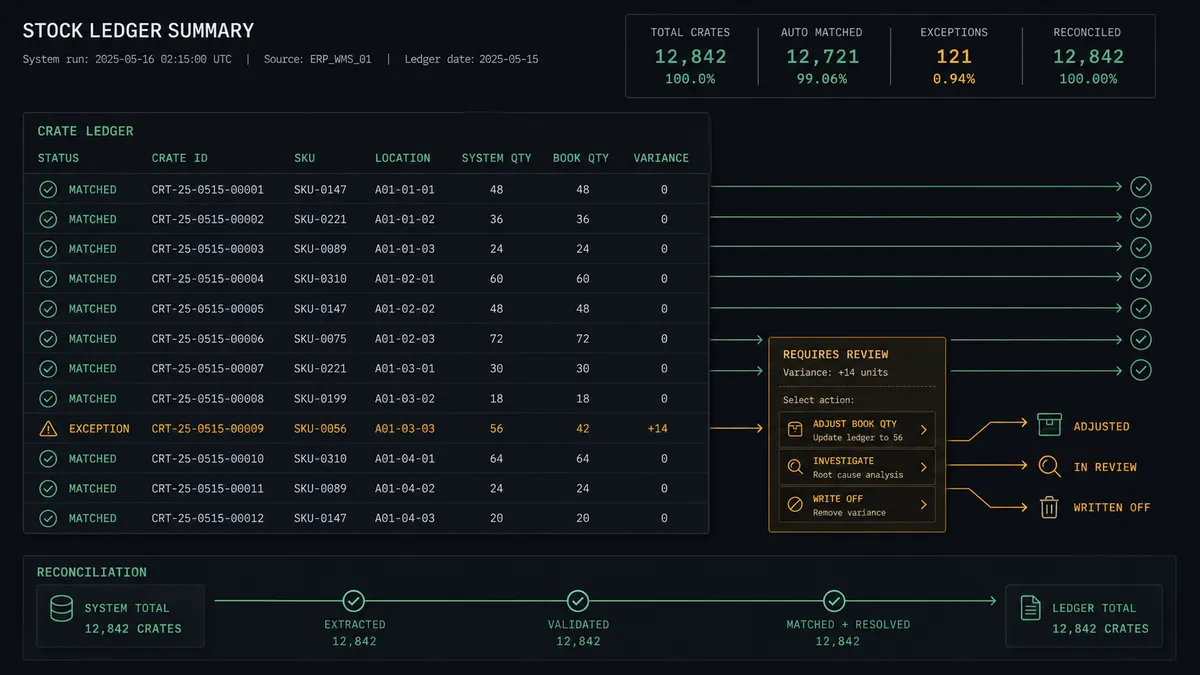
- Reconcile: It calls Get Sale to confirm the committed record matches the Stripe charge, flagging any variance.
That is the “just connect them” answer. Paid orders become DEAR sales within moments, availability is checked before promises are made, and your inventory position stays honest all day instead of after the evening rekeying session.
Can an AI agent run it? (and why a human stays in the loop)
Yes, and this is where the connection earns its keep. An AI agent holds the real actions as tools: Get Line Items, Product Availability, List Customers, Create Customer, Create Sale, and on the Stripe side, Create Refund. For the clean majority of orders, the agent verifies stock, matches the buyer, and commits the sale without ceremony. But when Product Availability comes back short, the agent does not follow a single hardcoded fallback. It reads the situation: how short, which line, is there an equivalent product via List Products, has this customer ordered before via List Sales.
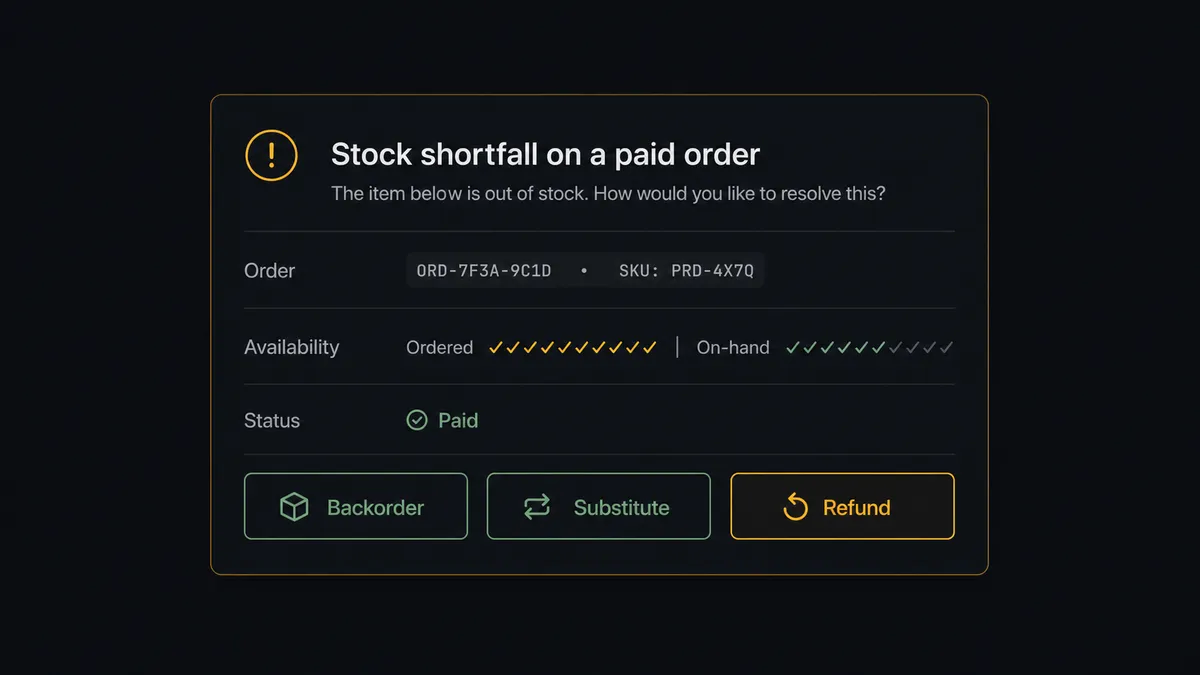
The consequential step is Create Refund, because that is money leaving your account and an order dying. The agent never takes it alone. It invokes a human-in-loop flow it holds as a callable tool, and the workflow pauses and posts to your operations channel: “Paid order from [customer] includes [item], ordered [quantity], available [on-hand quantity]. Options: backorder the shortfall, substitute [equivalent], or refund [amount]. Which?” A named person picks. On backorder or substitute, the agent builds the adjusted Create Sale. Only on an explicit refund decision does it call Create Refund in Stripe, and the decision, the approver, and the timestamp all land in the audit trail.
Prospects call this a digital andon cord, after the cord Toyota line workers pull the moment something looks wrong. The line runs at full speed while everything checks out, and stops the instant a paid promise cannot be kept, so a human decides how to keep faith with the customer.
FlowRunner vs Celigo
Celigo is a serious answer for this problem, and for some teams the right one. Its integration apps for ERP and commerce stacks are genuinely deep, prebuilt for common flows, and backed by strong error management. Mid-market companies with an IT team and an integration budget run substantial order volumes through it reliably.
The difference is who can build and change the workflow, and what happens at the moments that need judgment rather than retry logic. Celigo’s review tooling is oriented to integration errors; FlowRunner’s human-in-the-loop is oriented to business decisions, invoked by an agent as a step in the flow.
| What matters for this pair | FlowRunner | Celigo |
|---|---|---|
| Human-in-the-loop on refunds and shortfalls | Native. The agent pauses before Create Refund and a person picks backorder, substitute, or refund | Error management and retry queues, oriented to failed records rather than business approvals |
| Who runs the flow | An AI agent reads each order and picks actions as tools | Prebuilt integration apps and flows configured per pipeline |
| Users included | Unlimited users on every tier | Seat and endpoint licensing negotiated per contract |
| Bring your own AI keys | Yes, BYOK | AI features run within Celigo’s platform offering |
| Self-hosted option | Yes, cloud-hosted or self-hosted | Cloud iPaaS |
| Pricing model | Transparent workflow-based tiers from $45/mo | Enterprise contracts, typically scoped with implementation services |
If you are standardizing dozens of integration pipelines across a large ERP estate with dedicated IT ownership, Celigo is built for that scale. If you want this specific money-and-stock decision handled by an agent your operations team can see, change, and approve inside, without an implementation project, that is this pairing.
Before and after
| Category | Before | After |
|---|---|---|
| Order entry | Orders rekeyed from Stripe receipts into DEAR by hand | Create Sale commits each paid order within moments of checkout |
| Stock accuracy | DEAR reflects reality as of the last rekeying batch | Availability is checked and allocated as orders arrive |
| Overselling | Discovered by the picker, resolved by scramble | Product Availability catches shortfalls before the sale commits |
| Refund decisions | Made ad hoc by whoever notices, keyed manually into Stripe | A named approver chooses backorder, substitute, or refund with full context |
| Reconciliation | Stripe and DEAR drift apart between rekeying sessions | Get Sale confirms every committed record against the charge |
What you can build
Checkout to committed sale. Parse Webhook Event fires, the agent pulls lines with Get Line Items, verifies each with Product Availability, matches the buyer via List Customers, and commits with Create Sale. Inventory allocates the moment money clears.
Shortfall triage with a human decision. When availability falls short, the agent assembles the options, including substitutes found via List Products, and a named person chooses backorder, substitute, or refund before Create Refund can move any money back.
New-customer provisioning. First-time buyers get a clean DEAR record via Create Customer, matched by email so repeat purchases attach to one customer history instead of a pile of near-duplicates.
Reorder signal watching. The agent reviews Product Availability across your fast movers on a schedule, cross-references open orders via List Purchases and suppliers via List Suppliers, and posts a restock summary to your channel before stockouts become refund conversations.
Charge-to-sale audit. On a schedule, the agent compares recent Stripe charges via List Payment Intents against DEAR records via List Sales and flags anything paid but uncommitted, so no order can fall between the systems silently.
Getting started
Start on the free plan: 100 executions a month, every integration included, no credit card required, plus 14 days of Professional for new accounts. Both connectors are available on every tier, and every tier includes unlimited users and unlimited workflows.
Explore the integration details:
- Stripe integration (1 trigger and 67 actions covering payments, customers, refunds, and checkout sessions)
- DEAR Inventory integration (10 actions covering products, availability, sales, customers, and suppliers)
Start building free at flowrunner.ai or book a demo to see a live Stripe to DEAR Inventory workflow, shortfall approval and all.
Frequently asked questions
Is it free to connect Stripe and DEAR Inventory on FlowRunner?
You can build and run the connection on FlowRunner's free plan, which includes 100 executions a month and every integration with no credit card required, and new accounts also get 14 days of Professional. Both connectors are available on every FlowRunner tier, and every tier includes unlimited users and unlimited workflows.
Can I self-host the Stripe to DEAR Inventory workflow?
Yes. FlowRunner offers a cloud-hosted option and a self-hosted option, so the connection can run inside your own environment.
Does the AI agent need my own OpenAI or Claude key?
FlowRunner uses a bring-your-own-keys model, so you connect the AI provider key you already have. You are not locked to one model.
What happens when a customer pays for an item that is out of stock?
The agent catches it before the sale commits. Product Availability runs first, and on a shortfall the workflow pauses and posts the order, the stock position, and the options to your team. A named person chooses backorder, substitute, or refund, and only an approved refund triggers Create Refund in Stripe.
Which Stripe events can start the DEAR Inventory workflow?
Stripe's Parse Webhook Event trigger fires on the events you subscribe to, such as a completed checkout or a successful payment. The workflow reads the payload, pulls the line items, and runs Product Availability in DEAR before creating anything.
Does the connection create duplicate customers in DEAR?
No. The workflow calls List Customers to match the Stripe payer by email first, and only calls Create Customer when no match exists. Ambiguous matches go to a person instead of becoming duplicates.