How to Connect QuickBooks Online with Cin7 Core (DEAR) (With or Without an AI Agent)
Turn Cin7 Core (DEAR) sales into QuickBooks Online invoices and recorded payments, optionally as an AI agent that verifies every invoice against the sale and pauses for a human before Send Invoice puts a wrong number in front of a customer.
How do you connect QuickBooks Online to Cin7 Core (DEAR)?
You connect QuickBooks Online to Cin7 Core (DEAR) on a schedule, because neither connector exposes an event trigger: each run calls List Sales with a status and date filter, pulls the complete order with Get Sale, matches the buyer in QuickBooks Online with List Customers or Create Customer, records the sale with Create Invoice, and closes AR with Create Payment for money already received. FlowRunner is a visual AI-agent orchestration platform where automations run autonomously and pause for human judgment on the steps that carry real consequence. The same connection can run as an AI agent that verifies every drafted invoice against the sale it came from and stops for a named human before Send Invoice puts a number in front of a customer that the warehouse system does not back up.
The problem it solves
If you run inventory in Cin7 Core (DEAR) and accounting in QuickBooks Online, someone on your team is the sync. They work through the day’s sales, find each customer in the ledger, rebuild each order as an invoice, mark down which ones were already paid, and email the invoices out. It is slow, it is joyless, and the person doing it is usually the same person you need for actual finance work. Sales made on Monday reach the books when the backlog clears, and AR reflects last week more than this one.
The failure that stings is not the missed record; it is the wrong one sent outward. A price tier applied in Cin7 Core (DEAR) but lost in retyping, and a wholesale customer gets a retail invoice. A partially fulfilled order invoiced at full quantity. A payment recorded in the warehouse system but never in the ledger, so a customer who already paid gets a dunning email. Internal drift is fixable at month end; a wrong invoice in a customer’s inbox costs trust you do not get back with a correcting entry.
How it works: the connection
The connection reads from Cin7 Core (DEAR) and writes to QuickBooks Online. Here is the plain version, grounded in the real connector actions.
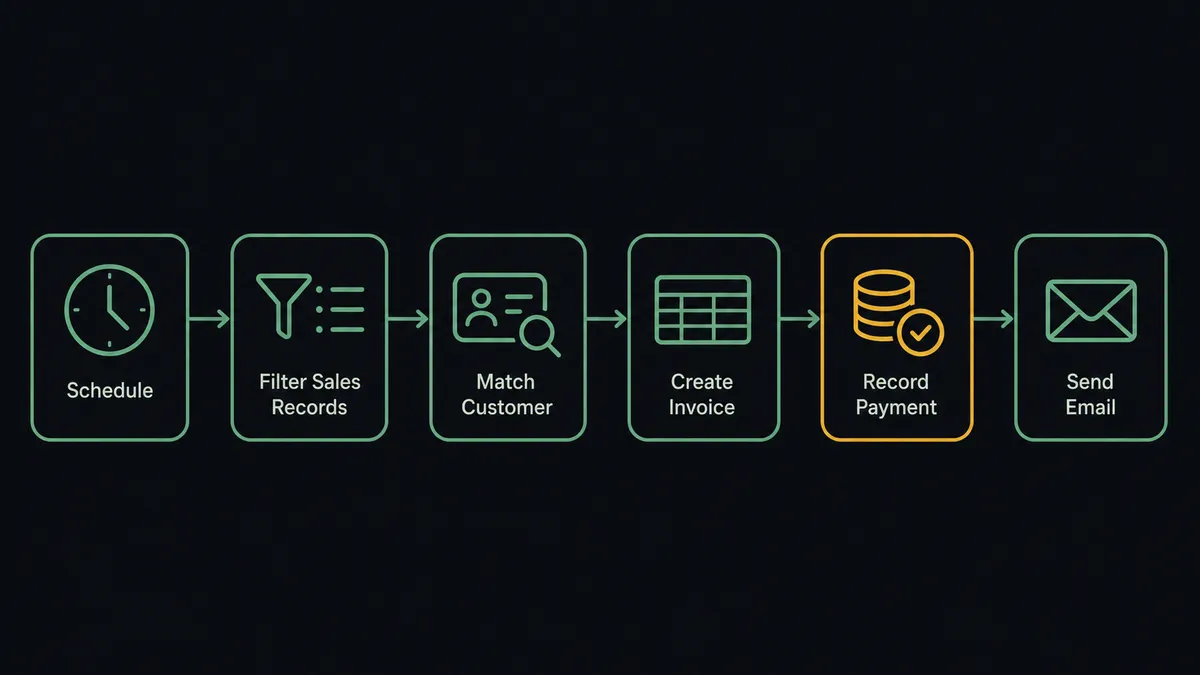
- Trigger: On a schedule, the workflow checks Cin7 Core (DEAR) for new and updated sales.
- Read: It calls List Sales with a status and created-date filter, then Get Sale for each result, which returns the order lines, invoice lines, fulfilment state, and payments in one record.
- Match the customer: It calls List Customers in QuickBooks Online by name. New buyers are added with Create Customer, carrying currency and payment terms.
- Record the sale: It calls Create Invoice with the sale’s SKUs, quantities, and prices, and the order number as a reference.
- Close the loop on cash: For payments already attached to the sale, it calls Create Payment against the new invoice so paid orders show paid in the ledger.
- Send: Once the invoice matches its sale, Send Invoice emails it to the customer from QuickBooks Online.
That is the “just connect them” answer. Sales reach the books the same day, paid means paid in both systems, and the person who used to be the sync gets their week back.
Can an AI agent run it? (and why a human stays in the loop)
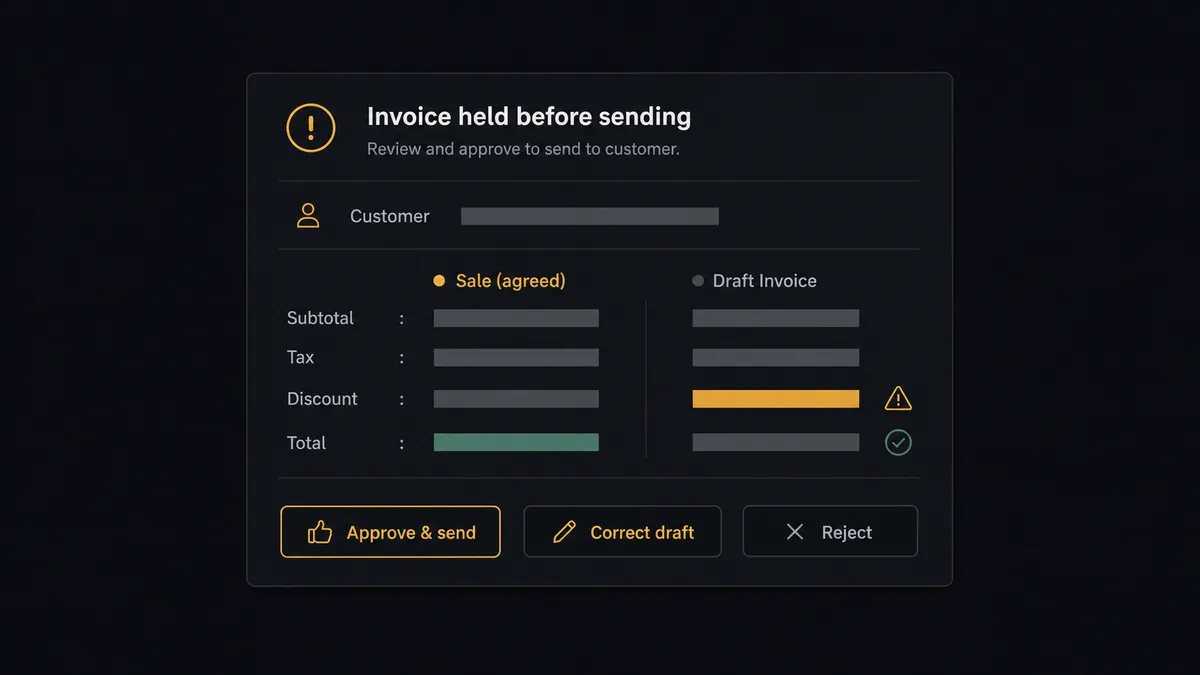
Yes, and the agent’s job description is one sentence: never let the ledger say something the warehouse cannot back up. It holds the real actions as tools: List Sales, Get Sale, Product Availability, List Customers on the Cin7 Core (DEAR) side; Create Customer, Create Invoice, Create Payment, Send Invoice, Void Invoice, Void Payment on the QuickBooks Online side. Before an invoice goes anywhere, the agent rebuilds it from Get Sale and compares the two line by line: quantities against fulfilment, prices against the customer’s price tier, the total against the sale’s total.
The consequential step is Send Invoice, because that is the moment an error leaves the building. When the comparison is clean, the invoice goes out unattended. When it is not, a fulfilment quantity lower than the invoiced quantity, a price that ignores the customer’s tier, a payment attached to the sale but missing from the draft, the agent invokes a human-in-loop flow it holds as a callable tool. The workflow pauses and posts: “Invoice for sale [order number], customer [name]: drafted lines disagree with the sale. Comparison attached. Approve to send, correct, or reject?” Only after a named approver acts does Send Invoice run. Void Invoice and Void Payment sit behind the same gate, because reversals rewrite history and deserve a witness.
Judgment is contextual. A rounding difference on a long-standing account goes out with a note in the audit trail; any discrepancy on a first invoice to a new customer stops the line. Prospects call this the digital andon cord: like Toyota’s production line pull cord, the workflow stops the moment it hits uncertainty, and a person pulls it back into motion.
FlowRunner vs Celigo
Celigo deserves its reputation in inventory-to-accounting sync. Its integrator.io iPaaS moves high volumes reliably, its prebuilt integration apps encode years of ERP edge cases, and companies with dedicated integration engineers get durable pipelines out of it. If your IT organization is standardizing every system-to-system flow on one managed platform, Celigo is a rational shortlist.
The distance between the two shows at the judgment steps and at who owns the flow. Here is the honest side-by-side.
| What matters for this pair | FlowRunner | Celigo |
|---|---|---|
| Human-in-the-loop before invoices reach customers | Native. The agent verifies against Get Sale and pauses before Send Invoice on any mismatch | Exception queues catch technical failures; outbound-correctness approvals are not a native step |
| Who runs the flow | An AI agent reads each sale, verifies, picks actions as tools | Prebuilt flows configured and maintained by an integration team |
| Users included | Unlimited users on every tier | Enterprise licensing; seats and endpoints priced accordingly |
| Bring your own AI keys | Yes, BYOK | AI capabilities are part of Celigo’s own platform stack |
| Self-hosted option | Yes, cloud-hosted or self-hosted | Cloud iPaaS |
| Pricing model | Transparent workflow-based tiers starting at $45/mo | Custom enterprise quotes, typically scoped by endpoints and volume |
If you need a dozen enterprise systems integrated under an IT program, Celigo is built for that world. If you need this connection, sales into the ledger with every outbound invoice verified and a named human on anything that reaches a customer or reverses a record, this pairing is where FlowRunner is the better fit.
Before and after
| Category | Before | After |
|---|---|---|
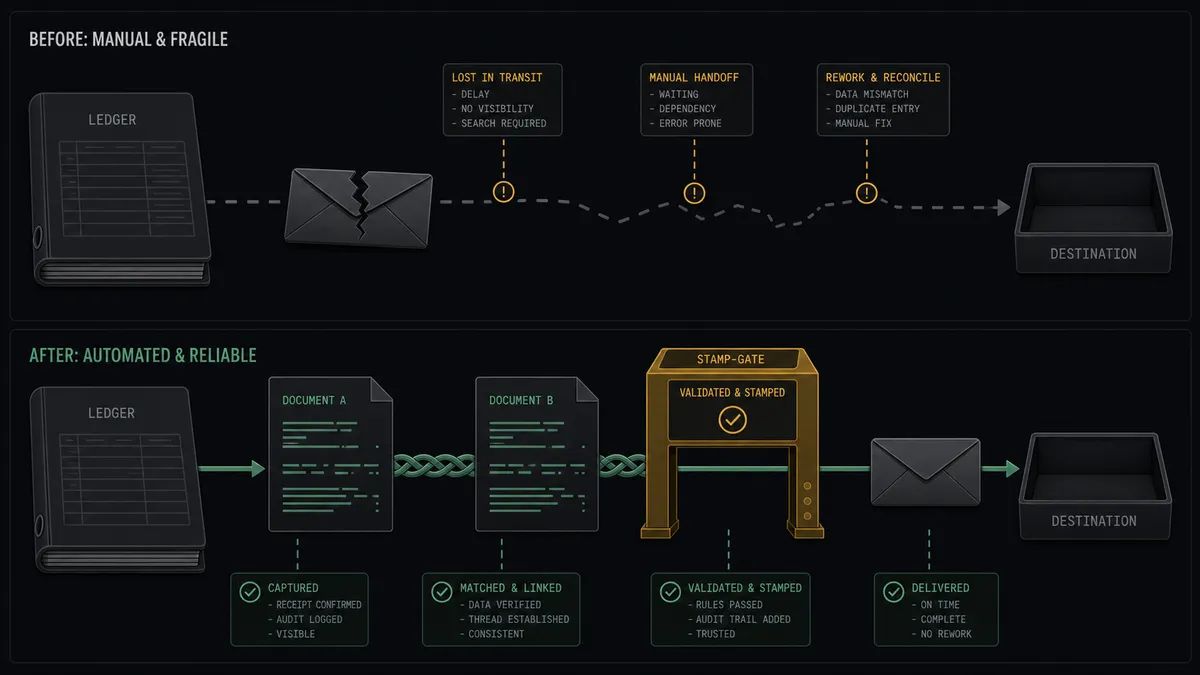
| Sales entry | A finance person rebuilds each Cin7 Core (DEAR) sale as an invoice by hand | List Sales and Get Sale feed Create Invoice on every scheduled run |
| Price accuracy | Price tiers lost in retyping; wholesale customers billed at retail | The agent verifies drafted prices against the sale’s price tier before anything sends |
| Payment status | Money recorded in the warehouse system, invoices still open in the ledger | Create Payment closes AR from the payments already on the sale |
| Outbound invoices | Errors discovered by the customer who received them | Send Invoice runs only after the draft matches Get Sale, or a named human approves |
| Reversals | Voids and deleted payments with no consistent record of who or why | Void Invoice and Void Payment run through approval and land in the audit trail |
What you can build
Sale to sent invoice, verified. Each run, the agent pulls new sales with List Sales, rebuilds each as an invoice from Get Sale, records it with Create Invoice, and releases Send Invoice only when the draft and the sale agree.
Paid in one system, paid in both. Payments attached to the sale in Cin7 Core (DEAR) become Create Payment entries against the matching invoice, so a customer who paid never hears otherwise from your ledger.
Purchases audit digest. The agent reads List Purchases and List Suppliers on the inventory side, compares them against List Bills in QuickBooks Online, and posts a weekly gap report: orders with no bill, bills with no order, so AP sees drift before it compounds.
Customer onboarding in both directions. When finance sets up an account in QuickBooks Online, the agent mirrors it into Cin7 Core (DEAR) with Create Customer, carrying payment terms and price tier, so the first sale never stalls on a missing record.
Availability-checked estimates. Before finance quotes a large order, the agent calls Product Availability for real On Hand and Available numbers across locations, then drafts the quote with Create Estimate and sends it with Send Estimate once a person confirms.
Getting started
Start on the free plan: 100 executions a month, every integration included, no credit card required, plus 14 days of Professional for new accounts. Both connectors are available on every tier, and every tier includes unlimited users and unlimited workflows.
Explore the integration details:
- QuickBooks Online integration (56 actions covering customers, invoices, payments, bills, and P&L reports)
- Cin7 Core (DEAR) integration (10 actions covering products, availability, sales, customers, and suppliers)
Start building free at flowrunner.ai or book a demo to see a live QuickBooks Online to Cin7 Core (DEAR) workflow, invoice verification approval and all.
Frequently asked questions
Is it free to connect QuickBooks Online and Cin7 Core (DEAR) on FlowRunner?
You can build and run the connection on FlowRunner's free plan, which includes 100 executions a month and every integration with no credit card required, and new accounts also get 14 days of Professional. Both connectors are available on every FlowRunner tier, and every tier includes unlimited users and unlimited workflows.
Can I self-host the QuickBooks Online to Cin7 Core (DEAR) workflow?
Yes. FlowRunner offers a cloud-hosted option and a self-hosted option, so the connection can run inside your own environment. Self-hosting is available for teams that need the workflow to run on their own infrastructure.
Does the AI agent need my own OpenAI or Claude key?
FlowRunner uses a bring-your-own-keys model, so you connect the AI provider key you already have. You are not locked to one model, and you control which provider runs the agent.
What happens when the invoice does not match the sale?
The agent holds the invoice instead of sending it. It posts the sale's order number, the customer, and a line-by-line comparison of the drafted invoice against Get Sale, then waits for a named person to approve, correct, or reject. Send Invoice runs only after sign-off, so the customer never sees the discrepancy.
Which triggers does this connection use if neither service has one?
Neither QuickBooks Online nor Cin7 Core (DEAR) exposes an event trigger in the FlowRunner catalog, so the workflow runs on a schedule. Each run calls List Sales with a status and date-range filter, then Get Sale for the full order, invoice, and payment detail.
How do payments recorded in Cin7 Core (DEAR) reach QuickBooks Online?
Get Sale returns the sale's payments along with its order and fulfilment lines. The agent records each one against the matching invoice with Create Payment in QuickBooks Online, so AR closes as the money arrives. Void Payment and Delete Payment are reserved for humans through the approval flow.