How to Connect Stripe with Cin7 Omni (With or Without an AI Agent)
Connect Stripe checkouts to Cin7 Omni sales orders with stock verified before booking, and an AI agent that pauses for a human before a refund goes out on an order inventory cannot cover.
How do you connect Stripe to Cin7 Omni?
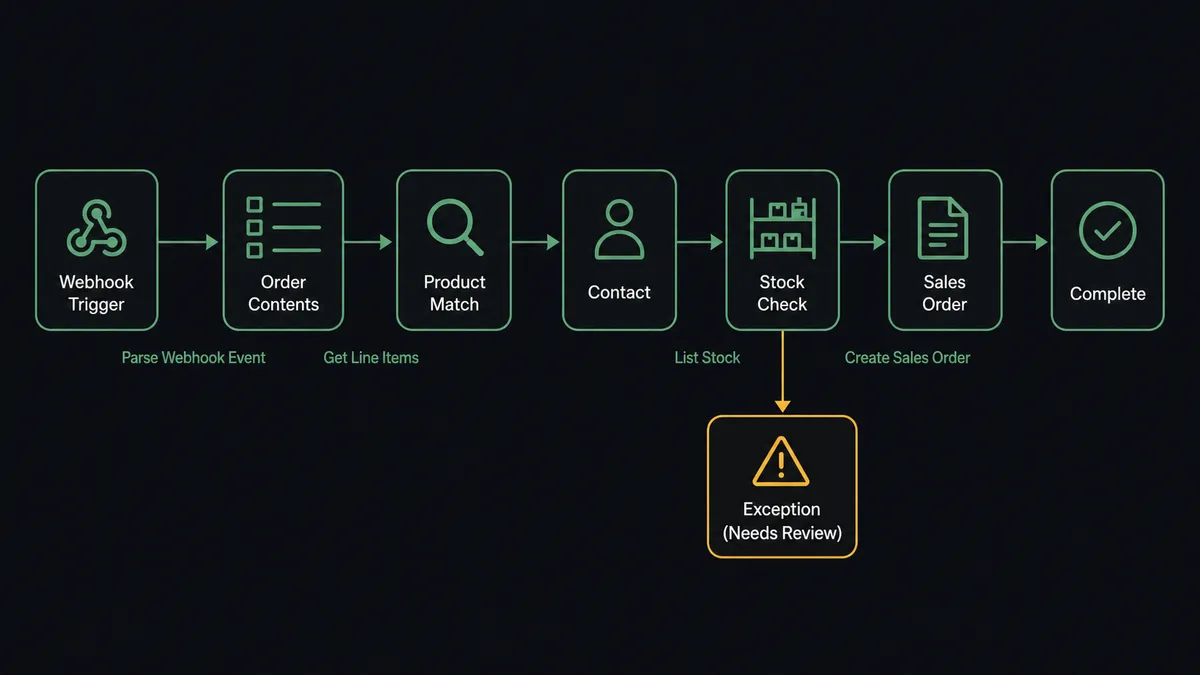
You connect Stripe to Cin7 Omni by having Stripe’s Parse Webhook Event trigger drive Cin7 Omni actions: when a checkout session completes, the workflow pulls the order with Get Checkout Session and Get Line Items, matches the buyer with List Contacts or onboards them with Create Contact, verifies availability with List Stock, and books the order with Create Sales Order. FlowRunner is a visual AI-agent orchestration platform where automations run autonomously and pause for human judgment on the steps that carry real consequence. The same connection can run as an AI agent that books clean orders on its own and pauses for a named human when stock cannot cover an order, before Create Refund sends the customer’s money back.
The problem it solves
Right now the payment system and the inventory system meet in a spreadsheet, or in a person’s browser tabs. A checkout completes in Stripe, and someone re-keys it into Cin7 Omni: find or create the customer, match each line to the right product option, check whether the warehouse actually has it, book the sales order. Every re-keyed order is a chance to fat-finger a SKU or a quantity, and the orders that arrive overnight wait until someone is back at a desk. Meanwhile the stock picture the customer bought against is hours older than the stock picture the warehouse is working from.
The edges are where money gets lost. An order books against inventory that was already committed, and the customer finds out a week later. A buyer pays for a variant that maps to the wrong product option, and the wrong item ships. A short-stock order triggers a panic refund that a partial shipment or a two-week backorder would have saved.
How it works: the connection
The connection listens to Stripe and writes to Cin7 Omni. Here is the plain version, grounded in the real connector actions.
- Trigger: Stripe fires Parse Webhook Event when a checkout session completes at the connected endpoint.
- Read: The workflow calls Get Checkout Session for the buyer and totals, and Get Line Items for what was actually purchased.
- Match the products: It resolves each line to a Cin7 Omni product option using List Products and Get Product, so the order references real SKUs, not descriptions.
- Match the buyer: It calls List Contacts filtered by email to find the member, and Create Contact to onboard a first-time buyer as a customer.
- Verify stock: It calls List Stock for the ordered product options, reading available, held, incoming, and on-order quantities across branches.
- Book the order: It calls Create Sales Order with the member ID, matched line items, quantities, unit prices, and delivery address.
- Record the exceptions: Orders that stock cannot cover are routed to the exception path instead of being booked blind, with the full stock picture attached.
That is the “just connect them” answer. Paid checkouts become sales orders in minutes with no re-keying, buyers become members automatically, and every order books against the stock picture as it is right now.
Can an AI agent run it? (and why a human stays in the loop)
Yes, and the agent earns its keep at exactly the point where a mapping table gives up. The agent holds Get Checkout Session, Get Line Items, List Products, List Contacts, Create Contact, List Stock, List Branches, Create Sales Order, and Create Refund as tools, and it reasons about each order. A clean order with confident SKU matches and covered stock books straight through. A fuzzy product match gets compared against Get Product details before anything books. An order that List Stock says is short becomes a decision, not a default.
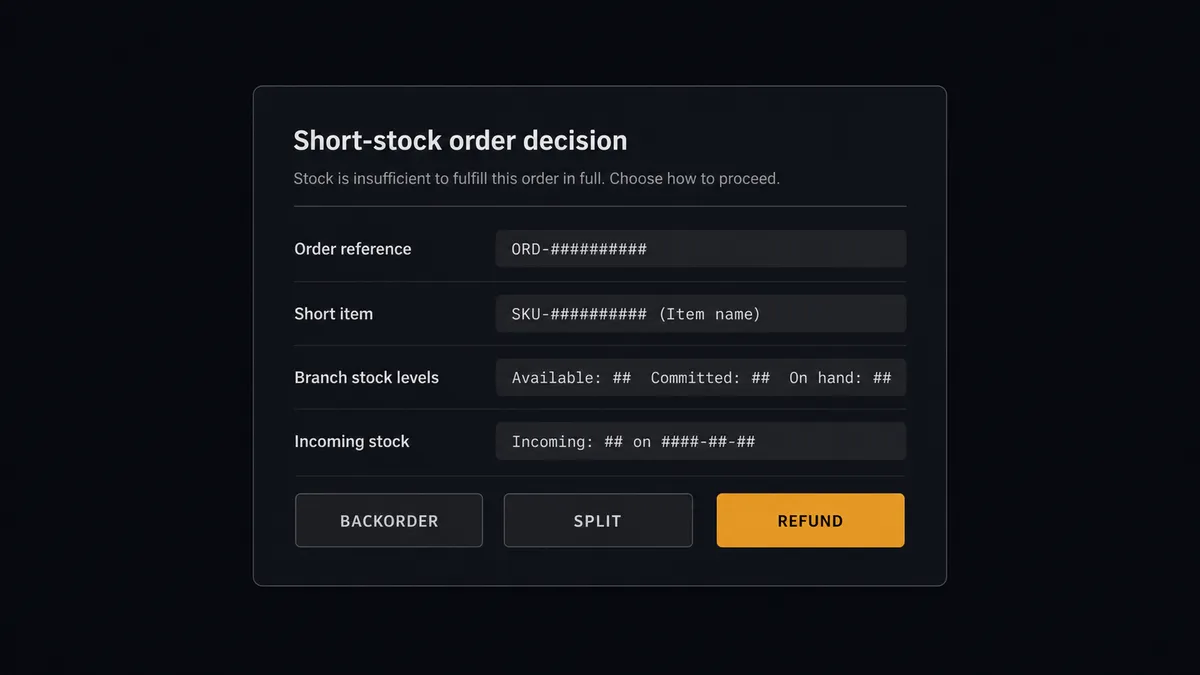
The consequential step is Create Refund, and the decision in front of it is the one that actually matters: what do we do when a paid order cannot ship complete? The agent does not pick for you. It assembles the real options from the data: the incoming and on-order quantities that would cover a backorder, the branch split that List Branches and List Stock make possible, and the refund. Then it invokes the human-in-loop flow it holds as a callable tool. The workflow pauses and posts: “Order [reference]: [item] short at [branch]. Incoming stock arrives [date range from the PO data]. Options: backorder, split shipment, refund. Which?” A named approver picks, and only on an explicit refund decision does the agent call Create Refund in Stripe, recording the outcome against the order. The decision, the approver, and the timestamp land in the audit trail.
This is the digital andon cord, the framing our own prospects gave us: like Toyota’s pull cord on the production line, the workflow stops the line when the right answer depends on judgment. Clean orders flow all day without a human touching them. The short-stock order, the one that costs money whichever way it goes, waits for a person who can weigh it.
FlowRunner vs Celigo
Operations teams evaluating this connection will meet Celigo, and its reputation in commerce ERP integration is earned. Its prebuilt integration apps for ERP ecosystems, especially NetSuite-centered stacks, are mature, its managed connectors carry years of edge-case hardening, and its error-management tooling for failed flows is genuinely strong. For a company standardizing a large ERP estate on managed sync, Celigo is a serious platform.
The difference is what runs the flow and what happens at the judgment step. Celigo’s model is configured data flows with error dashboards a person reviews after something fails. FlowRunner’s model is an agent that reasons about each order in flight and pulls a human in before the consequential step, not after the error report.
| What matters for this pair | FlowRunner | Celigo |
|---|---|---|
| Human-in-the-loop on the refund decision | Native. The agent invokes an approval flow as a callable tool before Create Refund | Error-management dashboards review failures after the fact; approvals are not an agent-invoked step |
| Who runs the flow | An AI agent reads each order, reasons about stock, picks actions as tools | Prebuilt integration apps and flows configured in its iPaaS |
| Users included | Unlimited users on every tier | Governed by custom-quoted editions |
| Bring your own AI keys | Yes, BYOK | Platform AI features; not a bring-your-own-key model |
| Self-hosted option | Yes, cloud-hosted or self-hosted | Cloud iPaaS only |
| Pricing model | Transparent workflow-based tiers, priced per execution | Custom-quoted editions; pricing scales with the integration footprint |
If you are running a large NetSuite-centered integration estate and want managed, templated sync at that scale, Celigo is a genuine fit. If you want each Stripe order reasoned about against live stock, with the short-stock and refund decisions made by a named person inside the flow, this pairing is where FlowRunner is the better fit.
Before and after
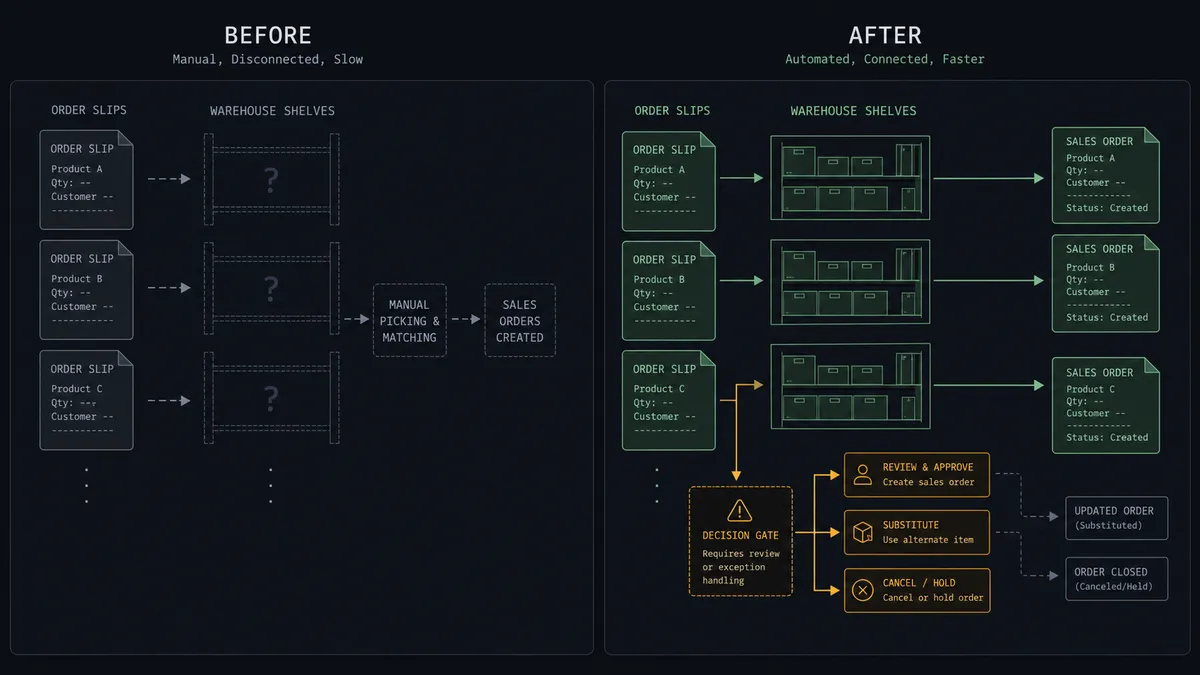
| Category | Before | After |
|---|---|---|
| Order entry | Checkouts re-keyed into Cin7 Omni by hand, in batches | Create Sales Order books each paid checkout in minutes with matched product options |
| New buyers | First-time customers exist in Stripe but not in the ERP | Create Contact onboards them as members with the first order attached |
| Stock confidence | Orders book against an hours-old stock picture | List Stock verifies available, held, and incoming quantities before booking |
| Short-stock handling | Panic refunds or silent backorders, depending on who is at the desk | The agent presents backorder, split, or refund, and a named approver picks |
| Refund records | Issued in the Stripe dashboard with no link to the order | Issued only after approval, recorded against the order with approver and timestamp |
What you can build
Checkout to booked order. Parse Webhook Event fires, the agent pulls Get Line Items, matches product options, verifies List Stock, and books with Create Sales Order. No re-keying, no stale stock assumptions.
First-order customer onboarding. A new buyer’s checkout becomes a Create Contact member record with the delivery address and first order attached, so the ERP knows every customer the storefront does.
Short-stock decision desk. Orders that List Stock cannot cover pause with backorder, split, and refund options packaged from real branch and incoming-stock data, and a named approver picks the path.
Refund with named approval. When refund is the decision, the agent calls Create Refund in Stripe, records the outcome against the sales order context, and the audit trail holds who decided and when.
Wholesale order intake. For invoice-based B2B buyers, a paid Stripe invoice books the matching Create Sales Order against the member’s price column, keeping wholesale and storefront revenue in one operational picture.
Getting started
Start on the free plan: 100 executions a month, every integration included, no credit card required, plus 14 days of Professional for new accounts. Both connectors are available on every tier, and every tier includes unlimited users and unlimited workflows, so ops and finance work from the same order picture from day one.
Explore the integration details:
- Stripe integration (1 webhook trigger and 67 actions across payments, subscriptions, invoices, refunds, and payouts)
- Cin7 Omni integration (10 actions across products, stock, sales orders, purchase orders, and contacts)
Start building free at flowrunner.ai or book a demo to see a live Stripe to Cin7 Omni workflow, short-stock approval and all.
Frequently asked questions
Is it free to connect Stripe and Cin7 Omni on FlowRunner?
You can build and run the connection on FlowRunner's free plan, which includes 100 executions a month and every integration with no credit card required, and new accounts also get 14 days of Professional. Both connectors are available on every FlowRunner tier, and every tier includes unlimited users and unlimited workflows.
Can I self-host the Stripe to Cin7 Omni workflow?
Yes. FlowRunner offers a cloud-hosted option and a self-hosted option, so the connection can run inside your own environment.
Does the AI agent need my own OpenAI or Claude key?
FlowRunner uses a bring-your-own-keys model, so you connect the AI provider key you already have. You are not locked to one model.
What happens when the agent cannot match a checkout line item to a Cin7 Omni product?
The agent searches List Products and Get Product to match the checkout line to a product option ID. When the match is ambiguous, it does not book a sales order against a guessed SKU. It posts the order line and the closest product candidates to your team's channel and waits for a person to confirm the mapping before Create Sales Order runs.
Which Stripe events can trigger a Cin7 Omni action?
Stripe uses a single trigger, Parse Webhook Event, which receives every Stripe event type from a connected webhook endpoint. For this pair, completed checkout sessions and paid invoices are the events that book sales orders, and refund and dispute events feed the exception path.
How does the workflow handle out-of-stock items?
Before booking, the agent calls List Stock to read available, held, incoming, and on-order quantities across branches. When stock cannot cover the order, it does not silently book or silently refund. It packages the options a person actually has, backorder against incoming stock, split across branches, or refund, and a named approver picks one before anything happens.