How to Connect DocuSign with Cin7 Core (DEAR) (With or Without an AI Agent)
Connect signed DocuSign agreements to Cin7 Core (DEAR) so a completed envelope becomes a customer and a sales order, with an AI agent that checks stock first and pauses for a human before an order allocates inventory.
How do you connect DocuSign to Cin7 Core (DEAR)?
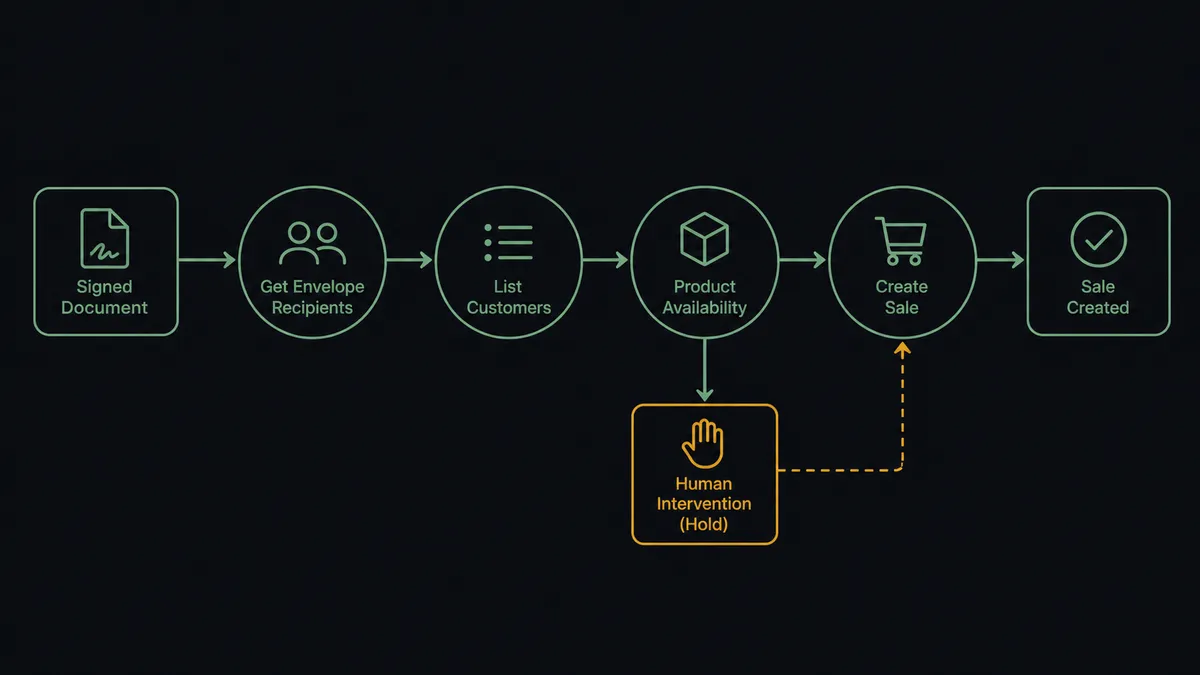
You connect DocuSign to Cin7 Core (DEAR) by having DocuSign’s On Envelope Completed trigger drive Cin7 Core actions: the workflow pulls the signer with Get Envelope Recipients, finds or creates the account with List Customers and Create Customer, verifies stock with Product Availability, and raises the order with Create Sale, so a fully signed agreement becomes a sales order in the ERP without anyone rekeying it. FlowRunner is a visual AI-agent orchestration platform where automations run autonomously and pause for human judgment on the steps that carry real consequence. Run as an agent, the same connection reads the signed document, checks the warehouse first, and stops for a named human before Create Sale allocates stock against a promise your inventory cannot keep.
The problem it solves
Today the handoff between a signed agreement and a live order is a person with two browser tabs open. A wholesale agreement or annual supply contract completes in DocuSign. Someone on the ops team downloads the PDF, reads the product schedule, opens Cin7 Core, searches for the customer, creates the account if it is new, and keys in a sales order line by line. The customer signed days ago and is already wondering when their stock ships, while the document waits in a folder for data entry.
The edges are where it hurts. The agreement promises quantities the warehouse cannot cover, and nobody notices until the order is allocated and a bigger customer’s replenishment gets shorted. The signed pricing does not match the price tier on the customer record, and the discrepancy surfaces at invoicing instead of at order entry. A declined envelope sits unnoticed because On Envelope Declined events go to one person’s inbox. Each of these is a conversation that should have happened on signing day, happening weeks later with money attached.
How it works: the connection
The connection listens to DocuSign and writes to Cin7 Core (DEAR). Here is the plain version, grounded in the real connector actions.
- Trigger: DocuSign fires On Envelope Completed the moment every signer has signed.
- Read: The workflow calls Get Envelope Recipients to pull the signer’s name, company, and email, and Download Document to archive the executed agreement.
- Match the customer: It calls List Customers in Cin7 Core, filtering by the signer’s company name. If no record exists, it calls Create Customer with the contact details, currency, and payment term.
- Check stock: It calls Product Availability for each SKU in the agreement’s product schedule, reading On Hand, Allocated, and Available quantities across locations.
- Raise the order: It calls Create Sale with the customer name, location, and order lines by SKU, quantity, and price, carrying the envelope ID as the customer reference.
- Handle the decline path: A second branch on On Envelope Declined routes the envelope, the recipient who declined, and the deal context to the sales channel so someone follows up while the deal is still warm.
That is the “just connect them” answer. Signed agreements become orders the same hour they complete, new accounts get created once instead of twice, and the envelope ID on every sale traces any order back to the document that authorized it.
Can an AI agent run it? (and why a human stays in the loop)
Yes, and this is where the connection stops being a data pipe. A deterministic sync copies fields from an envelope into an order. An AI agent reads the executed agreement, holds the Cin7 Core actions as tools, and decides what the document actually requires. List Customers, Create Customer, Product Availability, List Products, Create Sale: that is the toolbox, and the agent picks from it based on the signed terms.
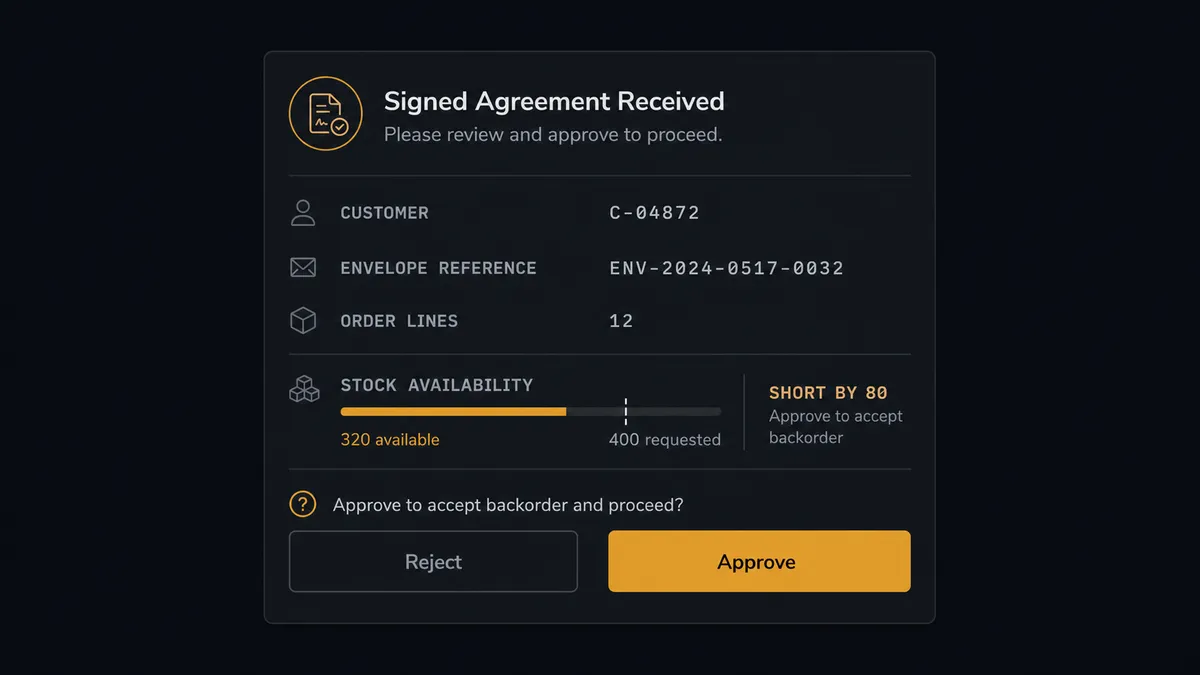
The consequential step is Create Sale, because in Cin7 Core a sales order is not a note, it is a claim on inventory. Once the order exists, stock gets allocated against it and every downstream fulfillment decision treats it as real. Before that step, the agent compares the signed product schedule against Product Availability and the signed pricing against the customer’s price tier. When everything lines up, it creates the sale on its own and nobody needs to look. When something is off, it invokes a human-in-loop flow it holds as a callable tool, and the workflow pauses. The message lands in your ops channel: “Signed agreement from [customer] is ready to become a sales order. Two SKUs in the schedule exceed available stock at the default location. Approve as-is, adjust quantities, or hold until the next receiving order lands?” A person decides with the full picture. Only then does Create Sale run.
This is the digital andon cord: like Toyota’s production line pull cord, the workflow stops the line the moment it hits uncertainty, and a human pulls it back into motion. Agreements still process in minutes. The rare order that deserves a human conversation gets one, before stock is committed instead of after.
FlowRunner vs Celigo
Celigo has earned its place in this conversation. Its integration apps for ERP and e-commerce sync are genuinely deep, and for a high-volume storefront-to-ERP pipeline managed by an IT team, its prebuilt flows and error management are real strengths. If your problem is moving high volumes of records between systems on well-understood rails, Celigo does that well.
The difference is who runs the flow and what happens at the moments that need judgment. Celigo is an iPaaS: you configure integration logic, and it executes that logic the same way every time. FlowRunner puts an AI agent in the loop that reads the signed document, reasons about stock and terms, and pauses for a person when the situation calls for one.
| What matters for this pair | FlowRunner | Celigo |
|---|---|---|
| Human-in-the-loop before Create Sale allocates stock | Native. The agent invokes an approval flow as a callable tool and waits for a named approver | Error handling and alerting on failed records, not a native pause-for-judgment step in the flow |
| Who runs the flow | An AI agent reads the agreement, reasons, picks actions as tools | Configured integration flows executed as defined |
| Users included | Unlimited users on every tier | Seat and endpoint licensing scoped by plan |
| Bring your own AI keys | Yes, BYOK. Connect the AI provider key you already have | AI features run inside Celigo’s own platform stack |
| Self-hosted option | Yes, cloud-hosted or self-hosted | Cloud iPaaS |
| Pricing model | Transparent workflow-based tiers | Enterprise iPaaS pricing scoped by endpoints and volume |
If you are an IT organization standardizing dozens of integrations on one managed platform, Celigo is a credible choice. If you are an operations team that wants signed agreements to become orders automatically, with a human on the one decision that commits inventory, this pairing is built for that.
Before and after
| Category | Before | After |
|---|---|---|
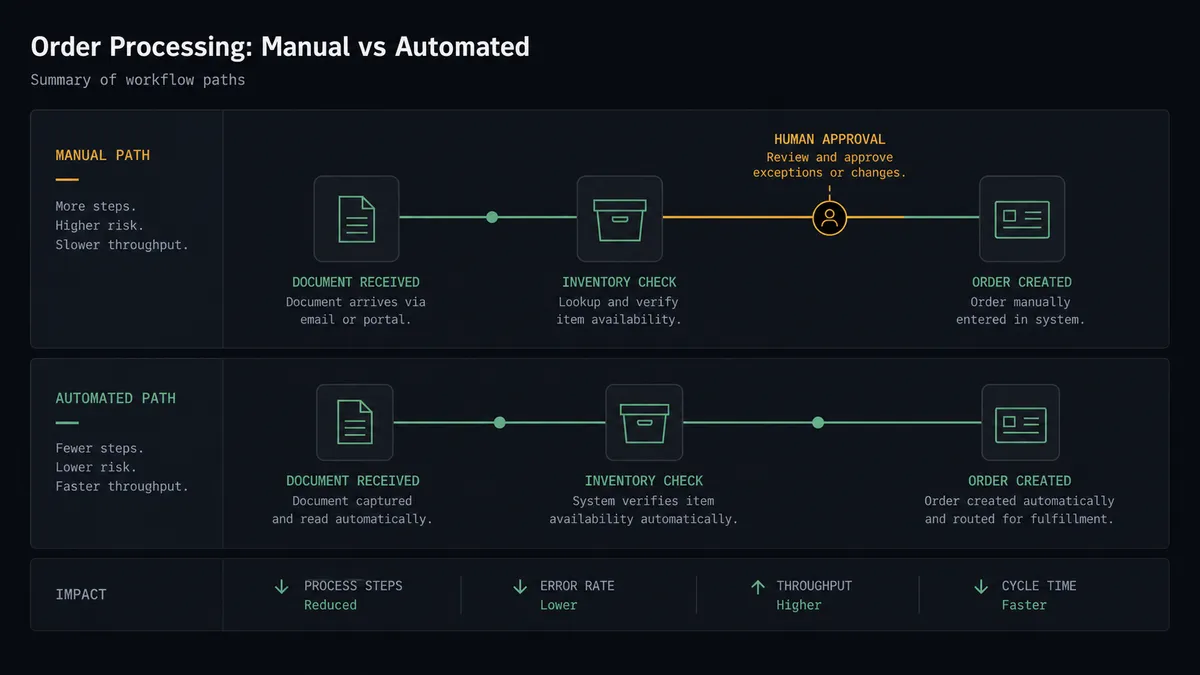
| Order entry | Someone downloads the signed PDF and keys the order into Cin7 Core by hand, usually the next business day | Create Sale raises the order within minutes of On Envelope Completed firing |
| Stock surprises | Availability gets checked after the order is allocated, when a shortage is already someone’s fire drill | Product Availability runs before the order exists, and shortfalls go to a human first |
| New accounts | Customer records get created twice with slightly different names, splitting order history | List Customers matches first, Create Customer runs only when no record exists |
| Declined agreements | On Envelope Declined events land in one inbox and go quiet | Declines route straight to the sales channel with the recipient and deal context attached |
| Traceability | Connecting an order back to its contract means digging through email and a signed-agreements folder | Every sale carries the envelope ID in its customer reference, and every approval carries a name and timestamp |
What you can build
Signed agreement to sales order. On Envelope Completed fires. The agent pulls the signer with Get Envelope Recipients, matches the account with List Customers or creates it with Create Customer, verifies stock with Product Availability, and raises the order with Create Sale, envelope ID attached.
Stock-checked contract renewals. When an annual supply agreement completes, the agent reads the committed quantities, checks them against Product Availability across locations, and posts a gap summary to ops before any order is raised.
Declined envelope escalation. On Envelope Declined fires. The agent pulls the recipient list with Get Envelope Recipients, identifies who declined, and posts the deal context to the sales channel so a human follows up the same day instead of finding out at quarter close.
New account onboarding with a clean master file. For first-time signers, the agent creates the Cin7 Core record with Create Customer, sets currency and payment terms from the agreement, and archives the executed document with Download Document, so finance never chases a signed copy again.
Order audit against contracts. On a schedule, the agent calls List Sales and cross-checks recent orders against their envelope references, flagging any sale with pricing that drifted from the signed agreement for a human to review before invoicing.
Getting started
Start on the free plan: 100 executions a month, every integration included, no credit card required, plus 14 days of Professional for new accounts. Both connectors are available on every tier, and every tier includes unlimited users and unlimited workflows.
Explore the integration details:
- DocuSign integration (4 triggers and 9 actions covering the full envelope lifecycle)
- Cin7 Core (DEAR) integration (10 actions covering products, stock, sales, and customers)
Start building free at flowrunner.ai or book a demo to see a live DocuSign to Cin7 Core (DEAR) workflow, stock-check approval and all.
Frequently asked questions
Is it free to connect DocuSign and Cin7 Core (DEAR) on FlowRunner?
You can build and run the connection on FlowRunner's free plan, which includes 100 executions a month and every integration with no credit card required, and new accounts also get 14 days of Professional. Both connectors are available on every FlowRunner tier, and every tier includes unlimited users and unlimited workflows.
Can I self-host the DocuSign to Cin7 Core (DEAR) workflow?
Yes. FlowRunner offers a cloud-hosted option and a self-hosted option, so the connection can run inside your own environment.
Does the AI agent need my own OpenAI or Claude key?
FlowRunner uses a bring-your-own-keys model, so you connect the AI provider key you already have. You are not locked to one model.
What happens when the agent finds the signed agreement does not match available stock?
The agent stops before Create Sale runs. It posts the customer name, the envelope reference, the requested lines, and the Product Availability numbers for each SKU to your team's channel, then waits for a person to approve the order as-is, adjust quantities, or hold it until stock arrives.
Which DocuSign events can start a Cin7 Core (DEAR) workflow?
DocuSign offers four triggers: On Envelope Completed, On Envelope Sent, On Envelope Declined, and On Envelope Voided. On Envelope Completed is the one that drives order creation, and On Envelope Declined is the one teams route to sales for follow-up.
Does the workflow create duplicate customers in Cin7 Core?
No. Before creating anything, the workflow calls List Customers to search by the signer's company name. It only calls Create Customer when no match exists, so repeat customers keep one record and one order history.