How to Connect Stripe with Custify (With or Without an AI Agent)
Connect Stripe billing events to Custify so customer success sees revenue health in real time, with an AI agent that opens CSM tasks automatically and pauses for a human before a subscription is canceled in Stripe.
How do you connect Stripe to Custify?
You connect Stripe to Custify by having Stripe’s Parse Webhook Event trigger drive Custify’s account actions: when a subscription starts, changes, or a payment fails, the workflow syncs the customer with Create or Update Person and Create or Update Company, keeps the plan current with Create or Update Subscription, and writes the event to the customer’s timeline with Track Event, so your success team sees billing reality without opening Stripe. FlowRunner is a visual AI-agent orchestration platform where automations run autonomously and pause for human judgment on the steps that carry real consequence. Run as an AI agent, the same connection reads each billing signal, opens CSM tasks for the accounts that need attention, and stops for a named person before the one action that actually ends revenue: canceling a subscription.
The problem it solves
Customer success teams run on signals, and billing is the loudest one they usually get last. A payment fails in Stripe. The CSM finds out three weeks later during a QBR prep, when the account’s health score in Custify still says green because nobody synced the two systems. Someone on ops exports Stripe data monthly, reshapes it in a spreadsheet, and pastes MRR figures into Custify fields by hand. By the time the number lands, it describes last month.
The edges are the expensive part. A downgrade event fires and no task gets created, so the shrinking account gets its check-in call two quarters late. A payment fails three times on a flagship logo and the dunning process treats it like any trial. Worst of all is the quiet ending: a subscription hits its final failed retry and lapses automatically, revenue gone, and the first human to notice is in finance during month-end close. The success team never got to run a save play because the signal never reached them while it was still a signal.
How it works: the connection
The connection listens to Stripe and writes to Custify. Here is the plain version, grounded in the real connector actions.
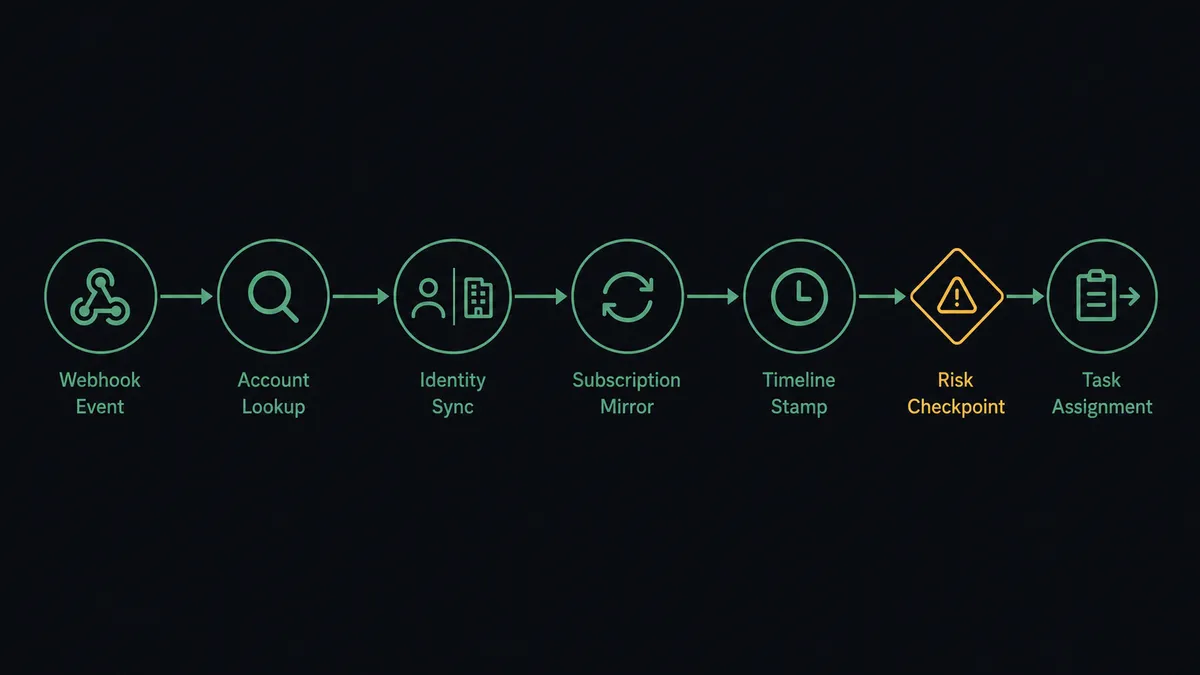
- Trigger: Stripe fires Parse Webhook Event when a subscription is created, updated, or canceled, or a payment fails.
- Read: The workflow calls Get Customer and Get Subscription in Stripe to pull the account, plan, amount, and status.
- Sync identity: It calls Create or Update Person and Create or Update Company in Custify so the account exists and stays current.
- Sync revenue: It calls Create or Update Subscription in Custify to mirror the plan, amount, and billing interval onto the account.
- Log the signal: It calls Track Event to stamp the billing event onto the customer’s Custify timeline, where health scoring can see it.
- Route the follow-up: For events that need a human touch, it calls Create Task to open an assigned follow-up for the account’s CSM.
That is the “just connect them” answer. Billing events land in Custify while they are still fresh, health scores reflect payment reality, and CSMs get tasks instead of surprises.
Can an AI agent run it? (and why a human stays in the loop)
Yes, and the difference is judgment about which signals matter. An AI agent holds the real actions as tools: Get Customer, Get Subscription, Create or Update Person, Create or Update Subscription, Track Event, Create Task, and on the Stripe side, Update Subscription and Cancel Subscription. A routine renewal gets synced and forgotten. A downgrade on a small account gets a Track Event and nothing more. But a failed payment on an account whose Custify timeline already shows declining usage gets read as a pattern, and the agent opens a Create Task for the CSM with the whole story attached, not just the latest event.
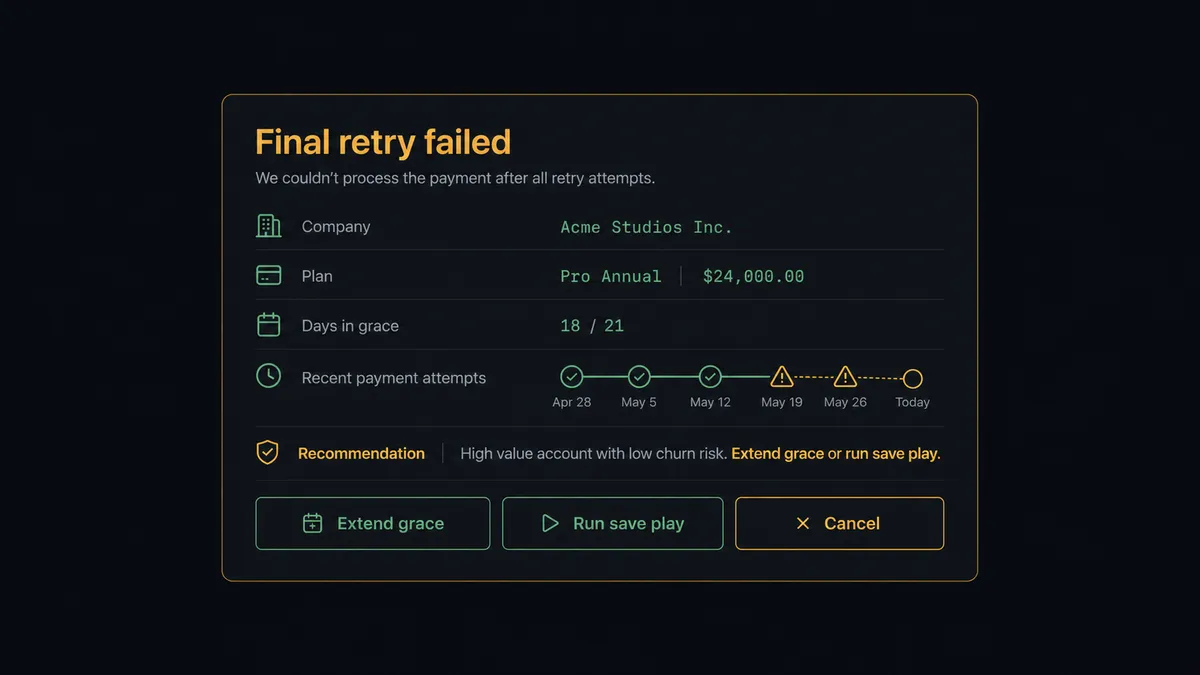
The consequential step is Cancel Subscription, because that action ends revenue and there is no automation on earth that should take it alone. When an account exhausts its retries, the agent does not follow a dunning script to the terminal state. It invokes a human-in-loop flow it holds as a callable tool. The workflow pauses and posts to your success channel: “Final retry failed for [company], on [plan] at [amount]/mo. Timeline shows [pattern]. Recommend: [grace period / save play / cancel]. Your call.” The CSM or their lead picks. Only then does the agent call Cancel Subscription, or Update Subscription for a grace extension, and the decision, the decider, and the timestamp land in the audit trail.
Prospects describe this as a digital andon cord: like Toyota’s line, where the cord stops production the moment a worker sees a defect, the workflow stops the line the moment the next step would end a customer relationship. Everything routine flows at machine speed. The endings require a person.
FlowRunner vs Zapier
Zapier’s strength here is real: it connects Stripe broadly, its editor is approachable for a success ops person without engineering help, and a simple “failed payment creates a Custify event” Zap goes live in an hour. For teams that only need billing events copied across, that is genuinely enough.
The gap opens when the workflow has to decide what a signal means and when a human has to own an outcome. FlowRunner makes both native.
| What matters for this pair | FlowRunner | Zapier |
|---|---|---|
| Human-in-the-loop on Cancel Subscription | Native. The agent pauses and a named person chooses grace, save, or cancel | Approval steps exist as add-ons, not a native agent decision |
| Who runs the flow | An AI agent reads the account’s history and picks actions as tools | Predefined step sequence per Zap, one treatment per event type |
| Users included | Unlimited users on every tier, so every CSM can be an approver | Priced by task volume; seats vary by plan |
| Bring your own AI keys | Yes, BYOK | AI features tied to Zapier’s own AI offering |
| Self-hosted option | Yes, cloud-hosted or self-hosted | Cloud only |
| Pricing model | Transparent workflow-based tiers | Per-task pricing that grows with your billing event volume |
If you need events mirrored and nothing more, Zapier does it well. If you want billing signals turned into judgment calls, with a human owning every revenue-ending decision and an audit trail behind it, that is this pairing.
Before and after
| Category | Before | After |
|---|---|---|
| Billing visibility | CSMs learn about payment failures weeks later, during QBR prep | Track Event puts every billing signal on the Custify timeline as it happens |
| Health scores | Scored on product usage alone, blind to payment reality | Subscription and payment data feed the same account record |
| At-risk follow-up | Whoever notices, whenever they notice | Create Task assigns the follow-up to the account’s CSM automatically |
| Subscription endings | Dunning runs to the terminal state unattended | A named person chooses grace, save play, or cancel before revenue ends |
| Accountability | Nobody can say who let an account lapse | Every cancellation decision carries an approver and a timestamp |
What you can build
Real-time revenue sync. Every subscription event flows through Create or Update Person, Create or Update Company, and Create or Update Subscription, so Custify always shows the plan and amount Stripe is actually billing.
Failed-payment task routing. A failed payment triggers Track Event plus a Create Task assigned to the account’s CSM, with the failure reason and account context in the task body, so follow-up is owned within minutes instead of discovered at month end.
Downgrade early warning. When a subscription update shrinks the amount, the agent stamps the timeline and opens a task flagged for the next check-in, so contraction gets a conversation while there is still something to save.
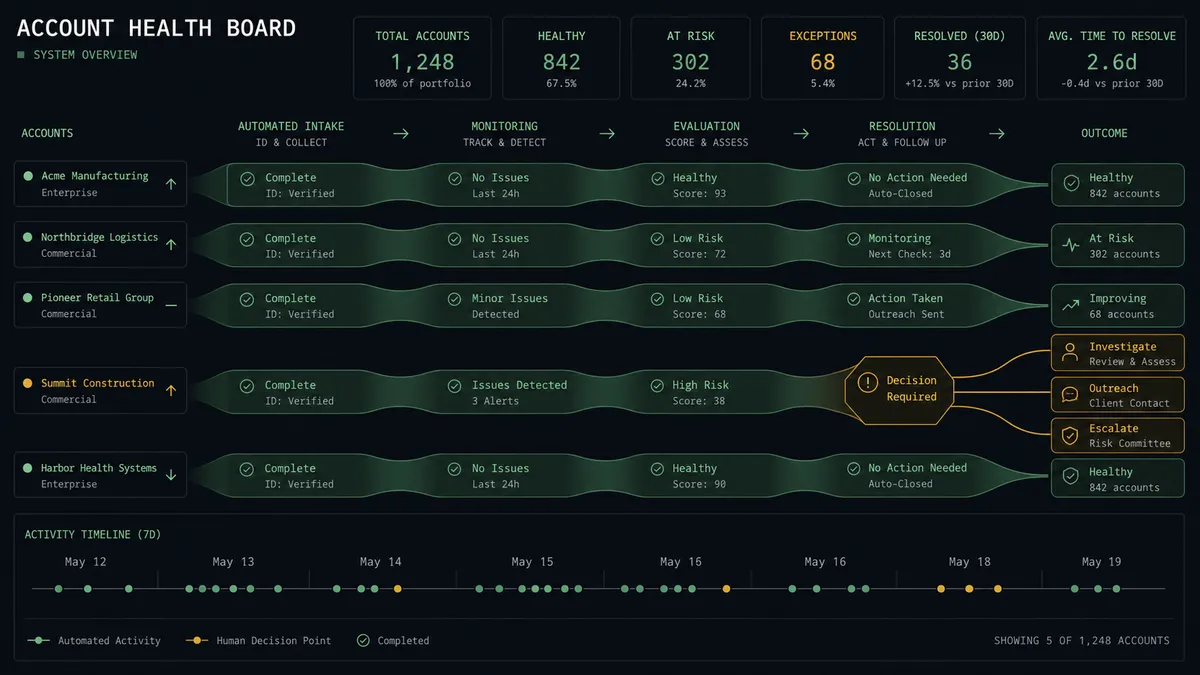
Gated cancellation. The final failed retry never auto-lapses. The agent packages the payment history and health signals, and a human picks grace period, save play, or Cancel Subscription. The choice is logged with a name.
NPS-to-billing correlation. When a low score arrives via Create NPS Response, the agent pulls the account’s Stripe status with Get Subscription and flags accounts that are both unhappy and recently billed, so the save conversation starts with the full picture.
Getting started
Start on the free plan: 100 executions a month, every integration included, no credit card required, plus 14 days of Professional for new accounts. Both connectors are available on every tier, and every tier includes unlimited users and unlimited workflows.
Explore the integration details:
- Stripe integration (1 trigger and 67 actions covering payments, customers, subscriptions, refunds, and invoicing)
- Custify integration (18 actions covering people, companies, subscriptions, events, and tasks)
Start building free at flowrunner.ai or book a demo to see a live Stripe to Custify workflow, gated cancellation and all.
Frequently asked questions
Is it free to connect Stripe and Custify on FlowRunner?
You can build and run the connection on FlowRunner's free plan, which includes 100 executions a month and every integration with no credit card required, and new accounts also get 14 days of Professional. Both connectors are available on every FlowRunner tier, and every tier includes unlimited users and unlimited workflows.
Can I self-host the Stripe to Custify workflow?
Yes. FlowRunner offers a cloud-hosted option and a self-hosted option, so the connection can run inside your own environment.
Does the AI agent need my own OpenAI or Claude key?
FlowRunner uses a bring-your-own-keys model, so you connect the AI provider key you already have. You are not locked to one model.
Can the agent cancel a subscription on its own?
No. Cancel Subscription in Stripe is gated behind a human-in-loop step. The agent assembles the account's payment history, health signals from Custify, and its recommendation, then waits for a named person to choose a grace period, a save play, or the cancellation. It never ends revenue on its own.
Which Stripe events can start the Custify workflow?
Stripe's Parse Webhook Event trigger fires on the events you subscribe to, such as a new subscription, an upgrade or downgrade, a failed payment, or a cancellation request. The workflow maps each one to the matching Custify actions, starting with Create or Update Person and Create or Update Company.
How does billing data show up inside Custify?
Three ways: Create or Update Subscription keeps the plan and amount current on the account, Track Event records each billing event on the customer's timeline, and Create Task opens a follow-up for the CSM when a signal needs a human touch.