How to Connect DocuSign with Custify (With or Without an AI Agent)
Connect DocuSign envelope events to Custify customer success records, optionally as an AI agent that logs signings and routes declines to CSMs, and pauses for a human before Create or Update Subscription rewrites an account's revenue data.
How do you connect DocuSign to Custify?
You connect DocuSign to Custify by having DocuSign’s On Envelope Completed trigger drive Custify actions: the workflow reads the signing with Get Envelope Recipients, matches the account with Get Company and List Companies, logs the moment with Track Event, and queues the follow-through with Create Task, so a signed renewal shows up on the account timeline your CSMs actually work from. FlowRunner is a visual AI-agent orchestration platform where automations run autonomously and pause for human judgment on the steps that carry real consequence. The same connection can run as an AI agent that logs signings and routes declines on its own, and pauses for a named human before Create or Update Subscription rewrites the revenue record behind the account’s health score.
The problem it solves
Today the contract lifecycle and the customer success platform are connected by whoever remembers. A renewal completes in DocuSign, and the CSM finds out from a congratulations thread, not from Custify. Someone eventually updates the account: logs the renewal, adjusts the subscription record, closes out the renewal play. Between the signature and that update, the CS platform is describing an account that no longer exists, and every health score, playbook trigger, and QBR deck built on it inherits the error.
The declines are the sharper failure. On Envelope Declined is a customer telling you, in writing, that they are not renewing on these terms. In most CS stacks that signal never arrives at all: the decline lives in the sales team’s DocuSign account, the CSM keeps running the standard renewal play, and the account churns with a green health score. The single most predictive churn event a CS platform can receive is the one most teams never wire into it.
How it works: the connection
The connection listens to DocuSign and writes to Custify. Here is the plain version, grounded in the real connector actions.
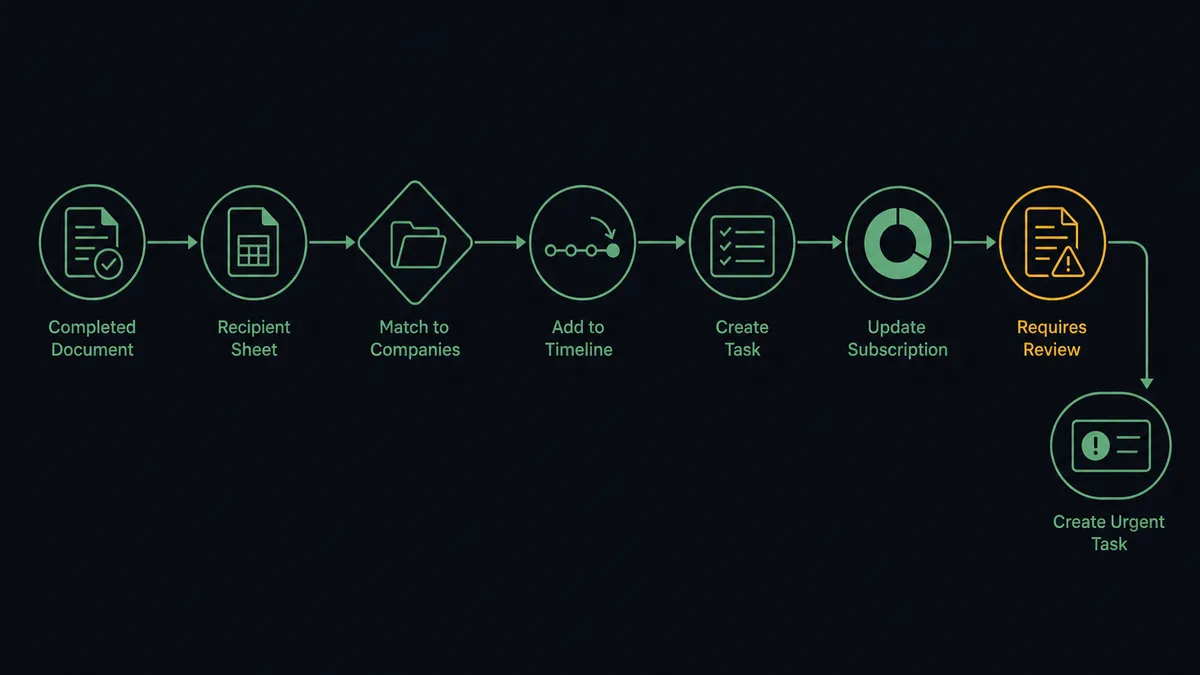
- Trigger: DocuSign fires On Envelope Completed when the renewal or amendment is fully signed.
- Read: The workflow calls Get Envelope Recipients and Get Envelope Status to pull the signer, completion date, and envelope context.
- Match: It calls Get Company and List Companies in Custify to find the account the envelope belongs to.
- Log: It calls Track Event so the signing lands on the account timeline with the envelope reference attached.
- Queue: It calls Create Task to assign the post-renewal play to the account’s CSM with a due date.
- Update: It calls Create or Update Subscription so the account’s revenue record reflects the newly signed terms.
- Catch declines: When On Envelope Declined fires, it calls Track Event and Create Task so the churn signal becomes an urgent, owned piece of work instead of silence.
That is the “just connect them” answer. Signatures and declines both land in the system that decides how the account gets worked.
Can an AI agent run it? (and why a human stays in the loop)
Yes, and the agent earns its keep by reading what was signed, not just that something was signed. An amendment is not a renewal; a partial renewal is not a full one. The agent holds Get Envelope Status, List Envelopes, Download Document, Get Company, List People, Create or Update Person, Track Event, Create Task, and Create or Update Subscription as tools, and reasons about which apply. A renewal with unchanged terms gets logged and its play closed. An envelope with a new signer the account has never seen gets that person added via Create or Update Person. A decline gets triaged by who declined and at what stage, and the CSM’s task says so.
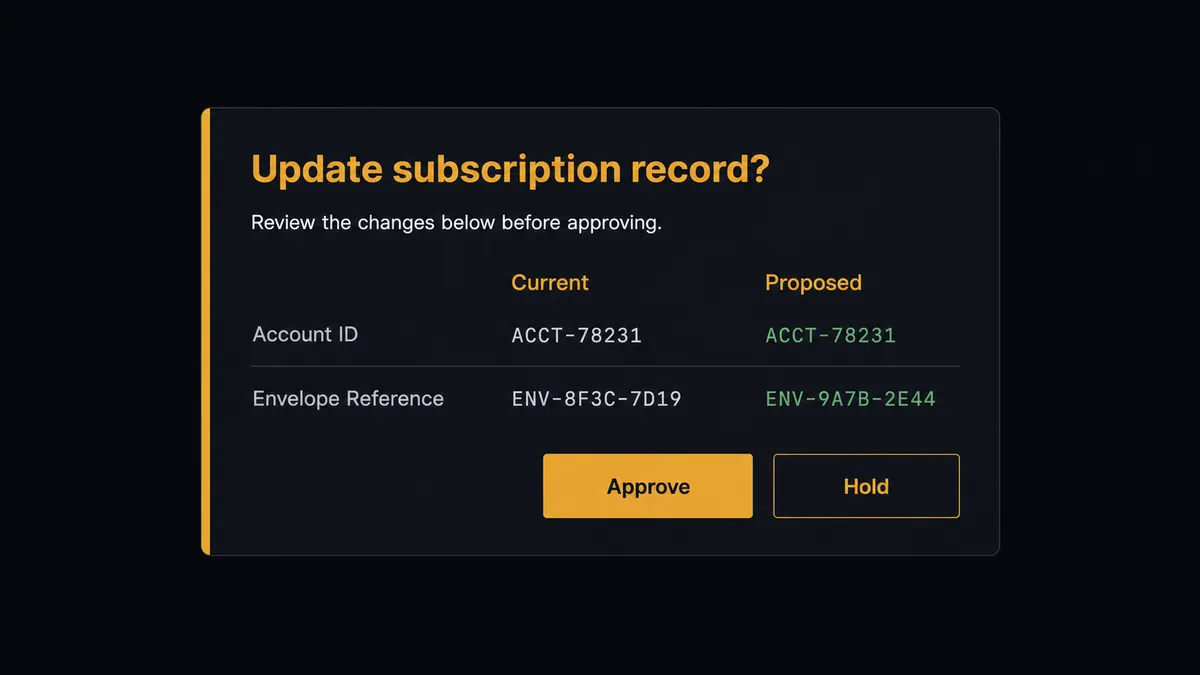
The consequential step is the subscription record. In Custify, subscription data is not bookkeeping; it feeds health scores, segments, and the playbooks that decide which accounts get attention. Create or Update Subscription written wrong does not fail loudly, it quietly reroutes your CS team’s effort for a quarter. So before that write, the agent invokes a human-in-loop flow it holds as a callable tool. The workflow pauses and posts to the CS lead: “Envelope [subject] completed for [company]. Current subscription record: [current]. Proposed update from the signed terms: [proposed]. Approve to update, or hold for review.” One click, then the record changes, with approver and timestamp in the audit trail. Delete Subscription and Delete Company sit behind the same gate, always.
Prospects call this pattern a digital andon cord: like Toyota’s quality control pull cord, the workflow stops the line the moment it hits uncertainty, and your team pulls it back into motion. The timeline fills itself. The revenue record changes only on a human’s say-so.
FlowRunner vs Zapier
Zapier is the obvious first candidate for wiring DocuSign into a CS tool, and its strengths here are real. The DocuSign integration is well established, setup is quick, and for firing a simple event into another system when an envelope completes, a Zap is a perfectly reasonable answer.
The difference shows up in what this pair writes. Logging an event is low stakes; rewriting the subscription record that drives health scoring is not. FlowRunner is built around native human-in-the-loop and AI-agent orchestration, where the agent separates the two on its own and routes only the consequential write through a person.
| What matters for this pair | FlowRunner | Zapier |
|---|---|---|
| Human-in-the-loop before Create or Update Subscription | Native. The agent invokes an approval flow as a callable tool and pauses until the CS lead signs off | Available via added approval steps you insert manually, not a native agent decision |
| Who runs the flow | An AI agent reads the envelope, reasons about what changed, and picks actions as tools | Predefined step sequence you configure per Zap |
| Users included | Unlimited users on every tier | Priced by task volume; seats vary by plan |
| Bring your own AI keys | Yes, BYOK. Connect the AI provider key you already have | AI features tied to Zapier’s own AI offering |
| Self-hosted option | Yes, cloud-hosted or self-hosted | Cloud only |
| Pricing model | Transparent workflow-based tiers with clear execution limits | Per-task pricing that is hard to predict as signing volume grows |
If all you need is a timeline event when an envelope completes, Zapier will do it. If signatures and declines should drive your CS platform’s revenue records, with a named person approving every change to how an account is scored, that is where FlowRunner is the better fit.
Before and after
| Category | Before | After |
|---|---|---|
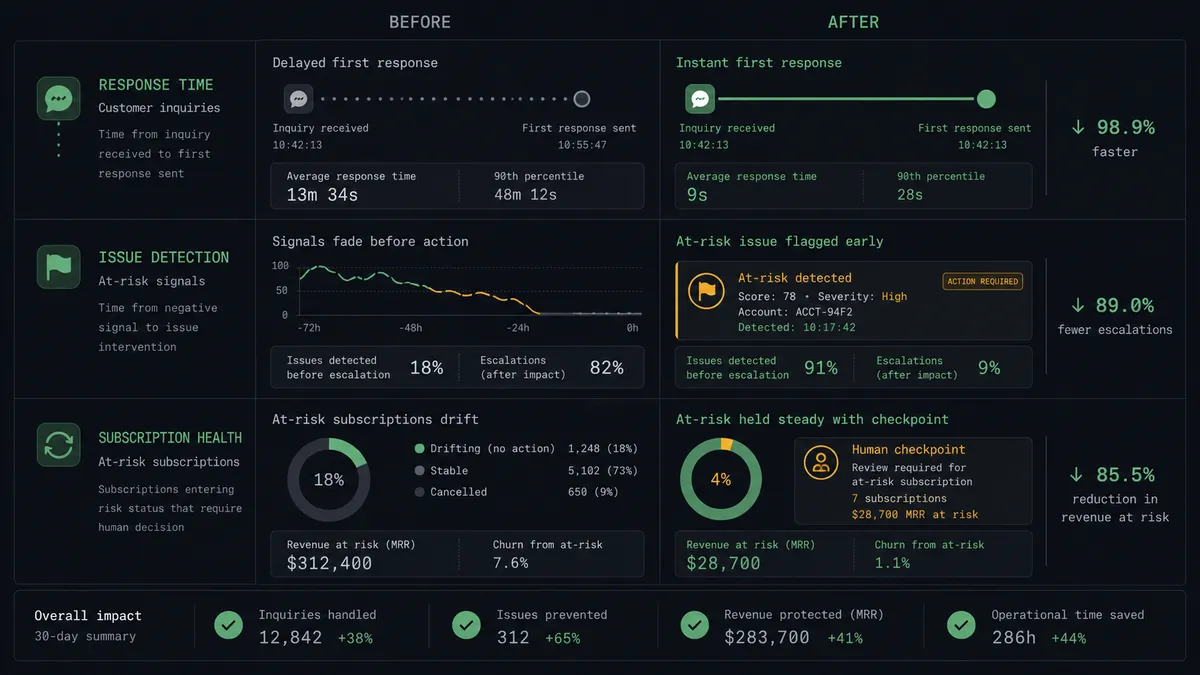
| Renewal visibility | CSMs learn about signed renewals from congratulations threads | Track Event puts the signing on the account timeline the moment it completes |
| Decline handling | Declines live in the sales team’s DocuSign and never reach CS | On Envelope Declined creates an urgent, owned task the same hour |
| Subscription accuracy | Revenue records drift from contracts until someone reconciles them | Every signed change is proposed against the current record and approved by name |
| Post-renewal follow-through | The renewal play closes whenever someone remembers | Create Task assigns the follow-through with the envelope attached |
| Account history | Contract events are reconstructed from email during escalations | The timeline carries every signing, decline, and void with its envelope reference |
What you can build
Renewal to timeline, same hour. On Envelope Completed fires. The agent matches the account via List Companies, logs the signing with Track Event, and closes the renewal play with Update Task, so the CS platform reflects reality before the congratulations thread does.
Decline early-warning. On Envelope Declined fires. The agent reads who declined via Get Envelope Recipients, logs the signal with Track Event, and creates an urgent Create Task for the CSM with the envelope context, turning the strongest churn signal into owned work.
Subscription change with a named approver. The agent derives the revenue change from the signed terms and holds Create or Update Subscription at the approval gate, showing the CS lead current versus proposed before anything is rewritten.
Voided-contract cleanup. On Envelope Voided fires. The agent logs the void with Track Event and, if a subscription change had been applied from that envelope, packages the reversal for approval so the record never reflects a contract that no longer exists.
New stakeholder capture. When an envelope introduces a signer the account has never seen, the agent calls List People, adds them with Create or Update Person, and notes the new stakeholder on the CSM’s task, so the org chart in Custify keeps up with who actually signs.
Getting started
Start on the free plan: 100 executions a month, every integration included, no credit card required, plus 14 days of Professional for new accounts. Both connectors are available on every tier, and every tier includes unlimited users and unlimited workflows.
Explore the integration details:
- DocuSign integration (4 triggers and 9 actions covering envelopes, recipients, documents, and signing status)
- Custify integration (18 actions covering people, companies, events, subscriptions, NPS, and tasks)
Start building free at flowrunner.ai or book a demo to see a live DocuSign to Custify workflow, subscription approval and all.
Frequently asked questions
Is it free to connect DocuSign and Custify on FlowRunner?
You can build and run the connection on FlowRunner's free plan, which includes 100 executions a month and every integration with no credit card required, and new accounts also get 14 days of Professional. Both connectors are available on every FlowRunner tier, and every tier includes unlimited users and unlimited workflows.
Can I self-host the DocuSign to Custify workflow?
Yes. FlowRunner offers a cloud-hosted option and a self-hosted option, so the connection can run inside your own environment.
Does the AI agent need my own OpenAI or Claude key?
FlowRunner uses a bring-your-own-keys model, so you connect the AI provider key you already have. You are not locked to one model.
What happens when the agent cannot match an envelope to a Custify account?
The agent stops and invokes a human-in-loop step. It posts the signer details from Get Envelope Recipients and the closest candidates from List Companies to your CS channel, then waits for a person to pick the account before anything is written. No event lands on the wrong company's timeline.
Which DocuSign events can trigger a Custify action?
DocuSign offers four triggers: On Envelope Completed, On Envelope Sent, On Envelope Declined, and On Envelope Voided. On Envelope Completed drives renewal logging, and On Envelope Declined is the churn signal that creates an urgent CSM task.
Does every Custify write need human approval?
No. The agent logs events with Track Event and creates CSM tasks on its own. It escalates the writes that change how the account is scored and worked: Create or Update Subscription, and any Delete action. Those wait for a named approver, and the approval lands in the audit trail.