How to Connect Stripe with Bigin (With or Without an AI Agent)
Connect Stripe payment events to Bigin by Zoho so paid checkouts move deals and update contacts automatically, with an AI agent that pauses for a human before a refund or subscription cancellation.
How do you connect Stripe to Bigin?
You connect Stripe to Bigin by having Stripe’s Parse Webhook Event trigger drive Bigin actions: when a checkout completes or an invoice is paid, the workflow finds the buyer with Search Records, creates the record with Create Contact if it is a new customer, moves the pipeline with Update Deal, and stamps the payment onto the record with Add Note. FlowRunner is a visual AI-agent orchestration platform where automations run autonomously and pause for human judgment on the steps that carry real consequence. The same connection can run as an AI agent that keeps the pipeline current on its own and pauses for a named human before it calls Create Refund or Cancel Subscription, the two actions in this pair that move money out or end recurring revenue.
The problem it solves
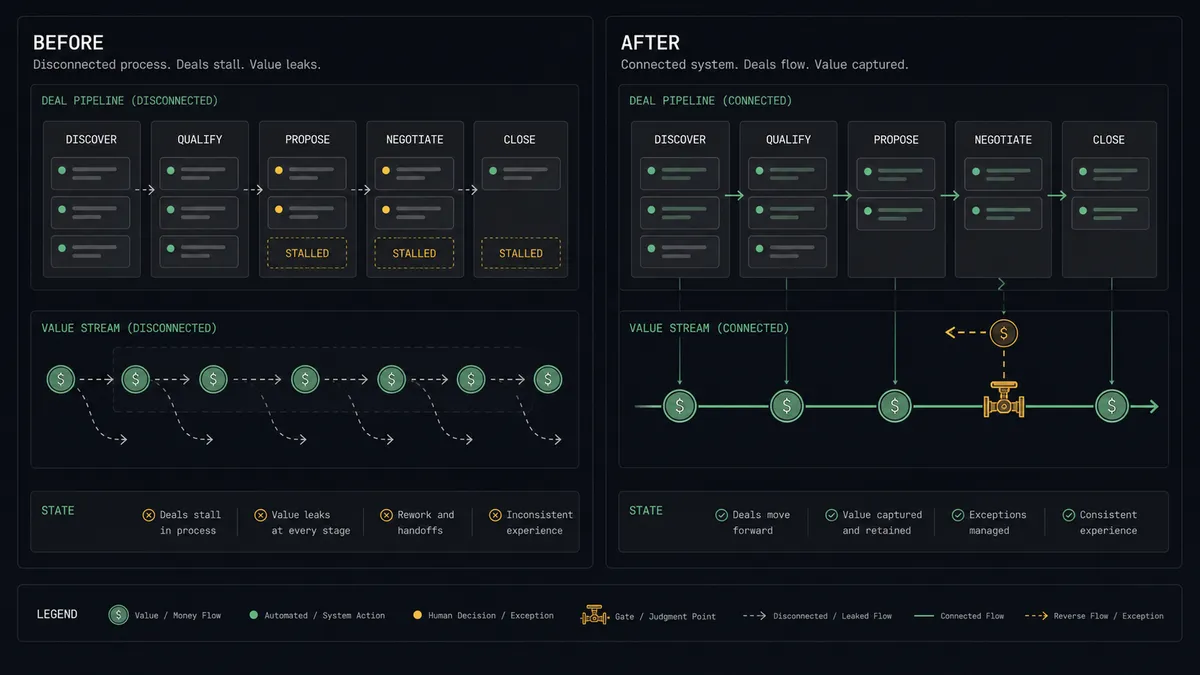
Right now the payment and the pipeline live in different rooms. A customer pays through Stripe, and the deal in Bigin still says Negotiation until someone notices, opens the record, drags the stage to Closed Won, and types a note about the payment. That update happens in batches, days late. The pipeline report that drives Monday’s decisions describes last week’s reality.
The edges hurt more. A renewal charge fails quietly and nobody chases it, so the first sign of churn is the customer already gone. A refund request arrives by email, gets handled ad hoc in the Stripe dashboard, and never reaches the CRM, so the account’s record shows a happy paying customer who actually left angry. A new buyer pays before a deal was ever created, and the revenue is invisible to the pipeline entirely.
How it works: the connection
The connection listens to Stripe and writes to Bigin. Here is the plain version, grounded in the real connector actions.
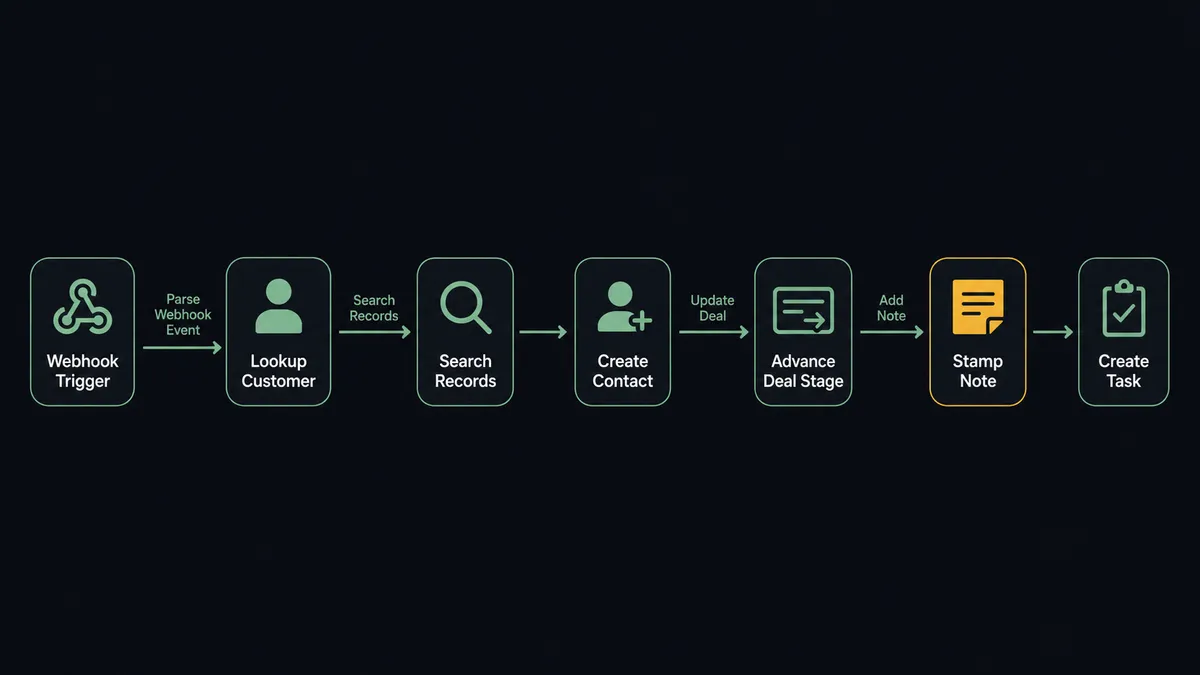
- Trigger: Stripe fires Parse Webhook Event when an event arrives at the connected webhook endpoint: a completed checkout, a paid invoice, a failed charge, a subscription change.
- Read: The workflow calls Get Customer in Stripe to pull the customer’s email and details behind the event.
- Match the record: It calls Search Records in Bigin, matching by email first, so the event attaches to the right person.
- Create if new: When no record exists, it calls Create Contact, and Create Company when the payment carries a business name, so a first-time buyer enters the pipeline with a real record.
- Move the deal: It calls Update Deal to advance the stage, moving a paid deal to your won stage, or Create Deal when a payment arrives with no deal to attach to.
- Stamp the evidence: It calls Add Note with the amount, the payment reference, and the event type, timestamped on the record.
- Chase the exceptions: On a failed renewal, it calls Create Task assigned to the account owner with a due date, so the follow-up exists before anyone reads a report.
That is the “just connect them” answer. Payments move the pipeline in real time, every record carries its payment history, and failed charges become tasks instead of surprises.
Can an AI agent run it? (and why a human stays in the loop)
Yes, and the agent version is what makes one workflow handle every event type instead of one Zap per event. The agent receives whatever Parse Webhook Event delivers and reasons about it: it holds Get Customer, List Subscriptions, Search Records, Create Contact, Update Deal, Create Task, Add Note, Create Refund, and Cancel Subscription as tools, and picks the path per event. A paid checkout from a known contact is a stage move and a note. A payment from an unknown email triggers a search cascade before anything is created.
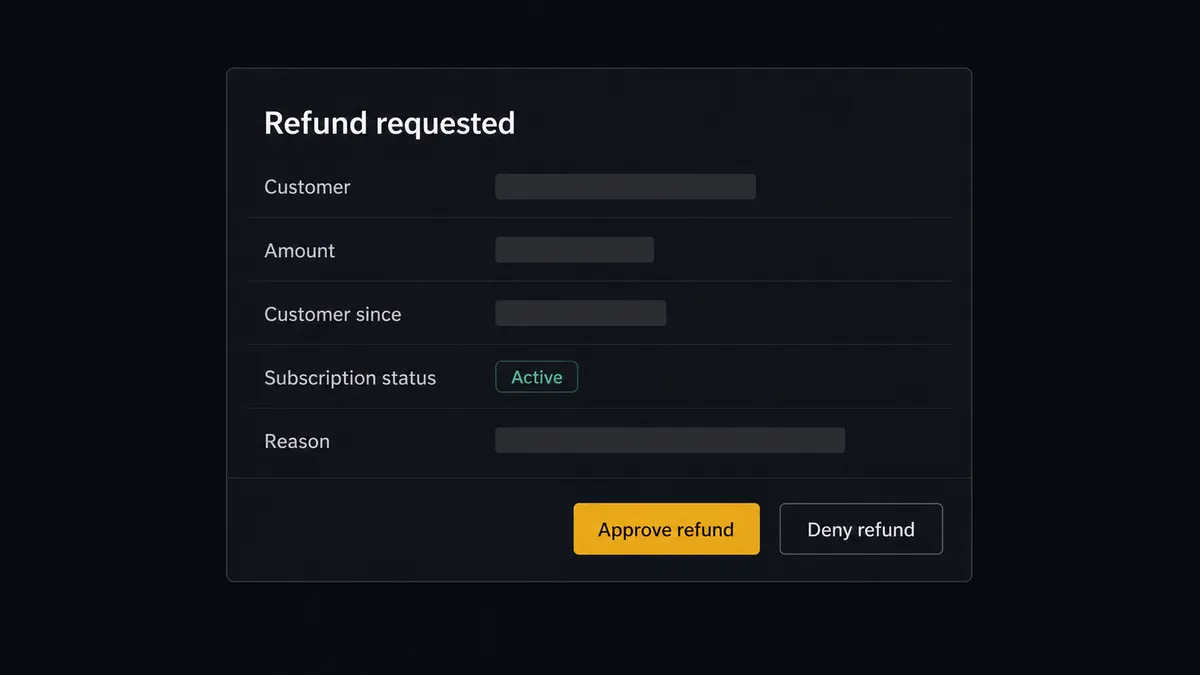
The consequential steps are Create Refund and Cancel Subscription. One moves money out of the business; the other ends recurring revenue. When a refund request event arrives, the agent does not execute it. It assembles what a decision needs: the customer, the amount, the subscription status from Get Subscription, the account’s note history from List Notes, and the reason. Then it invokes the human-in-loop flow it holds as a callable tool. The workflow pauses and posts to your team’s channel: “Refund requested: [customer], [amount], customer since [date], subscription [status]. Reason: [reason]. Approve to issue?” Only after a named approver signs off does the agent call Create Refund, log the outcome in Bigin with Add Note, and update the deal. The decision, the approver, and the timestamp land in the audit trail.
This is the digital andon cord, the framing our own prospects gave us: like Toyota’s pull cord on the production line, the workflow stops the line the moment money would move in the wrong direction without judgment. Pipeline updates flow all day untouched. Revenue leaving the business waits for a person.
FlowRunner vs Zapier
Zapier is the obvious first candidate for a Stripe to Bigin sync, and its strengths are real. The app directory is the category’s largest, the template gallery includes Stripe-to-CRM patterns you can copy in minutes, and a newcomer gets a first Zap live fast. Zapier also has a native Request Approval step on paid plans, so an approval pause exists there too. Credit where it is due.
The difference shows up in event breadth and where approvals live. Stripe’s webhook stream carries many event types; handling each with a separate Zap multiplies both maintenance and task consumption, since each action step in a run costs a task. And Zapier’s approvals are acted on inside Zapier’s own interface by signed-in Zapier users, while FlowRunner’s agent posts the approval into the channel your team already reads.
| What matters for this pair | FlowRunner | Zapier |
|---|---|---|
| Human-in-the-loop on refunds and cancellations | Native. The agent invokes an approval flow as a callable tool and pauses before Create Refund or Cancel Subscription | Native Request Approval step on paid plans; the reviewer signs in to Zapier to act on it |
| Who runs the flow | One AI agent classifies every webhook event and picks actions as tools | A step sequence per Zap; each event type typically gets its own Zap |
| Users included | Unlimited users on every tier | Per-seat pricing until Enterprise |
| Bring your own AI keys | Yes, BYOK | AI runs through Zapier’s own AI products and billing |
| Self-hosted option | Yes, cloud-hosted or self-hosted | Cloud only |
| Pricing model | Transparent workflow-based tiers, priced per execution | Per-task; each action step in a run consumes a task |
If you need one narrow sync, say paid checkout to new contact, and you already run Zapier, it will do that well. If you want one agent handling the full Stripe event stream with the money-moving steps gated by named approvals, this pairing is where FlowRunner is the better fit.
Before and after
| Category | Before | After |
|---|---|---|
| Deal stages | Paid deals sit in Negotiation until someone updates them in batches | Update Deal moves the stage the moment the payment event arrives |
| New buyers | Customers who pay before a deal exists are invisible to the pipeline | Create Contact and Create Deal put them on the board with the payment attached |
| Failed renewals | Churn is discovered after the customer is gone | Create Task puts a dated follow-up on the owner’s list the day the charge fails |
| Refund handling | Handled ad hoc in the Stripe dashboard, never recorded in the CRM | Approved by a named person, issued by the agent, logged on the record with Add Note |
| Pipeline reporting | Monday’s report describes last week | The pipeline reflects payments in real time |
What you can build
Checkout to Closed Won. Parse Webhook Event fires on a completed checkout, the agent matches the buyer with Search Records, advances the pipeline with Update Deal, and stamps the payment with Add Note. The pipeline stops lagging the bank account.
First-payment onboarding. A payment from an unknown email becomes Create Contact, Create Company where there is a business name, and Create Deal in the won stage, so self-serve buyers enter the CRM with their revenue attached.
Failed-renewal rescue. A failed invoice event becomes a Create Task for the account owner with the customer’s history in the description, due before the next retry, so saves happen while there is still time.
Refund with named approval. A refund request pauses at the human gate with customer, amount, and history packaged. On approval the agent calls Create Refund and writes the outcome back to the record.
Cancellation save loop. A subscription cancellation event pulls the account’s notes and value, and the agent proposes a save offer to the owner before executing Cancel Subscription, so retention gets a chance ahead of the confirmation email.
Common questions
Is it free to connect Stripe and Bigin on FlowRunner? You can build and run the connection on FlowRunner’s free plan, which includes 100 executions a month and every integration with no credit card required, and new accounts also get 14 days of Professional. Both connectors are available on every FlowRunner tier, and every tier includes unlimited users and unlimited workflows.
Can I self-host the Stripe to Bigin workflow? Yes. FlowRunner offers a cloud-hosted option and a self-hosted option, so the connection can run inside your own environment.
Does the AI agent need my own OpenAI or Claude key? FlowRunner uses a bring-your-own-keys model, so you connect the AI provider key you already have. You are not locked to one model.
What happens when the agent cannot match a Stripe payment to a Bigin record? The agent searches Bigin with Search Records by email, then by phone, then by free text. When nothing matches confidently, it does not create a duplicate contact or attach revenue to the wrong deal. It posts the payment details and closest candidates to your team’s channel and waits for a person to pick the record or approve creating a new one.
Which Stripe events can trigger a Bigin action? Stripe uses a single trigger, Parse Webhook Event, that handles all Stripe event types from a connected webhook endpoint. That means one workflow can react to checkout completions, invoice payments, subscription changes, failed charges, and refund events, and the agent branches on the event type it receives.
Can the workflow keep Bigin deals in step with subscription renewals? Yes. When a renewal invoice is paid, the agent finds the contact with Search Records, logs the payment with Add Note, and keeps the deal current with Update Deal. When a renewal fails, it creates a follow-up with Create Task so the owner chases the payment before it becomes churn.
Getting started
Start on the free plan: 100 executions a month, every integration included, no credit card required, plus 14 days of Professional for new accounts. Both connectors are available on every tier, and every tier includes unlimited users and unlimited workflows.
Explore the integration details:
- Stripe integration (1 webhook trigger and 67 actions across payments, subscriptions, invoices, refunds, and payouts)
- Bigin integration (17 actions across contacts, companies, deals, tasks, and notes)
Start building free at flowrunner.ai or book a demo to see a live Stripe to Bigin workflow, refund approval and all.
Frequently asked questions
Is it free to connect Stripe and Bigin on FlowRunner?
You can build and run the connection on FlowRunner's free plan, which includes 100 executions a month and every integration with no credit card required, and new accounts also get 14 days of Professional. Both connectors are available on every FlowRunner tier, and every tier includes unlimited users and unlimited workflows.
Can I self-host the Stripe to Bigin workflow?
Yes. FlowRunner offers a cloud-hosted option and a self-hosted option, so the connection can run inside your own environment.
Does the AI agent need my own OpenAI or Claude key?
FlowRunner uses a bring-your-own-keys model, so you connect the AI provider key you already have. You are not locked to one model.
What happens when the agent cannot match a Stripe payment to a Bigin record?
The agent searches Bigin with Search Records by email, then by phone, then by free text. When nothing matches confidently, it does not create a duplicate contact or attach revenue to the wrong deal. It posts the payment details and closest candidates to your team's channel and waits for a person to pick the record or approve creating a new one.
Which Stripe events can trigger a Bigin action?
Stripe uses a single trigger, Parse Webhook Event, that handles all Stripe event types from a connected webhook endpoint. That means one workflow can react to checkout completions, invoice payments, subscription changes, failed charges, and refund events, and the agent branches on the event type it receives.
Can the workflow keep Bigin deals in step with subscription renewals?
Yes. When a renewal invoice is paid, the agent finds the contact with Search Records, logs the payment with Add Note, and keeps the deal current with Update Deal. When a renewal fails, it creates a follow-up with Create Task so the owner chases the payment before it becomes churn.