How to Connect Stripe with Bitrix24 (With or Without an AI Agent)
Connect Stripe payment events to Bitrix24 so deals advance, timelines stay current, and owners get notified automatically, with an AI agent that pauses for a human before a refund or cancellation.
How do you connect Stripe to Bitrix24?
You connect Stripe to Bitrix24 by having Stripe’s Parse Webhook Event trigger drive Bitrix24 actions: when a checkout completes or an invoice is paid, the workflow matches the payer with List Contacts, creates the record with Create Contact if it is a new customer, advances the deal with Update Deal, and writes the payment onto the deal’s history with Add Timeline Comment, pinging the owner with Send Notification. FlowRunner is a visual AI-agent orchestration platform where automations run autonomously and pause for human judgment on the steps that carry real consequence. The same connection can run as an AI agent that keeps the whole portal current on its own and pauses for a named human before it calls Create Refund or Cancel Subscription in Stripe.
The problem it solves
Right now your Bitrix24 portal learns about money secondhand. A customer pays through Stripe, and the deal sits in its old stage until the owner notices the payout email, opens the portal, drags the deal, and types a comment. The one fact that matters most, whether the customer paid, arrives latest and least reliably, and the timeline that is supposed to be the deal’s memory is missing its most important entries.
The edges compound it. A renewal fails and no task gets created, so the follow-up depends on someone reading a Stripe digest email. A refund gets issued from the Stripe dashboard in isolation, so the deal still reads Won and the timeline says nothing, and the next person to touch the account walks in blind. A self-serve buyer pays with no lead or deal in the portal at all, invisible to reporting.
How it works: the connection
The connection listens to Stripe and writes to Bitrix24. Here is the plain version, grounded in the real connector actions.
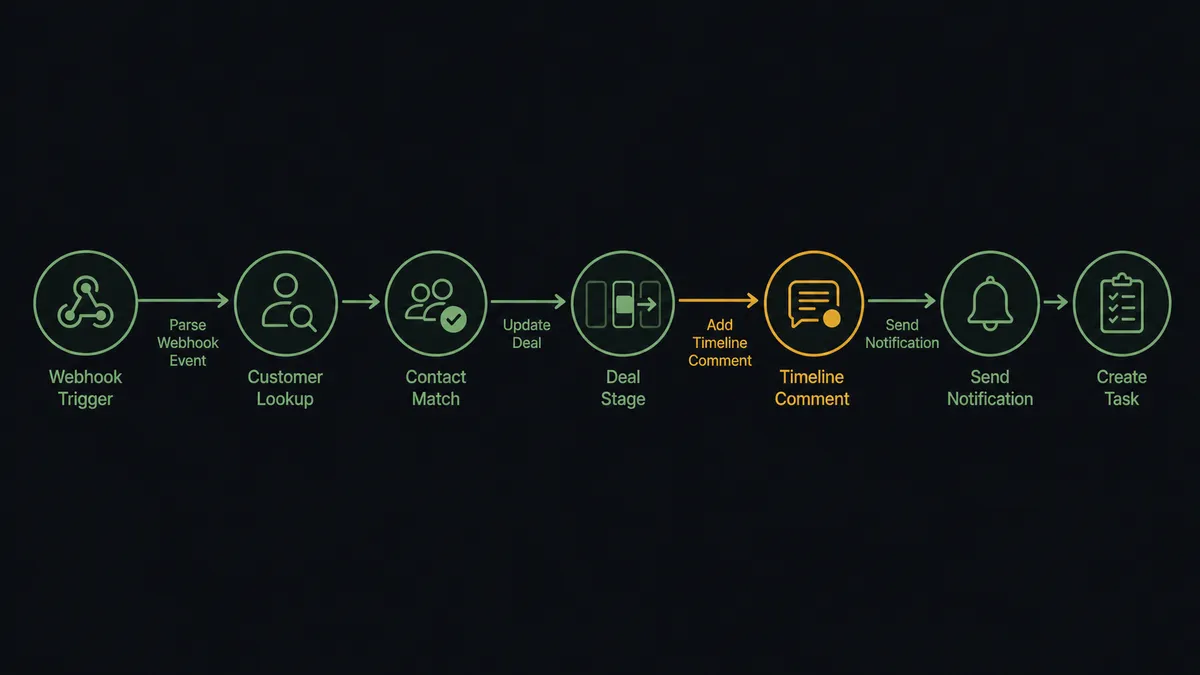
- Trigger: Stripe fires Parse Webhook Event when an event arrives at the connected endpoint: a completed checkout, a paid or failed invoice, a subscription change, a refund event.
- Read: The workflow calls Get Customer in Stripe to pull the payer’s email and details.
- Match the record: It calls List Contacts in Bitrix24, filtering by email, to find the person, and List Deals to find their open deal.
- Create if new: When no record exists, it calls Create Contact, and Create Deal in the right pipeline, using Get Deal Categories and Get Status List so the stage IDs are the portal’s own.
- Advance the deal: It calls Update Deal to move STAGE_ID to your won stage and set OPPORTUNITY to the paid amount.
- Write the memory: It calls Add Timeline Comment on the deal with the amount, payment reference, and event type, so the deal’s history includes the money.
- Tell the owner: It calls Send Notification so the responsible user sees the payment in their Bitrix24 notification center without anyone forwarding emails. On a failed renewal, Create Task puts a dated follow-up on their list instead.
That is the “just connect them” answer. The portal hears about money the moment it moves, deals advance themselves, and every payment is written into the timeline where the team already looks.
Can an AI agent run it? (and why a human stays in the loop)
Yes, and the agent is what lets one workflow serve the entire Stripe event stream. The agent holds Get Customer, Get Subscription, List Contacts, Create Contact, List Deals, Update Deal, Add Timeline Comment, Create Task, Send Notification, Create Refund, and Cancel Subscription as tools, and it reasons about each event instead of running a fixed branch. A paid invoice from a known contact is a stage move and a timeline comment. A payment with no matching portal record starts a search cascade and, if that fails, a notification to a person rather than a guessed match.
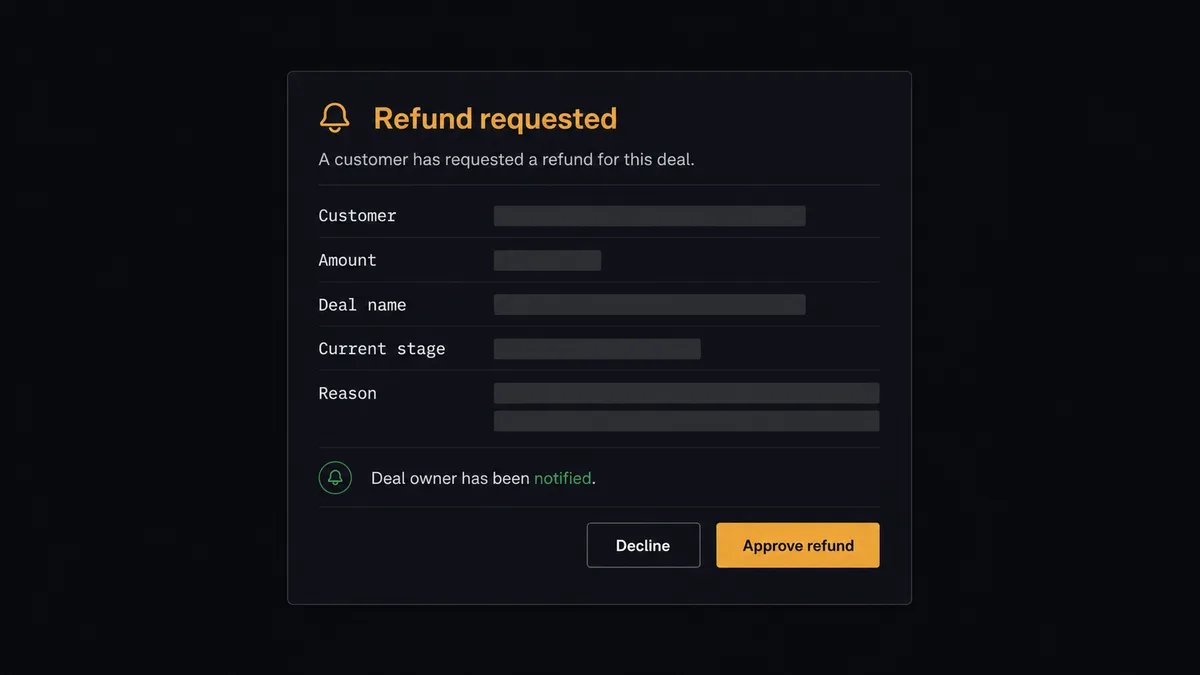
The consequential steps are Create Refund and Cancel Subscription. A wrong stage move is a drag-and-drop fix; a refund is money gone and a cancellation is revenue ended. So when a refund request arrives, the agent assembles the decision package: customer, amount, deal value from Get Deal, subscription status, and the timeline’s recent history. It invokes the human-in-loop flow it holds as a callable tool, the workflow pauses, and the approver sees: “Refund requested: [customer], [amount], deal [name] at stage [stage]. Reason: [reason]. Approve to issue?” It also fires Send Notification so the deal owner knows the account is in play. Only after a named approver signs off does the agent call Create Refund, then write the outcome to the deal with Add Timeline Comment. The decision, approver, and timestamp land in the audit trail.
This is the digital andon cord, the framing our own prospects gave us: like Toyota’s pull cord on the production line, the workflow stops the line the moment money would leave without judgment. The portal stays current all day on its own. The step that reverses revenue waits for a name.
FlowRunner vs Zapier
Zapier is a reasonable first reach for a Stripe to Bitrix24 sync, and its strengths are genuine. It has the category’s largest app directory, ready-made templates for payment-to-CRM patterns, and a fast first-Zap experience for a newcomer. It also ships a native Request Approval step on paid plans.
The friction appears at Bitrix24’s depth and at the approval step. Bitrix24 is a portal, not just a contact list: pipelines with portal-specific stage IDs, timeline comments, tasks, notifications, and 600+ REST methods behind them. An agent that reads Get Status List and Get Deal Categories adapts to your portal’s actual configuration; a fixed step sequence has your stage IDs hardcoded into it. And Zapier approvals are acted on by signed-in Zapier users inside Zapier’s interface.
| What matters for this pair | FlowRunner | Zapier |
|---|---|---|
| Human-in-the-loop on refunds and cancellations | Native. The agent invokes an approval flow as a callable tool and pauses before Create Refund or Cancel Subscription | Native Request Approval step on paid plans; the reviewer signs in to Zapier to act on it |
| Who runs the flow | One AI agent classifies every webhook event and adapts to the portal’s own pipelines | A step sequence per Zap; each event type typically gets its own Zap |
| Users included | Unlimited users on every tier | Per-seat pricing until Enterprise |
| Bring your own AI keys | Yes, BYOK | AI runs through Zapier’s own AI products and billing |
| Self-hosted option | Yes, cloud-hosted or self-hosted | Cloud only |
| Pricing model | Transparent workflow-based tiers, priced per execution | Per-task; each action step in a run consumes a task |
If you need a single narrow push, Zapier does it quickly. If you want the full event stream feeding deals, timelines, tasks, and notifications, with refunds gated by a named approver, this pairing is where FlowRunner is the better fit.
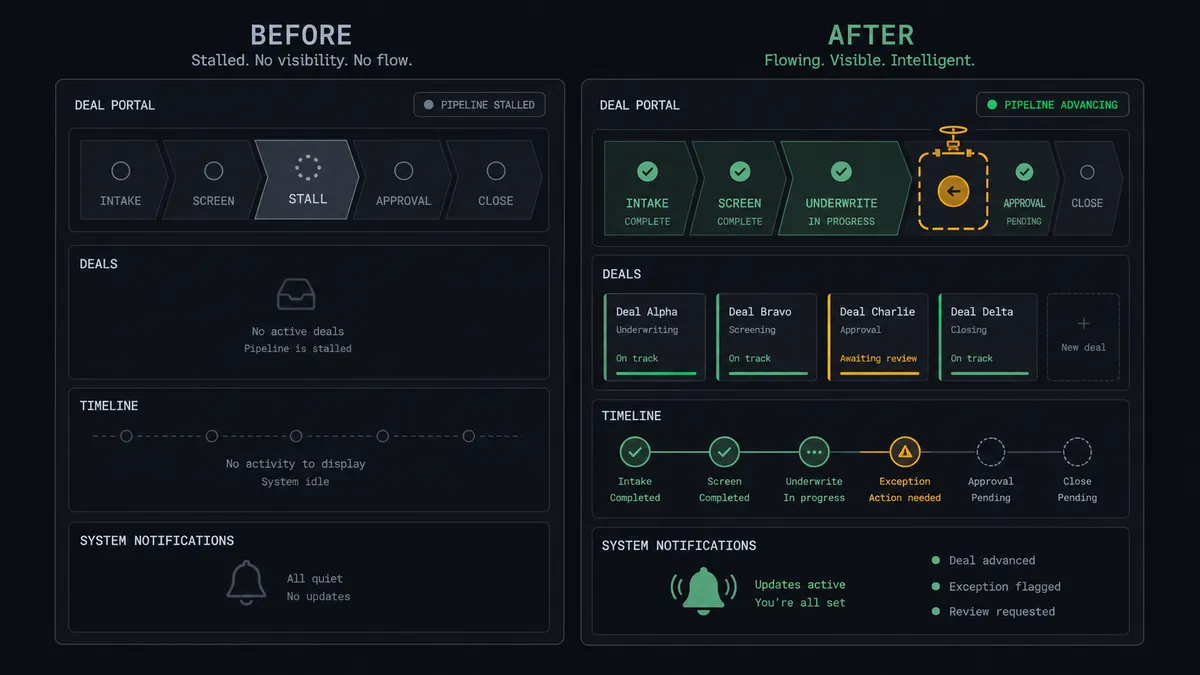
Before and after
| Category | Before | After |
|---|---|---|
| Deal stages | Owners drag deals to Won when they notice the payout email | Update Deal advances the stage the moment the payment event arrives |
| Deal history | Timelines are missing the payments, the one entry that matters most | Add Timeline Comment writes every payment onto the deal’s record |
| Owner awareness | Payment news travels by forwarded emails | Send Notification lands in the owner’s Bitrix24 notification center automatically |
| Failed renewals | Follow-up depends on someone reading a Stripe digest | Create Task puts a dated follow-up on the owner’s list the day the charge fails |
| Refunds | Issued in the Stripe dashboard, invisible to the portal | Approved by a named person, issued by the agent, written into the timeline |
What you can build
Payment to advanced deal. Parse Webhook Event fires on a paid invoice, the agent matches with List Contacts, advances with Update Deal, and records with Add Timeline Comment. The pipeline tracks the bank account in real time.
Self-serve buyer intake. A payment with no portal record becomes Create Contact and Create Deal in the correct pipeline via Get Deal Categories, so product-led revenue shows up in reporting.
Failed-renewal task loop. A failed invoice event creates a Create Task for the responsible user with the customer’s history in the description and a due date ahead of the next retry, plus a Send Notification so it is seen today.
Refund with named approval. A refund request pauses at the human gate with customer, amount, deal, and timeline history packaged. On approval the agent calls Create Refund and writes the outcome back with Add Timeline Comment.
Portal-wide reach with Call REST Method. When the flow needs something beyond the dedicated actions, generating a quote with crm.quote.add, for instance, the agent reaches it through Call REST Method against any of the 600+ Bitrix24 REST methods your webhook’s scopes allow.
Common questions
Is it free to connect Stripe and Bitrix24 on FlowRunner? You can build and run the connection on a $100 credit with no credit card, which is roughly 67 days free on the Growth tier at $45/mo. Both connectors are available on every FlowRunner tier, and every tier includes unlimited users and unlimited workflows.
Can I self-host the Stripe to Bitrix24 workflow? Yes. FlowRunner offers a cloud-hosted option and a self-hosted option, so the connection can run inside your own environment.
Does the AI agent need my own OpenAI or Claude key? FlowRunner uses a bring-your-own-keys model, so you connect the AI provider key you already have. You are not locked to one model.
What happens when the agent cannot match a payment to a Bitrix24 deal? The agent works through List Contacts and List Deals by email and name. When nothing matches confidently, it does not guess a deal or spawn a duplicate. It sends a Send Notification to the responsible user with the payment details and closest candidates, and waits for a person to pick the record before it writes anything.
Which Stripe events can trigger a Bitrix24 action? Stripe uses a single trigger, Parse Webhook Event, which receives every Stripe event type from a connected webhook endpoint. One workflow reacts to completed checkouts, paid and failed invoices, subscription changes, and refund events, and the agent branches on the event type rather than needing a separate workflow per event.
Can the workflow reach Bitrix24 features beyond CRM records? Yes. Alongside the dedicated lead, contact, company, deal, task, and notification actions, the connector’s Call REST Method action reaches any of the 600+ Bitrix24 REST methods, such as crm.quote.add or disk.folder.getchildren, provided your inbound webhook has the matching permission scope.
Getting started
Start with a $100 credit on the Growth tier at $45/mo. That is roughly 67 days free, and no credit card is required. Both connectors are available on every tier, and every tier includes unlimited users and unlimited workflows.
Explore the integration details:
- Stripe integration (1 webhook trigger and 67 actions across payments, subscriptions, invoices, refunds, and payouts)
- Bitrix24 integration (40 actions across leads, contacts, companies, deals, tasks, and notifications)
Start building free at flowrunner.ai or book a demo to see a live Stripe to Bitrix24 workflow, refund approval and all.