How to Connect Airtable with Attio (With or Without an AI Agent)
Connect Airtable bases to Attio records so operational data flows into your CRM automatically, with an AI agent that pauses for a human before it overwrites a rep-edited field or deletes a record.
How do you connect Airtable to Attio?
You connect Airtable to Attio by having Airtable’s On New or Updated Record trigger drive Attio actions: the workflow calls Find Record to pull the changed row, Query Records to look for a matching company or person in Attio, and Assert Record (Upsert) to create or update the record without stacking duplicates. FlowRunner is a visual AI-agent orchestration platform where automations run autonomously and pause for human judgment on the steps that carry real consequence. When the same connection runs as an AI agent, the agent checks whether the incoming row would overwrite something a person deliberately edited in Attio, and it stops for a named human before that overwrite or any deletion happens.
The problem it solves
Most teams that run both tools use Airtable as the operational workbench and Attio as the system of record. Intake forms, partner lists, event registrations, and enrichment projects live in bases. Then someone exports a CSV, or copies rows by hand, or maintains a “to sync” view they clear every Friday. The CRM is perpetually a week behind the workbench, and everyone quietly knows which fields to distrust.
The edges are where the real damage happens. A one-way sync happily overwrites the deal owner a rep just corrected in Attio, because the Airtable row still holds the stale value. A re-imported list creates a second company record with a slightly different name, and now two reps work the same account. A cleanup in Airtable cascades into deletions nobody intended. Silent overwrites and silent duplicates are worse than manual work, because nobody notices until the pipeline review.
How it works: the connection
The connection listens to Airtable and writes to Attio. Here is the plain version, grounded in the real connector actions.
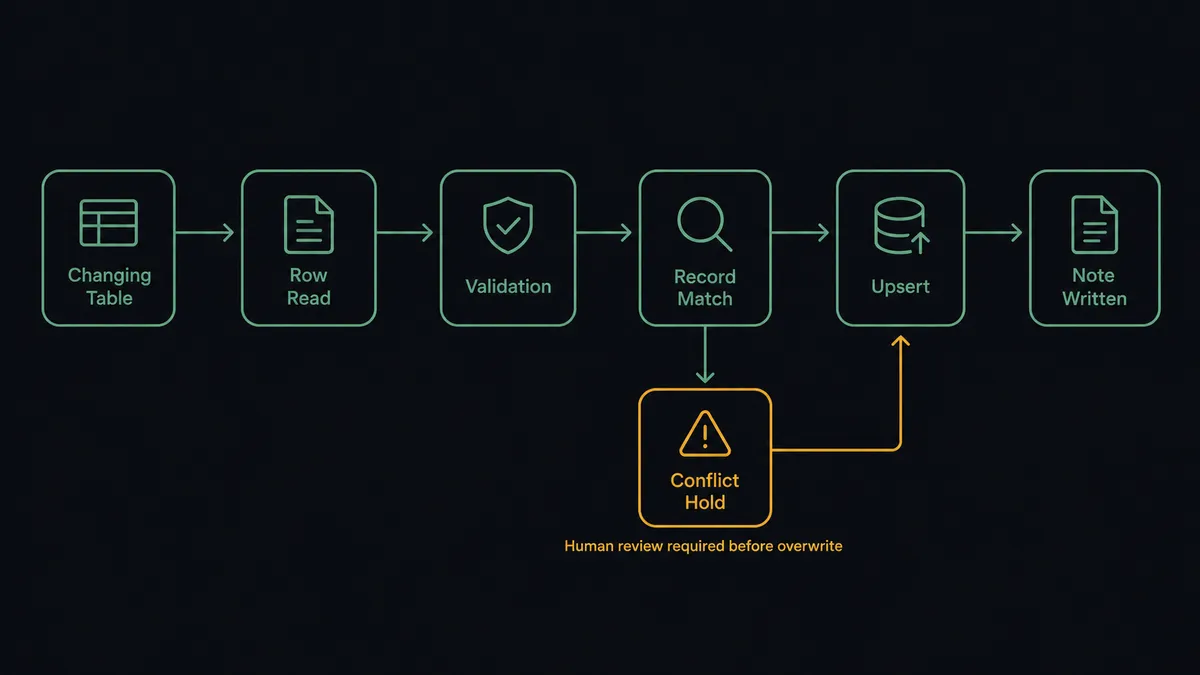
- Trigger: Airtable fires On New or Updated Record when a row is created or changes in the mapped table.
- Read: The workflow calls Find Record to pull the complete row, not just the changed field.
- Validate: It checks that the upsert key, usually a domain or an email, is present and well formed.
- Match: It calls Query Records in Attio to find the existing company or person tied to that key.
- Write: It calls Assert Record (Upsert), which creates the record if none exists and updates it if one does, so repeated syncs never stack duplicates.
- Log: It calls Create Note to record which Airtable row produced the change, so every CRM value has a traceable source.
That is the “just connect them” answer. Rows become records, edits become updates, and the Friday CSV ritual disappears. On New Record works the same way for pure intake tables where rows only ever arrive.
Can an AI agent run it? (and why a human stays in the loop)
Yes, and conflict handling is exactly why you would want it to. A field mapping cannot tell the difference between “this row was enriched with better data” and “this row is stale and about to clobber a correction someone made in the CRM yesterday.” An AI agent can. It holds Query Records, Assert Record (Upsert), Update Record, Delete Record, and Create Note as tools, reads both sides of every conflict, and picks the action the situation calls for.
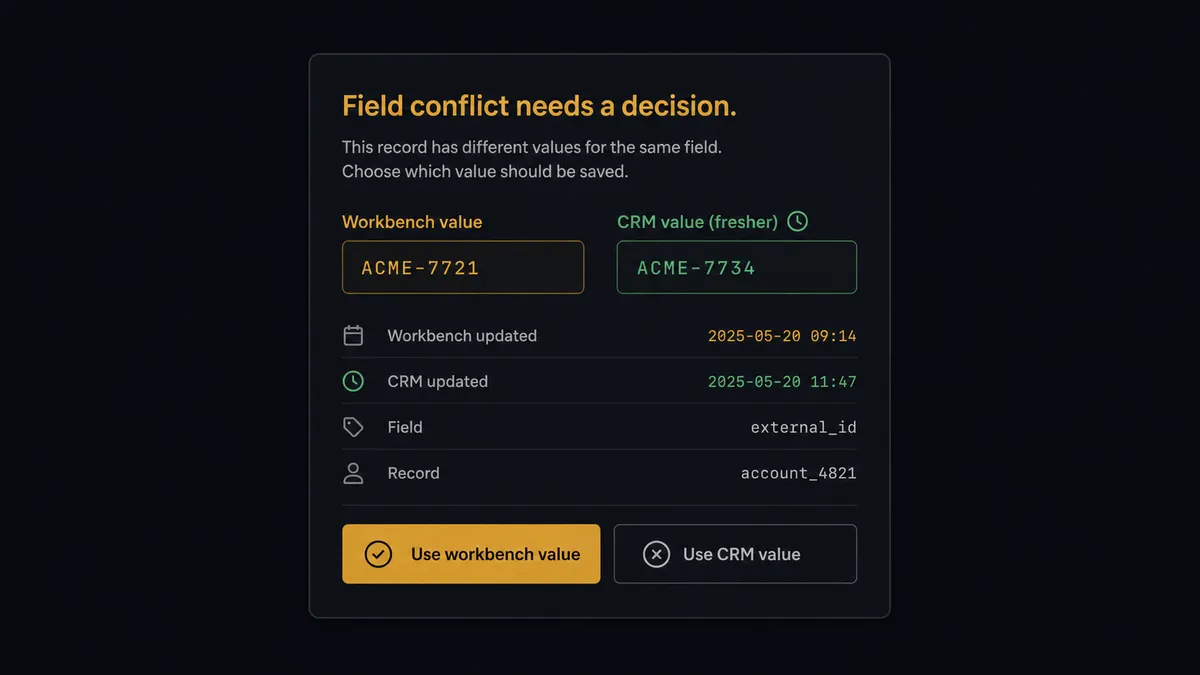
The consequential steps are Update Record when it would overwrite a human edit, and Delete Record always. Before either one, the agent invokes a human-in-loop flow it holds as a callable tool. The workflow pauses and posts to the ops channel: “Row [name] in the partners table changed the account owner field, but this field was edited in Attio more recently. Airtable says one value, Attio says another. Which wins?” A named approver picks, the write happens, and the decision, the approver, and the timestamp land in the audit trail. Deletions get the same treatment with the full record attached, because an unsynced row is recoverable and a deleted CRM record is not.
Everything routine flows straight through. New rows with clean keys, updates to fields nobody touched in Attio, note-only changes: the agent handles those without asking. It escalates on the shape of the conflict, not on a blanket “review everything” rule that trains your team to rubber-stamp. Prospects call this the digital andon cord: like Toyota’s cord on the factory line, the workflow stops the line the moment it hits uncertainty, and a person restarts it with both values in view.
FlowRunner vs Zapier
Zapier deserves its reputation here. Its connector library is enormous, its Airtable and Attio support is mature, and its template gallery gets a simple row-to-record push running in minutes. If your bases only ever append rows and nobody edits the CRM by hand, a Zap will carry that load without complaint.
The difference is what happens when both sides are alive. FlowRunner is built around native human-in-the-loop and AI-agent orchestration, where the agent notices a conflict and brings a person in before data is lost.
| What matters for this pair | FlowRunner | Zapier |
|---|---|---|
| Human-in-the-loop before overwrites and Delete Record | Native. The agent invokes an approval flow as a callable tool and pauses on conflicts | Available via added approval steps or paths, not a native agent decision |
| Who runs the flow | An AI agent reads both sides, reasons, picks actions as tools | Predefined step sequence you configure per Zap |
| Users included | Unlimited users on every tier | Priced by task volume; seats vary by plan |
| Bring your own AI keys | Yes, BYOK | AI features tied to Zapier’s own AI offering |
| Self-hosted option | Yes, cloud-hosted or self-hosted | Cloud only |
| Pricing model | Transparent workflow-based tiers | Per-task pricing; busy bases burn tasks fast |
For an append-only intake sync, Zapier is honestly fine. When Airtable and Attio are both edited by real people and a bad overwrite costs you a corrected account owner or a deleted record, the agent-with-a-gate model is the better fit.
Before and after
Here is what changes operationally when the connection is live.
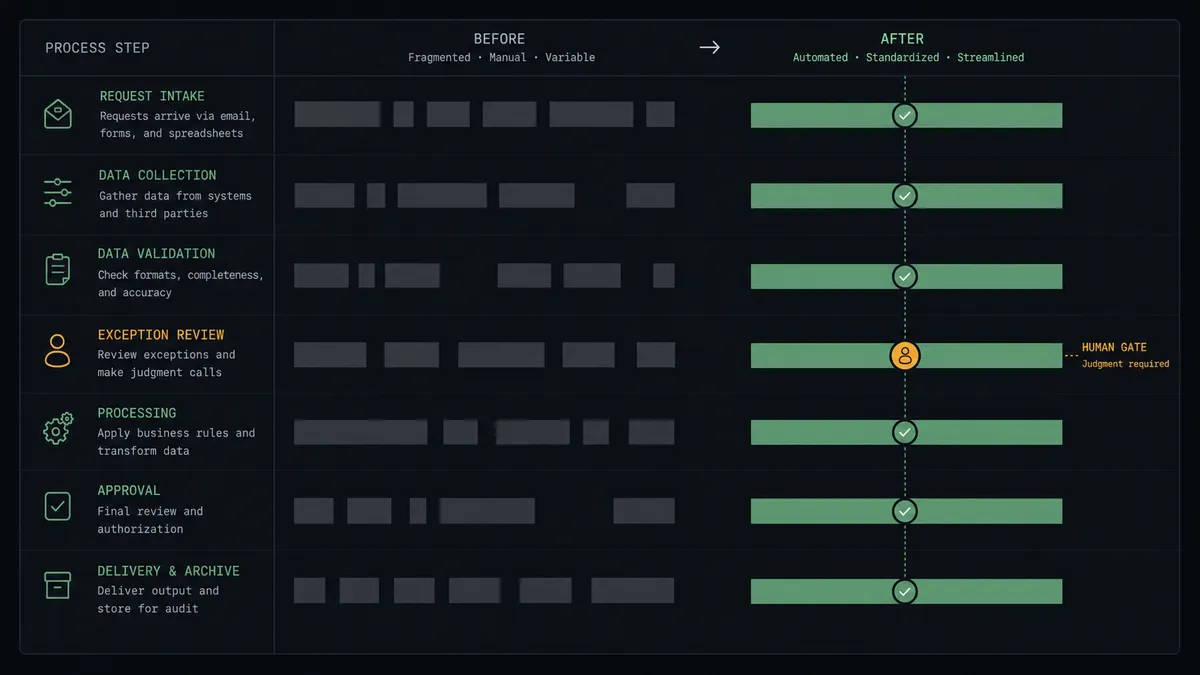
| Category | Before | After |
|---|---|---|
| Data freshness | The CRM trails the workbench by days until someone runs the export | Assert Record (Upsert) lands changes in Attio as rows change |
| Duplicates | Re-imports create near-duplicate companies that split rep attention | Upserts key on a stable identifier, so repeated syncs converge on one record |
| Overwrites | Stale rows silently clobber fields reps corrected in the CRM | Conflicts pause for a named approver before Update Record runs |
| Deletions | Base cleanups cascade into CRM deletions nobody intended | Delete Record only runs after a human confirms it, with the full record shown |
| Traceability | Nobody can say why a CRM field holds the value it holds | Create Note ties every synced change to its source row |
What you can build
Intake to CRM, no CSV. On New Record fires on your inbound leads table. The agent validates the row, matches with Query Records, and writes the person and company with Assert Record (Upsert), so every form fill becomes a clean CRM record.
Two-sided conflict referee. On New or Updated Record fires on a shared table. The agent compares each changed field against Attio, writes the uncontested ones, and routes real conflicts to a named approver instead of letting last-write-win decide.
Enrichment appliqué. A research base fills in firmographic columns over time. As analysts complete rows, the agent maps the finished fields onto the matching Attio company with Update Record and logs the source with Create Note, without touching fields owned by sales.
List sync for campaigns. Rows tagged for a campaign in Airtable become entries in an Attio collection via Add List Entry, and rows untagged propose Delete List Entry, which waits for approval so a filter mistake never empties a live campaign list.
Guarded cleanup. When rows are archived in Airtable, the agent assembles the matching Attio records, checks each for open tasks with List Tasks, and presents a deletion batch for human sign-off before any Delete Record runs.
Getting started
Start on the free plan: 100 executions a month, every integration included, no credit card required, plus 14 days of Professional for new accounts. Both connectors are available on every tier, and every tier includes unlimited users and unlimited workflows, so ops, sales, and the analysts who live in Airtable all share the same workflow from day one.
Explore the integration details:
- Airtable integration (2 triggers and 17 actions covering full record CRUD)
- Attio integration (26 actions across records, lists, notes, and tasks)
Start building free at flowrunner.ai or book a demo to see a live Airtable to Attio workflow, conflict gate and all.
Frequently asked questions
Is it free to connect Airtable and Attio on FlowRunner?
You can build and run the connection on FlowRunner's free plan, which includes 100 executions a month and every integration with no credit card required, and new accounts also get 14 days of Professional. Both connectors are available on every FlowRunner tier, and every tier includes unlimited users and unlimited workflows.
Can I self-host the Airtable to Attio workflow?
Yes. FlowRunner offers a cloud-hosted option and a self-hosted option, so the connection can run inside your own environment.
Does the AI agent need my own OpenAI or Claude key?
FlowRunner uses a bring-your-own-keys model, so you connect the AI provider key you already have. You are not locked to one model.
What happens when an Airtable row conflicts with a value someone edited in Attio?
The agent does not overwrite. It posts both values, the row that triggered the sync, and the record it maps to into your team's channel, then waits for a named approver to pick the winning value before Update Record runs.
Which Airtable events can trigger an Attio update?
Airtable offers two triggers: On New Record and On New or Updated Record. On New Record drives clean intake flows, and On New or Updated Record keeps existing Attio records in step as rows change.
Can the workflow delete Attio records when rows are removed from Airtable?
Only with a person in the loop. Delete Record is held behind the human-in-loop step, so the agent proposes the deletion with full context and a named approver confirms it before anything is removed from the CRM.