How to Connect Airtable with Bigin (With or Without an AI Agent)
Connect Airtable lead tables to Bigin by Zoho so captured leads become pipeline automatically, with an AI agent that pauses for a human before it deletes a duplicate record from the CRM.
How do you connect Airtable to Bigin?
You connect Airtable to Bigin by having Airtable’s On New Record trigger drive Bigin actions: the workflow calls Find Record to pull the new row, Search Records to check whether the lead already exists, then Create Contact and Create Deal to open the pipeline entry, with Add Note linking back to the source row. FlowRunner is a visual AI-agent orchestration platform where automations run autonomously and pause for human judgment on the steps that carry real consequence. When the connection runs as an AI agent, the agent also referees duplicates, updating the existing record instead of minting a twin, and it stops for a named human before Delete Record removes anything during cleanup.
The problem it solves
Airtable is where leads land: the website form writes rows, event lists get imported, and the outbound sheet lives there because it is easy. Bigin is where deals get worked. Between the two sits an unglamorous export ritual: filter the new rows, copy them over, create the contacts, open the deals, try to remember who was already in the CRM. On a lean team that happens weekly at best, which means a lead captured Monday gets its first call the following Tuesday.
Duplicates are the tax on doing it fast. The same person arrives from a webinar list and the website form spelled two ways, becomes two contacts, and two reps work them independently until the prospect points it out. Cleanup is worse than prevention: merging by hand is tedious, and deleting the wrong record takes the deal history with it. Most teams just live with a pipeline they quietly know overcounts.
How it works: the connection
The connection listens to Airtable and writes to Bigin. Here is the plain version, grounded in the real connector actions.
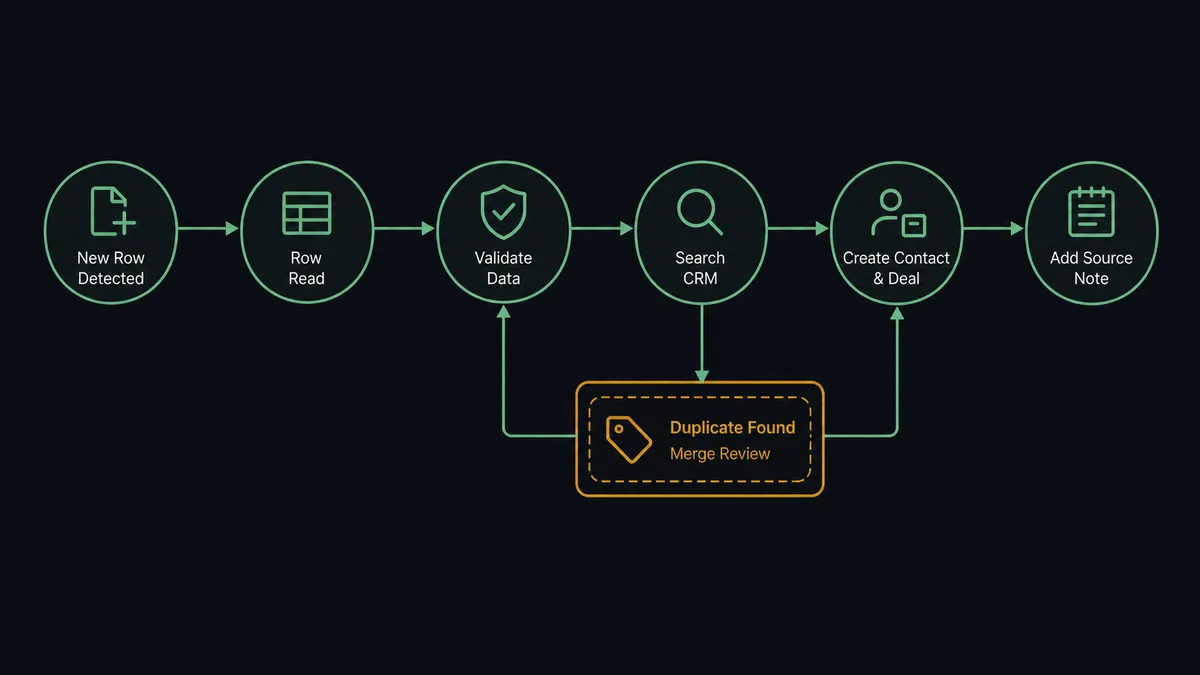
- Trigger: Airtable fires On New Record when a lead lands in the capture table.
- Read: The workflow calls Find Record to pull the full row, every field the form or import captured.
- Validate: It checks the lead is workable: a real email, a plausible company, the required fields present.
- Match: It calls Search Records in Bigin across contacts and companies to see whether this person or company already exists.
- Write: For a new lead, it calls Create Contact, Create Company when the company is new too, and Create Deal to open the pipeline entry in the right stage.
- Trace: It calls Add Note with a link to the source row, so every deal can answer “where did this lead come from.”
That is the “just connect them” answer. Rows become contacts and deals within moments of capture, and the weekly export dies quietly. On New or Updated Record extends the same flow to qualification fields that keep changing after capture, flowing updates onto the existing record with Update Contact.
Can an AI agent run it? (and why a human stays in the loop)
Yes, and duplicate refereeing is the part that actually needs a mind rather than a mapping. A field mapping cannot tell that “Jon Smith, Acme” from the webinar list and “Jonathan Smith, Acme Corp” already in Bigin are one person. The agent can. It holds Find Record, Search Records, Create Contact, Update Contact, Create Company, Create Deal, Update Deal, Add Note, and Delete Record as tools, and for every incoming row it reasons about identity: confident match, update the existing contact and note the new touchpoint; clearly new, create cleanly; ambiguous, ask.
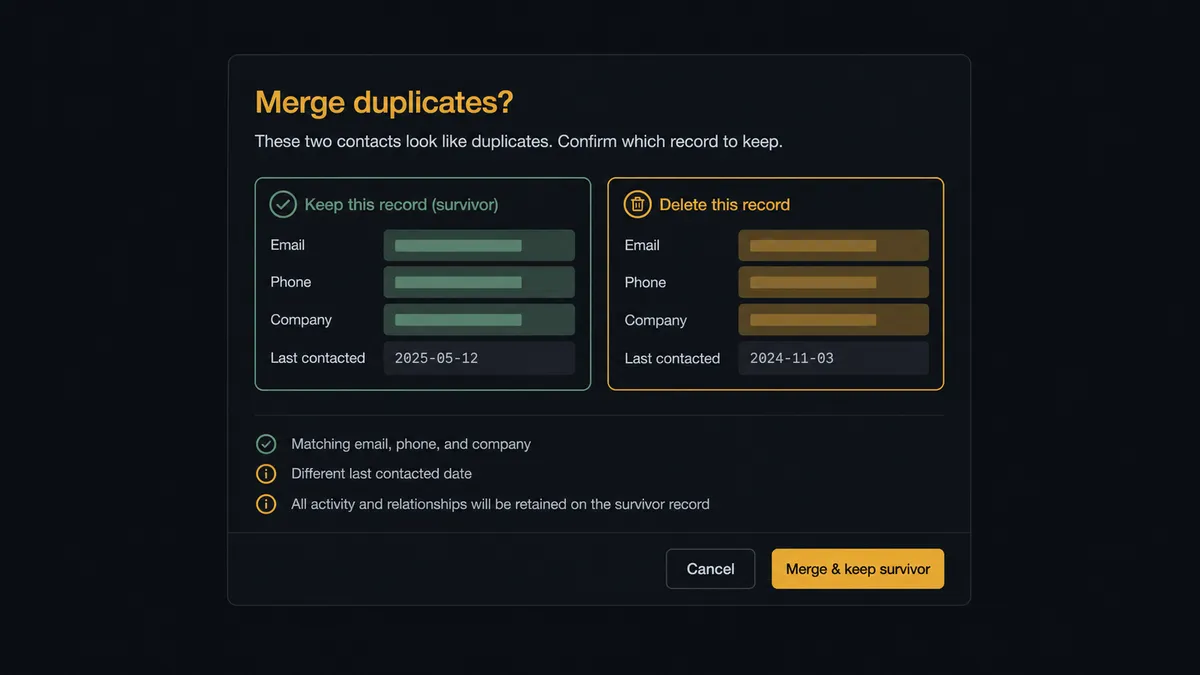
The consequential step is Delete Record, because deleting a CRM record deletes its history, and a wrong merge is two mistakes at once. When the agent finds true duplicates during intake or a scheduled cleanup pass, it does not resolve them silently. It invokes a human-in-loop flow it holds as a callable tool, and the workflow pauses and posts to the sales channel: “Probable duplicate: two contacts for [name] at [company], one with an open deal and one created last week from the webinar import. Proposed merge keeps the record with deal history and folds in the newer email. Approve the merge and deletion?” A named approver confirms, Update Contact completes the merge, Delete Record removes the twin, and the decision, both records, and the timestamp land in the audit trail.
Ambiguous identity also pauses the line before creation, so the pipeline never gains a twin in the first place. Everything unambiguous flows at machine speed. Prospects call this the digital andon cord: like Toyota’s cord on the line, the workflow stops itself where a wrong guess would be expensive, and a person clears it in seconds with both records side by side.
FlowRunner vs Zapier
Zapier has earned its default status for this pair: the connector library is vast, Airtable is one of its most-connected apps, and the template gallery will wire “new record, create a CRM contact” in minutes. For a small team pushing clean, well-formed rows into an empty CRM, that Zap genuinely does the job.
The difference is identity. FlowRunner is built around native human-in-the-loop and AI-agent orchestration, where deciding whether two records are the same person is agent reasoning with a human gate, not a filter step.
| What matters for this pair | FlowRunner | Zapier |
|---|---|---|
| Human-in-the-loop before Delete Record | Native. The agent invokes an approval flow as a callable tool with both records shown | Available via added approval steps or paths, not a native agent decision |
| Who runs the flow | An AI agent reasons about lead identity, picks actions as tools | Predefined step sequence you configure per Zap |
| Users included | Unlimited users on every tier | Priced by task volume; seats vary by plan |
| Bring your own AI keys | Yes, BYOK | AI features tied to Zapier’s own AI offering |
| Self-hosted option | Yes, cloud-hosted or self-hosted | Cloud only |
| Pricing model | Transparent workflow-based tiers | Per-task pricing; every row and lookup burns tasks |
If your lead volume is small and your sources never overlap, Zapier moves rows fine. If leads arrive from several sources that keep re-capturing the same people, and pipeline accuracy matters to how you forecast, the identity-aware path with a deletion gate is the better fit.
Before and after
Here is what changes operationally when the connection is live.
| Category | Before | After |
|---|---|---|
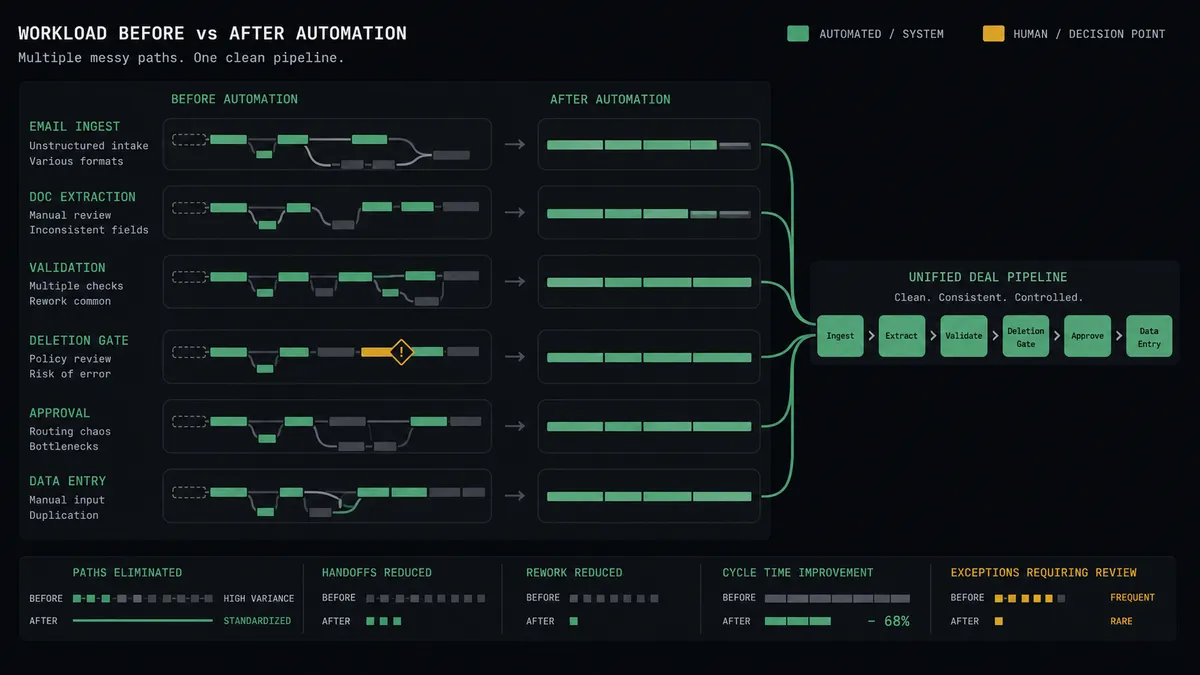
| Lead latency | Captured leads wait for the weekly export before anyone calls | Create Contact and Create Deal run within moments of the row landing |
| Duplicates | The same prospect becomes two contacts worked by two reps | Near-matches are refereed by the agent and merged with approval |
| Pipeline accuracy | The deal count quietly overcounts and forecasts inherit the noise | One person, one contact, one deal, enforced at intake |
| Lead source | Nobody can trace which import or form produced a deal | Add Note links every deal to its source row |
| Cleanup risk | Manual dedup deletes the wrong record and its history | Delete Record only runs after a named approver reviews both records |
What you can build
Capture to pipeline in one motion. On New Record fires. The agent validates the row, checks Search Records, and opens Create Contact plus Create Deal with the source linked via Add Note, so the first call happens while the lead is warm.
Identity referee at the door. Every incoming row is compared against existing contacts and companies, confident matches flow onto the existing record with Update Contact, and ambiguous ones wait for a human ruling before anything is created.
Scheduled dedup sweep. On a schedule, the agent walks the contact list with Search Records, clusters probable duplicates, and queues proposed merges through the approval gate, so the CRM converges instead of drifting.
Qualification field relay. On New or Updated Record fires as SDRs enrich rows in Airtable. The agent maps the changed fields onto the Bigin contact and deal with Update Contact and Update Deal, keeping both tools honest without double entry.
Import triage. A batch import lands hundreds of rows. The agent processes the clean ones straight through, holds the incomplete and ambiguous ones, and posts a single summary for a person to resolve, instead of littering the CRM with half-records.
Getting started
Start on the free plan: 100 executions a month, every integration included, no credit card required, plus 14 days of Professional for new accounts. Both connectors are available on every tier, and every tier includes unlimited users and unlimited workflows, so the people who own the Airtable bases and the people who work the pipeline share one workflow from day one.
Explore the integration details:
- Airtable integration (2 triggers and 17 actions covering full record CRUD)
- Bigin integration (17 actions across contacts, companies, deals, and tasks)
Start building free at flowrunner.ai or book a demo to see a live Airtable to Bigin workflow, merge gate and all.
Frequently asked questions
Is it free to connect Airtable and Bigin on FlowRunner?
You can build and run the connection on FlowRunner's free plan, which includes 100 executions a month and every integration with no credit card required, and new accounts also get 14 days of Professional. Both connectors are available on every FlowRunner tier, and every tier includes unlimited users and unlimited workflows.
Can I self-host the Airtable to Bigin workflow?
Yes. FlowRunner offers a cloud-hosted option and a self-hosted option, so the connection can run inside your own environment.
Does the AI agent need my own OpenAI or Claude key?
FlowRunner uses a bring-your-own-keys model, so you connect the AI provider key you already have. You are not locked to one model.
What happens when a lead already exists in Bigin under a slightly different name?
The agent treats near-matches as decisions, not coincidences. It compares email, company, and name across Search Records results, updates the existing contact when the match is confident, and posts ambiguous cases to your channel so a person rules before a twin record is created.
Which Airtable events can trigger a Bigin action?
Airtable offers two triggers: On New Record and On New or Updated Record. On New Record drives lead intake, and On New or Updated Record keeps qualification fields flowing into existing Bigin records as rows change.
Can the workflow delete duplicate records in Bigin on its own?
No. Delete Record is destructive, so it sits behind the human-in-loop step. The agent proposes the merge, shows both records and which fields it kept, and a named approver confirms before the duplicate is removed.