How to Connect Stripe with Attio (With or Without an AI Agent)
Sync Stripe payment and subscription events into Attio records and lists, with an AI agent that keeps the CRM current on its own and pauses for a named human before it refunds a charge or cancels a subscription.
How do you connect Stripe to Attio?
You connect Stripe to Attio by having Stripe’s Parse Webhook Event trigger drive Attio actions: when a customer is created, an invoice is paid, or a payment fails, the workflow matches the customer in Attio with Query Records, writes or updates the record with Assert Record (Upsert), and turns revenue signals into pipeline moves with Add List Entry and Create Task, so your CRM reflects what is actually happening in billing. FlowRunner is a visual AI-agent orchestration platform where automations run autonomously and pause for human judgment on the steps that carry real consequence. The same connection can run as an AI agent that keeps Attio current on its own and pauses for a named human before it touches money with Create Refund or Cancel Subscription.
The problem it solves
Your CRM and your billing system disagree, and the CRM is usually the one that is wrong. A customer’s card fails three times in Stripe while their Attio record still says “healthy account.” A subscription gets upgraded and nobody moves the deal. A churned customer keeps getting nurture emails because cancellation lives in Stripe and outreach lives in Attio. Today someone on the ops team reconciles this by hand: export from Stripe, search in Attio, update statuses one by one, and hope nothing changed while they were doing it.
The edges are where revenue actually leaks. A failed payment is a save-able account for about a week, but only if the account owner finds out while the customer still cares. A refund request handled by whoever saw the email first gets granted inconsistently, with no record of who decided or why. A cancellation processed instantly, without anyone asking a single question, takes an account worth saving and closes the door on it. None of this is a data problem. It is a “the right person never saw it in time” problem.
How it works: the connection
The connection listens to Stripe and writes to Attio. Here is the plain version, grounded in the real connector actions.
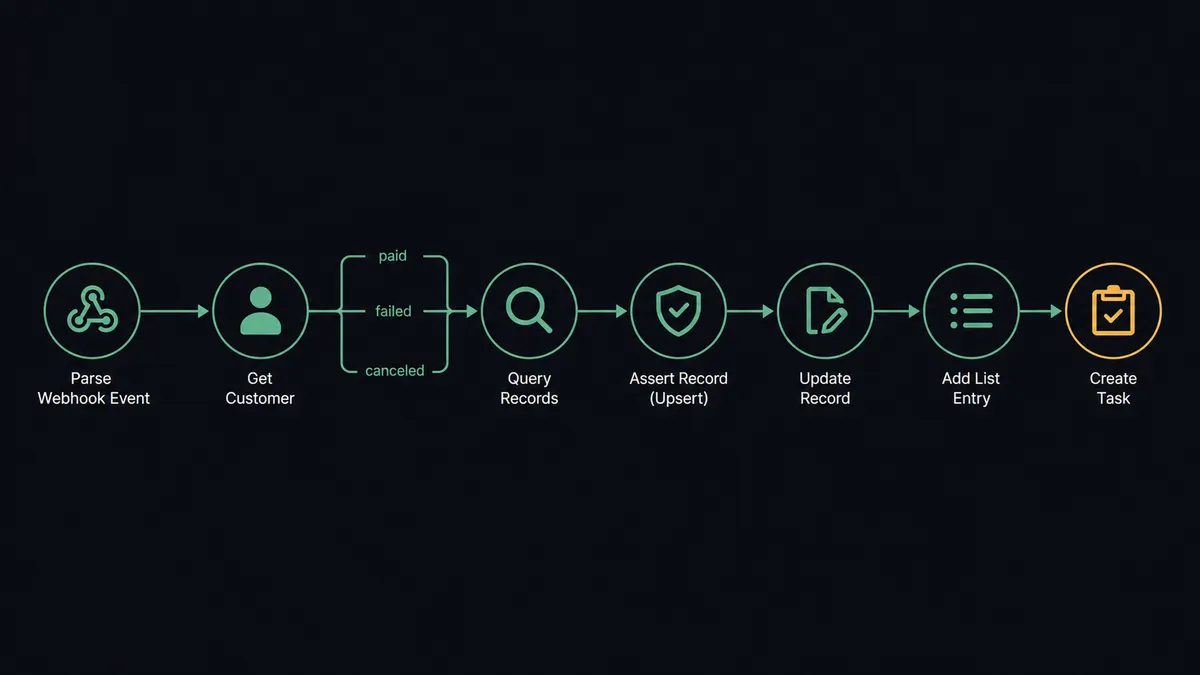
- Trigger: Stripe fires Parse Webhook Event, the single trigger that receives every event type from your connected webhook endpoint.
- Read: The workflow calls Get Customer, and Get Subscription or Get Invoice depending on the event, to pull the full account context.
- Branch: It routes on the event type: new customer, invoice paid, payment failed, subscription updated or canceled.
- Match: It calls Query Records in Attio, matching the customer’s email against email_addresses on People or the company domain against domains on Companies.
- Write: It calls Assert Record (Upsert) so the customer exists exactly once in Attio, then Update Record to set plan, billing status, and renewal date.
- Escalate the signal: For a failed payment or cancellation signal, it calls Add List Entry to place the account on the churn-risk list and Create Task to assign the save-play to the account owner with a deadline.
- Log it: It calls Create Note on the record with the event summary, so the next person who opens the account sees the billing story.
That is the “just connect them” answer. Billing events become CRM state, and at-risk accounts land on a list with an owner and a due date instead of in a reconciliation spreadsheet.
Can an AI agent run it? (and why a human stays in the loop)
Yes, and the difference between a sync and an agent shows up on the hard events. A sync maps event to field. An AI agent reads the event in context: is this the first failed payment or the fourth, is this a two-seat account or your largest logo, did the customer ask to cancel or did their card just expire. It holds both sides as tools: Get Customer, List Invoices, and Get Subscription on the Stripe side; Query Records, Update Record, Add List Entry, Create Task, and Create Note on the Attio side. A card expiry on a healthy account gets a polite dunning path. The same event on an account with an open support escalation gets the account owner pinged with full history.
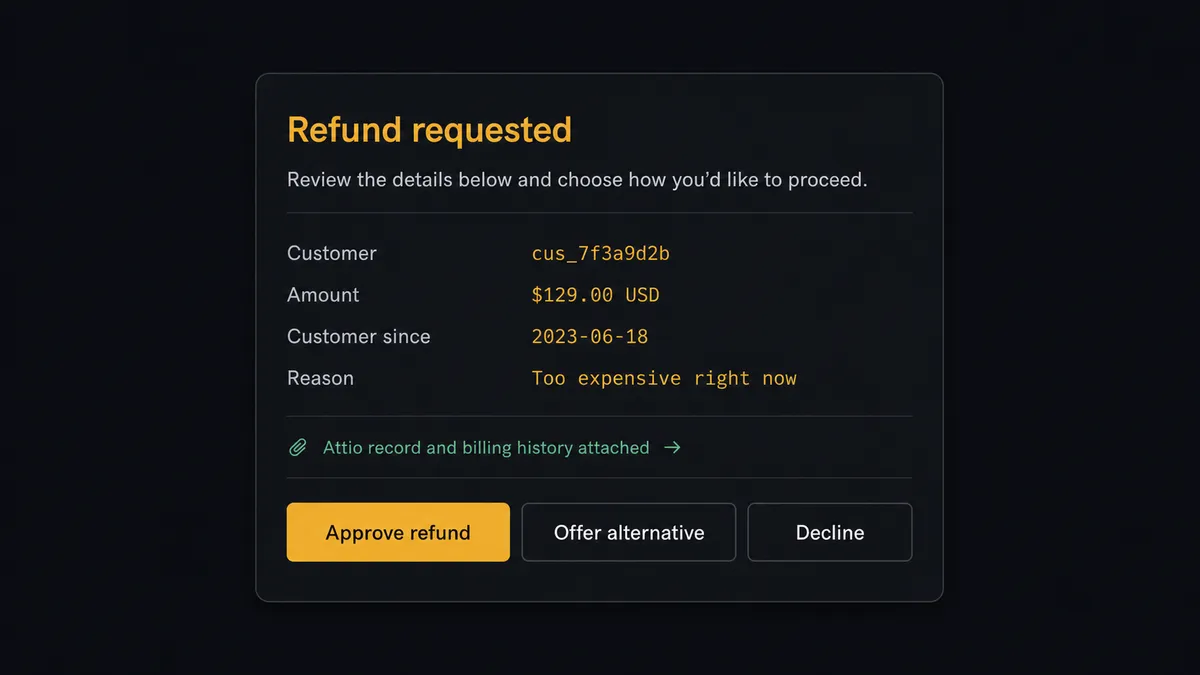
The consequential steps are the ones that move money. When a customer asks for their money back or wants out, the agent does not fire Create Refund or Cancel Subscription. It assembles what a human needs to decide: the customer, the amount, tenure, payment history from List Invoices, and the stated reason. Then it invokes a human-review flow it holds as a callable tool and posts: “Refund requested: [customer], [amount], customer since [date], reason: [reason]. Their Attio record and billing history are linked. Approve refund, offer alternative, or decline?” Only after a named approver acts does the agent execute in Stripe, and it writes the outcome back to Attio with Create Note so the CRM remembers the decision, not just the event.
This is the digital andon cord our prospects describe: like Toyota’s production line, the workflow stops the line the moment a step carries real consequence, a human pulls it back into motion, and everything that happened is on the record. Revenue operations run continuously; revenue decisions stay human.
FlowRunner vs Zapier
Zapier’s strength for this pair is genuine reach: its Stripe and Attio connectors are mature, its template gallery covers “new Stripe customer creates a CRM record” out of the box, and a revenue ops person can wire the basic sync without engineering help. For straightforward event logging, it is a fast path.
The gap appears the moment the workflow touches money or requires judgment. FlowRunner treats the agent, not the step sequence, as the operator, and treats human approval as a native tool the agent invokes rather than a step you bolt on.
| What matters for this pair | FlowRunner | Zapier |
|---|---|---|
| Human-in-the-loop on Create Refund and Cancel Subscription | Native. The agent pauses and routes the decision to a named approver before money moves | Available via added approval steps, not a native agent decision |
| Who runs the flow | An AI agent reads each billing event, reasons, picks actions as tools | Predefined step sequence you configure per Zap |
| Users included | Unlimited users on every tier | Priced by task volume; seats vary by plan |
| Bring your own AI keys | Yes, BYOK | AI features tied to Zapier’s own AI offering |
| Self-hosted option | Yes, cloud-hosted or self-hosted | Cloud only |
| Pricing model | Transparent workflow-based tiers | Per-task pricing; busy billing months cost more |
If you only need Stripe events logged into Attio, Zapier will do it. If failed payments should become owned save-plays and no refund or cancellation should ever run without a person deciding, this pairing is the better fit.
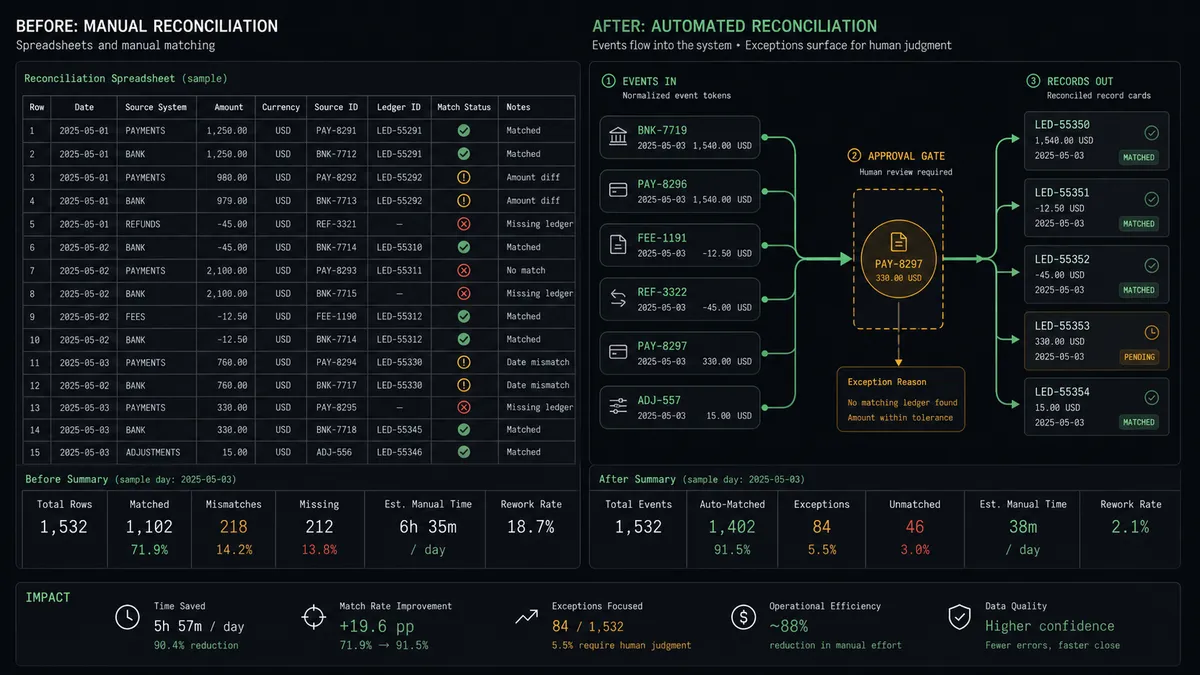
Before and after
| Category | Before | After |
|---|---|---|
| CRM accuracy | Attio reflects billing reality only after someone reconciles by hand | Every Stripe event updates the matching record within moments of the webhook firing |
| Failed payments | Discovered in a monthly report, long after the customer stopped caring | Account lands on the churn-risk list with an assigned Create Task while it is still save-able |
| Refund decisions | Granted by whoever saw the email, inconsistently, with no record | Packaged with history and approved by a named person before Create Refund runs |
| Cancellations | Processed instantly with no save attempt | Paused for a human who sees tenure, value, and reason before Cancel Subscription runs |
| Account context | Billing story invisible from inside the CRM | Create Note logs each event and decision on the record where the team works |
What you can build
Billing-truth sync. Parse Webhook Event fires on customer and invoice events. The agent matches with Query Records, writes with Assert Record (Upsert), and sets plan and status with Update Record. Attio stops lying about billing.
Failed-payment save-play. On a failed payment, the agent checks history with List Invoices, places the account on the churn-risk list with Add List Entry, and assigns the outreach with Create Task before the account goes cold.
Gated refund desk. Refund requests route through the agent, which packages amount, tenure, and reason, then holds Create Refund behind the approval tool. Decisions become consistent and every one is attributed.
Cancellation with a save attempt. When a subscription event signals intent to leave, the agent pauses before Cancel Subscription and hands the account owner the context to make one informed save attempt first.
Expansion signal routing. When Get Subscription shows an upgrade or added seats, the agent updates the record, moves the account’s list entry, and creates a task for the owner to open the expansion conversation.
Common questions
Is it free to connect Stripe and Attio on FlowRunner? You can build and run the connection on FlowRunner’s free plan, which includes 100 executions a month and every integration with no credit card required, and new accounts also get 14 days of Professional. Both connectors are available on every FlowRunner tier, and every tier includes unlimited users and unlimited workflows.
Can I self-host the Stripe to Attio workflow? Yes. FlowRunner offers a cloud-hosted option and a self-hosted option, so the connection can run inside your own environment.
Does the AI agent need my own OpenAI or Claude key? FlowRunner uses a bring-your-own-keys model, so you connect the AI provider key you already have. You are not locked to one model.
Can the agent refund a charge or cancel a subscription on its own? No. Create Refund and Cancel Subscription are gated behind a human-in-loop step. The agent packages the customer, amount, payment history, and reason, posts it to your team, and waits for a named approver before either action runs. The approval lands in the audit trail.
Which Stripe events can trigger an Attio update? Stripe uses a single trigger, Parse Webhook Event, which handles every Stripe event type from a connected webhook endpoint. The workflow branches on the event: new customers, paid invoices, failed payments, and subscription changes each take their own path into Attio.
How does a Stripe customer get matched to the right Attio record? The workflow queries Attio with Query Records using the customer’s email against email_addresses on People, or the company domain against domains on Companies. If no match exists, Assert Record (Upsert) creates the record, so the same customer never ends up in Attio twice.
Getting started
Start on the free plan: 100 executions a month, every integration included, no credit card required, plus 14 days of Professional for new accounts. Both connectors are available on every tier, and every tier includes unlimited users and unlimited workflows.
Explore the integration details:
- Stripe integration (1 trigger and 67 actions covering payments, subscriptions, invoices, refunds, and payouts)
- Attio integration (26 actions covering records, lists, notes, tasks, and comments)
Start building free at flowrunner.ai or book a demo to see a live Stripe to Attio workflow, refund gate and all.
Frequently asked questions
Is it free to connect Stripe and Attio on FlowRunner?
You can build and run the connection on FlowRunner's free plan, which includes 100 executions a month and every integration with no credit card required, and new accounts also get 14 days of Professional. Both connectors are available on every FlowRunner tier, and every tier includes unlimited users and unlimited workflows.
Can I self-host the Stripe to Attio workflow?
Yes. FlowRunner offers a cloud-hosted option and a self-hosted option, so the connection can run inside your own environment.
Does the AI agent need my own OpenAI or Claude key?
FlowRunner uses a bring-your-own-keys model, so you connect the AI provider key you already have. You are not locked to one model.
Can the agent refund a charge or cancel a subscription on its own?
No. Create Refund and Cancel Subscription are gated behind a human-in-loop step. The agent packages the customer, amount, payment history, and reason, posts it to your team, and waits for a named approver before either action runs. The approval lands in the audit trail.
Which Stripe events can trigger an Attio update?
Stripe uses a single trigger, Parse Webhook Event, which handles every Stripe event type from a connected webhook endpoint. The workflow branches on the event: new customers, paid invoices, failed payments, and subscription changes each take their own path into Attio.
How does a Stripe customer get matched to the right Attio record?
The workflow queries Attio with Query Records using the customer's email against email_addresses on People, or the company domain against domains on Companies. If no match exists, Assert Record (Upsert) creates the record, so the same customer never ends up in Attio twice.