How to Connect Stripe with Copilot (With or Without an AI Agent)
Connect Stripe payments to Copilot so every paying customer becomes a portal client automatically, with an AI agent that pauses for a human before a client-visible invoice posts or a portal invite goes out on a mismatched record.
How do you connect Stripe to Copilot?
You connect Stripe to Copilot by having Stripe’s Parse Webhook Event trigger drive Copilot’s provisioning actions: when a payment succeeds, the workflow pulls the payer with Get Customer, checks for an existing record with List Clients, creates the customer with Create Company and Create Client if none exists, and mirrors the billing record with Create Invoice, so a paid customer in Stripe becomes a live client in your portal without anyone touching either dashboard. FlowRunner is a visual AI-agent orchestration platform where automations run autonomously and pause for human judgment on the steps that carry real consequence. Run as an AI agent, the same connection reads each payment in context, provisions clean records on its own, and stops for a named person before anything client-visible posts on a record it is not sure about.
The problem it solves
Today the handoff between “they paid” and “they have a portal” is a person with two tabs open. A payment clears in Stripe. Someone on the operations team notices, opens Copilot, creates the company, creates the client, sends the portal invitation, and recreates the invoice so the client sees what they were charged. For a services business onboarding a handful of clients a week, that is an hour of copy-paste per client, and it happens at whatever moment someone checks the queue. The client’s first experience of your firm is a gap: they paid Tuesday morning and got portal access Wednesday afternoon.
The edges are worse than the lag. A payer’s email in Stripe does not quite match the contact your team already loaded into Copilot, so a duplicate client appears and the client now has two portals with half their documents in each. A payment comes in that does not match any contract amount, gets mirrored into the portal anyway, and the client’s first message is “what is this invoice?” A subscription payment lands for a client whose engagement ended last quarter. Each of these is a small fire, and each one is client-facing, which makes it a trust problem rather than a bookkeeping problem.
How it works: the connection
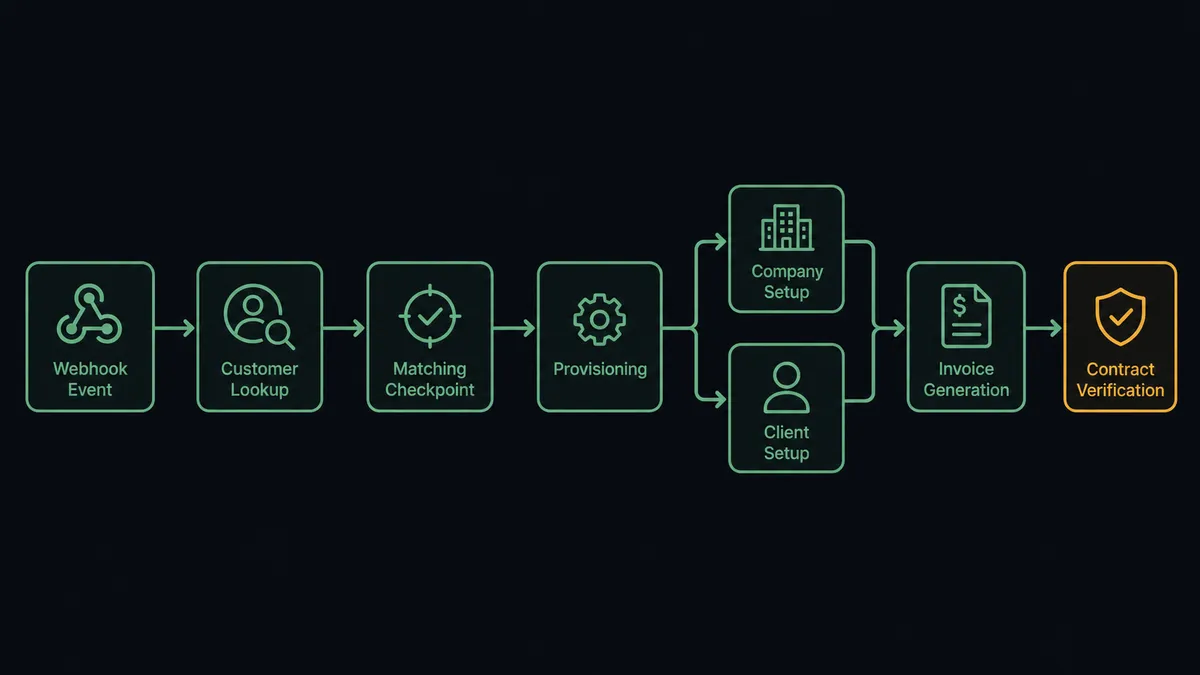
The connection listens to Stripe and writes to Copilot. Here is the plain version, grounded in the real connector actions.
- Trigger: Stripe fires Parse Webhook Event when a payment succeeds or a checkout completes.
- Read: The workflow calls Get Customer in Stripe to pull the payer’s name, email, and metadata, and Get Payment Intent for the amount and description.
- Match: It calls List Clients and List Companies in Copilot to find an existing record by email and company name.
- Provision: When no record exists, it calls Create Company for the organization and Create Client for the person, which issues the portal invitation.
- Mirror the billing: It calls Create Invoice in Copilot so the client sees the same amount they were charged in Stripe.
- Verify: It calls List Contracts to confirm the payment lines up with an active agreement, flagging anything that does not.
That is the “just connect them” answer. A payment becomes a portal, and the client’s records are current from the first minute of the engagement. Renewal payments run the same path, matching to the existing client instead of creating a new one.
Can an AI agent run it? (and why a human stays in the loop)
Yes, and this is where the connection stops being a sync and starts being staffed. Instead of a fixed sequence that treats every payment identically, an AI agent reads each event and picks its next move from a toolbox of real actions: Get Customer, List Clients, Create Client, Create Company, Create Invoice, List Contracts. A renewal from a known client gets matched and mirrored without ceremony. A first payment from a new company gets the full provisioning path. A payment that matches a client whose email is off by one character gets held, because the agent recognizes a near-match as a question, not an answer.
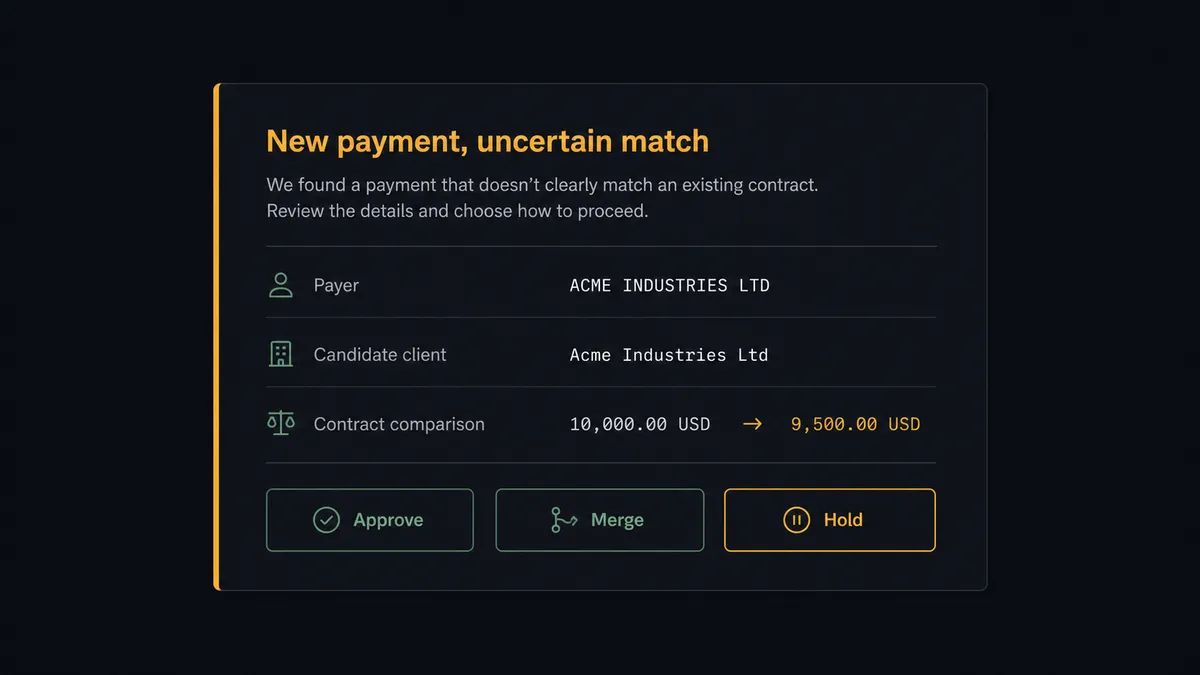
The consequential steps here are the ones a client sees. Create Client sends a portal invitation to a real inbox, and Create Invoice puts a number in front of a customer. Before either lands on an uncertain record, the agent invokes a human-in-loop flow it holds as a callable tool. The workflow pauses and posts to your operations channel: “New payment from [payer email] matches existing client [client name] at 90 percent confidence. Amount does not match any contract on file. Approve provisioning, merge with the existing record, or hold?” The approver decides in one click. Only then does the agent call Create Client or Create Invoice, and the decision, the approver, and the timestamp all land in the audit trail.
This is the pattern prospects describe as a digital andon cord. Like Toyota’s production line, where any worker pulls the cord the moment something looks wrong, the workflow stops the line the instant it hits uncertainty. The routine ninety percent of payments flow through untouched. The uncertain ten percent wait for a person, with full context already assembled, instead of becoming next week’s cleanup project.
FlowRunner vs Zapier
Zapier is the tool most teams reach for first here, and it has earned that. Its connector library is enormous, its editor is genuinely easy, and for a simple “new Stripe payment creates a Copilot client” Zap, you can be live in an afternoon. If your volume is low and every payment looks the same, that Zap does the job.
The difference shows up when payments stop looking the same. FlowRunner is built around native human-in-the-loop and agent orchestration, where pausing for a person is a first-class step the agent chooses, not a workaround you bolt on.
| What matters for this pair | FlowRunner | Zapier |
|---|---|---|
| Human-in-the-loop on portal invites and client-visible invoices | Native. The agent invokes an approval flow as a callable tool and pauses before Create Client or Create Invoice | Approval steps exist as add-on paths, not a native agent decision |
| Who runs the flow | An AI agent reads the payment, reasons, and picks actions as tools | Predefined step sequence you configure per Zap |
| Users included | Unlimited users on every tier | Priced by task volume; seats vary by plan |
| Bring your own AI keys | Yes, BYOK | AI features tied to Zapier’s own AI offering |
| Self-hosted option | Yes, cloud-hosted or self-hosted | Cloud only |
| Pricing model | Transparent workflow-based tiers | Per-task pricing that climbs with payment volume |
If you need a one-way push and nothing client-facing ever needs review, Zapier is a fine fit. If a wrong invoice in a client portal is a real cost to you, and you want a named approver in the loop with a full audit trail, this pairing is built for exactly that.
Before and after
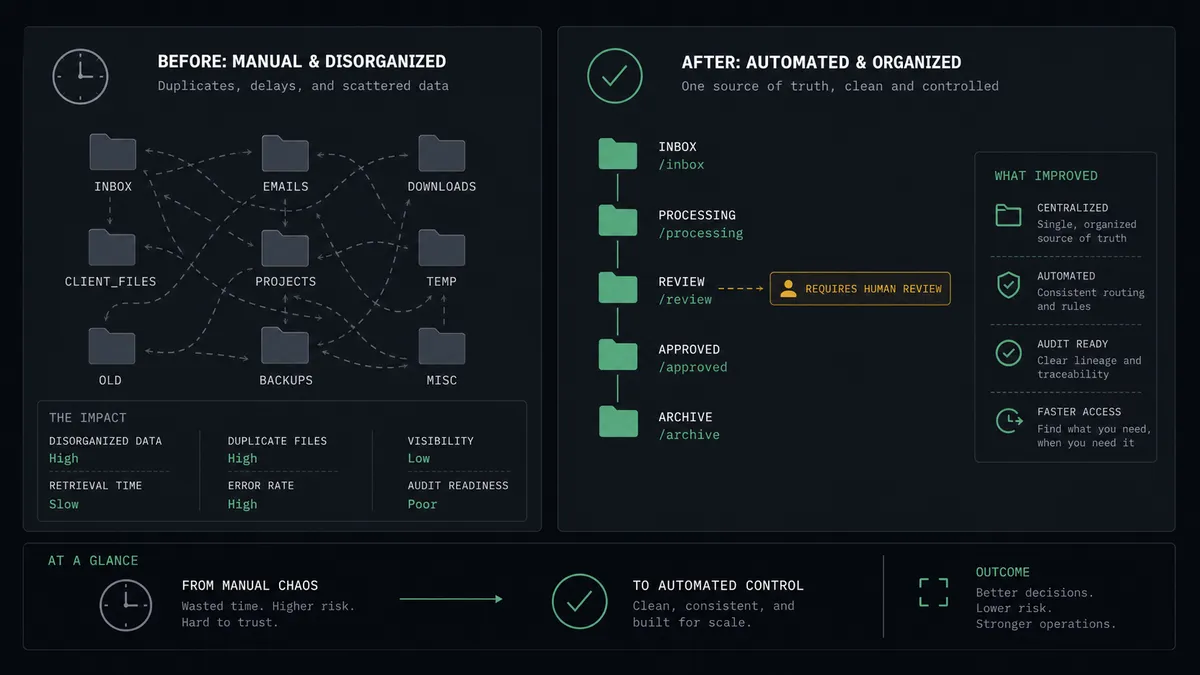
| Category | Before | After |
|---|---|---|
| Client provisioning | Someone notices the Stripe payment and hand-builds the client and company in Copilot | The portal record exists within moments of the payment clearing |
| Portal invitations | Sent whenever the onboarding checklist gets picked up, sometimes a day later | Sent automatically for clean matches, held for approval on uncertain ones |
| Invoice mirroring | Amounts retyped from Stripe into Copilot, with occasional typos clients catch first | Create Invoice mirrors the exact charged amount every time |
| Duplicate records | Near-match emails quietly create second client records that surface months later | List Clients matching catches near-misses and routes them to a person |
| Accountability | No record of who decided to provision or bill what | Every approval carries a name and timestamp in the audit trail |
What you can build
Payment to portal, hands off. Parse Webhook Event fires on a successful payment. The agent calls Get Customer, matches with List Clients, provisions with Create Company and Create Client, and mirrors the charge with Create Invoice. The client’s first portal login shows accurate records.
Contract mismatch gate. Every mirrored invoice is checked against List Contracts. When the paid amount matches no active agreement, the agent holds the invoice, packages both figures, and asks a named approver before anything posts to the portal.
Subscription renewals without duplicates. Recurring payments match to the existing client via List Clients and post a fresh Create Invoice against the same record, so long-running engagements keep one clean history instead of a new record per billing cycle.
Team-aware routing. The agent calls List Internal Users to find the account lead for the client’s company and routes the approval to that specific person, so the human in the loop is the one who actually knows the account.
Failed payment follow-up. When Parse Webhook Event reports a failed charge for an active client, the agent cross-references List Contracts and List Invoices, then opens a review with the account lead to decide whether to retry in Stripe with Confirm Payment Intent or reach out personally first.
Getting started
Start on the free plan: 100 executions a month, every integration included, no credit card required, plus 14 days of Professional for new accounts. Both connectors are available on every tier, and every tier includes unlimited users and unlimited workflows.
Explore the integration details:
- Stripe integration (1 trigger and 67 actions covering payments, customers, subscriptions, refunds, and invoicing)
- Copilot integration (9 actions covering clients, companies, invoices, and contracts)
Start building free at flowrunner.ai or book a demo to see a live Stripe to Copilot workflow, contract-mismatch approval and all.
Frequently asked questions
Is it free to connect Stripe and Copilot on FlowRunner?
You can build and run the connection on FlowRunner's free plan, which includes 100 executions a month and every integration with no credit card required, and new accounts also get 14 days of Professional. Both connectors are available on every FlowRunner tier, and every tier includes unlimited users and unlimited workflows.
Can I self-host the Stripe to Copilot workflow?
Yes. FlowRunner offers a cloud-hosted option and a self-hosted option, so the connection can run inside your own environment.
Does the AI agent need my own OpenAI or Claude key?
FlowRunner uses a bring-your-own-keys model, so you connect the AI provider key you already have. You are not locked to one model.
What happens when the payment amount does not match the client's contract?
The agent pauses. It pulls the client's agreements with List Contracts, packages the Stripe amount, the contract amount, and the difference, and posts the comparison to your team's channel. Nothing client-visible posts to the portal until a named person approves or corrects the record.
Which Stripe events can start the Copilot workflow?
Stripe's Parse Webhook Event trigger fires on the events you subscribe to, such as a completed checkout, a successful payment, or a new customer. The workflow reads the event payload and decides which Copilot actions to run, starting with List Clients to check for an existing record.
Will the workflow create duplicate clients in Copilot?
No. Before creating anything, the workflow calls List Clients and List Companies to match the Stripe customer by email and company name. It only calls Create Client or Create Company when no match exists, and the agent escalates near-matches to a human instead of guessing.