GoHighLevel + Stripe: Every Closed Deal Billed Automatically
Connect GoHighLevel to Stripe so a closed deal provisions a Stripe customer and invoice automatically, with an AI agent pausing for approval on large or first-time transactions.
How do you connect GoHighLevel to Stripe?
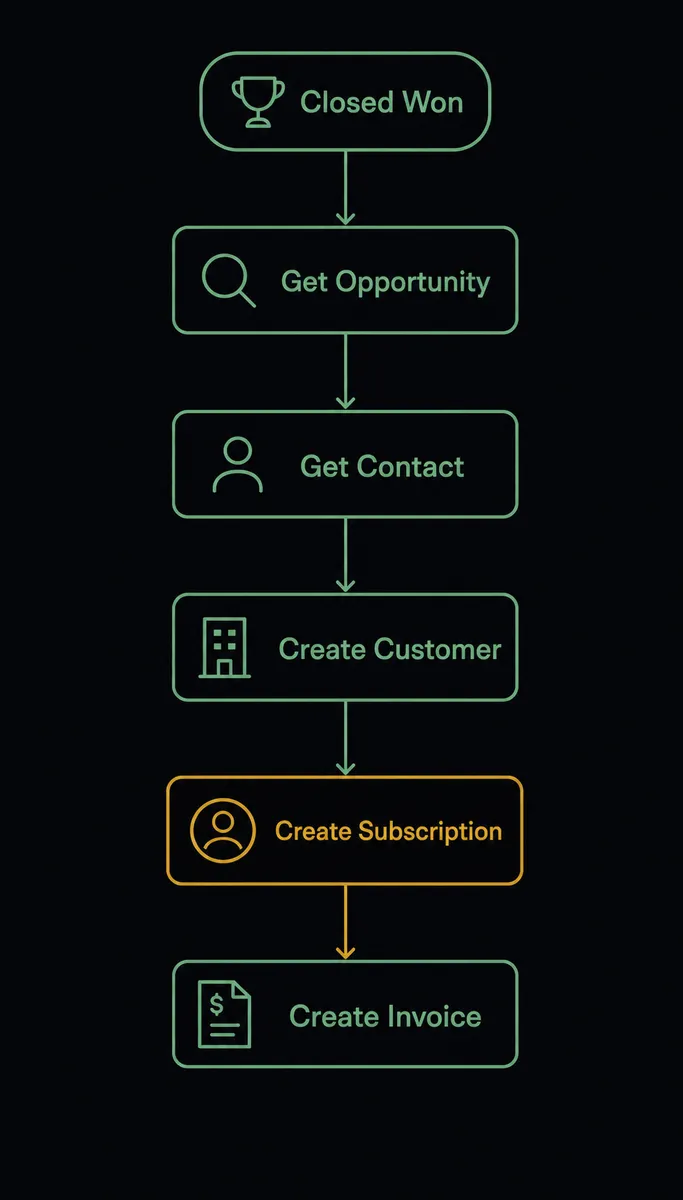
Connecting GoHighLevel to Stripe means using a GoHighLevel trigger, typically On New Opportunity scoped to your Closed Won pipeline, to fire Stripe’s Create Customer, Create Subscription, and Create Invoice actions, so a deal you close in your CRM turns into a billed customer in Stripe without anyone re-entering it into a payment form. FlowRunner is a visual AI-agent orchestration platform where automations run autonomously and pause for human judgment on the steps that carry real consequence. On FlowRunner, this same connection can run as an AI agent that reads the closed deal, provisions the Stripe subscription and invoice, and pauses for a human before it finalizes and sends billing on a large or first-time transaction.
The problem it solves
A deal closes in GoHighLevel. Now someone, usually a billing manager or an ops lead wearing too many hats, has to open Stripe in another tab, create the customer, set up the subscription, and build the first invoice by hand, copying the deal amount and contact details from the CRM. If they’re mid-batch on a Friday afternoon, a digit gets transposed, or a deal sits untouched over the weekend while the customer wonders why they haven’t been billed. Every closed deal is a small manual handoff, and handoffs are where things fall through the cracks.
The other half of the problem shows up after the invoice is sent. When a subscription payment fails, most teams have one response regardless of why it failed: someone checks the Stripe dashboard, sees a failed charge, and manually decides what to do. An expired card and a card with insufficient funds need different follow-up, but without a system that distinguishes them, both accounts get the same generic dunning email, or worse, get missed entirely until the customer churns quietly. Billing staff spend hours a week on payment failure triage that could be an automatic first pass with a human only where judgment is actually needed.
How it works: the connection
The flow starts on the GoHighLevel side. On New Opportunity fires when a deal reaches your Closed Won pipeline. The agent calls Get Opportunity By ID to pull the deal amount and product line, and Get Contact By ID to pull the customer’s billing details. With that data, it moves into Stripe: Create Customer provisions the billing record, Create Subscription sets up the recurring plan, and Create Invoice generates the first bill tied to that subscription.
From there the agent calls Finalize Invoice to move the invoice from draft to open, and Send Invoice to email it to the customer, unless the deal crosses the human-in-loop threshold described below. Back in GoHighLevel, the agent uses Add Tags To Contact to mark the record as a paying customer, Create Task to give the account owner a follow-up reminder, and Create Note to log what Stripe object was created and when, so anyone opening the contact later sees the full picture without switching systems.
On an ongoing basis, Stripe’s Parse Webhook Event trigger covers what happens after the invoice goes out: payment success, payment failure, subscription cancellation, and disputes all flow back into the same orchestration layer instead of sitting in a separate Stripe-only automation.
Can an AI agent run it? (and why a human stays in the loop)
A sync tool would stop at “deal closed, invoice created.” An AI agent goes further: it reads the deal amount, checks whether the contact is a first-time customer, and decides whether this transaction needs a second set of eyes before money is involved. This is not a fixed dollar rule sitting outside the workflow. It’s the agent evaluating the deal in context, the same way a careful ops lead would glance at an unusually large invoice before it goes out.
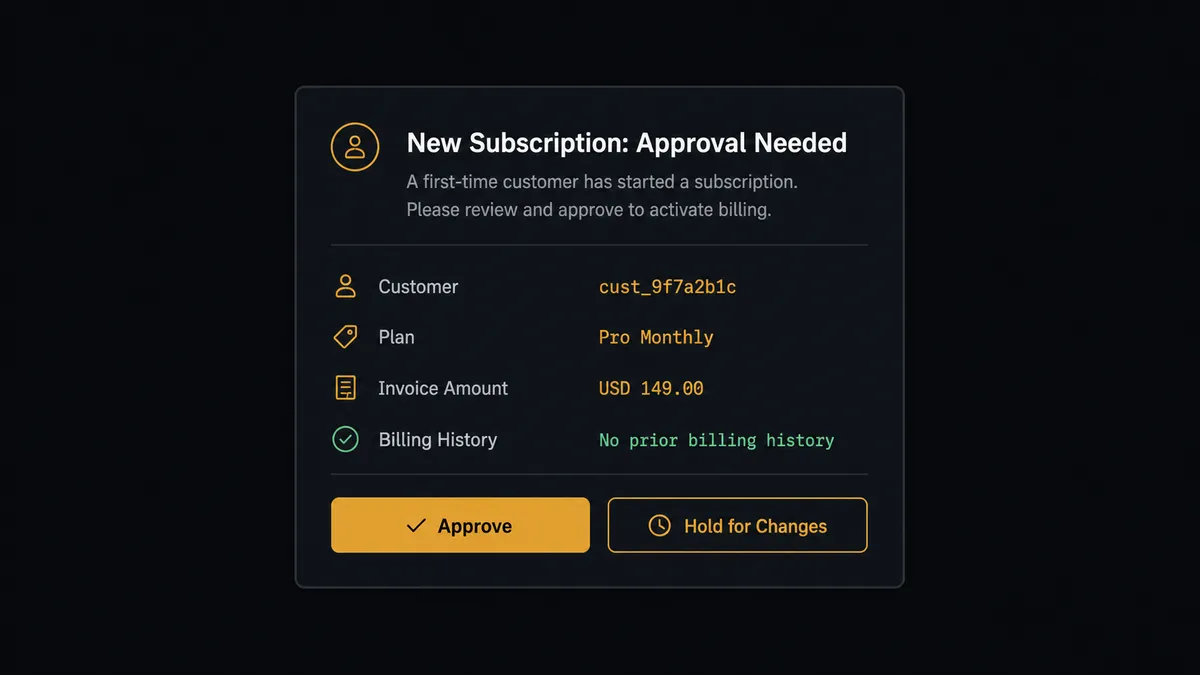
Say a deal closes at three times the account’s typical contract size, or the contact has no prior billing history in Stripe. The agent creates the customer and subscription, builds the draft invoice, and then stops. It does not call Finalize Invoice or Send Invoice on its own. Instead it posts to the billing manager’s Slack channel: “New subscription for [Contact] at [Company], first invoice for [amount], no prior billing history. Review here: [link]. Approve to send, or hold for changes?” The manager approves or edits the amount with one click. Only after that response does the agent finalize and send the invoice, and every step of that exchange, including who approved it and when, lands in the audit trail.
The same discipline applies on the failure side. When a subscription payment fails, the agent checks the reason: an expired card gets an automated payment-update email, insufficient funds gets a 3-day wait and a retry. If the retry also fails, the agent does not cancel the subscription itself. It routes to the billing team via Slack with the account’s full failure history: “This account has failed twice. Extend a grace period, or begin cancellation?” The team decides, the agent acts on that decision, and it reflects the outcome back in GoHighLevel by tagging the contact and updating the opportunity. This is not a sync tool. The agent knows when to stop and ask.
FlowRunner vs Zapier
Zapier genuinely makes it fast to wire a GoHighLevel trigger to a Stripe action, and its library of pre-built Zaps is a real advantage for teams that want a simple one-step connection with no setup friction. Where it runs out of road is anywhere the connection needs judgment rather than a fixed rule: Zapier can send every closed deal straight to Stripe, but it can’t read the deal amount, weigh whether the customer is new, and decide on its own whether to hold the invoice for a human.
| FlowRunner | Zapier | |
|---|---|---|
| Human-in-the-loop | Native. The agent decides when to pause based on context, not a fixed condition. | Not built in. Requires a manual review step or a separate approval app. |
| AI agent reasoning | The agent reads the deal, checks history, and chooses which Stripe or GoHighLevel action to call. | Zaps run the same fixed action sequence every time. |
| Users included | Unlimited users and workflows on every tier. | Per-user and per-Zap pricing scales with team size. |
| Bring your own AI key | Yes. You control the AI provider and the usage. | AI steps run through Zapier’s own model access. |
| Pricing model | Transparent workflow-based execution tiers. | Per-task pricing that grows with volume, harder to predict at scale. |
Before and after
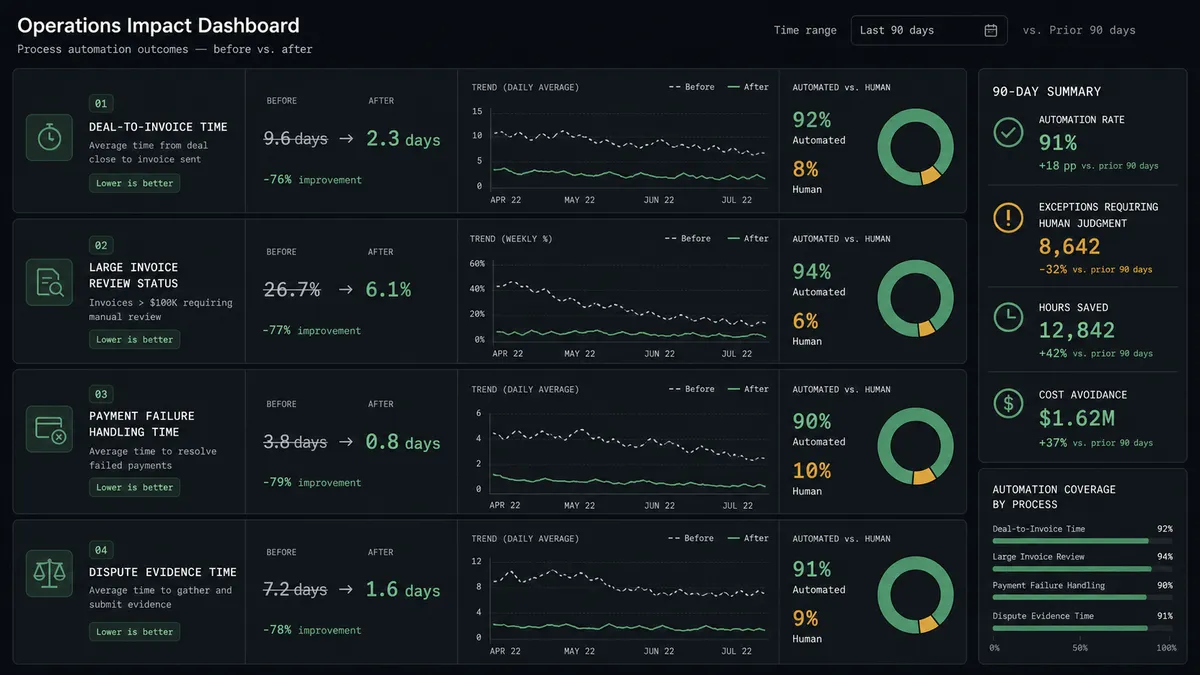
| Metric | Before | After |
|---|---|---|
| Deal-to-invoice time | Someone manually creates the Stripe customer and invoice after each closed deal | The Stripe customer, subscription, and invoice are created within seconds of the deal closing |
| Large invoice review | Invoices go out with whatever the last editor entered | An invoice above the threshold is held for the billing manager to approve before it sends |
| Payment failure handling | Billing staff check the Stripe dashboard daily and handle every failure the same way | Expired cards and insufficient funds each get the recovery sequence that fits the failure reason |
| Dispute evidence | Chargeback evidence assembled over 2-3 hours from multiple systems | Evidence package compiled and uploaded to Stripe automatically in minutes |
| Contact record accuracy | GoHighLevel and Stripe drift apart as billing changes happen in one system but not the other | Every billing outcome is tagged and noted back on the GoHighLevel contact automatically |
What you can build
Closed-deal billing. When On New Opportunity fires for a Closed Won deal, the agent creates the Stripe customer, subscription, and invoice, holding the send for approval above your threshold.
Payment failure recovery. Parse Webhook Event fires on a failed subscription payment. The agent routes expired cards to a self-service update link and insufficient-funds failures to a 3-day retry, escalating repeat failures to the billing team.
Dispute evidence assembly. When a chargeback opens, the agent pulls the order and contact record, generates an evidence package, and uploads it to Stripe, flagging any dispute it can’t confidently build a case for.
Refund review. When a refund request comes in above $500, the agent packages the reason and the contact’s history from GoHighLevel and routes it to the billing manager before Create Refund runs.
Churn tagging. When a subscription is canceled after a billing team decision, the agent tags the GoHighLevel contact and logs a note so sales and success teams see the full billing history without opening Stripe.
Common questions
Is it free to connect GoHighLevel and Stripe on FlowRunner? Yes. FlowRunner has a free plan with 100 executions a month, every integration included, and no credit card required, and new accounts get 14 days of Professional on top.
Can I self-host the GoHighLevel and Stripe connection? Yes. FlowRunner offers a self-hosted Community Edition and a self-hosted Enterprise tier for teams that need the workflow running on their own infrastructure, in addition to the cloud-hosted plans.
Does the agent need my own OpenAI key? Yes. FlowRunner uses a bring-your-own-key model, so you connect the AI provider of your choice, and the agent runs on your keys and your usage, not a shared pool.
What happens when the agent isn’t sure about an invoice or a refund? The agent pauses the workflow and routes the decision to a human over Slack, email, or WhatsApp, with the deal amount, contact history, and reasoning included, and resumes only after a person responds.
Does this replace GoHighLevel’s own invoicing? No. GoHighLevel invoicing still works for GoHighLevel-native billing; this connection is for teams that run recurring billing, subscriptions, and payment recovery through Stripe while managing the relationship in GoHighLevel.
What triggers the Stripe side of this workflow? Stripe’s Parse Webhook Event trigger fires on any Stripe event, including payment failures, disputes, and subscription changes, so the agent can react to what happens after the deal closes, not just at the moment it closes.
Getting started
FlowRunner has a free plan with 100 executions a month, every integration included, and no credit card required, and new accounts get 14 days of Professional on top. Build the closed-deal provisioning flow first, add the payment failure branch once it’s running, and add the human-in-loop approval step before you connect it to your live Stripe account.
Start at flowrunner.ai, or book a walkthrough at calendly.com/flowrunner/intro if you want help mapping the threshold rules to your own deal sizes.
Frequently asked questions
Is it free to connect GoHighLevel and Stripe on FlowRunner?
Yes. FlowRunner has a free plan with 100 executions a month, every integration included, and no credit card required, and new accounts get 14 days of Professional on top.
Can I self-host the GoHighLevel and Stripe connection?
Yes. FlowRunner offers a self-hosted Community Edition and a self-hosted Enterprise tier for teams that need the workflow running on their own infrastructure, in addition to the cloud-hosted plans.
Does the agent need my own OpenAI key?
Yes. FlowRunner uses a bring-your-own-key model, so you connect the AI provider of your choice, and the agent runs on your keys and your usage, not a shared pool.
What happens when the agent isn't sure about an invoice or a refund?
The agent pauses the workflow and routes the decision to a human over Slack, email, or WhatsApp, with the deal amount, contact history, and reasoning included, and resumes only after a person responds.
Does this replace GoHighLevel's own invoicing?
No. GoHighLevel invoicing still works for GoHighLevel-native billing; this connection is for teams that run recurring billing, subscriptions, and payment recovery through Stripe while managing the relationship in GoHighLevel.
What triggers the Stripe side of this workflow?
Stripe's Parse Webhook Event trigger fires on any Stripe event, including payment failures, disputes, and subscription changes, so the agent can react to what happens after the deal closes, not just at the moment it closes.