How to Connect Smartsheet to Slack for Exception Approvals
Connect Smartsheet and Slack so row changes and stalled intakes route to Slack for a quick approve or escalate, with the decision written back to the row automatically.
How do you connect Smartsheet to Slack?
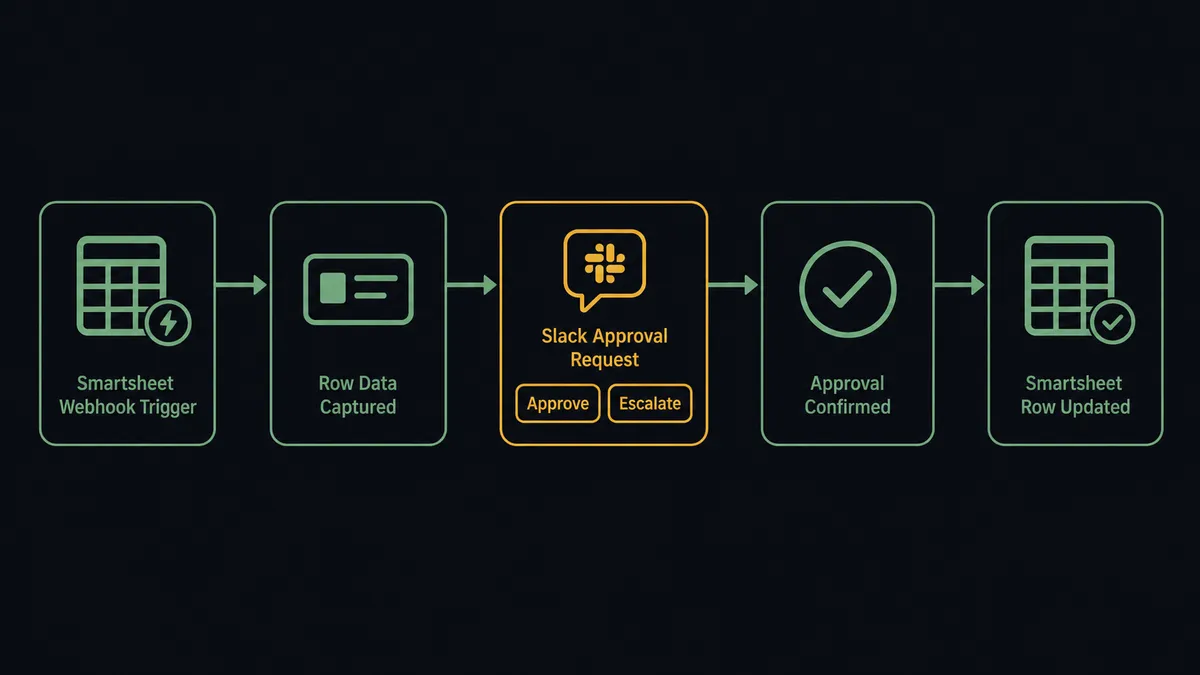
Connect Smartsheet to Slack by having a Smartsheet webhook, registered through Create Webhook and confirmed with Set Webhook Status, fire when a tracked row changes, then having FlowRunner’s Slack connector post that row’s context to a channel with Send Message to Channel, using On Block Action to capture whatever a person clicks. FlowRunner is a visual AI-agent orchestration platform where automations run autonomously and pause for human judgment on the steps that carry real consequence. The same connection can run as a static sync, but as an AI agent it reads the row, decides whether it’s routine or an exception, and only pulls a human into Slack for the rows that actually need a decision.
The problem it solves
A PMO lead or ops manager runs the real operational system in a Smartsheet grid: delivery dates, owners, statuses, attachments. The grid only stays accurate if humans keep it accurate, which means someone is manually adding rows when a deal closes, emailing owners for status, and pasting their replies back into cells. Intake rows sit incomplete for days because nobody remembers to chase them. When a milestone slips or a number looks wrong, there’s no record of who changed it or when, so the PMO lead ends up reconstructing history from memory and old email threads instead of doing the job the tracker was supposed to do for them.
Meanwhile the team’s actual conversations about exceptions happen somewhere else entirely, in Slack DMs, ad hoc channel pings, or a meeting nobody wrote down. The tracker and the decision-making are disconnected. A stalled intake falls through the cracks not because nobody noticed, but because noticing it required someone to open the sheet, and by the time they did, the start date had already slipped.
How it works: the connection
The connection runs off a Smartsheet webhook. Create Webhook registers a callback on the tracker sheet, and Set Webhook Status completes the verification handshake Smartsheet requires before events start flowing. From that point, a row edit on the sheet fires the workflow instead of waiting for someone to open it.
When the trigger fires, Get Row retrieves the changed row’s cells, owner, and hierarchy. For teams that prefer a scheduled sweep over a live webhook, Get Sheet with Rows Modified Since does the same job on a timer, surfacing intake rows still incomplete after a set number of days.
Once the agent has the row’s data, it posts to Slack. Send Message to Channel delivers a structured card to the relevant channel, or Send Direct Message routes it privately to the row’s owner. If the decision needs a click rather than free text, the message ships with interactive buttons, and On Block Action fires the moment someone responds, carrying the decision back into the workflow. The agent then writes the outcome back onto the row: Create Discussion on Row posts the decision where the row’s owner will see it, and Update Rows changes the relevant cells so the sheet reflects reality again. Nothing about this loop requires anyone to manually copy a value between the two systems.
Can an AI agent run it? (and why a human stays in the loop)
A static sync would post every row change to Slack and call it done. An AI agent does something a sync tool can’t: it reads the row, reasons about what it’s looking at, and calls Smartsheet and Slack actions as tools in whatever order the situation calls for, rather than following one fixed sequence. Most row changes are routine and never reach a person. The agent updates the tracker and moves on. It’s the exceptions that get escalated, and the agent decides which rows count as exceptions based on its instructions and the data in front of it, not a hardcoded rule like “always ask after three days.”
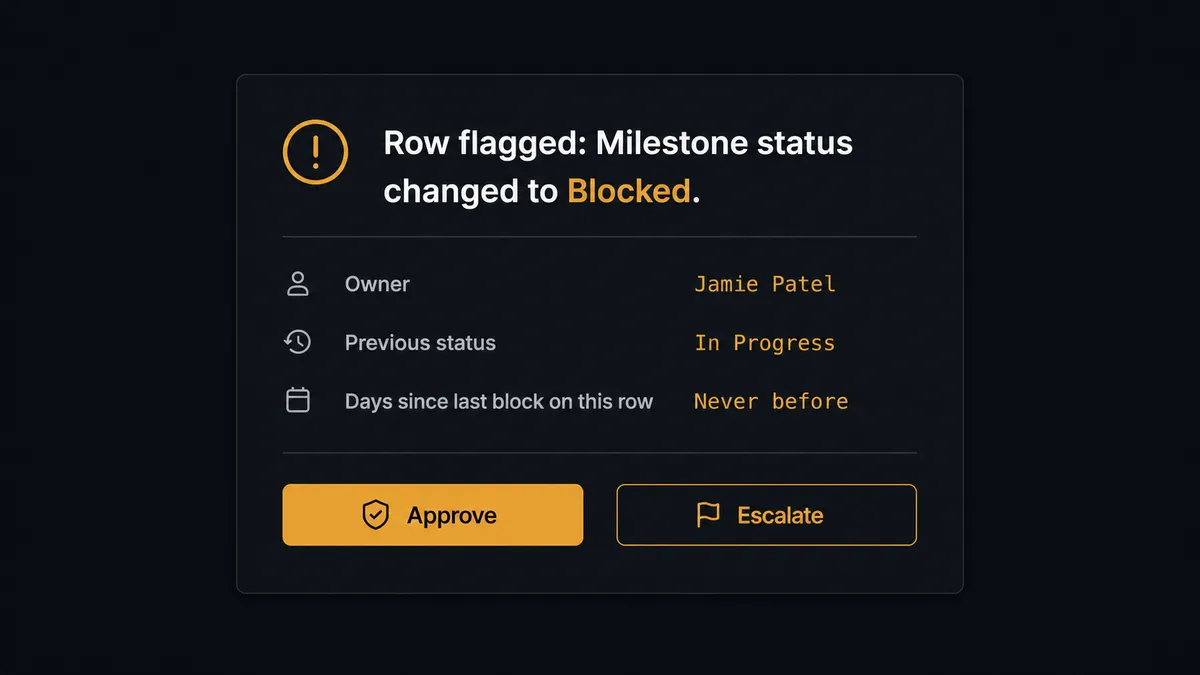
Picture a delivery tracker where a milestone flips to Blocked. The agent checks the row’s history with Get Cell History and finds this project has never been blocked before, unlike three other rows from the same owner that flip to Blocked and back within a day as a normal part of their process. That pattern difference is what triggers the escalation, not the word “Blocked” itself. The agent packages the row’s owner, the date it changed, what it was before, and the relevant discussion thread, then posts it to the PMO lead in Slack with Approve and Escalate buttons. The PMO lead taps a button from their phone. On Block Action fires, the agent resumes, and Create Discussion on Row plus Update Rows record the decision, the approver’s identity, and the timestamp on the row itself.
This is not a sync tool. The agent knows when to stop and ask, and it only asks when the data actually warrants a person’s judgment. Everything routine keeps moving without anyone touching it.
FlowRunner vs Zapier
Zapier is genuinely easy to set up for a two-step Smartsheet-to-Slack notification, and for a team that only wants “post a message when a row changes,” Zapier’s simplicity is a real strength worth acknowledging. Where it runs out of road is the exception itself: Zapier can send the notification, but it can’t reason about which rows deserve a person’s attention, and it has no native way to pause a multi-step workflow, collect a structured decision, and write that decision back with an audit trail.
| Capability | FlowRunner | Zapier |
|---|---|---|
| Human-in-loop as a callable tool | Native: the agent decides when to invoke it, and it’s a first-class workflow step | Not available; you’d need a separate approval app bolted on |
| Decision audit trail | Approver identity and timestamp captured automatically on every decision | Not built in; requires custom logging |
| AI provider | Bring your own key (Claude, GPT, or others you already pay for) | Limited native AI steps, typically routed through Zapier’s own AI credits |
| Users on every tier | Unlimited, including Growth at $45/mo | Per-user pricing on most plans |
| Pricing model | Transparent workflow-based execution tiers | Per-task pricing that scales with volume in ways that are hard to predict upfront |
Before and after
| Category | Before | After |
|---|---|---|
| Tracker freshness | Rows get added when someone remembers, so the sheet describes last week | Rows and status changes appear the moment the webhook fires, matching events as they happen |
| Status collection | Individual emails go out and answers get pasted back into cells by hand | Create Update Request sends a scoped form and answers land directly in the right cells |
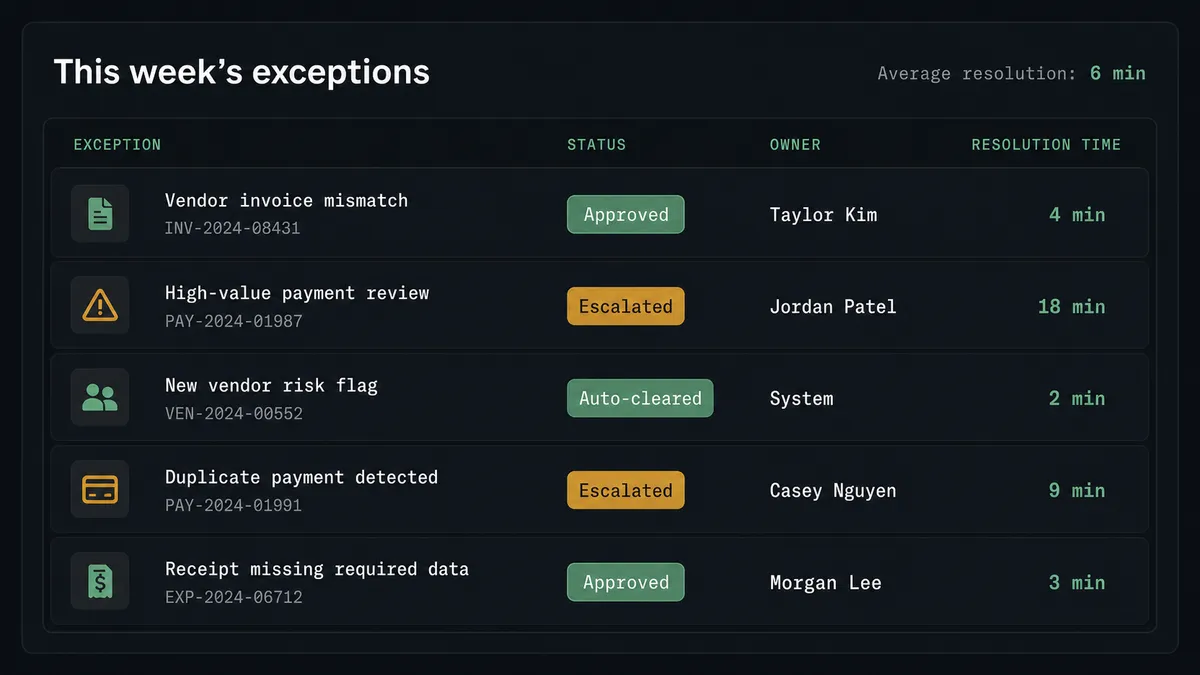
| Exception handling | Exceptions surface in scattered email threads or ad hoc Slack pings with no structure | Exceptions post to Slack with Approve and Escalate buttons and resolve in about 6 minutes |
| Change history | A cell is wrong and nobody can say when it changed or from what | Get Cell History returns every value a cell has held, with author and timestamp |
| Decision record | Approvals happen in conversation with no lasting record anyone can point to | Every approval is captured with approver identity and timestamp in the audit trail automatically |
What you can build
Stalled intake escalation. Get Sheet with Rows Modified Since finds intake rows still incomplete after a set window, the agent posts the stalled row to Slack for the PMO lead to reassign or extend, and the decision writes back through Update Rows and Create Discussion on Row.
Weekly portfolio digest to Slack. Get Report pulls the cross-sheet roll-up, Export Sheet renders the board-ready PDF into FlowRunner file storage, and Send Message to Channel delivers the summary and the link to #operations every Friday, no manual assembly.
Vendor document intake from Slack. When a file lands in a #vendor-docs channel, On File Shared fires, the agent pulls the file and uses Attach File to Row to file it onto the correct Smartsheet row, then confirms in the thread.
Blocked-status routing by owner. A Create Webhook callback on the master tracker catches status changes, and when a row flips to Blocked, Send Direct Message routes the specific row’s context straight to its owner instead of broadcasting to the whole channel.
Sheet consolidation with an approval gate. Before a Delete Sheet cleanup, the agent stages evidence with List Sheets and an Export Sheet archive, posts the candidate list to Slack, and only runs the deletion after the operations owner approves each one by name.
Common questions
Is it free to connect Smartsheet and Slack on FlowRunner? Yes. FlowRunner has a free plan with 100 executions a month, every integration included, and no credit card required, and new accounts get 14 days of Professional on top.
Do I need to build a Smartsheet webhook myself? No. FlowRunner handles the Create Webhook registration and the Set Webhook Status verification handshake for you when you choose a sheet-change trigger, so the row-level trigger is ready without touching Smartsheet’s API directly.
Does the AI agent need my own OpenAI key? Yes, FlowRunner runs on a bring-your-own-key model for AI providers, so you connect the model you already pay for instead of paying FlowRunner a markup on tokens.
What happens when the agent isn’t sure about a row? The agent invokes a human-in-loop flow as a tool: it posts the row’s context to Slack with Approve and Escalate buttons, pauses the workflow, and resumes only after a person responds, with the decision and approver identity captured in the audit trail.
Can I self-host this connection instead of using FlowRunner Cloud? Yes, FlowRunner’s Enterprise tier supports self-hosted deployment with the same Smartsheet and Slack connectors, which matters for teams whose compliance rules require on-prem data handling.
Will every row change post to Slack, or only the ones that matter? You choose the scope. Most teams route only stalled intakes, blocked statuses, or flagged exceptions to Slack, while routine row additions stay silent and simply land in the tracker.
Getting started
Start on the free plan: 100 executions a month, every integration included, no credit card required, plus 14 days of Professional for new accounts. Connect Smartsheet and Slack, build the webhook trigger, and add the Slack approval step before your first row ever needs a human decision. Sign up at flowrunner.ai or book time to walk through your specific tracker at calendly.com/flowrunner/intro.
Frequently asked questions
Is it free to connect Smartsheet and Slack on FlowRunner?
Yes. FlowRunner has a free plan with 100 executions a month, every integration included, and no credit card required, and new accounts get 14 days of Professional on top.
Do I need to build a Smartsheet webhook myself?
No. FlowRunner handles the Create Webhook registration and the Set Webhook Status verification handshake for you when you choose a sheet-change trigger, so the row-level trigger is ready without touching Smartsheet's API directly.
Does the AI agent need my own OpenAI key?
Yes, FlowRunner runs on a bring-your-own-key model for AI providers, so you connect the model you already pay for instead of paying FlowRunner a markup on tokens.
What happens when the agent isn't sure about a row?
The agent invokes a human-in-loop flow as a tool: it posts the row's context to Slack with Approve and Escalate buttons, pauses the workflow, and resumes only after a person responds, with the decision and approver identity captured in the audit trail.
Can I self-host this connection instead of using FlowRunner Cloud?
Yes, FlowRunner's Enterprise tier supports self-hosted deployment with the same Smartsheet and Slack connectors, which matters for teams whose compliance rules require on-prem data handling.
Will every row change post to Slack, or only the ones that matter?
You choose the scope. Most teams route only stalled intakes, blocked statuses, or flagged exceptions to Slack, while routine row additions stay silent and simply land in the tracker.