How to Connect Slack with Aha! (With or Without an AI Agent)
Connect Slack feedback to the Aha! ideas portal automatically, with an AI agent that dedupes and files ideas on its own and pauses for a product lead before Create Feature puts anything on the roadmap.
How do you connect Slack to Aha!?
You connect Slack to Aha! by having Slack’s On Reaction Added trigger drive Aha! actions: a teammate marks a feedback message with your capture emoji, the workflow pulls the thread, checks List Ideas for duplicates, and files it with Create Idea in the right product’s ideas portal, posting the reference back to the thread. FlowRunner is a visual AI-agent orchestration platform where automations run autonomously and pause for human judgment on the steps that carry real consequence. The same connection can run as an AI agent that captures and dedupes feedback on its own and pauses for a product lead before it calls Create Feature, because an idea in the portal is input while a feature on the roadmap is a commitment.
The problem it solves
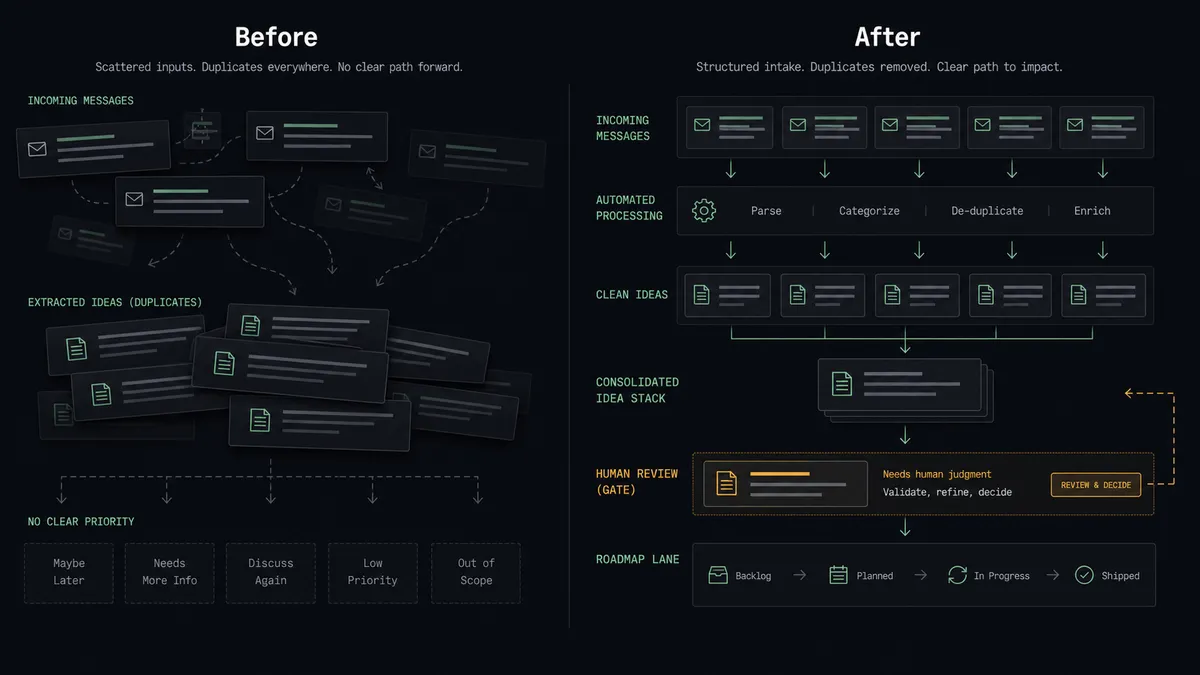
Right now the path from customer feedback to your Aha! portal runs through whoever happens to notice. A sales engineer posts a prospect’s blocker in Slack. Support pastes a churn-risk complaint. Someone says “we should log this in Aha!” and gets three thumbs-up, and then everyone returns to their day. A product manager sweeps the channel every week or two, filing what still looks important and losing the thread context, the customer name, and the sentiment that made it matter in the first place.
The edges are where the damage compounds. The same request gets filed four times under four different names, so votes split and nothing looks urgent. Feedback from the loudest channel gets captured while quieter signals evaporate. And the reverse failure is just as costly: an excited teammate skips the portal entirely and creates a feature straight on the roadmap, so the backlog fills with uncommitted maybes that engineering treats as noise. The portal is supposed to be the funnel; without a working intake and a guarded promotion step, it is neither.
How it works: the connection
The connection listens to Slack and writes to Aha!. Here is the plain version, grounded in the real connector actions.
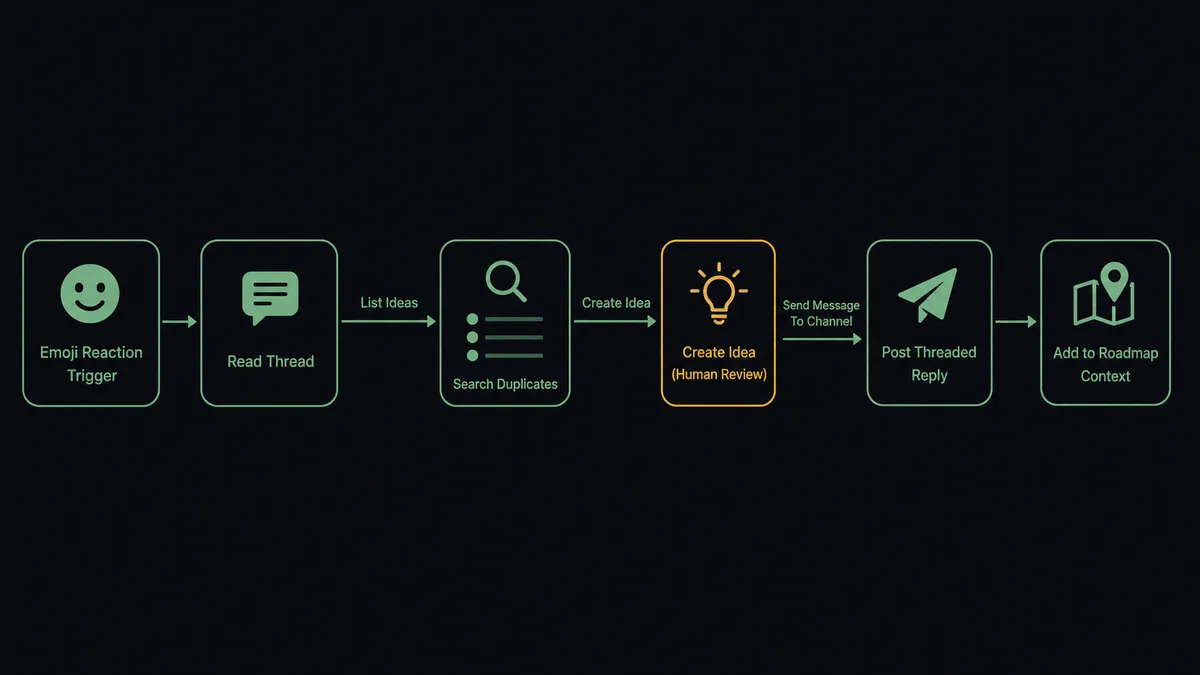
- Trigger: Slack fires On Reaction Added when a teammate marks a message with the capture emoji.
- Read: The workflow calls Get Latest Thread Messages to pull the whole thread, so the filed idea carries the discussion, not just the first message.
- Check for duplicates: It calls List Ideas with a full-text query against the product’s portal to find existing matches, and List Features to see whether the request is already on the roadmap.
- File it: It calls Create Idea in the right product, with a clean name, a rich-text description carrying the thread context, and a category where one fits.
- Close the loop: It calls Send Message To Channel to reply in the thread with the idea’s reference number, so the person who captured it knows it landed.
- Keep the map fresh: On request, the workflow reads List Products, List Releases, and List Initiatives so anyone in Slack can ask what is planned without opening Aha!.
That is the “just connect them” answer. Feedback stops depending on someone’s weekly sweep, duplicates get caught at the door, and every filed idea links back to the conversation that produced it.
Can an AI agent run it? (and why a human stays in the loop)
Yes, and this is where capture becomes curation. The agent holds List Products, List Ideas, Create Idea, List Features, Get Feature, Create Feature, Update Feature, List Releases, and List Initiatives as tools, and it reasons about each captured thread instead of pattern-matching it. It reads the thread and writes an idea name a product manager would have written. It searches the portal first and, when it finds a near-match, asks in the thread whether to merge rather than filing a twin. When the same theme keeps arriving from different channels, it says so, citing the existing idea references.
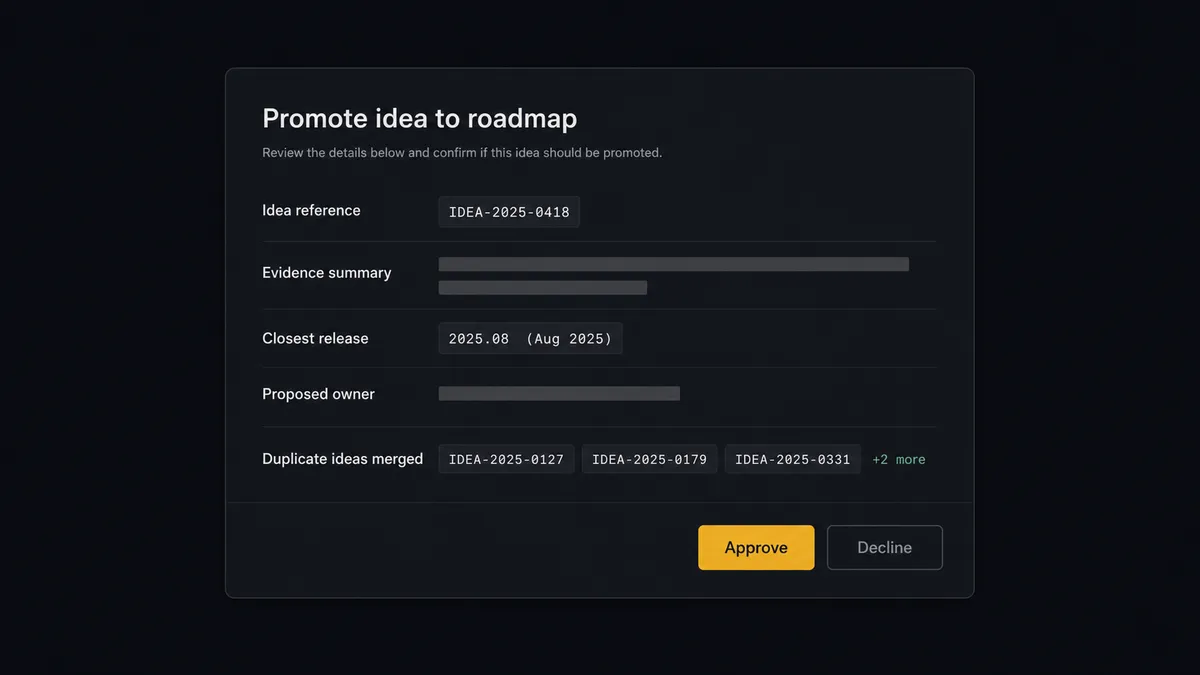
The consequential step is Create Feature. An idea in the portal costs nothing; a feature on the roadmap is a signal to engineering and to leadership. So when the agent’s evidence says an idea has outgrown the portal, it does not promote it. It invokes the human-in-loop flow it holds as a callable tool, and the workflow pauses and posts to the product channel: “Idea [reference] has recurring requests across support and sales threads. Closest release context: [release]. Approve promoting to a feature with status [status], assigned to [owner]?” Only after the product lead approves does the agent call Create Feature, and the decision, the approver, and the timestamp land in the audit trail.
This is the digital andon cord, the framing our own prospects gave us: like Toyota’s pull cord on the production line, the workflow stops the line the moment a step would commit the team. Capture runs all day without a human. The promotion decision, the one that shapes the roadmap, always has a name attached.
FlowRunner vs n8n
Technical teams evaluating a Slack to Aha! bridge will shortlist n8n, with reason. Its self-hosting is mature and free on the Community edition with unlimited executions, its code runtime is permissive for developers who want to script transformations inline, and its community and template library are large.
The difference is the shape of the decision-making. In n8n, the dedupe logic, the promotion criteria, and any approval pause are nodes you design, wire, and maintain by hand, in the spots you predicted. In FlowRunner, an agent reasons over each thread and decides mid-flight when a human needs to enter, invoking the approval as a tool.
| What matters for this pair | FlowRunner | n8n |
|---|---|---|
| Human-in-the-loop on Create Feature | Native. The agent invokes an approval flow as a callable tool and pauses before the roadmap commit | Wait-node approvals wired per workflow at a fixed spot, not a decision the agent makes |
| Who runs the flow | An AI agent reads the thread, reasons, picks actions as tools | A node graph you wire by hand; agents via added LangChain nodes |
| Users included | Unlimited users on every tier | Also unlimited on cloud plans |
| Bring your own AI keys | Yes, BYOK | Yes, you connect your own model keys |
| Self-hosted option | Yes, cloud-hosted or self-hosted | Yes, mature free self-hosting on Community |
| Pricing model | Transparent workflow-based tiers, priced per execution | Also per-execution; SSO, RBAC, and audit features sit on custom-priced Enterprise |
If your team is developers who want a free self-hosted graph they control end to end, n8n is a genuine fit. If the people running feedback intake are product and ops people, and you want roadmap promotion gated by a named approver with audit trails on a $299/mo tier rather than a custom-priced one, this pairing is where FlowRunner is the better fit.
Before and after
| Category | Before | After |
|---|---|---|
| Feedback capture | A product manager sweeps Slack weekly and files what still looks important | One emoji files the thread into the ideas portal the moment it happens |
| Duplicates | The same request lives under four names and its votes split four ways | The agent searches List Ideas first and asks before filing a near-match |
| Context | Filed ideas lose the customer name and the thread that made them matter | Every idea carries the thread summary and links back to the conversation |
| Roadmap discipline | Enthusiastic teammates create features directly and the backlog fills with maybes | Create Feature runs only after a product lead approves the promotion |
| Visibility | ”Is this on the roadmap?” means pinging the product manager | Anyone asks the agent in Slack and gets an answer from List Features and List Releases |
What you can build
Emoji-to-portal capture. On Reaction Added fires, the agent pulls the thread with Get Latest Thread Messages, dedupes against List Ideas, files with Create Idea, and posts the reference in-thread. Feedback capture becomes one click.
Feature promotion with named approval. When recurring evidence accumulates on an idea, the agent packages it with release context from List Releases and waits for the product lead before calling Create Feature.
Roadmap answers in Slack. Someone mentions the agent and asks what is planned for an area. On Mention fires, the agent queries List Features and List Releases, and replies with current statuses and reference numbers.
Status change narration. On request, the agent looks up a feature with Get Feature and posts its workflow status and assignee to the requesting thread, so account teams answer customers without an Aha! seat.
Idea hygiene assistant. A scheduled flow lists recent ideas, flags near-duplicates the search surfaced, and proposes merges in the product channel, updating names and descriptions via Update Feature only where a person confirms.
Common questions
Is it free to connect Slack and Aha! on FlowRunner? You can build and run the connection on FlowRunner’s free plan, which includes 100 executions a month and every integration with no credit card required, and new accounts also get 14 days of Professional. Both connectors are available on every FlowRunner tier, and every tier includes unlimited users and unlimited workflows.
Can I self-host the Slack to Aha! workflow? Yes. FlowRunner offers a cloud-hosted option and a self-hosted option, so the connection can run inside your own environment.
Does the AI agent need my own OpenAI or Claude key? FlowRunner uses a bring-your-own-keys model, so you connect the AI provider key you already have. You are not locked to one model.
What happens when the agent is not sure whether feedback is a duplicate? The agent searches with List Ideas and List Features before filing anything. When the match is ambiguous, it does not create a duplicate and it does not silently drop the feedback. It posts the closest existing ideas to the Slack thread and waits for a person to pick merge or create before it calls Create Idea.
Which Slack events can trigger an Aha! action? Slack offers eight triggers: On Channel Message, On Mention, On Reaction Added, On Block Action, On File Shared, On New Member, On Channel Created, and On Message from Query. Aha! has no triggers in the catalog, so Slack starts every flow in this pair. On Reaction Added is the cleanest capture signal: one emoji from a teammate files the thread.
Can the agent schedule a new feature into a release? The agent reads List Releases and List Initiatives so the approval message shows the roadmap context a product lead needs, and Create Feature sets the name, description, workflow status, and assignee. Release scheduling stays a product decision made in Aha! after the feature exists.
Getting started
Start on the free plan: 100 executions a month, every integration included, no credit card required, plus 14 days of Professional for new accounts. Both connectors are available on every tier, and every tier includes unlimited users and unlimited workflows, so sales, support, and product can all capture feedback from day one.
Explore the integration details:
- Slack integration (8 triggers and 16 actions covering messages, mentions, reactions, channels, and members)
- Aha! integration (10 actions across products, features, ideas, releases, and initiatives)
Start building free at flowrunner.ai or book a demo to see a live Slack to Aha! workflow, promotion approval and all.
Frequently asked questions
Is it free to connect Slack and Aha! on FlowRunner?
You can build and run the connection on FlowRunner's free plan, which includes 100 executions a month and every integration with no credit card required, and new accounts also get 14 days of Professional. Both connectors are available on every FlowRunner tier, and every tier includes unlimited users and unlimited workflows.
Can I self-host the Slack to Aha! workflow?
Yes. FlowRunner offers a cloud-hosted option and a self-hosted option, so the connection can run inside your own environment.
Does the AI agent need my own OpenAI or Claude key?
FlowRunner uses a bring-your-own-keys model, so you connect the AI provider key you already have. You are not locked to one model.
What happens when the agent is not sure whether feedback is a duplicate?
The agent searches with List Ideas and List Features before filing anything. When the match is ambiguous, it does not create a duplicate and it does not silently drop the feedback. It posts the closest existing ideas to the Slack thread and waits for a person to pick merge or create before it calls Create Idea.
Which Slack events can trigger an Aha! action?
Slack offers eight triggers: On Channel Message, On Mention, On Reaction Added, On Block Action, On File Shared, On New Member, On Channel Created, and On Message from Query. Aha! has no triggers in the catalog, so Slack starts every flow in this pair. On Reaction Added is the cleanest capture signal: one emoji from a teammate files the thread.
Can the agent schedule a new feature into a release?
The agent reads List Releases and List Initiatives so the approval message shows the roadmap context a product lead needs, and Create Feature sets the name, description, workflow status, and assignee. Release scheduling stays a product decision made in Aha! after the feature exists.