How to Connect Slack with ChatBot (With or Without an AI Agent)
Connect Slack to ChatBot.com so unmatched customer phrases become reviewed training improvements, with an orchestrating agent that clusters the misses and pauses for a human before Train Phrases changes how the production story answers.
How do you connect Slack to ChatBot?
You connect Slack to ChatBot by having Slack’s On Mention trigger drive ChatBot.com’s training actions: a builder asks for a review, the workflow pulls the unmatched phrases with List Training Phrases, maps them against your stories with List Stories and Get Story, and commits the approved improvements with Train Phrases, so the questions your story failed to answer become the questions it answers next week. FlowRunner is a visual AI-agent orchestration platform where automations run autonomously and pause for human judgment on the steps that carry real consequence. The same connection can run as an orchestrating AI agent that clusters the misses by intent, drafts the whole training plan itself, and pauses for a named human before the production story’s behavior changes.
The problem it solves
Every ChatBot.com story accumulates a backlog of unmatched phrases, the questions real customers asked that fell through to the fallback response. That backlog is the single best roadmap for improving the story, and almost nobody works it, because working it is tedious: open the dashboard, scroll hundreds of raw phrases, mentally dedupe “wheres my package”, “track order??”, and “shipping status pls” into one intent, figure out which interaction should own it, and train them one batch at a time. It is classification work at scroll speed, so it happens quarterly, and in between, the same customers hit the same fallback every day.
The edges are why the work gets done nervously when it gets done at all. Train the wrong phrases onto the wrong interaction and the story starts answering shipping questions with the returns policy, in production, immediately. Bulk-train without cleaning the noise first and the intent model learns from gibberish. Miss the cluster that actually signals a new product problem, and the fallback keeps eating a complaint your team never hears about. Training a live story is a deploy, and it deserves a deploy’s discipline.
How it works: the connection
The connection bridges the review channel and the story’s training loop. Here is the plain version, grounded in the real connector actions.
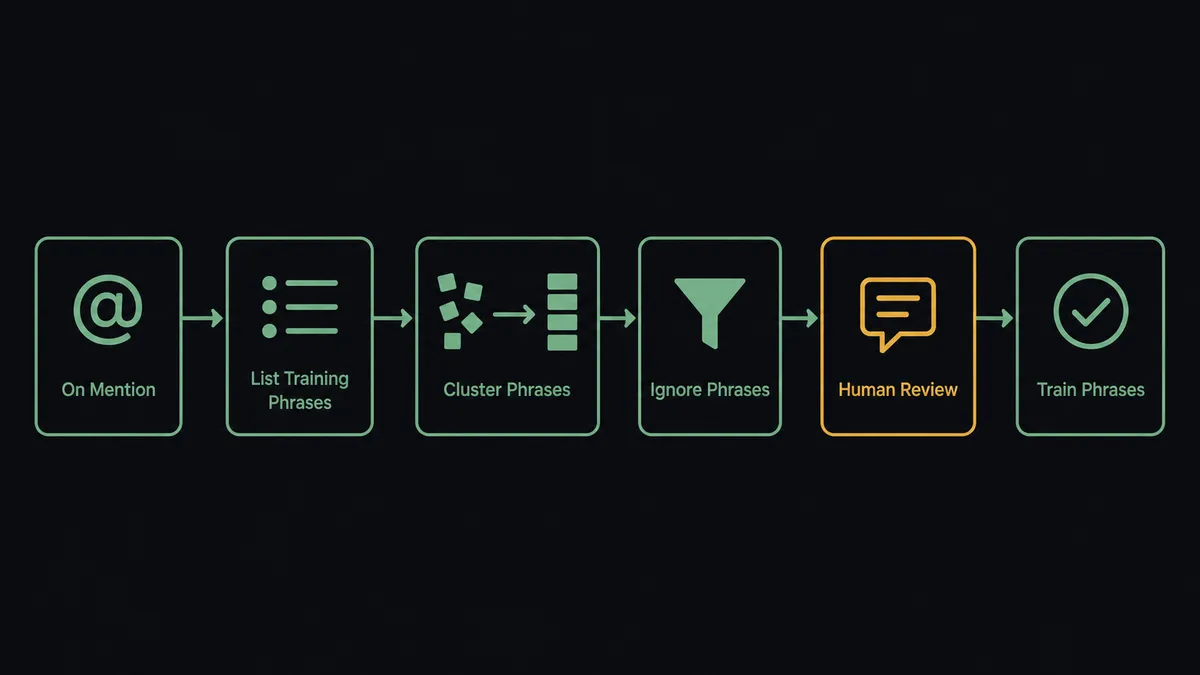
- Trigger: Slack fires On Mention when a builder summons the workflow: “@flow review this week’s misses.”
- Pull: The workflow calls List Training Phrases to fetch everything the story failed to match since the last review.
- Map: It calls List Stories and Get Story to load the story structure, so proposals point at real interactions.
- Clean: It calls Ignore Phrases on the spam and gibberish, so the review contains signal, not noise.
- Propose: Send Message To Channel posts the training plan: clusters of phrases, each mapped to a target interaction, with an “unsure” section for a person to resolve.
- Commit: After the approval click, Train Phrases assigns the approved clusters, and Train Custom Text covers the variants worth adding by hand.
- Verify: The workflow sends the newly trained phrases to the story with ChatBot’s Send Message action and posts the responses in the thread, proof the misses now hit.
That is the “just connect them” answer. The unmatched backlog becomes a clustered, reviewable plan instead of a scroll, and training becomes a one-click commit with verification. Get Report adds the scoreboard: fallback rates and chat volumes posted to the channel so the team sees the miss rate actually fall.
Can an AI agent run it? (and why a human stays in the loop)
Yes, and clustering is exactly the work the agent is built for. “wheres my package”, “you people lost my order”, and “delivery late again” are one intent wearing three moods, and a keyword filter cannot see that. The agent reads every miss, groups by meaning, matches each group against the story structure from Get Story, and drafts the plan a builder would have spent an afternoon producing. It also reads the misses nobody was looking for: a cluster that maps to no existing interaction is not training data, it is a product signal, and the agent flags it as a proposed new story branch instead of forcing it somewhere it does not belong. Its toolbox is the real action set: List Training Phrases, Train Phrases, Train Custom Text, Ignore Phrases, List Stories, Get Story, Send Message, Get Report.
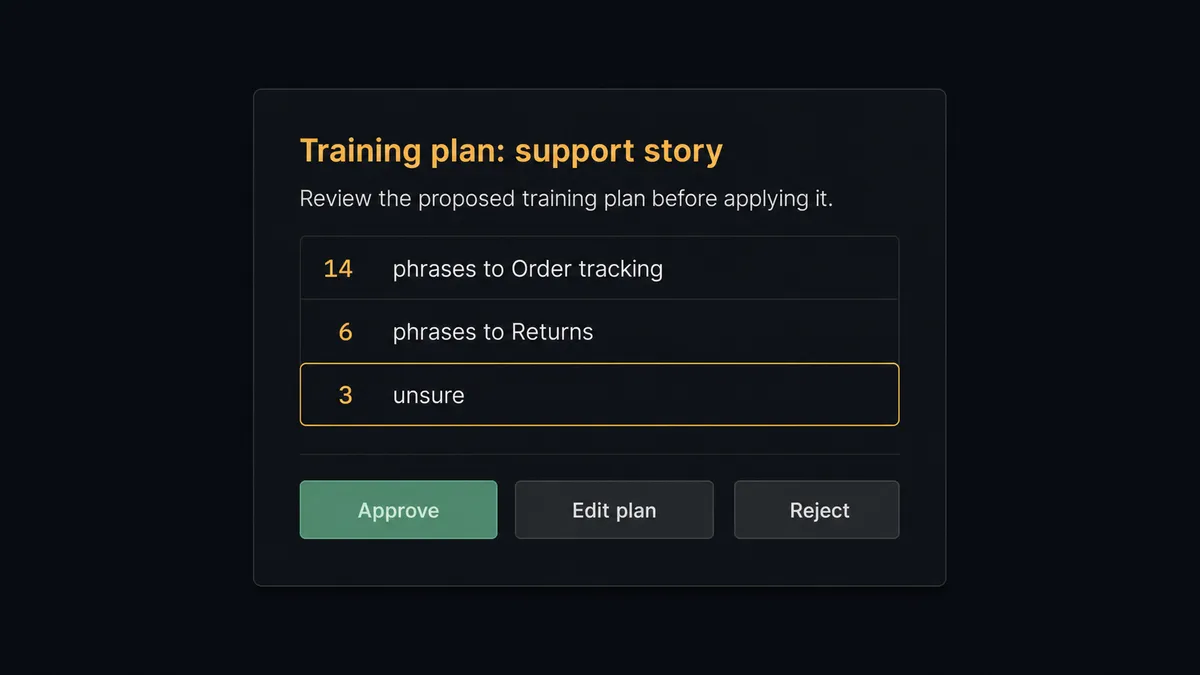
The consequential step is the commit. Train Phrases changes how the production story classifies customer messages from the moment it runs, with no staging layer in between. So the agent holds Train Phrases and Train Custom Text behind a human-in-loop flow it invokes as a callable tool. The workflow pauses and posts: “Training plan for the support story: 14 phrases to ‘Order tracking’, 6 phrases to ‘Returns’, 3 unsure, mapping attached. Approve, edit, or reject.” A named approver adjusts the unsure cluster, clicks approve, and only then does the story learn. The verification pass follows immediately, and the plan, approver, timestamp, and test responses all land in the audit trail. Set User Ban and Delete Segment live behind the same gate, because silencing a user or dissolving a segment is not a housekeeping task.
This is the digital andon cord, the framing our own prospects gave us: like the pull cord on a Toyota line, the workflow stops the line the moment the next step changes production behavior. Pulling, clustering, and cleaning run free. The story’s brain changes only with a name attached.
FlowRunner vs LangChain
For a builder audience the honest alternative is writing this yourself, and LangChain is the strongest version of that path: full code-level control, a huge ecosystem, and every piece of this loop, ChatBot’s API, clustering, Slack approvals, implementable exactly to your taste. If this pipeline is something you want to own as source code, LangChain will carry it.
The trade is everything around the clever part. Here is the honest side-by-side.
| What matters for this pair | FlowRunner | LangChain |
|---|---|---|
| Human-in-the-loop before Train Phrases | Native. The agent invokes an approval flow as a callable tool, plan attached | A pattern you implement: interrupt state, approval UI, resume logic, yours to maintain |
| Who runs the flow | An AI agent clusters, maps, verifies, picks actions as tools, visible on a canvas | Your code; clustering plus every retry and webhook is also your code |
| Users included | Unlimited users on every tier; support leads approve plans without touching code | Whoever can read the repository |
| Bring your own AI keys | Yes, BYOK | Yes, BYOK by nature |
| Self-hosted option | Yes, cloud-hosted or self-hosted | Self-hosted by definition; the infrastructure is yours either way |
| Pricing model | Transparent workflow-based tiers | Free framework, paid in engineering time and the observability you build around it |
If intent-training tooling is core product for you, building on LangChain is defensible. If it is a weekly operational loop that should run this week, survive your vacation, and let a support lead click approve, this pairing is the better fit.
Before and after
| Category | Before | After |
|---|---|---|
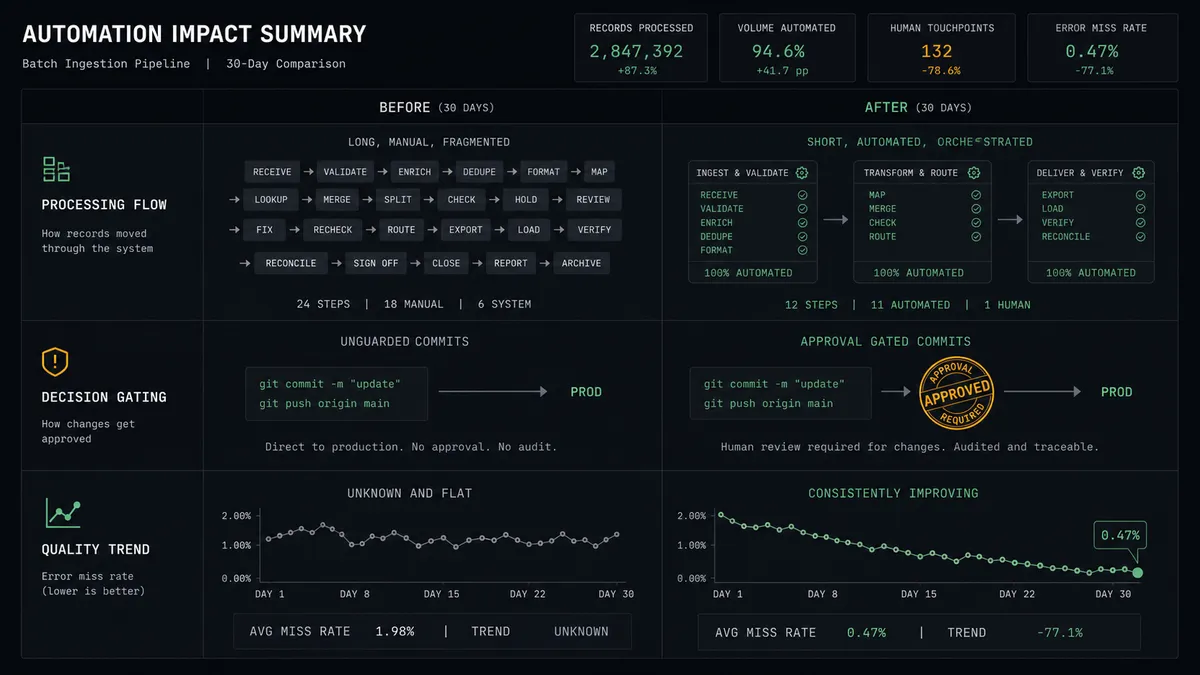
| Unmatched backlog | Hundreds of raw phrases reviewed quarterly, at scroll speed | Clustered by intent and posted as a reviewable plan on demand |
| Training safety | Batches committed straight to production, effects found by customers | Named approval on every plan, verification responses posted as proof |
| Noise handling | Gibberish trained in alongside real misses | Ignore Phrases clears the junk before the plan is even drafted |
| New-intent discovery | Clusters signaling product problems drown in the scroll | Unmapped clusters flagged as proposed new story branches |
| Progress visibility | Nobody knows if the fallback rate is improving | Get Report posts the miss-rate trend to the channel after each cycle |
What you can build
Weekly training review. On Mention pulls the backlog with List Training Phrases, the agent clusters and cleans with Ignore Phrases, and Train Phrases commits the approved plan, verified with ChatBot’s Send Message. The story improves on a cadence instead of a guilt cycle.
New-intent radar. Clusters that map to no interaction in Get Story get posted as proposed story additions with example phrases, so the fallback stops silently eating whole categories of customer questions.
Miss-rate scoreboard. On a schedule, Get Report pulls chat and fallback metrics and the agent posts the trend to the quality channel, connecting each approved training cycle to the number it moved.
Escalation transcript pulls. On Mention with a chat reference, List Chats and Get Chat retrieve the conversation and the agent posts a summary with the full transcript threaded, so debugging a complaint about the story takes one message.
Gated user management. When abuse patterns show up in transcripts, the agent proposes Set User Ban with the evidence attached, and a person decides. Segments stay curated the same way: Add Users To Segments runs free, Delete Segment waits for sign-off.
Getting started
Start on the free plan: 100 executions a month, every integration included, no credit card required, plus 14 days of Professional for new accounts. Both connectors are available on every tier, and every tier includes unlimited users and unlimited workflows.
Explore the integration details:
- Slack integration (8 triggers and 16 actions covering messages, channels, members, and interactive approvals)
- ChatBot integration (37 actions covering stories, training, users, segments, and reports)
Start building free at flowrunner.ai or book a demo to see a live Slack to ChatBot workflow, training approval and all.
Frequently asked questions
Is it free to connect Slack and ChatBot on FlowRunner?
You can build and run the connection on FlowRunner's free plan, which includes 100 executions a month and every integration with no credit card required, and new accounts also get 14 days of Professional. Both connectors are available on every FlowRunner tier, and every tier includes unlimited users and unlimited workflows.
Can I self-host the Slack to ChatBot workflow?
Yes. FlowRunner offers a cloud-hosted option and a self-hosted option, so the connection can run inside your own environment.
Does the AI agent need my own OpenAI or Claude key?
FlowRunner uses a bring-your-own-keys model, so you connect the AI provider key you already have. You are not locked to one model.
What happens when the agent is unsure which story an unmatched phrase belongs to?
It puts the phrase in an 'unsure' cluster instead of forcing a match. The review card shows those phrases separately with the agent's best guesses, and a person assigns or discards them. Train Phrases never commits a mapping the agent had to guess.
Which Slack triggers and ChatBot actions does this connection use?
Slack's On Mention and On Channel Message triggers start the flows, with On Block Action capturing approvals. On the ChatBot side the workflow uses List Training Phrases, Train Phrases, Ignore Phrases, List Stories, Get Story, Send Message, and Get Report.
Can the workflow test a story after it trains it?
Yes. After Train Phrases commits, the agent sends the newly trained phrases to the story with ChatBot's Send Message action and posts the responses to the Slack thread, so the team sees the story answering the previously missed questions correctly.