Send OpenAI Drafts to Slack for Human Approval
Connect OpenAI and Slack so generated replies, answers, and content route into a Slack approval card, with the AI agent inserting a human on any draft that reaches a customer or touches sensitive material.
How do you connect OpenAI to Slack?
You connect OpenAI to Slack in FlowRunner by choosing a Slack trigger (On Channel Message, On Mention, or On File Shared), generating content with OpenAI’s Create Chat Completion or Create Response, and posting the result back to Slack with Send Message to Channel or Send Direct Message. FlowRunner is a visual AI-agent orchestration platform where automations run autonomously and pause for human judgment on the steps that carry real consequence. The same connection can run as a full AI agent: OpenAI drafts the reply, the agent reasons about what it produced, and a Slack approval card lands in front of a human whenever the draft reaches a customer or touches sensitive material.
The problem this solves
Support leads, ops managers, and internal help desks face the same bottleneck every day. A question comes in, a document needs a summary, or a campaign needs copy and a voiceover. Someone has to draft it from a blank page, check it against policy, and get it in front of the right person before it goes anywhere. That review happens over email threads, screenshots pasted into direct messages, or a spreadsheet of open items nobody fully trusts.
The cost shows up in two places. First, in the time spent writing first drafts that a model could produce in seconds. Second, in the exceptions that fall through the cracks: the reply that goes out without a second look, the answer to a policy question that nobody flagged as sensitive until a customer pushed back. Teams want the drafting handled and the judgment preserved. Most automation tools force a choice between the two.
How it works: the connection
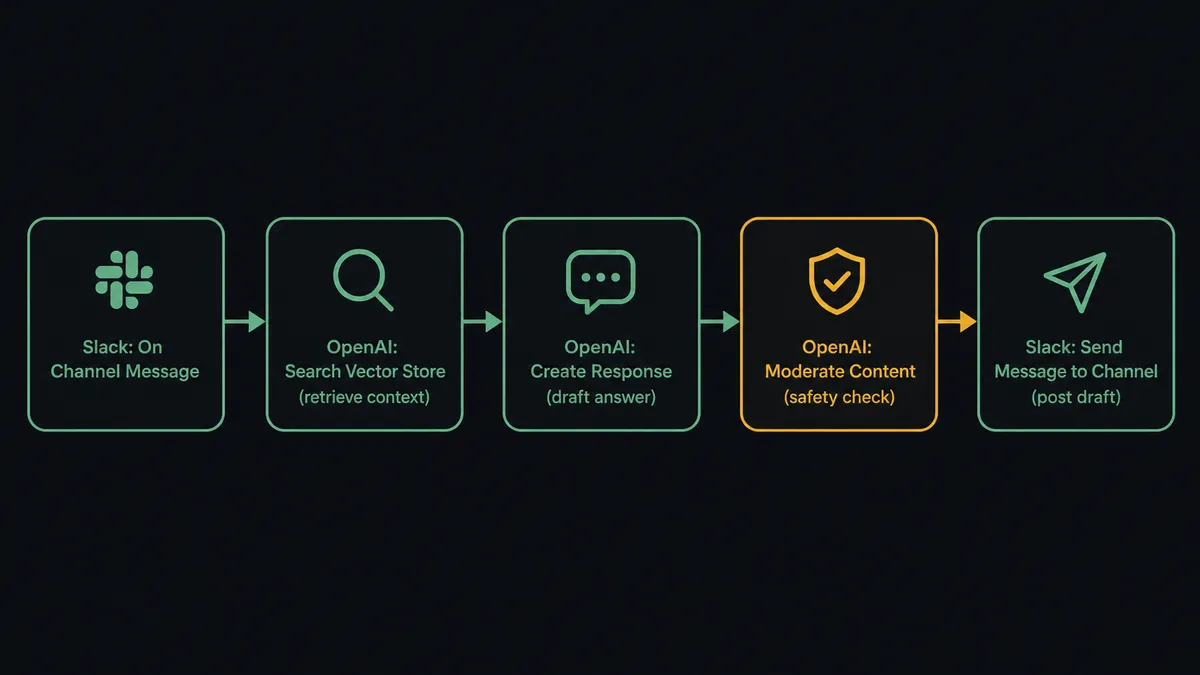
When a request lands in a monitored Slack channel, the On Channel Message trigger fires (On Mention works the same way for a direct @FlowRunner call, and On File Shared covers documents dropped into a channel). The agent passes the request to Create Chat Completion to classify intent, then calls Create Response to produce a grounded draft. For questions that depend on internal content, the agent calls Search Vector Store first, retrieving the relevant passages from a vector store built with Create Vector Store and Add File to Vector Store, so the draft is grounded in real material instead of a guess.
Every draft runs through Moderate Content before it goes anywhere. This checks the generated text against OpenAI’s safety categories: harassment, hate speech, violence, sexual content, self-harm, and more. A clean result and a low-stakes context let the agent post directly. Anything else routes to a person first.
The output side is Slack. The agent posts the finished draft with Send Message to Channel for a shared thread, or Send Direct Message when the review belongs to one person. If the conversation needs an update once a decision lands, Update Message in Channel edits the original post in place instead of adding noise to the thread.
Can an AI agent run it? (and why a human stays in the loop)
The plain connection handles drafting and posting. An AI agent handles judgment.
In a basic Zapier or n8n setup, a trigger maps to a fixed action every time: generate text, post it, done. The agent in FlowRunner works differently. It reads what OpenAI produced, evaluates the moderation result and the context of the request, and decides what to do next. It does not run the same script on every message. It reasons about each one.
The human-in-loop capability is where this stops being a sync tool. The agent does not escalate on a fixed rule like “always ask before posting.” It makes a judgment call based on what the draft is for.
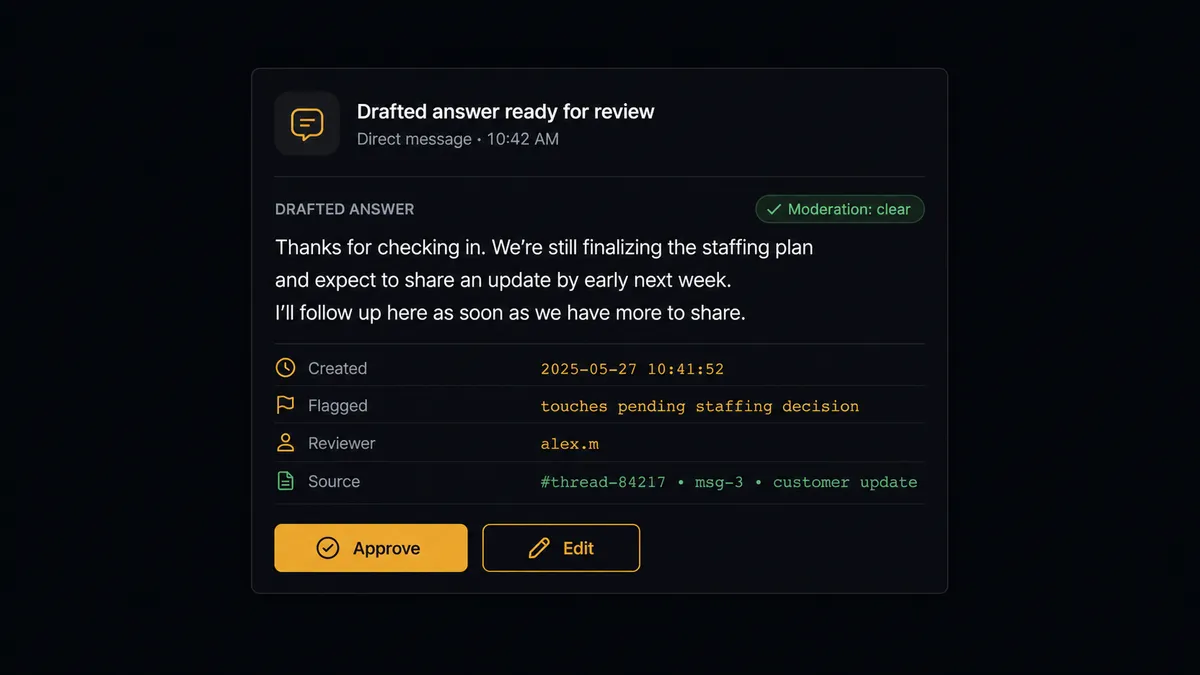
Consider an internal Q&A channel. An employee asks how expense reimbursement works. The agent retrieves the relevant policy passage with Search Vector Store, drafts a clean answer with Create Response, and Moderate Content returns nothing concerning. The agent posts it directly with Send Message to Channel. Later that day, a different employee asks a question that touches a pending reduction-in-force decision. The retrieved context includes confidential material, and the agent’s instructions flag anything about headcount changes as sensitive. It does not draft an answer and post it. It invokes the human-in-loop subflow.
The subflow sends a Slack direct message to the HR lead using Send Direct Message: “A question came in about staffing changes. Here is the drafted answer and the source passages it pulled from. Your options: approve to post, or edit before it goes out.” Two Block Kit buttons capture the decision. On Block Action fires the moment the person clicks, and the agent resumes with that decision as its next input, the approver’s identity and timestamp captured automatically in the audit trail.
This is the digital andon cord in practice. The agent does not fail closed and drop the question, and it does not fail open and post something it should not have. It knows when to stop and ask.
FlowRunner vs Zapier
Zapier is the right comparison for most non-technical teams connecting OpenAI and Slack today. It has the largest integration library in the category and is genuinely easy to set up for a single trigger mapped to a single action. If the workflow is “new Slack message triggers a completion, post the result back,” Zapier handles that.
The differences show up once the workflow needs reasoning, retrieval, or a real decision before something reaches a customer or a sensitive channel.
| Feature | Zapier | FlowRunner |
|---|---|---|
| Basic OpenAI-to-Slack trigger-action | Yes | Yes |
| AI agent that reasons before posting | No (fixed action sequences) | Yes (agent reads the draft and moderation result, then decides) |
| Human-in-loop as agent-invoked tool | No | Yes (agent calls it based on context, not a hardcoded rule) |
| Interactive Slack buttons that resume a paused workflow | No | Yes (On Block Action routes the decision back to the agent) |
| BYOK for OpenAI (your API key, your usage) | No | Yes |
| Audit trail with decision-maker identity and timestamp | No | Yes (every approval captured automatically) |
| Unlimited users on every tier | No (user-based pricing) | Yes |
Zapier moves the data. FlowRunner runs the judgment layer on top of it.
Before and after
| Category | Before | After |
|---|---|---|
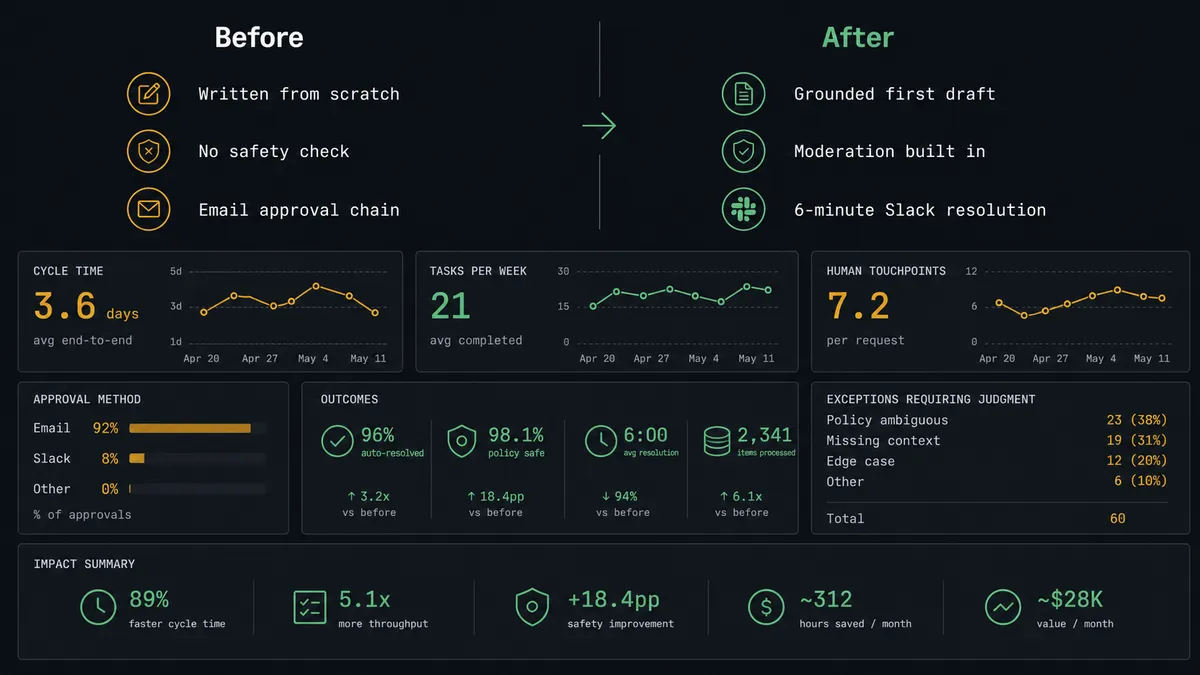
| AI provider sprawl | Separate providers for chat, images, audio, and moderation | One connector for text, images, audio, embeddings, and moderation |
| First drafts | Support and ops staff write every reply from scratch | Create Response and Create Chat Completion produce grounded first drafts, ready to edit |
| Content safety | Generated text posted with no safety check | Moderate Content screens every draft before it moves |
| Exception handling | Exceptions tracked over email and separate threads | Agent posts flagged drafts to Slack with Approve / Edit buttons |
| Approval speed | Review requires a meeting or an email chain | Three exceptions approved and escalated in one Slack session from a phone, 6-minute resolution |
| Approval audit trail | Decisions live in email threads or nowhere at all | Every approval captured with approver identity and timestamp automatically |
What you can build
Drafted support replies with a review gate. A customer question lands in a support channel. On Channel Message fires. The agent classifies intent with Create Chat Completion, drafts a reply with Create Response, and runs it through Moderate Content. Clean, routine replies post directly with Send Message to Channel. Anything unusual routes to the support lead for edit and approval first.
Retrieval-grounded internal Q&A. Employee questions get answered from a vector store built with Create Vector Store and Add File to Vector Store. The agent calls Search Vector Store for relevant passages, then Create Response for a cited answer. Confident answers post directly; questions touching sensitive policy route to the owning team through the human-in-loop subflow.
Multimodal campaign approval. A campaign brief posted in Slack triggers the agent to draft copy with Create Response, generate image options with Generate Image, and produce a voiceover with Text to Speech. Everything routes to the creative lead via Send Direct Message for selection and approval before it goes anywhere near a publishing tool.
Vendor document intake with extraction and review. A vendor drops a PDF in #vendor-docs. On File Shared fires. The agent uploads it with Upload File, extracts the relevant fields with Create Response, and posts a structured summary in the thread. Matches move on automatically; discrepancies surface with Send Message to Channel for the ops team to resolve.
Weekly operations digest. Every Monday at 8am, the agent calls Create Response to turn the week’s workflow data into a short narrative summary, then posts it to #operations with Send Message to Channel using Block Kit formatting. Leadership gets a written summary without anyone drafting a report by hand.
Common questions
Is it free to connect OpenAI and Slack on FlowRunner? FlowRunner has a free plan with 100 executions a month, every integration included, and no credit card required, and new accounts get 14 days of Professional on top. Both the OpenAI and Slack connectors are included on every tier, and all tiers include unlimited users and workflows.
Do I need my own OpenAI API key? Yes. FlowRunner uses a BYOK (Bring Your Own Keys) model, so you connect your own OpenAI account. You control usage and cost directly, and your prompts and completions run under your own API agreement with OpenAI.
Can the agent post OpenAI-generated content directly to a Slack channel? Yes. Once a draft clears Moderate Content and, where needed, a human approval step, the agent posts it with Send Message to Channel or Send Direct Message. Nothing generated by OpenAI reaches a channel without passing through that path.
What happens when the agent isn’t confident about an answer? The agent invokes a human-in-loop subflow as a callable tool. It sends a Slack message with the draft, the moderation result, and the reason it flagged the content. The human responds with interactive buttons, and the agent resumes with that decision captured in the audit trail.
Can I self-host FlowRunner? Yes. FlowRunner offers a self-hosted Community Edition (free) and an Enterprise self-hosted tier. Both include the OpenAI and Slack connectors.
Does FlowRunner work with AI providers besides OpenAI? Yes. FlowRunner is provider-agnostic. You can run OpenAI, Claude, and Gemini in the same workflow, each handling the task it does best. OpenAI is one model option, not a required dependency.
Getting started
FlowRunner has a free plan with 100 executions a month, every integration included, and no credit card required, and new accounts get 14 days of Professional on top. Any real email address works; disposable domains are not accepted.
Connect both integrations from the FlowRunner integration library: OpenAI and Slack. Both are available on every tier.
Start at flowrunner.ai or book a 30-minute walkthrough at calendly.com/flowrunner/intro to see the agent and human-in-loop flow running on a real drafting workflow.
Frequently asked questions
Is it free to connect OpenAI and Slack on FlowRunner?
FlowRunner has a free plan with 100 executions a month, every integration included, and no credit card required, and new accounts get 14 days of Professional on top. Both the OpenAI and Slack connectors are included on every tier, and all tiers include unlimited users and workflows.
Do I need my own OpenAI API key?
Yes. FlowRunner uses a BYOK (Bring Your Own Keys) model, so you connect your own OpenAI account. You control usage and cost directly, and your prompts and completions run under your own API agreement with OpenAI.
Can the agent post OpenAI-generated content directly to a Slack channel?
Yes. Once a draft clears Moderate Content and, where needed, a human approval step, the agent posts it with Send Message to Channel or Send Direct Message. Nothing generated by OpenAI reaches a channel without passing through that path.
What happens when the agent isn't confident about an answer?
The agent invokes a human-in-loop subflow as a callable tool. It sends a Slack message with the draft, the moderation result, and the reason it flagged the content. The human responds with interactive buttons, and the agent resumes with that decision captured in the audit trail.
Can I self-host FlowRunner?
Yes. FlowRunner offers a self-hosted Community Edition (free) and an Enterprise self-hosted tier. Both include the OpenAI and Slack connectors.
Does FlowRunner work with AI providers besides OpenAI?
Yes. FlowRunner is provider-agnostic. You can run OpenAI, Claude, and Gemini in the same workflow, each handling the task it does best. OpenAI is one model option, not a required dependency.