How to Connect Parseur with ChatBot (With or Without an AI Agent)
Connect Parseur document extraction to ChatBot so parsed FAQs and guides train your published stories, with an AI agent that stages the training and pauses for a human before new content changes what a live story tells customers.
How do you connect Parseur to ChatBot?
You connect Parseur to ChatBot by turning documents into story training: Parseur’s On Document Processed (Realtime) trigger fires when a knowledge document is extracted, the workflow pulls the text with Get Parsed Data, resolves the target story with List Stories, and teaches it with Train Custom Text against the right User Input interaction. FlowRunner is a visual AI-agent orchestration platform where automations run autonomously and pause for human judgment on the steps that carry real consequence. Run the same connection as an AI agent and the pipeline gains an editor’s judgment: the agent classifies each document, picks the story and interaction it belongs to, and pauses for a named human before new content changes what a published story tells customers.
The problem it solves
A ChatBot story is a conversation tree that answers what it was taught, and the teaching is manual. The knowledge lives in documents that keep moving: FAQ pages, policy PDFs, product one-pagers, support macros. When those change, someone has to notice, extract the relevant text, open the story, and retrain the right interaction. In practice that happens in bursts, months apart, and between bursts the story confidently gives customers last quarter’s answer.
Meanwhile the story generates its own to-do list that nobody works. Every question visitors typed that the story failed to match lands in the unmatched-phrases queue, with a count of how often each one stumped it. That queue is a ranked list of what your customers actually want to know, and in most accounts it just grows. The two failures compound: stale training makes more unmatched phrases, and an unworked queue means the story never learns. Both are copy-paste problems wearing down whoever owns the story, and both are exactly the kind of repetitive judgment-plus-clerical work that should be split: the clerical part automated, the judgment part routed to a person.
How it works: the connection
The connection listens to Parseur and writes to ChatBot. Here is the plain version, grounded in the real connector actions.
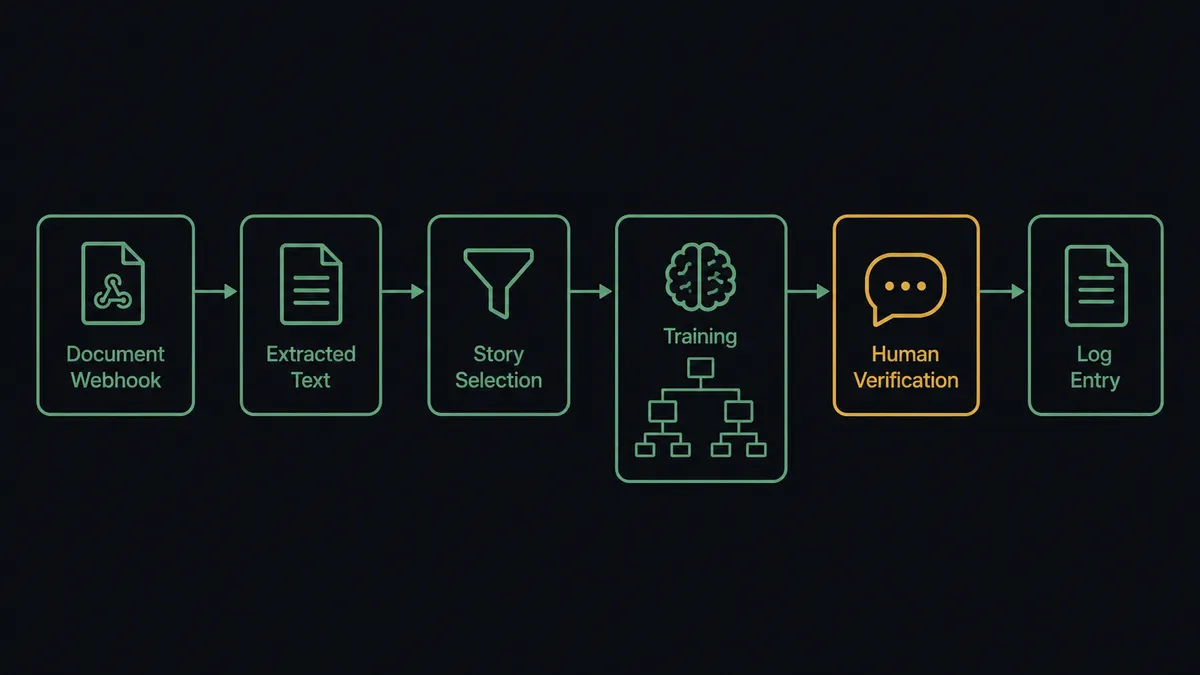
- Trigger: Parseur fires On Document Processed (Realtime) the moment an updated FAQ, guide, or policy document is extracted.
- Read: The workflow calls Get Parsed Data to retrieve the structured text: title, sections, and answer content.
- Resolve the target: It calls List Stories to find the story ID and check its published state, then Get Story for the details.
- Train: It calls Train Custom Text with the parsed content assigned to the target User Input interaction, so the story can match that material.
- Verify: It calls Send Message through the Chat API with a question the new content should answer, using a stable session identifier, and checks the returned interactions.
- Report: It logs what was trained, into which story and interaction, so the story’s knowledge has a change history outside anyone’s memory.
That is the “just connect them” answer. Documents in, trained story out, verified with a real query. The unmatched queue runs as a second loop: List Training Phrases pulls what visitors typed that the story missed, and Train Phrases, Ignore Phrases, or Delete Training Phrases resolve each one.
Can an AI agent run it? (and why a human stays in the loop)
Yes, and the agent is what turns two chores into one supervised system. It holds the real actions as tools: Get Parsed Data and List Documents on the Parseur side; List Stories, Get Story, Train Custom Text, List Training Phrases, Train Phrases, Ignore Phrases, Delete Training Phrases, and Send Message on the ChatBot side. For each parsed document it reasons like the person who used to do this by hand. Which story does this belong to? Which User Input interaction should match it? Is this a real update or a duplicate of what the story already knows? For the unmatched queue, it groups phrases by intent, maps each group to the interaction that should answer it, and separates genuine gaps from keyboard noise.
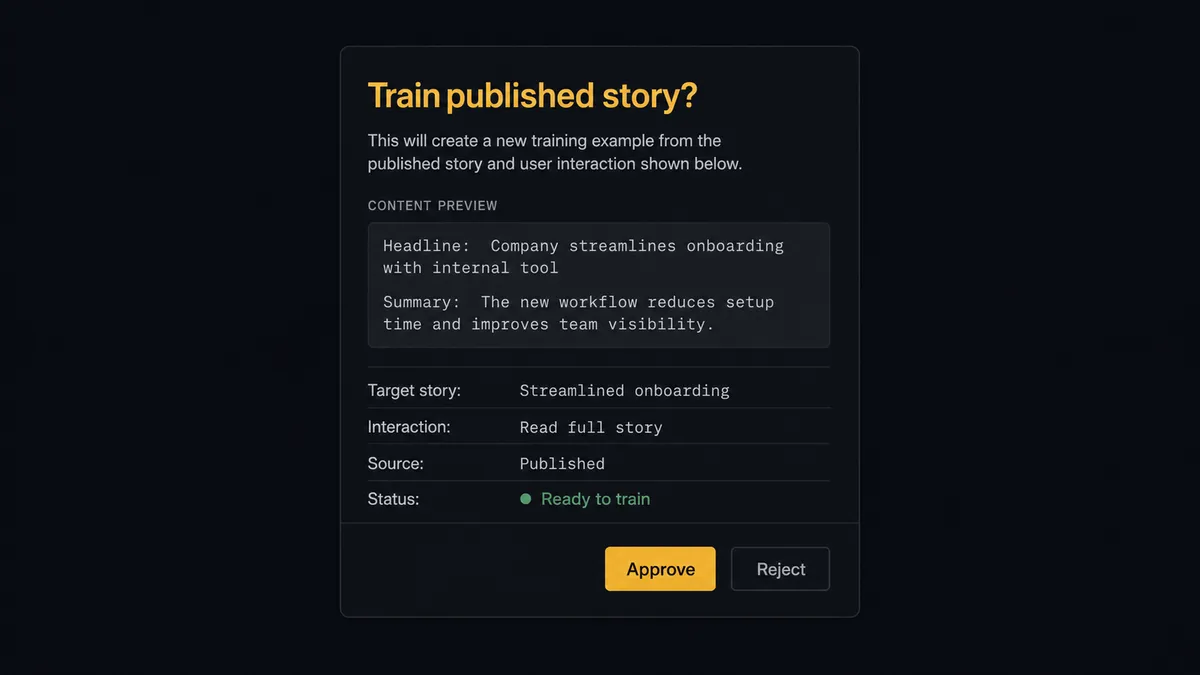
The consequential step is training a published story. A story that is live on your site answers customers the moment its training changes, and a bad Train Custom Text call means wrong answers at scale with no smoke test in between. So the agent stages, and a person approves. It invokes a human-in-loop flow it holds as a callable tool and posts: “Parsed update to the shipping FAQ. Target: the delivery questions interaction in the published support story. Content attached. Train it?” Only after approval does Train Custom Text run, followed by a Send Message verification with the question the content should now answer. The same gate guards Train Phrases mappings, because teaching the story that a phrase means the wrong thing is a subtle failure that surfaces one confused customer at a time. And Delete Story, which permanently removes a story and every interaction in it, never runs without a named approver.
This is the digital andon cord FlowRunner is built around: the line runs, and the moment a step would change what customers are told, it stops for the person accountable. The agent does the assembling, grouping, and verifying. Your team does the approving.
FlowRunner vs LangChain
For a builder, LangChain is the credible alternative here, and the case for it is real. You get code-level control of the whole pipeline, a deep ecosystem of document loaders that includes far more input formats than any single parsing tool, and with LangGraph you can implement interrupt-based human review wherever you decide it belongs. If your team is already maintaining a LangChain stack, adding a training pipeline to it is a known quantity.
The cost is that you own everything: the runtime, the review surface, the retry logic, the audit story. FlowRunner ships those as platform features around the same two APIs.
| What matters for this pair | FlowRunner | LangChain |
|---|---|---|
| Human-in-the-loop before training a published story | Native. The agent invokes an approval flow as a callable tool, over Slack, email, or WhatsApp, with an audit trail | Interrupt patterns available in LangGraph; the review channel and persistence are yours to build |
| Who runs the flow | An AI agent picks actions as tools inside a visual workflow anyone can inspect | Your code, maintained by whoever wrote it |
| Users included | Unlimited users on every tier; the support lead can approve without touching code | Whoever has repo access |
| Bring your own AI keys | Yes, BYOK | Yes, keys in your own code |
| Self-hosted option | Yes, cloud-hosted or self-hosted, no runtime to operate | Runs wherever you deploy it; you operate the runtime |
| Pricing model | Transparent workflow-based tiers | Open-source library is free; infrastructure and engineering time are the real cost |
If this pipeline is a component inside a product your engineers own end to end, LangChain is a fair choice. If you want the training loop live this week with the story owner approving every change from Slack, this pairing gets you there without a deploy.
Before and after
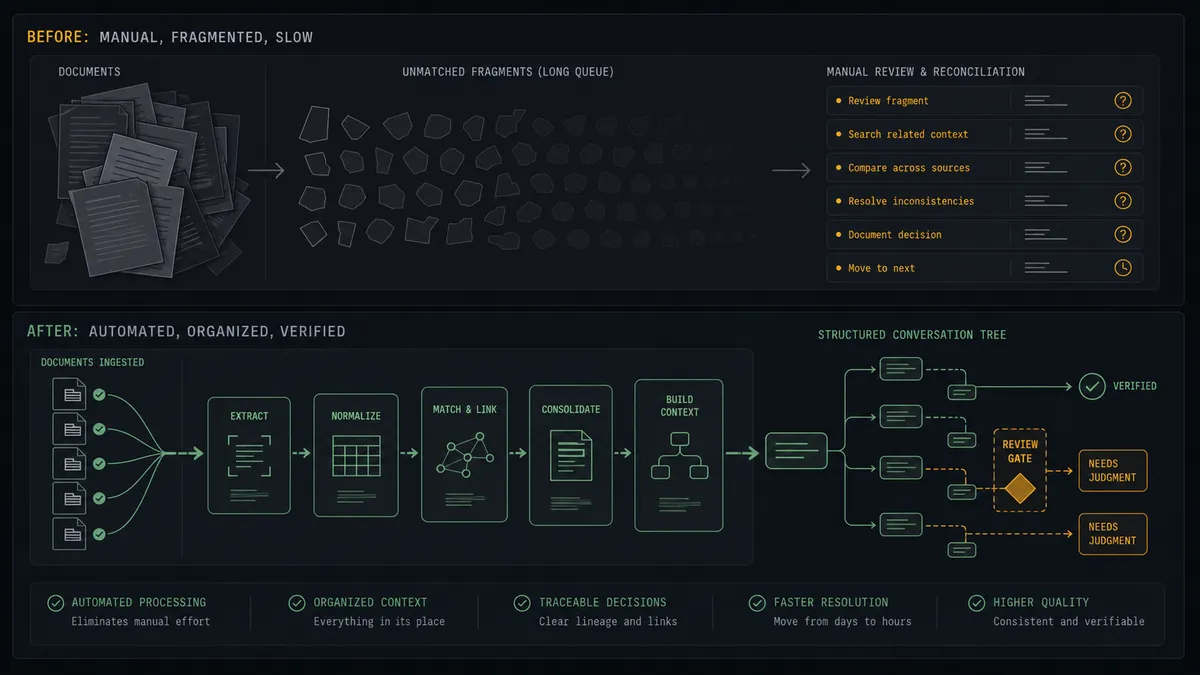
| Category | Before | After |
|---|---|---|
| Training freshness | Stories get retrained in bursts, months apart, when someone finds time | On Document Processed (Realtime) queues every document change for training the day it happens |
| Unmatched queue | The list of questions the story missed grows unworked | The agent triages it on a schedule and proposes mappings a person approves |
| Training safety | Content goes into a live story with no review and no test | Every Train Custom Text call is approved first and verified with Send Message after |
| Knowledge history | Nobody can say what the story was taught, or when, or by whom | Every training change carries content, approver, and timestamp in the audit trail |
| Owner workload | The story owner does copy-paste extraction and triage by hand | The owner reviews staged decisions instead of assembling them |
What you can build
Docs-to-story training loop. On Document Processed (Realtime) fires on each updated FAQ or guide. The agent classifies it, stages Train Custom Text against the right interaction, a person approves, and Send Message verifies the story now answers correctly.
Unmatched-phrase triage. On a weekly schedule the agent pulls List Training Phrases, groups phrases by intent, and proposes Train Phrases for real gaps, Ignore Phrases for noise, and Delete Training Phrases for junk. The story owner approves the batch in one review instead of clicking through a queue.
Story bootstrap from parsed knowledge. For a new product line, the agent creates a fresh story with Create Story, then feeds it parsed launch documentation through the same gated Train Custom Text path, so a new assistant starts grounded instead of empty.
Visitor profile enrichment. When parsed documents carry customer context, the agent matches them to chat visitors with List Users and updates attributes through Update User, then organizes audiences with Update User Segments so future conversations start with better context.
Training health report. On a schedule the agent calls Get Report for conversation metrics and List Training Phrases for gap counts, and posts a digest of what the story handled, what it missed, and what is waiting for approval, so the owner sees the whole system at a glance.
Getting started
Start on the free plan: 100 executions a month, every integration included, no credit card required, plus 14 days of Professional for new accounts. Both connectors are available on every tier, and every tier includes unlimited users and unlimited workflows.
Explore the integration details:
- Parseur integration (2 triggers and 6 actions for document extraction pipelines)
- ChatBot integration (37 actions covering stories, training, users, and reports)
Start building free at flowrunner.ai or book a demo to see a live Parseur to ChatBot workflow, training approval and all.
Frequently asked questions
Is it free to connect Parseur and ChatBot on FlowRunner?
You can build and run the connection on FlowRunner's free plan, which includes 100 executions a month and every integration with no credit card required, and new accounts also get 14 days of Professional. Both connectors are available on every FlowRunner tier, and every tier includes unlimited users and unlimited workflows.
Can I self-host the Parseur to ChatBot workflow?
Yes. FlowRunner offers a cloud-hosted option and a self-hosted option, so the connection can run inside your own environment.
Does the AI agent need my own OpenAI or Claude key?
FlowRunner uses a bring-your-own-keys model, so you connect the AI provider key you already have. You are not locked to one model.
What happens when the agent is unsure whether parsed content should train a live story?
The agent stops and invokes a human-in-loop step. It posts the parsed content, the target story and interaction, and its reasoning, then waits for a person to approve, edit, or reject it. Nothing trains a published story without sign-off, and uncertain content never slips through silently.
Which Parseur events can trigger a ChatBot action?
Parseur offers two triggers: On Document Processed (Realtime), an instant webhook that fires the moment a document is processed, and On Document Processed (Polling), which periodically checks a mailbox for newly processed documents. Realtime is the natural fit for keeping story training current.
How does the workflow handle questions the story failed to match?
On a schedule the agent calls List Training Phrases to pull the unmatched phrases visitors typed, groups them, and proposes a Train Phrases mapping to the right User Input interaction, an Ignore Phrases dismissal for noise, or a Delete Training Phrases cleanup. A person approves each mapping before the story learns it.