How to Connect Perplexity with Slack (With or Without an AI Agent)
Connect Perplexity and Slack in FlowRunner so Sonar-grounded research briefs post automatically to your team channel, with a human confirming sources before any answer drives a decision.
How do you connect Perplexity to Slack?
In FlowRunner, a Slack trigger fires when a research request arrives in a channel or as a mention, the agent calls Perplexity’s Ask or Chat Completion (Advanced) action to get a web-grounded answer with citations, and Send Message to Channel posts the sourced brief back to your team. FlowRunner is a visual AI-agent orchestration platform where automations run autonomously and pause for human judgment on the steps that carry real consequence. That same connection runs as an AI agent with an analyst confirming sources before any verified answer reaches a customer or drives a business decision.
The problem it solves
Research today is a manual relay race. An analyst gets a question, opens a browser, reads through a dozen tabs, copies snippets, and writes a summary with links they hope are still current. The work is slow, the sources are only as fresh as the last time someone searched, and when the summary lands in Slack it is already a paraphrase of a paraphrase. Exceptions fall through the cracks when the analyst is busy or the question arrives after hours.
The deeper problem is accountability. When a sourced answer drives a pricing decision, a customer-facing response, or a compliance call, someone needs to verify the sources. There is no structured place for that verification to happen. It lands in an email thread, a Slack DM, or a sticky note. There is no audit trail. When the answer turns out to be wrong, nobody knows who confirmed it or when.
How it works: the connection
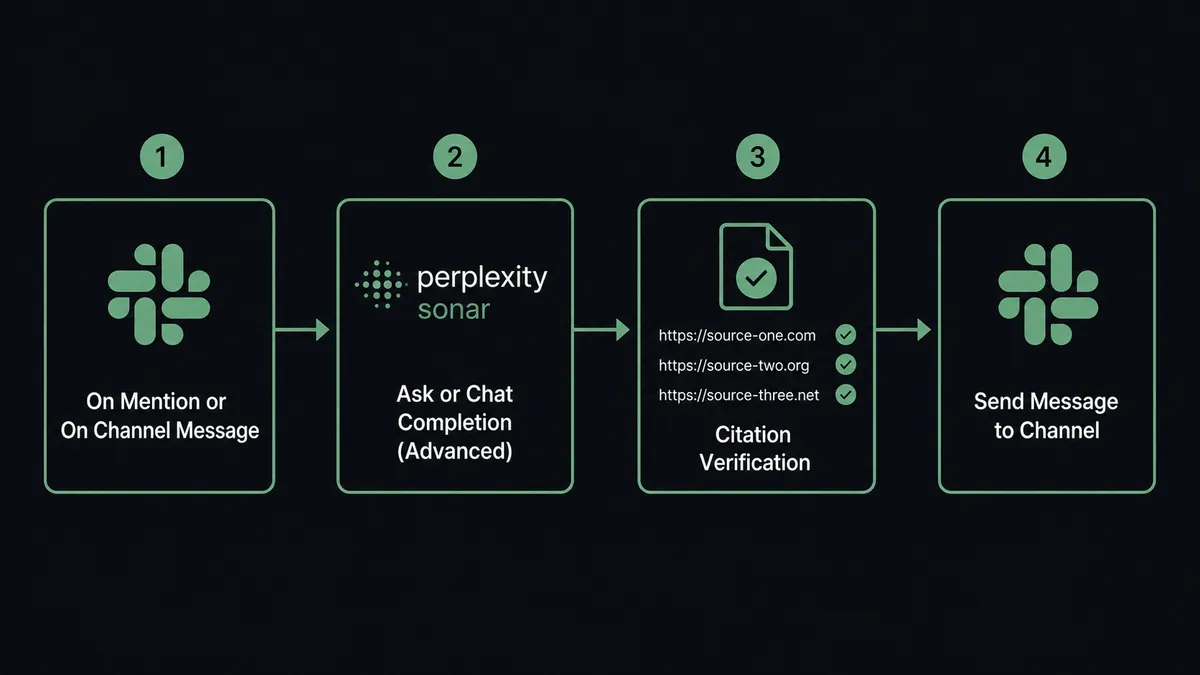
The trigger is a Slack event. Use On Mention when anyone can @mention your agent to kick off a research request, or On Channel Message to monitor a dedicated research channel and start a flow whenever a question is posted.
The agent passes the question text to Perplexity’s Ask action, which calls a Sonar model, searches the live web, and returns a grounded answer along with its citations, the underlying search results, and related follow-up questions. For more control, Chat Completion (Advanced) gives the agent full access to search mode (web, academic, SEC filings), recency filters, domain restrictions, structured JSON output, and reasoning effort for complex questions.
The agent reads the answer and source list. It checks that sources resolve and are recent. It assembles a sourced brief: the synthesized answer, the citation links, and any source conflicts it detected. That brief is ready to post to Slack.
For an internal research request where the sources are clearly current and consistent, the agent posts the verified brief directly to the relevant channel using Send Message to Channel. For anything that will reach a customer or drive a decision, the agent pauses and involves a human before posting.
Can an AI agent run it? (and why a human stays in the loop)
This is not a sync tool. The agent knows when to stop and ask.
When the agent reads a Perplexity answer, it reasons about what it found. It is not checking a hardcoded rule like “always escalate if the answer is longer than 500 words.” It is evaluating the situation: Do the sources conflict? Is the answer going to a customer? Is a source from a site it has not seen before, or from a domain that typically publishes opinion rather than data? Is the question about a regulatory claim?
If any of those conditions apply, the agent invokes a human-in-loop subflow as a callable tool. The workflow pauses. The agent sends the analyst a Slack Direct Message with the full Perplexity answer, every citation link, and a note explaining why it is escalating. The message has two interactive buttons: Confirm Sources and Reject.
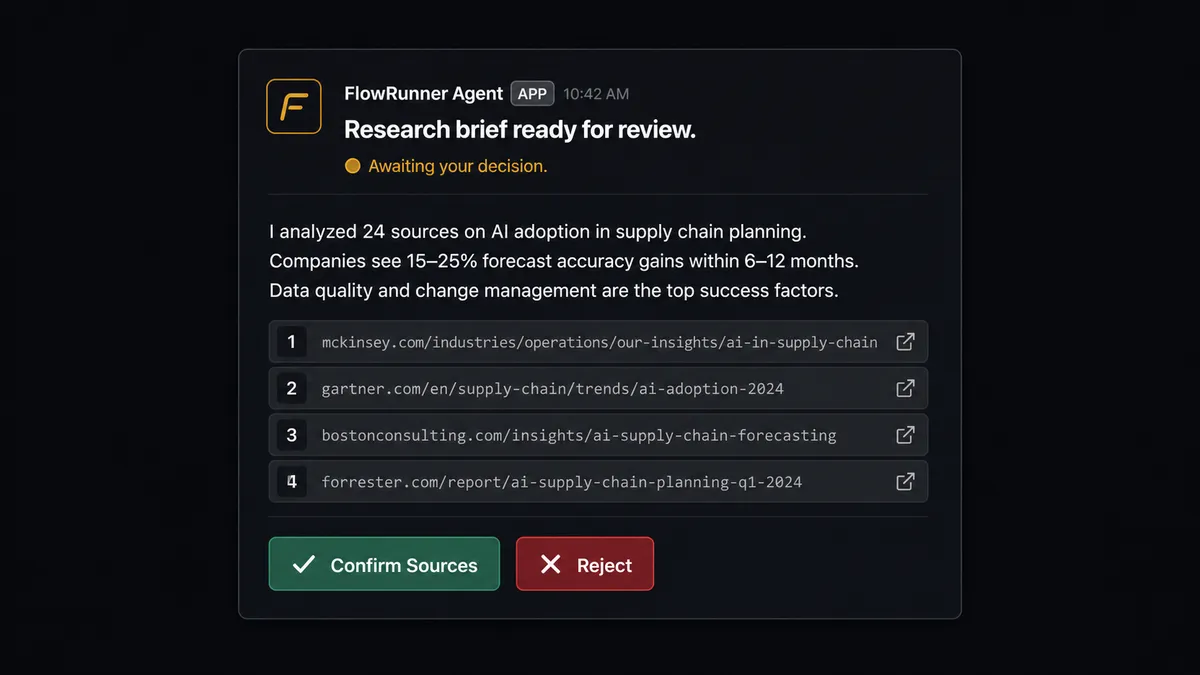
The analyst opens the links, reads the sources, and clicks Confirm. The On Block Action trigger fires, the workflow resumes, and the agent posts the verified brief to the team channel. The decision, the analyst’s identity, and the timestamp are captured in the audit trail. If they click Reject, the agent logs the rejection and either requests a new search with different parameters or notifies the requester that the answer could not be verified.
This is the digital andon cord: the agent stops the line when it hits a step that carries real consequence, hands it to a person with full context, and resumes once the person decides.
Every timed brief, every customer-facing answer, every claim that will appear in a report goes through this gate. The agent handles the research. The analyst owns the conclusion.
FlowRunner vs Zapier (the tool you’re probably comparing)
Zapier is the right comparison for non-technical teams who want to connect two apps without writing code. It does this well. Zapier has a large template library, reliable connectors, and a user experience that most teams can navigate without training.
The differences show up when the connection needs to reason, not just relay.
| Feature | Zapier | FlowRunner |
|---|---|---|
| Human approval on consequential steps | Basic conditional logic; no interactive decision loop | Native human-in-loop subflow invoked by the agent as a callable tool with Slack buttons, audit trail, and resume-on-decision |
| AI agent that reads and evaluates output | Zaps pass data; no agent reads and reasons about the Perplexity answer | AI Agent node reads the answer, checks sources, decides whether to escalate based on context |
| Unlimited users on every tier | Per-user pricing applies to most Zapier plans | Unlimited users and unlimited workflows on every FlowRunner tier |
| BYOK for AI | Zapier AI features use Zapier’s own infrastructure | FlowRunner uses BYOK; your Perplexity API key stays on your account |
| Audit trail for human decisions | Not native | Every approval, rejection, decider identity, and timestamp captured automatically |
| Self-hosted option | No | Community Edition (free) and Enterprise self-hosted |
The core difference: Zapier moves data from Perplexity to Slack. FlowRunner runs an agent that reads the data, reasons about it, and decides whether a human needs to see it before it moves.
Before and after
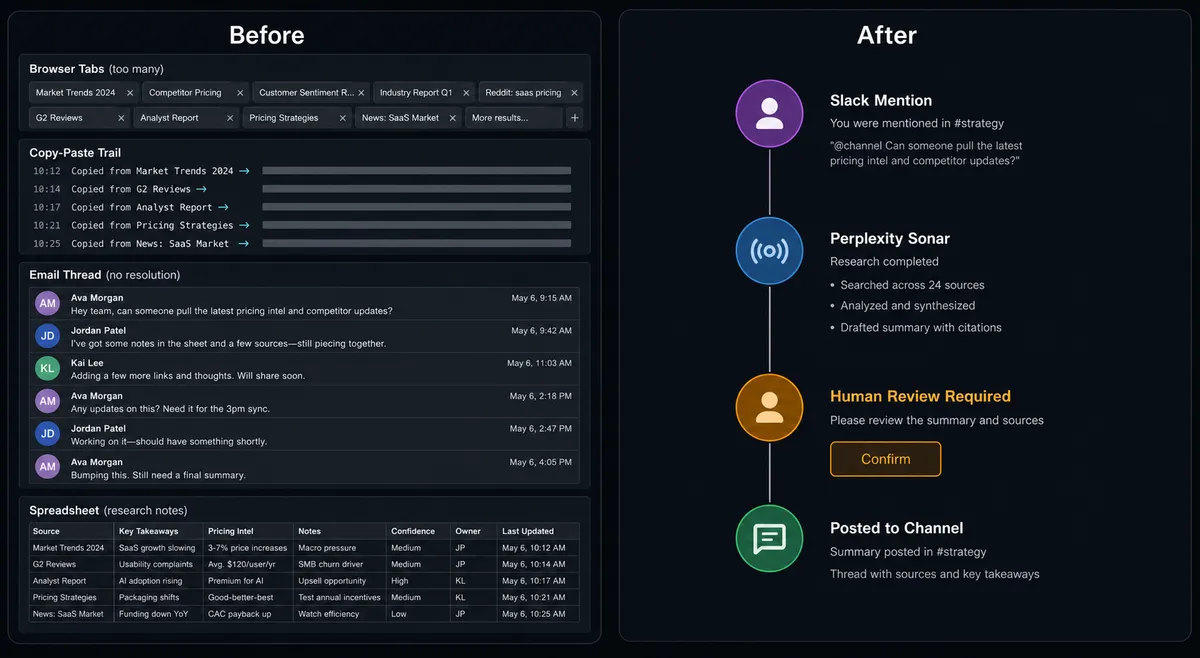
| What changed | Before | After |
|---|---|---|
| Time to sourced answer | 45 min to 2 hours of manual search and summarizing | Under 2 minutes from Slack mention to sourced brief |
| Source verification | Analyst’s memory of what they read | Every citation linked in the brief; analyst clicks through before confirming |
| Answers based on current data | Depends on when the analyst last searched | Perplexity Sonar searches the live web at request time |
| Accountability for verified answers | None; no record of who reviewed what | Audit trail captures analyst identity, confirmation timestamp, and which sources were presented |
| Customer-facing answer process | Email chain between requester and reviewer; easy to skip | Structured human-in-loop gate; agent will not post until a person confirms |
What you can build
Market brief on demand. An analyst @mentions the FlowRunner agent in a Slack channel with a company name. The agent uses Chat Completion (Advanced) with a recency filter to pull current information, assembles a sourced brief, and routes it to the analyst via Send Direct Message for source confirmation before it goes into a report.
Competitive monitoring digest. A scheduled flow runs Search the Web for competitor announcements each morning. The agent filters for results published in the last 24 hours, uses Ask to synthesize a summary with citations, and posts the digest to #competitive-intel using Send Message to Channel. Anything that looks like a major product launch gets flagged and routed to a human via Send Direct Message with Confirm and Escalate buttons before the team is notified.
Customer question verification. When a support agent in a #customer-questions channel flags a factual question with an emoji reaction, On Reaction Added fires. The FlowRunner agent sends the question to Perplexity via Ask, reads the sourced answer, and sends the analyst a Send Direct Message with the answer and citations. The analyst confirms, and the agent posts the verified answer back in the thread using Update Message in Channel.
Research-triggered project channel. A new deal enters the pipeline and a project channel needs a briefing doc. The agent uses Create Agent Response (Perplexity’s Agent API with web search, finance search, and people search tools) to run multi-step research on the company, then posts the sourced brief to a new private channel created with Create Private Channel. Stakeholders are added with Invite User to Channel.
Common questions
Is it free to connect Perplexity and Slack on FlowRunner? FlowRunner has a free plan with 100 executions a month, every integration included, and no credit card required, and new accounts get 14 days of Professional on top. Both the Perplexity connector (BYOK, your own Perplexity API key) and the Slack connector (OAuth2) are included on every tier.
Do I need my own Perplexity API key? Yes. FlowRunner uses a BYOK model for AI providers. You connect your own Perplexity API key in the FlowRunner credentials vault. This keeps your data under your control and your Perplexity usage on your own account.
Can I self-host FlowRunner? Yes. FlowRunner offers a Community Edition for self-hosted single-instance deployments at no cost, and an Enterprise self-hosted tier with multi-instance clustering and full compliance features. Contact the team for Enterprise self-hosted pricing.
What happens when the agent is not sure about a cited source? The agent invokes a human-in-loop flow as a callable tool. It pauses the workflow, sends the Perplexity answer with all source links to the analyst via Slack, and waits for a decision. The analyst confirms the sources and the workflow resumes. The decision, decider identity, and timestamp are captured in the audit trail.
Does this work for customer-facing content, not just internal research? Yes. The human-in-loop step is especially useful for customer-facing answers: the agent runs the Perplexity research, then routes the answer for human review before it goes out. Anything sourced-but-unverified stays inside the workflow until a person signs off.
How many Slack actions does FlowRunner support? FlowRunner’s Slack connector includes 16 actions (Send Message to Channel, Send Direct Message, Update Message in Channel, Create Public Channel, Create Private Channel, Find Channel, Invite User to Channel, Search Messages, Find Member, and more) and 8 triggers including On Block Action for interactive button approvals.
Getting started
FlowRunner has a free plan with 100 executions a month, every integration included, and no credit card required, and new accounts get 14 days of Professional on top. Any real email address works; disposable domains are not accepted.
The Perplexity and Slack connectors are live at /integrations/perplexity and /integrations/slack. Both work on every FlowRunner tier, alongside unlimited users and unlimited workflows.
Start at flowrunner.ai or book a 30-minute walkthrough at calendly.com/flowrunner/intro. The team will show you the exact flow for your research and approval use case.
Frequently asked questions
Is it free to connect Perplexity and Slack on FlowRunner?
FlowRunner has a free plan with 100 executions a month, every integration included, and no credit card required, and new accounts get 14 days of Professional on top. Both the Perplexity connector (BYOK, your own Perplexity API key) and the Slack connector (OAuth2) are included on every tier.
Do I need my own Perplexity API key?
Yes. FlowRunner uses a BYOK model for AI providers. You connect your own Perplexity API key in the FlowRunner credentials vault. This keeps your data under your control and your Perplexity usage on your own account.
Can I self-host FlowRunner?
Yes. FlowRunner offers a Community Edition for self-hosted single-instance deployments at no cost, and an Enterprise self-hosted tier with multi-instance clustering and full compliance features. Contact the team for Enterprise self-hosted pricing.
What happens when the agent is not sure about a cited source?
The agent invokes a human-in-loop flow as a callable tool. It pauses the workflow, sends the Perplexity answer with all source links to the analyst via Slack, and waits for a decision. The analyst confirms the sources and the workflow resumes. The decision, decider identity, and timestamp are captured in the audit trail.
Does this work for customer-facing content, not just internal research?
Yes. The human-in-loop step is especially useful for customer-facing answers: the agent runs the Perplexity research, then routes the answer for human review before it goes out. Anything sourced-but-unverified stays inside the workflow until a person signs off.
How many Slack actions does FlowRunner support?
FlowRunner's Slack connector includes 16 actions (Send Message to Channel, Send Direct Message, Update Message in Channel, Create Public Channel, Create Private Channel, Find Channel, Invite User to Channel, Search Messages, Find Member, and more) and 8 triggers including On Block Action for interactive button approvals.