How to Connect Slack with Capsule CRM (With or Without an AI Agent)
Connect Slack deal conversations to Capsule CRM so the pipeline stays true to what sales actually said, with an AI agent that logs tasks and contacts automatically and pauses for a human before Update Opportunity rewrites a deal's value or milestone.
How do you connect Slack to Capsule CRM?
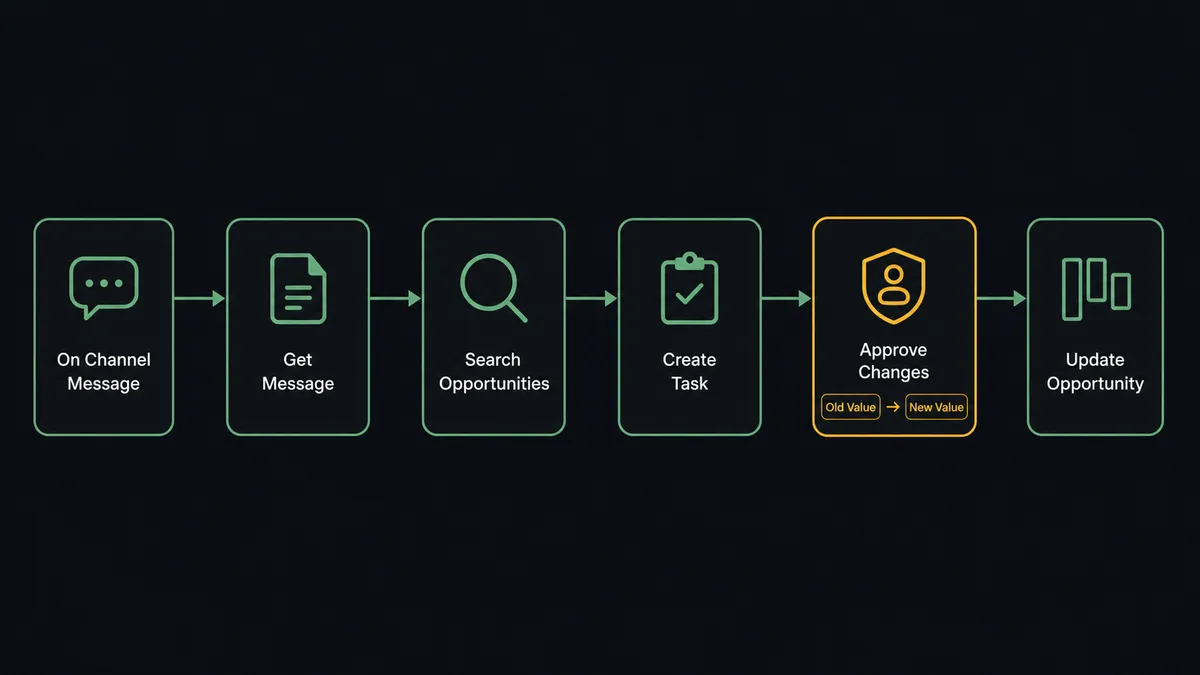
You connect Slack to Capsule CRM by having Slack’s On Channel Message trigger drive Capsule CRM actions: the workflow reads a deal update with Get Message, finds the deal with Search Opportunities, logs the agreed next step with Create Task, and commits stage and value changes with Update Opportunity, so what sales says in the channel becomes what the CRM shows. FlowRunner is a visual AI-agent orchestration platform where automations run autonomously and pause for human judgment on the steps that carry real consequence. The same connection can run as an AI agent that tells the difference between conversation and commitment, writes the safe records itself, and pauses for a named human before it rewrites a deal’s value or milestone.
The problem it solves
In most small sales teams, the deal is discussed in Slack and recorded in Capsule CRM, and those two activities are done by the same person at different times, which is to say the second one is done late or not at all. “They verbally agreed, sending the contract Thursday” gets typed into the channel at 4pm and into the CRM sometime next week, after the pipeline review already ran on stale data. The founder or ops lead scrolls channels before every forecast call, reconstructing reality from threads, because the CRM is a lagging indicator of its own pipeline.
The edges hurt the numbers directly. A deal renegotiated down in a thread still shows the old value in the forecast. A contact who joined the buying committee exists in Slack history and nowhere else. Worst is the cleanup problem in reverse: when someone finally does bulk-update the CRM from memory, they update the wrong opportunity, mark the wrong deal lost, or delete a “duplicate” person who was actually the champion on a live deal. A CRM that gets edited in catch-up batches is a CRM nobody fully trusts.
How it works: the connection
The connection listens to deal channels and writes to Capsule CRM. Here is the plain version, grounded in the real connector actions.
- Trigger: Slack fires On Channel Message when an update lands in a watched deal channel.
- Read: The workflow calls Get Message to pull the update and its thread context.
- Resolve: It calls Search Opportunities to find the deal, and Search Parties when the update mentions a person, matching against existing records.
- Log: It calls Create Task against the opportunity with the agreed next step and its deadline, so commitments made in chat get owners and dates.
- Enrich: For a new stakeholder, it calls Create Person, or Create Organisation for a new company, linked to the deal’s party.
- Update: For stage and value changes, it calls Get Opportunity to capture the current state, then routes the change to approval before Update Opportunity commits it.
- Confirm: Send Message To Channel replies in the thread with what was recorded, so the channel knows the CRM heard it.
That is the “just connect them” answer. Deal talk becomes deal data at the moment it is spoken, and the pipeline review starts from a CRM that is already current. On Mention adds the read path: ask for a deal and the agent answers from Get Opportunity, List Tasks, and the milestones in List Milestones.
Can an AI agent run it? (and why a human stays in the loop)
Yes, and the hard part is exactly what an agent is for: reading a channel where deal-changing statements and ordinary conversation are interleaved. “Pushing our call to Tuesday” is a calendar detail. “They want to start with the smaller package” is a value change. “Legal signed off, sending the order form” is a milestone move. The agent classifies each message, and only the ones that change the record touch the CRM. Its toolbox is the real action set: Search Opportunities, Get Opportunity, Create Task, Create Person, Search Parties, Update Opportunity, with List Pipelines and List Milestones as its map of your sales process.
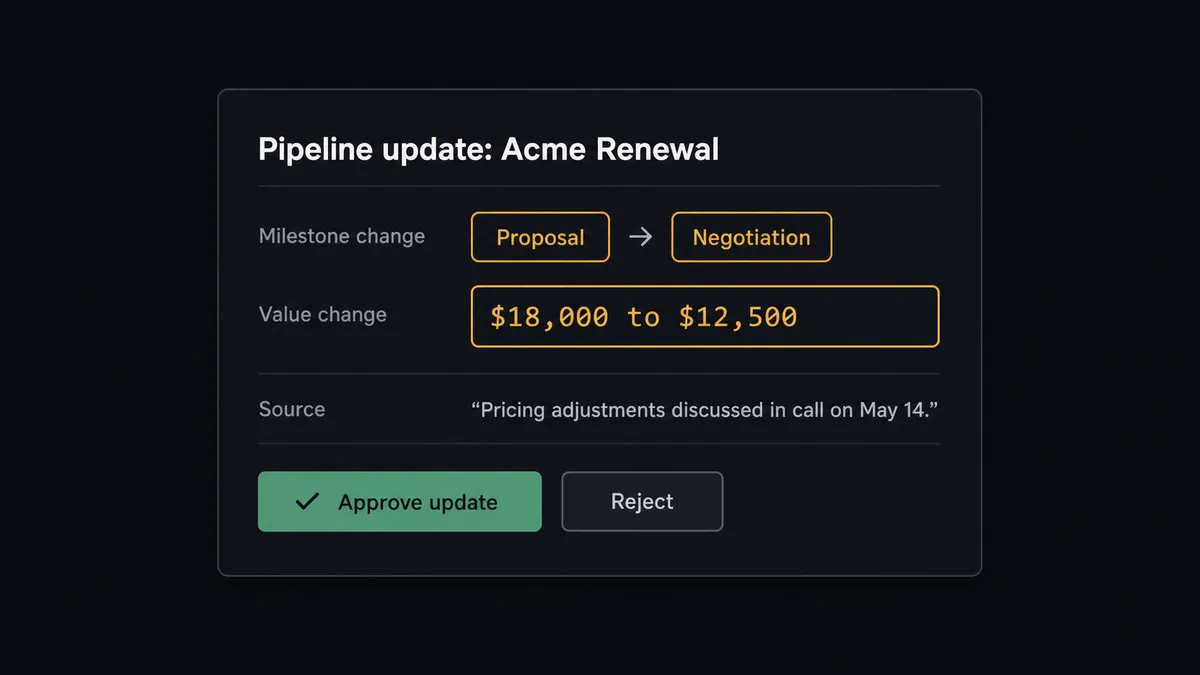
The consequential step is the pipeline rewrite. Value and milestone are the two fields your forecast is built from, and a wrong write there does not look wrong, it looks like revenue. So the agent holds Update Opportunity behind a human-in-loop flow it invokes as a callable tool whenever value or milestone would change. The workflow pauses and posts: “Acme Renewal: move from Proposal to Negotiation, value change $18,000 to $12,500 based on ‘they want the smaller package’. Approve the update?” The deal owner clicks approve, the change commits, and the source message, approver, and timestamp land in the audit trail. Delete Opportunity and Delete Party sit behind the same gate with no exceptions, because deletion takes history with it.
This is the digital andon cord, the framing our own prospects gave us: like the pull cord on a Toyota line, the workflow stops the line the moment the next write changes what leadership believes about revenue. Tasks and contacts flow freely. The forecast changes only with a name attached.
FlowRunner vs Zapier
Zapier is the natural first stop for Slack-to-CRM wiring, and its strengths are real: a huge connector library, an editor anyone can drive, and templates that stand up a “new message creates a record” push in minutes. For simple capture in one direction, it is genuinely good.
This pair is not simple capture; it is interpreting conversation and protecting the forecast. Here is the honest side-by-side.
| What matters for this pair | FlowRunner | Zapier |
|---|---|---|
| Human-in-the-loop on Update Opportunity | Native. The agent pauses with old and new values before any value or milestone change | Approval steps can be assembled into a Zap, not a native agent decision |
| Who runs the flow | An AI agent classifies messages, resolves deals, picks actions as tools | Predefined step sequence you configure per Zap |
| Users included | Unlimited users on every tier | Priced by task volume; seats vary by plan |
| Bring your own AI keys | Yes, BYOK | AI features tied to Zapier’s own AI offering |
| Self-hosted option | Yes, cloud-hosted or self-hosted | Cloud only |
| Pricing model | Transparent workflow-based tiers | Per-task pricing that climbs with every message evaluated |
If you want each new message in one channel to become a Capsule CRM entry, Zapier does that well. If you want an agent reading deal channels, logging what matters, and stopping for a person before the forecast changes, this pairing is the better fit.
Before and after
| Category | Before | After |
|---|---|---|
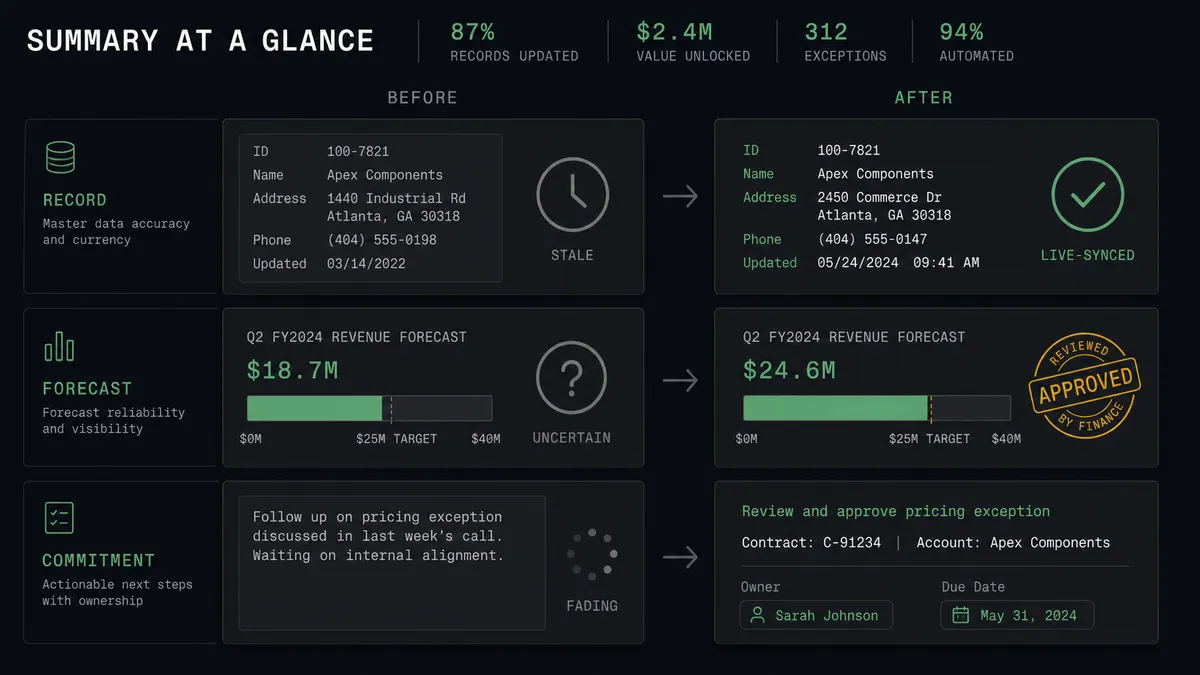
| Record freshness | The CRM trails the channel by days, updated in catch-up batches | Deal talk becomes deal data the moment it is posted |
| Forecast trust | Pipeline reviews start with “is this current?” | Value and milestone changes are approved, stamped, and sourced |
| Next steps | Commitments made in threads evaporate | Create Task gives every commitment an owner and a date |
| New stakeholders | Buying-committee contacts exist only in Slack history | Create Person and Create Organisation capture them, linked to the deal |
| Destructive edits | Bulk cleanup edits and deletes happen from memory, silently | Update Opportunity changes and every delete pass through a named approval |
What you can build
Deal-channel scribe. On Channel Message watches the deal channels, the agent classifies updates, Create Task logs commitments, and gated Update Opportunity keeps stage and value true. The CRM stops being a Friday chore.
Pipeline answers in-thread. On Mention, “where is the Acme renewal?” runs Search Opportunities and Get Opportunity, and the agent replies with milestone, value, open tasks from List Tasks, and the last recorded step, without anyone opening Capsule.
Stakeholder capture. When a thread introduces “their new CFO, Dana”, the agent checks Search Parties, drafts a Create Person entry linked to the account, and confirms in-thread, so the buying committee exists in the CRM before the next call.
Lost-deal discipline. When a channel goes quiet past your threshold, the agent proposes the move to lost with the evidence, and a person decides. Update Opportunity fires on approval, so the pipeline sheds dead weight without anyone quietly deleting deals.
Case handoff from support threads. When a customer issue surfaces in a shared channel, the agent opens a Capsule case with Create Case, links the party from Search Parties, and posts the case reference back, so support history and sales history stop living apart.
Getting started
Start on the free plan: 100 executions a month, every integration included, no credit card required, plus 14 days of Professional for new accounts. Both connectors are available on every tier, and every tier includes unlimited users and unlimited workflows.
Explore the integration details:
- Slack integration (8 triggers and 16 actions covering messages, channels, members, and interactive approvals)
- Capsule CRM integration (31 actions covering parties, opportunities, cases, tasks, and pipelines)
Start building free at flowrunner.ai or book a demo to see a live Slack to Capsule CRM workflow, pipeline-change approval and all.
Frequently asked questions
Is it free to connect Slack and Capsule CRM on FlowRunner?
You can build and run the connection on FlowRunner's free plan, which includes 100 executions a month and every integration with no credit card required, and new accounts also get 14 days of Professional. Both connectors are available on every FlowRunner tier, and every tier includes unlimited users and unlimited workflows.
Can I self-host the Slack to Capsule CRM workflow?
Yes. FlowRunner offers a cloud-hosted option and a self-hosted option, so the connection can run inside your own environment.
Does the AI agent need my own OpenAI or Claude key?
FlowRunner uses a bring-your-own-keys model, so you connect the AI provider key you already have. You are not locked to one model.
What happens when the agent is unsure which deal a Slack update refers to?
It asks before it writes. If Search Opportunities returns more than one plausible deal, the agent posts the candidates in the thread and waits for a pick. A pipeline update applied to the wrong deal corrupts the forecast, so ambiguity always resolves to a person.
Which Slack triggers and Capsule CRM actions does this connection use?
The main path uses Slack's On Channel Message trigger, with On Mention for on-demand lookups, driving Capsule CRM's Search Opportunities, Get Opportunity, Update Opportunity, Create Task, Create Person, and Search Parties actions.
Does the agent close or delete deals on its own?
Never. Update Opportunity calls that change value or milestone, including marking a deal lost, pause for a named approver with old and new values shown. Delete Opportunity and Delete Party are gated without exception, because a deleted record takes its history with it.