How to Connect Calendly with Capsule CRM (With or Without an AI Agent)
Connect Calendly bookings, cancellations, and no-shows to Capsule CRM records, with an AI agent that builds the pipeline automatically and pauses for a human before a deal is marked lost or a customer meeting is canceled.
How do you connect Calendly to Capsule CRM?
You connect Calendly to Capsule CRM by letting bookings build the pipeline: Calendly’s On Invitee Created trigger fires when a prospect books a meeting, the workflow checks for the invitee with Search Parties, writes the record with Create Person, opens the deal with Create Opportunity, and logs the meeting with Create Task. FlowRunner is a visual AI-agent orchestration platform where automations run autonomously and pause for human judgment on the steps that carry real consequence. Run the same connection as an AI agent and the calendar becomes more than an intake form: the agent reads each booking, cancellation, and no-show in the context of the deal behind it, and pauses for a named human before it writes off an opportunity or touches a meeting a customer is expecting.
The problem it solves
The calendar knows things the CRM never hears about. A prospect books a demo, and unless someone copies the invitee’s name, email, and answers into Capsule CRM, the deal starts life as a calendar entry with no pipeline record. After the meeting, someone remembers to create the opportunity, or does not. When the prospect cancels, the calendar updates and the CRM keeps showing a meeting that will never happen. Your pipeline review runs on records, and the records run on whoever had time to copy things over this week.
No-shows are the sharpest edge. A prospect misses a call and the deal enters limbo: the rep means to follow up, the task never gets created, and three weeks later nobody remembers whether this was a dead lead or a hot one with a sick kid at home. Some teams solve this with a blanket rule that marks every no-show cold, which quietly buries deals that one polite rebooking link would have saved. The judgment call between “send a fresh link” and “let it go” is exactly the kind of decision that never survives being automated with a rule, and never gets made at all when it depends on a human remembering.
How it works: the connection
The connection listens to Calendly and writes to Capsule CRM. Here is the plain version, grounded in the real connector actions.
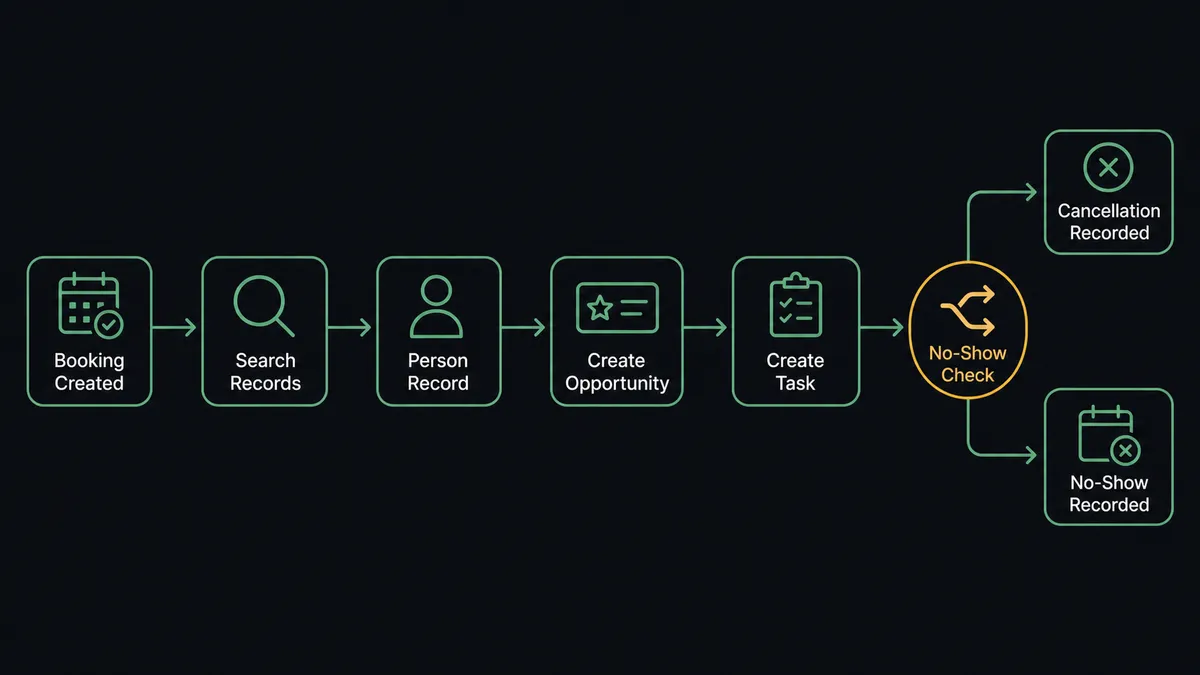
- Trigger: Calendly fires On Invitee Created the moment a prospect books through your scheduling page.
- Match: The workflow calls Search Parties in Capsule CRM with the invitee’s email to check for an existing person or organisation.
- Write the record: If the invitee is new, it calls Create Person with the name and email, tagged by the event type they booked.
- Open the deal: It calls Create Opportunity linked to the party, with the routing form or booking answers in the description and a milestone at the top of the pipeline.
- Log the meeting: It calls Create Task with the meeting time as the due date, assigned to the meeting owner, so prep and follow-up live on the record.
- Handle the exits: On Invitee Canceled updates the task and flags the opportunity for follow-up; On Mark Invitee as No-Show routes the deal into the no-show path instead of silence.
That is the “just connect them” answer. Every booking becomes a record, every cancellation is visible in the pipeline, and On New Routing Form Submitted catches the prospects who filled out the form but never picked a time, which is its own follow-up list most teams never see.
Can an AI agent run it? (and why a human stays in the loop)
Yes, and the difference is what happens after the happy path. An agent holds the real actions as tools: Search Parties, Get Party, Get Opportunity, Create Person, Create Opportunity, Update Opportunity, and Create Task on the Capsule CRM side; Create Single-Use Scheduling Link, Create One-Off Meeting, and Cancel Scheduled Event on the Calendly side. When a booking arrives, the agent does not just stamp out records. It reads the situation: a first-time prospect gets a new opportunity, a booking from an account with an open deal gets attached to that deal instead of duplicating it, and a current customer booking a support slot gets a case-style task rather than a phantom sales opportunity.
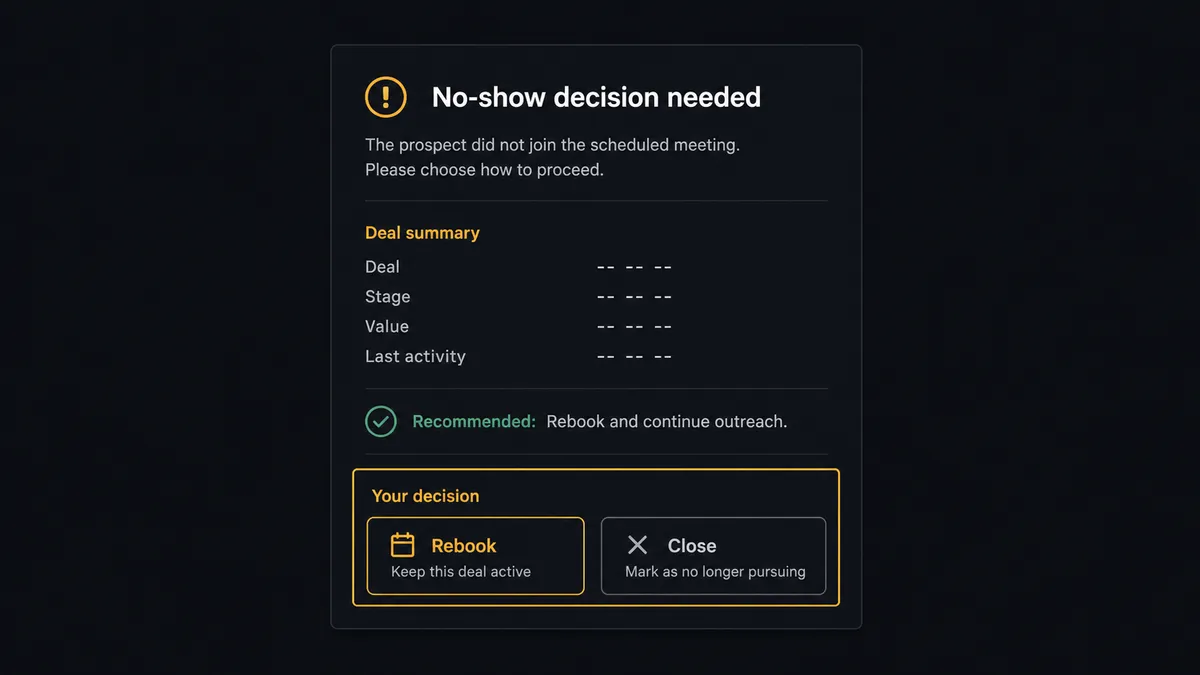
The consequential steps are the ones that end conversations. Moving an opportunity to a lost milestone with Update Opportunity buries a deal, and Cancel Scheduled Event reaches into a real person’s calendar. The agent treats both as gated. After a second no-show on a mid-pipeline deal, it does not quietly close anything. It invokes a human-in-loop flow it holds as a callable tool, and your channel gets: “Second no-show from the invitee on the Riverside Dental opportunity. History shows an engaged first call. Recommend one more Create Single-Use Scheduling Link before we close this. Send the link, or mark the deal lost?” A person picks. If they choose the link, the agent generates it and logs the touch with Create Task. If they choose lost, Update Opportunity runs with the approver’s name and timestamp in the audit trail.
Prospects call this the digital andon cord: the workflow stops the line the moment the next step carries judgment, a person pulls the cord back, and the line keeps moving. The agent handles every routine booking; your team only sees the calls worth making.
FlowRunner vs Zapier
Zapier is the default way most teams first wire Calendly to a CRM, and it earned that position. The template gallery almost certainly has a prebuilt “Calendly booking creates a contact” flow for your exact combination, setup is genuinely fast, and for logging bookings one way into Capsule CRM it does the job.
The gap opens after the booking. FlowRunner treats cancellations, no-shows, and closes as decisions with a human gate, not just more steps in a sequence.
| What matters for this pair | FlowRunner | Zapier |
|---|---|---|
| Human-in-the-loop before a deal is marked lost or a meeting is canceled | Native. The agent invokes an approval flow as a callable tool and pauses | Available via added approval steps, not a native agent decision |
| Who runs the flow | An AI agent reads each booking against the deal behind it | Predefined step sequence treats every event the same |
| Users included | Unlimited users on every tier | Priced by task volume; seats vary by plan |
| Bring your own AI keys | Yes, BYOK. Connect the provider key you already have | AI features tied to Zapier’s own AI offering |
| Self-hosted option | Yes, cloud-hosted or self-hosted | Cloud only |
| Pricing model | Transparent workflow-based tiers with clear execution limits | Per-task pricing across every booking, cancellation, and update |
If you just want bookings copied into the CRM, Zapier does that well. If you want the no-show judgment call routed to a person and every closed deal to carry an approver’s name, that is what this pairing is for.
Before and after
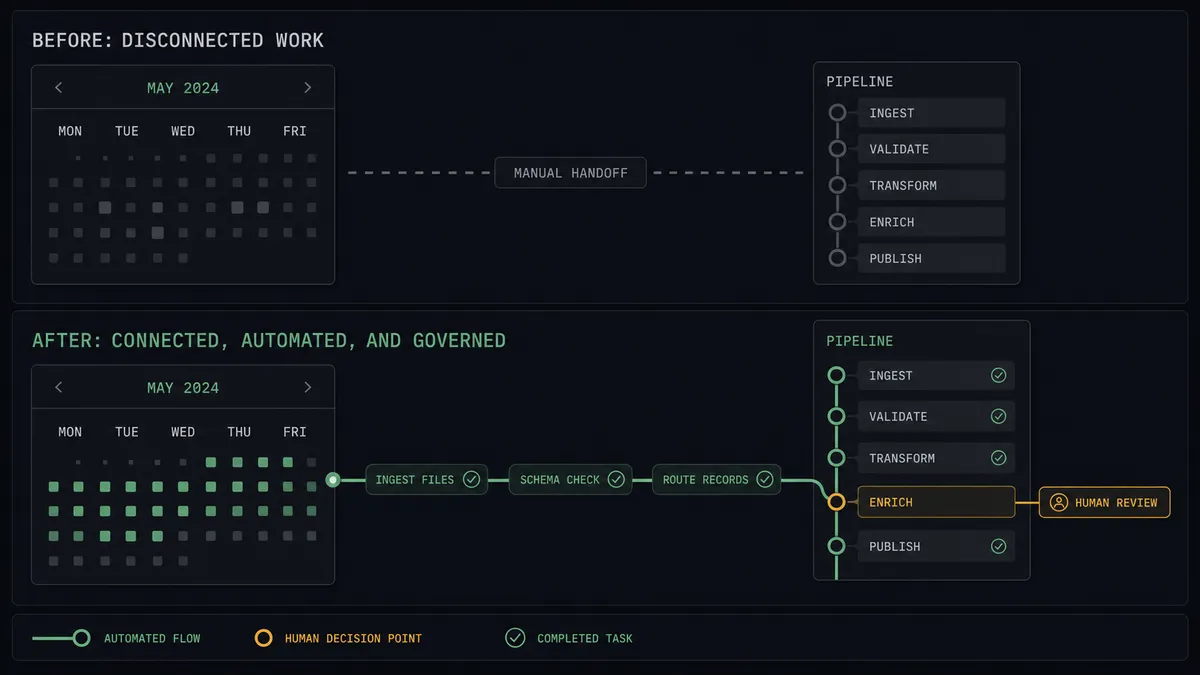
| Category | Before | After |
|---|---|---|
| Booking capture | Invitee details get copied into Capsule CRM when someone finds time | Create Person and Create Opportunity run the moment the booking lands |
| Cancellations | The calendar updates but the CRM keeps showing a meeting that will not happen | On Invitee Canceled updates the task and flags the deal for follow-up |
| No-show follow-up | Deals drift into limbo while reps mean to circle back | The agent proposes a rebooking link or a close, and a person decides |
| Lost-deal hygiene | Opportunities get closed in bulk during quarterly cleanup, reasons unknown | Every lost milestone move carries an approver, a reason, and a timestamp |
| Routing form leads | Prospects who filled the form but never booked disappear entirely | On New Routing Form Submitted turns them into a visible follow-up list |
What you can build
Booking to pipeline, hands off. On Invitee Created fires, the agent matches with Search Parties, writes Create Person, opens Create Opportunity, and logs Create Task. Every demo booked is a deal in the pipeline before the meeting starts.
No-show recovery with judgment. On Mark Invitee as No-Show fires. The agent reviews the deal with Get Opportunity, recommends a path, and a person approves either Create Single-Use Scheduling Link for one more chance or Update Opportunity to close it. On Unmark Invitee as No-Show reverses the flag when the prospect turns up after all.
Routing form rescue list. On New Routing Form Submitted fires even when no meeting gets booked. The agent creates the party and a follow-up task, so the leads who stalled at the calendar step get a human touch instead of vanishing.
VIP fast lane. When a booking’s email domain matches a strategic account, the agent attaches the meeting to the existing opportunity, bumps the task to the account owner, and offers Create One-Off Meeting to add a senior teammate to the conversation.
Clean cancellation handling. When your side needs to cancel, the agent drafts the reason, a named approver signs off, and only then does Cancel Scheduled Event run, followed by a Create Task to rebook, so a schedule change never turns into a dropped relationship.
Getting started
Start on the free plan: 100 executions a month, every integration included, no credit card required, plus 14 days of Professional for new accounts. Both connectors are available on every tier, and every tier includes unlimited users and unlimited workflows.
Explore the integration details:
- Calendly integration (5 triggers and 3 actions for scheduling automation)
- Capsule CRM integration (31 actions covering parties, opportunities, cases, and tasks)
Start building free at flowrunner.ai or book a demo to see a live Calendly to Capsule CRM workflow, no-show decision and all.
Frequently asked questions
Is it free to connect Calendly and Capsule CRM on FlowRunner?
You can build and run the connection on FlowRunner's free plan, which includes 100 executions a month and every integration with no credit card required, and new accounts also get 14 days of Professional. Both connectors are available on every FlowRunner tier, and every tier includes unlimited users and unlimited workflows.
Can I self-host the Calendly to Capsule CRM workflow?
Yes. FlowRunner offers a cloud-hosted option and a self-hosted option, so the connection can run inside your own environment.
Does the AI agent need my own OpenAI or Claude key?
FlowRunner uses a bring-your-own-keys model, so you connect the AI provider key you already have. You are not locked to one model.
What happens when the agent is unsure whether a no-show means a dead deal?
The agent stops and invokes a human-in-loop step. It posts the invitee, the deal's history from Get Opportunity, and its recommendation to your team channel, then waits. A person decides whether the agent sends a fresh Create Single-Use Scheduling Link or the opportunity moves to a lost milestone. Nothing is written until someone chooses.
Which Calendly events can trigger a Capsule CRM action?
Calendly offers five triggers: On Invitee Created, On Invitee Canceled, On Mark Invitee as No-Show, On Unmark Invitee as No-Show, and On New Routing Form Submitted. On Invitee Created is the workhorse for pipeline building, and the no-show pair drives follow-up logic.
Can the workflow cancel a Calendly meeting on its own?
No. Cancel Scheduled Event reaches into a customer's calendar, so the agent always pauses first. It posts the meeting, the reason it recommends canceling, and the affected invitee, and a named approver signs off before the cancellation goes out. The decision is captured in the audit trail.