How to Connect Airtable with Capsule CRM (With or Without an AI Agent)
Connect Airtable intake tables to Capsule CRM records and opportunities, with an AI agent that dedupes every lead against the CRM and pauses for a human before Update Party overwrites data your team already trusts.
How do you connect Airtable to Capsule CRM?
You connect Airtable to Capsule CRM by having Airtable’s On New Record trigger fire when a lead lands in your intake table, checking for an existing match with Search Parties, and creating the CRM records with Create Person, Create Organisation, and Create Opportunity, so a row in the operations base becomes a working pipeline entry without anyone copying fields between tabs. FlowRunner is a visual AI-agent orchestration platform where automations run autonomously and pause for human judgment on the steps that carry real consequence. The same connection can run as an AI agent that dedupes every row against the CRM and pauses for a person before Update Party overwrites data your team already trusts.
The problem it solves
Airtable is where operational reality lives: the event lead list, the partner intake form, the enriched prospect table someone built on a weekend. Capsule CRM is where the sales team actually works. Between them sits a human copy machine. Someone exports or eyeballs the new rows, retypes names and emails into Capsule, creates the opportunity, and marks the row “added.” It happens weekly at best, so the CRM trails the intake table by days, and the leads that arrive hot get worked cold.
The sharper problem is what happens when the two systems disagree. The intake row says the contact is at a new company; the CRM says otherwise, updated last month by the rep who actually spoke to them. A naive sync picks a winner silently, and it usually picks wrong, because a spreadsheet row from a scraped list should not outrank a rep’s firsthand note. One bad overwrite of a key account’s record teaches the whole team to distrust the sync, and then you are back to the copy machine.
How it works: the connection
The connection listens to Airtable and writes to Capsule CRM. Here is the plain version, grounded in the real connector actions.
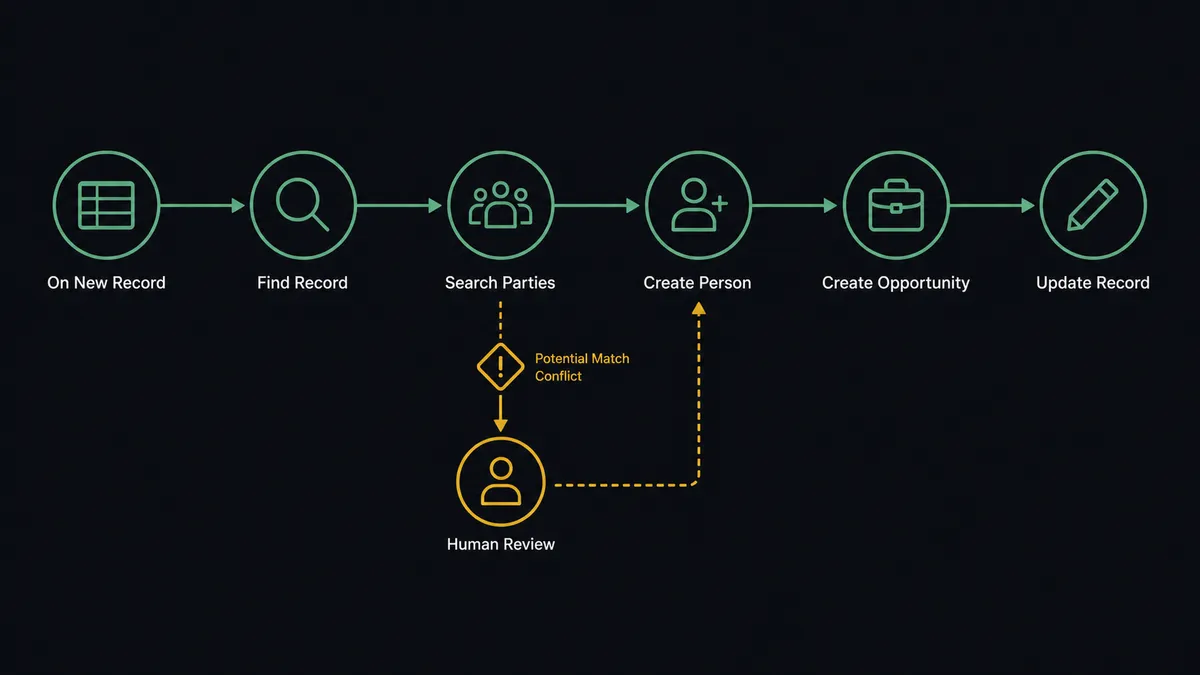
- Trigger: Airtable fires On New Record when a lead row lands in the intake table.
- Read: The workflow calls Find Record to pull the full row: name, email, phone, company, and source.
- Dedupe: It calls Search Parties in Capsule CRM by email and name to check whether this person or organisation already exists.
- Create: For a clean new lead, it calls Create Person, Create Organisation for the company, and Create Opportunity to put the deal in the pipeline.
- Link back: It calls Update Record in Airtable to stamp the row with the Capsule party and opportunity IDs, so the two systems stay traceably joined.
- Annotate: It calls Create Task in Capsule CRM to queue the first touch for the owning rep, with the source row referenced.
That is the “just connect them” answer. Rows become worked leads the same hour they arrive, and every row knows its CRM counterpart.
Can an AI agent run it? (and why a human stays in the loop)
Yes, and the dedupe is where an agent beats a field-matching rule. The agent holds the pair’s real actions as tools: Find Record, Find Many Records, Update Record, Create Comment, Search Parties, Get Party, Create Person, Create Organisation, Update Party, Create Opportunity, Create Task. It reads each row the way a careful ops person would: “J. Smith at Acme” and “Jane Smith, Acme Corp” are probably one person; two “Jane Smith” entries at different companies are probably two. It normalizes the obvious, creates the clean, and treats ambiguity as a question rather than a coin flip.
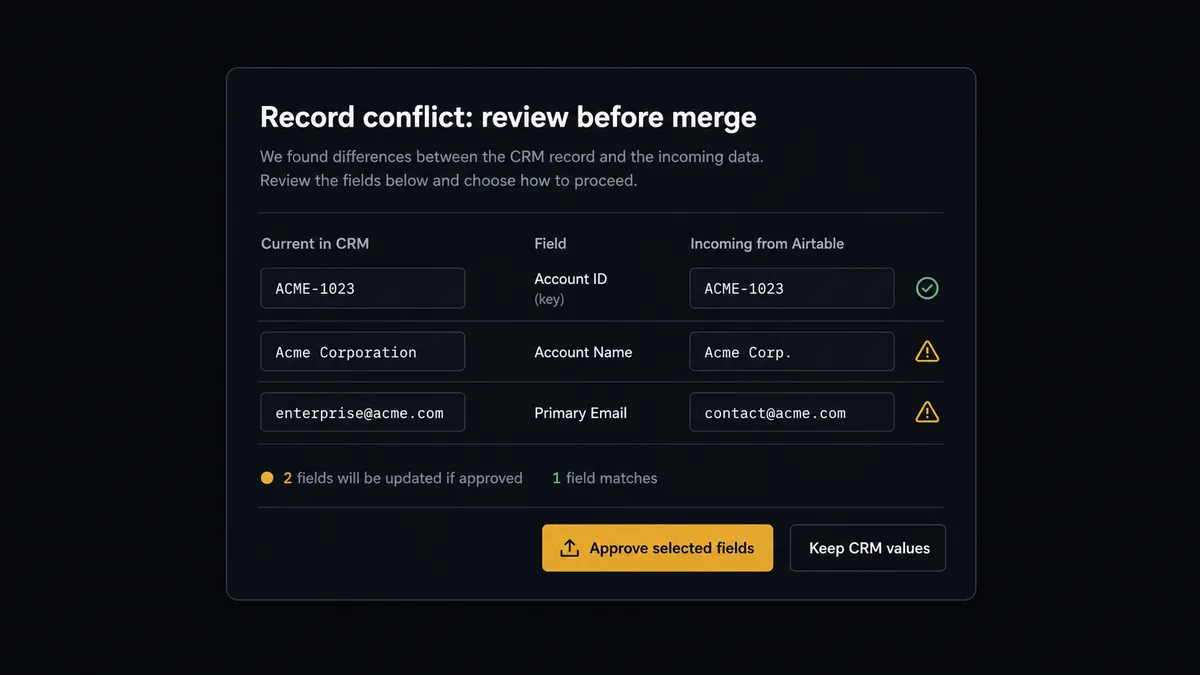
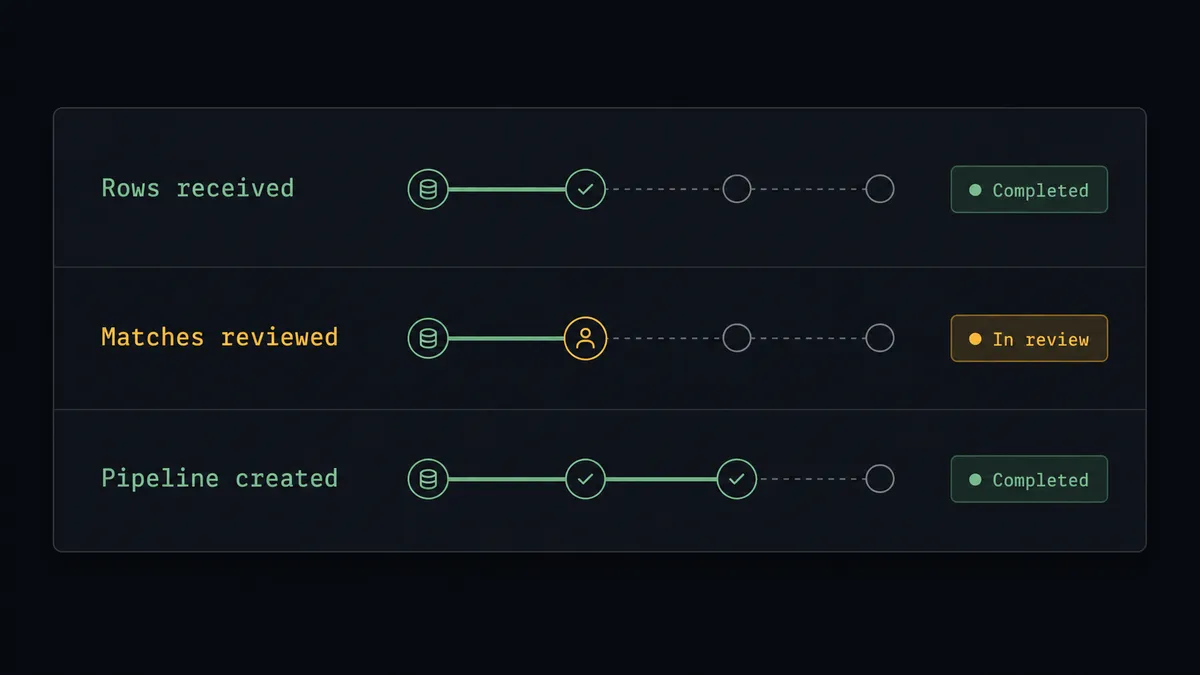
The consequential step is Update Party, because it overwrites a record the team already works from. The CRM’s current phone number came from a rep’s conversation; the incoming row’s came from a form or a list. Blindly preferring either corrupts something. So when a matched lead carries conflicting fields, the agent invokes a human-in-loop flow it holds as a callable tool. The workflow pauses and posts the diff: “Incoming row matches [party] in Capsule. Conflicts: company differs, phone differs, email matches. Current values left, incoming values right. Approve fields to update?” The reviewer approves per field, and Update Party writes exactly those. Delete Party, the unrecoverable action, never runs inside this flow at all without the same named approval.
Ambiguous matches stop the line the same way: rather than guess whether two similar records are one person, the agent presents both from Get Party and lets a human make the call once, permanently recorded. Prospects call this the digital andon cord: like Toyota’s production line, the workflow halts the moment it hits uncertainty, because CRM trust, once lost to a silent overwrite, is expensive to win back.
FlowRunner vs Zapier
Zapier handles Airtable and Capsule well, and for the straightforward version of this sync it is genuinely quick: the template gallery has “new record creates a contact” patterns ready, setup is friendly, and a linear Zap will faithfully copy new rows into the CRM. Teams with clean data and no duplicates get real value from that in an afternoon.
The catch is that lead data is never clean for long, and the failure mode of a linear sync is the silent overwrite or the silent duplicate. FlowRunner is built around native human-in-the-loop and AI-agent orchestration, so the conflict case, the case that actually damages a CRM, is handled as a first-class decision.
| What matters for this pair | FlowRunner | Zapier |
|---|---|---|
| Human-in-the-loop before Update Party overwrites CRM data | Native. The agent posts a field-level diff as a callable approval tool and waits | Available via added approval steps, not a native agent decision |
| Who runs the flow | An AI agent dedupes, reasons about matches, picks actions as tools | Predefined step sequence you configure per Zap |
| Users included | Unlimited users on every tier | Priced by task volume; seats vary by plan |
| Bring your own AI keys | Yes, BYOK. Connect the AI provider key you already have | AI features tied to Zapier’s own AI offering |
| Self-hosted option | Yes, cloud-hosted or self-hosted | Cloud only |
| Pricing model | Transparent workflow-based tiers | Per-task pricing that can be hard to predict as volume grows |
If your intake table is small and tidy, a Zapier sync will serve. If the table is the front door for real lead volume and your CRM is the system of record your team must be able to trust, the gated merge is the difference, and that is what this pairing does.
Before and after
| Category | Before | After |
|---|---|---|
| Lead latency | Rows wait for the weekly copy session into the CRM | On New Record moves each lead into Capsule CRM the hour it arrives |
| Duplicates | The same contact created twice under slightly different names | Search Parties runs before every create; ambiguous matches go to a person |
| Overwrites | A sync or a hurried paste replaces rep-verified data | Update Party writes only reviewer-approved fields, never a blind merge |
| Traceability | No way to tell which CRM records came from which rows | Update Record stamps every row with its Capsule IDs both ways |
| First touch | New leads sit unassigned until someone notices them | Create Task queues the first touch with the source row referenced |
What you can build
Intake-to-pipeline with dedupe. On New Record fires, the agent pulls the row with Find Record, dedupes via Search Parties, creates the person, organisation, and opportunity, and stamps the row with Update Record. Conflicts route to the gated merge instead of the CRM.
Event lead list processing. After a conference, hundreds of rows land at once. The agent works the batch with Find Many Records, creates the clean majority, and queues the ambiguous minority as a single review with side-by-side candidates from Get Party.
Edit propagation with guardrails. On New or Updated Record fires when ops corrects a row. The agent proposes the corresponding Update Party change, trivial fixes flow after review, and anything touching an account with open opportunities gets the full field-level diff treatment.
Opportunity intake from project tables. Rows representing deals rather than contacts map to Create Opportunity against the matched party, with milestone and value drawn from the row, and Create Task assigning the owner Capsule-side.
Reconciliation sweep. On a schedule, the agent compares stamped Airtable rows against their Capsule records via Get Party, lists drift in either direction, and posts a reconciliation summary with proposed fixes, each one behind the same approval gate.
Getting started
Start on the free plan: 100 executions a month, every integration included, no credit card required, plus 14 days of Professional for new accounts. Both connectors are available on every tier, and every tier includes unlimited users and unlimited workflows.
Explore the integration details:
- Airtable integration (2 triggers and 17 actions covering bases, tables, records, and comments)
- Capsule CRM integration (31 actions covering parties, opportunities, tasks, and cases)
Start building free at flowrunner.ai or book a demo to see a live Airtable to Capsule CRM workflow, merge review and all.
Frequently asked questions
Is it free to connect Airtable and Capsule CRM on FlowRunner?
You can build and run the connection on FlowRunner's free plan, which includes 100 executions a month and every integration with no credit card required, and new accounts also get 14 days of Professional. Both connectors are available on every FlowRunner tier, and every tier includes unlimited users and unlimited workflows.
Can I self-host the Airtable to Capsule CRM workflow?
Yes. FlowRunner offers a cloud-hosted option and a self-hosted option, so the connection can run inside your own environment. Self-hosting is available for teams that need the workflow to run on their own infrastructure.
Does the AI agent need my own OpenAI or Claude key?
FlowRunner uses a bring-your-own-keys model, so you connect the AI provider key you already have. You are not locked to one model, and you control which provider runs the agent.
What happens when an Airtable row conflicts with an existing Capsule CRM record?
Nothing is overwritten. The agent builds a field-level comparison, the CRM's current value next to the incoming Airtable value for each disagreeing field, and sends it to a person. Only the fields the reviewer approves are written by Update Party, so a stale spreadsheet row can never silently replace data the team trusts.
Which triggers and actions does the Airtable to Capsule CRM workflow use?
Airtable provides the triggers: On New Record for fresh intake rows and On New or Updated Record if you also sync edits. The workflow reads rows with Find Record, dedupes with Capsule CRM's Search Parties, writes with Create Person, Create Organisation, and Create Opportunity, and links the systems by writing the Capsule ID back with Update Record. Capsule CRM has no triggers.
Can the sync run in both directions?
The workflow writes the Capsule party and opportunity IDs back to the Airtable row with Update Record, so every row knows its CRM counterpart. Field changes flow from Airtable toward Capsule CRM through the same gated path; Capsule CRM has no triggers in the catalog, so a scheduled comparison drives any reverse reconciliation.