How to Connect Slack with Canny (With or Without an AI Agent)
Connect Slack feedback to Canny boards so customer requests become tracked, voteable posts, with an AI agent that dedupes against the board and pauses for a human before anything publishes where customers can see it.
How do you connect Slack to Canny?
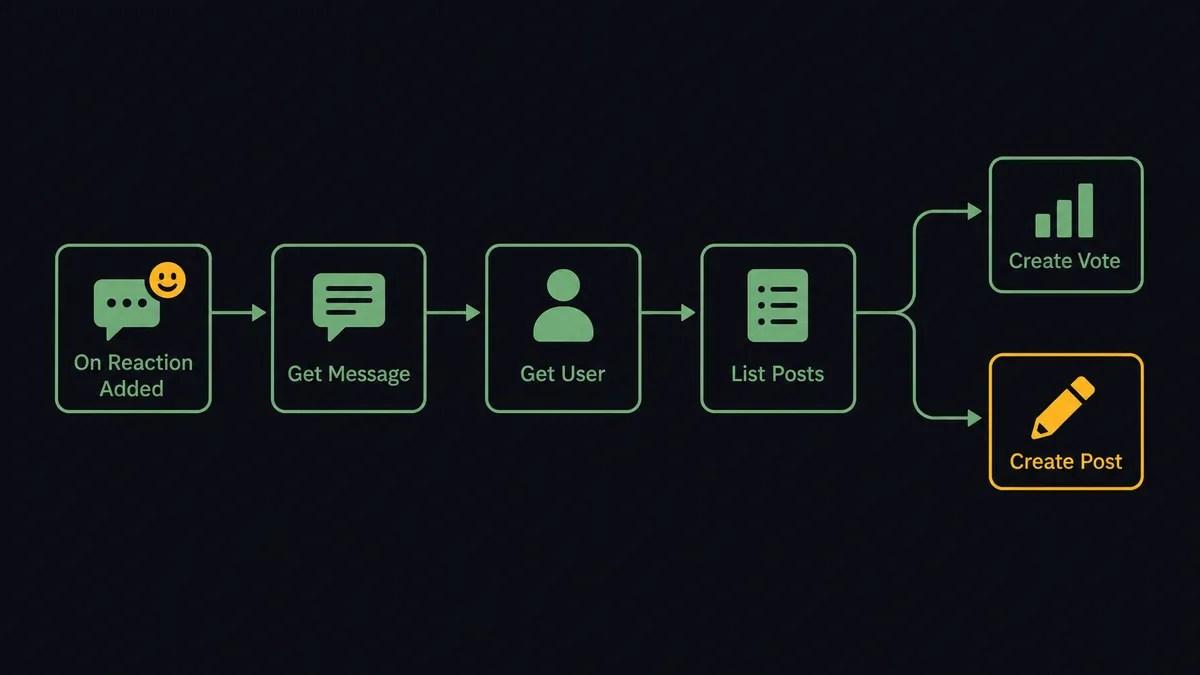
You connect Slack to Canny by having Slack’s On Reaction Added trigger drive Canny’s feedback actions: a teammate tags a customer message with an emoji, the workflow pulls it with Get Message, checks the board for an existing request with List Posts, and either records the demand with Create Vote or files a new one with Create Post, so feedback spotted in chat becomes a countable entry on the board. FlowRunner is a visual AI-agent orchestration platform where automations run autonomously and pause for human judgment on the steps that carry real consequence. The same connection can run as an AI agent that extracts the real ask from a rambling thread, dedupes it against the board, attributes it to the actual customer, and pauses for a named human before anything publishes where customers can see it.
The problem it solves
Feedback dies in scrollback. A customer says “honestly we would pay more if exports handled multiple sheets” in a shared channel, three people react with an eyes emoji, and everyone assumes someone logged it. Nobody did. Six months later the roadmap discussion includes the sentence “has anyone actually asked for this?”, and the honest answer is that at least a dozen customers did, in a dozen threads nobody can find. The prioritization tool is only as good as what reaches it, and what reaches it depends on whoever felt like doing data entry that day.
The edges make it worse. The same request gets filed three times under three phrasings, so a feature with real demand looks like three weak asks instead of one strong one. Requests get filed under the account manager’s name instead of the customer’s, so the record shows your own team asking for features. And when something ships, the “this is live” comment goes out to everyone who voted, or it does not go out at all, depending on who remembers. The board customers see is public, and public mistakes need public corrections.
How it works: the connection
The connection listens for tagged messages and writes to the board. Here is the plain version, grounded in the real connector actions.
- Trigger: Slack fires On Reaction Added when a teammate marks a customer message with the feedback emoji.
- Read: The workflow calls Get Message to pull the full message and its thread context.
- Attribute: It calls Get User with the customer’s email so the request belongs to the real requester, not the teammate who tagged it.
- Dedupe: It calls List Posts to search the board for an existing post covering the same ask.
- Match path: On a hit, it calls Create Vote so the existing post’s score grows by one real customer.
- Miss path: On a clean miss, it drafts a post title and body and routes it to approval; Create Post runs only after sign-off.
- Confirm: Back in Slack, the workflow replies in the thread with the Canny link, so the tagger knows the capture landed.
That is the “just connect them” answer. A one-emoji gesture becomes an attributed, deduplicated, countable entry on the board, and the thread gets a receipt. List Comments and List Votes make the reverse direction work too: activity on the board can flow back into Slack as a digest.
Can an AI agent run it? (and why a human stays in the loop)
Yes, and the judgment work is exactly where a fixed rule falls over. Customers do not phrase requests like board entries. The agent reads the thread and extracts the actual ask from around the complaint: “exports handled multiple sheets” is the same request as the existing post titled “Multi-tab spreadsheet export”, even though they share almost no words. It holds the real toolbox, Get User, List Posts, Get Post, Create Vote, Create Post, Create Comment, and picks per case: vote on the match, draft the miss, skip the message that is venting rather than requesting.
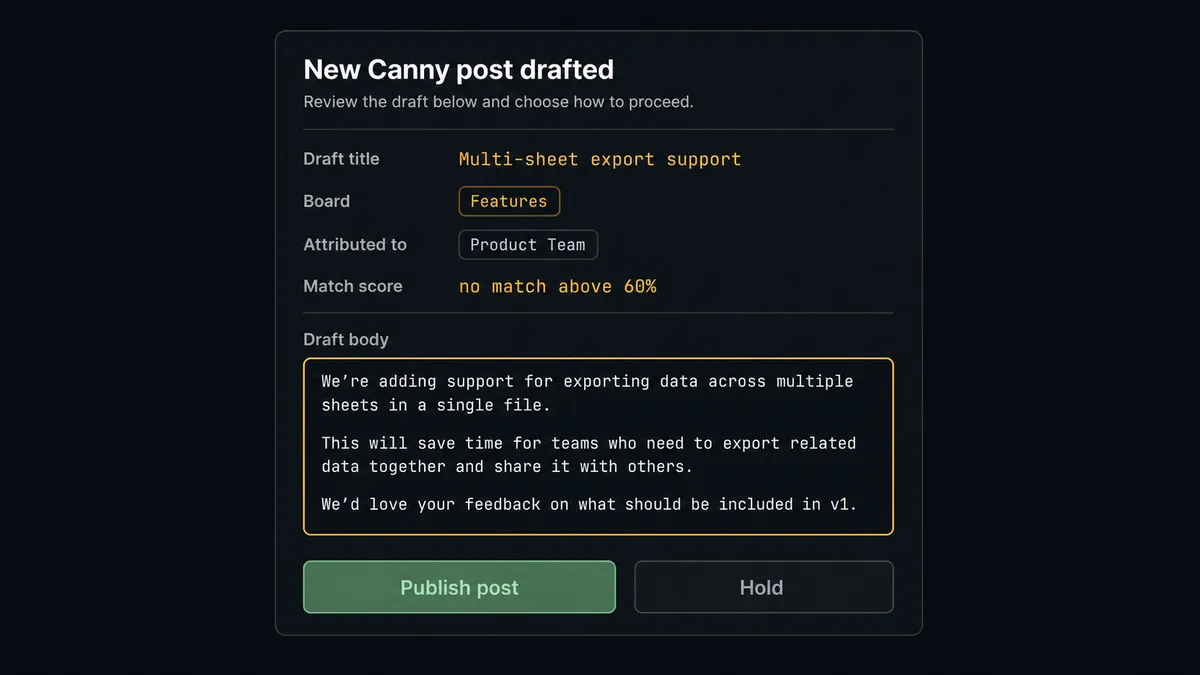
The consequential step is anything the board shows customers. Create Post and Create Comment write to a public board under a real name, and Canny notifies the voters on a post when activity lands, which makes a comment outbound communication to every customer who voted. So the agent gathers what the approver needs and invokes a human-in-loop flow it holds as a callable tool. The workflow pauses and posts: “New post drafted for the Features board: ‘Multi-sheet export support’, attributed to [customer] from [company], no existing match above 60 percent. Approve the text?” The same discipline covers Create Vote when attribution is uncertain, because a vote cast on someone’s behalf is a data point in your prioritization record, and “did this customer actually ask for this?” is a question a person should answer before the score moves.
This is the digital andon cord, the framing our own prospects gave us: like the pull cord on a Toyota line, the workflow stops the line the moment the next step is visible to customers or bends the record. Capture runs at full speed. Publishing waits for a name.
FlowRunner vs n8n
Technical teams evaluating this often shortlist n8n, and the shortlist is deserved: n8n self-hosts on a free tier, its node library and template community are large, and an engineer can wire Slack events to Canny’s API and shape every payload along the way. If you want that level of control and have someone to own it, n8n delivers it.
The difference is where the judgment and the safety live. Here is the honest side-by-side.
| What matters for this pair | FlowRunner | n8n |
|---|---|---|
| Human-in-the-loop before Create Post and Create Comment | Native. The agent invokes an approval flow as a callable tool and shows text, board, and audience | Buildable with wait nodes and forms you assemble and maintain yourself |
| Who runs the flow | An AI agent extracts the ask, dedupes semantically, picks actions as tools | Node graph you design; matching logic is yours to script |
| Users included | Unlimited users on every tier | Cloud plans meter workflows and executions; self-hosting shifts cost to your infra and time |
| Bring your own AI keys | Yes, BYOK | Yes, also BYOK |
| Self-hosted option | Yes, cloud-hosted or self-hosted | Yes, a genuine n8n strength |
| Pricing model | Transparent workflow-based tiers | Execution-based cloud pricing, or free self-host plus your own ops burden |
If your team wants to own the pipeline as code-adjacent infrastructure, n8n is a credible pick. If you want product ops capturing deduplicated, attributed feedback this week, with the public-publish gate built in rather than built by you, this pairing is the better fit.
Before and after
| Category | Before | After |
|---|---|---|
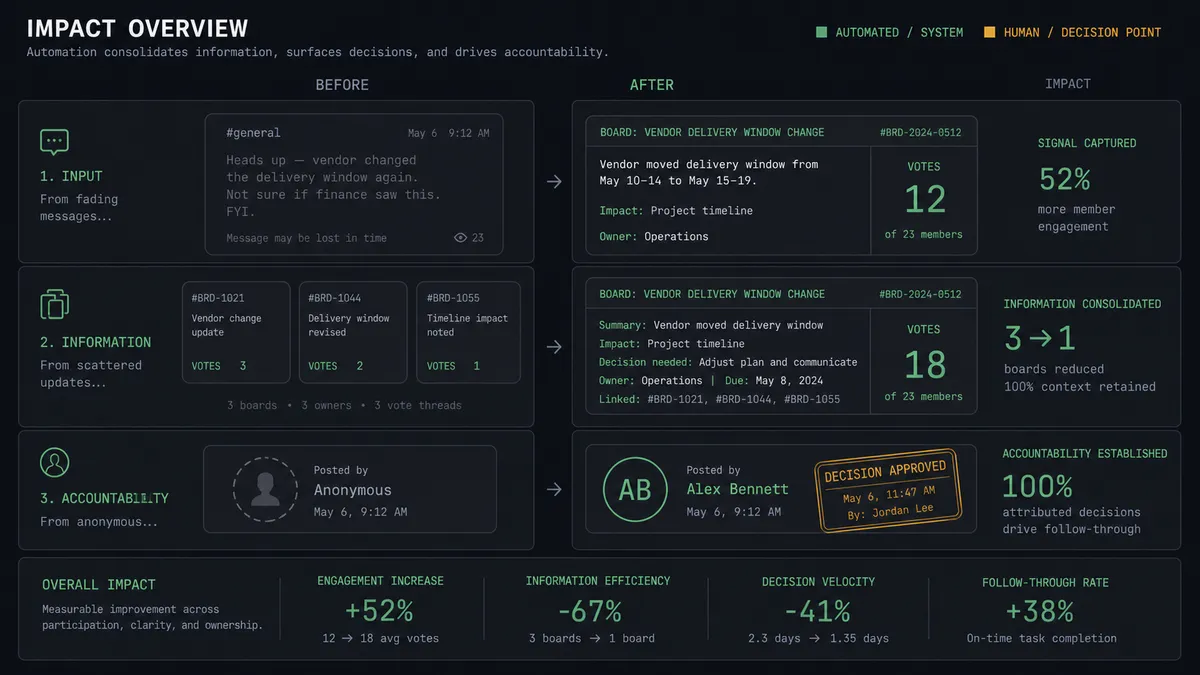
| Capture | Feedback lives in scrollback until someone does data entry | One emoji reaction files it, attributed and deduplicated |
| Duplicates | The same ask splits into three weak posts under three phrasings | List Posts matching consolidates demand into one countable post |
| Attribution | Requests logged under the account manager’s name | Get User ties every post and vote to the real customer |
| Public publishing | Anyone with board access posts anything, or nothing | Create Post and Create Comment wait for a named approver who sees text and audience |
| Closing the loop | ”This shipped” comments depend on memory | Drafted for every shipped post, sent only after sign-off, receipt in the audit trail |
What you can build
Emoji-to-board capture. On Reaction Added files tagged customer messages: Get User attributes, List Posts dedupes, Create Vote counts the match, and the gated Create Post path handles genuine new requests. The board finally reflects what customers say in channels.
Vote consolidation on demand. Via On Mention, the agent takes a theme like “export requests”, runs List Posts and List Votes, and posts a consolidation proposal: which near-duplicate posts to merge demand into, with every affected customer listed, for a person to act on.
Shipped-feature loop closer. When a linked ticket resolves, the agent drafts the Create Comment announcement, names the audience, “posting to ‘Multi-sheet export’, all voters notified”, and waits. One click closes the loop with every customer who asked.
Weekly demand digest. On a schedule, the agent runs List Posts and List Comments across boards from List Boards, ranks movers by fresh votes, and posts a summary to the product channel with links, so prioritization meetings start from the board, not from vibes.
Requester lookup in-thread. On Mention with a customer email, Get User and List Votes return everything that customer has asked for and voted on, posted as a thread reply before a renewal call.
Getting started
Start on the free plan: 100 executions a month, every integration included, no credit card required, plus 14 days of Professional for new accounts. Both connectors are available on every tier, and every tier includes unlimited users and unlimited workflows.
Explore the integration details:
- Slack integration (8 triggers and 16 actions covering messages, channels, members, and interactive approvals)
- Canny integration (11 actions covering posts, boards, votes, comments, and users)
Start building free at flowrunner.ai or book a demo to see a live Slack to Canny workflow, publish approval and all.
Frequently asked questions
Is it free to connect Slack and Canny on FlowRunner?
You can build and run the connection on FlowRunner's free plan, which includes 100 executions a month and every integration with no credit card required, and new accounts also get 14 days of Professional. Both connectors are available on every FlowRunner tier, and every tier includes unlimited users and unlimited workflows.
Can I self-host the Slack to Canny workflow?
Yes. FlowRunner offers a cloud-hosted option and a self-hosted option, so the connection can run inside your own environment.
Does the AI agent need my own OpenAI or Claude key?
FlowRunner uses a bring-your-own-keys model, so you connect the AI provider key you already have. You are not locked to one model.
What happens when the agent is unsure whether a request matches an existing Canny post?
It does not guess with public data. The agent posts the candidate matches from List Posts to the Slack thread with scores and asks: vote on one of these, or draft a new post? A person picks, and only then does Create Vote or the gated Create Post path run.
Which Slack triggers and Canny actions does this connection use?
The main path uses Slack's On Reaction Added trigger, with On Channel Message and On Mention as alternatives, driving Canny's Get User, List Posts, Create Vote, Create Post, and Create Comment actions.
Why does posting a comment to Canny need approval?
Because Canny notifies the voters on a post when activity lands, a comment is not a note, it is outbound communication to every customer who voted. The agent drafts the comment and shows the approver the text and the audience before Create Comment runs.