How to Connect Outlook with Canny (With or Without an AI Agent)
Connect an Outlook feedback inbox to Canny boards, optionally as an AI agent that dedupes and logs feedback automatically and pauses for a human before a new post goes on the public board.
How do you connect Outlook to Canny?
You connect Outlook to Canny by running a scheduled workflow that polls Get Emails on your shared feedback inbox, reads each message with Get Email, searches Canny for a matching request with List Posts, and then either adds the customer’s voice to an existing post with Create Vote and Create Comment or raises a new one with Create Post. FlowRunner is a visual AI-agent orchestration platform where automations run autonomously and pause for human judgment on the steps that carry real consequence. When the same connection runs as an AI agent, the agent classifies and dedupes every email on its own, and stops for a named reviewer before anything new is published on a board your customers can see.
The problem it solves
Feedback arrives where customers already are, which is email. A customer replies to an onboarding sequence with “would be great if exports supported scheduled delivery.” An account manager forwards a feature request from a renewal call. A support thread ends with “please pass this to the product team.” All of it lands in an Outlook inbox, and the plan is that someone will re-key the good ones into Canny later. Later means a product ops person spending Friday afternoon reading threads, guessing which board each request belongs on, and searching Canny by hand to avoid creating the fourth duplicate of the same request.
The edges are where the real damage happens. Duplicates split the vote count, so the most-requested feature looks like three medium requests instead of one loud one. The customer who took the time to write never hears back, so they stop writing. And the requests that never get transferred at all simply vanish, which means the roadmap is prioritized on the subset of feedback that survived a manual copy-paste process. The inbox is not a feedback system. It is where feedback goes to be forgotten.
How it works: the connection
Outlook exposes no event triggers, so the workflow opens on a schedule rather than an inbox event. Here is the plain version, grounded in the real connector actions.
- Trigger: On a schedule, the workflow polls Get Emails on the shared feedback inbox, every 15 minutes during business hours.
- Read: For each new message, Get Email pulls the full body, sender, and subject.
- Classify: The workflow separates product feedback from support requests and noise, routing non-feedback to the right queue.
- Search: List Boards and List Posts search Canny for an existing post that covers the same request.
- Log the match: When a match exists, List Users finds or resolves the sender, then Create Vote and Create Comment record the customer’s vote and their exact words against the existing post.
- Raise the new ones: When nothing matches, Create Post opens a new request on the right board with the email excerpt as detail.
- Close the loop: Reply to Email sends the sender the Canny link so they can track status without asking.
That is the “just connect them” answer. Every emailed request becomes a vote, a comment, or a post, the counts stay honest, and the sender gets a link instead of silence.
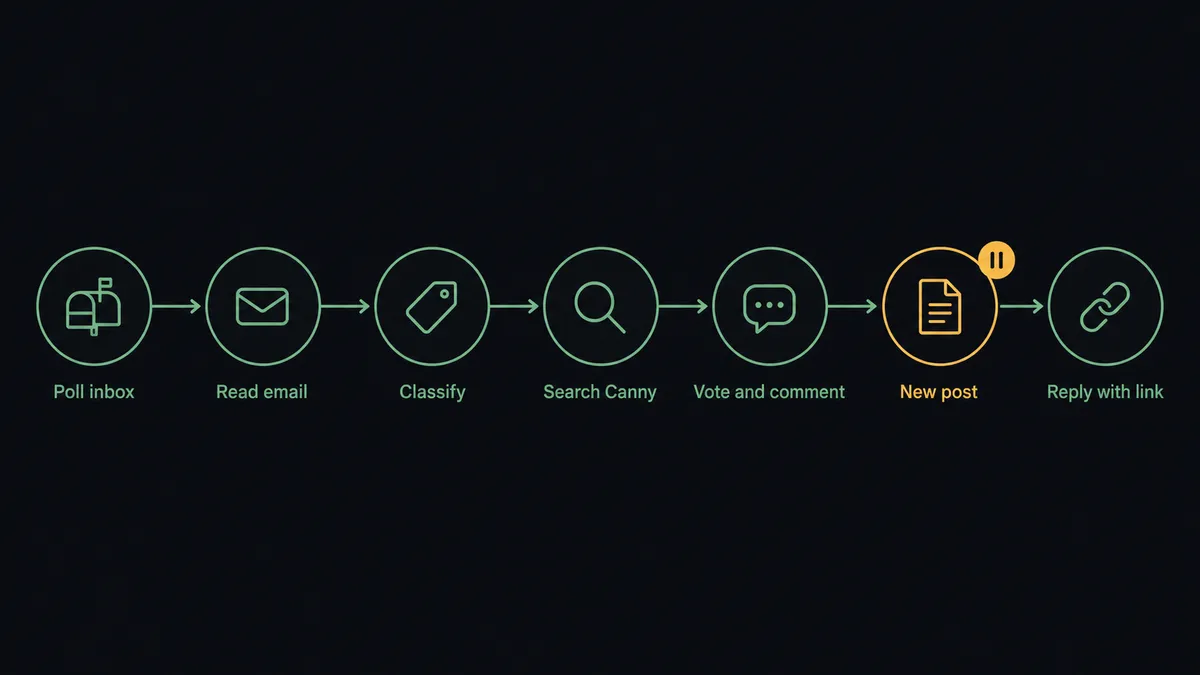
Can an AI agent run it? (and why a human stays in the loop)
Yes, and dedupe is exactly the kind of judgment a rules engine fakes badly. “Scheduled exports,” “let me email reports weekly,” and “cron for the CSV download” are the same request in three vocabularies, and keyword matching will file them as three posts. An agent reads the intent behind the words, holds List Posts, Create Vote, Create Comment, and Create Post as tools, and picks the right one per email. It votes and comments on its own, because adding a customer’s voice to an existing thread is low-consequence and reversible.
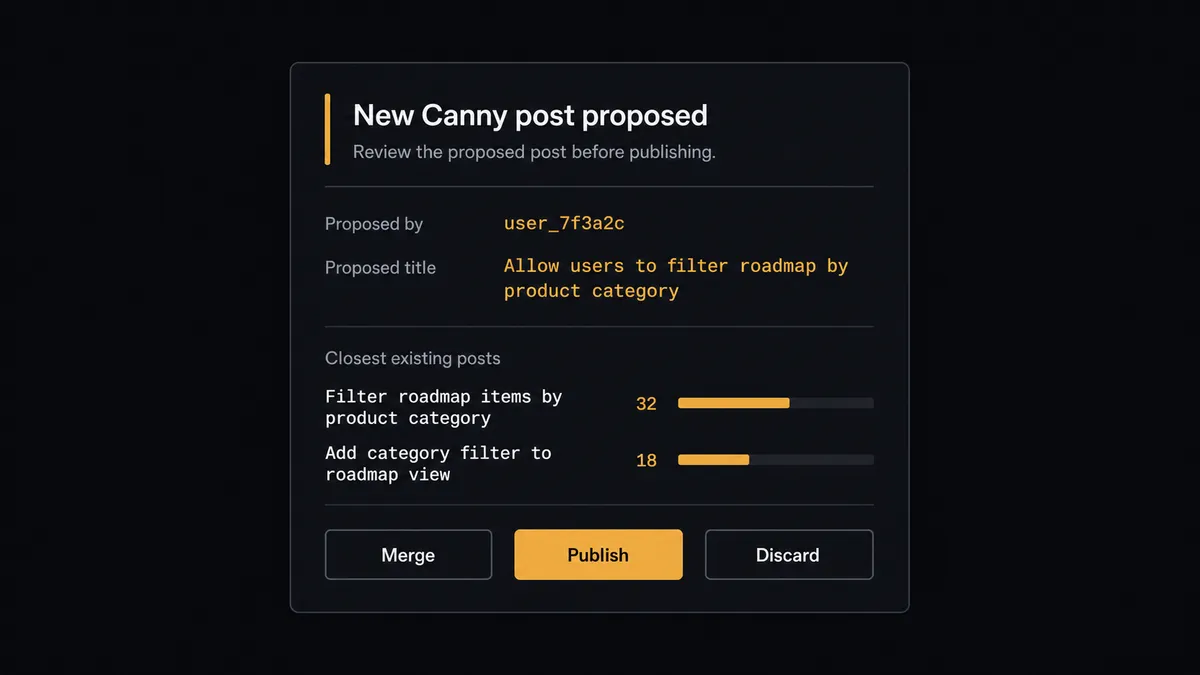
Create Post is different. A new post on a Canny board is public, customer-visible content, often written in a customer’s own words, and it shapes what every other customer votes on. So before the agent creates one, it invokes a human-in-loop flow it holds as a callable tool. The workflow pauses and posts to the product channel: “New feedback from [sender] does not match any existing post. Proposed title: [title]. Closest existing posts: [two candidates]. Publish as new, merge into a candidate, or discard?” A product owner clicks once. Only then does Create Post run, and the decision, the reviewer’s name, and the timestamp land in the audit trail.
The same judgment applies on the reply side: routine “logged it, here is your link” replies go out via Reply to Email, but when the thread carries frustration or a churn signal, the agent writes the response with Create Draft Email and leaves it for a human to send. Prospects call this pattern a digital andon cord: like Toyota’s quality control pull cord, the workflow stops the line the moment it hits uncertainty, and your team pulls it back into motion.
FlowRunner vs n8n
Teams with engineers on hand often reach for n8n here, and the instinct is reasonable. n8n has HTTP-level flexibility that can hit any Canny API endpoint, a very large node library, a strong self-hosting story, and thousands of community templates to start from. If you have a developer who enjoys owning the workflow as code-adjacent infrastructure, n8n can absolutely poll a mailbox and post to Canny.
The difference is who can build and run it, and what happens at the publish step. In n8n, the dedupe logic and the approval step are things your developer designs, wires, and maintains. In FlowRunner, the agent’s reasoning and the human gate are native platform features a product ops lead configures visually.
| What matters for this pair | FlowRunner | n8n |
|---|---|---|
| Human-in-the-loop on Create Post | Native. The agent invokes an approval flow as a callable tool and pauses before publishing | Buildable with wait nodes and webhooks a developer wires and maintains |
| Who runs the flow | An AI agent reads, reasons, picks actions as tools | A node graph a technical user designs step by step |
| Users included | Unlimited users on every tier | Cloud plans price by executions; collaboration features vary by plan |
| Bring your own AI keys | Yes, BYOK | Yes, via its AI nodes |
| Self-hosted option | Yes, cloud-hosted or self-hosted | Yes, a core strength |
| Pricing model | Transparent workflow-based tiers | Execution-based cloud pricing, or self-host infrastructure you operate |
If your team wants a developer-owned automation stack and has the engineering hours to maintain it, n8n is a genuine option. If you want product ops to own feedback triage end to end, with a named reviewer on everything that reaches the public board, this pairing on FlowRunner is the better fit.
Before and after
| Category | Before | After |
|---|---|---|
| Feedback capture | Requests live in email threads until someone re-keys them into Canny | Every classified feedback email becomes a vote, comment, or post the same day it arrives |
| Duplicates | The same request exists as three posts, splitting its vote count | The agent matches intent with List Posts and consolidates votes onto one post |
| Customer loop | Senders never hear whether their request registered | Reply to Email returns the Canny link so customers track status themselves |
| Board quality | Anyone transferring feedback can publish anything, in any wording | New posts reach the public board only after a named reviewer approves |
| Prioritization | The roadmap reflects whichever feedback survived manual transfer | Vote counts reflect the full inbox, so the loudest request is actually the loudest |
What you can build
Inbox to board, deduped. The scheduled run polls Get Emails, classifies each message, searches with List Posts, and logs matches with Create Vote and Create Comment. Only genuinely new requests wait for a human before Create Post publishes them.
Closing the loop at scale. After a request is logged, Reply to Email sends the sender their Canny post link. When a status changes on a post, the workflow gathers the voters’ emails and drafts individual updates with Create Draft Email for a product marketer to review and send.
Account manager forwarding lane. AMs forward customer requests to the feedback inbox from their own mailboxes. The agent resolves the real customer with List Users and Get User, so the vote lands under the customer’s name, not the AM’s.
Weekly feedback digest. Every Monday the workflow calls List Posts and List Comments for the week’s activity, and the agent writes a summary of new themes and fastest-rising posts, sent to the product team with Send Email.
Meeting prep from the board. Before a roadmap review on the calendar, the workflow pulls the top-voted posts per board with List Posts and List Votes and creates a prep event with Create Calendar Event containing the summary, so the meeting starts from live data.
Getting started
Start on the free plan: 100 executions a month, every integration included, no credit card required, plus 14 days of Professional for new accounts. Both connectors are available on every tier, and every tier includes unlimited users and unlimited workflows.
Explore the integration details:
- Outlook integration (21 actions covering email, drafts, contacts, and calendar)
- Canny integration (11 actions covering posts, boards, comments, and votes)
Start building free at flowrunner.ai or book a demo to see a live Outlook to Canny workflow, new-post approval and all.
Frequently asked questions
Is it free to connect Outlook and Canny on FlowRunner?
You can build and run the connection on FlowRunner's free plan, which includes 100 executions a month and every integration with no credit card required, and new accounts also get 14 days of Professional. Both connectors are available on every FlowRunner tier, and every tier includes unlimited users and unlimited workflows.
Can I self-host the Outlook to Canny workflow?
Yes. FlowRunner offers a cloud-hosted option and a self-hosted option, so the connection can run inside your own environment.
Does the AI agent need my own OpenAI or Claude key?
FlowRunner uses a bring-your-own-keys model, so you connect the AI provider key you already have. You are not locked to one model.
What happens when the agent cannot match an email to an existing Canny post?
It stops. Because Create Post publishes to a board your customers can see, the agent packages the email excerpt, the sender, and the closest existing posts it found with List Posts, then asks a product owner to approve a new post, merge into an existing one, or discard. Nothing appears on the board until a person decides.
Which Outlook and Canny actions does this connection use?
Outlook has no event triggers, so the workflow runs on a schedule and polls Get Emails on the feedback inbox. It reads each message with Get Email, searches Canny with List Posts and List Users, then logs feedback with Create Vote, Create Comment, or Create Post, and closes the loop with Reply to Email.
Does the customer who sent the feedback get a response?
Yes. After the feedback is logged, the workflow uses Reply to Email to send the Canny post link back to the sender so they can follow status changes. Replies drafted in the customer's thread are held as drafts with Create Draft Email when the agent judges the situation needs a human tone.