How to Connect Notion with Canny (With or Without an AI Agent)
Keep a Notion roadmap database in step with your Canny feedback board, with an AI agent that syncs votes and statuses automatically and pauses for a product manager before a public comment goes out to every voter.
How do you connect Notion to Canny?
Neither service exposes a trigger, so you connect Notion to Canny with a daily workflow: List Boards and List Posts pull each board’s top-voted and recently changed posts, Find or Create Database Item keeps one Notion roadmap row per request, and Update Database Item refreshes votes and status so the roadmap database always reflects real demand. FlowRunner is a visual AI-agent orchestration platform where automations run autonomously and pause for human judgment on the steps that carry real consequence. Run as an AI agent, the same connection also closes the loop the other way: when a roadmap item ships, the agent drafts the announcement and pauses for a product manager before Create Comment notifies every voter on the post.
The problem it solves
Today the feedback board and the roadmap live in different rooms. Canny accumulates posts and votes; the actual planning happens in a Notion database that someone updates from memory before each roadmap review. The two drift immediately. A post quietly triples its votes and nobody planning the quarter notices, because the Notion row still shows the count from six weeks ago. Prioritization meetings argue from stale numbers, and the loudest recent anecdote beats the accumulated tally.
The other direction breaks worse. Features ship, and the people who asked for them find out by accident, months later, if ever. Closing the loop means finding the Canny post, writing a comment, and remembering that the comment goes to every voter, which is exactly why busy teams skip it. The board fills with shipped-but-still-open posts, voters conclude nobody reads the board, and the feedback pipeline you built to hear customers teaches them to stop talking.
How it works: the connection
The connection reads from Canny and writes to Notion, then closes the loop back to Canny. Here is the plain version, grounded in the real connector actions.
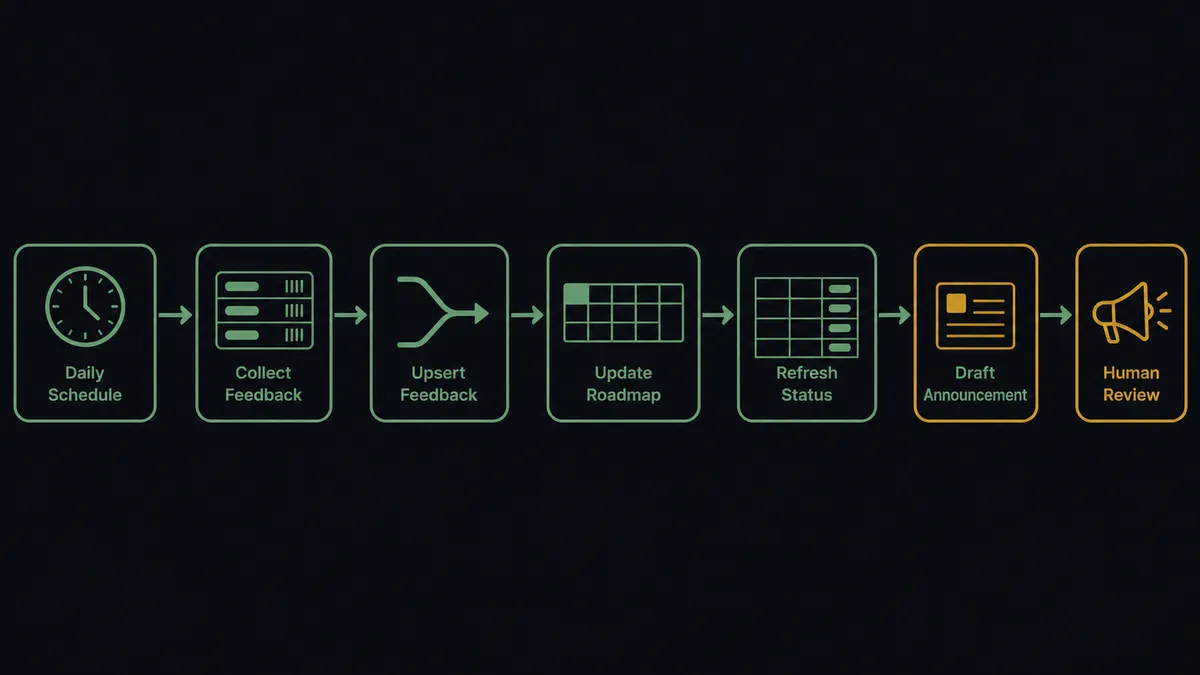
- Trigger: On a schedule, the daily run calls List Boards, then List Posts per board for top-voted and recently changed posts.
- Read: For posts worth a closer look, Get Post pulls the full detail, and List Comments and List Votes add the conversation and the demand behind it.
- Upsert the roadmap row: The workflow calls Find or Create Database Item so each Canny post has exactly one row in the Notion roadmap database, never a duplicate.
- Refresh: It calls Update Database Item to sync vote count, status, board, and category, and Add Content To Page to log notable movement on the row itself.
- Detect ships: It reads the roadmap database the same way, and when a row’s status reaches shipped, it drafts the closing announcement.
- Close the loop: After approval, Create Comment posts the announcement on the Canny post, which notifies every voter.
- Record: The roadmap row gets the link and the date, so the loop-closing is itself on the record.
That is the “just connect them” answer. The roadmap argues from live demand, and shipped features tell the people who asked for them.
Can an AI agent run it? (and why a human stays in the loop)
Yes, and the agent earns its place by reading content, not just counts. It holds the real actions as tools: List Posts, Get Post, List Comments, List Votes, Create Post, Create Vote, Create Comment, Get User on the board side; Find or Create Database Item, Update Database Item, Add Content To Page, Create Page, Get Database on the workspace side. When feedback arrives from other channels, a support thread, a sales call note in Notion, the agent resolves the customer with Get User, searches the board with List Posts for prior art, and either logs a new request with Create Post or adds the customer’s weight to an existing one with Create Vote. When the near-matches are genuinely close, it does not guess: a wrong merge silently buries a customer’s voice, so a product manager rules on it with the candidates side by side.
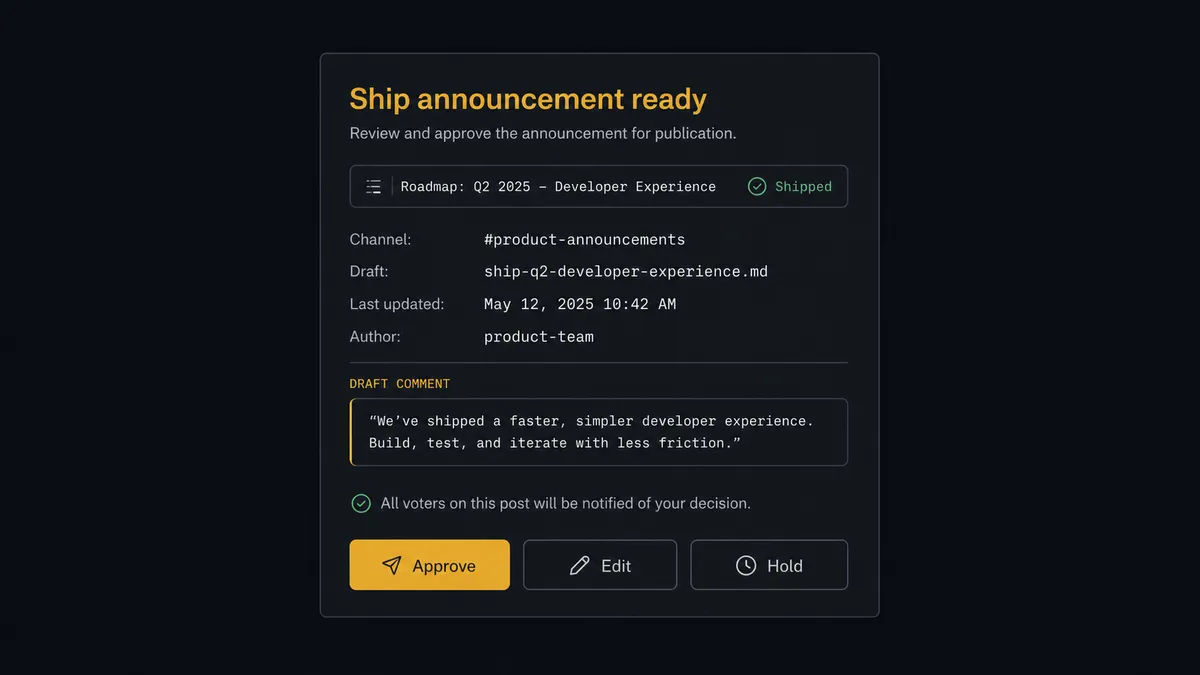
The consequential step is the public announcement. A comment on a Canny post is not a note in a database: Create Comment notifies every voter, the people who cared enough to ask. A premature “this has shipped” to that exact audience, or wording that promises more than the release delivers, is a broadcast error to your most engaged customers. So the agent drafts the comment, attaches the roadmap row and the release context, and invokes a human-in-loop flow it holds as a callable tool. The workflow pauses and posts to the product channel: “Roadmap item [title] marked shipped. Drafted Canny comment attached; it will notify all voters on the post. Approve, edit, or hold?” The product manager approves or tightens the wording. Only then does Create Comment run, and the approver’s name and timestamp land in the audit trail next to the post.
Everything internal, vote refreshes, status syncs, change logs on the Notion row, runs unattended, because the blast radius is a database your team reads. Prospects call the split a digital andon cord: like Toyota’s quality control pull cord, the workflow stops the line the moment a step reaches the public, and your team pulls it back into motion.
FlowRunner vs n8n
Product teams with engineering support will consider n8n for this sync, with reason. n8n has a very large node library, a strong fair-code self-hosting story, and an active community that shares workflow templates, including patterns for both Notion and HTTP-based APIs like Canny’s. A developer comfortable with node graphs and expressions can wire a vote-count sync in n8n.
The difference is who maintains the judgment. FlowRunner is built around native human-in-the-loop and AI-agent orchestration, where the agent reasons about duplicates and drafts announcements, and a person clears what the public sees. Here is the honest side-by-side.
| What matters for this pair | FlowRunner | n8n |
|---|---|---|
| Human-in-the-loop on voter-facing comments | Native. The agent invokes an approval flow as a callable tool and pauses before Create Comment notifies voters | Wait and approval nodes exist; the gate is wiring you build and maintain per workflow |
| Who runs the flow | An AI agent reads posts, judges duplicates, drafts announcements, and picks actions as tools | A node graph you assemble; agent nodes are available for those comfortable configuring them |
| Users included | Unlimited users on every tier | Cloud plans meter by executions, with limits that vary by plan |
| Bring your own AI keys | Yes, BYOK | Yes, n8n also connects your own model keys |
| Self-hosted option | Yes, cloud-hosted or self-hosted | Yes, self-hosting is a core n8n strength |
| Pricing model | Transparent workflow-based tiers with clear execution limits | Execution-based cloud pricing, or self-hosting with infrastructure you operate |
If your team wants to own a node graph and has the engineering time to maintain it, n8n is a credible choice. If you want product managers running this loop themselves, with an agent doing the reading and a named approval on everything voters see, that is where FlowRunner is the better fit.
Before and after
The shift is qualitative: the roadmap and the board stop drifting apart.
| Category | Before | After |
|---|---|---|
| Roadmap data | Vote counts in Notion reflect whenever someone last copied them | Find or Create Database Item and Update Database Item refresh every tracked post daily |
| Prioritization | Meetings argue from stale numbers and recent anecdotes | The roadmap database shows live demand, with movement logged on each row |
| Feedback intake | Requests from support and sales die outside the board | The agent logs them with Create Post or Create Vote, attributed to the real customer |
| Duplicate handling | Near-duplicate posts split the vote and hide demand | Near-matches go to a product manager before anything is created or merged |
| Closing the loop | Shipped features announced to voters rarely, manually, or never | Every ship drafts a comment, and an approved Create Comment notifies every voter |
What you can build
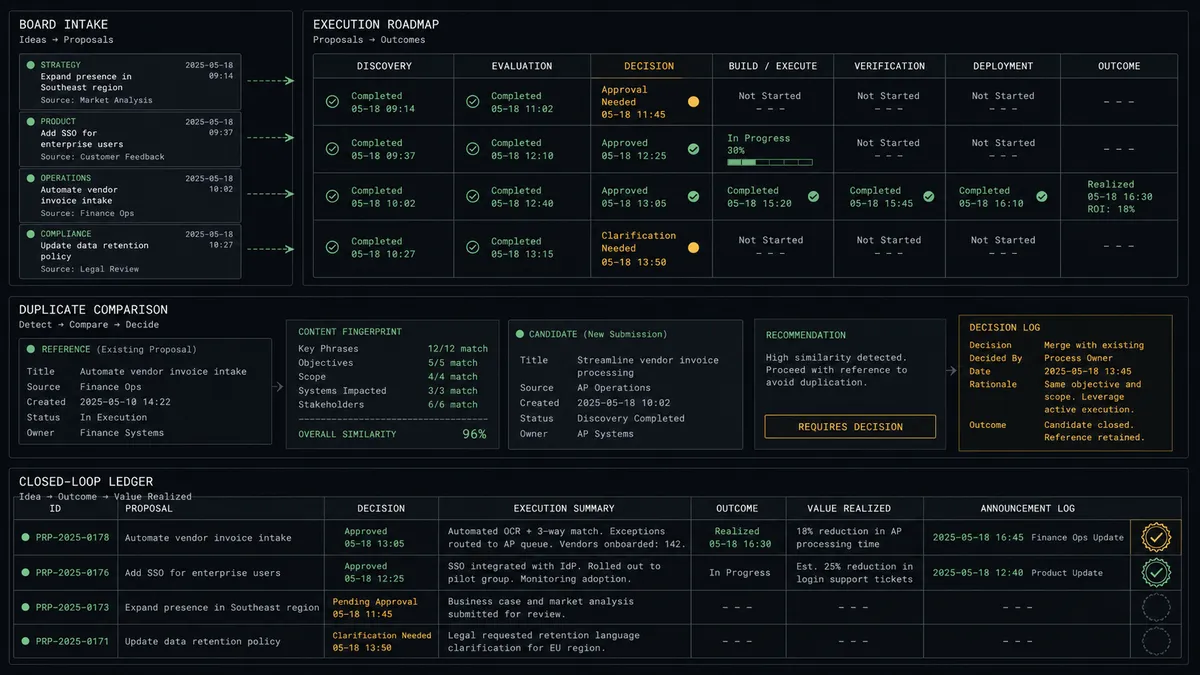
The living roadmap database. List Posts feeds a Notion database where each row is a Canny post with live votes, status, and a link back to the demand. Update Database Item keeps it honest daily, so quarterly planning starts from evidence instead of memory.
The everywhere-intake pipeline. Feature requests from support tickets, sales notes, and internal Notion pages get resolved to a real customer with Get User, checked for prior art with List Posts, and logged with Create Post or Create Vote, so the board’s tally includes the customers who never found the board.
The gated ship announcer. When a roadmap row hits shipped, the agent drafts the closing comment, routes it for approval, and posts it with Create Comment. Voters hear about the feature from you, in approved wording, instead of discovering it by accident.
The weekly demand digest. The agent pulls top-voted and fastest-moving posts with List Posts and List Votes, writes the digest to a Notion page with Create Page, and flags posts whose demand pattern changed, so leadership reads the board’s signal without reading the board.
The decision log. Every duplicate ruling and announcement approval is written back as a Notion database item with full context: what the agent found, what it proposed, what the human decided. The judgment history becomes searchable instead of living in chat scrollback.
Getting started
Start on the free plan: 100 executions a month, every integration included, no credit card required, plus 14 days of Professional for new accounts. Both connectors are available on every tier, and every tier includes unlimited users and unlimited workflows, so product, support, and leadership all read the same living roadmap.
Explore the integration details:
- Notion integration (23 actions covering pages, databases, blocks, and comments)
- Canny integration (11 actions covering posts, boards, votes, comments, and users)
Start building free at flowrunner.ai or book a demo to see a live Notion to Canny workflow, announcement approval and all.
Frequently asked questions
Is it free to connect Notion and Canny on FlowRunner?
You can build and run the connection on FlowRunner's free plan, which includes 100 executions a month and every integration with no credit card required, and new accounts also get 14 days of Professional. Both connectors are available on every FlowRunner tier, and every tier includes unlimited users and unlimited workflows.
Can I self-host the Notion to Canny workflow?
Yes. FlowRunner offers a cloud-hosted option and a self-hosted option, so the connection can run inside your own environment.
Does the AI agent need my own OpenAI or Claude key?
FlowRunner uses a bring-your-own-keys model, so you connect the AI provider key you already have. You are not locked to one model.
What happens when the agent is unsure whether a request duplicates an existing Canny post?
It does not merge or create anything. The agent presents the near-matches from List Posts side by side with the new request, and a product manager makes the call, because a wrong merge silently buries a customer's voice under someone else's ask.
Neither Notion nor Canny has a trigger, so what starts the workflow?
A schedule. The daily run calls List Posts by board and status to pull top-voted and recently changed posts, then updates the Notion roadmap database with Find or Create Database Item and Update Database Item.
Does the agent post to the Canny board on its own?
Not where customers can see it. Internal roadmap updates in Notion run unattended, but a public comment on a post, which notifies every voter, only goes out through Create Comment after a product manager approves the wording.